Hostinger vs SiteGround: Which Hosting Truly Wins 2026?
Hostinger and SiteGround remain two trusted web hosting providers in 2026, known for reliable performance and satisfied users. Both deliver strong uptime and speed, making them ideal for small business websites and growing online ventures.
While both offer successful value, they shine in different areas. This Hostinger vs SiteGround comparison highlights their key strengths, helping you choose the best fit for your needs in affordable web hosting this year.
Hostinger vs SiteGround — Hosting Comparison
Hostinger remains the top pick in 2026 for those seeking affordable web hosting and fast performance. It offers an intuitive interface, making it perfect for beginners and small businesses building their first website.
SiteGround excels in managed WordPress hosting and strong customer support. It’s best suited for growing companies and professional developers handling large-scale projects.
Hosting Type | Hostinger | SiteGround |
Web Hosting | ✔️ | ✔️ |
VPS Hosting | ✔️ | ❌ |
Dedicated Hosting | ❌ | ❌ |
Cloud Hosting | ✔️ | ✔️ |
Reseller Hosting | ❌ | ✔️ |
Managed WordPress Hosting | ✔️ | ✔️ |
Hostinger provides shared hosting, managed WordPress hosting, VPS hosting, cloud hosting, and specialized plans, such as CyberPanel hosting and Minecraft server hosting, for niche users. These options deliver affordable web hosting solutions with flexibility for small businesses and gamers.
SiteGround offers shared hosting, managed WordPress hosting, cloud hosting, and reseller hosting, making it a strong choice for professional website management. While it lacks VPS plans, users can rely on its reliable hosting infrastructure for business growth.
Quick Overview: Hostinger vs SiteGround
Both Hostinger and SiteGround are reliable hosting providers with free SSL, free migration, backups, and eCommerce support.
Hostinger is the better choice for beginners and budget users because it’s cheaper and includes built-in AI tools for website building, images, and content.
SiteGround is better for users who prioritize stability and daily backups, but it costs more and doesn’t offer AI features.
Feature | Hostinger | SiteGround |
Starting Price | From about US$1.99/mo (promo) | From about US$2.99/mo (promo) |
Free Domain | Yes (on qualifying plans) | Yes (on qualifying plans) |
Free Privacy Protection | Yes | Yes |
Free Website Migration | Yes | Yes |
Number of Data Centers | 12 | 11 |
Multilingual Support | Yes (8+ languages) | English only |
Malware Scanner | Yes | Yes |
Free SSL Certificates | Yes | Yes |
Backups | Yes (weekly/daily depending on plan) | Yes (daily) |
AI Website Builder | Yes | No |
AI Image Generation | Yes | No |
AI Writing Tools | Yes | No |
E-commerce Features | Yes | Yes |
Comparison for Bloggers, Businesses, WordPress Users
This comparison highlights which hosting provider caters to different user types based on goals, website budget, and technical needs. Hostinger is ideal for bloggers, beginners, and small businesses seeking affordable web hosting and a simple setup.
Its tools, like AI website builders and multi-site hosting, make it attractive for users experimenting with personal websites or new online projects.
SiteGround targets businesses, agencies, and advanced WordPress users who prioritize high-performance hosting, security features, and premium support. It suits sites where daily backups, server speed optimization, and managed WordPress hosting are critical, such as eCommerce stores and client-focused projects.
Users needing staging environments and expert 24/7 support benefit most from this choice.
Hostinger appeals to cost-conscious creators seeking budget-friendly hosting solutions, while SiteGround serves professionals and high-traffic sites needing reliable infrastructure and enhanced website performance.
Hostinger Plans & Pricing Breakdown
Choosing the right hosting plan is critical for website speed, reliability, and overall performance. In 2026, Hostinger vs SiteGround remains a key comparison for bloggers, small businesses, and e-commerce sites. Let’s explore each plan step by step.
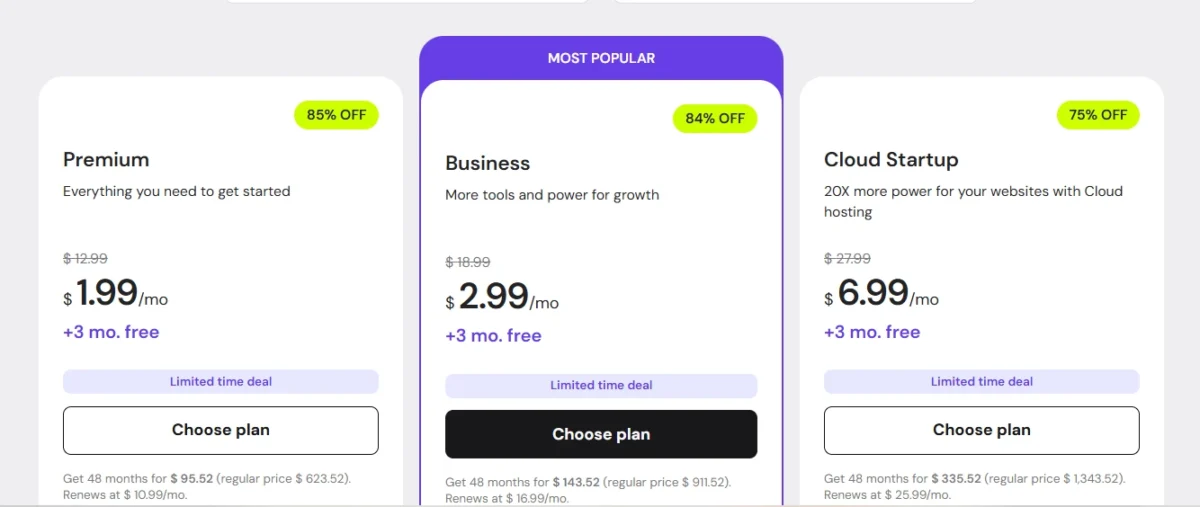
This image shows Hostinger’s 2026 hosting plans, including Premium, Business, and Cloud Startup with major discount offers. It highlights starting prices, free months, and limited-time deals for new users.
Hostinger Premium Plan Overview
Hostinger’s Premium Web Hosting starts at $2.69 per month and renews at $8 monthly. It includes 100 GB SSD storage, a free SSL certificate, one email account, and supports up to 100 websites. This plan is ideal for small business websites and growing blogs that need fast, reliable web hosting.
Hostinger Business Plan Features
The Business Web Hosting plan begins at $3.59 per month and renews at $9 monthly. It doubles storage to 200 GB NVMe, includes the same number of email accounts, and comes with a free domain. Users also get AI website-building tools, WordPress staging, and e-commerce-ready features, making it perfect for online stores and professional websites.
SiteGround Hosting Plans and Pricing Explained

This image shows SiteGround’s hosting plans with discounted pricing for StartUp, GrowBig, and GoGeek packages. It highlights monthly costs, savings percentages, and renewal details for different website needs.
StartUp
SiteGround’s StartUp plan starts at around $2.99 per month, with renewals at $10.99 monthly. It provides 10 GB SSD storage, unmetered traffic, managed WordPress hosting, and support for one website. This plan suits beginner websites or single projects requiring high uptime and reliable server performance.
GrowBig
The GrowBig plan starts at $4.99 per month and renews at $29.99 monthly. It allows unlimited websites, offers 20 GB SSD storage, unlimited email accounts, a free CDN, and advanced security features. This plan is ideal for medium-sized businesses, multiple WordPress websites, and users needing enhanced website speed and security.
GoGeek
The GoGeek plan starts at $7.99 per month with renewals at $44.99 monthly. It includes 40 GB SSD storage, priority support, enterprise-level tools, White Label options, and advanced security. This plan is built for high-traffic websites, e-commerce stores, and agencies managing multiple client sites.
Hosting Provider | Plan | Starting Price (per month) | Renewal Price (per month) | Key Features |
Hostinger | Premium Web Hosting | $1.99 | $10.99 | 100 GB SSD, free SSL, 1 email account, 100 websites |
Hostinger | Business Web Hosting | $2.99 | $16.99 | 200 GB NVMe, free domain, AI website builder, WordPress staging, e-commerce ready |
SiteGround | StartUp | $2.99 | $17.99 | 10 GB SSD, managed WordPress hosting, 1 website, unmetered traffic |
SiteGround | GrowBig | $4.99 | $29.99 | 20 GB SSD, unlimited websites, unlimited email accounts, free CDN, advanced security |
SiteGround | GoGeek | $7.99 | $44.99 | 40 GB SSD, unlimited websites, priority support, White Label, enterprise features |
Hostinger generally offers lower introductory and renewal prices with more storage for small to medium websites, while SiteGround excels in security, email capacity, and managed WordPress features. For most users, the Hostinger Business plan offers the best balance of affordability, performance, and advanced tools.
Pro Tip: Use Hostinger’s exclusive coupon codes to reduce cost and upgrade to higher-tier packages without breaking the budget.
Price vs Renewal Cost Comparison
Many hosting providers attract customers with low introductory prices, but renewal costs often tell a different story. For example, Hostinger’s Premium Web Hosting starts at just $1.99/month and renews at $10.99, while the Business plan rises from $2.99 to $10.99. In contrast, SiteGround’s StartUp plan jumps from $2.99 on renewal to $17.99, and the GoGeek plan escalates from $7.99 to $44.99 per month.
This shows the hidden reality of hosting pricing: the introductory price is only the starting point. Long-term budgeting requires checking renewal rates, especially for growing websites or multiple projects. Ignoring this can lead to unexpected expenses after the first year.
Total Cost Comparison: 2-3 Years
To truly understand the long-term expense of hosting, it’s important to calculate the total cost over 2 and 3 years, including renewal prices. This helps website owners plan budgets accurately and avoid surprises.
Hosting Provider | Plan | Intro Price (Year 1) | Total Cost (2 Years) | Total Cost (3 Years) |
Hostinger | Premium Web Hosting | $96 | $192 | $288 |
Hostinger | Business Web Hosting | $108 | $216 | $324 |
SiteGround | StartUp | $216 | $432 | $648 |
SiteGround | GrowBig | $360 | $720 | $1,080 |
SiteGround | GoGeek | $540 | $1,080 | $1,620 |
Which Host Is Cheaper Long-Term: Hostinger or SiteGround?
When evaluating Hostinger vs SiteGround for multi-year hosting, Hostinger clearly offers better value for small businesses, bloggers, and startups. Its introductory prices are lower, and even after renewal, monthly costs remain moderate. This makes it the most affordable web hosting for over 2–3 years.
Key reasons Hostinger is cheaper long-term:
- Renewal rates increase only moderately, keeping the total 2- and 3-year cost predictable.
- Plans like Business Web Hosting provide ample storage, email accounts, and extra tools without large price jumps.
- Budget-conscious users can use coupons and promotional codes to reduce initial costs further.
SiteGround’s trade-off:
- Although SiteGround offers advanced security, priority support, and managed WordPress features, its renewal prices are significantly higher, making it less cost-efficient for long-term hosting.
- This premium pricing is best suited for high-traffic websites or enterprise projects that need these extra services.
Performance and Speed Test Results

This image presents Hostinger’s website performance metrics, including speed, page size, and request count. It visually represents how efficiently the webpage loads.
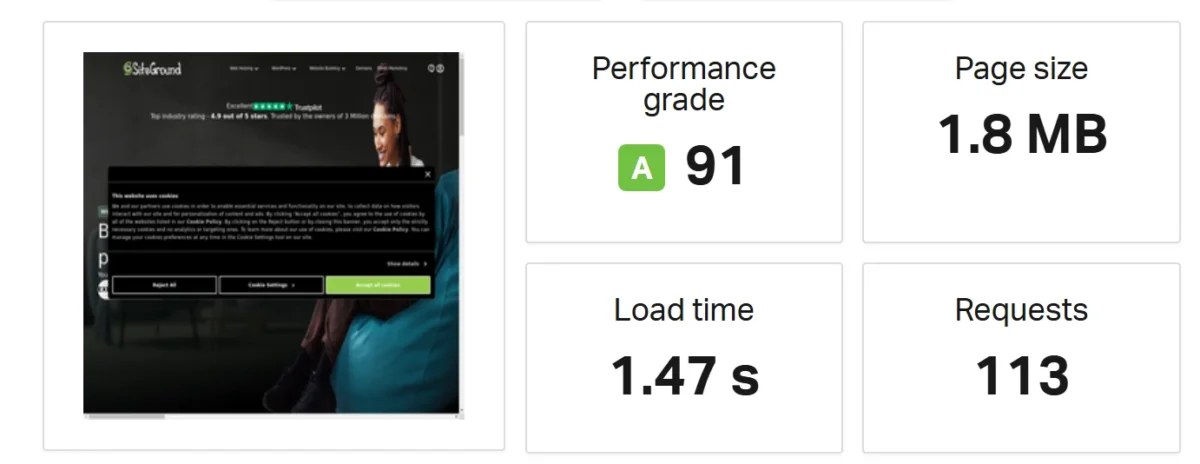
This image illustrates SiteGround’s website performance metrics, including speed, page size, and request volume. It highlights overall page efficiency.
Speed Test Data: Hostinger vs SiteGround
Hostinger:
The image shows a website performance testing dashboard analyzing the Hostinger homepage. The results indicate a Performance Grade of C with a score of 79. The page load time is recorded at 912 milliseconds, suggesting a relatively fast loading speed.
The total page size is 11.5 MB, which is considered large and may impact performance. The page generates 105 requests, reflecting the number of resources loaded, such as images, scripts, and stylesheets. A visual preview of the Hostinger website is included, displaying marketing content promoting an 85% discount offer.
SiteGround:
The image presents a website performance testing dashboard analyzing the SiteGround homepage. The results indicate a Performance Grade of A with a high score of 91. The page load time is recorded at 1.47 seconds.
The total page size is 1.8 MB, which is relatively lightweight and beneficial for faster loading. The page generates 113 requests, representing the number of assets loaded, including scripts, stylesheets, and images. A visual preview of the SiteGround website is included, showing the homepage layout and interface elements.
Core Web Vitals and Page Load
Hostinger:
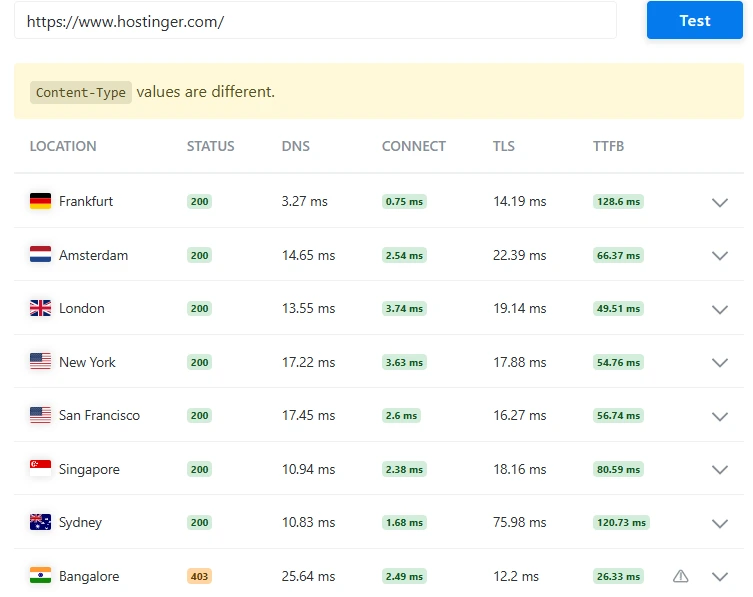
Global speed test of Hostinger.com showing server response times and connection metrics from different locations.
Bitcatcha Server Response Time
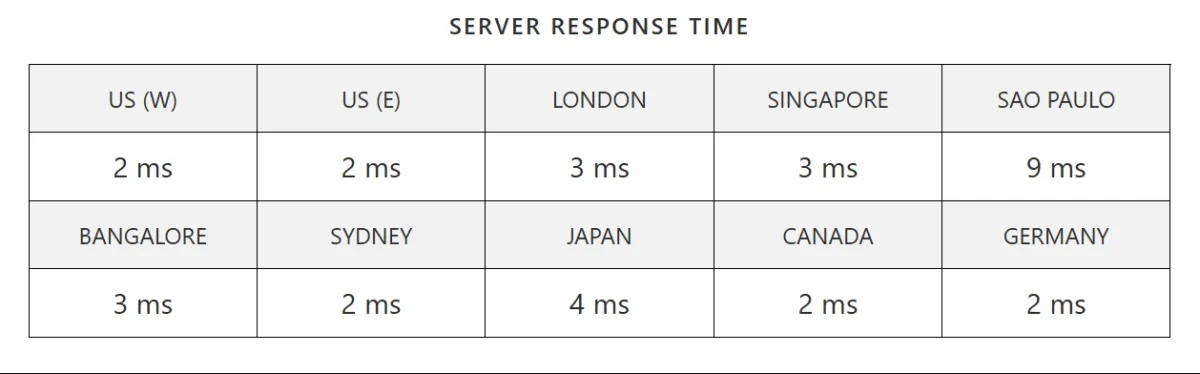
This image shows global server response times across multiple locations, ranging from 2 ms to 9 ms. The low latency in most regions indicates fast and reliable performance worldwide.
SiteGround:
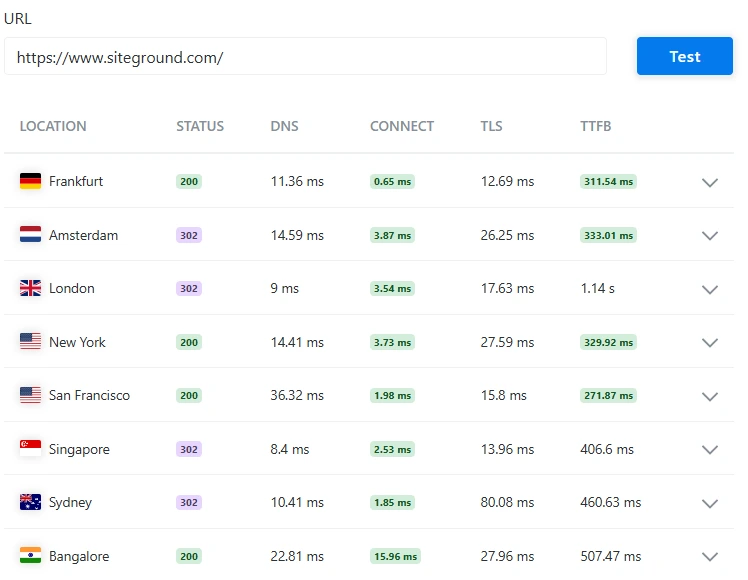
This image shows SiteGround’s server performance metrics from different countries. The response times indicate stable and consistent global performance.
Bitcatcha Server Response Time
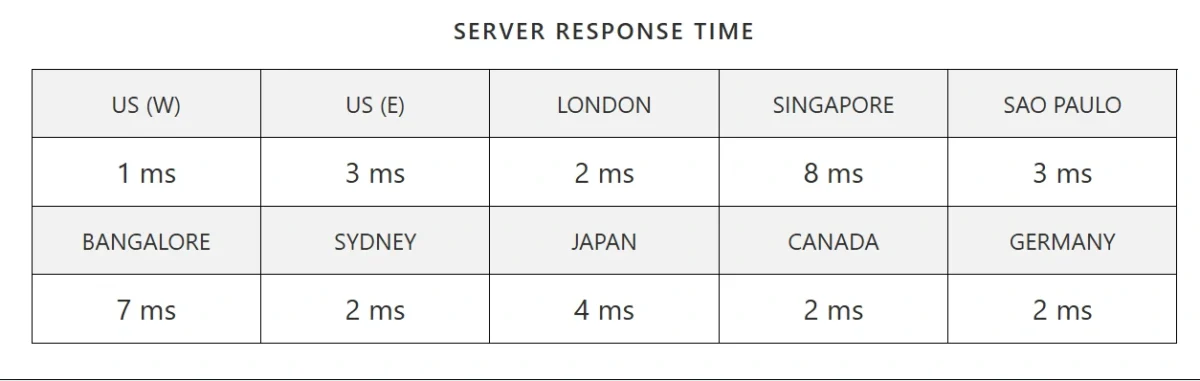
This image shows excellent global server response times ranging from 1 ms to 8 ms. The results highlight fast and consistent performance across major international locations.
Uptime and High-Traffic Handling
Hostinger offers 99.98% uptime, maintaining stable performance even during sudden traffic spikes. Its servers handle high traffic efficiently, with only minimal slowdowns under extreme loads.
SiteGround also delivers 99.99% uptime and shows strong traffic-handling capabilities, remaining stable during peak periods. Overall, both hosts are reliable for high-traffic websites, with SiteGround slightly edging Hostinger in long-term uptime consistency.
WordPress Hosting Performance Comparison
Hostinger is ideal for users who want affordable WordPress hosting with a simple setup and fast load times. It works well for beginners, bloggers, and small sites that need cheap managed WordPress hosting without complex features.
SiteGround is designed for projects that demand high-performance WordPress hosting and consistent uptime. It suits businesses and large sites that rely on secure WordPress hosting with advanced support and stability.
Hostinger vs SiteGround for WordPress
Hostinger and SiteGround are strong options for WordPress hosting for beginners and advanced users in 2026.
Hostinger targets new site owners with low-cost plans, simple setup, and fast LiteSpeed WordPress performance, making it ideal for small blogs and startups.
SiteGround is designed for experienced users who need managed WordPress hosting with higher stability and control.
Choose Hostinger if:
- You are new to WordPress
- You want cheap WordPress hosting with low renewal costs
- You prefer a simple setup and AI-powered website tools
- You are a freelancer or small business owner
Choose SiteGround if:
- You manage client or agency websites
- You run high-traffic or WooCommerce stores
- You need WordPress staging, daily backups, and phone support
- You prioritize security and long-term reliability
Quick verdict:
Hostinger fits most beginners, while SiteGround is the smarter choice for professional and scalable WordPress sites.
Caching, CDN, and Server Stack
In 2026, Hostinger web hosting and SiteGround hosting solutions cater to different users. Hostinger focuses on high-speed web performance and affordability with LiteSpeed servers and built-in caching, making it ideal for small business websites.
SiteGround emphasizes cloud-based reliability and premium support, perfect for high-traffic WordPress sites. Both hosts deliver excellent site speed and uptime, but your choice depends on budget, traffic, and security priorities.
Comparison Highlights:
Server Stack:
- Hostinger: LiteSpeed web servers, NVMe SSD storage → faster load times for WordPress blogs.
- SiteGround: Nginx + Apache on Google Cloud → higher stability under heavy traffic websites.
Caching:
- Hostinger: LiteSpeed Cache with Object Cache, ESI, and Guest Mode, offering advanced website caching.
- SiteGround: SuperCacher (Nginx Direct Delivery, Dynamic Cache, Memcached) for dynamic site acceleration.
CDN:
- Hostinger: Free in-house CDN improves global website speed.
- SiteGround: Cloudflare integration + in-house network ensures fast content delivery worldwide.
Backups & Security:
- Hostinger: Weekly (lower plans) / Daily (premium), automated malware scanning, WAF, DDoS protection for a secure hosting environment.
- SiteGround: Daily backups, AI anti-bot system, WAF, 24/7 server monitoring for enterprise-level website protection.
Verdict:
- Choose Hostinger for the best speed-to-price ratio, ideal for beginners, budget-friendly web hosting, and small businesses.
- Choose SiteGround for high-traffic WordPress or e-commerce sites, where maximum uptime and security matter most.
Ease of Use and Control Panels
Hostinger and SiteGround both have modern and user-friendly control panels.
- Hostinger’s hPanel is more intuitive and beginner-friendly.
- SiteGround’s Site Tools offers advanced resource management.
- Hostinger is best for simple and budget-friendly hosting.
- SiteGround is suitable for premium, secure, high-performance hosting.
hPanel vs Site Tools Comparison
Hostinger’s hPanel provides a personalized, beginner-friendly dashboard that is easy to navigate, while SiteGround’s Site Tools often includes extra add-ons and extensions that can clutter the interface.
Users can pin frequently used tools in Site Tools, but hPanel feels ready-to-use for website management without additional setup. Additionally, SSL installation and renewal are automatic in hPanel, unlike Site Tools, which requires manual SSL updates every 90 days, making hPanel more convenient for secure WordPress hosting.
Hostinger hPanel
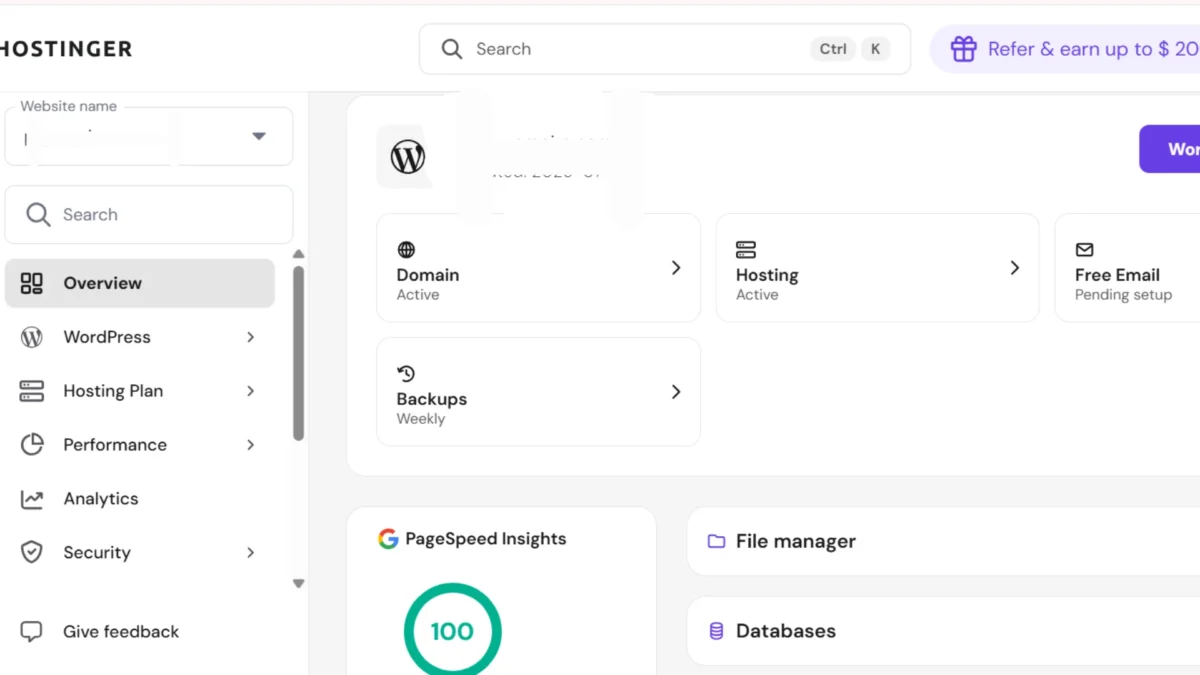
Hostinger’s control panel, hPanel, is highly intuitive and beginner-friendly for WordPress hosting. It features an interactive onboarding process, one-click WordPress installation, and automatic SSL setup, making website management simple from the start.
All tools and settings are neatly organized in the left sidebar, allowing users to navigate easily and manage web hosting accounts efficiently. Menus like WordPress and Domain contain all the necessary options for managing websites, domains, and subdomains, ensuring smooth website administration.
The dashboard also provides quick access to speed tests, malware scans, as well as the file manager, databases, and WordPress admin panel, enhancing overall site performance monitoring. Switching between multiple domains is seamless, making overall site management smooth and efficient for small business websites.
SiteGround Site Tools
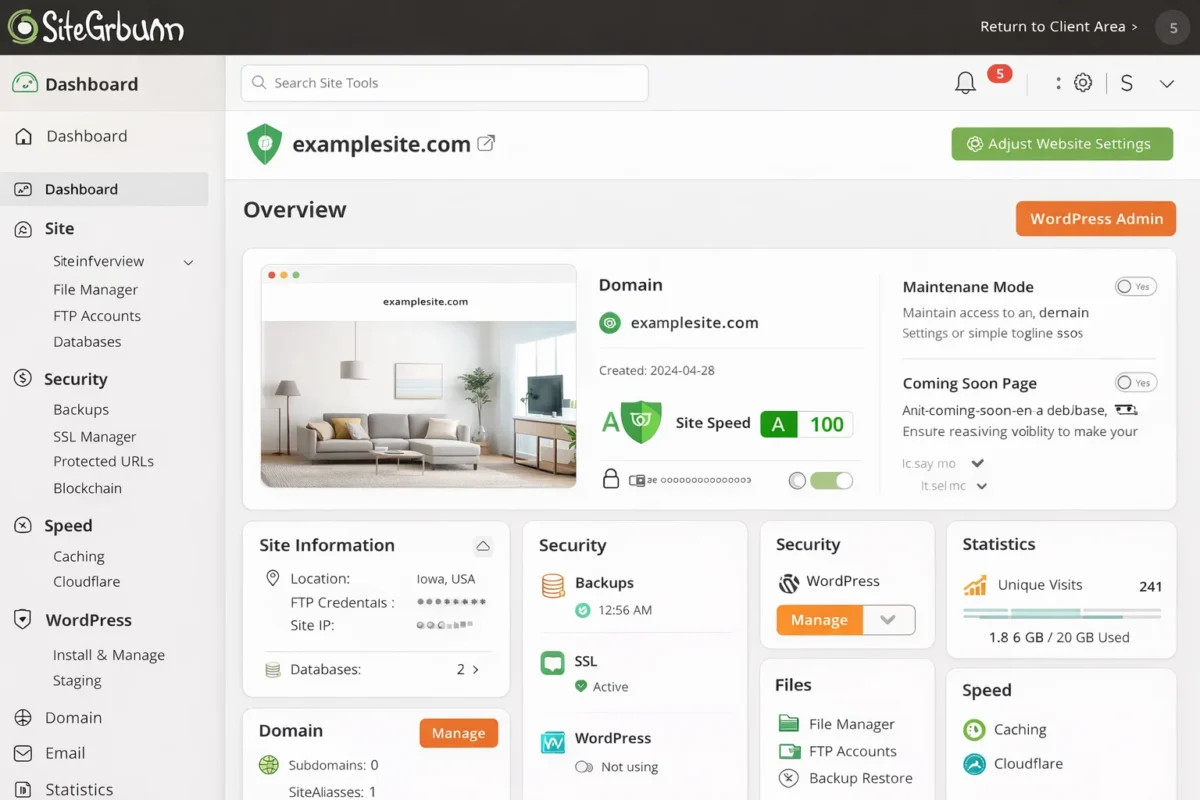
SiteGround’s Site Tools is a beginner-friendly hosting control panel that is simple to use. The sidebar menu layout groups main actions, making website management and domain control easy and efficient.
Setup, Dashboard, and Daily Management
Hostinger offers a quick and easy setup with guided onboarding, making it ideal for beginners. The hPanel dashboard organizes all tools neatly, allowing users to access WordPress, domains, databases, and security features without confusion.
Daily management is straightforward, with one-click app installs, automatic updates, and simple domain switching, ensuring smooth website operations.
SiteGround’s Site Tools also provides a clean layout but requires manual SSL updates and extra clicks for certain tasks, making hPanel feel more efficient and user-friendly for routine management.
Which Is Easier for Beginners?
Python programming is beginner-friendly due to its simple syntax and easy-to-read code, making it ideal for new coders.
JavaScript learning engages learners with interactive web projects and real-time visual feedback, perfect for front-end development beginners.
For music, the ukulele lessons are simple, offering easy chords and quick song learning, suitable for beginner musicians.
Security, Backup, and Hosting Reliability
Security
- Both provide free SSL certificates and DDoS protection for secure websites.
- SiteGround includes the SG Security plugin, daily automatic backups, and WordPress hardening features; higher plans offer on-demand backups for data recovery.
- Hostinger has an application firewall, free malware scanner, and weekly or daily backups depending on the plan, ensuring website protection for small and medium sites.
- Verdict: Both are strong, but SiteGround is better for eCommerce sites or agencies needing critical backup solutions, while Hostinger offers solid budget hosting security.
Backups
- SiteGround: Daily automatic backups on all plans, often storing up to 30 versions. Includes one-click, on-demand restoration.
- Hostinger: Weekly backups on lower-tier plans; daily backups only on higher-tier plans. Restoration is simple via hPanel, but less frequent on cheaper plans.
- Key Difference: SiteGround prioritizes reliability and consistency, while Hostinger focuses on affordability and accessible restoration.
Reliability
- SiteGround offers top-tier website reliability and server uptime, making it ideal for high-traffic sites or business-critical WordPress hosting. Its strong customer support ensures smooth operation for professional websites.
- Hostinger provides fast and affordable shared hosting with LiteSpeed servers, perfect for beginner websites or budget-friendly WordPress hosting. It delivers consistent site performance without high costs.
Malware, SSL, and Firewall Features
Malware Protection
- Hostinger: Free automatic malware scanner, effective for standard security.
- SiteGround: AI-powered real-time malware detection, more proactive, ideal for business/e-commerce sites.
SSL Certificates
- Both offer free automatic Let’s Encrypt SSL for all domains. Easy installation and automatic renewal.
Firewalls
- Hostinger: Custom in-house firewall (WAF) for basic protection.
- SiteGround: Advanced custom WAF + AI bot protection, better for critical sites.
Verdict / Use Case
- SiteGround: Choose for top-tier, proactive security.
- Hostinger: Choose for standard, budget-friendly protection.
Backup Policies and Restore Limits
Backup Frequency
- Hostinger: Weekly on basic plans; daily on Business/Cloud plans.
- SiteGround: Daily backups on all plans.
Retention Period
- Hostinger: 7–30 days depending on plan.
- SiteGround: Up to 30 days.
On-Demand / Manual Backups
- Both providers allow on-demand backups on higher-tier plans.
Restore Process
- Hostinger: Automated restores via hPanel; weekly backups may limit restoring to very recent days.
- SiteGround: One-click restore for entire site or specific files/databases.
Verdict / Use Case
- SiteGround: Best for business-critical sites needing daily backups and easy restores.
- Hostinger: Best for smaller or less critical sites on a budget.
Hidden Hosting Limitations
Hostinger:
- Extremely low starting price ($1.99/mo) requires a 48-month commitment, and renewal jumps to $7.99–$10.99/mo.
- Support is limited to 24/7 chat and email; no phone assistance.
- Basic plans offer only weekly backups; daily backups need a higher-tier plan.
- Email accounts are limited on some plans.
- Frequent dashboard upsells for security and marketing tools.
SiteGround:
- Entry-level plans start low ($2.99/mo) but can renew at $17.99+/mo.
- Storage and traffic caps are strict (40GB SSD, 10,000 monthly visits for the starter plan).
- No free domain is included.
- VPS and dedicated hosting options are unavailable.
- Their Site Tools panel has a steeper learning curve for beginners.
Customer Support and Migration Experience

Customer Support
- Both offer 24/7 assistance and detailed knowledge bases.
- Hostinger: Live chat & email; pre-signup support only via AI chatbot (Kodee). Response time ~14 min (chat) and <30 min (email). Agents are polite but often refer to knowledge base articles.
- SiteGround: Live chat, phone, and email ticket system. Phone <5 min, chat <4 min. Agents are fast, professional, and solution-oriented, though a knowledge base review is needed first.

Migration Experience
- Hostinger: Free, expert-assisted migration via hPanel. Ideal for beginners and budget-conscious users. Uses LiteSpeed Cache for improved speed post-migration.
- SiteGround: WordPress Migrator plugin available free for self-service; $30/site for managed migration. High-performance focus, with 78% of sites migrating faster. Best for agencies or users seeking professional, managed transfers.
Key Takeaways
- Speed: SiteGround often boosts site speed by ~95%.
- Ease of Use: Both have modern, user-friendly panels (hPanel vs Site Tools).
- Support Advantage: SiteGround includes phone support; Hostinger does not.
- Recommendation: Hostinger for free, simple, beginner-friendly migration; SiteGround for high-performance, managed migration, even at a cost.
Live Chat, Tickets, and Response Time
Hostinger focuses on fast, AI-assisted, budget-friendly support, making it suitable for beginners and small businesses. SiteGround delivers premium, highly personalized assistance, ideal for agencies and growing websites.
Live Chat: SiteGround consistently connects almost instantly, offering expert guidance for technical issues. Hostinger provides round-the-clock chat, though wait times average around 14 minutes, with solutions often referencing knowledge base articles.
Ticketing & Issue Resolution: SiteGround excels with advanced ticket routing and a 98% satisfaction rate. Hostinger responds quickly, typically under 30 minutes, efficiently handling general inquiries with AI assistance.
Phone Support: Only SiteGround offers 24/7 phone support, giving it an edge for urgent or complex problems.Accessibility & Experience: Hostinger requires an account for chat access, while SiteGround’s support is highly accessible but occasionally routes users through documentation or paid advanced help.
Both platforms maintain extensive knowledge bases, though SiteGround specializes in troubleshooting for complex, scaling websites.
How Easy Is It to Migrate to SiteGround?
Migrating to SiteGround hosting is simple and fast, often under 10 minutes using their free WordPress migration plugin. Generate a migration token in the dashboard, install the plugin on your old site, and the system automatically transfers files and databases.
For a smoother experience, SiteGround offers professional website migration services, perfect for users who want expert help without handling technical steps. After migration, update your domain’s nameservers to complete the switch and ensure your site runs seamlessly on SiteGround’s platform.
Does SiteGround Offer Free Website Migration?
SiteGround provides free WordPress migration using its Migrator plugin, allowing users to transfer unlimited websites effortlessly. This automated tool is ideal for WordPress site transfers and beginner-friendly migrations.
For those who prefer expert assistance, SiteGround’s professional migration service handles the first website at no cost. This ensures a smooth, expert-led website transfer without downtime.
The plugin has limitations, as it cannot move multisite setups, locally built sites, or WordPress.com websites. Additional professional migrations may incur a fee, but the plugin remains free for ongoing WordPress migrations.
Non-WordPress websites require manual migration, though SiteGround’s support team can guide users through a secure website move.
Data Centers & Global Performance
Hostinger operates 13 global data centers across the Americas, Europe, and Asia, providing fast, reliable website hosting worldwide. SiteGround has 11 data centers, including multiple US and European locations, to support international website performance.
Using LiteSpeed servers, Hostinger delivers lightning-fast load times under one second, ideal for WordPress speed optimization. SiteGround’s cloud hosting and SG Optimizer plugin boost performance but require manual setup for site acceleration.
Both guarantee 99.9% uptime, consistently exceeding expectations. Tests with a WordPress site, including images and custom code, confirmed stable, high-performance hosting and reliable speeds.
Where Are SiteGround’s Data Centers Located?
SiteGround runs global data centers on Google Cloud, covering four continents for faster website performance.
In the USA, servers are in Iowa, Virginia, Texas, and California, ensuring low-latency hosting for American visitors.
Europe has data centers in the UK, Netherlands, Germany, Spain, and France, providing reliable European hosting.
Asia and Australia are served by Singapore and Sydney locations, helping sites achieve regional speed optimization.
Hostinger vs SiteGround — Best for Global Audiences
Hostinger and SiteGround cater to websites targeting international audiences but serve different needs. Hostinger is ideal for budget-friendly hosting and small business websites, while SiteGround is better for high-traffic sites and enterprise-level projects.
Both providers feature multiple data centers worldwide and integrate CDNs like Cloudflare for fast global load times and reduced latency.
Pros, Cons, and Hosting Disadvantages
Hostinger Pros & Cons
Pros:
- Affordable pricing – Great for beginners and small websites.
- High performance – Fast loading speeds with LiteSpeed servers.
- User-friendly – Easy control panel and setup.
- Free SSL & backups – Basic security included even on lower plans.
Cons / Disadvantages:
- Limited support channels – Only live chat and email; no phone support.
SiteGround Pros & Cons
Pros:
- Excellent support – 24/7 live chat, phone, and ticket system.
- Strong security – Daily backups, SG Security plugin, WordPress hardening.
- Reliable performance – Consistent uptime and fast loading speeds.
- Managed WordPress hosting – Optimized for WordPress users.
Cons / Disadvantages:
- Higher pricing – Premium hosting comes with a higher cost.
Choosing Hostinger or SiteGround
Choosing between Hostinger web hosting and SiteGround hosting depends on your goals. Hostinger is ideal for beginners, small businesses, and budget-conscious users looking for fast website performance at a low cost. SiteGround, on the other hand, suits established businesses, agencies, and users who prioritize premium uptime and 24/7 managed support.
Hostinger delivers top-loading speeds and affordability, while SiteGround excels in server reliability, advanced security, and professional WordPress hosting.
Feature | Choose Hostinger If… | Choose SiteGround If… |
Budget | You want the lowest cost ($1.99–$2.99/mo) | You can pay more for premium value |
Experience | Beginner, blogger, or new site owner | Agency, developer, or high-traffic site |
Performance | Fast LiteSpeed tech | Reliable Google Cloud infrastructure |
Support | 24/7 chat and self-help guides | 24/7 phone, chat, and ticket support |
Backups | Weekly sufficient (daily on higher plans) | Daily automatic backups, easy restores |
Best for Beginners and Budget Sites
Hostinger is perfect for beginner-friendly web hosting and small business websites. Its intuitive hPanel and AI website builder simplify site creation, while affordable hosting plans provide generous SSD storage and fast LiteSpeed servers. The Premium plan offers a free domain, SSL, and enough resources to start a WordPress site smoothly.
SiteGround excels in managed WordPress hosting and high-performance business websites. With Google Cloud infrastructure, advanced security features, and staging tools, it ensures maximum uptime and site reliability. Its 24/7 support and specialized caching make it ideal for critical websites that need speed and stability.
Best for Businesses and WooCommerce
Both hosting providers perform well in 2026, but serve different audiences. SiteGround suits established brands needing managed business hosting and stable high-traffic website hosting. Hostinger fits startups seeking affordable web hosting plans with solid speed and value.
Performance for High-Traffic Websites
SiteGround operates on Google Cloud, delivering consistent uptime for scalable cloud hosting and resource-heavy platforms. It handles dynamic sites efficiently.
Hostinger uses LiteSpeed and NVMe, offering fast response times for fast-loading websites and reliable traffic spike management on higher plans.
WooCommerce & E-commerce Hosting
SiteGround is strong for serious stores. It provides secure environments tailored for WooCommerce hosting solutions and protected online payment processing.
Hostinger supports eCommerce with optimized servers for eCommerce website hosting and entry-level online store hosting plans, though advanced tools are plan-based.
Business Reliability & Support
SiteGround delivers 24/7 expert assistance, ideal for mission-critical websites and long-term enterprise hosting reliability.
Hostinger keeps costs low and offers dependable service, making it suitable for small business website hosting and budget-focused growth.
Pricing Perspective (2026)
Hostinger remains attractive for low-cost hosting packages with competitive renewal rates. It benefits long-term users.
SiteGround charges more, but pricing reflects premium hosting services and enhanced server performance optimization.
Which Hosting Platform Is Best for You?
Hostinger suits users who want low-cost hosting without technical complexity. It offers fast response times and budget-friendly plans, making it ideal for bloggers, freelancers, and startups looking for cheap shared hosting plans and beginner-friendly web hosting with reliable speed.
SiteGround is built for demanding websites that require stability and stronger protection. With advanced security layers and consistent uptime, it works well for growing brands and online stores seeking high-performance managed hosting and secure hosting for eCommerce websites.
Hosting Alternatives to Consider
Choosing a stronger option in 2026 depends on your goals. Some users want lower renewal costs. Others need advanced scalability or high-performance web hosting. Several providers now compete with better-managed cloud hosting solutions and stronger infrastructure control.
Cloudways is ideal for growth-focused projects. It lets you choose AWS, Google Cloud, or DigitalOcean for flexible deployment. This makes it powerful for scalable cloud hosting and dynamic traffic management. It suits businesses needing on-demand server resources.
Kinsta targets serious WordPress users. It runs on Google Cloud’s premium tier for stronger stability. This makes it suitable for enterprise WordPress hosting and large content sites. It is a strong pick for high-traffic website hosting.
IONOS focuses on affordability and support. Plans start very low and include useful features. It fits users searching for cheap web hosting plans with solid value. Daily backups and phone support improve budget-friendly hosting services.
A2 Hosting balances speed and price. Its optimized servers improve loading times. It works well for users wanting fast shared hosting without high costs. It is often chosen for Turbo server performance hosting.
DreamHost is known for reliability. It offers a strong uptime promise and a long refund period. This makes it dependable for reliable website hosting and long-term projects. It is also trusted for its 99.99% uptime guarantee and hosting reputation.
Alternatives and Managed WordPress Options
In 2026, several brands dominate the managed WordPress hosting comparison market. SiteGround stands out for reliability and user-friendly tools.
Hostinger attracts budget-focused users seeking strong speed at a lower cost. Kinsta and WP Engine target high-traffic sites with scalable cloud setups. These providers focus on WordPress speed optimization and built-in performance features.
For advanced flexibility, Cloudways allows users to deploy on different cloud servers. Liquid Web delivers premium support and stable infrastructure. ScalaHosting offers managed VPS solutions for growing projects.
WordPress.com provides an official platform with simplified management. Together, these services cover needs from scalable WordPress hosting solutions to enterprise WordPress hosting services.
SEO Impact of Hosting Choice
2026 testing confirms that both hosts deliver strong results, but they target different users. Hostinger is ideal for startups and lean projects seeking affordable web hosting with strong LiteSpeed server performance. SiteGround suits established brands that require managed WordPress hosting and enterprise-level reliability for high-traffic websites.
For SEO, performance depends heavily on Core Web Vitals. Hostinger achieves sub-second speeds, improving page load time optimization and reducing bounce rates for better rankings. SiteGround focuses on stability and advanced caching, strengthening website uptime reliability and long-term organic search growth through consistent performance.
Infrastructure also impacts visibility. Hostinger offers broad global coverage, supporting international website hosting strategies. SiteGround provides stronger US-focused infrastructure, benefiting US-based audiences and improving regional latency performance.
Hosting Effect on SEO, Speed, and ROI
Hostinger delivers faster website loading speed with LiteSpeed servers, offering excellent budget-friendly web hosting for startups and small businesses.
SiteGround provides consistent server performance, advanced WordPress security, and broad data center coverage, ideal for sites needing high reliability and minimal downtime.
SEO depends on site speed, uptime, and server location, while ROI relies on cost-effective hosting versus premium support and stability.
Final Verdict: Hostinger vs SiteGround
For 2026, Hostinger is the top choice for most users due to its affordable web hosting and high-performance WordPress hosting. It delivers 100% uptime and fast loading speeds, making it perfect for beginners, startups, and bloggers. Features like an AI website builder and support for 25–100 websites ensure easy site management.
SiteGround excels in premium hosting solutions and managed WordPress performance. It provides daily backups, advanced security, and top-tier customer support, ideal for agencies, high-traffic websites, and established businesses. Its infrastructure ensures maximum uptime and reliability for demanding projects.
Winner: Hostinger — best for value, performance, and user-friendly hosting
Runner-Up: SiteGround — best for security, premium support, and speed
Final Verdict Summary (Snippet-Optimized)
Hostinger is perfect for budget web hosting and beginner-friendly WordPress sites, offering low renewal rates and an intuitive hPanel dashboard. SiteGround suits businesses needing managed WordPress hosting, advanced website security, and reliable 24/7 support.
While SiteGround delivers slightly faster site speed and strong anti-bot protection, Hostinger excels with affordable plans and easy website management.
Best Hosting by Use Case
Use Case | Recommended Host | Key Reason |
Absolute Beginner | Hostinger | Easier hPanel, AI builder, lower cost |
Best Value for Money | Hostinger | More storage (NVMe), cheaper renewals |
Small Business / Startup | Hostinger | Affordable plans, support 100+ websites, and have good speed |
High-Traffic / E-commerce | SiteGround | Superior speed (NGINX/Google Cloud), staging tools |
Professional / Agency | SiteGround | Collaboration tools, white-labeling, staging |
Speed / Performance | SiteGround | Faster LCP/TTFB, advanced caching |
Technical / VPS Needs | Hostinger | Offers dedicated KVM VPS plans |
Quick Comparison Logic:
- Price & Value: Hostinger is more budget-friendly, ideal for multiple sites with ample storage.
- Performance & Speed: SiteGround handles heavy sites better with Google Cloud infrastructure.
- Ease of Use: Hostinger’s hPanel is beginner-friendly; SiteGround’s Site Tools is modern but slightly steeper to learn.
- Support: SiteGround offers faster, 24/7 support, including phone; Hostinger relies on AI chat and live support.
- Security & Backups: SiteGround provides daily backups and advanced AI security; Hostinger offers weekly or daily backups depending on the plan.
Related:
- Hostinger vs Bluehost
- Cloudways vs Hostinger
- Hostinger vs HostGator
- GreenGeeks Review
- Scalahosting Review
FAQs — Hostinger vs SiteGround
Is Hostinger better than SiteGround?
Hostinger vs SiteGround: Hostinger is perfect for budget-friendly web hosting and beginner websites, offering low prices and simple, user-friendly tools.
SiteGround, though more expensive, provides high-performance hosting, advanced website security, and reliable support, making it ideal for growing businesses and demanding online projects.
Choose based on whether affordability or premium hosting features are your priority.
Is Hostinger good for WordPress?
Hostinger is a budget-friendly WordPress hosting solution, perfect for beginners and small business websites. It offers one-click WordPress setup and LiteSpeed caching for faster site performance.
Its custom hPanel dashboard makes website management simple and user-friendly, ensuring an efficient experience for freelancers and growing sites.
Which hosting platform is best overall?
Hostinger leads in 2026 for affordable web hosting with high-speed performance and intuitive website management tools. The best choice can vary based on needs, as some hosts excel in premium security features or specialized customer support services.
Does SiteGround use cPanel?
As of 2026, SiteGround has fully replaced cPanel with its proprietary Site Tools dashboard, offering custom website management and database control. This platform ensures faster performance and more tailored hosting features for users.
Does Hostinger offer a free domain?
Hostinger includes a free domain name for the first year with annual shared hosting or WordPress hosting plans. This offer covers popular extensions like .com, .net, and .xyz and includes domain privacy protection. Renewal is charged at standard rates after the first year.

Alex Bryant, founder of PvyEmpire.com, is passionate about WordPress and specializes in web hosting, performance optimization, and site management. With extensive experience testing top hosting providers, he created PvyEmpire.com to share honest, data-backed reviews, expert guides, and verified coupons & deals, helping website owners save money, boost performance, and grow their online presence with confidence.