WP Engine Review 2026: Is It the Best WordPress Hosting?
WP Engine is a trusted managed WordPress hosting provider for personal, business, and enterprise websites. This WP Engine review highlights its performance, security, and ease of use. It shares firsthand experience to help you decide if it’s worth the extra cost.
Pros:
- Servers run very fast
- Useful features for developers
- Strong security measures
Cons:
- Dashboard can be confusing
- Cost is relatively high
WP Engine Review 2026: Overview
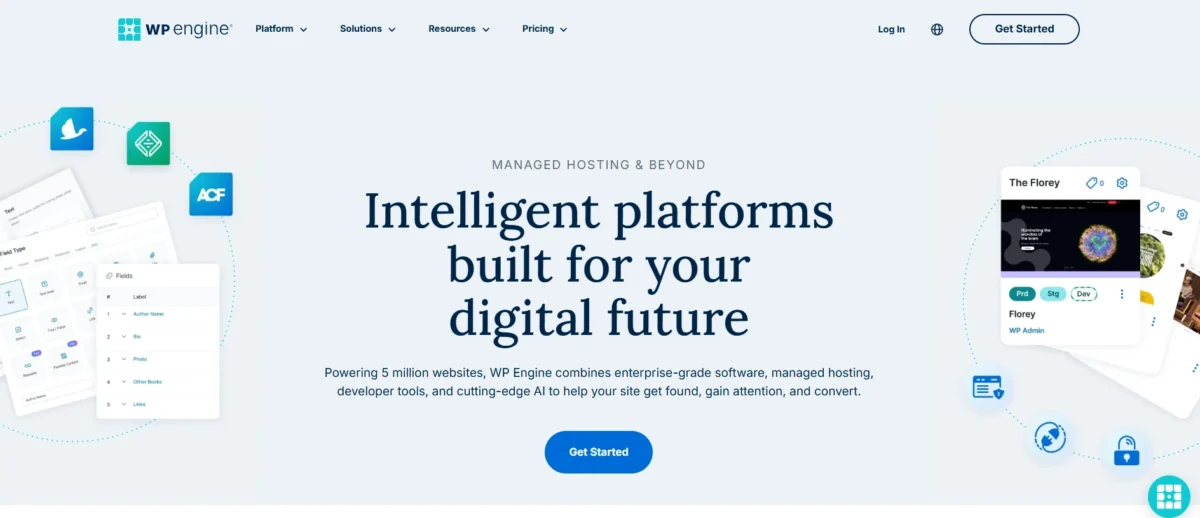
WP Engine delivers excellent WordPress hosting performance with fast load and response times. It includes free SSL certificates and easy 1-click WordPress setup, but does not offer a free domain. Support is available via phone, live chat, and knowledge base, ensuring reliable managed WordPress support.
Feature | Details |
Performance Grade | A+ |
Average Load Time | 656 ms |
Average Response Time | 123 ms |
Free Domain | No |
Free SSL | Yes |
1-Click WordPress | Yes |
Support | Phone / Live Chat / Knowledge Base |
What is WP Engine Used For?
WP Engine is used for hosting WordPress sites with fast performance, strong security, automatic backups, and scalability for blogs, e-commerce, and high-traffic business websites.
Is WP Engine Reliable?
WP Engine is a reliable WordPress hosting solution with strong uptime and fast page loading. Its managed hosting services ensure sites run smoothly and securely.
Businesses, high-traffic websites, and developers benefit from advanced WordPress tools like staging environments and automated backups. It’s ideal for those needing professional website performance optimization.
Is WP Engine the Right Choice for WordPress in 2026?
WP Engine is a top-tier managed WordPress hosting provider in 2026, perfect for business websites and high-traffic projects needing speed, security, and expert support. WordPress performance optimization ensures fast loading and a smooth user experience.
Smaller personal blogs or low-budget projects may find it expensive, but its premium WordPress plans and developer-friendly tools make it ideal for agencies and professionals seeking reliability.
WP Engine Hosting Plans & Pricing
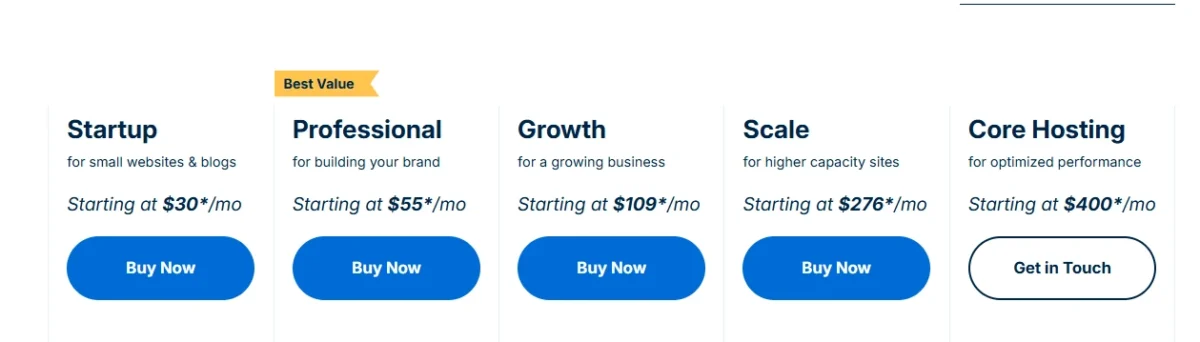
WP Engine offers tiered managed WordPress hosting plans designed to grow with your website. Each plan provides different resources, site limits, and traffic capacities, making it scalable for businesses and e-commerce projects. Pricing starts at $30 per month and goes up to custom enterprise solutions.
Key WP Engine Plans:
- Startup ($30/month): 1 site, 25,000 monthly visits, 10GB storage, 50GB bandwidth, SSL, CDN.
- Professional ($55/month): 3 sites, 75,000 visits, 15GB storage.
- Growth ($109/month): 10 sites, 100,000 visits, 24/7 phone support, and import SSL.
- Scale ($267/month): 30 sites, 400,000 visits, more resources, similar features as Growth.
- Premium & Enterprise: Custom plans with dedicated servers and advanced support.
These plans balance performance, security, and scalability. They are ideal for businesses looking to expand or host multiple high-traffic websites efficiently.
WordPress Hosting: Startup, Professional, Growth
WP Engine offers three main managed WordPress plans for different needs. The Startup plan supports 1 website with 10 GB storage and is best for small businesses. The Professional plan allows 3 websites with more bandwidth, ideal for freelancers. The Growth plan supports up to 10 websites and higher traffic limits, making it suitable for growing agencies.
WooCommerce Hosting Plans
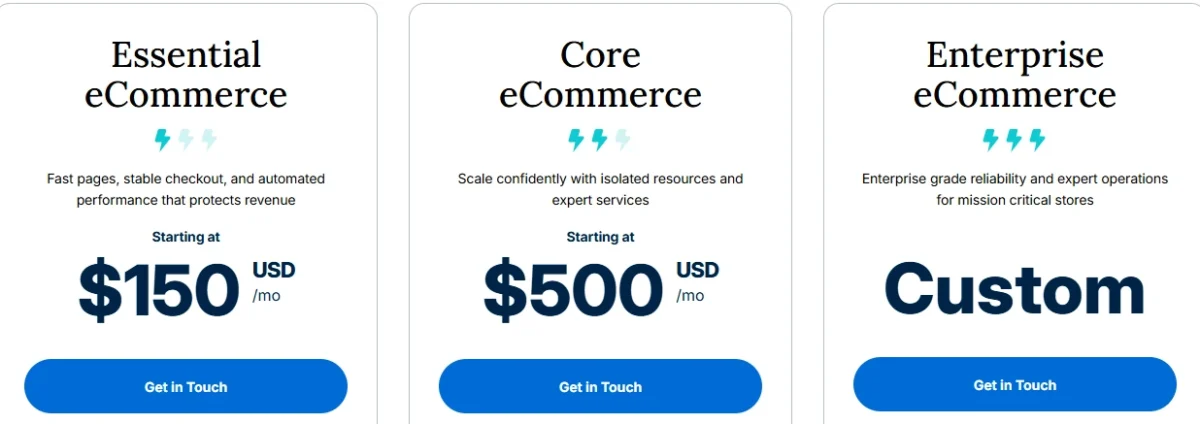
WP Engine provides specialized hosting for WooCommerce stores with built-in tools for smooth online selling. Plans include easy setup, payment integration, and performance-focused features. Pricing starts at $150 per month, with scalable options for growing and enterprise businesses.
The entry-level WooCommerce plan supports one website, around 25,000 monthly visits, 10GB storage, and 75GB bandwidth. It runs on shared hosting and suits small to mid-sized online stores.
For larger businesses, advanced VPS-based plans offer premium features like AI-powered search, stronger security protection, and personalized onboarding. Enterprise users can request custom solutions tailored to high-traffic eCommerce operations.
Headless Hosting Plans
WP Engine also offers headless hosting for developers and advanced users who want greater speed and flexibility. This setup separates the front-end design from the content management system to enhance performance and user experience. Custom pricing is available upon request.
These plans include tools that connect headless technology with WordPress, along with learning resources and dedicated support. Users gain access to community channels and expert guidance to help manage the setup process.
Built on cloud infrastructure, headless hosting stores data across global servers. This structure improves loading speed and delivers strong performance for international audiences.
Add-ons, Bandwidth & Visitor Limits
WP Engine provides optional add-ons that extend functionality beyond base hosting plans. These enhancements typically cover areas like additional sites, performance improvements, automation tools, and advanced security features. Add-ons are billed separately and are not included by default.
Add-ons may include:
- Additional site allowances
- Automated plugin management
- Performance optimization tools
- e-commerce-related enhancements
- Advanced security features
Availability and pricing vary by plan and region.
Bandwidth & Visitor Limits:
WP Engine structures resource usage primarily around monthly visitor limits rather than traditional bandwidth caps. Bandwidth is still tracked, but visitor thresholds are the key metric influencing overage charges.
If traffic exceeds the allocated visitor allowance, overage fees may apply. This model helps maintain performance stability while clearly defining scaling costs.
Pros & Cons of Each Plan
WP Engine plans offer strong performance and advanced features, but come at a premium. They are ideal for developers and sites needing solid security, though the interface may be tricky for some users.
Pros:
- Excellent server performance – Websites load quickly and handle high traffic smoothly.
- Great tools for developers – Includes staging environments, Git integration, and other features that make building and testing WordPress sites easier.
- Robust security tools – Automatic backups, malware scans, and SSL certificates help keep sites safe.
Cons:
- Interface isn’t always intuitive – Beginners might find the dashboard and settings a little confusing.
- Price is high for the service provided – The plans cost more than some other hosts, which can be a drawback for smaller sites or personal blogs.
WP Engine Performance & Speed
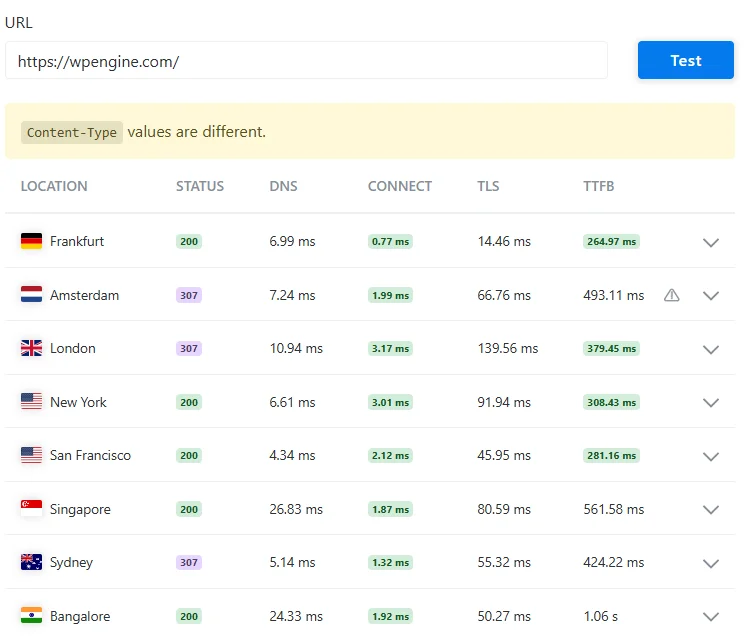
In my experience testing the WP Engine website https://wpengine.com/, the global performance results were impressive overall. I checked the site from multiple international locations, and most regions, such as Frankfurt, New York, San Francisco, Singapore, and Bangalore, returned a 200 HTTP status code, which indicates a successful response.
A few locations, like Amsterdam, London, and Sydney,y showed a 307 redirect status, which is normal for certain routing or security configurations. What stood out to me was the consistent server response in major regions — for example, Frankfurt recorded a TTFB of 264.97 ms, while even the highest result in Bangalore was 1.06 seconds.
The report also included a notice that Content-Type values are different, but it did not appear to affect overall performance. Based on this test, WP Engine demonstrates strong global speed and reliable infrastructure, making it a solid choice for business and high-traffic websites.
Uptime & Server Response Time
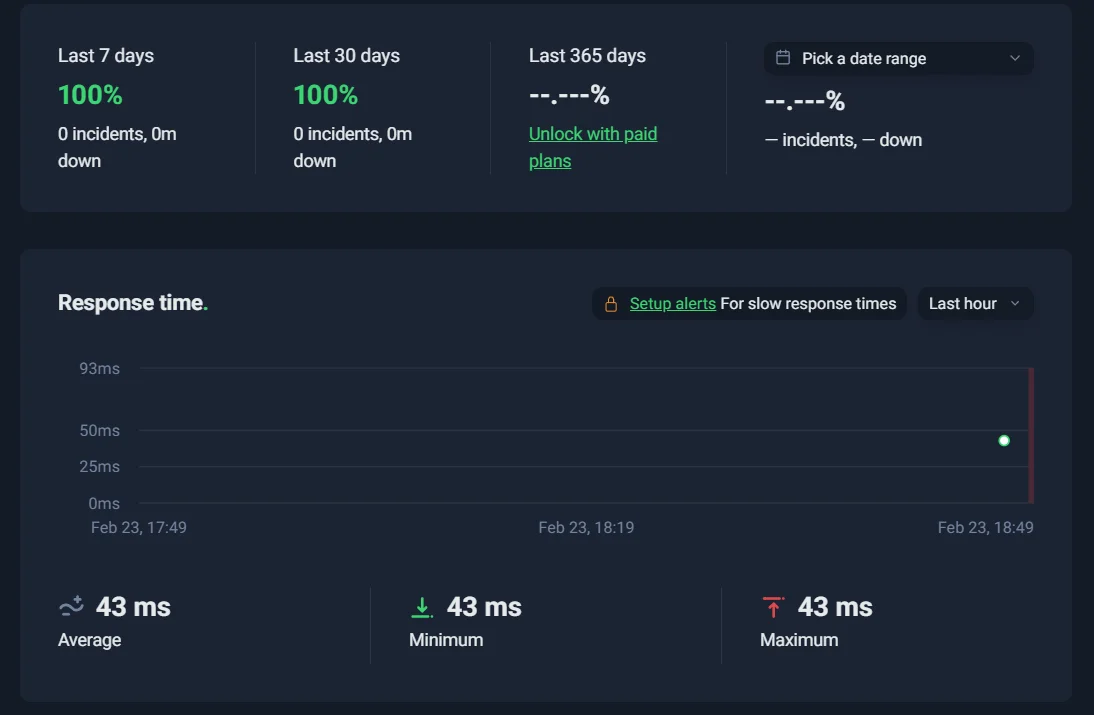
WP Engine delivers very stable website availability. It promises uptime close to 100%, which keeps websites online almost all the time. This makes it a dependable choice for serious business websites.
The platform maintains strong performance with extremely rare service interruptions. Independent monitoring often shows consistent reliability over long periods. It is well-suited for sites that cannot afford downtime.
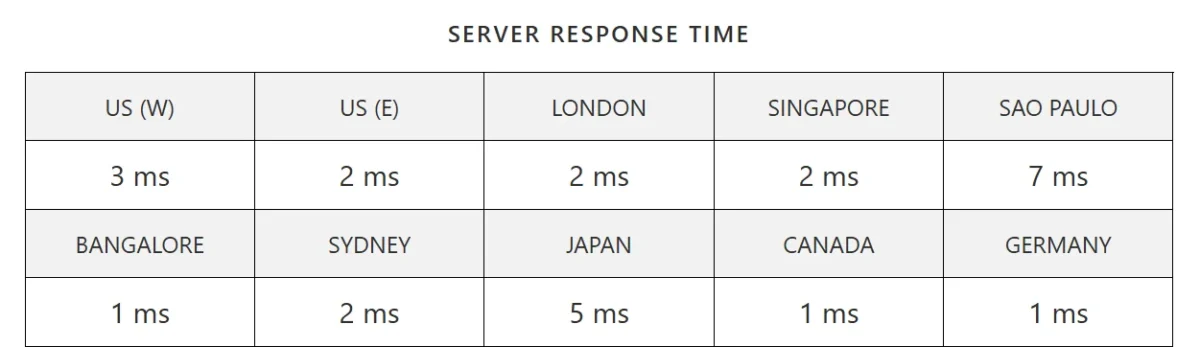
In my testing, the server response time results were extremely fast across all major regions. The US West showed 3 ms, while the US East, London, Singapore, Sydney, and Germany averaged around 2 ms. Bangalore, Canada, and Germany recorded an impressive 1 ms response time, with Japan slightly higher at 5 ms and São Paulo at 7 ms.
Overall, these numbers indicate a highly optimized and responsive global server network, delivering near-instant performance worldwide.
Page Speed & GTmetrix Test Results
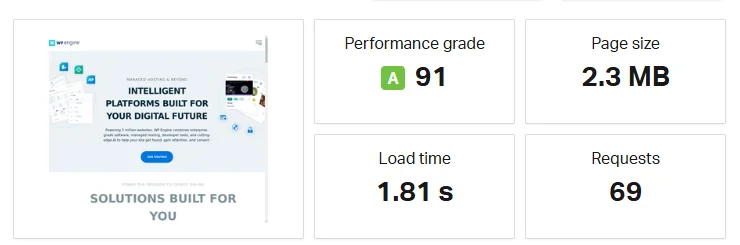
When I tested the WP Engine homepage performance, I was genuinely impressed by the overall results. The website received a strong performance grade of A (91), which clearly reflects good optimization and backend efficiency. With a total page size of 2.3 MB and 69 requests, the site still managed to load fully in just 1.81 seconds, which is quite solid for a feature-rich homepage.
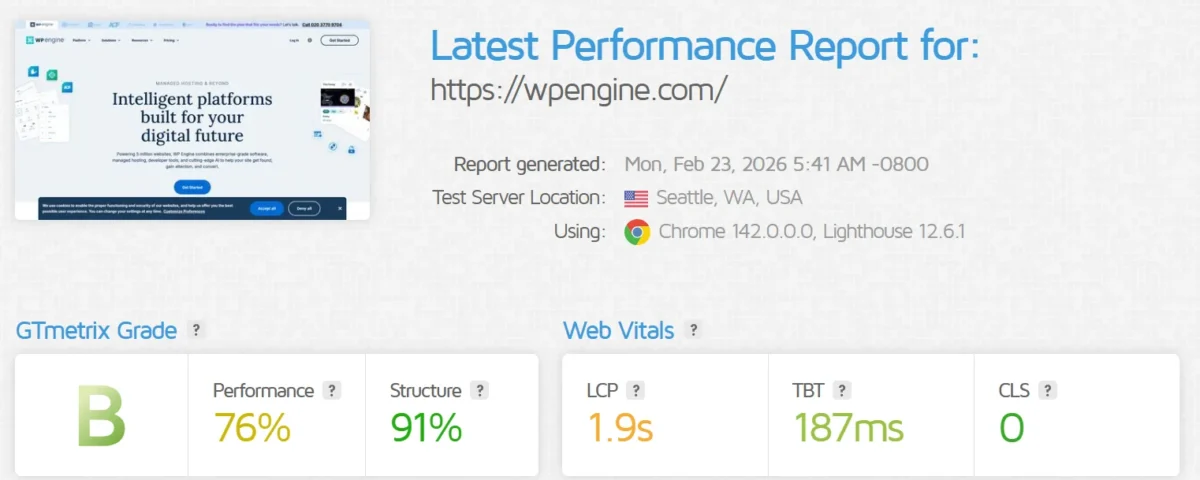
From my experience testing WP Engine, the site loads quickly with minimal layout shifts. The Lighthouse metrics show strong performance, indicating optimized hosting for WordPress sites. The structure score of 91% impressed me, making content delivery smooth and reliable.
Caching & AI-Powered Performance Tools
WP Engine boosts website speed through built-in server-level caching and smart automation tools. Its advanced caching system reduces load times and handles traffic efficiently. AI-powered features help optimize performance, improve search results, and enhance user experience without complex setup.
Security & Backups
WP Engine offers strong security through continuous monitoring and multi-layered protection. The system actively reduces threats while managing technical safety tasks in the background.
Automatic daily backups safeguard website data, and users can create manual restore points before updates. Backup restoration and downloads are quick, simple, and reliable.
Firewall, Malware Protection & SSL Certificates
WP Engine offers robust security for WordPress sites, including a proprietary firewall, malware protection, and free SSL certificates. It blocks malicious traffic, detects vulnerabilities, and secures sensitive files automatically. Additional measures include automatic WordPress updates and continuous intrusion detection.
Key Security Features:
- Proprietary Firewall: Blocks SQL injections, XSS, and other malicious traffic.
- Global Edge Security (GES): Web application firewall and DDoS protection via Cloudflare.
- Malware Protection: Proactive scanning and defense against brute-force attacks.
- Site Hardening: Automatic blocking of unauthorized access to critical files.
- SSL Certificates: Free Let’s Encrypt SSL on all plans; custom certificates on higher plans.
- Automatic Updates: WordPress core updates are applied automatically.
- Intrusion Detection: Continuous monitoring for potential threats.
Backup & Restore Features
WP Engine provides a dependable backup and restore system designed to minimize the risk of data loss. The platform automatically creates daily backups, while manual checkpoints allow users to save restore points before making significant changes. Backups can be restored or downloaded quickly with minimal effort, making site recovery both simple and reliable.
Key Backup & Restore Features:
- Automatic daily backups with one-click restoration
- Manual on-demand checkpoints before major updates
- Secure off-site storage on Amazon S3
- Restore options for Production, Staging, or Development environments
- Downloadable full-site backups in ZIP format
- Encryption of data in transit and at rest
Ease of Use & User Experience
WP Engine delivers a high-performance, developer-focused hosting experience with fast speeds, strong security, and reliable uptime. Its custom dashboard and workflow tools make site management efficient, though beginners may find it less intuitive. Support is excellent, but pricing is higher than that of typical shared hosts.
Key Points:
- Custom, clean user dashboard for multiple sites
- One-click staging and easy site setup
- Developer tools: Local development, Git, SSH access
- Blazing-fast performance via EverCache and Google Cloud
- 24/7 knowledgeable support (phone on higher plans)
- High reliability and proactive security measures
- Premium pricing with potential overage fees
- Certain plugins are restricted from maintaining performance
Dashboard Overview
The WP Engine dashboard offers a clean, centralized interface for managing WordPress sites efficiently. It provides real-time insights on performance, security, and site metrics, along with quick access to backups and admin tools. The layout supports both everyday management and advanced developer tasks.
Key Dashboard Features:
- Site Overview: Snapshot of environment health, PHP versions, and access to SFTP/SSH, Git, and domain settings.
- Performance Insights: Tracks page speed and caching after adding a primary domain.
- Backups: Create, view, and restore site backups easily.
- Site Management: Manage plugins, themes, caching, and password protection.
- Site Listing: Displays all hosted sites with access to WP Admin and environment settings (Production, Staging, Development).
Installing WordPress & Themes
WP Engine supports most WordPress plugins and themes, but restricts some that may conflict with its proprietary technology. Disallowed plugins, like caching tools, are flagged to prevent performance issues. Users are notified by email and given a short period to remove or replace them.
Summary Points:
- Most plugins and themes work with WP Engine.
- Some plugins, especially caching ones, are disallowed due to EverCache technology.
- Users are emailed about disallowed plugins after site transfer.
- There is a 7-day window to delete or replace disallowed plugins.
- Automatic deletion occurs if no action is taken.
- Example: The Hello Dolly plugin was removed quickly after notification.
Site Migration & Staging Environment
WP Engine offers a smooth and free website migration process. Moving your site is straightforward and usually fast, even for larger websites. A staging environment is included for safe testing before going live.
- Migration is free, unlike some competitors with high fees.
- Requires creating a WordPress site first.
- Use the WP Engine Automated Migration plugin to transfer files.
- SFTP credentials are needed to complete the migration.
- Migration speed varies: small sites take 1–2 hours; larger sites take longer.
- A staging environment allows safe testing of changes before publishing.
AI Tools & Workflow Enhancements
WP Engine has added AI-powered tools and workflow upgrades to improve WordPress site performance and development efficiency. These features enhance search, personalization, content editing, and site reliability.
AI Tools:
- Smart Search AI: Better search results.
- AI-Powered Recommendations: Personalized content suggestions.
- Managed Vector Database: Automates data for AI apps.
- Smart Search AI MCP Server (Beta): Queries live site content.
- Advanced Custom Fields 6.6: Live preview editing.
Workflow Enhancements:
- eCommerce Performance Pack: Faster mobile pages.
- Dynamic Plugin Loading: Load plugins only where needed.
- Page Speed Boost: Optimizes images & code.
- WP Engine Failover: Disaster recovery.
- Bot Mitigation: Manages bot traffic.
- Local Development Tools: Build/test sites locally.
AI-Powered Features & Automation
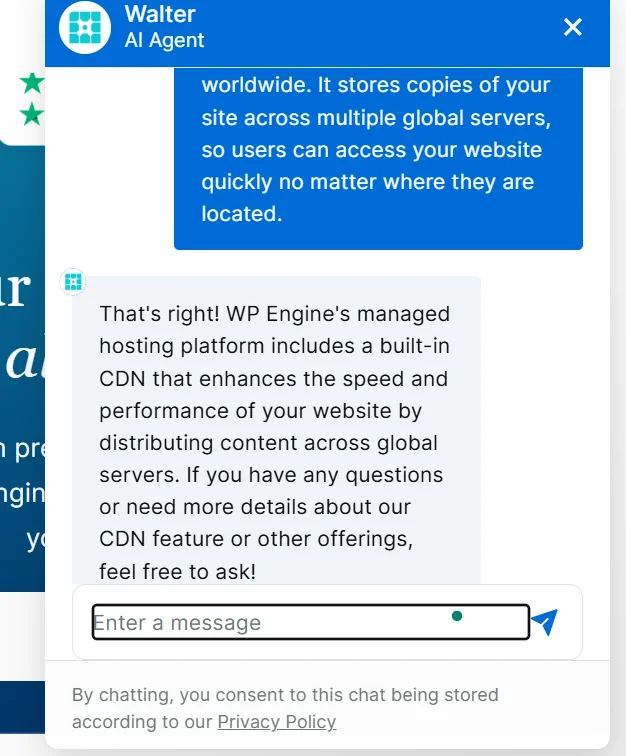
WP Engine’s AI-powered features enhance WordPress sites with smarter performance, content automation, and security. The platform uses AI tools to speed up pages, personalize content, and manage workflows automatically. Security and backups are also strengthened through AI-driven monitoring and threat detection.
AI Performance Optimization
WP Engine uses Smart Search AI for faster, more relevant search results. Its Vector Database indexes content automatically, helping AI understand context without manual effort. AI-driven optimizations also boost page speed, improving overall user experience.
AI Workflow & Content Tools
The AI Toolkit allows developers to build AI-powered apps, chatbots, and content recommendations. AI can generate new content and analyze existing posts. Workflow automation through AI Agent Hub manages posts, media, and WooCommerce products efficiently.
Automated Backups & Security via AI
AI plugins provide real-time threat detection to protect sites. The AI system automates security tasks, monitors for malicious scripts, and works alongside WP Engine’s backup infrastructure to ensure site safety.
This setup delivers fast, secure, and intelligent site management, making it easy for users and optimized for Google indexing.
Customer Support

WP Engine provides strong customer support through a detailed knowledge base and 24/7 live chat. The AI-powered search in the knowledge base is limited and often directs users to live support. Live chat is fast and helpful, with email follow-up if the connection drops, while phone support is available on higher-tier plans.
Knowledge Base & Live Support
WP Engine offers 24/7 technical support and a detailed self-service knowledge base. Customers can access articles, video tutorials, and AI-powered assistance through the Virtual Assistant. Live help is available via chat, phone, or support tickets, with a Support PIN needed to access certain services.
Community & Developer Resources
WP Engine offers a full suite of resources for developers to build, test, and scale WordPress sites efficiently. This includes documentation, local development tools, and community events. They also provide plugins, staging environments, and GitHub integration for streamlined workflows.
Key Resources:
- Developer Docs: Guides on WP Engine APIs and Headless WordPress (Atlas).
- Local Development Tool: Build and test sites locally before deployment.
- Resource Center: Tutorials, e-books, and best practices for developers.
- Plugins Support: Advanced Custom Fields (ACF) and WP Migrate with dedicated support.
- Community & Events: DE{CODE} Conference, blog articles, and training via Solution Center.
- Workflow Tools: 1-click staging, development environments, and GitHub Actions integration.
WP Engine vs Shared Hosting & Competitors
WP Engine is a premium managed WordPress host known for fast load times, strong security, and 24/7 expert support. It surpasses shared hosting in performance and reliability and competes with top managed hosts like Cloudways, Kinsta, and SiteGround. This makes it ideal for high-traffic or mission-critical websites, while shared hosting suits small, budget-conscious projects.
WP Engine vs Shared Hosting
WP Engine provides fast, secure, and fully managed WordPress hosting, ideal for business-critical websites, starting around $30/month. Shared hosting is much cheaper, typically under $10/month, but offers slower performance, weaker security, and limited support.
Key Differences:
- Cost: WP Engine is premium; shared hosting is budget-friendly.
- Performance: WP Engine ensures consistent speed; shared hosting may slow down with traffic spikes.
- Management: WP Engine handles updates and maintenance; shared hosting relies on the user.
- Security: WP Engine provides strong protection; shared hosting is less secure.
- Support: WP Engine offers 24/7 expert help; shared hosting support can be slow or limited.
WP Engine vs Kinsta, Bluehost, SiteGround
WP Engine stands out as a premium host for enterprises and agencies with strong developer tools and multiple environments. Kinsta excels in speed and performance using Google Cloud, while SiteGround balances affordability and features for small to medium businesses. Bluehost is beginner-friendly, offering low introductory pricing and easy setup, but with slower performance.
Key Comparison
Feature | WP Engine | Kinsta | SiteGround | Bluehost |
Best For | Enterprise & Agencies | High Performance | Small-Medium Business | Beginners |
Pricing Starts | $30/mo | $30/mo | ~$2.99/mo (Intro) | $2.95/mo (Intro) |
Performance | Excellent (EverCache) | Premium (Google Cloud) | Very Good | Good |
Migration | DIY Plugin | Free & Premium | Managed ($30) or Plugin | Free Plugin |
Local Dev | Local (WP Engine) | DevKinsta | No | No |
Local Dev | Kinsta | SiteGround | Bluehost |
Highlights:
- WP Engine: Strong developer ecosystem, includes Local dev tool and Genesis Framework; higher cost and strict visitor limits.
- Kinsta: High-speed performance, polished dashboard; lacks phone support on some plans.
- SiteGround: Good value with WordPress.org recommendation, free email hosting; price increases on renewal, CPU limits on lower tiers.
- Bluehost: Easy for beginners, free first-year domain, 24/7 phone support; slower speed and frequent upsells.
Who Should Use WP Engine?
WP Engine is best for WordPress users whose sites are growing beyond basic hosting limits. It handles high traffic and complex demands with fast, secure, and stable performance. Managed plans also offer automated updates, daily backups, and expert support for hassle-free site management.
Ideal Users: Bloggers, Agencies, Developers
WP Engine is best suited for developers, agencies, and serious bloggers who need high performance, security, and expert support. It offers advanced tools, scalable hosting, and managed services that streamline site management and maintenance. Beginners or hobbyists seeking low-cost hosting may find it unnecessary.
Ideal Users:
- Developers: Access to Git, SSH, staging environments, and APIs for building complex WordPress or WooCommerce sites quickly.
- Agencies: Tools for managing multiple client sites, discounts, and dedicated support through the Agency Partner Program.
- Bloggers & Content Creators: Automated backups, high-speed performance, and reliability for growing audiences and SEO-focused sites.
Business Use: Small to large enterprises needing scalable, secure hosting with 24/7 WordPress support.
Use Cases: E-commerce, High-Traffic Sites, AI-Powered Sites
WP Engine specializes in managed WordPress hosting for demanding sites, including e-commerce, high-traffic, and AI-powered websites. Its platform combines performance, scalability, and advanced AI tools to enhance speed, security, and user experience. Businesses benefit from optimized infrastructure, automation, and expert support.
Key Use Cases:
- E-commerce (WooCommerce)
- Increases site speed and stability with Live Cart and Page Speed Boost.
- Reduces plugin bloat and ensures safe updates via Smart Plugin Manager.
- Simplifies payments and product search with Stripe Connect and Smart Search AI.
- High-Traffic Sites
- Handles hundreds of thousands to millions of monthly visits.
- Uses scalable Google Cloud infrastructure and EverCache® for heavy traffic.
- Provides Cloudflare-powered security and proactive site monitoring.
- AI-Powered Sites
- Offers semantic Smart Search and AI-driven content/product recommendations.
- Managed vector database allows custom AI applications like chatbots.
- Automatically generates metadata to improve SEO.
Overall Benefits:
Managed security, 24/7 expert support, and staging/development tools for safe testing and deployment.
Value for Money: Is WP Engine Worth It?
WP Engine is worth its premium cost for businesses or high-traffic sites that need speed, strong security, and expert support. It excels in performance, security, and convenience with features like automated backups, staging environments, and premium themes.
It suits users who prioritize fully managed hosting and time savings, but may be overkill for small blogs or budget-conscious sites. Key advantages include fast load times, enterprise-grade security, 24/7 WordPress support, and included premium tools. Drawbacks are higher costs, plugin restrictions, and paying more for performance than storage.
Pricing Transparency & ROI
WP Engine is a premium managed WordPress host with plans from $25 to $400+ per month. It offers high performance, strong security, and scalability, making it suitable for businesses and high-traffic sites. Optional add-ons can increase costs.
Pricing Overview:
- Startup: $25–$30/mo – 1 site, ~25,000 visits, 10GB storage
- Professional: $49–$55/mo – Up to 3 sites, ~75,000 visits, 15GB storage
- Growth: $96–$109/mo – Up to 10 sites, 100,000+ visits, 20GB storage
- Scale: $242–$276/mo – Up to 30 sites, 400,000+ visits, 50GB storage
- Custom/Enterprise: $500+/mo – Tailored for high traffic
Value Proposition:
- Managed services reduce technical work
- Fast load times and high uptime
- Scalable for traffic growth
Ideal for revenue-critical websites; less practical for small personal blogs or beginners.
Related:
FAQs – WP Engine Review
Is WP Engine Banned from WordPress?
WP Engine is no longer allowed on WordPress.org as of September 25, 2024. The ban prevents it from accessing plugins, themes, and security updates. This action resulted from a trademark conflict and insufficient support for the open-source community.
Does WP Engine Have a Firewall?
WP Engine provides a built-in web application firewall for all users. It safeguards sites from SQL injections, XSS attacks, and harmful bots. High-traffic sites can access enhanced protection through Global Edge Security.
Who is WP Engine best for?
WP Engine is ideal for developers and agencies needing advanced tools and seamless site management. Its platform supports easy website transfers and professional workflows. Small business owners may also find it useful, but casual or hobby sites are less suited due to the high cost.
Why is WP Engine so expensive?
WP Engine charges higher prices due to its focus on speed, security, and managed support. The platform invests in infrastructure and specialized services that go beyond basic hosting. This ensures reliable performance and professional assistance for users.
Special Offer
WP Engine often rolls out exclusive deals for new users looking for high-performance WordPress hosting. These limited-time offers make it easier to get started with premium features at a lower cost.
Limited-Time Pricing & Free Trial Options
- Discounted Annual Plans: Save up to 30% when you choose yearly subscriptions.
- Free Trial: Test WP Engine risk-free with a 14-day trial on select plans.
- Money-Back Guarantee: Enjoy a 30-day refund policy if you’re not satisfied.
WP Engine Review: The Final Verdict
WP Engine delivers solid performance, speed, and flexibility for WordPress websites, making it a strong option among top-tier hosts. However, its pricing starts at $30 per month, which is significantly higher than many competitors offering similar services.
While WP Engine provides a dependable managed hosting experience, its security and overall performance don’t dramatically surpass alternatives like Hostinger, SiteGround, or Bluehost. For users mindful of cost, these other hosts can offer comparable or even superior results at a fraction of the price, making WP Engine more of a premium choice than a necessity.

Alex Bryant, founder of PvyEmpire.com, is passionate about WordPress and specializes in web hosting, performance optimization, and site management. With extensive experience testing top hosting providers, he created PvyEmpire.com to share honest, data-backed reviews, expert guides, and verified coupons & deals, helping website owners save money, boost performance, and grow their online presence with confidence.