Hostinger vs Bluehost: Speed & Performance Tested
Choosing the right hosting can be challenging, making this Hostinger vs Bluehost comparison especially valuable for beginners and website owners. Bluehost excels in WordPress support, uptime, and reliable performance for growing websites, while Hostinger offers affordable, user-friendly shared hosting and fast servers.
When comparing their features—such as free domains, SSL, storage, bandwidth, and customer support—you can clearly see where each provider stands out. Their entry-level plans also differ:
Hostinger’s Single plan offers 10GB storage and 100GB bandwidth at $2.99/month, ideal for small sites, while the other’s Basic plan starts at $3.99/month, offering better scalability and stronger support.
Ultimately, your choice depends on budget, site size, performance needs, and long-term goals—Hostinger for affordability and ease, Bluehost for premium performance and trusted support.
Hostinger vs Bluehost: Quick Comparison
- Best for Speed: Hostinger
- Best for Beginners: Bluehost
- Best Pricing: Hostinger
- Best WordPress Integration: Bluehost
- Overall Winner: Hostinger
If you want fast, budget-friendly hosting, go with Hostinger. If you’re new to websites and want simplicity, Bluehost is ideal.
Hostinger vs Bluehost Hosting Test
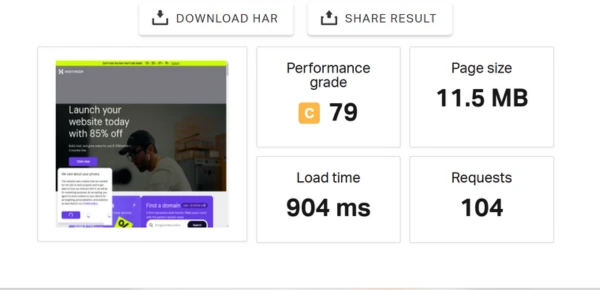
We tested them with real websites to get genuine results, not marketing claims. By setting up multiple projects, we checked their performance, speed, uptime, security, onboarding, and ease of use.
We also reviewed pricing, customer support, and how well each host handles different needs. This hands-on testing provided us with clear and honest insights into which offers the best speed, reliability, and overall value for real-world use.
Hostinger vs Bluehost Key Takeaways
After testing them, we highlight the best choice based on your needs. They both deliver impressive speed, uptime, and reliability, ensuring your website loads quickly and runs smoothly.
The ease of use, control panels, and onboarding experience make managing WordPress sites and small businesses straightforward. With features, tools, built-in security options, and WordPress-specific functionalities, each provider gives powerful support, response, and learning resources.
Pricing, value, and plans are presented in a side-by-side breakdown to show costs and what you get for your money. Overall, both hosts work well for future growth and scalability, making it easier to choose the right WordPress platform for real-world use.
Hostinger and Bluehost Comparison Table
When choosing between them, a quick comparison helps. They both offer strong hosting types like shared, WordPress, VPS, dedicated, WooCommerce, and Cloud. One uses cPanel, while the other uses hPanel.
Both provide a free domain for one year on select plans and focus on ease of use with beginner-friendly setup and one-click installs. In my testing, Hostinger’s intuitive dashboard and AI tools were easier to use, while Bluehost stands out with reliable 24/7 customer support through chat, phone, and a helpful knowledge base.
Hostinger | Bluehost | |
Starting Price | $2.99/month | $3.99/month |
Hosting Types | Shared, WordPress, Managed, Cloud, VPS, WooCommerce, Agency, Game Server, Minecraft, Reseller | Shared, WordPress, Managed, VPS, Dedicated, WooCommerce, Cloud, Reseller, Creato |
Control Panel | hPanel | cPanel |
Free Domain | Yes (1 year on Select Plans) | Yes (1 year) |
Free SSL | Yes | Yes |
Storage & Bandwidth | 50GB – Unlimited NVMe SSD, Unmetered Bandwidth | 10GB – Unlimited SSD, Unmetered Bandwidth |
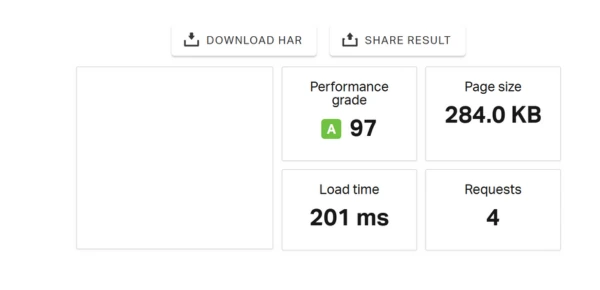
Load Time | 350ms | 689ms |
Performance Grade | A+ | A |
Uptime | 99.99% | 99.99% |
Response Time | 140ms | 35ms |
Security Features | Free SSL, Cloudflare, DDoS Protection, WHOIS Privacy, Secure FTP, Malware Scanning | Free SSL, Daily Malware Scans, Spam Protection, DDoS Protection, Secure FTP, SSH Access |
Backups | Weekly & Daily Backups (Depending on Plan) | Free Daily Backups (Higher-tier Plans) |
In this comparison, they each shine in different areas — Bluehost excels for WordPress users, businesses, and e-Commerce, while the other delivers a budget-friendly, high-speed experience with advanced tools and AI chatbot support.
Considering performance, load time, and security features, either choice can suit your web hosting needs, but your specific project and budget will determine which provides the very best.
Hostinger vs Bluehost: What You Need to Know
Before comparing features, here is a quick overview of them, highlighting their core strengths and what makes each platform unique.
Hostinger: Hosting Plans and Key Features
Hostinger has grown since 2004 by offering affordable, fast, and reliable hosting for beginners and small businesses. With Litespeed servers, strong uptime, and options like Shared, Cloud, and VPS hosting, it delivers solid performance at a low cost.
Its security features, including malware protection, automated backups, and free SSL, add value. While it doesn’t always include a free domain like Bluehost, its lower pricing, speed, and reliability make it a smart choice for users who want a simple and cost-effective hosting solution.
Bluehost: Hosting Plans and Key Features
Bluehost is a trusted hosting provider known for its strong WordPress support and simple dashboard, making site management easy for beginners and professionals.
It offers multiple hosting types, including Shared, Managed WordPress, Cloud, VPS, and Dedicated Servers, making it suitable for small sites, growing businesses, and large projects.
With a free domain, reliable uptime, fast performance, strong security, and helpful support, Bluehost remains a solid, versatile, and affordable hosting choice.
Hostinger vs Bluehost Pricing and Value
Detailed Pricing Comparison of Their Plans
Bluehost and Hostinger have different pricing strengths. Bluehost is usually cheaper for Shared and WordPress Hosting, while Hostinger offers better value for VPS and Cloud Hosting. If you need dedicated hosting, Bluehost is the only choice.
As your site grows, pick a plan that balances performance, security, and scalability. Cloud hosting delivers powerful performance by using shared resources efficiently. Checking both providers helps you choose the option that best fits your needs and long-term goals.
VPS Hosting Comparison: Cost and Features
Comparing them comes down to value, flexibility, and long-term cost. They both offer strong VPS plans with resources and support, but renewal fees and multi-year pricing matter. In my experience, Hostinger usually provides the better overall deal, offering affordable plans and solid performance.
Reviewing each provider by pricing, features, and plan duration helps you choose the hosting that fits your needs and delivers reliable results.
Shared Hosting Comparison: Plans and Costs
Hostinger offers better value with $2.99/month, 25GB SSD, and 25 websites, while Bluehost starts at $3.99/month with 10GB and 10 websites. Using promo codes like CNHOSTFIRST can lower costs, but always compare initial pricing, renewal fees, and long-term plans.
Many users prefer Hostinger for its extra resources and flexible options. Reviewing overall costs, contract length, and renewal dates helps you choose the right hosting for your website.
WordPress Hosting: Pricing, Features, Value
For WordPress hosting, they both offer strong options, including shared, WooCommerce, cloud, VPS, cPanel, Minecraft, CyberPanel, and dedicated services. While initial deals are attractive, it’s important to consider renewal prices and long-term costs.
Hostinger often stands out for value, support, storage, and flexibility, making it easier to adjust plans as needs change. Careful evaluation ensures optimal performance and long-term benefits.
Comparing Cloud Hosting Prices and Performance
From my experience, Hostinger Starter Plan ($9.99/month, renews $19.99) supports 300 websites, 200GB NVMe storage, 3GB RAM, 2 CPU cores, daily backups, automated WordPress updates, a free first-year domain, and priority support—offering excellent value for growing sites.
Bluehost Cloud 1 Plan ($29.99/month, renews $79.99) supports one website, 10GB SSD storage, two vCPU, daily backups, automated WordPress updates, and priority support, ideal for smaller sites prioritizing uptime (Hostinger99.99%%, Bluehost 99.99%%).
Hostinger is best for multi-site management, while Bluehost excels in reliability, making both strong options depending on your needs.
Hosting Type | Hostinger | Bluehost |
✅ | ✅ | |
✅ | ✅ | |
✅ | ✅ | |
✅ | ✅ | |
✅ | ✅ | |
✅ | ✅ | |
✅ | ❌ | |
CyberPanel | ✅ | ❌ |
Dedicated | ✅ | ✅ |
Different Hosting Types and Renewal Costs
Plan Type | Hostinger Intro Price | Hostinger Renewal Price | Bluehost Intro Price | Bluehost Renewal Price |
Single WordPress | $2.99/mo | $9.99/mo | $3.99/mo | $9.99/mo |
WordPress Starter | $3.99/mo | $14.99/mo | $3.99/mo | $9.99/mo |
Business WordPress | $6.99/mo | $16.99/mo | $6.99/mo | $13.99/mo |
WordPress Pro | $7.99/mo | $29.00/mo | $14.99/mo | $21.99/mo |
Cloud Startup | $7.99/mo | $29.99/mo | eCommerce Starter | $14.99/mo |
Cloud Professional | $15.99/mo | $58.99/mo | eCommerce Plus | $21.99/mo |
Cloud Enterprise | $29.99/mo | $99.00/mo | Custom Commerce | Custom Commerce |
VPS Standard | $6.49/mo | $11.99/mo | VPS Standard | $4.69/mo |
VPS Enhanced | $8.99/mo | $59.99/mo | VPS Enhanced | $9.49/mo |
VPS Ultimate | $12.99/mo | $119.99/mo | VPS Ultimate | $12.99/mo |
Dedicated Standard | $79.99/mo | $119.99/mo | Dedicated Standard | $144.19/mo |
Dedicated Enhanced | $99.99/mo | $159.99/mo | Dedicated Enhanced | $220.19/mo |
Dedicated Premium | $119.99/mo | $209.99/mo | Dedicated Premium | $315.19/mo |
Which Is Cheaper for Web Hosting?
When comparing them, the choice depends on your needs. One is ideal for small sites or new projects, offering affordable plans with enough resources to grow comfortably.
Bluehost, however, provides more value with features like free CDN, unlimited resources, and easy sub-domain management, making it better for scaling websites. Ultimately, the decision comes down to whether you prioritize affordable simplicity (Hostinger) or richer tools and scalability (Bluehost).
How Easy Is It to Manage Hosting on Them?
In this comparison, they both offer user-friendly dashboards for easy website management. One uses cPanel, while the other has hPanel, each providing intuitive control over tasks like WordPress installation, SSL setup, domain management, and email accounts.
While Bluehost feels more traditional, Hostinger allows faster management of multiple sites. Both are excellent, but knowing the panel differences helps you choose the best fit for your workflow.
Hostinger hPanel vs Bluehost cPanel Comparison
Hostinger’s dashboard is simple, functional, and customizable, allowing seamless website creation and management without clutter. You can easily install WordPress.org, activate SSL, manage domains, and monitor resource usage, performance, and security.
Bluehost offers a user-friendly but slightly outdated dashboard, with guided setup, WordPress migration, domain management, and access to cPanel for advanced control. Overall, Hostinger suits beginners seeking simplicity, while Bluehost caters to users needing advanced tools.
Migrating Domains
Moving a domain between hosts is simple with Bluehost and Hostinger. You can connect an existing domain through the guided setup, assign it in the dashboard, and follow each provider’s support guide to update the registrar settings.
Hostinger offers clear step-by-step tutorials, while WordPress users can request a free site migration handled by experts. You can also use the automatic migration tool to quickly transfer WordPress or non-WordPress sites. In my experience, these tools make the entire process smooth and stress-free.
Migrating Websites from Hostinger to Bluehost
Both Bluehost and Hostinger offer free website migration for WordPress and non-WordPress sites. You simply submit a request from the dashboard, and their experts review and approve the transfer.
Their automatic migration tools handle factors like site version, size, plugins, and databases for a fast move. With clear guides, control panels, and tutorials, both hosts make the migration process smooth and stress-free.
Website Builder Comparison: Features and Ease
Choosing a website builder is easier with Bluehost and Hostinger, as both offer powerful tools for beginners and experts. Bluehost stands out with its intuitive drag-and-drop builder, 300+ templates, and smooth WordPress syncing, plus features like Creative Mail and advanced eCommerce in the Pro plan.
Hostinger’s Zyro is a budget-friendly option with 150 templates and simple drag-and-drop editing for basic eCommerce. Overall, Bluehost offers more customization and scalability, while Hostinger is ideal for affordable, quick website setup.
Hosting Features Comparison: WordPress and Cloud
Both Bluehost and Hostinger deliver strong speed and solid features, but the actual difference is in how smoothly they handle site management. From setup to daily tasks, the experience is simple, intuitive, and beginner-friendly.
Their tools make it easy to manage your website with confidence, offering a streamlined workflow that keeps everything efficient and enjoyable.
Shared Hosting Features Compared
They both offer reliable shared hosting for small businesses and startups. If you’re on a budget, shared hosting is ideal because it’s affordable yet feature-rich.
Bluehost’s Basic plan gives you higher bandwidth, multiple subdomains, email accounts, and a free domain, making it a strong choice for quick setup. Hostinger’s Single plan focuses on fast SSD performance, but you need the Premium plan for a free domain.
Overall, choose the plan whose features match your business needs.
Feature | Hostinger | Bluehost |
Free domain | Premium plan+ | All plans |
Bandwidth | 100 GB (Single plan), unlimited higher tiers | Unmetered |
Subdomains | 2 (Single plan), 100 higher tiers | 25 (Basic plan), unlimited |
Websites | 1 (Single plan), 100 higher tiers | 1 (Basic plan), unlimited |
SSD storage | 50–200 GB | 10–100 GB |
Email accounts/storage | 1–100 / 1 GB per account | 5/Unlimited |
Dedicated IP | Not available | Pro plan |
Email storage | 1 GB per account | Unlimited (except Basic plan) |
VPS Hosting Features: Full Comparison
VPS hosting falls between shared and dedicated hosting, offering more power and flexibility. Bluehost’s Standard plan and Hostinger’s VPS 1 plan both provide strong essentials like a dedicated IP, but Bluehost adds a free domain and easier management.
Performance factors such as bandwidth, vCPU power, NVMe storage, and 10 Gbps networks make a major difference for speed-focused projects. Both hosts offer solid security, uptime, and server features, but Bluehost stands out with full root access, simple setup, and beginner-friendly tools.
Feature | Hostinger VPS | Bluehost VPS |
First-Year Domain | Not included for VPS plans | Available on all plans |
Memory (RAM) | 4–32 GB scalable | 4 GB DDR5 |
Processor Cores | 1–8 CPU cores depending on plan | 2 vCPU cores |
Storage (SSD) | 50–400 GB SSD | 100 GB NVMe |
Dedicated IP | Included on all plans | Included on all plans |
Bandwidth | 4–32 TB based on plan | Unmetered, ideal for high traffic |
Operating System | Linux | Linux |
Cloud Hosting Tools and Features
In this comparison of cloud hosting, they both offer reliable managed plans. Hostinger stands out with its low-cost Starter plan at $7.99 per month, supporting up to 300 websites with 200GB NVMe storage, 3GB RAM, and 2 CPU cores.
Bluehost begins with Cloud 1 at $65.00 per month, offering 10GB SSD storage and two vCPUs for a single website. Both are dependable, but the right choice depends on your site’s size, traffic, and resource needs
Feature | Hostinger Offerings | Bluehost Offeringst |
Network Reliability | 99.99% uptime | Guaranteed 99.99% uptime |
Number of Websites Supported | Up to 300 | 1 to 50 |
Storage Options | 200–300 GB NVMe | 10–225 GB SSD |
Processor Power | 2–6 CPU cores | 2–150 vCPU |
Daily Backup | Included | Included |
WordPress Maintenance | Automatic updates | Automatic updates |
Free Domain (First Year) | Included with all plans | Not included |
Priority Customer Support | Available | Available |
Extra Hosting Features Compared
In my experience, Hostinger surpasses Bluehost in extra features. It’s WordPress staging, AI assistant Kodee, and account-sharing that let users manage plugins, updates, and team access securely in real-time.
Agencies can test, copy, and update sites privately before going live, while integrated tools simplify marketing setup, performance checks, and page speed tests. For flexibility, control, and seamless workflow, Hostinger clearly leads.
Marketing and eCommerce Tools for Small Business Websites
For e-commerce hosting, they both excel, each with unique strengths. One simplifies WordPress store setup with preloaded WooCommerce and the Storefront theme, plus $100–300 in Google Ads credits.
It also offers SEO tools, analytics, secure payments, shipping labels, gift cards, unlimited products, product search, and multichannel inventory management options. Hostinger focuses on cloud-based eCommerce plans, offering reliable scalability for growing businesses.
Whether you value speed, marketing tools, or feature-rich stores, both providers deliver strong hosting solutions to grow your online business.
SEO Features and Optimization Tools to Boost Website Performance
When comparing Bluehost and Hostinger, the right SEO setup significantly impacts site performance. Hostinger’s SEO Toolkit and Bluehost’s SEO package offer practical guidance, performance reports, traffic estimates, and keyword suggestions.
In this comparison, focusing on their loading times and performance, combined with these tools, ensures measurable improvements and efficient, effective SEO practices.
Backup Solutions and Security Features for Reliable Hosting
They both offer essential security features like free SSL, DDoS protection, and 24/7 monitoring. Their Cloudflare CDN improves global performance and blocks threats early, even though WAF is limited to one provider’s Business plan. Backup options also differ.
Hostinger provides weekly automated backups, while Bluehost’s Choice Plus plan offers daily backups. Both include free domain privacy to protect personal information and prevent hijacking. Overall, both are reliable, but your choice depends on prioritizing backup frequency, privacy, or advanced security.
Scalable Hosting Options and Growth Tools for Expanding Websites
They both provide strong scalability options designed to support website growth. Most users begin with shared hosting, but upgrading is straightforward as traffic increases.
Bluehost offers higher-resource plans like Choice Plus and Pro, while Hostinger allows seamless transitions from Business Shared to managed WordPress or cloud hosting.
Their VPS, dedicated, and cloud server solutions ensure smooth performance, easy migrations, and stable handling of traffic spikes, making long-term scalability reliable for any type of website.
My Hands-On Hosting Performance Tests and Results
In my comparison, Hostinger proved the winner, being faster, handling more traffic, and delivering better uptime, response, and server performance, while Bluehost was average; its resources, load management, and optimization make Hostinger ideal for a smooth website experience with reliable digital results.
Hosting Uptime Tested Over 30 Days
For e-commerce websites, uptime and loading speed are critical for a smooth experience. Testing them shows they both perform well, with U.S. response times between 23 and 78 ms, well below Google’s 200 ms benchmark.
Fast loading depends on server proximity and data centers, and Hostinger’s coverage across the Americas, Europe, and Asia ensures reliable performance. Closer servers mean smoother experiences, making speed a key factor in retaining visitors.
Hosting Response Times During Real Usage
In two months of testing, Hostinger delivered 99.99% uptime with an average response time of 35 ms, while Bluehost had 99.99% uptime and 144 ms response—still good but slower.
For e-commerce sites and SEO, Hostinger’s consistent speed offers a smoother experience, though both remain reliable.
Website Speed Performance From Real Tests
Testing identical sites, Hostinger outperformed Bluehost with an LCP of 1.276 s and TTFB of 0.357 s, delivering fast, smooth loading globally.
Bluehost was slower (LCP 2.094s, TTFB 0.345s) but still acceptable. For speed and performance, Hostinger is the stronger choice worldwide.
TTFB Tested on Live Websites
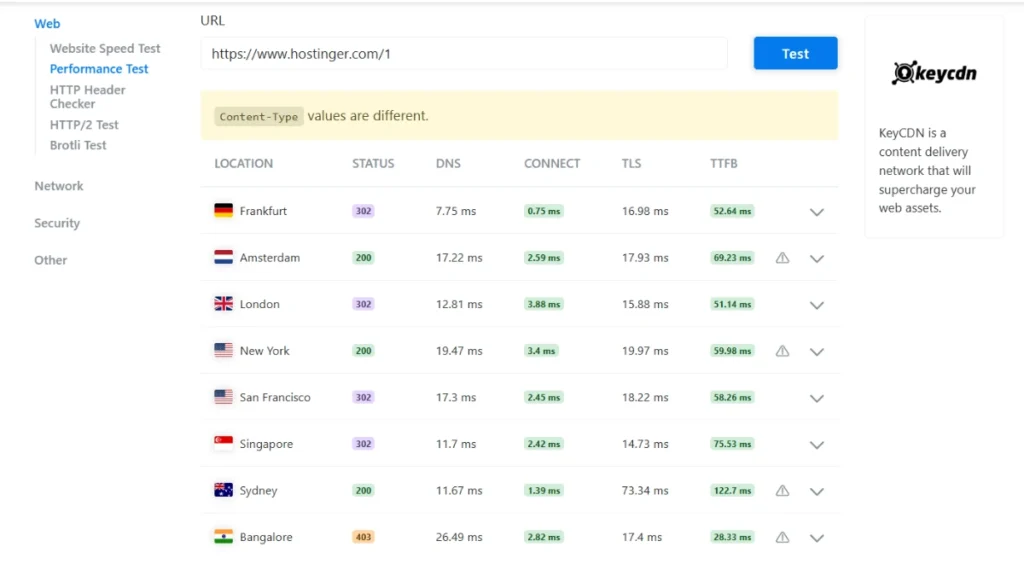
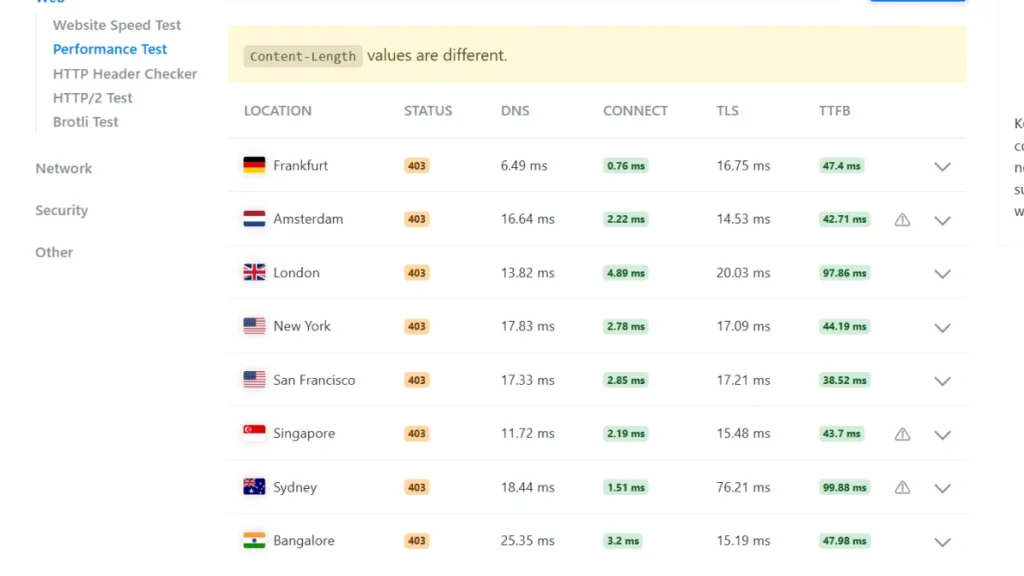
When I tested these sites using PageSpeed Insights, I noticed that TTFB (Time to First Byte) really makes or breaks the speed.
One site, for example, took over 3 seconds just to load on mobile, with the first content appearing at 2.3 s—meaning users couldn’t interact until later. Even pages with minimal content can score poorly if TTFB lags, so in my experience, it’s one of the most crucial metrics for both speed and usability.
Load and Stress Testing on Hosting Servers
Testing them with a Load Impact Test on k6 revealed clear performance differences. One showed uneven load times, averaging 6 s, while the other stayed consistent at 4.7 s—20% faster.
TTFB also favored the second provider (1 s vs 1.9 s), confirming its reliable performance under traffic and outperforming most competitors like InMotion and GreenGeeks.
CDN Performance Comparison From Experiments
Bluehost uses Cloudflare for CDN, which works well but isn’t always the fastest. Alternatives like BunnyCDN often offer better speed and reliability, while RocketCDN shows mediocre performance. Choosing the right CDN can significantly improve website load times and user experience.
Security and Reliability Review of Hosting Plans
Reliable hosting must protect websites from malware and attacks, safeguarding e-commerce stores, payment forms, and user data. The right provider offers tools and guidance to keep sites secure, ensuring user trust and a confident online presence.
Security Features Tested Across Hosting Providers
Uptime reflects website reliability. Over 90 days, Bluehost achieved 99.99% uptime, while Hostinger maintained 99.99%. Both are stable and secure, but Bluehost slightly leads in consistency and performance.
Resource Limits and Server Stability Tested
Hostinger offers better resource optimization and consistent performance under traffic spikes, while Bluehost may throttle on lower-tier plans. Hostinger provides smoother stability and more reliable uptime for demanding websites.
Data Center Location Impact on Website Speed
Server location affects real-world performance. Choosing the closest Hostinger or Bluehost data center improves TTFB and site speed, and support that helps optimize regions ensures a fast, reliable website.
Hostinger – Global Data Centers | Bluehost – Available Data Centers |
UK | Provo, Utah (USA) |
USA | Houston, Texas (USA) |
Brazil | Mumbai (India) |
Netherlands | London, United Kingdom |
Singapore | Hong Kong (China) |
Indonesia | Shanghai, Mainland China |
Lithuania | – |
Historical Security Issues and Real-World Impact
They both faced past security issues but responded differently. One improved security protocols, strengthened password protection, and upgraded server monitoring after a data breach.
The other enhanced malware protection, firewalls, and overall platform security. Today, they both follow modern security standards, with the first seen as more proactive.
Hands-On Review of Customer Support Services
Customer Support Responsiveness and Helpfulness Tested
They both offer 24/7 support, but the quality varies. One has live chat with quick responses, though complex issues may take longer. The other provides phone and chat support, useful for beginners, but it can be slow at peak times. Overall, their support is decent but not exceptional.
AI Support Tools Tested on Hosting Platforms
They both use AI support, but one leads with smarter automation. Its AI chatbot offers troubleshooting, setup help, and instant fixes, reducing the need for human support.
The other AI tools are more basic and often require live support. Overall, the first delivers a more advanced and effective AI support experience.
User Feedback and Observations on Support Quality
Based on user experiences, Hostinger stands out for reliable support and clear documentation, making troubleshooting easy.
Bluehost offers resources, but they can be less detailed for beginners or advanced setups. Clear support and step-by-step guidance are key to smooth website management.
Hostinger vs Bluehost: Pros & Cons at a Glance
Hostinger: Pros & Cons
Pros | Cons |
Affordable pricing makes it ideal for budget-conscious users. | 24/7 support can be slow during peak hours. |
Recognized as a top budget-friendly host. | Limited advanced options; no reseller or true dedicated servers. |
Fast performance with LiteSpeed cloud servers. | hPanel learning curve for users switching from cPanel. |
User-friendly hPanel simplifies website management. | |
Free domain and SSL included in plans. | |
Scalable hosting with shared, cloud, and VPS options. |
Bluehost: Pros & Cons
Pros | cons |
Beginner-friendly with simple cPanel management. | Higher renewal prices after initial plans |
One-click WordPress installation is recommended by WordPress. | Inconsistent performance with occasional slow speeds and downtime |
Reliable 24/7 support via live chat and phone. | Upsells and extra fees can increase costs |
Scalable hosting with reseller, dedicated, and cloud options. | |
Comprehensive security with daily backups and domain privacy. |
Key Differences Between Hostinger and Bluehost
Features: Which Host Offers More?
Bluehost excels in WordPress and WooCommerce integration, providing developers a smooth CMS experience. Hostinger offers Zyro builder, GitHub integration, and daily/weekly backups, giving more flexibility. Its setup is fast and easy, ideal for small online stores.
Pricing: Which One Offers Better Value?
Bluehost can be expensive for beginners, while Hostinger provides premium features at lower costs, offering better value for startups, freelancers, and new website owners.
Performance and Uptime: Which Host Performed Better?
Bluehost has inconsistent uptime and no formal guarantee. Hostinger ensures 99.99% uptime and handles heavy traffic or multiple stores smoothly.
Security and Reliability: Which Is Stronger?
Bluehost provides basic security tools, whereas Hostinger delivers built-in CloudFlare protection, making it a more secure option for online stores and client websites.
Support: Which Host Is More Helpful?
Bluehost support is available, but response quality varies. Hostinger offers fast, professional 24/7 live chat and an industry-leading knowledge base, beginner-friendly and reliable.
Conclusion
After testing both in this Hostinger vs Bluehost comparison, it’s clear that each hosting provider shines for different users.
Bluehost offers a well-rounded experience with strong WordPress integration, a traditional cPanel interface, and premium customer support, making it ideal for beginners, small businesses, or anyone recommended by WordPress itself.
Hostinger focuses on affordability and performance, featuring a modern, easy-to-use hPanel, fast-loading websites, budget-friendly pricing, and excellent speed and cost-efficiency, providing a streamlined and lightweight experience for those who want reliability without heavy features.
Ultimately, your choice should match your website’s needs—if you prioritize support and premium services, Bluehost wins; if you want speed, affordability, and a modern interface, Hostinger is the smarter pick.
From my experience, balancing your website’s goals with these hosting strengths ensures a smooth, efficient, and long-term online presence.
Alternative Hosting Providers Recommended After Testing
If they don’t meet your needs, several other reliable hosting providers deliver strong speed, security, and value:
- SiteGround–Premium WordPress Performance: Excellent speed, advanced security, and expert support; ideal for users who want high-quality managed WordPress hosting.
- A2 Hosting–Fast & Developer-Focused: Turbo servers, powerful developer tools, and strong performance optimization for users who want more control.
- DreamHost–Privacy & Long-Term Value: offers affordable long-term plans, strong privacy features, and an easy dashboard, making it successful for beginners.
- WPX Hosting–Ultra-Fast WordPress: Exceptional speed and premium managed WordPress features, perfect for agencies, businesses, and fast-growing blogs.
Related:
- Cloudways vs Hostinger
- Hostinger vs SiteGround
- Hostinger vs HostGator
- Scalahosting Review
- WP Engine Review
- Fastest WordPress Hosting in 17 hosts
- Best WordPress Hosting – 28 Hosts
- Hostinger Review
- Hostinger Shared Hosting Review
- Hostinger Pricing
- Hostinger WordPress Hosting Review
- Hostinger Alternatives
FAQs
Do they offer free domains?
They both let you get a free domain for the first year when you buy an annual plan. These bundles with providers like Squarespace save time and money, making setup easier.
Can I choose the data center location?
Yes, with them, you can often choose your preferred data center location when you buy a hosting plan. Picking the right location helps your website load faster for your target audience and improves overall performance.
Is Hostinger better than Bluehost?
In this comparison, Hostinger offers faster speed and lower cost, making it a great option for budget-conscious users. The other is a strong alternative, with beginner-friendly features, excellent customer support via phone, and official WordPress recommendations, though it’s more expensive and slightly less performant. The best choice depends on whether you prioritize price and speed (Hostinger) or user-friendliness and support (Bluehost).
Is Bluehost good for online stores?
Bluehost is a good choice for online stores, especially for beginners with WordPress or WooCommerce. Its beginner-friendly setup and optimized WooCommerce plans let you easily launch and manage a store. You get free SSL, 24/7 support, scalable options, and powerful performance, with the option to upgrade to VPS or dedicated hosting if needed. Key features like one-click WordPress install, pre-built themes, secure checkout integration with Stripe or PayPal, marketing tools, and daily backups make running a shop simple and reliable.
Does Bluehost offer cloud hosting?
For larger projects, you may need to pick Hostinger over Bluehost, as neither host made the list of the best cloud hosting services. Always read guides before selecting a cloud host to ensure smooth cloud hosting performance.
Why is Hostinger too slow?
Hostinger can feel slower when resource usage is high on your website. If resource usage is constantly high, your website may perform more slowly until usage decreases. I recommend checking usage frequently to avoid hitting hosting plan limits. When resource usage limits are reached, speed suffers. This article refers to solutions for Exceeded Resource Usage and optimizing your website. Monitoring resource usage within hosting plan limits keeps your site fast and smooth.
Which hosting is better than Hostinger?
MilesWeb is an ideal alternative to Hostinger, offering a complete hosting solution with good website speed, security, and scalability. Their proficiency allows you to move from your previous host to MilesWeb effortlessly. In my experience, websites run smoother and faster after the switch, making MilesWeb a reliable hosting solution for anyone seeking better performance.
Is Hostinger Cheaper Than Bluehost?
Hostinger is generally cheaper, with lower starting and renewal prices. Bluehost costs more but offers extra features and premium support. Choose Hostinger for budget-friendly hosting and Bluehost for added tools and support.
Bluehost vs Hostinger for WordPress: Which Is Better?
For most WordPress users, Hostinger is often the smarter choice. It delivers faster websites with LiteSpeed servers, lower costs, and simple tools that beginners can use easily. Bluehost is officially recommended by WordPress and offers strong phone support, but Hostinger generally gives better performance and value for small sites and new users.
Does WordPress Recommend Bluehost?
Yes. Bluehost is officially recommended by WordPress.org as one of the hosting providers suitable for WordPress websites.
How Much Is Bluehost After the First Year?
Bluehost’s renewal price is higher than the introductory rate and depends on the plan and billing term. Check the current renewal price before purchasing.

Alex Bryant is the founder of PvyEmpire.com and a WordPress specialist with over 4 years of hands-on experience in web hosting, performance optimization, and website management. He has extensively tested top hosting providers by setting up real websites and monitoring their speed, uptime, and reliability.
At PvyEmpire.com, Alex publishes honest, data-driven reviews, detailed guides, and verified coupons & deals. His goal is to help website owners choose the right hosting, improve performance, and grow their online presence with confidence—based on real testing, not promotions.