
Bluehost Hosting Review: Pricing Features & Performance
Finding the right web host can be frustrating, especially when every provider claims to be fast, reliable, and affordable. In this bluehost hosting review, I’ll look at whether Bluehost actually delivers on those promises or falls short in key areas.
You’ll get a clear look at Bluehost’s pricing, performance, features, ease of use, and overall value. By the end, you’ll know whether Bluehost is a good fit for your website—or if another hosting option makes more sense.
Is Bluehost Really That Good?
Bluehost serves as a solid starting point for beginners and small WordPress sites because of its straightforward setup, official WordPress endorsement, and bundled essentials like free domains and SSL certificates. The platform maintains strong uptime performance and offers scalable hosting options as websites grow.
However, significant drawbacks include steep renewal price increases, inconsistent customer support quality, and frequent upselling of add-ons that should be standard features.
The cheapest plans impose storage and email limitations while charging extra for domain privacy and backups, and US-only data centers create slower load times for international visitors, making it less ideal for high-traffic or global websites.
Bluehost vs Other Hosting Providers
Bluehost is beginner-friendly, with easy WordPress setup, free SSL, and a first-year domain. However, its performance and pricing can lag behind competitors.
- Hostinger: Faster performance and lower entry prices.
- GoDaddy: Strong management tools and backup options.
- SiteGround: Better overall performance and features.
- DreamHost: Stronger capabilities for users who need more flexibility.
Bluehost is a good choice for beginners who value simplicity, but users seeking faster speeds, advanced features, or better international performance may find better alternatives.
Bluehost Plans and Pricing Explain
Bluehost offers a variety of hosting solutions tailored to different needs — from beginners’ websites to high-traffic business sites:
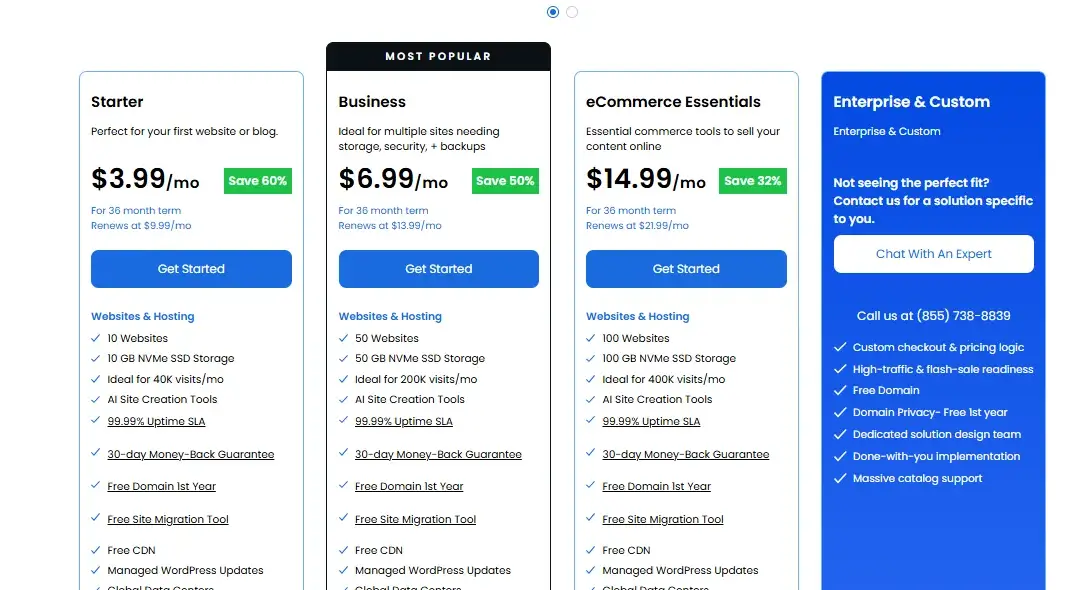
Shared & WordPress Hosting: Best for beginners and small websites. Includes one-click WordPress installation, AI-powered site builders, free SSL, and a free domain for the first year. Plans start around $3.99–$14.99 per month, depending on promotions and plan tier.
WooCommerce Hosting: Pre-configured for online stores with integrated payment gateways, inventory tools, and booking features. Ideal for small to medium eCommerce businesses, starting around $14.99–$21.99 per month.
VPS Hosting: Offers dedicated resources, root access, and NVMe storage powered by AMD EPYC processors. Suitable for developers or growing businesses needing more control. Starting at $4.99 – $49.99 per month.
Cloud Hosting: Provides enterprise-level performance with distributed server networks, high uptime, and multi-region redundancy. Perfect for high-traffic websites that require reliable performance. Pricing typically ranges from $65–$230 per month, depending on the plan.
Hosting Type | Starting Price (Monthly) | Ideal For | |
1 | Shared / WordPress | $3.99 – $14.99 | Beginners, small sites, and new blogs |
2 | WooCommerce | $14.99 – $21.99 | Online stores and small e-commerce businesses |
3 | VPS | $4.99 – $49.99 | Developers and growing companies need resources |
4 | Cloud | $65.00 – $230.00 | High-traffic websites requiring reliable uptime |
Bluehost WooCommerce Pricing Breakdown
Bluehost offers two managed WooCommerce plans: eCommerce Essentials and eCommerce Premium. Introductory prices start around $6.95 and $9.95/month, while renewal rates can rise to about $21.99 and $30.99/month.
Both plans include SSL, CDN, a free first-year domain, AI tools, malware protection, 24/7 support, and Yoast SEO. Premium adds Yoast SEO Premium, priority support, advanced security, and additional WooCommerce features.
The lowest prices usually require 12–36-month terms. Also consider extra costs such as payment processing, premium plugins or themes, domain renewals, and optional marketing or security services.

Plan | Starting Price | What You Get | Best For |
eCommerce Essentials | Entry‑level fee | WooCommerce pre‑installed, free SSL, basic store tools | New/small stores |
eCommerce Premium | Higher monthly fee | More advanced features and better performance | Growing stores |
Bluehost Hidden Costs and Renewals
Bluehost’s low introductory prices can increase significantly at renewal. Some features, such as advanced backups, security tools, and other add-ons, may also cost extra.
Before purchasing, check the renewal price and review optional add-ons carefully. This helps you avoid unexpected costs and understand the true long-term price.
Bluehost Refund and Guarantee Policy
Bluehost offers a 30-day money-back guarantee on Shared, VPS, and Dedicated hosting plans. However, domains, cloud hosting, monthly plans, and some add-ons are excluded.
If a bundled domain is canceled, a domain fee may be deducted. Refunds usually take 5–7 business days, and customers must contact Bluehost support to request one.
Migrating Your Site to Bluehost
Transferring your website to Bluehost involves choosing between automated WordPress tools or manual processes for other platforms. Here’s how to execute a seamless migration:
1. Automated WordPress Migration Steps
Install the Migrator Plugin: Access your current WordPress admin panel and add the Bluehost Site Migrator plugin.
- Run Compatibility Check: Input your domain within the plugin interface to confirm server compatibility.
- Authorize Connection: Sign into your Bluehost Account Manager, locate the “Websites” area, choose Transfer an Existing WordPress site, and grant permission for connecting both platforms.
- Review and complete: After the automated system duplicates your content and database, examine everything using a temporary URL before completing the process.
2. Manual Website Migration Guide
For non-WordPress platforms or those wanting direct oversight, this alternative works best.
- Backup and Download Files: Connect via an FTP application such as Filezilla to retrieve all content from your existing host’s public_html folder.
- Export Database: Navigate to phpMyAdmin on your current hosting service and download your database in .sql format.
- Create a New Database on Bluehost: Within your Bluehost Account Manager, access MySQL Databases to establish a fresh database and user credentials.
- Upload Files and Import Database: Transfer your content through FTP to Bluehost and use Bluehost’s phpMyAdmin for importing the .sql document.
- Update Configuration: Change your wp-config.php (or similar settings file) by adding the updated Bluehost database details, username, and password.
Note: Access your Bluehost dashboard for account management. For guidance, visit the Bluehost Help Center.
3. Update Domain and DNS Settings
Making your migration visible requires directing your domain toward the Bluehost servers.
- Update name servers: Access your domain registrar account (such as GoDaddy or Namecheap) and change the name servers to: 1( ns1.bluehost.com ), 2 ( ns2.bluehost.com)
- Wait for Propagation: DNS changes typically require 24–48 hours to distribute globally.
- Optional Domain Transfer: Should you wish to move your domain registration to Bluehost, verify it’s been registered for a minimum of 60 days and request an EPP/Authorization code from your existing registrar.
For a detailed guide, check GoDaddy’s instructions on updating nameservers.
4. Bluehost Post-Migration Checklist
- Test Site Functionality: Confirm all navigation links, media files, and plugins operate properly.
- Activate SSL: Access the Bluehost Account Manager to enable your complimentary SSL certificate for enhanced security.
- Save Permalinks: For WordPress installations, navigate to Settings > Permalinks and press “Save Changes” twice to update your URL configuration.
Free Site Transfers Explained

Bluehost offers several ways to migrate a WordPress website, including an automated migration tool and manual transfer options.
Important: The automated tool generally supports one WordPress site per transfer. After migration, DNS changes may take 24–48 hours to fully propagate.
Automated Migration: Install the Bluehost Migrator plugin, generate a transfer key, and start the migration from your Bluehost account.
Cloud Migration: Bluehost Cloud users can use its dedicated migration process.
Manual Transfer: Advanced users can move files and databases using FTP and phpMyAdmin.
Domain Transfer: Domain transfers are separate from website migration and may require the domain to be at least 60 days old and unlocked.
Bluehost Speed and Performance
Bluehost offers 99.9% uptime along with SSD/NVMe storage, server caching, and CDN support to improve loading speeds. These features help deliver reliable performance for blogs, business websites, and online stores while supporting a better user experience and SEO.
Bluehost Speed Test Results

Bluehost demonstrates solid performance across key hosting metrics.
Speed Performance

Testing shows page load times ranging from 440ms to 770ms, outperforming most competitors. The platform consistently scores A+ to B grades (83/100+) in performance tools. Speed is powered by NVMe SSDs, AMD EPYC processors, and Cloudflare CDN integration.
Bluehost Uptime and Reliability
Bluehost offers a 99.99% uptime guarantee, exceeding the standard 99.9% industry benchmark. Real-world monitoring frequently records 100% uptime over 30-day periods, with one test showing 99.9955% uptime across 350,000+ requests.
Bluehost High Traffic Performance
Stress tests confirm shared hosting handles 100 simultaneous users without performance drops. For sites expecting sustained high traffic, upgrading to Pro Shared, VPS, or dedicated hosting is recommended. The platform supports easy scaling as website demands grow.
Bluehost Downtime and Stability Performance
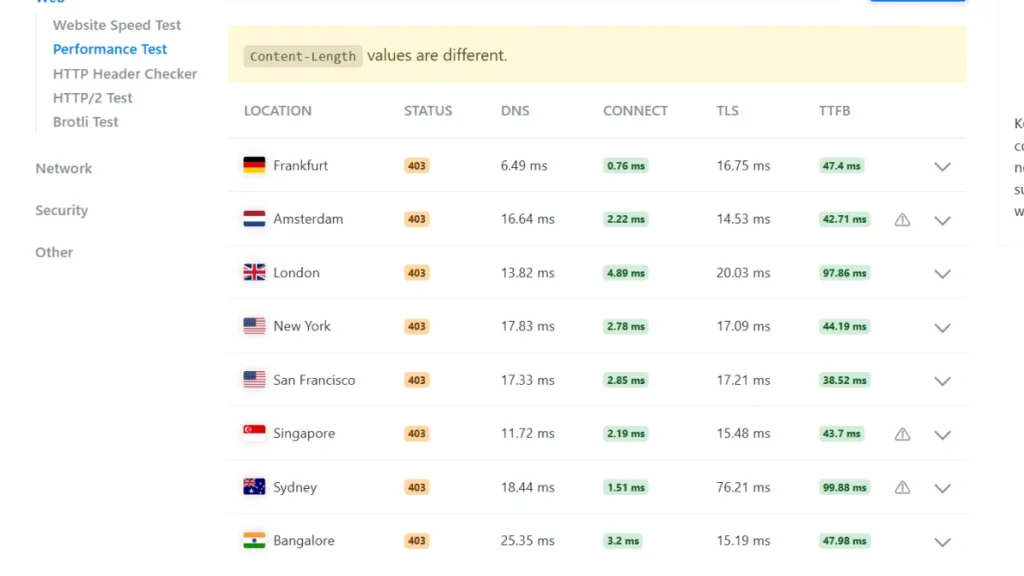
Bluehost offers 99.99% uptime for shared hosting and 99.9% for dedicated servers, supported by redundant infrastructure and automatic failover.
SSD/NVMe storage, Cloudflare CDN, caching, and resource controls help maintain reliable performance during moderate traffic. Overall, Bluehost provides a good balance of stability, speed, and affordability for WordPress websites.
Bluehost CPU and Resource Limits
Bluehost monitors CPU, memory, and bandwidth usage to maintain stable shared hosting performance. Server-side caching, CDN support, security monitoring, and automatic updates help reduce resource usage and improve efficiency.
Higher-tier plans provide more resources for demanding websites, while growing sites may need to move to VPS or dedicated hosting for greater control and consistent performance.
Bluehost also provides monitoring and diagnostic tools to help identify high resource usage, slow database queries, and traffic-related issues.
Bluehost Features and SEO Tools
- NVMe SSD Storage & Caching – Helps improve website loading speed.
- Cloudflare CDN – Delivers content faster to visitors worldwide.
- Free SSL & Security – Includes SSL, malware scanning, firewall, and DDoS protection.
- WordPress Integration – Quick setup, automatic updates, and easy management.
- AI Website Tools – Helps with website creation, content, and metadata.
- SEO Analysis Tool – Provides recommendations to improve on-page SEO.
- Yoast SEO Support – Offers readability checks, sitemaps, and structured data.
- Rank Math & AIOSEO – Supports advanced SEO tracking and optimization.
- Google Analytics & Search Console – Track traffic and search performance through WordPress.
SEO Tools Explained
- SEO Analysis: Provides site audits, performance scores, and optimization recommendations.
- Keyword Tracking: Monitors rankings, impressions, and click-through rates.
- XML Sitemaps: Automatically creates and submits sitemaps to search engines.
- Technical SEO Checks: Identifies speed, security, and mobile usability issues.
- Analytics: Tracks visitors, engagement, and audience data.
- WordPress SEO Plugins: Supports Yoast SEO, AIOSEO, and other popular tools.
- Professional SEO Services: Optional expert support for ongoing optimization and marketing.
WordPress Features Review for Beginners
Bluehost offers WordPress-focused hosting with NVMe storage, AI-powered tools, automatic setup, staging, free SSL, and Cloudflare CDN. It is also recommended by WordPress.org, making it a beginner-friendly option.
Key Features
- AI & Setup: WonderSuite AI, one-click WordPress installation, guided migration, and automatic updates.
- Performance: NVMe/SSD storage, Cloudflare CDN, caching, and WordPress-optimized servers.
- Staging: Test themes, plugins, and updates safely before going live.
- Security: SSL, malware scanning, DDoS protection, firewalls, and backups.
- Plans: Entry plans support smaller sites, while higher tiers offer more storage, websites, traffic capacity, and WooCommerce features.
- Scalability: Cloud hosting options provide more resources for growing websites and traffic spikes.
Best Plugins for Beginners
The right plugins can make WordPress easier to manage and improve SEO, security, speed, backups, and user engagement.
| Category | Recommended Tool | Main Benefit |
|---|---|---|
| Setup | WonderStart | Guided website setup |
| Design | WonderBlocks | Ready-made page sections |
| SEO | Yoast SEO | SEO titles, meta data, and sitemaps |
| Security | Wordfence | Firewall and malware protection |
| Spam | Akismet | Automatic spam filtering |
| Speed | WP Rocket | Caching and performance optimization |
| Backups | UpdraftPlus | Automated cloud backups |
| Forms | WPForms | Drag-and-drop contact forms |
| All-in-One | Jetpack | Stats, social, and security |
Bluehost’s native WonderSuite tools are especially useful for beginners, while plugins such as Yoast SEO, Wordfence, WP Rocket, and UpdraftPlus cover the main areas of website management.
Bluehost Security and Support
Bluehost provides 24/7 support through live chat and phone, along with security features such as free SSL, malware scanning, DDoS protection, firewalls, and network monitoring.
Backup options vary by plan, with premium services like CodeGuard offering automated backups and quick restores. Users can also access Bluehost’s Knowledge Base and Academy for tutorials and troubleshooting.
Overall, Bluehost offers solid security and support, but backup coverage depends on the plan.
Support Channels Options Explained
Bluehost offers 24/7 customer support through live chat and phone. Chat is accessible through the contact page or account dashboard.
Phone support includes dedicated US lines (888-401-4678 for support, 844-303-1730 for sales) and an international number (+1 801-765-9400).
The company no longer offers a public ticket system, focusing instead on direct communication. Complex issues can be escalated internally by support agents and tracked via email.
For faster service, have your account username or domain, password digits or validation PIN, and specific issue details ready before contacting support.
User Reviews and Ratings
Source | Rating / Score | Positive Feedback | Negative Feedback |
N/A | Easy setup, WordPress-friendly | Price increases, sales tactics | |
TrustPilot | 4.6 / 5 | Helpful support, site migrations | Cancellation issues, domain transfer |
Google / Capterra | 4.3–4.4 / 5 | Simple account setup, updated control panel | Confusing money-back policy, premium features |
Pros and Cons of Bluehost Hosting
Pros
- Easy for beginners to use
- Recommended by WordPress.org
- Free domain and SSL for a year
- Includes backups, CDN, and security tools
- 24/7 support available
Cons
- High renewal costs
- Paid expert migrations
- No uptime guarantee
- Performance issues
on basic plans - Frequent upselling prompts
Summary
Bluehost is a beginner‑friendly and affordable web hosting provider that works well for small to medium websites and WordPress projects, though it has some drawbacks with renewals and support.
Bluehost
Bluehost offers WordPress-focused hosting with scalable infrastructure, built-in tools, and 24/7 support. It suits a range of websites, from personal blogs and small businesses to larger WordPress projects.

Common Complaints Explained
Bluehost has some common drawbacks, including aggressive upsells and significantly higher renewal prices after the introductory period.
Some users also report inconsistent speeds, shared-hosting performance issues, and mixed customer support experiences. Basic plans may require paid backup services, while website migration can cost extra.
Bluehost’s data centers are primarily U.S.-based, which may affect international performance. Shared hosting also generally requires longer-term commitments, limiting flexible monthly billing options.
Other Top Hosting Alternatives
Hosting Provider | Best For | Key Highlights |
Low-cost performance hosting | Offers fast LiteSpeed servers, a custom hPanel interface, and global data centers for reliable worldwide speed. | |
Premium support and WordPress hosting | Built on Google Cloud with advanced security, daily backups, and expert 24/7 assistance. | |
Contract-free flexibility | Provides monthly billing, transparent pricing, and a leading 97‑day refund policy. | |
Beginner‑friendly shared hosting | Includes unmetered bandwidth, simple setup, and a free first‑year domain. | |
High‑speed WordPress hosting | Delivers outstanding load times, free CDN, and rapid live chat help in under a minute. | |
Environmentally responsible hosting | Balances performance with eco‑friendly operations powered by 100% renewable energy credits. |
Bluehost Domains and Extra Services
Provider | Domain Services | Additional Products |
Domain registration with competitive renewal rates | Offers website builder, email hosting, and VPS services. | |
Affordable domains with free privacy protection | Includes SSL certificates, VPN access, and professional email options. | |
Low-cost domain packages with bundled hosting tools | Provides business email, website builder, and eCommerce tools. | |
Domain registration with simple management tools | Features cloud storage, professional email hosting, and WordPress website builder. | |
Domains integrated into hosting plans | Delivers managed WordPress features, site migration, and staging tools. | |
Domain purchase integrated with hosting | Supplies turbo servers, reseller hosting, and developer tools. | |
Domain mapping for managed cloud setups | Partners with multiple cloud providers and offers built-in CDN integration. | |
Domain registration with eco‑friendly operations | Provides site builder, email hosting, and green energy offset programs. |
Buying and Managing Domains
Process | Description | Key Features |
Domain Purchase | Register a new domain or transfer one directly from the Bluehost Account Manager | Offers a free domain for the first year with hosting, various extensions (.com, .net, .store), and WHOIS privacy options |
Availability Check | Use the domain search tool to find available names and alternatives | Suggests multiple extensions and related domains |
Checkout & Payment | Add the domain to the cart and complete payment securely | Transparent pricing with optional add-ons like Domain Privacy + Protection |
Domain Dashboard | Centralized panel for all domain operations | Manage renewals, DNS settings, privacy, and transfers in one place |
Auto-Renewal | Keeps domains active without manual renewal | Reduces the risk of accidental expiration and loss of ownership |
DNS & Hosting Setup | Easily connect standalone domains to hosting or external builders | Supports custom name servers and advanced DNS controls |
Email Integration | Create branded email accounts linked to your domain | Available through the “Email & Office” section within your account |
Email and Marketing Tools
Bluehost offers professional email and marketing tools through Titan, Google Workspace, and CreativeMail.
- Titan Email: Business email with webmail, calendars, contacts, spam protection, encryption, and up to 80 GB storage.
- Google Workspace: Use Gmail, Drive, Docs, Sheets, Calendar, and Meet with your business domain, starting with 30 GB of storage.
- CreativeMail: Create email campaigns, lead forms, and automated messages directly through Bluehost or WordPress.
- Third-Party Integrations: Supports tools like Mailchimp and HubSpot for analytics, audience targeting, and campaign optimization.
Conclusion
Overall, Bluehost is a solid choice for beginners, bloggers, and small WordPress websites that want affordable, easy-to-manage hosting. Its simple setup, WordPress integration, and beginner-friendly tools make getting started straightforward.
However, renewal prices can increase significantly, while some features and support options may cost extra. Bluehost is worth considering for beginners and budget-conscious users, but check renewal pricing and included features before buying.
Who Should Choose Bluehost Hosting
Bluehost is a good fit for beginners, bloggers, and small businesses looking for affordable and easy-to-manage WordPress hosting. Its simple setup, WordPress integration, WooCommerce support, and 24/7 support make it beginner-friendly.
It’s also suitable for content creators and small projects that need essential hosting features without complex setup.
Who Should Avoid Bluehost
Bluehost may not be ideal for high-traffic websites, resource-heavy projects, or users who need advanced server customization and stronger performance guarantees.
Users focused on long-term costs should also compare renewal prices and paid add-ons before choosing a plan.
- Scalahosting Review
- Hostinger vs Bluehost
- Cloudways vs Hostinger
- Hostinger vs SiteGround
- Hostinger vs HostGator
- ScalaHosting Review
- FatCow review
FAQs – Bluehost Hosting Review
Is Bluehost good for beginners?
Yes. Bluehost is beginner-friendly with an easy dashboard, simple WordPress setup, guided tools, and 24/7 support.
Is Bluehost worth the price in?
Yes, especially for beginners and small WordPress sites. However, renewal prices are higher, so check long-term costs before buying.
Does Bluehost offer free migration?
Yes, eligible plans include free WordPress migration for one website.
Is Bluehost good for WooCommerce?
Yes. Bluehost supports WooCommerce and offers easy setup, security, and performance features for small to medium online stores.
Are backups free on Bluehost?
Some plans include backups, but features and frequency vary. Daily automated backups may require a paid add-on.
Can I cancel Bluehost anytime?
Yes. You can cancel anytime, but refunds generally apply only within the 30-day money-back guarantee period.
Can I cancel Bluehost anytime and get a refund?
You can cancel anytime, but a full refund is generally available only within the first 30 days.
How reliable is Bluehost’s uptime?
Bluehost is generally reliable for small and medium websites, but actual uptime can vary. Check the plan’s current uptime policy before purchasing.

Alex Bryant is the founder of PvyEmpire.com and a WordPress specialist with over 4 years of hands-on experience in web hosting, performance optimization, and website management. He has extensively tested top hosting providers by setting up real websites and monitoring their speed, uptime, and reliability.
At PvyEmpire.com, Alex publishes honest, data-driven reviews, detailed guides, and verified coupons & deals. His goal is to help website owners choose the right hosting, improve performance, and grow their online presence with confidence—based on real testing, not promotions.