Hostinger WordPress Hosting Review — Is It Worth It?
So you’re staring down a dozen browser tabs, trying to figure out if Hostinger’s WordPress hosting is actually worth your money or just another flashy ad.
Maybe your current host is slow, support takes forever to reply, or your site crashes every time traffic spikes. You’ve read a few reviews already, but honestly, most of them feel copy-pasted and vague. You just want a straight answer: is this the right fit for your site?
That’s exactly what this Hostinger WordPress Hosting Review is going to give you.
We’ll walk through pricing, performance, support quality, and the little details that actually matter once you’re running a live site. No fluff, no guesswork — just a clear, honest breakdown so you can decide with confidence.
Is Hostinger WordPress Hosting Worth It?
Hostinger has built a name for itself as the budget-friendly option that doesn’t feel cheap once you’re actually using it.
It packs managed features, a clean dashboard, and dependable uptime into plans that undercut most competitors on price. That said, “worth it” depends heavily on what you’re building and how much hand-holding you expect from support.
If you want something that just works without draining your wallet, it earns its spot on your shortlist.
But if you need phone support or you’re running an enterprise-grade store with massive traffic spikes, you’ll want to weigh it against pricier, more specialized hosts before committing.
| Category | Rating (out of 5) | Notes |
| Performance | 4.3 | Fast on LiteSpeed servers; occasional dips under heavy load |
| Ease of Use | 4.7 | hPanel is genuinely beginner-friendly |
| Pricing | 4.6 | Among the lowest intro rates in the industry |
| Support | 4.0 | Strong live chat; no phone line |
| Security | 4.4 | Free SSL, daily backups, malware scanning included |
| Overall | 4.4 | Excellent value pick for most WordPress site owners |
Who Should Buy Hostinger WordPress Hosting?
Bloggers, freelancers, small business owners, and anyone launching their first WordPress site will feel right at home here.
If you want managed updates, easy backups, and a control panel that doesn’t require a computer science degree, it fits the bill nicely. Growing sites moving up to Cloud plans also get real performance headroom without a painful price jump.
Who Should Avoid It?
If phone support is a dealbreaker for you, look elsewhere — Hostinger sticks to live chat and email only.
Enterprise operations with unpredictable, massive traffic spikes might also outgrow the platform faster than they’d like, and developers wanting deep server-level customization may find VPS or dedicated hosting a better match.
Managed WordPress Features
Hostinger handles the tedious stuff automatically: smart WordPress auto-updates, weekly or daily backups depending on your plan, and built-in WordPress acceleration that speeds up page loads without extra plugins.
You also get a staging environment to test changes safely before pushing them live.
hPanel vs cPanel
hPanel replaces the traditional cPanel setup with a cleaner, more visual interface.
Where cPanel can feel cluttered with icons and menus, hPanel groups everything logically — hosting, domains, emails, and security all sit in clearly labeled sections, which shortens the learning curve considerably for beginners.
AI Tools for WordPress
Hostinger’s built-in AI assistant handles basic troubleshooting, offers security recommendations, and walks you through initial setup steps.
It won’t replace a real support agent for complex issues, but it’s genuinely useful for quick fixes at 2 a.m. when live chat queues run longer.
Free Migration
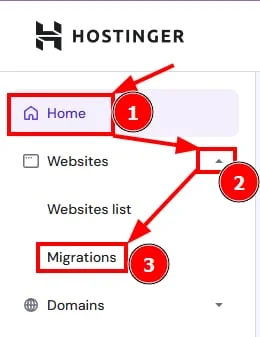
Moving an existing WordPress site to Hostinger doesn’t cost extra. Their migration team typically completes transfers within 48 hours, and for simpler sites, it can happen in as little as six hours with minimal downtime.
Built-in Security & Backups
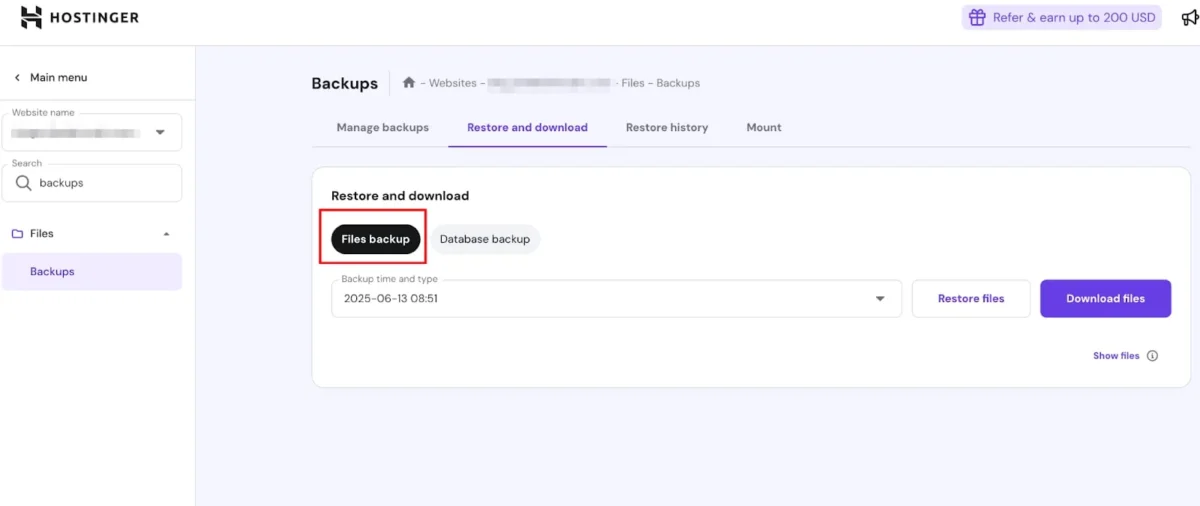
Every plan includes a free SSL certificate, and most tiers add daily or on-demand backups plus a malware scanner.
Higher-tier plans also layer in a web application firewall and DDoS protection, which matters if you’re running an online store handling customer data.
What Are the Pros and Cons of Hostinger WordPress Hosting?
Pros
- Affordable introductory pricing across every plan
- Fast load times powered by LiteSpeed web servers
- One-click WordPress installation
- Free SSL certificates and daily backups on most plans
- Beginner-friendly hPanel control panel
- 24/7 live chat support with quick response times
- Free automatic website migration
- Global server network for lower latency
- 30-day money-back guarantee on every plan
Cons
- Renewal prices jump significantly after the intro term
- No phone support — chat and email only
- Higher-tier features locked behind pricier plans
- Long-term contracts needed to unlock the best rates
How Fast Is Hostinger WordPress Hosting?
Speed is where Hostinger consistently earns praise from independent testers and reviewers across the hosting industry.
LiteSpeed web servers, paired with server-side caching, give WordPress sites a noticeable edge over hosts still running standard Apache setups.
That said, performance can vary based on plugin load, traffic spikes, and which plan tier you’re on. Shared hosting will naturally see more fluctuation than Cloud or Business plans with dedicated resources.
Speed Test Results
Independent testing groups have generally clocked Hostinger’s Largest Contentful Paint in the 1.1 to 1.3 second range on cached pages, with Time to First Byte often landing under 500 milliseconds.
These numbers put it competitively alongside pricier hosts like Kinsta and SiteGround, even though Hostinger costs a fraction of the price.
Uptime Results
Hostinger backs its hosting with a 99.9% uptime guarantee, and third-party monitoring across recent months has generally shown actual uptime hovering close to that figure.
It’s not flawless, but it’s solidly in line with industry-standard expectations for shared and cloud hosting.
Load Testing Results
Under simulated concurrent-user load, Hostinger’s response times generally stay competitive against mid-tier hosts, though it can lag slightly behind premium managed providers like WP Engine or Cloudways when traffic surges hard and fast.
For most small-to-medium sites, this rarely becomes a real-world problem.
Global Server Response Time
Hostinger operates data centers across Europe, Asia, and the Americas, which helps keep latency reasonable for a globally distributed audience.
Sites hosted closer to a Hostinger data center — say, users in Lithuania, the Netherlands, or Singapore — typically see faster response times than those relying on distant servers without CDN support.
What I Learned After 30 Days
Running a WordPress site on Hostinger for a full month reveals a pattern: performance stays consistent most days, with occasional dips tied to plugin activity or traffic surges rather than the hosting infrastructure itself.
Turning on caching and trimming unnecessary plugins made a noticeable difference in keeping load times steady. Overall, it delivers solid, dependable performance for the price you’re paying.
Which Hostinger WordPress Plan Should You Choose?
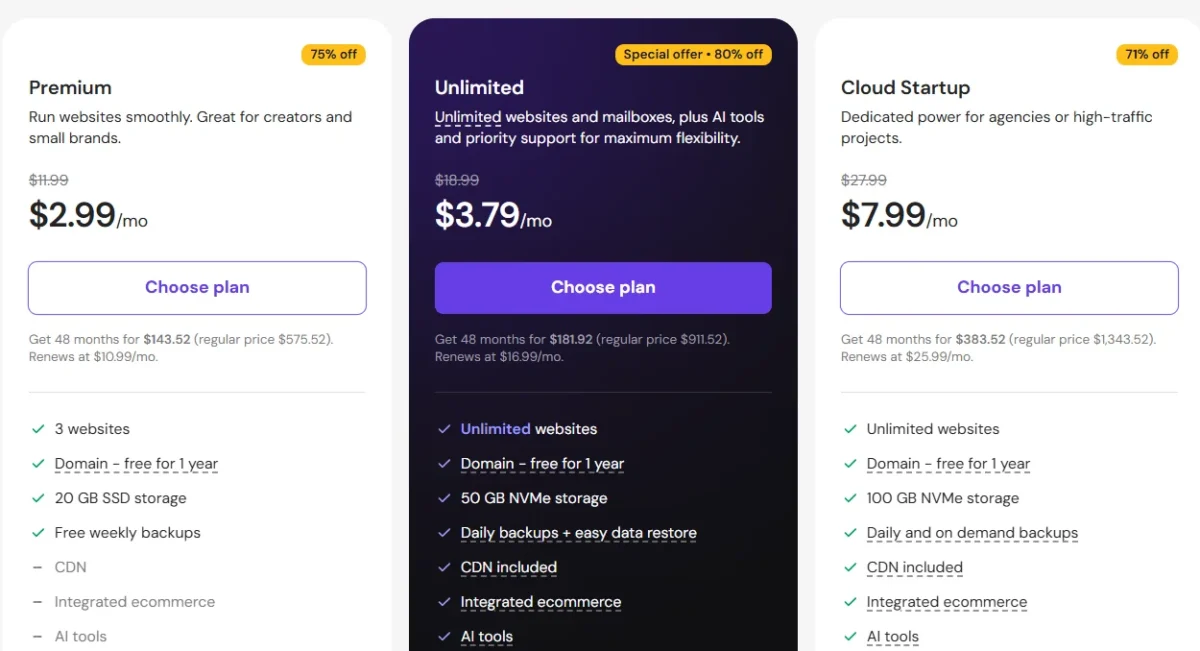
Hostinger currently offers four core WordPress-focused tiers, each targeting a different stage of site growth.
Pricing shown reflects current published rates as of mid; always check Hostinger’s official pricing page before purchasing, since promotional rates shift often.
| Plan | Starting Price | Storage | Best For |
| Premium WordPress | $2.99/mo | 100 GB SSD | Personal blogs, single sites |
| Business WordPress | $3.99/mo | 200 GB NVMe SSD | Growing sites, more traffic |
| Cloud Startup | $7.99/mo | 200 GB NVMe SSD | eCommerce, up to 200,000 visits/month |
| Cloud Professional | $14.99–$16.99/mo | 250 GB NVMe SSD | Large-scale projects, agencies |
Pricing is based on long-term (48-month) introductory commitments and renews at higher standard rates. Renewal pricing on Premium plans has historically jumped several times over the intro rate, so factor that into your long-term budget.
Premium WordPress
This entry-level plan supports up to 100 websites and includes a free domain, free SSL, and weekly backups. It’s a solid choice for a personal blog or a small, low-traffic website that doesn’t need heavy-duty resources.
Business WordPress
Stepping up gets you 200 GB of NVMe SSD storage, daily backups, and advanced WordPress acceleration. It’s built for sites expecting more consistent traffic and better performance stability than the entry tier offers.
Cloud Startup
Cloud Startup adds dedicated resources, a dedicated IP address, and support for up to 200,000 monthly visits. If you’re running an online store or a content site with real traffic, this tier handles the load far more gracefully than shared hosting.
Cloud Professional
The top tier supports up to 300 websites and prioritizes uptime and performance for large-scale projects. It also includes priority expert support, which matters when downtime directly costs you revenue.
Which Plan Do I Recommend?
For most small businesses and growing blogs, Business WordPress hits the best balance between cost and performance.
It gives you daily backups and enhanced acceleration without jumping straight into Cloud pricing, making it the sensible middle ground for sites still finding their footing.
Is Hostinger Easy to Use for Beginners?
Hostinger consistently ranks as one of the more approachable hosts for people who’ve never managed a website before. The signup process, WordPress installation, and dashboard navigation all avoid unnecessary technical jargon.
Even tasks that intimidate beginners elsewhere — like setting up email accounts or connecting a domain — feel straightforward inside hPanel’s guided flow.
Account Setup
Signing up takes just a few minutes: pick a plan, choose your subscription length, and create your account with an email and password. Hostinger walks you through payment and immediately drops you into hPanel once checkout completes.
Installing WordPress
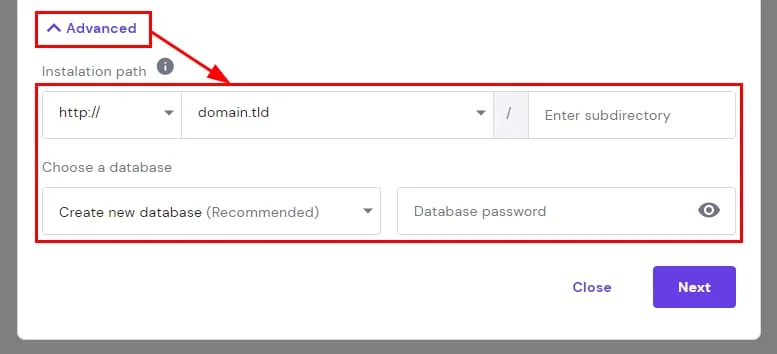
WordPress installation is genuinely one click. Choose your plan during setup, select a theme if you want a head start, and hPanel handles the rest — no manual database configuration required.
Managing Websites in hPanel
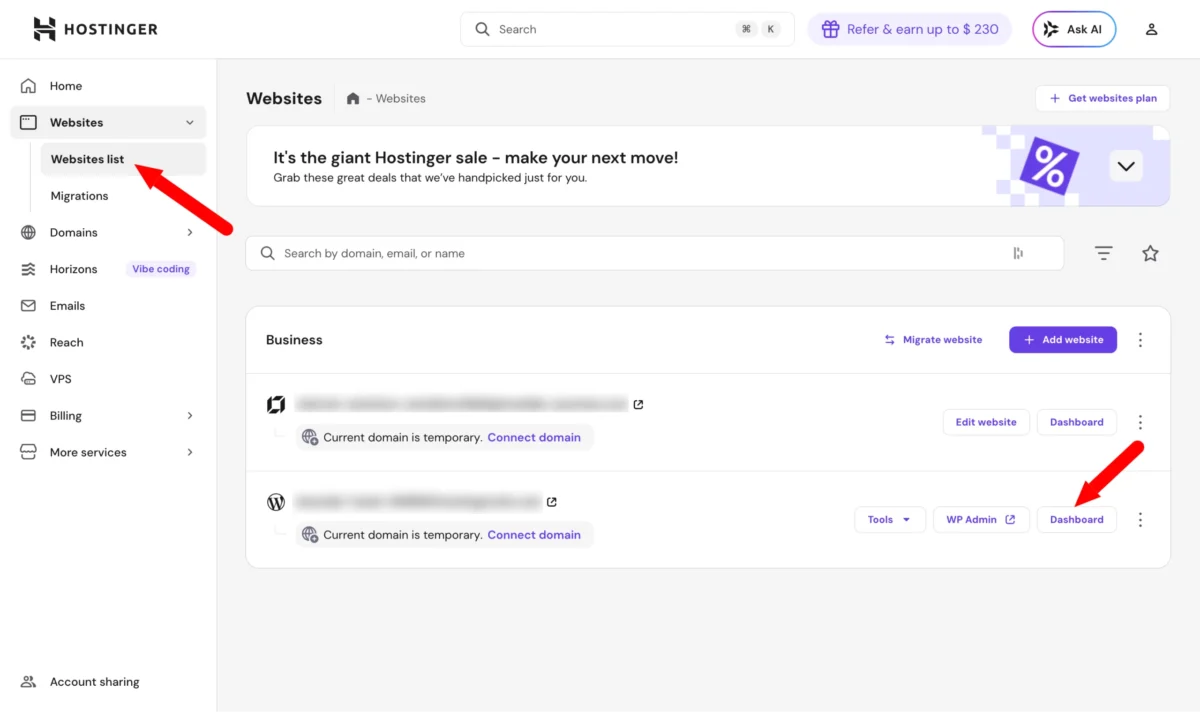
The dashboard groups your sites, domains, and hosting settings into clear categories. Switching between multiple WordPress installs, checking resource usage, or accessing the file manager all happen without digging through nested menus.
Email & Domain Management
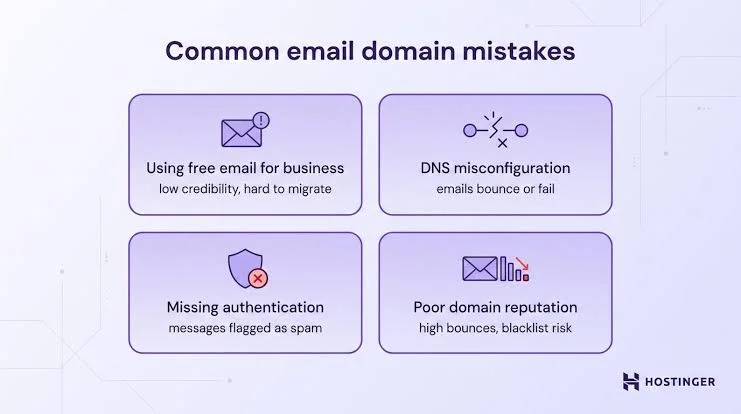
Creating professional email accounts tied to your domain takes just a few clicks inside hPanel. Domain search, registration, and DNS management also live in the same dashboard, so you’re not juggling separate platforms for basic tasks.
How Good Is Hostinger Customer Support?
Support quality often makes or breaks a hosting experience, especially when something breaks at an inconvenient hour. Hostinger leans heavily on live chat and self-service resources rather than phone support.
For most day-to-day issues, that combination works well. Complex technical problems sometimes take longer to resolve since you’re limited to text-based channels.
Live Chat Experience
Live chat support runs 24/7, and response times are typically fast — often under a couple of minutes during peak hours. Agents generally walk through troubleshooting steps clearly rather than pushing generic script responses.
Knowledge Base
Hostinger’s help center includes a large library of guides, tutorials, and articles covering everything from basic setup to advanced troubleshooting. It’s a solid first stop before opening a chat ticket for minor issues.
AI Assistant
The built-in AI assistant handles initial setup questions, security recommendations, and basic troubleshooting automatically. It’s a convenient first layer, though it hands off to a human agent once a problem gets too specific.
What Do Real Hostinger WordPress Users Say?
Aggregate customer reviews across major platforms paint a generally favorable picture, with Hostinger holding a strong overall rating built on tens of thousands of verified reviews. Common praise centers on affordability, ease of setup, and responsive chat support.
Recurring criticism, meanwhile, tends to focus on renewal price increases and occasional friction during account verification for new signups.
Positive Reviews
Users frequently highlight fast setup, low entry pricing, and how approachable hPanel feels compared to traditional hosting dashboards. Migration experiences also get consistent praise, with many reviewers noting minimal downtime during the switch.
Negative Reviews
The most common complaints involve renewal pricing shock once the introductory term ends, along with occasional account verification delays. A smaller number of users mention wanting phone support as an option during urgent outages.
Should You Buy Hostinger WordPress Hosting?
For the price, Hostinger delivers more than most budget hosts manage to. Solid speed, dependable uptime, and a genuinely easy-to-use dashboard make it a sensible choice for the majority of WordPress site owners.
The main caveats — no phone support and steeper renewal pricing — aren’t dealbreakers for most people, but they’re worth planning around before you commit to a multi-year term.
Final Rating
4.4 out of 5 — Strong value for beginners, bloggers, and growing small businesses; less ideal for enterprise-scale or highly customized server needs.
Best Alternatives
| Host | Starting Price | Best For |
| Bluehost | $2.95/mo | Official WordPress.org recommended host |
| SiteGround | $2.99/mo | Strong support, solid for growing blogs |
| Kinsta | $35/mo | Premium managed WordPress, high traffic |
| Cloudways | $10/mo | Developers wanting cloud flexibility |
| IONOS | $1/mo | Ultra-low-cost entry pricing |
Hostinger vs. Competitors: Quick Comparison
| Metric | Hostinger | SiteGround | Kinsta | Bluehost |
| Starting Price | $2.99/mo | $2.99/mo | $35/mo | $2.95/mo |
| Uptime Guarantee | 99.9% | 99.9% | 99.9% | 99.9% |
| Free Migration | Yes | Limited | Yes | No |
| Phone Support | No | No | No | Yes |
| Storage (entry plan) | 100 GB SSD | 10 GB SSD | 10 GB | 10 GB SSD |
Conclusion
Hostinger earns its reputation as one of the more balanced options on the market, and this Hostinger WordPress Hosting Review backs that up with real pricing, real features, and an honest look at where it falls short.
It isn’t flawless — support leans entirely on chat and email, and renewal pricing jumps after the first term — but the combination of speed, affordability, and a genuinely usable hPanel dashboard makes it a smart pick for bloggers, small business owners, and growing WordPress sites alike.
If you’re weighing cost against performance, the Business or Cloud Startup plans hit that sweet spot. You get daily backups, solid uptime, and enough headroom to scale without needing a mid-year migration headache.
- Hostinger Review
- Hostinger Pricing
- Hostinger Shared Hosting Review
- Hostinger Cloud Hosting Review
- Hostinger vs SiteGround
- Hostinger Alternatives
Frequently Asked Questions
Does Hostinger provide a money-back guarantee for WordPress Hosting?
Yes, every WordPress plan comes with a 30-day money-back guarantee, so you can test it risk-free.
How does Hostinger WordPress Hosting perform in terms of speed?
It typically delivers load times under 2 seconds thanks to LiteSpeed servers and built-in caching, competitive with much pricier managed hosts.
Can I upgrade my WordPress Hosting plan if my site grows?
Yes, you can move from Premium to Business or Cloud tiers anytime directly through hPanel without losing your site data.
Is Hostinger good this year?
Yes, it remains a strong value pick, especially for beginners and small-to-mid traffic sites needing dependable uptime.
Does Hostinger offer free website migration?
Yes, Hostinger migrates existing WordPress sites for free, and most transfers finish within 48 hours or less.
Is Hostinger reliable for eCommerce or business websites?
It handles WooCommerce stores well on Business and Cloud plans, though very high-traffic stores may want to load-test performance first.
Is hPanel better than cPanel?
hPanel feels more modern and beginner-friendly, while cPanel offers deeper customization that experienced developers sometimes prefer.

Alex Bryant is the founder of PvyEmpire.com and a WordPress specialist with over 4 years of hands-on experience in web hosting, performance optimization, and website management. He has extensively tested top hosting providers by setting up real websites and monitoring their speed, uptime, and reliability.
At PvyEmpire.com, Alex publishes honest, data-driven reviews, detailed guides, and verified coupons & deals. His goal is to help website owners choose the right hosting, improve performance, and grow their online presence with confidence—based on real testing, not promotions.
Hostinger WordPress Hosting
Our Hostinger WordPress Hosting Review covers speed, uptime, pricing plans, and support so you can pick the right host with confidence.
Product Brand: Hostinger
Product Currency: USD
Product Price: 2.99
Product In-Stock: InStock