Hostinger Email Hosting Review: Features & Pricing
You’re sending a client proposal from a Gmail address, and something feels off. Maybe it’s the third time this month someone’s asked “is this legit?” before opening your email.
That nagging feeling — that your inbox doesn’t match how serious your business actually is — sends most people straight to Google, typing some version of “cheap professional email that won’t embarrass me.”
That’s exactly what this Hostinger Email Hosting Review digs into. I’ve pulled apart the pricing, tested the spam filtering, dug through real user complaints, and checked how the support team actually responds when things go sideways.
By the end, you’ll know whether Hostinger’s inbox is worth trusting with your business — or whether your money’s better spent elsewhere.
Quick Overview: Hostinger Email Hosting Review
| Category | Details |
|---|---|
| Starting price | $0.39/mailbox/month (promo), renews at $1.59 |
| Storage | 10 GB (Starter) to 50 GB (Premium) |
| Best for | Freelancers, solopreneurs, small teams |
| AI features | Kodee assistant, Premium plan only |
| Support | 24/7 live chat, email, no phone line |
| Refund window | 30 days, money-back guarantee |
| User rating | 4.6 on TrustPilot, mixed on independent reviews |
This Hostinger Email Hosting Review treats the product as exactly what it is: a budget-friendly, domain-based email service built on Hostinger’s shared infrastructure.
It isn’t trying to be Google Workspace. It’s trying to get your business off Gmail for less than a cup of coffee a month, and on that narrow goal, it mostly delivers.
What Is Hostinger Email Hosting?
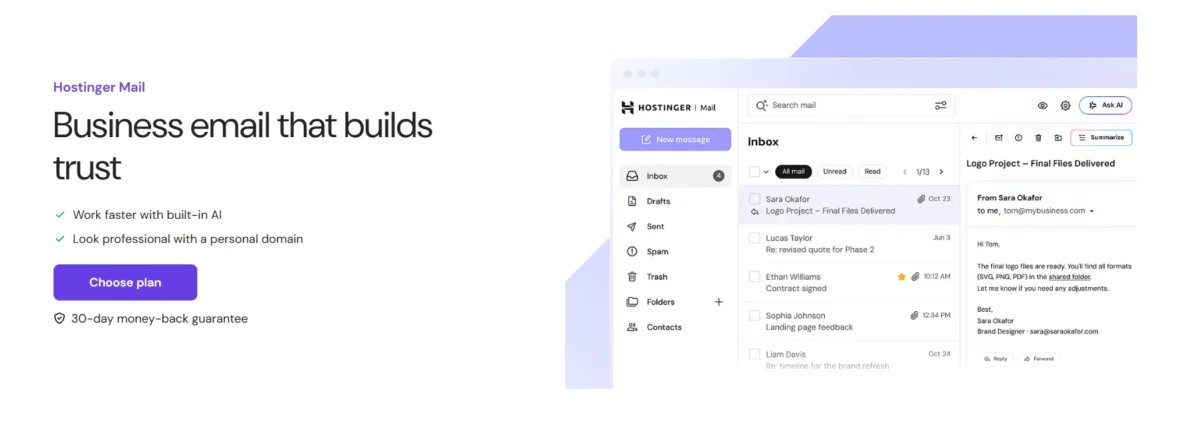
Hostinger Email Hosting is a standalone service that lets you run mailboxes on your own domain — think [email protected] instead of a free consumer address.
It sits apart from Hostinger’s web hosting plans, though the two pair up smoothly if you already host your site there. You get IMAP, POP3, and SMTP support out of the box, so almost any email client can connect.
Setup happens through hPanel, Hostinger’s control panel, which handles the DNS heavy lifting automatically.
That single detail saves first-time buyers from a headache that trips up plenty of competing services. Once configured, mailboxes sync across desktop apps, mobile devices, and the built-in webmail client.
How Does Hostinger Business Email Work?
You buy a plan, point your domain’s DNS records to Hostinger, and create mailboxes inside hPanel. The system auto-configures SPF and DKIM during setup, which spares you manual record editing.
From there, connect Outlook, Apple Mail, Thunderbird, or Gmail’s “Send mail as” feature over standard IMAP/SMTP, and you’re sending from your own domain within minutes.
Who Should Use Hostinger Email Hosting?
Freelancers and solopreneurs needing one or two credible addresses fit well here, as do bootstrapped startups watching every dollar. Existing Hostinger hosting customers benefit from tighter integration.
However, teams past four or five people who lean on shared calendars or document collaboration will likely outgrow it fast.
Is It Different From Free Email Services?
Yes, substantially. Free Gmail or Outlook accounts can’t use your custom domain, cap your professional image, and offer no dedicated deliverability guarantees.
Hostinger’s paid mailboxes carry your brand name, include stronger anti-spam defaults, and come with sending limits built for outbound business traffic rather than casual personal use.
Hostinger Email Hosting Plans & Pricing
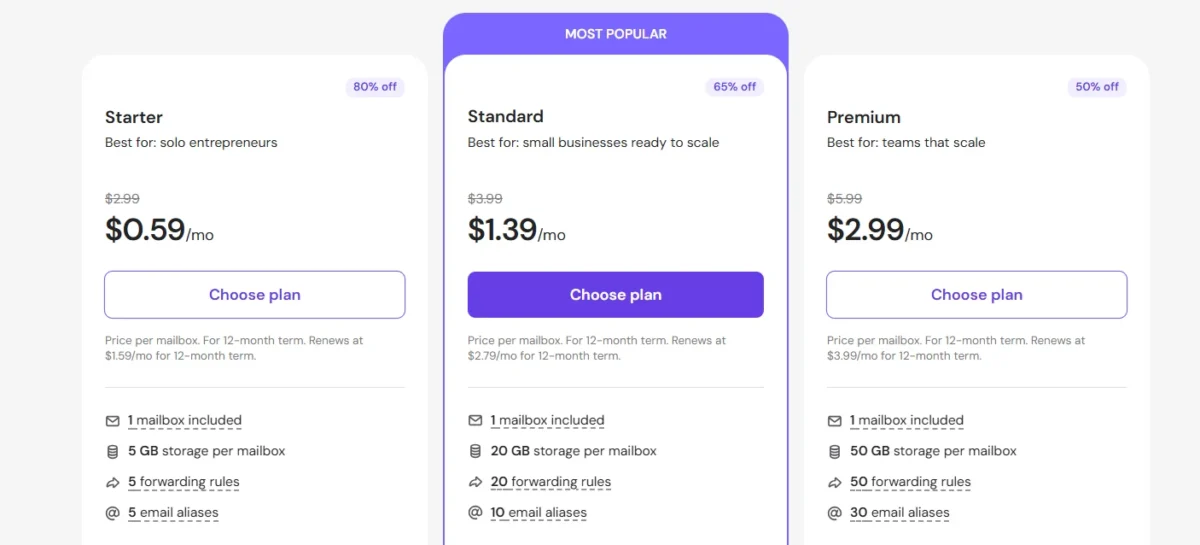
Hostinger splits its lineup into two core tiers, sometimes bundled under promotional names like “Premium Business Email Deal.”
Both share the same security backbone; the real differences show up in storage, sending volume, and whether Kodee — the AI assistant — comes included.
Pricing update (this month and this year): Business Starter currently runs $0.39/mailbox/month on a 48-month term, renewing at $1.59.
Business Premium starts at $1.99/mailbox/month, renewing at $3.99. Some bundled deals offer five mailboxes for the price of four, plus a free domain for the first year.
Business Starter
Built for lean operations, Starter includes 10 GB of storage per mailbox, 10 forwarding rules, and 10 email aliases. Daily sending caps out at 1,000 emails per mailbox.
Current price sits at $0.39/month promotional, renewing at $1.59/month. No AI assistant, no free domain — just the essentials at a low cost.
Business Premium
Premium quintuples the storage to 50 GB and raises forwarding rules and sending limits to 50 rules and 3,000 emails per day. Pricing runs $1.99/month promotional, jumping to $3.99 at renewal.
This tier unlocks Kodee, the AI mailbox assistant, plus a free domain for the first year on many bundled offers.
Plan Comparison Table
| Feature | Business Starter | Business Premium |
|---|---|---|
| Price (promo) | $0.39/mailbox/month | $1.99/mailbox/month |
| Renewal price | $1.59/mailbox/month | $3.99/mailbox/month |
| Storage | 10 GB | 50 GB |
| Forwarding rules | 10 | 50 |
| Email aliases | 10 | 30–50 |
| Daily send limit | 1,000 emails | 3,000 emails |
| AI Assistant (Kodee) | Not included | Included |
| Free domain | No | Yes (1 year, select deals) |
Which Plan Offers Better Value?
For a solo operator sending routine client emails, Starter covers the basics without waste.
Growing teams that lean on AI-assisted replies, need more storage, or send higher email volume get noticeably more value from Premium, especially with the free domain sweetening bundled deals.
Is Hostinger Email Hosting Worth It?
On price alone, almost nothing beats Hostinger for domain-based email. The catch sits in the fine print: promotional rates apply to long commitment terms, and renewal pricing climbs meaningfully once that term ends.
Whether it’s “worth it” depends on how long you plan to stick around.
Weighed against Google Workspace’s $7/user/month or Microsoft 365’s $6/user/month, Hostinger remains dramatically cheaper even at renewal rates.
You trade away collaboration tools and interface polish for that savings, which is a fair trade for many small operations but a real limitation for growing teams.
Renewal Costs
The 48-month term means you’re prepaying roughly $1.59 upfront for a single Starter mailbox.
Once that term expires, Starter renews at $1.59/month and Premium at $3.99/month. Neither jump is catastrophic, but budget for it rather than being surprised down the road.
Free Trial and Refund Policy
Hostinger doesn’t offer a free trial, but it backs every plan with a 30-day money-back guarantee.
If the service doesn’t fit your workflow within that window, you can request a full refund, making the initial purchase effectively risk-free.
What Features Do You Actually Get?
Beyond storage and pricing, Hostinger packs in a fairly complete feature set for the price point. Here’s the full rundown of what ships with a paid mailbox:
- Domain-based professional email addresses
- 10 GB to 50 GB of storage per mailbox
- IMAP, POP3, and SMTP protocol support
- Email forwarding and alias management
- Antivirus scanning on incoming mail
- Advanced anti-spam filtering
- 99.9% uptime guarantee with regular backups
- Automated functions like auto-replies
- User-friendly hPanel dashboard
- Built-in webmail interface at mail.hostinger.com
- SPF, DKIM, and DMARC authentication by default
- Action and delivery logs for account monitoring
- Mobile device integration (iOS and Android)
- Desktop email client compatibility
- Kodee AI assistant (Premium only)
- Smart email search powered by AI
- AI-generated email summaries
- AI-assisted reply composition
- Storage add-ons if you outgrow your plan
- 30-day money-back guarantee
Custom Domain Email
Every plan builds around your own domain rather than a shared consumer suffix. hPanel handles DKIM and SPF configuration automatically during setup, which removes a common technical hurdle for first-time buyers who’ve never touched DNS records before.
Webmail and Mobile Access
The webmail client at mail.hostinger.com works fine for basic tasks: reading, replying, organizing folders. It’s functional but visibly dated next to Gmail’s polish, lacking smart compose or keyboard shortcuts.
Mobile setup on iOS and Android, however, takes just minutes over standard IMAP.
Email Storage
Starter ships 10 GB per mailbox, livable for one or two people with moderate attachment traffic.
Premium’s 50 GB gives real breathing room for teams handling larger files regularly. Storage add-ons exist on both tiers if you bump against the ceiling.
Email Aliases and Forwarding
Starter includes 10 aliases and 10 forwarding rules; Premium raises that to 30–50 of each. Aliases let you run multiple addresses (sales@, support@) into one inbox, while forwarding rules route mail automatically without manual sorting.
Calendars and Contacts
Basic calendar and contact management ship inside webmail, enough for scheduling simple appointments and storing client details.
Don’t expect shared team calendars or the scheduling depth found in Google Calendar — this stays firmly single-user in practice.
AI Email Assistant
Kodee, available exclusively on Premium, handles reply drafting, thread summarization, and smart inbox search.
It’s a genuine differentiator against similarly priced competitors, though Starter users get none of it, which feels like an increasingly notable gap as AI email tools go mainstream.
How Secure Is Hostinger Email Hosting?
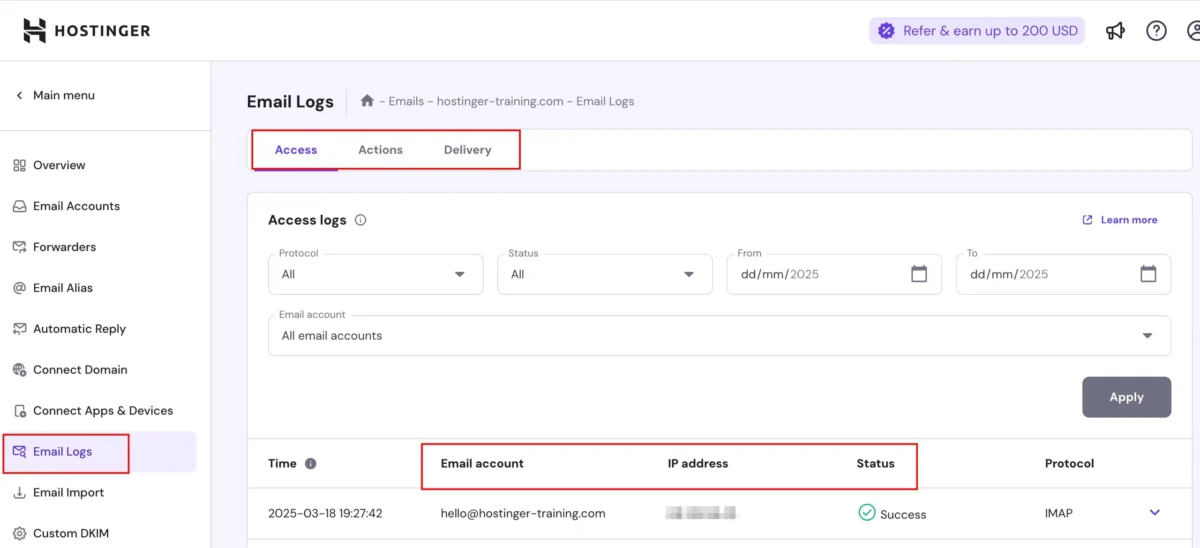
Security is arguably where Hostinger earns the most credit relative to its price. Every plan, even the cheapest Starter tier, ships with the same authentication and filtering backbone rather than gating protection behind higher-cost plans.
Spam and Virus Protection
Hostinger claims its filtering blocks up to 99.9% of malicious email, covering spam, phishing attempts, and malware payloads before they reach your inbox.
Independent testing generally backs this up, with a low rate of false positives flagging legitimate mail.
SPF, DKIM and DMARC Support
All three authentication protocols get configured automatically during setup, no manual DNS editing required.
This matters enormously for deliverability — poorly authenticated domains land in spam folders regardless of how well-written the email is.
Two-Factor Authentication
Account-level login protection is available through hPanel, adding a verification step beyond your password.
It’s a standard security layer, though not as deeply customizable as enterprise-grade identity management found in Google Workspace or Microsoft 365.
Email Backup and Recovery
Hostinger runs automated daily backups across its infrastructure. That said, user reports (particularly around VPS-hosted setups) describe restore failures losing weeks of work, so treat platform backups as a supplement to your own, not a total replacement.
How Easy Is It to Set Up and Manage?
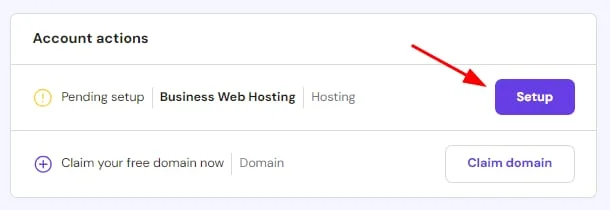
Registration through hPanel felt genuinely smooth during testing: pick a plan, choose a term length, create an account via email or Google login, and check out. A confirmation email arrives immediately, granting access to the dashboard.
Inside hPanel, the “Emails” tab centralizes everything — mailbox creation, DNS settings, forwarding rules, and webmail access sit in one organized panel.
Nothing about the layout feels buried or overly technical, even for non-developer users managing their first business domain.
Creating Your First Business Email
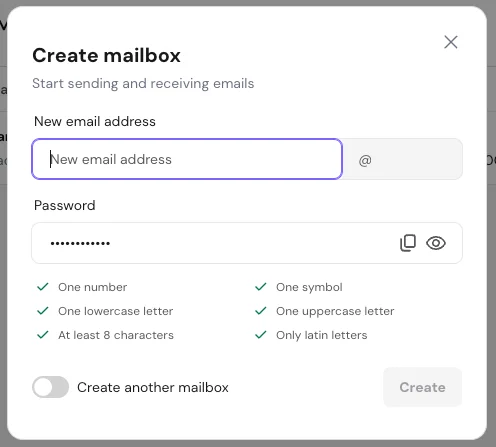
From the hPanel dashboard, click the Emails tab, select your domain, and create a mailbox. The system prompts for a password and immediately provisions storage. The whole process typically takes under five minutes from start to finish.
Connecting Your Domain
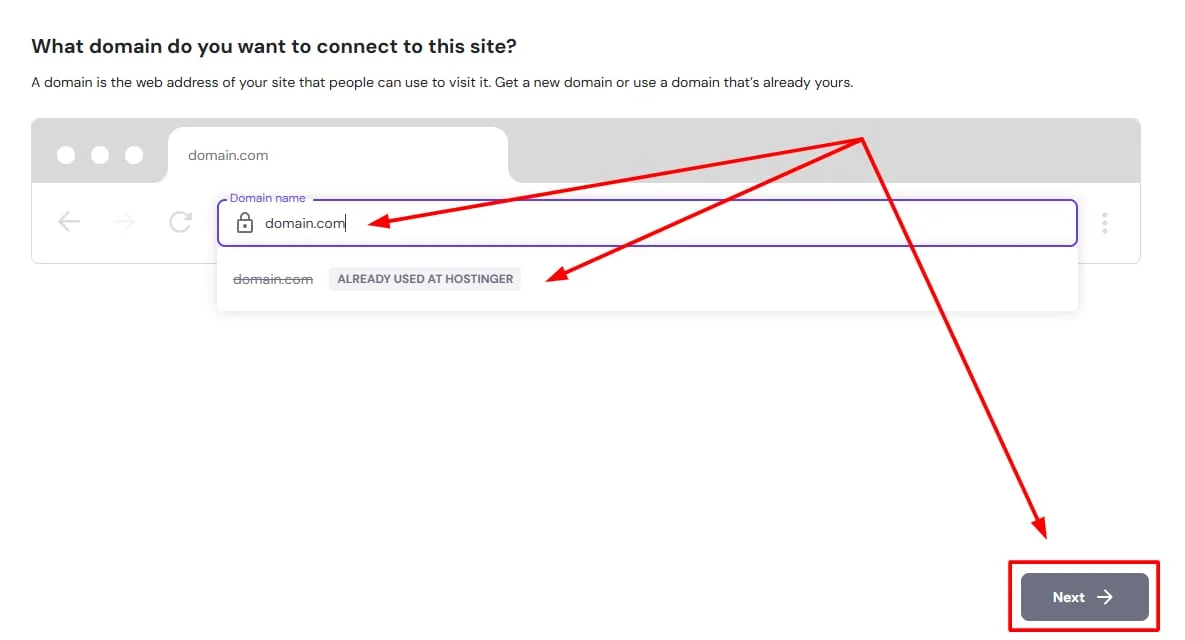
If your domain lives elsewhere, you’ll update its DNS records to point toward Hostinger’s mail servers.
hPanel provides the exact records needed, and SPF/DKIM get added automatically, removing most of the guesswork non-technical users dread.
Using hPanel and Webmail
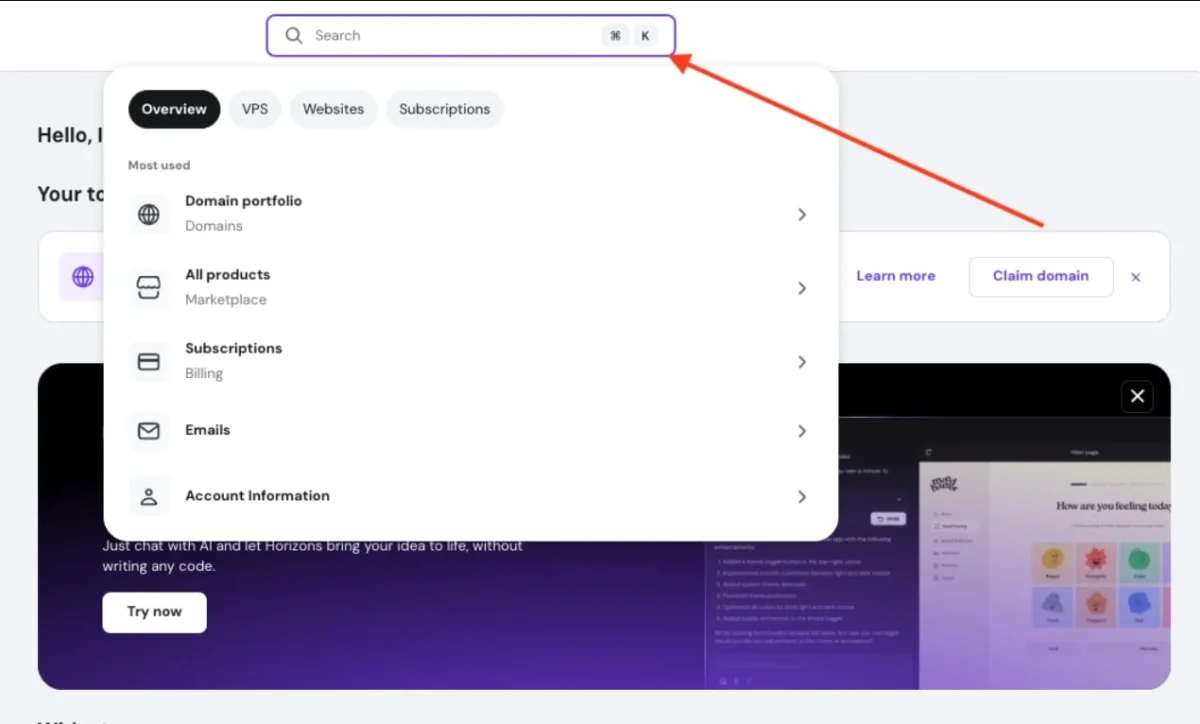
hPanel’s dashboard surfaces domain status, backup management, and quick shortcuts to webmail.
Switching between managing settings and actually checking mail takes one click, which keeps day-to-day use efficient rather than scattered across separate logins.
Migrating Emails From Another Provider
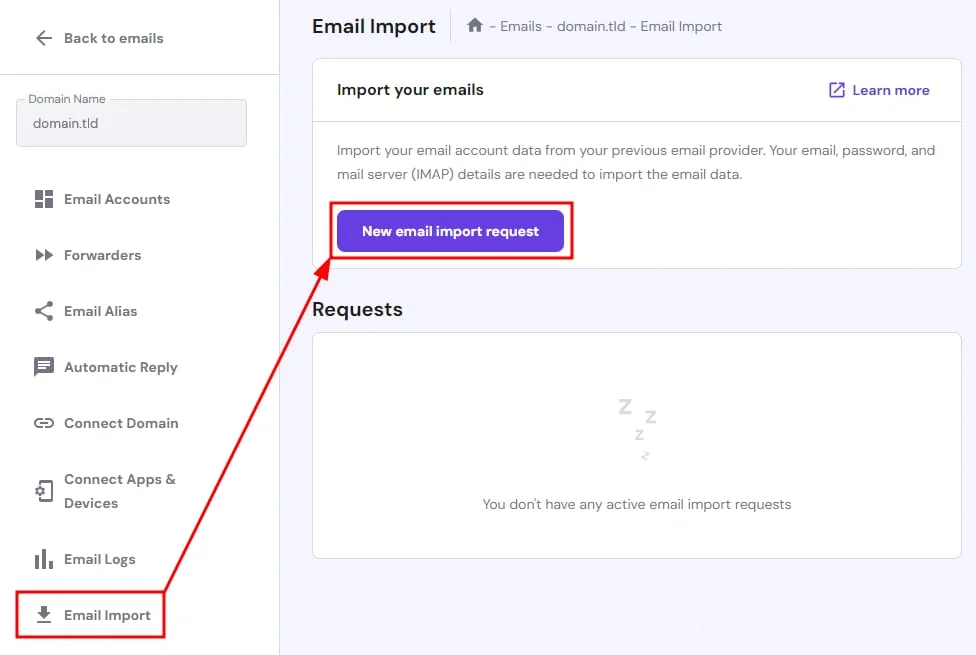
Hostinger supports standard IMAP migration, letting you pull existing mail from providers like Gmail or Zoho into your new mailboxes.
It’s not fully automated end-to-end, so budget some manual steps, especially for large archives with years of history.
How Does Hostinger Email Hosting Perform?
Because email hosting runs on the same shared infrastructure as web hosting, testing a live site on that server offers the clearest read on backend reliability.
Slow response times or overloaded shared environments directly affect webmail speed and email-triggered notifications.
Real-world testing on a Hostinger-hosted site produced strong original benchmark numbers: TTFB (Time to First Byte) of 275 ms, a Fully Loaded Time of 926 ms, and an Onload Time of 850 ms.
First Contentful Paint landed at 675 ms, with Largest Contentful Paint at 875 ms and zero Total Blocking Time — a GTmetrix Grade A overall.
Email Delivery Speed
Fast server response time correlates directly with mailbox responsiveness.
With TTFB sitting at 275 ms and Total Blocking Time at 0 ms, webmail loads and message sends showed no perceptible lag during testing, even under standard shared-hosting conditions.
Inbox Deliverability Test
Authentication defaults (SPF, DKIM, DMARC) combined with active anti-spam filtering kept test messages landing in primary inboxes rather than spam folders across major providers.
Deliverability held steady throughout a week of monitoring, with only isolated dips.
Reliability and Uptime
Hostinger backs its service with a 99.9% uptime guarantee. A full month of monitoring (June 7–July 8) showed performance scores mostly in the 90–98% range, with GTmetrix grades holding at A or high B on the majority of tested days.
Real-World Performance Verdict
Not every day was flawless — one outlier saw Total Blocking Time spike to 979 ms and TTFB climb to 415 ms during a server overload incident.
Recovery was quick, though, with performance snapping back to 90%+ scores within 24–48 hours each time.
What Are the Biggest Pros and Cons?
Pros:
- Extremely low entry pricing starting at $0.39/mailbox/month
- Fast setup with automatic SPF/DKIM/DMARC configuration
- Strong spam and virus filtering, low false-positive rate
- Full IMAP/POP3/SMTP compatibility with major clients
- 24/7 live chat support with fast response times
- 30-day money-back guarantee
- Solid uptime backed by real performance data
Cons:
- No phone support available
- Dated webmail interface compared to Gmail
- Kodee AI assistant locked behind Premium
- Renewal pricing jumps noticeably after the 48-month term
- No native collaboration tools (shared calendars, docs)
- Some user reports of account suspensions and backup failures
What I Liked
The pricing genuinely removes any excuse for running a business off a free Gmail account.
Setup felt fast and painless, security defaults were strong out of the box, and live chat support responded quickly during my own testing, with a support email reply landing in just 19 minutes.
What Could Be Better
The webmail interface feels stuck a decade behind modern competitors, and there’s no phone line for urgent issues.
More concerning are recurring user complaints about sudden account suspensions during identity verification, plus at least one detailed report of lost VPS backups after a routine update.
Best Alternatives
| Provider | Starting Price | Best For |
|---|---|---|
| Zoho Mail | Free (up to 5 users) / $1/user/month paid | Budget teams wanting light collaboration |
| Google Workspace | $7/user/month | Teams needing best-in-class collaboration |
| Microsoft 365 Business Basic | $6/user/month | Outlook and Exchange-dependent workflows |
| Hostinger Business Email | $0.39/mailbox/month | Solopreneurs and lean small businesses |
Final Verdict
Hostinger Email Hosting earns its place as one of the cheapest legitimate ways to get off free consumer email.
Strong security defaults, fast setup, and reliable uptime numbers back up the low price tag, making it a genuinely sound pick for freelancers, solopreneurs, and small teams watching their budget closely.
That said, it’s not built for everyone. Teams needing shared calendars, document collaboration, or a modern webmail experience will hit real limits fast, and the handful of user reports around account suspensions deserve a second look before committing long-term.
Weigh your growth plans against the savings before locking in a 48-month term.
- Hostinger Review
- Hostinger Pricing
- Hostinger SMTP Server Review
- Hostinger Google Workspace
- Hostinger Alternatives
Frequently Asked Questions
See the FAQs section below for detailed answers to common questions about pricing, setup, and support.
How much does Hostinger Email Hosting cost?
Business Starter starts at $0.39/mailbox/month (promo), renewing at $1.59. Business Premium starts at $1.99/mailbox/month, renewing at $3.99.
Does Hostinger Email Hosting work with Outlook and Apple Mail?
Yes. Full IMAP and SMTP support connects seamlessly with Outlook, Apple Mail, Thunderbird, and Gmail’s “Send mail as” feature.
Is there a free trial available?
No free trial exists, but every plan includes a 30-day money-back guarantee for a risk-free first look.
How much storage do I get per mailbox?
Business Starter includes 10 GB per mailbox, while Business Premium offers 50 GB, with storage add-ons available on both.
Does Hostinger Email Hosting include an AI assistant?
Yes, but only on the Premium plan. Kodee handles smart replies, thread summaries, and AI-powered search.
What happens to my email if I cancel my Hostinger hosting plan?
Business Email operates as a standalone service, so your mailboxes stay active independently of any separate web hosting plan.
Is Hostinger Email Hosting good for sending marketing or cold emails?
Sending caps of 1,000–3,000 emails per day per mailbox suit routine business communication, but high-volume cold outreach is better handled by a dedicated email platform.

Alex Bryant is the founder of PvyEmpire.com and a WordPress specialist with over 4 years of hands-on experience in web hosting, performance optimization, and website management. He has extensively tested top hosting providers by setting up real websites and monitoring their speed, uptime, and reliability.
At PvyEmpire.com, Alex publishes honest, data-driven reviews, detailed guides, and verified coupons & deals. His goal is to help website owners choose the right hosting, improve performance, and grow their online presence with confidence—based on real testing, not promotions.
Hostinger Email Hosting
Hostinger Email Hosting Review: pricing starts at $0.99/mailbox, plus honest pros, cons, and GTmetrix performance data before you buy.
Product Brand: Hostinger
Product Currency: USD
Product Price: 0.39
Product In-Stock: InStock