Namecheap Review 2026: Features, Pricing, Pros & Cons
Choosing a hosting provider can feel confusing, especially when every company claims to be the “best.” If you’ve been searching for a Namecheap Review, you’re probably trying to figure out if it’s actually worth your money or just another overhyped option. I’ve been there too—scrolling through mixed reviews, unsure who to trust.
In this Review, you’ll get a clear and honest breakdown of what this platform really offers. We’ll look at its features, pricing, performance, and real pros and cons in simple terms. By the end, you’ll know whether Namecheap is the right choice for your website or if you should consider other options.
Namecheap Review 2026: Quick Verdict at a Glance
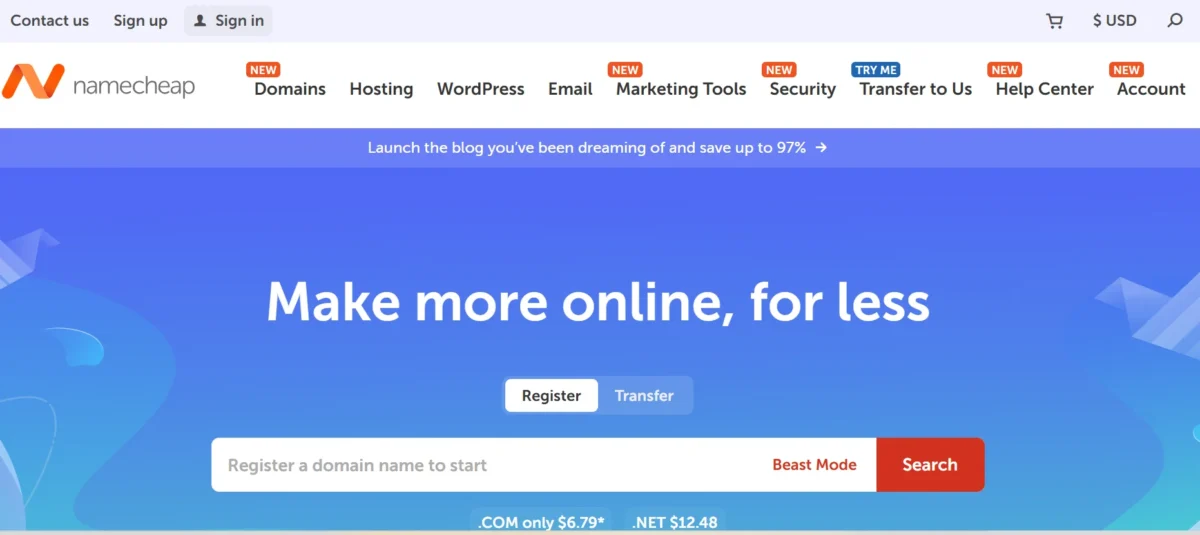
Namecheap is a budget web hosting provider known for its affordable hosting services and strong domain registration system. It’s especially popular among beginners who want a domain and hosting in one place without spending too much. The platform offers shared hosting plans, free SSL, and a beginner-friendly control panel.
However, it’s not perfect for everyone. While it delivers solid value for money, performance under heavy traffic and advanced features may feel limited. For small projects or entry-level websites, though, it does the job well.
Our Expert Opinion
From a practical standpoint, Namecheap works best as an entry-level web hosting solution. It’s ideal if you’re launching your first website or running a low-traffic project. The setup is simple, pricing is predictable, and you don’t need deep technical knowledge to get started.
That said, if your site grows or you expect high traffic, you might outgrow it. Compared to premium hosting providers, its performance and scalability are more limited. Still, for beginners, it strikes a good balance between cost and usability.
Features: What’s Included and What’s Not
Namecheap offers a mix of essential tools and beginner-friendly features. You’ll get hosting with free SSL, email accounts, and access to a cPanel hosting provider environment, which makes managing your website easier.
At the same time, some advanced features are either limited or missing. This is common with affordable hosting services, so understanding what you get—and what you don’t—is important before making a decision.
What Namecheap Includes
Namecheap provides most of the basics you’d expect from a reliable web hosting service for beginners. Its shared hosting plans include SSD hosting plans, free SSL certificates, and unmetered bandwidth for small websites.
You also get access to an easy-to-use hosting control panel, making it simple to manage files, domains, and emails. For beginners, this setup feels straightforward and doesn’t require coding knowledge.
What’s Missing or Limited
While Namecheap covers the basics, it lacks some advanced features found in higher-end providers. For example, staging environments and advanced caching options aren’t always available on lower-tier plans.
Also, performance optimization tools are limited compared to premium hosting services. If you’re planning a high-traffic or resource-heavy site, this could become a bottleneck over time.
Namecheap Pricing and Value
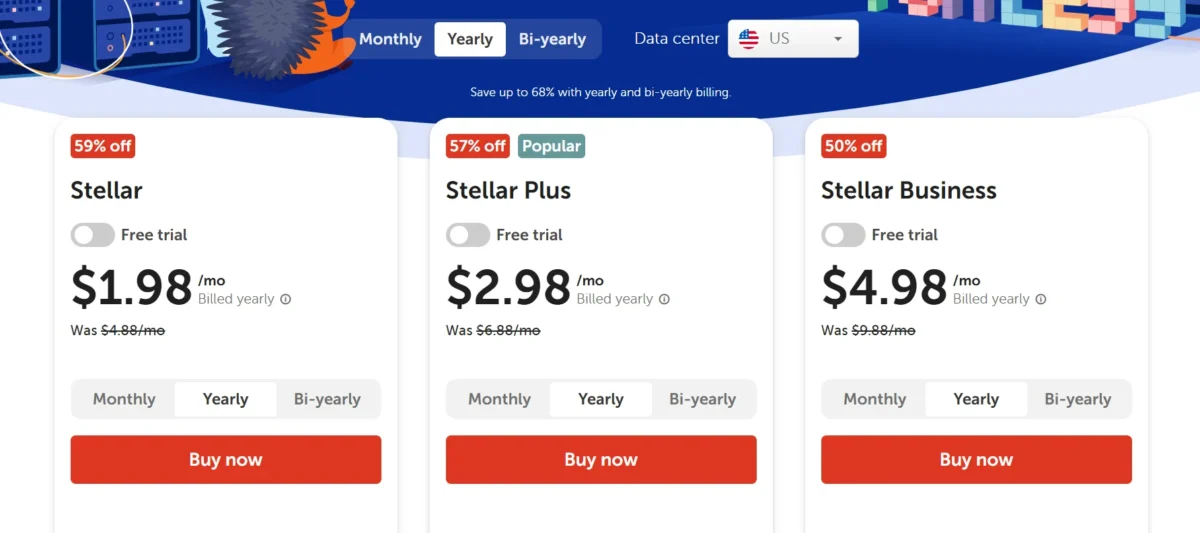
Namecheap is widely known for its low entry pricing, making it one of the best budget hosting providers under $5 per month. This makes it attractive for startups, bloggers, and small business websites.
However, like most hosting companies, renewal pricing is higher than the initial cost. Understanding this difference helps you avoid surprises later.
Namecheap Web Hosting
| Plan Name | Storage | Bandwidth | Number of Sites | Price | Key Features |
|---|---|---|---|---|---|
| Stellar | 20 GB SSD | Unmetered | 3 Websites | $1.98 | Free domain (1st year), Free SSL, Website Builder, 24/7 Support |
| Stellar Plus | Unmetered SSD | Unmetered | Unlimited | $2.98 | Unlimited storage, Auto backups, Free CDN, Free SSL, Email hosting |
| Stellar Business | 50 GB SSD | Unmetered | Unlimited | $4.98 | Cloud storage, Daily backups, Enhanced performance, Free SSL, Priority support |
Namecheap VPS Hosting Plans
| Plan Name | Storage | Bandwidth | CPU | RAM | Price | Key Features |
|---|---|---|---|---|---|---|
| Pulsar | 40 GB SSD | 1 TB | 2 Cores | 2 GB | $26.50 | Full root access, SSD storage, Free website migration, 24/7 support |
| Quasar | 120 GB SSD | 3 TB | 4 Cores | 6 GB | $46.98 | Better performance, Scalable resources, Free SSL, VPS management options |
| Magnetar | 240 GB SSD | 6 TB | 8 Cores | 12 GB | $87.95 | High performance, Advanced security, Priority support, Ideal for heavy traffic |
Namecheap Dedicated Server Plans
| Plan Name | Storage | CPU | RAM | Price | Key Features |
|---|---|---|---|---|---|
| Xeon E3-1230v5 | 480 GB SSD SATA | 4 Cores | 16 GB | $37.66 | Full root access, Dedicated resources, DDoS protection, 24/7 support |
| Xeon E-2336 | 2 × 480 GB SSD SATA | 6 Cores | 32 GB | $56.52 | Higher performance, RAID support, Enhanced security, Free setup |
| Dual Xeon Gold 5218 | 2 × 1 TB SSD NVMe | 8 Cores | 64 GB | $135.41 | Enterprise-level performance, NVMe storage, Maximum reliability, Priority support |
Namecheap WordPress Hosting Plans
| Plan Name | Storage | Backup | Price | Key Features |
|---|---|---|---|---|
| Starter | 10 GB SSD | Yes (Auto) | First Month Free | Managed WordPress, Free SSL, Easy setup, Basic performance |
| Turbo | 50 GB SSD | Yes (Auto) | $94.87 | Faster speed, More resources, Free CDN, Staging environment |
| Supersonic | 100 GB SSD | Yes (Auto) | $142.58 | High performance, Advanced caching, Priority support, Ideal for high traffic |
Namecheap Reseller Hosting Plans
| Plan Name | Storage | Bandwidth | Number of Sites | Price | Key Features |
|---|---|---|---|---|---|
| Nebula | 30 GB SSD | Unmetered | 25 Accounts | $122.10 | WHM control panel, Free SSL, White-label hosting, 24/7 support |
| Galaxy Expert | 90 GB SSD | Unmetered | 100 Accounts | $251.84 | More resources, Free cPanel accounts, Private nameservers, Email hosting |
| Universe Pro | 1500 GB SSD | Unmetered | 200 Accounts | $381.59 | High storage, Advanced reseller tools, Priority support, Scalable hosting |
Pricing and Plans
Namecheap offers multiple shared hosting plans designed for different needs. The entry-level plan is very affordable, which is great if you’re just starting or testing a project.
If you’re wondering how much Namecheap hosting costs per month, the answer depends on the plan and billing cycle. Longer plans usually come with better discounts, making yearly pricing more cost-effective.
Uptime and Reliability
Namecheap provides a standard web hosting uptime guarantee, aiming for stable performance with minimal downtime. In most real-world scenarios, uptime is decent for small and medium websites.
However, it doesn’t offer a strict 100% uptime promise like some premium providers. For mission-critical websites, this may be a concern, but for basic use, it’s generally reliable.
Domain Registration
One area where Namecheap truly stands out is in cheap domain registration. It’s one of the most popular domain registrars globally, offering competitive pricing and free domain privacy protection.
Having domain and hosting in one place simplifies management. You don’t need to connect services manually, which is especially helpful for beginners.
AI Website Builder and CDN
Namecheap includes a basic AI website builder, allowing users to create simple websites without coding. It’s useful if you want to get online quickly without hiring a developer.
It also offers CDN integration, which helps improve loading speed by distributing content across global servers. While not the most advanced system, it works well for small websites.
Ease of Use
Ease of use is one of Namecheap’s strongest points. The interface is clean, and the cPanel interface makes navigation simple even for first-time users.
If you’re looking for hosting without technical knowledge, this platform is a solid choice. Everything from setup to daily management feels intuitive.
Migration Guarantee
Namecheap offers hosting with free website migration on select plans. This means you can move your existing site without extra cost or technical hassle.
For beginners switching providers, this feature saves time and reduces risk. It’s not fully automated in all cases, but support usually helps guide the process.
NameCheap Pros and Cons
Here’s a quick breakdown of what works and what doesn’t:
✅ Pros:
- Affordable hosting pricing plans
- Beginner-friendly hosting environment
- Free SSL and domain privacy protection
- Easy-to-use control panel
- Good for low-traffic websites
❌ Cons:
- Higher renewal costs
- Limited advanced features
- Performance drops under heavy load
- Not ideal for large-scale websites
Who Should Use Namecheap in 2026
Namecheap is best suited for users who need simple, affordable website hosting services. It’s especially useful for beginners, freelancers, and small businesses with limited budgets.
If your focus is on launching quickly without dealing with technical complexity, Namecheap makes the process smooth. However, growing businesses may eventually need more powerful hosting solutions.
Namecheap is a good choice if:
You’re building your first website or running a small blog, portfolio, or startup. It’s also ideal if you want a domain and hosting bundle at a low cost.
Additionally, if you prefer predictable pricing and a simple setup, Namecheap fits well. It removes many of the barriers beginners usually face.
Do I Recommend NameCheap?
Yes—but with some conditions. If you’re a beginner or running a low-traffic site, Namecheap Review insights clearly show that it offers strong value for money.
However, if you need high performance, scalability, or advanced tools, you may want to explore other hosting providers. It’s good, but not built for every use case.
Is Namecheap Right for Your Business?
For small business hosting, Namecheap can be a practical starting point. It keeps costs low while offering enough features to get your website online and running smoothly.
That said, businesses expecting rapid growth or high traffic should consider more scalable solutions. Namecheap works best as an entry-level platform, not a long-term enterprise solution.
Consider an alternative if
You need advanced performance, faster servers, or better scalability. In that case, comparing Namecheap vs Hostinger hosting comparison or other premium providers may help.
Also, if uptime and speed are critical for your business, investing in higher-end hosting might be worth it.
How does Namecheap match up to the competition?
When you compare Namecheap with competitors like Hostinger, IONOS, and GoDaddy, the main differences come down to pricing, performance, ease of use, and long-term value.
Namecheap stands out as a strong option if your priority is low cost and a simple setup. It offers affordable starting prices and more stable renewal rates compared to most competitors. When compared to Hostinger, both providers have similar entry pricing, but Namecheap is often better in terms of pricing transparency and overall value.
However, Hostinger clearly leads in performance. It provides faster loading speeds, better WordPress optimization, and more advanced AI tools, making it a better choice for users who need higher speed and scalability.
When comparing Namecheap with IONOS, the focus shifts more toward pricing versus long-term cost. IONOS is known for extremely low introductory prices, sometimes starting as low as $1 per month. However, its renewal costs can increase significantly.
In terms of performance, both platforms are quite similar, offering around 99.9% uptime and decent speed. Still, Namecheap often performs slightly better in customer support and overall user experience.
On the other hand, GoDaddy takes a different approach as a brand-focused platform. It provides strong marketing tools, business features, and phone support, but it is generally more expensive.
When it comes to value for money and performance, GoDaddy often falls behind both Namecheap and Hostinger. In many comparisons, Hostinger offers better features at a lower price, while Namecheap remains the more budget-friendly and beginner-friendly option.
Overall, Namecheap holds a clear position in the hosting market. It may not be the fastest or most advanced provider, but it is one of the best choices for beginners, small websites, and users who want affordable hosting without surprises. If your focus is speed and advanced features, Hostinger is usually the better option.
If you want very low starting prices and don’t mind higher renewals, IONOS can be considered. And if you prefer a well-known brand with extra business tools, GoDaddy is an option, although it often comes at a higher cost.
In simple terms, Namecheap is a safe and budget-friendly starting point, while the other providers are more suitable as your website grows and requires better performance or advanced features.
- Best Budget Option: Namecheap
- Best Performance: Hostinger
- Cheapest Intro Price: IONOS
- Best Brand Tools: GoDaddy
Customer Support
Namecheap customer support is generally considered good for basic and beginner issues, but mixed for complex technical problems.
Most users report that live chat support is fast, polite, and helpful, especially for things like domain setup, DNS changes, or hosting guidance. Many beginners like it because they can usually get answers without technical knowledge, which makes it a strong point for a budget hosting provider.
However, some users also mention drawbacks. Response time can slow down during peak hours, and for advanced or billing-related issues, support may feel less detailed or more scripted. In rare cases, users report delays or back-and-forth communication before getting a full resolution.
Overall, Namecheap support works well for everyday hosting and domain needs, but it may not feel premium if you need deep technical troubleshooting or urgent enterprise-level help.
Conclusion
Namecheap is a solid choice if you want affordable, beginner-friendly hosting without complications. It covers all the basics—free SSL, simple setup, and reliable performance for smaller websites—making it a great entry point for new users.
That said, it’s not built for high-performance demands or large-scale growth. If your needs are simple, Namecheap delivers good value. But if you expect your site to scale quickly, it’s worth considering more advanced hosting options.
FAQs
Is Namecheap hosting good for beginners?
It starts very cheaply, but renewal prices are higher after the first term.
How much does Namecheap hosting cost?
It starts very cheaply, but renewal prices are higher after the first term.
Does Namecheap offer free SSL?
Yes, most plans include a free SSL certificate.
Is Namecheap fast or slow?
It’s reasonably fast for small websites, but it may slow down under heavy traffic.
Can I host a WordPress site on Namecheap?
Yes, it supports WordPress and offers easy setup options.
Related

Alex Bryant is the founder of PvyEmpire.com and a WordPress specialist with over 4 years of hands-on experience in web hosting, performance optimization, and website management. He has extensively tested top hosting providers by setting up real websites and monitoring their speed, uptime, and reliability.
At PvyEmpire.com, Alex publishes honest, data-driven reviews, detailed guides, and verified coupons & deals. His goal is to help website owners choose the right hosting, improve performance, and grow their online presence with confidence—based on real testing, not promotions.