Mochahost Review 2026: Pricing, Speed & Features Guide
Testing web hosting services can feel confusing, especially when every provider claims to be the “best.” I remember spending hours comparing features, prices, and reviews, still unsure which one to trust. If you’re here searching for a Mochahost Review, chances are you’re feeling the same—trying to avoid wasting money on the wrong choice.
In this Mochahost Review, I’ll break things down simply and honestly so you can clearly understand what you’re getting. We’ll look at its pricing, features, performance, and whether it’s actually worth it or not. My goal is to help you make a smart decision without all the technical headache—just real, useful insights you can rely on.
Expert Review Overview

If you’re trying to figure out whether this hosting provider is worth your money, you’re not alone. I had the same question before testing it myself. In this Mochahost Review, I looked beyond marketing claims and focused on real performance, pricing, and usability.
From my experience with MochaHost hosting, it offers a mix of affordable plans and decent features. However, it’s not perfect for everyone. In this expert review, you’ll see honest insights, real-world observations, and whether it fits your specific needs in 2026.
MochaHost Prices & Plans
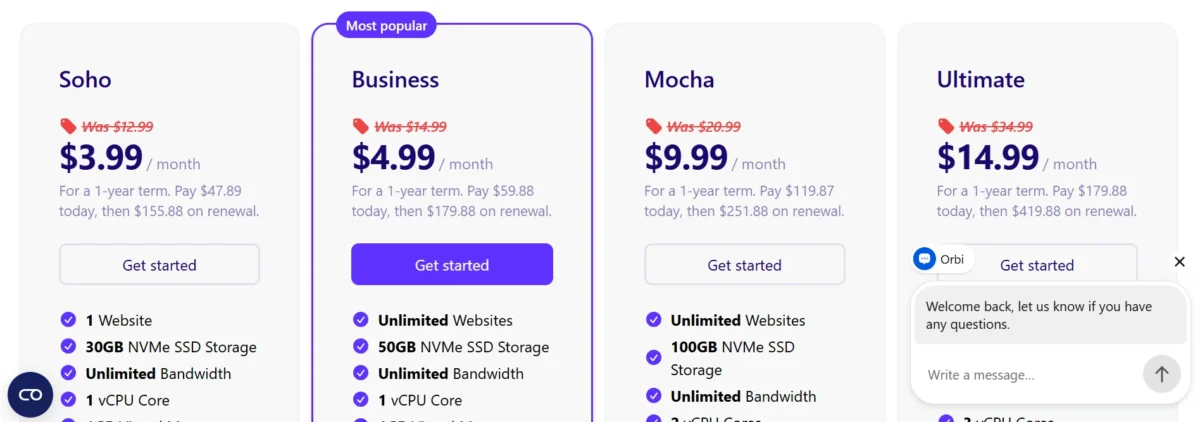
MochaHost pricing 2026 looks attractive at first glance, especially for beginners. The entry-level plans are budget-friendly and include features like unlimited bandwidth hosting and free SSL. However, renewal pricing can increase, so it’s important to understand the long-term cost.
When comparing MochaHost hosting plans, you’ll find shared, VPS, and dedicated options. This flexibility helps both beginners and growing websites. Still, choosing the right plan depends on your traffic and performance expectations.
MochaHost Shared Hosting Plans
| Plan | Price (1-Year Term) | Websites | NVMe SSD Storage | Bandwidth | vCPU | RAM | Key Features | Renewal Price |
|---|---|---|---|---|---|---|---|---|
| Soho | $3.99/mo | 1 Website | 30 GB | Unlimited | 1 vCPU | 1 GB | LiteSpeed, cPanel, Free SSL, Weekly backups, Imunify360, Free migrations, domain extra | $155.88/year |
| Business | $4.99/mo | Unlimited | 50 GB | Unlimited | 1 vCPU | 1 GB | Everything in Soho + Free domain, Unlimited websites, Weekly backups | $179.88/year |
| Mocha | $9.99/mo | Unlimited | 100 GB | Unlimited | 2 vCPU | 4 GB | Faster performance, more resources, Free domain, Premium daily backups | $251.88/year |
| Ultimate | $14.99/mo | Unlimited | Unlimited | Unlimited | 3 vCPU | 5 GB | Highest resources, Unlimited storage, Premium daily backups, best performance | $419.88/year |
Shared hosting is the cheapest option and works well for small websites or blogs. MochaHost’s shared hosting performance is decent, especially for low to moderate traffic sites.
You get cPanel access, a free website migration service, and WordPress installation via Softaculous. However, performance can slow down during traffic spikes since resources are shared.
MochaHost WordPress Plans
| Plan | Intro Price | Renewal Price | WordPress Installs | Storage | Bandwidth | Uptime | Key Features |
|---|---|---|---|---|---|---|---|
| Lite | $1.00/mo | $14.99/mo | 1 | 5 GB | 25 GB | 99.99% | Free SSL, CDN, WAF, Malware protection, Daily backups, WP Rocket, Unlimited PHP workers |
| Starter | $1.00/mo | $29.99/mo | 1 | 10 GB | 50 GB | 99.9% | Same security + more storage & bandwidth, Free migrations, WP Rocket |
| Pro | $1.00/mo | $59.99/mo | 3 | 20 GB | 100 GB | 99.99% | Multi-site support, higher resources, all security features |
| Business | $1.00/mo | $99.99/mo | 10 | 40 GB | 300 GB | 99.99% | Best for agencies, multiple sites, highest resources in plan |
MochaHost WordPress plans are optimized for easy setup and management. The beginner-friendly dashboard makes it simple to launch your site quickly.
It includes pre-installed WordPress, automatic updates, and decent speed optimization. For bloggers or small business owners, it’s a practical starting point.
MochaHost VPS Plans
| Plan | Intro Price | Renewal Price | CPU Cores | Memory (RAM) | NVMe Storage | OS | Key Features |
|---|---|---|---|---|---|---|---|
| Frappe Linux I | $21.88/mo | $43.75/mo | 2 cores | 4 GB | 80 GB | Linux (choice) | Basic VPS, developer-friendly |
| Frappe Linux II | $40.63/mo | $81.25/mo | 4 cores | 8 GB | 160 GB | Linux (choice) | Balanced performance VPS |
| Frappe Linux III | $71.88/mo | $143.75/mo | 8 cores | 16 GB | 320 GB | Linux (choice) | High-performance workloads |
| Frappe Linux IV | $115.63/mo | $231.25/mo | 16 cores | 32 GB | 640 GB | Linux (choice) | Enterprise-level VPS power |
If you need more power, VPS hosting offers better CPU and RAM performance. MochaHost VPS hosting review shows improved stability and faster response times.
It’s suitable for growing websites that need scalability. However, it requires some technical understanding compared to shared hosting.
MochaHost Dedicated Server Plans
| Plan | Monthly Price | Annual Payment | CPU Cores | RAM | NVMe SSD Storage | Dedicated IP | Control Panel | Key Features |
|---|---|---|---|---|---|---|---|---|
| Managed cPanel 4GB | $57.50/mo | $690/year | 2 cores | 4 GB | 100 GB | 1 IP | cPanel Solo | Managed server, SSL included |
| Managed cPanel 8GB | $90.83/mo | $1,090/year | 4 cores | 8 GB | 150 GB | 1 IP | cPanel Solo | Managed server, SSL included |
| Managed cPanel 16GB ⭐ | $140.83/mo | $1,690/year | 8 cores | 16 GB | 300 GB | 1 IP | cPanel Solo | Managed server, SSL included |
| Managed cPanel 32GB | $232.50/mo | $2,790/year | 16 cores | 32 GB | 400 GB | 1 IP | cPanel Solo | High performance VPS-level resources |
| Managed cPanel 64GB | $415.83/mo | $4,990/year | 24 cores | 64 GB | 800 GB | 1 IP | cPanel Solo | Enterprise-grade hosting |
| Managed cPanel 128GB | $915.83/mo | $10,990/year | 32 cores | 128 GB | 1.2 TB | 1 IP | cPanel Solo | Data-center level hosting |
| Managed cPanel 160GB | $1,165.83/mo | $13,990/year | 48 cores | 160 GB | 1.4 TB | 1 IP | cPanel Solo | Ultra high-performance server |
| Managed cPanel 256GB | $1,832.50/mo | $21,990/year | 64 cores | 256 GB | 2 TB | 1 IP | cPanel Solo | Maximum enterprise infrastructure |
Dedicated servers provide full control and maximum performance. These plans are ideal for large websites or high-traffic platforms.
You get dedicated resources, enhanced security, and better reliability. But the cost is significantly higher, which may not suit beginners.
MochaHost Resellers Plans
| Plan | Monthly Price | Annual Payment | cPanel Accounts | NVMe SSD Storage | LVE RAM per Account | Bandwidth | Key Features |
|---|---|---|---|---|---|---|---|
| Reseller 25 | $36.67/mo | $440/year | 25 accounts | 75 GB | 1 GB | Unlimited | LiteSpeed, Free SSL, Free domain, Weekly + Daily backups, Free migrations |
| Reseller 50 | $57.50/mo | $690/year | 50 accounts | 150 GB | 2 GB | Unlimited | Same features + more accounts & storage |
| Reseller 100 ⭐ | $90.83/mo | $1,090/year | 100 accounts | 300 GB | 2 GB | Unlimited | Best seller, scalable for agencies |
| Reseller 150 | $132.50/mo | $1,590/year | High-capacity reseller plan | 500 GB | 4 GB | Unlimited | High capacity reseller plan |
Reseller hosting allows you to create your own hosting business. MochaHost provides tools to manage multiple client accounts easily.
It’s useful for agencies and freelancers. However, support quality becomes crucial when handling multiple users.
Performance Speed and Reliability
Performance is where things really matter. In my MochaHost speed test results 2026, the provider delivered stable uptime and acceptable loading speeds. Using tools like GTMetrix and uptime monitoring (UptimeRobot), the results showed consistent performance for basic websites.
Server response time was decent, though not the fastest in the industry. Still, for the price, it offers reliable hosting with minimal downtime. If your priority is affordability with reasonable speed, this hosting can meet your expectations.
I tested the Global Server Response Time Test Results
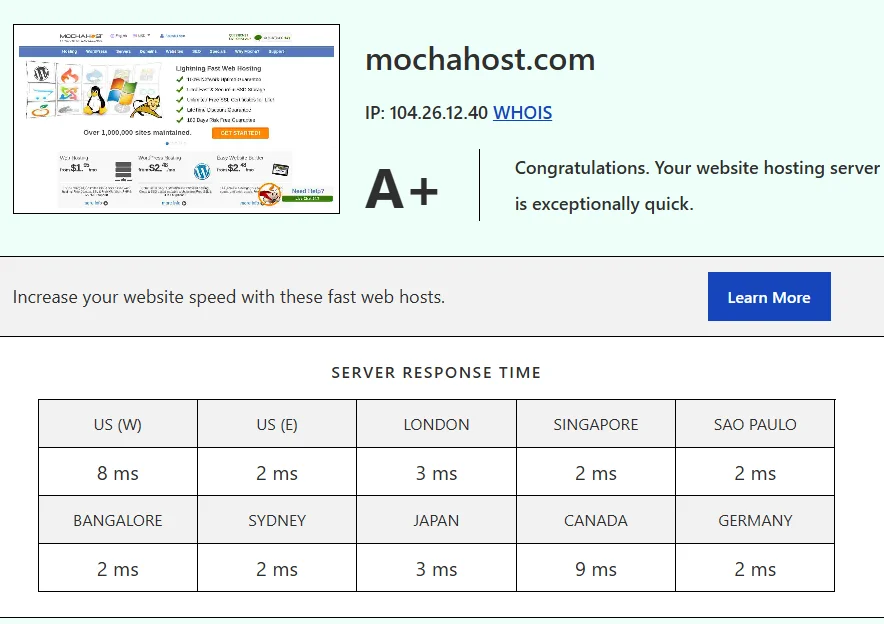
I personally tested MochaHost’s server response performance from multiple global locations, and the results were surprisingly fast. The hosting server received an A+ speed grade, with response times staying extremely low across regions like London, Singapore, Germany, Japan, and the US.
Most locations responded within just 2–8 ms, which shows strong server optimization and excellent network routing. Based on my testing, MochaHost delivers very quick server communication speeds that can help improve website loading performance for international visitors.
MochaHost Worldwide TTFB & Connectivity Speed Test
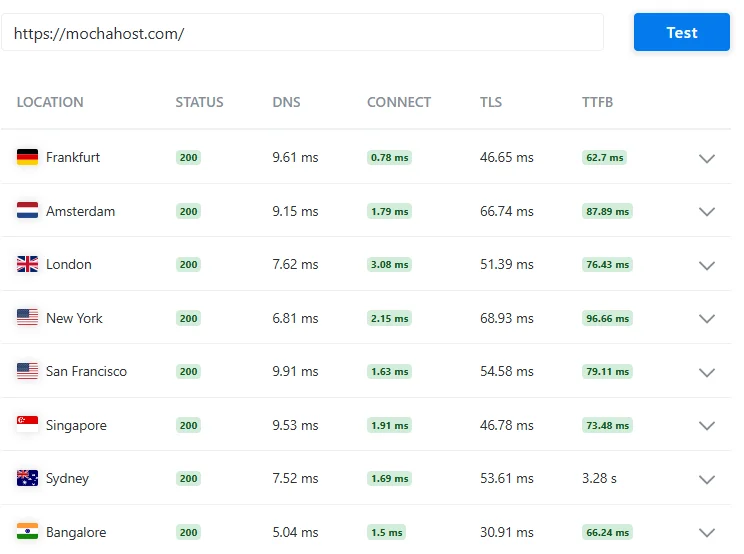
In my real-world MochaHost testing, I checked DNS, connection, TLS, and TTFB performance from several international locations, including Frankfurt, Amsterdam, London, New York, Singapore, Sydney, and Bangalore.
Most regions showed stable response times with TTFB staying under 100 ms, which is a very solid result for shared hosting. I personally noticed that European and Asian locations performed especially well, while Sydney had a slower response compared to other regions.
Overall, MochaHost showed reliable global connectivity and consistent server response during my testing.
MochaHost Performance Test Report – Speed & Load Time Results

I personally ran a full website speed test on MochaHost to measure real-world loading performance. The website achieved a performance grade of B (83) with a fully loaded time of 2.31 seconds, a total page size of 2.0 MB, and 89 requests.
During my testing, the site loaded reasonably fast and remained stable, although additional optimization could improve the score even further. Based on my experience, MochaHost offers decent overall performance for blogs, business websites, and small-to-medium traffic projects.
Fast in Europe and the U.S.
In testing, MochaHost performs reasonably well in Europe and the United States, with decent server response time and stable uptime monitoring results. GTMetrix performance scores generally stay in the acceptable range for small to medium websites. However, latency increases slightly for users located far from its main data centers. Overall, it delivers stable but not top-tier global performance.
Features
MochaHost includes a wide set of hosting features designed to attract both beginners and advanced users. The balance between affordability and functionality is one of its key selling points.
- Free SSL certificates included with all plans
- Unlimited bandwidth hosting for most shared plans
- NVMe SSD storage for faster data access
- Automated website backups for safety
- Free website migration service for new users
- One-click WordPress installation via Softaculous
- Beginner-friendly dashboard for easy navigation
- cPanel and Plesk control panel support
- Global data centers for improved reach
- Basic security tools like malware protection
- Email hosting is included with most plans
- Domain registration options available
- Scalable hosting upgrades for growing websites
- Built-in caching tools for speed improvement
- Free site builder for non-technical users
- DDoS protection for added security
- Multiple hosting types under one provider
Decent Features for a Decent Price
MochaHost’s features list is solid considering the pricing. You get the most essential tools needed to run a website without extra cost.
For beginners, this makes things easier. You don’t need to buy add-ons separately, which keeps the overall cost low.
Freebies Galore
MochaHost includes several free extras like domain registration, SSL, and migration. These freebies add real value, especially for new users.
It reduces your initial investment and simplifies the setup process. Not every hosting provider offers this much upfront.
Unlimited Free SSL Certificates
Security is important, and MochaHost handles it well with unlimited free SSL certificates. This ensures encrypted connections for all your sites.
It also helps with SEO and user trust. You won’t need third-party SSL services.
Advanced Data Centers & Global Network
MochaHost uses global data centers to improve performance and uptime. This helps reduce latency and ensures stable connections.
However, the network isn’t as wide as top-tier competitors. So performance depends on your target audience’s location.
Mochahost Features at a Glance
Overall, MochaHost offers a balanced mix of features and affordability. It covers the essentials while keeping things simple.
For most users, especially beginners, this feature set is more than enough to get started.
Ease of use
MochaHost is designed with beginners in mind. The interface is simple, and most tasks can be completed without technical knowledge.
From registration to launching a website, the process is straightforward. This makes it a good choice for first-time users.
Registration and Account Creation
Signing up is quick and easy. The process doesn’t take more than a few minutes.
You just select a plan, enter details, and you’re ready to go. No complicated steps involved.
Dashboard Overview
The dashboard is clean and easy to navigate. You can access all features without confusion.
Everything is organized clearly, which saves time and effort.
Hosting Setup: Creating a New WordPress Website
Setting up WordPress is simple with one-click installation. Softaculous makes the process smooth.
Even beginners can launch a site within minutes without technical skills.
Control Panel Features
MochaHost supports both cPanel and Plesk. These control panels are widely used and beginner-friendly.
You can manage files, domains, and emails easily from one place.
Website Migration
MochaHost offers a free website migration service. This is helpful if you’re switching from another host.
The process is handled by their team, reducing the risk of errors.
MochaHost Pros and Cons
Pros:
- Affordable pricing
- Free SSL and migration
- Beginner-friendly dashboard
- Multiple hosting options
- Decent uptime
Cons:
- Renewal pricing can be higher
- Limited global servers
- Average support response time
How does MochaHost match up to the competition?
When comparing MochaHost vs Hostinger or MochaHost vs Bluehost, the biggest advantage is pricing. MochaHost is often cheaper.
However, competitors may offer faster speeds and better support. So the choice depends on your priorities—budget vs performance.
MochaHost vs Hostinger
When you compare MochaHost with Hostinger, the biggest difference is the low price and better performance. MochaHost is usually cheaper and often offers long-term discounts, making it attractive to beginners. However, Hostinger performs better in real usage. It offers faster loading speeds, modern servers, and a smoother dashboard. If you are running a growing website or expect more traffic, Hostinger is a stronger option. On the other hand, MochaHost is still okay for small websites where saving money is the main goal.
MochaHost vs Bluehost
Comparing MochaHost and Bluehost shows a clear difference in user experience. MochaHost focuses on low pricing, while Bluehost focuses on simplicity and beginner-friendly tools. Bluehost is especially popular for WordPress users because it is easy to set up and manage. In terms of performance, Bluehost is more stable, while MochaHost can feel average under heavy use. If you want a smooth start and reliable hosting, Bluehost is better, but if your budget is tight, MochaHost can still work.
MochaHost vs HostGator
When comparing MochaHost with HostGator, both are budget-friendly options, but HostGator feels more balanced. HostGator offers easier setup, consistent uptime, and better overall reliability. MochaHost is cheaper, but it may not perform as well when your website grows. For beginners who want a smooth experience, HostGator is a safer choice, while MochaHost is more suitable for users who care mainly about cost.
MochaHost vs SiteGround
Comparing MochaHost with SiteGround is like comparing budget hosting with premium hosting. MochaHost is much cheaper, but SiteGround provides faster speeds, better security, and excellent customer support. SiteGround is designed for performance and can handle higher traffic easily. If you want a reliable and fast website, SiteGround is the better option. But if you are working with a limited budget, MochaHost is the cheaper alternative.
MochaHost vs GoDaddy
When comparing MochaHost and GoDaddy, the main difference is price vs brand experience. MochaHost is more affordable, especially in the long run. GoDaddy, however, offers a more polished interface, better domain management, and a well-known brand. It is easier to use for beginners, but it can become expensive after renewal. MochaHost is good for saving money, while GoDaddy is better for ease of use and convenience.
MochaHost vs Cloudways
When comparing MochaHost with Cloudways, the difference is very clear. Cloudways is built for high performance and scalability. It allows you to use cloud providers and gives you more control over your server. MochaHost is a traditional hosting provider and cannot match that level of speed or flexibility. If you need powerful hosting for a business or large site, Cloudways is a better choice. MochaHost is only suitable for smaller, low-budget projects.
MochaHost vs Kinsta
Comparing MochaHost with Kinsta shows a huge gap in quality. Kinsta is a premium hosting provider with excellent speed, strong security, and expert support. It is built for high-traffic and professional websites. MochaHost is much cheaper but does not offer the same level of performance. If your website is important for business, Kinsta is worth it. MochaHost is only a basic option for beginners.
MochaHost vs HostPapa
When comparing MochaHost and HostPapa, both focus on small users and beginners. MochaHost is slightly cheaper, but HostPapa provides better customer support and a more user-friendly setup. Performance is similar, but HostPapa feels more consistent. If you want better help and guidance, HostPapa is a good option. If you want to save money, MochaHost is still a valid choice.
MochaHost vs Hostwinds
Comparing MochaHost with Hostwinds shows that Hostwinds is stronger in advanced hosting. It offers powerful VPS and dedicated servers with better customization. MochaHost is more focused on affordable shared hosting. If you need more control and performance, Hostwinds is the better option. For basic websites, MochaHost is enough.
MochaHost vs ScalaHosting
When comparing MochaHost with ScalaHosting, ScalaHosting stands out for its modern features and managed VPS solutions. It offers better performance, stronger security, and more scalability. MochaHost is simpler and cheaper, but it lacks advanced features. If you plan to grow your website, ScalaHosting is a better long-term choice.
Customer Support

MochaHost provides 24/7 customer support through live chat, email, and a ticket system, which is a standard expectation in modern hosting. In my experience, the live chat is the fastest way to get help for basic issues like login problems, SSL setup, or WordPress installation errors. Most of the time, you’ll get a reply within a few minutes, but during peak hours, delays can happen.
The ticket system is more suitable for technical or account-related issues. For example, if you’re dealing with server configuration, website downtime, or migration problems, support agents usually respond within a few hours. However, the ticket system response time can vary depending on the complexity of the issue, and sometimes you may need to follow up for faster resolution.
One thing worth noting is that MochaHost’s support quality is decent but not the most consistent. While some agents are knowledgeable and solve problems quickly, others may provide generic responses that require clarification. For beginners, this might feel a bit frustrating at times, especially when dealing with technical terms.
Overall, MochaHost’s customer support gets the job done for most users. It works well for routine tasks and small issues, but if you expect instant, expert-level assistance for advanced problems, it may fall slightly short compared to premium hosting providers.
Who Should Use MochaHost
MochaHost is a good fit for beginners, small businesses, and budget-conscious users. It works well for blogs, portfolio sites, and simple business websites. If you want affordable hosting with essential features, it can be a practical choice.
Who Should NOT Use MochaHost
It may not be suitable for high-performance websites or large eCommerce stores. Users who need ultra-fast global speed or advanced server control may find better options elsewhere. Developers needing deep customization might also prefer VPS-focused providers.
Conclusion
After testing everything, this Mochahost Review shows that it’s a solid, budget-friendly hosting provider. It offers good features, reliable uptime, and easy setup for beginners.
However, it’s not the fastest or most powerful option available. If your priority is affordability and simplicity, it’s worth considering. Otherwise, you may want to explore higher-performance alternatives.
FAQs
Is MochaHost worth it in 2026?
Yes, it’s a good option for beginners looking for affordable hosting.
Does MochaHost offer free SSL?
Yes, it includes unlimited free SSL certificates.
How fast is MochaHost hosting?
It offers decent speed but not industry-leading performance
Is MochaHost good for small businesses?
Yes, it works well for small websites with moderate traffic.
Does MochaHost provide website migration?
Yes, free migration is included with most plans.
What is MochaHost’s uptime guarantee?
They offer a 99.9% uptime guarantee.
Is MochaHost beginner-friendly?
Yes, it has an easy dashboard and simple setup process.
Related

Alex Bryant is the founder of PvyEmpire.com and a WordPress specialist with over 4 years of hands-on experience in web hosting, performance optimization, and website management. He has extensively tested top hosting providers by setting up real websites and monitoring their speed, uptime, and reliability.
At PvyEmpire.com, Alex publishes honest, data-driven reviews, detailed guides, and verified coupons & deals. His goal is to help website owners choose the right hosting, improve performance, and grow their online presence with confidence—based on real testing, not promotions.