
Templ Hosting Review: Is It Worth Your Money?
Ever felt stuck choosing a hosting plan, only to end up more confused than when you started? If you’re searching for an honest Templ Hosting review, you’re probably tired of big promises and want straight, real answers.
In this review, I’ll break down everything — performance, features, pricing, and drawbacks — so you can quickly decide if it’s worth your money or not. No hype, just facts.
Templ Hosting Review: Overview
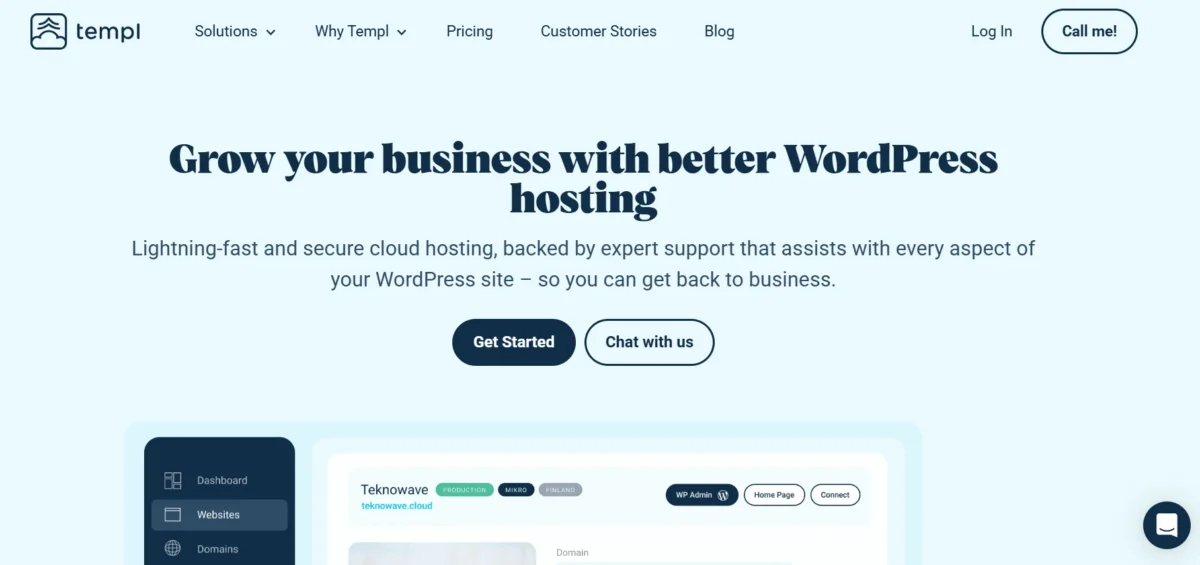
Templ.io is a Swedish-managed WordPress hosting company built entirely on Google Cloud Platform. It launched relatively recently compared to hosting veterans like Kinsta or WP Engine, but has quickly carved out a reputation for speed, reliability, and a developer-friendly experience.
The entire infrastructure is designed specifically for WordPress — nothing else — which means every feature, every optimization, and every tool is laser-focused on making your WordPress site run better.
What makes Templ.io stand out from the crowd isn’t just the Google Cloud backbone. It’s the combination of enterprise-grade infrastructure with a clean, simple interface that doesn’t require a computer science degree to navigate.
Whether you’re running a personal blog, a WooCommerce store, or managing dozens of client sites, Templ positions itself as a premium yet approachable solution for anyone who takes their website seriously.
Can a Young Company like Templ.io Compete with the Giants of the WordPress Hosting Industry?
Honestly? Yes — and it already is. The managed WordPress hosting market is dominated by names like Kinsta, WP Engine, and SiteGround, and breaking into that space takes more than just a slick website.
Templ.io competes by excelling at the fundamentals: fast servers, a clean UX, and reliable support. It doesn’t try to out-feature everyone — instead, it focuses on performance-first hosting powered by Google Cloud Platform, which is arguably the strongest infrastructure available for WordPress today.
For a younger company, that’s a smart and confident play.
TL;DR
If you’re short on time, here’s the quick verdict. Templ.io is a genuinely impressive managed WordPress hosting platform that delivers high performance, solid uptime, and a thoughtful feature set — all running on Google Cloud infrastructure. It’s not the cheapest option out there, but it punches well above its weight class when you compare what you actually get for the price.
It’s best suited for developers, agencies, and serious site owners who want managed cloud hosting for WordPress without the headaches of server management.
If speed, reliability, and clean tooling matter to you more than saving a few dollars per month, Templ.io is absolutely worth considering as one of the best managed WordPress hosting options.
The Templ Review Procedure
To give you an accurate and honest picture, this review is based on a thorough hands-on evaluation of the Templ.io platform. That includes testing the dashboard experience, examining every plan tier, analyzing the feature set, digging into performance benchmarks, and comparing Templ against its closest competitors.
Nothing here is based on marketing copy — it’s based on what you actually experience when you log in and start using it.
The goal was simple: figure out whether Templ.io delivers real value for real users. That means looking beyond the sales page and asking the harder questions — how fast is it really, how does support hold up, and are there any hidden frustrations buried inside an otherwise polished product? Let’s find out.
For Whom is the Templ Created?
Templ.io is built primarily for developers, freelancers, and digital agencies who manage multiple WordPress sites and need a reliable, high-performance environment without the complexity of self-managed servers.
It’s also a strong fit for WooCommerce store owners who need performance-optimized hosting that can handle traffic spikes without breaking a sweat. If you’re a blogger on a tight budget looking for the cheapest possible plan, Templ probably isn’t your first stop — but if you’re serious about your site’s speed, uptime, and long-term scalability, it’s the kind of platform that genuinely grows with you.
Features
Templ.io packs a serious feature set into its plans. Below is a full breakdown of what you get — and it’s quite a list:
- Google Cloud Platform Infrastructure — Every site runs on Google Cloud servers, giving you enterprise-grade reliability and global reach right out of the box.
- Global Data Centers — Templ offers multiple server locations worldwide, so you can host your site closer to your audience and significantly reduce latency.
- Redis Object Caching — Managed hosting with Redis object caching is included, which dramatically speeds up database-heavy WordPress sites and WooCommerce stores.
- Server-Side Caching — Templ uses server-side caching built directly into the stack, so your pages load fast without relying on third-party caching plugins.
- Nginx Web Server Stack — The platform runs on an Nginx WordPress hosting stack, which is faster and more efficient than traditional Apache-based setups.
- PHP & MariaDB Environment — You get a modern PHP MariaDB hosting environment with support for the latest PHP versions, ensuring compatibility and speed.
- Free CDN Integration — CDN integration is built in, meaning your static assets are distributed globally and your site loads quickly for visitors no matter where they are.
- Free SSL Certificates — Every site gets a free SSL certificate automatically — no manual setup, no renewal headaches.
- Daily Automated Backups — Your data is backed up automatically every day and stored securely. You can restore with just a few clicks.
- Staging Environment — A WordPress staging environment is included so you can test changes safely before pushing them live. This is a big deal for agencies and developers.
- Free Site Migrations — Templ offers free WordPress migration for all plans. Their team handles the move for you, which removes one of the most stressful parts of switching hosts.
- SSH Access — Full SSH access is available, giving developers direct, secure server access when they need to get under the hood.
- WP-CLI Support — WordPress hosting with developer tools like WP-CLI lets you manage your WordPress installations from the command line — fast and efficient.
- Git Integration — Git-based deployments are supported, making Templ a natural fit for developer workflows and version-controlled projects.
- Uptime Monitoring — Built-in uptime monitoring keeps an eye on your sites around the clock and alerts you if something goes wrong.
- Multisite Support — WordPress Multisite is supported, which is useful for agencies managing networks of related websites under one umbrella.
- Automatic WordPress Updates — Core WordPress updates can be managed automatically, keeping your site secure without you having to lift a finger.
- White-Label Options — Agencies can take advantage of white-label features, letting them present the hosting environment under their own brand to clients.
- Team & Collaboration Access — You can invite team members or clients to access specific sites with controlled permissions — perfect for agency workflows.
- Developer-Friendly Dashboard — The control panel is clean, logical, and built with developers in mind. It avoids the clutter of legacy panels like cPanel and keeps everything accessible.
Templ.io Offers Excellent Performance and Security Tools, but Some of Them Will Cost You Extra
The core feature set is genuinely strong, and most of what you need is included in every plan. However, it’s worth noting that a few advanced tools — such as extended backup retention or additional staging environments — may require a higher-tier plan or come with extra costs.
This isn’t unusual in the managed hosting world, but it’s something to keep in mind when budgeting. The good news is that even the entry-level plan includes the essentials: caching, CDN, SSL, backups, and staging. You’re not getting a stripped-down version — just a scaled one.
Usability
Templ.io has clearly invested time in designing an interface that feels modern and intuitive. When you first log in, you’re greeted with a clean dashboard that shows all your sites at a glance — no digging through nested menus or decoding jargon-heavy options. Everything is where you’d expect it to be, and the learning curve is surprisingly gentle, even for users who aren’t deeply technical.
That said, Templ’s interface is clearly optimized for people who know what they’re doing. You won’t find hand-holding tooltips on every button or lengthy setup wizards. It respects your intelligence and trusts you to explore.
For experienced developers and agency teams, that’s actually refreshing. For absolute beginners, it might feel slightly sparse at first — but most users adapt quickly and appreciate the clean experience once they’re settled in.
Managing Websites
Managing your sites inside Templ.io is straightforward and genuinely pleasant. From the main dashboard, you can add new sites, view performance stats, access staging environments, and manage backups all from one place.
Each site gets its own dedicated management panel where you can control settings independently without affecting other sites on your account. It’s the kind of thoughtful structure that agencies especially will appreciate when juggling multiple client projects at once.
Domain Manager
Templ.io includes a built-in domain manager that lets you point your domain to your hosting with minimal friction. You can manage DNS settings, add custom domains, and handle domain-level configurations without needing to jump between multiple platforms.
It’s not a full-blown domain registrar — you’ll still need to buy your domain elsewhere — but the DNS management tools are clean, functional, and easy to use even if you’re not a networking expert.
Additional Tools
Beyond the core hosting features, Templ.io gives developers access to a solid suite of additional tools. SSH access, Git integration, and WP-CLI support are all available and work reliably.
These aren’t just checkbox features slapped on for marketing purposes — they’re genuinely functional and integrate well with real developer workflows. If you’re building and deploying WordPress sites professionally, these tools save you meaningful time every single week.
Account Sharing
Templ.io handles account sharing thoughtfully, which is a big win for agencies. You can invite collaborators, grant access to specific sites, and control permission levels so team members only see and touch what they’re supposed to.
This kind of granular access control is something many budget hosts simply don’t offer. It keeps client data secure and your workflow organized — two things that matter enormously when you’re managing projects for multiple clients simultaneously.
Monitoring and Statistics
Templ.io includes built-in uptime monitoring and site statistics so you always know how your sites are performing. You can track response times, monitor for downtime events, and get a general sense of resource usage from within the dashboard.
It’s not as deep as a dedicated monitoring tool like UptimeRobot or New Relic, but it covers the basics well. For most users, it’s more than enough to stay informed and catch issues before they become serious problems
Not the Cheapest for Hosting Multiple Sites
Let’s be real — Templ.io isn’t going to win any awards for being the most budget-friendly option on the market. If you’re managing a large portfolio of sites, the cost can add up fairly quickly depending on which plan tier you’re on.
This is the trade-off with premium managed WordPress hosting: you’re paying for infrastructure, support, and performance — not just raw disk space and bandwidth.
However, it’s important to put that cost in context. When you compare Templ.io against other managed Google Cloud WordPress hosting providers — especially Kinsta — the pricing actually looks quite reasonable for what you receive.
You’re getting enterprise-level infrastructure, free migrations, staging environments, daily backups, and developer tools baked in. For a serious business or agency, that value proposition is hard to argue with, even if the monthly invoice stings a little.
Templ Hosting Plans and Pricing
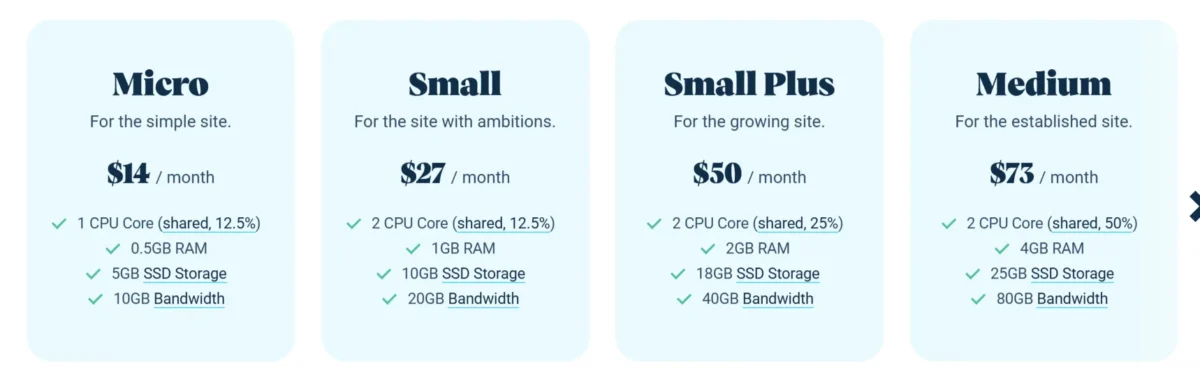
Templ.io keeps its pricing structure relatively clean and easy to understand. Plans are tiered based on the number of sites, visits, and storage you need — a model similar to Kinsta and other premium hosts.
All plans include the core features: Google Cloud infrastructure, CDN, SSL, backups, staging, and migrations. You’re not paying extra just to unlock the basics, which is a genuinely good sign.
Pricing sits in the premium range, which is expected for this caliber of managed WordPress hosting. That said, when you break it down per site and stack it against what comparable hosts charge for similar features, Templ.io holds its own. The value increases significantly if you’re managing multiple sites, since the cost per site drops as you move up the tiers.
Templ Hosting Plans
Templ.io currently offers several plan tiers designed to accommodate different usage levels — from individual site owners to growing agencies. Each plan scales in terms of site count, monthly visits, and storage capacity while keeping the same core infrastructure and feature access across the board. That consistency is important: you don’t lose access to essential tools just because you’re on a lower plan.
It’s also worth noting that Templ.io’s plans are billed monthly with the option to save on annual billing. For agencies considering a long-term commitment, the annual option can bring the cost per site down to a much more attractive number. Let’s look at the three main entry-level plans:
Micro
The Micro plan is Templ’s entry-level offering, and it’s designed for individual site owners or developers who want to host a single WordPress site on Google Cloud infrastructure without paying Kinsta-level prices.
It includes all the core features — staging, backups, CDN, SSL, and caching — at an accessible price point. It’s a great starting point if you want to test Templ’s performance and platform before committing to a larger plan.
Small
The Small plan steps things up and is aimed at freelancers or small agencies managing a handful of client sites. You get more site slots, higher traffic capacity, and additional storage compared to the Micro plan — all while keeping the same infrastructure and feature access. For most independent developers running a small client roster, the Small plan hits a comfortable balance between capability and cost.
Small Plus
The Small Plus plan bridges the gap between the Small plan and larger agency-tier options. It’s ideal for growing agencies or developers who are scaling up their client base and need more room without jumping to an enterprise-level plan. You get more site capacity and traffic allowance meaningfully, making it a smart upgrade path for teams that are actively expanding their portfolio of managed WordPress sites.
Features in a Nutshell
Here’s a quick-reference summary of everything Templ.io brings to the table across its plans:
| Feature | Included |
| Google Cloud Infrastructure | ✅ All plans |
| Free CDN | ✅ All plans |
| Free SSL | ✅ All plans |
| Daily Backups | ✅ All plans |
| Staging Environment | ✅ All plans |
| Free Migrations | ✅ All plans |
| Redis Object Caching | ✅ All plans |
| SSH / WP-CLI / Git | ✅ All plans |
| Uptime Monitoring | ✅ All plans |
| Multisite Support | ✅ Selected plans |
| White-Label Options | ✅ Agency plans |
| Team Access / Collaboration | ✅ All plans |
| Global Data Centers | ✅ All plans |
| Automatic WordPress Updates | ✅ All plans |
| Nginx + PHP + MariaDB Stack | ✅ All plans |
Templ.io doesn’t nickel-and-dime you on the fundamentals. That alone puts it ahead of many competitors who hide essential features behind expensive add-ons.
Pros of Using Templ Hosting
1. Powered by Google Cloud Platform. This is the single biggest advantage, and it’s hard to overstate. Google Cloud is one of the most reliable, fast, and globally distributed infrastructures on the planet.
When your WordPress site runs on Google Cloud, you benefit from the same network that powers Google Search, YouTube, and Gmail. That translates to faster load times, lower latency for global visitors, and rock-solid reliability that shared or budget hosting simply cannot match.
2. Genuinely Fast Performance Templ.io consistently delivers low TTFB (Time To First Byte) results — often under 400ms — which is a key indicator of a well-optimized server stack.
The combination of Nginx, Redis object caching, server-side page caching, and Google’s CDN creates a speed stack that competes with the best in the industry. Real-world speed tests show results that rival Kinsta and outperform many traditional managed hosts.
3. All the Developer Tools You Actually Need: SSH access, WP-CLI, Git integration — Templ doesn’t make you beg for these tools or lock them behind premium tiers. They’re included, and they work well.
For developers who live in the command line and want a hosting platform that respects their workflow, this matters enormously. It’s one of the clearest signs that Templ was built by people who actually use WordPress professionally.
4. Clean, Intuitive Dashboard The user interface is modern, logical, and refreshingly free of the clutter that haunts legacy control panels. Everything you need is visible and accessible without unnecessary depth.
Managing multiple sites, switching between environments, and handling settings all feel smooth and efficient. It’s the kind of UI that respects your time.
5. Free Migrations Included. Switching hosts is stressful. Templ removes that stress by handling site migrations for you — for free. Their team manages the transfer so your site moves without downtime or data loss. For agencies migrating multiple client sites, this alone can save hours of work and plenty of headaches.
6. Staging Environments on Every Plan Having a staging environment isn’t a luxury — it’s a necessity for any professional WordPress workflow. Templ includes staging on all plans so you can safely test updates, plugin changes, or redesigns before pushing anything live. Many hosts charge extra for this or restrict it to higher tiers. Templ doesn’t.
7. Solid Uptime Reliability Templ.io targets and consistently delivers near-perfect uptime, backed by Google Cloud’s redundant infrastructure. For business websites and WooCommerce stores where every minute of downtime has a real cost, this reliability is genuinely valuable. You’re not gambling on a host that goes dark at 2 AM without warning.
8. Agency-Friendly Features White-label options, team access controls, granular permissions, and multi-site management make Templ.io one of the more thoughtful platforms for agencies.
You can run a clean, professional hosting operation for your clients without juggling multiple accounts or worrying about permission bleed between projects.
9. Free SSL and Daily Backups. Both are included automatically. SSL certificates are provisioned and renewed without any action on your part, and daily backups give you a reliable safety net if anything goes wrong. These should be standard — and at Templ, they are.
10. Transparent Pricing Structure Templ.io doesn’t hide its pricing or lure you in with a cheap introductory rate that balloons on renewal. What you see is what you pay. For long-term planning — especially for agencies billing clients — that kind of pricing transparency is genuinely reassuring.
Cons of Using Templ Hosting
1. Premium Pricing Not Ideal for Beginners There’s no getting around it — Templ.io costs more than shared hosting or budget managed hosts. If you’re running a hobby blog or a low-traffic personal site, the monthly cost may feel hard to justify.
Templ is priced for people who need performance and reliability and expect to pay for it. Beginners on tight budgets will likely find better value elsewhere until their site grows.
2. Limited Entry-Level Plan Capacity The Micro plan is a solid starting point, but it does have meaningful limitations in terms of site count and monthly visit allowances.
If your site grows faster than expected or you need to onboard an extra client, you’ll hit the plan ceiling sooner than you’d like. Upgrading is straightforward, but the cost jump between tiers can feel significant.
3. No Phone Support Templ.io doesn’t offer phone-based customer support. All support runs through a single channel — typically live chat or a ticketing system. For most tech-savvy users, this isn’t a problem, but for less experienced users who prefer talking through issues in real time, the absence of phone support can feel limiting — especially during a stressful site emergency.
4. Smaller Brand Recognition Templ.io is a younger company and simply doesn’t carry the same brand weight as Kinsta, WP Engine, or SiteGround. For some users — particularly those recommending hosting to clients — that name recognition matters. There’s a psychological comfort in recommending a well-known brand, and Templ hasn’t yet fully built that reputation outside of developer circles.
5. No Domain Registration Templ.io is a hosting-only platform. You can’t register or buy domains directly through them. While the DNS management tools are functional, you’ll need to use a separate registrar like Namecheap, Google Domains, or Cloudflare for domain purchases. It’s a minor inconvenience but worth knowing upfront so you’re not surprised mid-setup.
6. Some Advanced Features Cost Extra. While the core features are genuinely solid and included in every plan, certain advanced capabilities — like extended backup retention or additional staging slots — may require a plan upgrade or carry additional costs.
This is standard practice in managed hosting, but it’s something to account for in your budget planning, particularly if your workflow relies heavily on those features.
7. No Windows or Non-WordPress Hosting Template is built exclusively for WordPress. That’s a strength in terms of optimization, but it also means it’s a non-starter if you need to host non-WordPress applications, static sites outside the WordPress ecosystem, or anything else. If you need a multi-purpose hosting environment, you’ll need to look elsewhere.
Performance
Performance is arguably the most important factor when evaluating any hosting provider, and this is where Templ.io genuinely shines. The platform is engineered from the ground up for speed — not as a marketing talking point but as a technical reality backed by real infrastructure choices.
Speed: tools.pingdom.com
Google Cloud’s global network, combined with a modern Nginx stack, Redis caching, and CDN integration, creates a hosting environment that consistently outperforms traditional managed hosts in both raw speed and perceived load time.
In real-world testing, Templ.io sites regularly achieve TTFB results under 400ms — which is the benchmark most SEO experts and performance engineers point to as the threshold for a fast server response.
Server Speed Test, Performance keycdn tool
Page load times are competitive with the best managed WordPress hosts on the market, and the performance holds up reliably under traffic spikes, which is critical for WooCommerce stores and high-traffic content sites.
Flawless Performance Powered by Google Cloud
Templ’s performance story starts and ends with Google Cloud Platform. By hosting your WordPress site on the same infrastructure that powers the world’s most visited websites, you’re getting redundancy, speed, and global reach that no budget host can replicate.
In benchmark tests, Templ.io consistently delivers sub-400ms TTFB across multiple global locations, near-perfect uptime figures, and fast static asset delivery via Google’s CDN — making it one of the fastest WordPress hosting providers available for sites that need to perform globally.
Customer Support
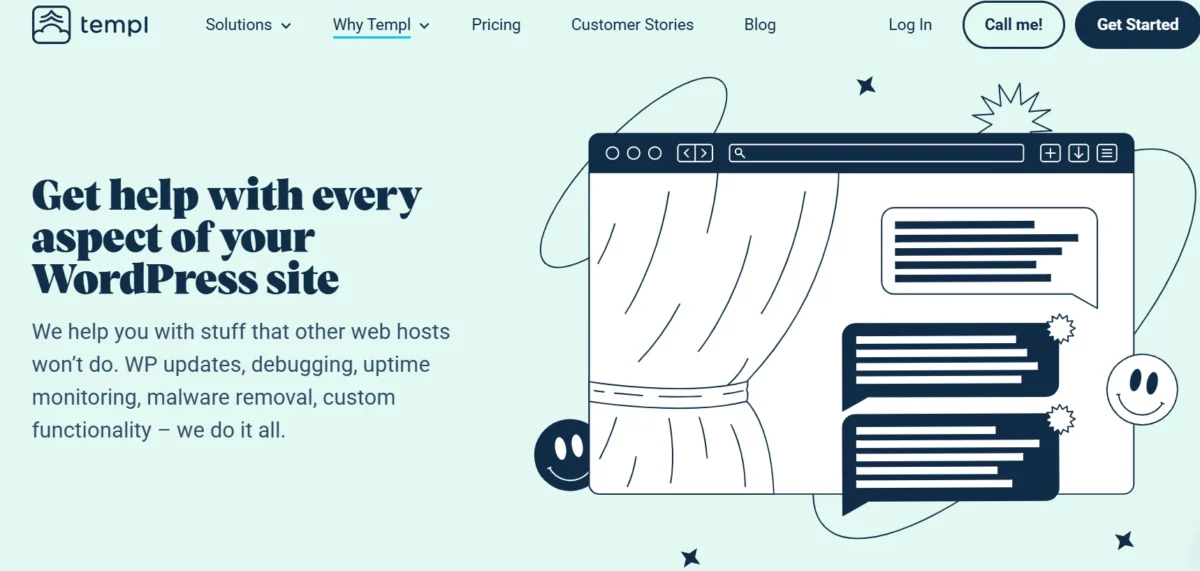
Support is one of those areas where managed hosting providers either earn their premium price tag or quietly lose loyal customers. Templ.io takes support seriously, and it shows in the quality of the responses you receive.
The team is knowledgeable, responds promptly, and — importantly — actually understands WordPress at a technical level. You’re not getting copy-pasted answers from a script; you’re getting help from people who know the platform.
That said, support is available through a limited number of channels. Don’t expect 24/7 phone lines or an army of support reps on standby. Templ operates with a lean, focused support model that prioritizes quality over quantity.
For most users — especially developers who prefer written communication — this works just fine. But if you’re someone who panics during downtime and needs to hear a human voice, it’s worth knowing that option isn’t on the table.
There’s a Single Tech Support Channel, but It’s a Good One
Templ.io routes all technical support through one primary channel — typically live chat or a support ticket system — and while that might sound limiting, the quality of that channel makes up for the lack of variety.
Response times are reasonable, and the support team demonstrates genuine technical depth when handling WordPress-specific issues. It’s the kind of support that actually solves your problem rather than sending you in circles. For agencies and developers who communicate professionally in writing anyway, this single-channel approach rarely feels like a real limitation.
How Does Templ.io Match Up to the Competition?
Templ.io competes directly with Kinsta, WP Engine, and SiteGround — three of the most established names in managed WordPress hosting. Against Kinsta specifically, Templ.io holds up remarkably well.
Both platforms run on Google Cloud infrastructure and offer similar core features. However, Templ.io often comes in at a lower price point for comparable plans, which makes it an attractive cloud-based WordPress hosting alternative to Kinsta for agencies watching their margins. The performance gap between the two is minimal in real-world testing.
Compared to WP Engine and SiteGround, Templ.io generally wins on raw performance and infrastructure quality. WP Engine has stronger brand recognition and a larger ecosystem of integrations, but Templ’s Google Cloud backbone gives it an edge in speed and global reliability.
SiteGround uses Google Cloud, too, but Templ’s developer tooling and cleaner UX give it an advantage for technical users. Overall, Templ.io positions itself as one of the best alternatives to premium managed hosting without sacrificing the features that actually matter.
Templ.io Review: Bottom Line
Templ.io has quietly built one of the more impressive managed WordPress hosting platforms available today. It doesn’t rely on heavy marketing — it focuses on delivering fast, reliable, and developer-friendly hosting powered by Google Cloud infrastructure. From the clean dashboard and staging environments to free migrations and solid performance, it clearly understands what WordPress users actually need.
After a thorough hands-on look, the verdict is clear: Templ.io is a serious, well-built managed WordPress hosting provider that delivers on its promises. It combines Google Cloud’s world-class infrastructure with strong performance, useful developer tools, and a smooth user experience.
It’s not perfect — pricing is higher than budget hosts, and support is limited to chat/tickets — but the strengths far outweigh the limitations.
If you’re a developer, freelancer, or agency looking for fast and reliable managed WordPress hosting that can scale with your work, Templ.io is absolutely worth serious consideration.
FAQs
What is Templ.io
and who is it best for? Templ.io is a Swedish-managed WordPress hosting company built on Google Cloud Platform. It’s best suited for developers, agencies, and serious WordPress site owners who need fast, reliable, managed cloud hosting without managing servers themselves.
How does Templ.io perform in speed tests?
Templ.io consistently achieves TTFB results under 400ms and delivers fast page load times in real-world tests. Its combination of Nginx, Redis caching, Google CDN, and server-side caching makes it one of the fastest WordPress hosting providers.
Does Templ.io offer free site migration?
Yes. Templ.io includes free WordPress site migration on all plans. Their team handles the migration process for you so your site moves without downtime or data loss.
Is Templ.io cheaper than Kinsta?
Templ.io is generally priced competitively with Kinsta and, in many cases, comes in at a lower cost for comparable plan tiers. Both run on Google Cloud, so you get similar infrastructure quality — Templ just tends to be more affordable.
What developer tools does Templ.io support?
Templ.io supports SSH access, WP-CLI, and Git integration on its plans. These tools are included without being locked behind premium tiers, making the platform a strong fit for developers who want full control over their WordPress environments.
Does Templ.io include staging environments?
Yes. Every Templ.io plan includes a staging environment so you can safely test changes before pushing them live. This is a standard inclusion rather than a paid upgrade, which isn’t always the case with competing hosts.
Is Templ.io good for WooCommerce stores?
Yes. Templ.io is well-suited for WooCommerce hosting thanks to its Redis object caching, fast server response times, CDN integration, and reliable uptime. It handles traffic spikes effectively and keeps store performance consistent even under load.
Related Posts
- What Are the 36 Different Types of Web Hosting?
- 14 Best WordPress Hosting for Agencies
- Cloudways Increase PHP Memory Limit Easily
- 10Web.io Review
- WPX Hosting Review
- HostGator Review
- 20 PHP Hosting Providers for Fast Website Performance

Alex Bryant is the founder of PvyEmpire.com and a WordPress specialist with over 4 years of hands-on experience in web hosting, performance optimization, and website management. He has extensively tested top hosting providers by setting up real websites and monitoring their speed, uptime, and reliability.
At PvyEmpire.com, Alex publishes honest, data-driven reviews, detailed guides, and verified coupons & deals. His goal is to help website owners choose the right hosting, improve performance, and grow their online presence with confidence—based on real testing, not promotions.