Bluehost vs Cloudways: Don’t Choose the Wrong One!
Picking a web host always sounds simple until you actually sit down to do it. You open a few tabs, start comparing plans, and suddenly you’re drowning in terms like “cloud hosting” and “shared server” without knowing what any of it means for your actual website.
If you’ve landed on the bluehost vs cloudways debate, you’re probably just trying to figure out which one won’t leave you regretting your choice six months from now.
Good news: that’s exactly what this post is here to sort out. We’ll walk through how each platform handles performance, pricing, and ease of use, so you’re not stuck guessing.
By the end, you’ll know which option actually fits your site’s needs and feel confident making the call instead of just picking a name you’ve heard before.

Bluehost vs Cloudways: Quick Comparison
Cloudways wins on raw speed and infrastructure flexibility, while Bluehost wins on beginner-friendliness and price transparency. Here’s the snapshot before we dig into the details.

| Feature | Bluehost | Cloudways |
|---|---|---|
| Hosting type | Shared, VPS, dedicated | Managed cloud (DigitalOcean, Vultr, AWS, Linode, Google Cloud) |
| Starting price | $2.69–$6.99/month | $11/month (billed monthly) |
| Free trial | 30-day money-back guarantee | 3-day free trial, no credit card |
| Avg. TTFB | ~478ms | ~119ms |
| Uptime (recent testing) | 99.96% | 99.90% |
| Data centers | 9 global locations | 150+ cities via 5 cloud providers |
| Best for | Beginners, single-site owners | Agencies, developers, growing sites |
Both hosts are solid, but they’re built for different kinds of users. Bluehost feels like a one-stop shop; Cloudways feels like a toolkit you assemble yourself.

Bluehost vs Cloudways Features and Hosting Types
Bluehost runs on traditional shared and VPS infrastructure, meaning your site shares server resources with other accounts unless you upgrade to a higher-tier plan.
Cloudways, on the other hand, is a managed cloud hosting platform — it doesn’t own servers itself but lets you deploy your site on infrastructure from DigitalOcean, Vultr, AWS, Google Cloud, or Linode, all through one dashboard. That distinction matters more than it sounds.
Cloud hosting generally handles traffic spikes better because resources like CPU and RAM aren’t fixed the way they are on shared hosting. If your site suddenly gets featured somewhere and traffic triples overnight, Cloudways lets you scale up in a few clicks.
Bluehost’s shared plans, by contrast, can hit resource caps and throw 503 errors if a site pulls too much CPU — something to keep in mind if you run WooCommerce or heavy page builders.
Bluehost vs Cloudways Key Features
- Bluehost: Free domain (first year), free SSL, cPanel dashboard, one-click WordPress install, Cloudflare CDN, AI-powered site builder (WonderSuite), automatic WordPress updates, malware scanning
- Cloudways: Choice of 5 cloud providers, NVMe SSD storage, Object Cache Pro, unlimited apps per server (on most plans), vertical scaling, Git integration, SSH/SFTP access, Cloudflare Enterprise CDN add-on
- Shared ground: Both offer free SSL certificates, daily/weekly backups, staging environments, and 24/7 support
Pricing, Plans, and Overall Value
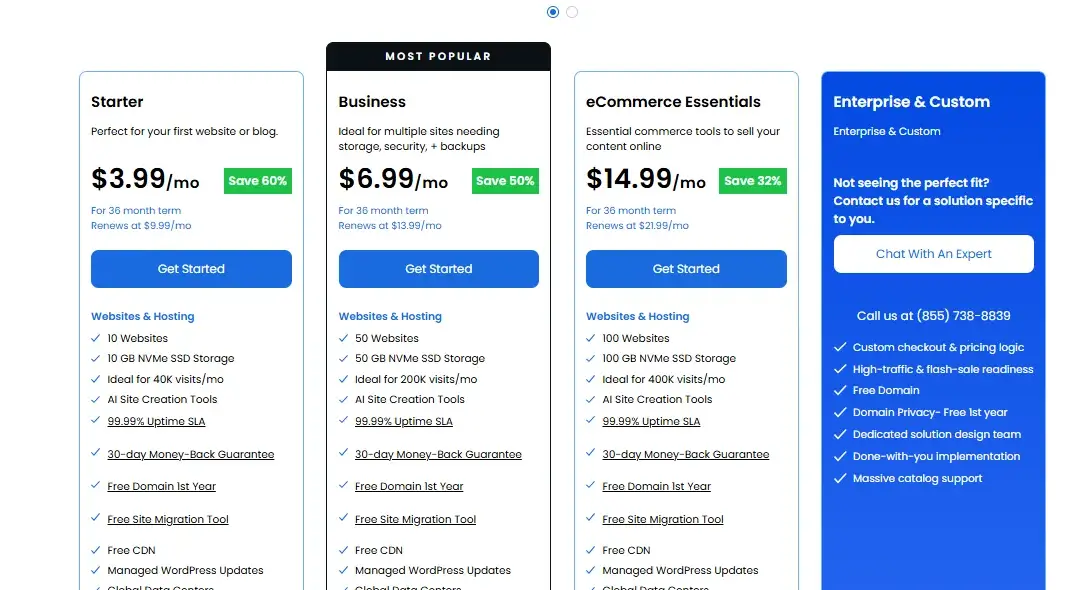
Bluehost is cheaper to start with, but Cloudways offers more predictable long-term pricing. Bluehost’s shared hosting begins around $3.99/month on a 36-month term, while Cloudways starts at $11/month with no long-term contract required.

That gap looks bigger than it actually is once you factor in renewals. Bluehost’s promotional pricing jumps significantly at renewal — often to $9.99–$13.99/month depending on the plan — while Cloudways’ pricing stays roughly flat since it’s billed monthly against actual server usage. If you hate surprise renewal bills, that’s worth noting upfront.
Pricing and Refund Policies
Bluehost is the cheaper entry point, especially if you’re a first-time website owner watching every dollar. It backs that up with a 30-day money-back guarantee, giving you a full month to test things out.
Cloudways takes a different approach: instead of a refund window, it offers a 3-day free trial with no credit card required, so you can poke around the dashboard before committing any money at all.
Neither approach is objectively better — it depends on how you like to evaluate a host. If you want to build a full site before deciding, Bluehost’s 30-day guarantee gives you more breathing room. If you just want to kick the tires on the interface first, Cloudways’ trial gets you in faster.
Which Host Offers Better Long-Term Value?
For a single blog or small business site, Bluehost tends to deliver better long-term value simply because you’re not paying for cloud infrastructure you don’t need.
A basic shared plan covers most low-traffic sites just fine, and the all-in-one pricing (domain, SSL, backups) keeps things simple.
For anyone managing multiple sites, high-traffic WordPress installs, or client work, Cloudways usually pays for itself. You’re not locked into rigid plan tiers — you scale CPU and RAM as needed and only pay for what you use.
Agencies in particular tend to find the pay-as-you-go model cheaper at scale than juggling several separate Bluehost accounts.
Speed, Performance, and Uptime
Cloudways is measurably faster than Bluehost across nearly every benchmark. In GTmetrix testing conducted, Cloudways scored a 99% performance grade compared to Bluehost’s 89%, with Cloudways posting a Time to First Byte (TTFB) of roughly 119ms against Bluehost’s 478ms — about four times faster server response.
That speed gap comes down to infrastructure. Cloudways runs on NVMe SSD-backed cloud servers with its own Lightning Stack caching layer, while Bluehost’s shared plans rely on more conventional server architecture.
If page speed directly affects your conversions or SEO rankings — and for most sites, it does — this is one of the more important differences in this whole comparison.
Page Load Speed and Response Times
| Metric | Bluehost | Cloudways |
|---|---|---|
| TTFB | 478ms | 119ms |
| Largest Contentful Paint (LCP) | 1.5s | 925ms |
| First Contentful Paint (FCP) | 876ms | — |
| Total Blocking Time (TBT) | 0ms | 1ms |
| Fully Loaded Time | 2.1s | 5.5s* |
*Cloudways’ fully loaded time can run higher on richer, content-heavy test builds, but its backend response speed (TTFB and LCP) consistently outperforms Bluehost — the metrics that matter most for perceived speed and SEO.
Uptime, Caching, CDN, and Storage
- Uptime: Bluehost has posted slightly higher uptime in recent monitoring (99.96% vs. Cloudways’ 99.90%), though both are well within industry-standard reliability.
- Caching: Cloudways layers in Varnish, Redis Object Cache Pro, and its Lightning Stack; Bluehost relies more on Cloudflare’s free CDN tier and basic page caching.
- CDN: Bluehost includes Cloudflare CDN free with most plans. Cloudways offers Cloudflare Enterprise as an add-on (roughly $4.99–$5/domain/month) with features like Argo Smart Routing.
- Storage: Cloudways uses NVMe SSD storage across its cloud providers, generally faster than the SATA SSDs common on Bluehost’s shared tiers.
Ease of Use and WordPress Management
Bluehost is easier to use for most beginners, mainly because of its familiar cPanel-based dashboard and AI-guided setup wizard.
You can go from signup to a live WordPress site in about a minute using its WonderSuite builder, without touching server settings at all.
Cloudways takes a bit more comfort with technical concepts. Its dashboard splits things into “Servers” and “Applications,” which makes sense once you understand cloud hosting but can feel unfamiliar if you’ve only ever used cPanel.
That said, Cloudways’ interface is genuinely well-designed — it’s just built for people who want more control, not less.
Setup, WordPress Installation, and Dashboard
Getting a WordPress site running looks different on each platform. On Bluehost, you pick a plan, register or connect a domain, and the WonderSuite AI builder walks you through generating a themed site in roughly a minute — no separate “server” step involved.
On Cloudways, you first launch a server (choosing your cloud provider, server size, and data center), then add a WordPress application to that server.
It’s two steps instead of one, but it also means you have direct control over things like PHP version, server resources, and provider choice from day one.
Both dashboards include SSL management, staging environments, and one-click cache controls — Cloudways just exposes more of the underlying server settings, which power users appreciate and beginners sometimes find overwhelming.
Which Host Is Better for Beginners?
Bluehost is the better choice for beginners, hands down. In the bluehost vs cloudways comparison, this is one category where the gap is pretty clear-cut — Bluehost’s cPanel interface, guided onboarding, and AI site builder remove almost all the technical guesswork.
Cloudways isn’t impossible for a beginner to learn, but you’ll spend more time understanding concepts like server sizing and cloud provider selection before you feel comfortable. If this is your first website ever, Bluehost will get you there with far less friction.
Security, Backups, and Maintenance
- Malware protection: Both hosts include real-time malware scanning and removal. Cloudways layers this through Imunify360; Bluehost uses its own detection tools plus an optional CodeGuard add-on (~$3.99/month).
- Firewalls: Cloudways includes a dedicated Imunify360 firewall with brute-force and bot mitigation. Bluehost includes a Web Application Firewall (WAF) with SQL injection and XSS protection.
- Vulnerability monitoring: Cloudways adds Patchstack CVE monitoring for known WordPress plugin vulnerabilities — a feature Bluehost doesn’t currently match.
- Backups: Both offer automated backups (daily on Bluehost, daily/weekly depending on plan for Cloudways), with on-demand backup options on Cloudways.
- SSL: Free, auto-renewing SSL certificates come standard on both platforms.
Overall, Cloudways edges out Bluehost on security depth, mainly because of its proactive vulnerability scanning through Patchstack — a genuinely useful feature if you run a lot of third-party plugins.
Scalability and Server Locations
Cloudways is significantly more scalable and geographically flexible than Bluehost.
Because Cloudways runs on cloud infrastructure, you can add CPU and RAM vertically in a few clicks without migrating to a new plan — something that simply isn’t possible on Bluehost’s shared hosting tiers.
Server location is another area where the gap is wide. Bluehost operates around 9 data centers globally, covering North America, Europe, and parts of Asia.
Cloudways, by pulling from five different cloud providers, gives you access to 150+ cities across 50+ countries — including regions like South America, the Middle East, and Africa that Bluehost doesn’t directly cover.
| Bluehost | Cloudways | |
|---|---|---|
| Data center count | 9 locations | 150+ cities (via 5 providers) |
| Scaling method | Upgrade to new plan | Add CPU/RAM instantly |
| Global coverage | US-focused, some EU/Asia | Global, all continents |
If your audience is spread across multiple continents, Cloudways’ location flexibility can genuinely improve load times for visitors far from Bluehost’s nearest data center.
Customer Support Comparison
Both hosts offer solid support, but Cloudways tends to respond faster. Recent testing put Cloudways’ live chat response time under 30 seconds, compared to Bluehost’s roughly one-minute average — both fast, but Cloudways has a slight edge.
Bluehost includes phone support on its Business-tier plans, which Cloudways only offers on its higher Premium support add-on (around $100/month). For most everyday issues, though, live chat handles things quickly on both platforms.
Bluehost also backs its support with a large knowledge base of 1,000+ WordPress guides, while Cloudways offers around 300+ articles plus an AI assistant (Copilot) for quick troubleshooting.
Website Migration and Onboarding
Both hosts offer migration help, but the fine print differs. Bluehost advertises free migration only for “qualified” accounts, while anything outside that scope runs into paid migration fees.
Cloudways offers a free migration plugin for self-service moves, with paid, expert-assisted migration available for more complex sites.
Free Migration and Setup Assistance
If you’re moving an existing site, check the terms carefully before assuming it’s free.
Bluehost’s complimentary migration typically covers a single, straightforward WordPress site — more complex setups or additional sites can cost extra through its paid migration service.
Cloudways provides a free migration plugin you can run yourself, and if you’d rather not deal with it, its assisted migration service is available for a fee depending on site complexity.
Neither host makes migration frustrating, but budget-conscious movers should read the qualification terms on Bluehost before assuming their move is fully covered.
Email Hosting and Domain Features
- Bluehost: Includes free email accounts (up to 10 on most plans) and a free domain for the first year with any hosting purchase.
- Cloudways: Doesn’t include a free domain or built-in email by default — you’ll need a Rackspace or Google Workspace add-on, typically around $1 per mailbox/month.
- Domain privacy: Bluehost includes free domain privacy in the first year on qualifying plans; Cloudways doesn’t manage domains directly since it’s infrastructure-focused.
- Bottom line: Bluehost is the more complete “all-in-one” package here — useful if you don’t want to juggle separate domain registrars and email providers.
Bluehost vs Cloudways Pros and Cons
Bluehost
- ✅ Cheaper starting price
- ✅ Beginner-friendly cPanel and AI builder
- ✅ Free domain and email included
- ✅ WordPress.org recommended host
- ❌ Slower average load times
Cloudways
- ✅ Significantly faster TTFB and load times
- ✅ True vertical scaling, no plan migrations needed
- ✅ Choice of 5 cloud infrastructure providers
- ✅ Stronger proactive security (Patchstack monitoring)
- ❌ Higher starting price ($11/month)
Bluehost vs Cloudways: Which Host Is Better for You?
There’s no single winner in the bluehost vs cloudways matchup — it genuinely depends on what you’re building and how comfortable you are with technical setup.
If you want the simplest possible path to a live website, Bluehost gets you there faster and cheaper. If speed, scalability, and infrastructure control matter more to you, Cloudways is worth the higher starting cost.
Bluehost Is Best For
- First-time website owners
- Small blogs or portfolio sites
- Anyone wanting an all-in-one package (domain, email, hosting)
- Budget-conscious single-site owners
Cloudways Is Best For
- Developers and web agencies managing multiple client sites
- WooCommerce stores or high-traffic WordPress sites
- Anyone who wants cloud infrastructure without server management headaches
- Sites expecting unpredictable traffic spikes
Is Bluehost or Cloudways Better for WordPress?
Bluehost has the edge on WordPress-specific integration, since it’s officially recommended by WordPress.org and preinstalls WordPress with zero configuration. That endorsement carries weight for newer site owners who want a platform built with WordPress front and center.
That said, Cloudways isn’t a weak choice for WordPress — it just approaches things differently.
Its managed WordPress hosting includes Object Cache Pro, automatic core updates, and staging environments, all running on genuinely faster cloud infrastructure.
If you’re running a content-heavy or WooCommerce-powered WordPress site, Cloudways’ performance advantage often matters more than Bluehost’s official endorsement.
Which Is Better for High-Traffic Websites?
Cloudways handles high traffic noticeably better than Bluehost. Because Bluehost’s shared plans cap CPU usage, inodes, and database size, busy sites can run into 503 errors or admin panel slowdowns once they exceed those limits — a common complaint among growing WooCommerce stores.
Cloudways avoids that ceiling almost entirely. Since it’s built on cloud infrastructure, you can add CPU and RAM vertically the moment traffic increases, without migrating plans or risking downtime.
If you’re already seeing steady growth — or expect a traffic spike from a launch, sale, or press mention — Cloudways is the safer long-term bet.
Bluehost vs Cloudways: Final Verdict
At the end of the day, the “right” host isn’t about which platform is objectively better — it’s about which one fits where your website actually is right now.
Bluehost makes sense if you’re just starting out and want simplicity without a big upfront cost. Cloudways makes sense once speed, uptime under pressure, and scaling flexibility start to matter more than convenience.
If you’re still unsure, think about where your site will be in a year, not just today. A blog that might grow into a busy WooCommerce store is often better served by Cloudways from the start, even if it costs a bit more now.
A simple portfolio or local business site, on the other hand, probably doesn’t need cloud-level infrastructure — and Bluehost will serve it just fine.
Bluehost vs Cloudways FAQs
Which is cheaper, Bluehost or Cloudways?
Bluehost is cheaper upfront, starting around $3.99/month versus Cloudways’ $11/month. But Bluehost’s renewal pricing rises significantly, so the long-term cost gap narrows.
Is Cloudways better for beginners?
Not really — Bluehost is the more beginner-friendly option thanks to its cPanel dashboard and AI-guided setup. Cloudways is better suited to users comfortable with basic server concepts.
Does Cloudways offer a free domain?
No. Cloudways doesn’t include a free domain with its hosting plans, unlike Bluehost, which includes one for the first year.
Can you move a website from Cloudways to Bluehost?
Yes. Bluehost supports migrations from Cloudways, either through its free migration tool (for qualifying accounts) or a paid, expert-assisted migration service.
What are the main disadvantages of Cloudways?
Its higher starting price, lack of a free domain or built-in email, and a steeper learning curve for total beginners are the most common drawbacks.
Which host has better uptime?
Recent testing shows Bluehost slightly ahead at 99.96% uptime versus Cloudways’ 99.90%, though both are reliable enough for most websites.
Is Cloudways worth the extra cost over Bluehost?
For high-traffic, WooCommerce, or agency-managed sites, yes — the speed and scalability gains generally justify the higher price. For a simple blog or small business site, Bluehost’s lower cost is usually the smarter choice.

Alex Bryant is the founder of PvyEmpire.com and a WordPress specialist with over 4 years of hands-on experience in web hosting, performance optimization, and website management. He has extensively tested top hosting providers by setting up real websites and monitoring their speed, uptime, and reliability.
At PvyEmpire.com, Alex publishes honest, data-driven reviews, detailed guides, and verified coupons & deals. His goal is to help website owners choose the right hosting, improve performance, and grow their online presence with confidence—based on real testing, not promotions.