Bluehost vs GoDaddy: Hosting, Domains & Price Breakdown
Choosing between Bluehost vs GoDaddy can feel surprisingly confusing when both promise easy setup, affordable hosting, and plenty of features.
You might be wondering which one will actually give you better value without hidden costs, slow performance, or a frustrating experience later.
This comparison breaks down their hosting plans, pricing, performance, features, support, security, and ease of use. By the end, you’ll have a clearer picture of which host fits your website, budget, and long-term needs.
Bluehost vs GoDaddy at a Glance
For most new WordPress websites, Bluehost is the better overall choice because its current hosting plans combine WordPress-focused tools, staging, migration, backups, and scalable options.
GoDaddy remains attractive if you want hosting and domain management under one large registrar with a broad range of website and business tools.

| Category | Bluehost | GoDaddy | Better Choice |
|---|---|---|---|
| Entry-level web hosting | $3.99/mo on a 36-month term | $5.99/mo on a 3-year term | Bluehost |
| Entry-level storage | 10GB NVMe | 25GB NVMe | GoDaddy |
| Free domain | First year on eligible terms | Available with eligible annual hosting | Tie |
| Free SSL | Yes | Yes | Tie |
| WordPress focus | Strong | Strong | Bluehost |
| Website staging | Included on current Starter plan | Depends on product | Bluehost |
| Site migration | Free migration tool | WordPress migration tool | Tie |
| cPanel | Available | Available on standard web hosting | Tie |
| Backups | Weekly backups on current Bluehost plans | Depends on plan/product | Bluehost |
| Support | 24/7 chat; phone on selected plans | 24/7 phone, chat, and SMS | GoDaddy |
| Domain ecosystem | Strong | Extremely broad | GoDaddy |
| Refund period | 30 days for qualifying hosting | 30 days for qualifying products | Tie |
| Scalability | Shared, WordPress, VPS, dedicated, cloud | Shared, WordPress, VPS, dedicated | Tie |
| Best overall | WordPress and growing websites | Domains and all-in-one services | Bluehost |

Current Bluehost pricing lists Starter at $3.99 per month on a 36-month term with 10 websites, 10GB NVMe storage, a free first-year domain, staging, weekly backups, free migration, and a 99.99% uptime SLA.
GoDaddy’s current Economy web-hosting offer starts at $5.99 per month on a three-year term with 25GB NVMe storage, one website, cPanel, a free domain, free email, and a one-year SSL certificate.
That difference tells an important story. GoDaddy gives you more entry-level storage, while Bluehost gives you more websites and stronger WordPress-oriented management tools at its current entry-level price.
Therefore, the winner depends on what you value most, although Bluehost has the stronger package for a typical WordPress site.
Which Host Offers Better Performance?
Bluehost has the stronger hosting package on paper, but raw speed shouldn’t be judged from marketing claims alone. Server location, caching, theme quality, plugins, image sizes, CDN configuration, and traffic patterns can change the result dramatically.
| Performance factor | Bluehost | GoDaddy |
|---|---|---|
| Storage technology | NVMe SSD | NVMe SSD |
| CDN | Included on current plans | Available through hosting/security products |
| Caching | Static and object caching on current Bluehost plans | Performance and CDN options vary by plan |
| WordPress optimization | Managed WordPress updates and WordPress tools | Managed WordPress options |
| Uptime commitment | 99.99% SLA on current web-hosting plans | 99.9% guarantee applies under stated terms |
| High-traffic upgrades | VPS, cloud, dedicated and other options | VPS, dedicated and higher-performance hosting |
| Performance verdict | Strong WordPress-oriented stack | Strong hardware and performance options |
Bluehost currently advertises a 99.99% uptime SLA on its web-hosting plans and includes features such as static content caching, object caching, CDN, managed WordPress updates, and NVMe storage.
GoDaddy says its latest web-hosting hardware can provide up to 2x faster performance with its CDN and security products, although it also notes that actual results vary by region.
For a real website, however, the best test is your own site. A lightweight blog using Astra can behave very differently from a WooCommerce store packed with product images and plugins.
In other words, don’t treat a hosting company’s maximum performance claim as a guaranteed page-load time.
Website Speed and Response Time
Website speed depends on the complete delivery stack rather than the host alone. Bluehost’s current plans include NVMe storage, caching, CDN support, and WordPress optimization features.
GoDaddy also uses NVMe storage on current web-hosting plans and offers CDN-backed performance options.
| Speed factor | Bluehost | GoDaddy |
|---|---|---|
| NVMe storage | Yes | Yes |
| CDN | Included on current Bluehost web-hosting plans | Available |
| Static caching | Yes | Available through performance features |
| Object caching | Yes on current plans | Plan-dependent |
| WordPress optimization | Strong | Strong |
| Best approach | Optimize caching, images, plugins, and CDN | Optimize caching, images, plugins, and CDN |
For SEO, focus on metrics such as Time to First Byte (TTFB), Largest Contentful Paint (LCP), and Interaction to Next Paint (INP) rather than one generic “speed” number.
A host with excellent hardware can still deliver a slow page if the website loads a huge hero image or dozens of unnecessary scripts.
Uptime and Reliability
Bluehost currently has the stronger published uptime commitment on its standard web-hosting page. Its current plans advertise a 99.99% uptime SLA, while GoDaddy’s hosting page references a 99.9% uptime guarantee subject to its terms.
| Reliability measure | Bluehost | GoDaddy |
|---|---|---|
| Published uptime commitment | 99.99% SLA | 99.9% guarantee |
| Monitoring | Hosting infrastructure | Hosting infrastructure |
| Backup options | Weekly backups on current plans | Product/plan dependent |
| Suitable for business sites | Yes | Yes |
| Reliability winner by published commitment | Bluehost | — |
The difference between 99.9% and 99.99% looks tiny until you convert it into downtime. A 99.9% availability target allows about 8 hours and 46 minutes of downtime across a year, while 99.99% allows about 52 minutes.
Actual availability can differ, and SLA terms matter more than the headline percentage.
Load and Traffic Testing
Traffic handling becomes more important once your site grows beyond ordinary shared-hosting usage. A website receiving a few thousand visits monthly has very different requirements from an online store dealing with sudden traffic spikes.
| Traffic consideration | Bluehost | GoDaddy |
|---|---|---|
| Shared hosting | Yes | Yes |
| Managed WordPress | Yes | Yes |
| VPS | Yes | Yes |
| Dedicated hosting | Yes | Yes |
| Cloud options | Yes | Available through higher-tier products |
| Caching tools | Included on current plans | Available |
| Traffic growth path | Clear | Clear |
Bluehost’s current web-hosting tiers explicitly identify approximate monthly-visit capacity, including around 40,000 visits for Starter, 200,000 for Business, and 400,000 for eCommerce Essentials.
These figures are useful planning guides rather than guarantees because real traffic depends heavily on page weight and caching.
For either provider, don’t wait until a traffic spike breaks the site before upgrading. If your database queries are getting slower, PHP workers stay busy, or checkout pages struggle under simultaneous visitors, moving to a stronger hosting tier can solve the underlying resource bottleneck.
Bluehost vs GoDaddy Features
Features look similar at first glance, yet the packaging is noticeably different. Bluehost leans heavily toward WordPress management and website growth, while GoDaddy combines hosting with domains, website creation, email, marketing, and other small-business services.
| Feature | Bluehost | GoDaddy |
|---|---|---|
| WordPress hosting | Yes | Yes |
| Managed WordPress updates | Yes | Yes on managed WordPress |
| Free SSL | Yes | Yes |
| Free domain | First year on eligible plans | Available on eligible plans |
| Site migration | Free migration tool | WordPress migration tool |
| Staging | Included on current plans | Product-dependent |
| CDN | Included | Available |
| NVMe storage | Yes | Yes |
| Website builder | AI site creation tools | Website builder and Airo |
| cPanel | Available | Standard web hosting |
| WooCommerce | Yes | Yes |
| VPS | Yes | Yes |
| Dedicated hosting | Yes | Yes |
| Available | Included with current web-hosting offers | |
| Backups | Weekly on current plans | Plan-dependent |
The most important difference isn’t the number of features. It’s whether the features match your workflow.
A WordPress publisher may get more practical value from staging, migration, caching, and managed updates than from a large collection of marketing tools.
Storage, Bandwidth, and Websites
Storage and website limits can change the economics of a hosting plan quickly. GoDaddy’s current Economy plan includes 25GB of NVMe storage for one website, while Bluehost’s Starter plan includes 10GB of NVMe storage for up to 10 websites.
| Specification | Bluehost Starter | GoDaddy Economy |
|---|---|---|
| Websites | 10 | 1 |
| NVMe storage | 10GB | 25GB |
| Free domain | 1st year | Yes* |
| SSL | Free | Free for 1 year |
| Control panel | cPanel | cPanel |
| Best for | Multiple small sites | One storage-heavy site |
*Eligibility and term requirements apply.
So which specification matters more? If you plan to host several lightweight blogs, Bluehost’s 10-site allowance is much more useful. If you’re building one media-heavy website, GoDaddy’s 25GB entry-level storage can give you more breathing room.
WordPress Hosting and Integration
WordPress is where Bluehost has its clearest advantage. WordPress.org currently lists Bluehost among its recommended hosts and describes it as its longest-running recommended host.
The listing also highlights WordPress pre-installation, an AI site builder, free domain, SSL, CDN, and 24/7 support.
| WordPress feature | Bluehost | GoDaddy |
|---|---|---|
| WordPress installation | Yes | Yes |
| Managed updates | Yes | Yes on managed plans |
| WordPress migration | Free tool | Migration tool |
| Staging | Yes on current plans | Product-dependent |
| WooCommerce | Yes | Yes |
| AI website tools | Yes | Airo |
| WordPress-focused ecosystem | Very strong | Strong |
| WordPress.org recommendation | Yes | Not listed on current recommended-host page |
GoDaddy is still a capable WordPress host. Its managed WordPress Basic plan currently includes WordPress pre-installed, automatic core updates, a migration tool, CDN-backed performance, and site optimization tools.
Website Builder and Extra Tools
GoDaddy wins when you want a broader business toolkit outside WordPress. Its ecosystem combines domains, hosting, website building, email, marketing, AI tools, and other services in one account.
| Tool | Bluehost | GoDaddy |
|---|---|---|
| AI website creation | Yes | Yes |
| Drag-and-drop website building | Available | Strong |
| Domain registration | Yes | Excellent |
| Available | Yes | |
| Marketing tools | Available | Extensive |
| Website analytics | Yes | Yes |
| WordPress tools | Strong | Strong |
| Business-oriented ecosystem | Strong | Very strong |
That makes GoDaddy especially convenient for a small business owner who wants one dashboard for several online services. Bluehost makes more sense when WordPress itself is the center of the project.
Which Is Easier to Use?
Bluehost gets the edge for WordPress users, while GoDaddy is arguably easier for users who want an all-in-one business platform. Both companies simplify setup, but they organize their tools around slightly different priorities.
| Usability factor | Bluehost | GoDaddy |
|---|---|---|
| New account setup | Easy | Easy |
| WordPress onboarding | Excellent | Excellent |
| Domain management | Easy | Excellent |
| cPanel access | Yes | Yes |
| Website builder | Yes | Very strong |
| Advanced controls | Available | Available |
| Beginner guidance | Strong | Strong |
| Best for WordPress beginners | Bluehost | GoDaddy |
If you’re starting your first WordPress site, Bluehost’s guided workflow can reduce the number of decisions you need to make.
GoDaddy feels particularly natural when your project starts with a domain and then expands into hosting, email, website building, and marketing.
Dashboard and Account Management
Bluehost’s dashboard puts website management and WordPress tasks close together. You can manage sites, domains, hosting, migrations, staging, and other account functions from a centralized interface.
GoDaddy takes a broader account-management approach because its ecosystem covers more than hosting. That can be useful when you manage domains, email, websites, marketing products, and security services together.
However, the broader catalog can also mean more menus and product prompts.
Control Panel and Site Setup
Both providers make cPanel available on standard web hosting, which gives experienced users familiar tools. cPanel lets you work with files, databases, email, domains, FTP, and other hosting functions without relying entirely on a proprietary interface.
| Control-panel area | Bluehost | GoDaddy |
|---|---|---|
| cPanel | Yes | Yes |
| File management | Yes | Yes |
| Database management | Yes | Yes |
| Email management | Yes | Yes |
| Domain management | Yes | Yes |
| WordPress setup | Guided | Guided |
| Advanced controls | Available | Available |
For a beginner, the important point is simple: you rarely need to touch cPanel on day one. Start with the guided setup. Move into advanced controls only when your website actually requires them.
Which Provider Has Better Security?
Bluehost has a stronger security package on its current higher tiers, while GoDaddy provides solid baseline protection and optional security upgrades.
Neither provider should replace good WordPress security practices such as strong passwords, updates, least-privilege accounts, and independent backups.
| Security feature | Bluehost | GoDaddy |
|---|---|---|
| Free SSL | Yes | Yes |
| Malware scanning | Yes | Available |
| Malware removal | Yes on current plans | Available through security products |
| CDN | Yes | Yes |
| WAF | Included on selected plans | Available |
| DDoS protection | Included on selected plans | Available |
| Backups | Weekly on current plans | Plan-dependent |
| Domain privacy | Included on selected plans | Free domain privacy |
| Security upgrades | Yes | Yes |
Bluehost currently lists malware scanning and removal, weekly backups, SSL, CDN, and a web application firewall on selected hosting tiers.
GoDaddy’s current hosting page advertises a 30-day security trial on standard web hosting and includes CDN, WAF, daily malware scanning, and continuous monitoring in its enhanced security offering.
SSL, Backups, and Malware Protection
SSL is no longer a luxury because HTTPS protects connections and has become a basic requirement for modern websites.
Both providers offer SSL with current hosting products, although the exact duration and renewal terms can differ by plan.
Backups deserve more attention than they usually get. A backup gives you a recovery point after a plugin conflict, failed update, accidental deletion, or security incident.
Bluehost currently advertises weekly website backups across its web-hosting plans, while GoDaddy’s backup availability varies by product and security package.
Bluehost vs GoDaddy Pricing
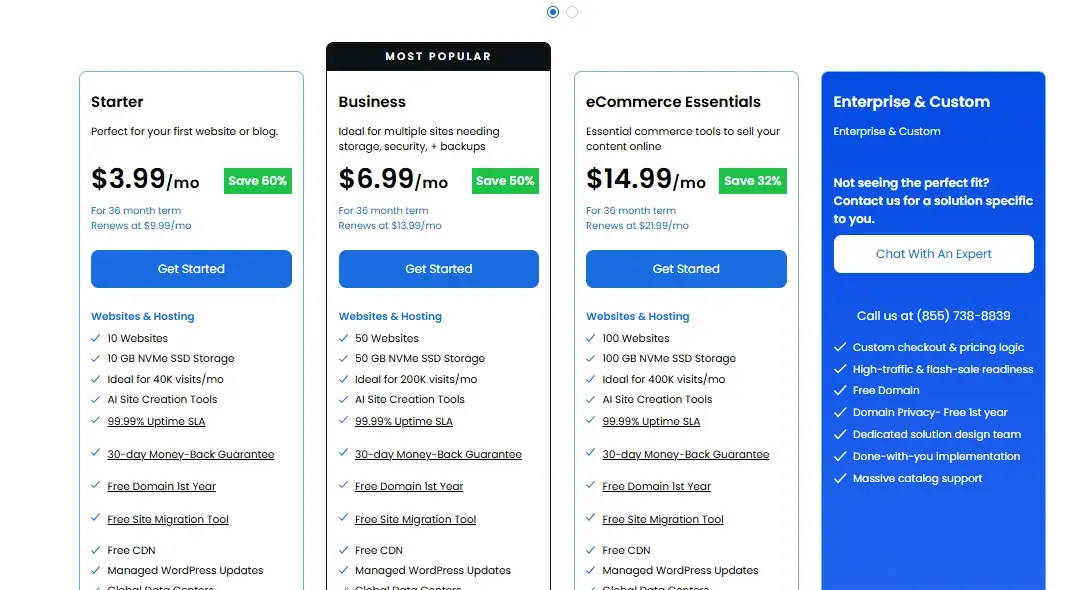
Bluehost currently has the lower advertised entry price on its main web-hosting plans. However, the first-year or first-term price only tells half the story because renewal rates can become the larger expense over several years
Bluehost Hosting Plans and Renewal Prices
Bluehost’s current pricing page lists three main web-hosting tiers with different resource levels. The Starter plan targets simple websites, Business increases websites and storage, while eCommerce Essentials adds commerce-focused tools.
| Bluehost plan | Current introductory price | 36-month renewal | Websites | Storage |
|---|---|---|---|---|
| Starter | $3.99/mo | $9.99/mo | 10 | 10GB NVMe |
| Business | $6.99/mo | $13.99/mo | 50 | 50GB NVMe |
| eCommerce Essentials | $14.99/mo | $21.99/mo | 100 | 100GB NVMe |
Prices can change and regional taxes may apply. Bluehost’s published renewal information confirms that renewal pricing depends on the billing term, with Starter listed at $15.99 monthly, $11.99 on a 12-month term, and $9.99 on a 36-month term.
GoDaddy Hosting Plans and Renewal Prices
GoDaddy’s current standard hosting lineup starts with Economy and moves through Deluxe and Ultimate tiers. The plans increase website limits, storage, and SSL coverage as you move upward.
| GoDaddy plan | Current promotional price | Regular displayed price | Websites | Storage |
|---|---|---|---|---|
| Economy | $5.99/mo | $11.99/mo | 1 | 25GB NVMe |
| Deluxe | $7.99/mo | $16.99/mo | 10 | 50GB NVMe |
| Ultimate | $12.99/mo | $21.99/mo | 25 | 75GB NVMe |
The displayed promotional price currently applies to a three-year first term on GoDaddy’s US hosting page. Because promotional terms can change, check the checkout page before treating any advertised number as your final long-term cost.
Which One Offers Better Overall Value?
Bluehost offers better overall value for most new WordPress websites. Its current Starter plan costs less than GoDaddy Economy while allowing 10 websites instead of one, and it adds staging, weekly backups, migration, CDN, and WordPress-focused features.
GoDaddy becomes more compelling if you need 25GB of entry-level storage for one website or want domain registration, hosting, website building, and business services under one provider. The smarter choice therefore depends on your actual workload rather than the size of the discount badge.
Which Has Better Domain Pricing?
GoDaddy wins the domain-management battle because domain registration is one of its core businesses. Bluehost can handle domains perfectly well, especially when you want hosting and domain management together, but GoDaddy provides a much broader registrar ecosystem.
| Domain factor | Bluehost | GoDaddy |
|---|---|---|
| Domain registration | Yes | Yes |
| Domain privacy | Available | Free on eligible domains |
| Domain forwarding | Yes | Yes |
| DNS management | Yes | Extensive |
| Domain marketplace | Limited compared with GoDaddy | Extensive |
| Domain transfer | Yes | Yes |
| Bulk domain tools | Available | Strong |
| Best for domain-heavy users | Good | GoDaddy |
GoDaddy currently describes itself as managing more than 82 million domains for more than 20 million customers. Its domain service also includes free privacy on eligible registrations and tools such as DNS management and domain forwarding.
Domain Registration and Renewal Costs
The renewal price matters more than the flashy first-year offer. For example, GoDaddy currently lists .com renewal at $22.99 while its promotional first-year price can be dramatically lower under qualifying offers. Bluehost currently lists .com registration at $12.99 and renewal at $23.99.
| Domain | Bluehost | GoDaddy |
|---|---|---|
| .com registration | $12.99 | Promotional offers vary |
| .com renewal | $23.99 | $22.99 |
| .net registration | $18.99 | Promotional offers vary |
| .net renewal | $19.99 | $24.99 |
| Domain privacy | $15 listed for .com | Free privacy on eligible domains |
Domain prices vary by extension, promotion, customer status, and region. Always check the exact renewal price for your domain before registering it because a cheap first year doesn’t necessarily mean a cheap long-term domain.
Free Domain and Domain Management
Both providers offer a free first-year domain with qualifying hosting plans. Bluehost says its free-domain promotion applies to eligible 12- or 36-month hosting purchases and selected extensions, while GoDaddy provides free domains with qualifying annual hosting or managed WordPress purchases.
| Domain feature | Bluehost | GoDaddy |
|---|---|---|
| Free first-year domain | Yes | Yes |
| Eligibility | Qualifying hosting terms | Qualifying annual hosting |
| Privacy | Plan/domain dependent | Free on eligible domains |
| DNS management | Yes | Yes |
| Domain forwarding | Yes | Yes |
| Domain marketplace | Basic | Extensive |
If you already own several domains, GoDaddy’s dedicated registrar tools can save time. If you only need one domain for a WordPress website, Bluehost’s integrated approach may be simpler.
Domain Transfer and Moving Costs
Domain transfers usually make more sense when you consider the registration year included with the transfer. GoDaddy currently advertises incoming domain transfers starting at $11.99 with one free year of registration.
Bluehost also supports domain transfers, although the exact price depends on the extension and current offer.
| Transfer factor | Bluehost | GoDaddy |
|---|---|---|
| Incoming transfers | Yes | Yes |
| Free registration year | Extension/offer dependent | Included with qualifying transfer |
| Outgoing transfer | Available | No charge stated by GoDaddy |
| Transfer lock rules | Applies | Applies |
| Bulk domain management | Good | Excellent |
Remember that changing hosting and transferring a domain are separate actions. You can keep your domain at GoDaddy while hosting the website at Bluehost without transferring the domain at all.
How Good Is Customer Support?
GoDaddy has the broader support-channel advantage, while Bluehost remains strong for WordPress-focused help.
GoDaddy currently advertises 24/7 phone, chat, and SMS support for hosting customers. Bluehost provides 24/7 chat support and phone support on qualifying plans.
| Support option | Bluehost | GoDaddy |
|---|---|---|
| 24/7 chat | Yes | Yes |
| Phone support | Yes on selected plans | Yes |
| SMS/text support | Not a primary advertised channel | Yes |
| Knowledge base | Yes | Yes |
| WordPress expertise | Strong | Strong |
| Domain support | Yes | Excellent |
| Best overall support coverage | Strong | GoDaddy |
For a beginner, availability matters more than a marketing badge. When a site breaks at midnight, being able to reach a real support channel can save hours of troubleshooting.
Which Is Better for Scalability?
Both providers offer a reasonable upgrade path, but Bluehost’s current lineup gives WordPress site owners a particularly clear growth path.
You can move from entry-level hosting into higher web-hosting tiers and then consider VPS, cloud, dedicated, or specialized solutions as resource requirements increase.
| Growth stage | Bluehost | GoDaddy |
|---|---|---|
| Small blog | Shared hosting | Shared hosting |
| Multiple sites | Business tiers | Deluxe/Ultimate |
| Growing WordPress site | Managed WordPress | Managed WordPress |
| Online store | eCommerce hosting | Managed WordPress/eCommerce |
| Higher traffic | Cloud/VPS | VPS/high-performance hosting |
| Advanced infrastructure | Dedicated | Dedicated |
| Agency needs | Agency options | Pro/business options |
Bluehost’s current product lineup includes shared hosting, managed WordPress, WooCommerce, cloud hosting, VPS, dedicated servers, and agency-oriented solutions.
For a site approaching serious traffic levels, don’t choose solely by the number of monthly visitors advertised. CPU allocation, RAM, PHP workers, database performance, object caching, CDN configuration, and query efficiency become much more important.
What Are the Refund Policies?
Both companies offer a 30-day money-back window on qualifying hosting products, but the exclusions matter. Bluehost explicitly excludes domains, monthly-term products, cloud hosting, AI services, setup fees, and many add-ons from its 30-day guarantee.
| Refund factor | Bluehost | GoDaddy |
|---|---|---|
| Standard hosting refund window | 30 days | 30 days under applicable terms |
| Domain fees | Generally nonrefundable | Deducted/list-price conditions can apply |
| Add-ons | Many excluded | Product-specific exclusions |
| Monthly plans | Excluded from Bluehost guarantee | Terms vary |
| After refund period | Generally no refund | Generally no refund |
| Policy complexity | Moderate | Product-dependent |
GoDaddy’s current refund policy also uses product-specific rules and states that refunds depend on the applicable refund period. Hosting that has already been performed can be non-refundable under certain circumstances.
Before purchasing either service, read the refund terms for the exact product in your cart. That’s especially important when a hosting package includes a “free” domain because cancelling may result in the domain’s regular price being deducted from the refund.
Bluehost vs GoDaddy Pros and Cons
The quickest way to understand the trade-off is to strip away the feature lists. Bluehost emphasizes WordPress and hosting management, while GoDaddy emphasizes its broader online-business ecosystem.
Bluehost Pros and Cons
Pros
- Strong WordPress integration
- WordPress.org recommended host
- 10 websites on the current Starter plan
- NVMe storage
- Free first-year domain on eligible terms
- Free migration tool
- Staging included on current plans
- Weekly backups
- Clear upgrade path
- 24/7 chat support
Cons
- Renewal prices are higher than introductory prices
- Entry-level storage is only 10GB
GoDaddy Pros and Cons
Pros
- Strong domain-management ecosystem
- 25GB NVMe storage on current Economy hosting
- cPanel on standard web hosting
- Free domain with eligible plans
- Free email with current web-hosting offers
- 24/7 phone, chat, and SMS support
- Strong website-builder ecosystem
- Extensive business tools
- Multiple hosting tiers
Cons
- Economy hosts only one website
- Promotional pricing can make long-term costs less obvious
Which Is Better for Different Users?
There isn’t one universal winner because your website determines which features actually matter. A beginner blog has different requirements from a domain portfolio, an agency, or a growing WooCommerce store.
Best for Beginners and WordPress
Bluehost is the better choice for most WordPress beginners. WordPress.org currently lists Bluehost among its recommended hosts, and Bluehost’s current plans include guided WordPress tools, managed updates, migration, staging, CDN, and AI site creation features.
GoDaddy is still beginner-friendly, especially if you want a website builder instead of a WordPress-first workflow. However, someone specifically searching for WordPress hosting will generally get more focused value from Bluehost.
Best for Budget-Conscious Users
Bluehost is the stronger choice when comparing the current entry-level hosting packages. Its Starter plan currently begins at $3.99 per month on a 36-month term, compared with GoDaddy Economy at $5.99 per month on a three-year term.
The calculation changes if your priority is storage. GoDaddy gives Economy users 25GB compared with Bluehost’s 10GB. Therefore, Bluehost wins for multi-site value, while GoDaddy can make sense for one larger website.
Best for Domain Management
GoDaddy is the better choice for serious domain management. Its registrar ecosystem includes extensive domain search, transfers, privacy, DNS management, marketplace tools, and a large selection of extensions.
If you only own one domain, that advantage may not matter much. In that situation, convenience may matter more than registrar depth.
Best for High-Traffic Websites
Neither entry-level shared plan should be the automatic choice for a high-traffic website. As traffic grows, you should evaluate VPS, cloud, managed WordPress, or dedicated infrastructure based on CPU, RAM, database workload, caching, and application architecture.
Bluehost has a broad set of higher-tier products and currently publishes approximate traffic guidance for several plans. GoDaddy also offers higher-performance hosting and dedicated infrastructure.
Can You Use Bluehost and GoDaddy Together?
Yes. You can register your domain at GoDaddy and host the website at Bluehost. You don’t need to transfer the domain simply because you changed hosting providers.
The basic process looks like this:
- Purchase a Bluehost hosting plan.
- Keep your domain registered at GoDaddy.
- Open the domain’s DNS settings at GoDaddy.
- Replace the domain’s nameservers with the nameservers Bluehost provides.
- Wait for DNS propagation.
- Add the domain to your Bluehost hosting account.
- Install or migrate WordPress.
- Confirm SSL works correctly.
- Test the website before considering the migration complete.
This setup can actually be useful. GoDaddy handles the domain while Bluehost handles hosting. Think of the domain as your street address and hosting as the building where your website lives. They work together even though two different companies provide them.
Bluehost vs GoDaddy: Which Should You Choose?
Bluehost is the better overall choice for most people building a WordPress website. It currently offers a stronger WordPress-centered package, more websites on the entry-level plan, staging, migration, backups, CDN, NVMe storage, and a 99.99% uptime SLA.
GoDaddy makes more sense if your priority is domain management, broader business tools, or 24/7 support through phone, chat, and SMS. Its 25GB Economy plan also gives you more entry-level storage for one website.
| Choose | Why |
|---|---|
| Bluehost | Best overall for WordPress |
| Bluehost | Better multi-site value at entry level |
| Bluehost | Stronger WordPress-focused toolkit |
| GoDaddy | Better domain-management ecosystem |
| GoDaddy | More entry-level storage |
| GoDaddy | Broader support channels |
| GoDaddy | Strong all-in-one business tools |
Before buying, compare the exact checkout price rather than relying on a headline promotion. Hosting companies frequently change introductory offers, renewal rates, included products, and term requirements.
The cheapest first month can become an expensive long-term plan if renewal pricing and add-ons don’t fit your budget.
Bluehost vs GoDaddy FAQs
Is Bluehost cheaper than GoDaddy?
Yes, Bluehost currently has the lower advertised entry-level hosting price. Its Starter plan is $3.99/month on a 36-month term, while GoDaddy Economy currently starts at $5.99/month on a three-year term.
Is Bluehost or GoDaddy better for WordPress?
Bluehost is better for most WordPress users. WordPress.org currently lists Bluehost among its recommended hosts, while Bluehost also provides WordPress-focused migration, staging, managed updates, CDN, and AI website tools.
Can I use a GoDaddy domain with Bluehost?
Yes. You can leave the domain registered at GoDaddy and point its DNS or nameservers to Bluehost without transferring the domain.
Which is better for beginners?
Bluehost is generally better for WordPress beginners. GoDaddy may be easier for users who want an all-in-one website builder and business-services platform.
Which has better performance?
There isn’t a universal winner from hosting specifications alone. Both use NVMe storage and offer CDN/performance tools, while actual speed depends heavily on the website, server location, caching, theme, plugins, and traffic.
Do Bluehost and GoDaddy offer free domains?
Yes, both offer a free first-year domain with qualifying hosting purchases. Bluehost applies eligibility rules to its hosting terms and supported extensions, while GoDaddy offers the benefit with qualifying annual hosting or managed WordPress plans.
Which hosting provider is better overall?
Bluehost is the better overall choice for most WordPress websites. GoDaddy becomes the stronger option when domain management, broader business tools, higher entry-level storage, or expanded support channels matter more than WordPress specialization.
Conclusion
Bluehost and GoDaddy both provide enough infrastructure to launch a blog, business website, portfolio, or online store.
The real difference appears when you compare the entire package rather than one promotional price. Bluehost stands out for WordPress users, multi-site hosting, staging, migration, backups, and its current entry-level value.
GoDaddy, meanwhile, remains a strong option for domain-heavy users and businesses that want hosting, domains, website building, email, marketing, and support in one ecosystem.
If WordPress is at the center of your project, choose Bluehost. If domain management and an all-in-one business platform matter more, GoDaddy deserves a closer look.

Alex Bryant is the founder of PvyEmpire.com and a WordPress specialist with over 4 years of hands-on experience in web hosting, performance optimization, and website management. He has extensively tested top hosting providers by setting up real websites and monitoring their speed, uptime, and reliability.
At PvyEmpire.com, Alex publishes honest, data-driven reviews, detailed guides, and verified coupons & deals. His goal is to help website owners choose the right hosting, improve performance, and grow their online presence with confidence—based on real testing, not promotions.