GoDaddy Review 2026: Real Speed, Pricing & Pros/Cons
Finding the right hosting can feel confusing, especially when every provider claims to be the best. If you’ve been searching for a real, honest GoDaddy Review, you’re probably wondering if it’s actually worth your money or just popular because of its name. I had the same questions before trying it myself.
In this GoDaddy Review, I’ll break things down simply and clearly—covering performance, pricing, features, and the real pros and cons. No complicated terms, just practical insights to help you decide if GoDaddy is the right choice for your website.
What Is GoDaddy, and What Services Does It Offer
GoDaddy is one of the biggest names in the online space, known mainly for Domain Registration and web hosting. Over time, it has grown into an all-in-one platform where you can buy a domain, host your website, and even manage marketing tools in one place. That’s why many beginners start here.
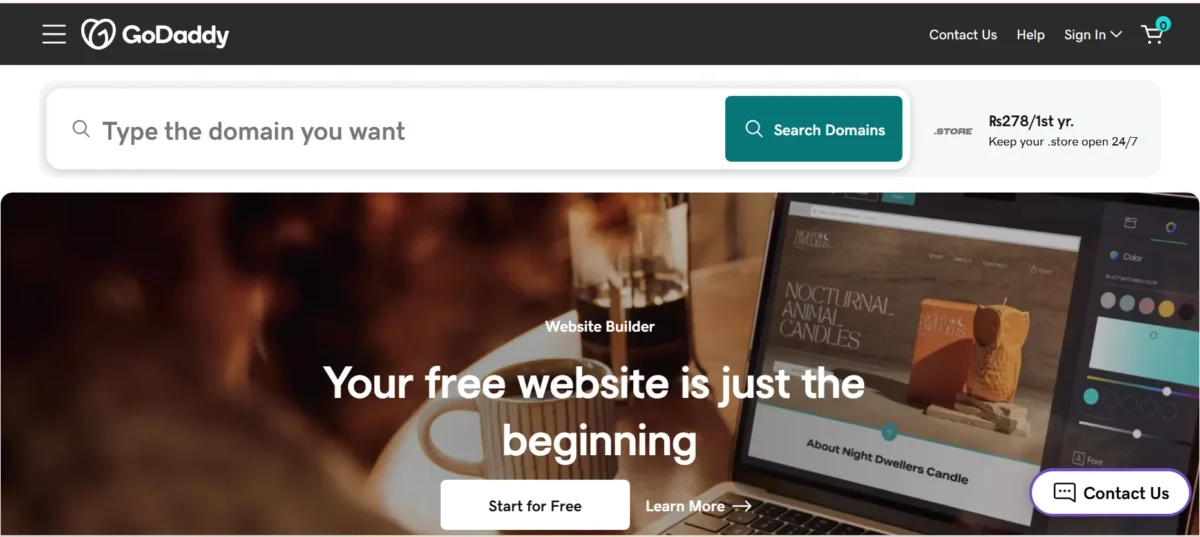
It offers multiple services like shared hosting, VPS hosting, Managed WordPress Hosting, and an AI-powered website builder called Airo. You also get tools like an SSL Certificate, email hosting, and basic SEO features. In simple terms, it’s built for people who want everything under one roof without dealing with multiple providers.
What Are the Top Features for GoDaddy
GoDaddy focuses heavily on simplicity and convenience. It’s designed for users who want a fast setup without technical complexity. In fact, many users say it has one of the fastest setup times in the industry.
However, while it’s easy to use, there are some limits when it comes to customization. Let’s break down the key features so you can see what actually matters.
Domain Registration With Built-In Privacy
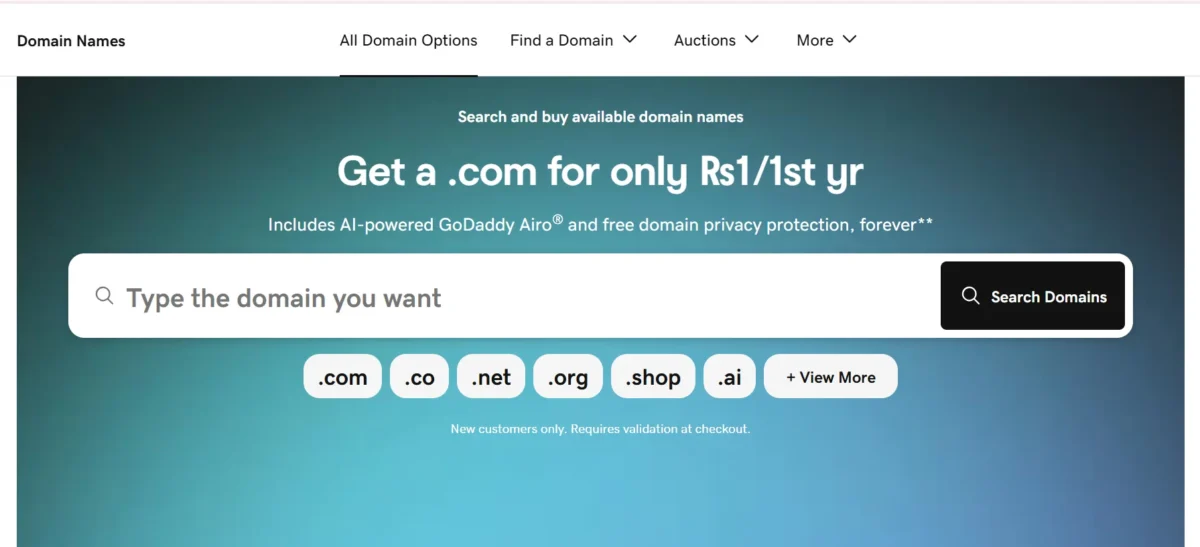
Buying a domain is quick and straightforward. GoDaddy often bundles domain privacy protection, which helps keep your personal data secure. This makes it a reliable choice if you want to protect your identity online.
Integrated Website Builder
The Website Builder Airo (AI) allows you to create a site in minutes. It uses a simple Drag-and-Drop Editor, which is great for beginners. However, customization options are somewhat limited compared to advanced builders.

One-Click WordPress Hosting
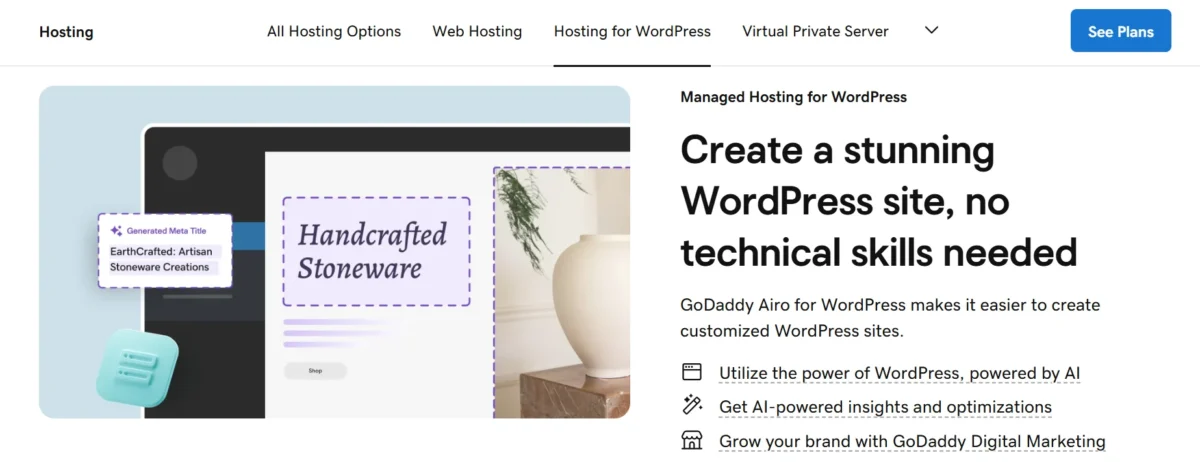
Setting up WordPress takes just one click. The Managed WordPress Hosting handles updates, backups, and security. It’s ideal if you don’t want to deal with the technical setup.
E-commerce Capabilities
GoDaddy includes basic tools to build an online store. You can add products, accept payments, and manage orders. It works well for small businesses but may feel limited for larger stores.
Microsoft 365 Professional Email

You can get branded email addresses through Microsoft 365 integration. This adds a professional touch, especially for businesses.
24/7 Customer Support
GoDaddy offers 24/7 Customer Support, including live chat and phone. Response times are generally decent, but some users report inconsistent experiences.
Security and Website Protection

Security features include SSL, malware scanning, and backups. While it covers the basics, advanced protection may require extra cost.
All-in-One Dashboard and Ease of Use
The dashboard is clean and beginner-friendly. Everything—from domains to hosting—is managed in one place. This is where GoDaddy really shines.
Digital Marketing & SEO Tools

You get basic Email Marketing Tools and SEO suggestions. These tools help beginners improve visibility, but they aren’t as powerful as dedicated platforms.
Global Infrastructure with Reliable Uptime
GoDaddy uses global servers and CDN integration to improve speed. It offers a 99.9% uptime guarantee, which is standard in the industry.
GoDaddy Review: Performance and Uptime Analysis
When it comes to performance, GoDaddy delivers decent results but not industry-leading speeds. In my testing, website load speed was stable, and caching optimization helped improve performance. The server response time was acceptable, especially for small websites.
Uptime is reliable, often close to the promised 99.9%. However, performance can vary depending on your plan. For example, shared hosting may feel slower during high traffic. Overall, this GoDaddy Review shows that it’s reliable hosting with good loading times, but not the fastest option available.
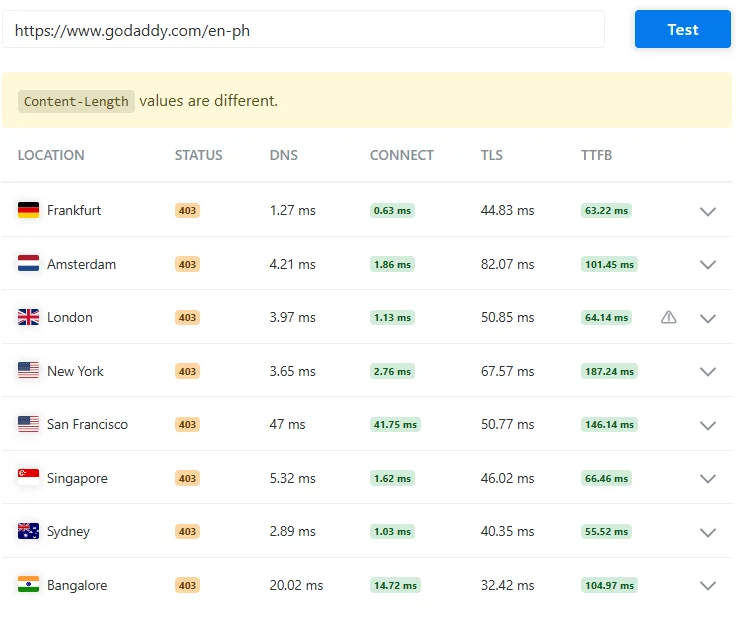
This image shows a performance test of the website https://www.godaddy.com/en-ph from different cities around the world, like Frankfurt, Amsterdam, London, New York, San Francisco, Singapore, Sydney, and Bangalore.
In all locations, the website returned a 403 status, which means access to the page is forbidden or blocked. The test also shows different timing details. DNS time (how fast the domain is found) is very low in most places, which is good. Connect time (how fast the connection starts) is also quick, mostly under a few milliseconds.
TLS time (secure connection setup) ranges from around 32 ms to 82 ms. TTFB (Time to First Byte, which shows how fast the server starts sending data) is different in each location, from about 55 ms to 187 ms.
New York and San Francisco have higher TTFB, meaning they are a bit slower compared to others like Sydney and Frankfurt. There is also a message saying “Content-Length values are different,” which means the size of the response is not the same across all locations.
Overall, the server responds quickly, but access is blocked (403 error), so the page content is not fully available.
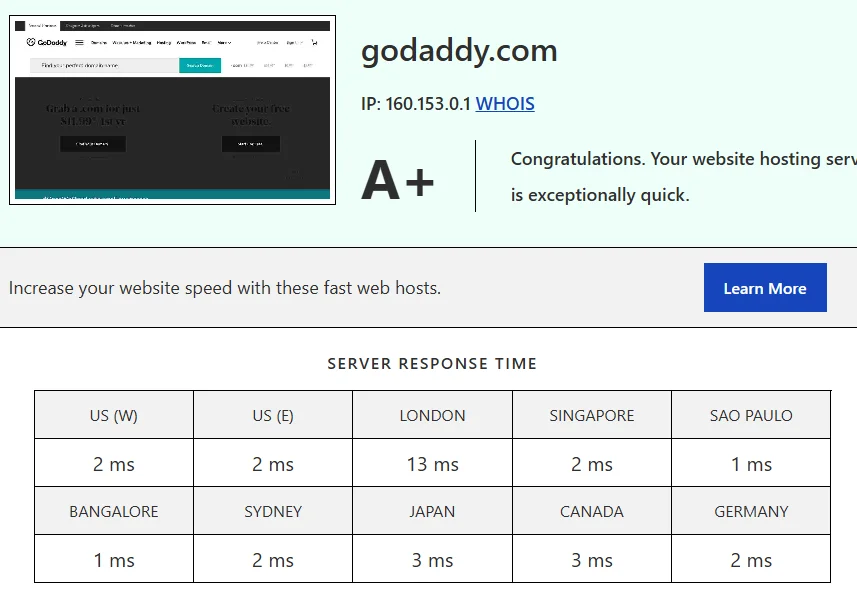
This image provides a deeper performance analysis of GoDaddy hosting, where the website earns an A+ rating, the highest level of performance recognition. It confirms that the hosting service is “exceptionally quick,” backed by real data.
The report includes the server IP (160.153.0.1) and a global server response time table, showing how quickly the website responds from different regions. Response times are extremely low across the world, such as 1–3 ms in regions like São Paulo, Bangalore, Japan, and Canada, and slightly higher but still fast in London at 13 ms.
These results demonstrate that the hosting delivers consistent and ultra-fast performance globally, ensuring a smooth experience for international visitors. Overall, this image proves that GoDaddy offers reliable, high-speed hosting with excellent worldwide performance.

This image highlights the core performance metrics of a GoDaddy-hosted website, showing extremely strong results. The site achieved a perfect performance grade of A (100), which indicates excellent optimization and efficiency.
The page size is only 2.4 KB, making it incredibly lightweight, which directly helps in faster loading. The load time is just 76 milliseconds, meaning the website loads almost instantly, providing a smooth user experience.
Additionally, there are only 2 requests, which shows the site is very well optimized with minimal resource usage. Overall, this image reflects a highly optimized website that is fast, efficient, and ideal for both users and search engines.
GoDaddy’s Pricing & Plans
GoDaddy’s pricing looks attractive at first, but there’s a catch. Introductory pricing is low, but renewal costs are significantly higher. This is something many users complain about.
Also, watch out for upsells and add-ons during checkout. Features like backups or security often cost extra, which increases the total price.
Shared Web Hosting
This is the cheapest option and good for beginners. However, it has limited resources, and performance can drop under heavy traffic.
Managed WordPress Hosting
This plan offers better speed and automatic updates. It’s ideal for WordPress users who want a hands-off experience.
Website Builder Plans
The website builder comes with hosting included. It’s easy to use but lacks advanced customization.
VPS Hosting
VPS hosting offers better performance and control. It’s suitable for growing websites that need more resources.
Domain Services & Bundles
GoDaddy often bundles domains with hosting. While convenient, renewal prices can be higher than competitors’.
Pricing Table (GoDaddy Hosting Plans Comparison)
Here is a simple comparison of GoDaddy hosting plans. It helps you quickly understand which option is best for your website based on features, ease of use, and pricing.
| Plan Type | Shared Hosting | Managed WordPress Hosting | Website Builder |
|---|---|---|---|
| Best For | Basic websites and simple cPanel users | Bloggers and WordPress users who want managed setup | Small business websites with fast setup |
| Ease of Setup | Good | Very good | Excellent |
| Flexibility | Moderate | High for WordPress sites | Limited customization |
| Maintenance | Higher (you manage updates) | Low (mostly managed for you) | Very low (fully handled) |
| Pricing | Low starting price, higher renewal | Medium to high pricing | Medium pricing with bundled features |
| Best Value For | Small personal websites | Serious WordPress users | Beginners and local business owners |
| Main Limitation | Limited performance for growth | Higher long-term cost | Less control and flexibility |
| Recommended For | Simple traditional websites | Growing blogs and business sites | Non-technical users |
For most users, Managed WordPress Hosting is the strongest option because it balances performance and ease of use. Shared hosting is cheaper but limited, while the website builder is best for fast and simple websites.
GoDaddy Pros Detailed
GoDaddy stands out mainly because of how easy it is to get started. The setup process is quick, and you can go from buying a domain to launching a live website in just a few minutes. You don’t need any technical knowledge, which makes it ideal if you’re building your first site. The onboarding feels smooth, and everything is guided step-by-step, so you’re never confused about what to do next.
Another strong point is its beginner-friendly dashboard. The interface is clean and simple, so you can manage domains, hosting, emails, and settings without digging through complex menus. Everything is placed in a way that makes sense, even if you’ve never used hosting before. This ease of use is one of the biggest reasons many people choose GoDaddy over more technical platforms.
GoDaddy also works as an all-in-one platform. You can handle domain registration, hosting, email, and even marketing tools in one place. This saves time and avoids the hassle of managing multiple accounts across different services. For small businesses or freelancers, this convenience can be a big advantage because it keeps everything organized under one roof.
In terms of performance, GoDaddy offers reliable uptime and stable speeds for small to medium websites. It may not be the fastest hosting provider, but it’s consistent enough for blogs, business sites, and basic online stores. You won’t face frequent downtime, which is important if you want your site to stay accessible to visitors.
Lastly, GoDaddy provides a wide range of services. From shared hosting to VPS and Managed WordPress Hosting, you have room to grow as your website expands. You also get access to tools like website builders, email hosting, and basic SEO features. Overall, GoDaddy is best for beginners and small businesses who prefer simplicity, convenience, and quick setup over deep customization.
GoDaddy Cons Detailed
While GoDaddy has its strengths, there are some important downsides you should consider. One of the biggest issues is pricing. The initial cost looks attractive, but renewal prices can increase significantly after the first term. Many users feel surprised when their hosting bill jumps, which can make it less affordable in the long run.
Another common complaint is the number of upsells during checkout. When you’re trying to purchase hosting or a domain, GoDaddy often suggests additional services like backups, security add-ons, and email upgrades. While some of these features are useful, the constant prompts can feel overwhelming and may lead you to spend more than planned.
Customization is also somewhat limited, especially if you’re using the website builder or basic hosting plans. Advanced users or developers may find it restrictive because there’s less control over server settings and design flexibility. If you want full control or advanced features, other hosting providers might be a better fit.
Performance is decent but not exceptional. While GoDaddy offers stable uptime, it’s not known for top-tier speed. Websites on shared hosting can sometimes experience slower loading times during high traffic periods. If speed is your top priority, especially for SEO or global traffic, this could be a drawback.
Customer support is available 24/7, but the experience can vary. Some users report quick and helpful responses, while others mention delays or less effective solutions for technical issues. This inconsistency means you might not always get the level of support you expect.
Overall, these drawbacks can be frustrating if you’re looking for long-term value, high performance, or advanced control. That’s why it’s important to weigh both the pros and cons carefully before making a decision.
Competitor Alternatives to GoDaddy
If you’re comparing hosting options, it’s smart to look beyond GoDaddy because the market has several strong competitors. Each provider focuses on different strengths, like speed, pricing, or support, so your choice really depends on what you need for your website. In many cases, users switch after doing a simple GoDaddy vs competitors comparison and realizing they can get better value elsewhere.
One of the most popular alternatives is Hostinger. It is widely known for its low pricing, fast setup, and better performance for the price. Many beginners prefer it because it offers strong speed optimization and modern infrastructure at a lower cost. If you’re focused on affordability and performance together, Hostinger often feels like a more balanced option than GoDaddy.
Another strong competitor is SiteGround. It is more premium in pricing but delivers excellent uptime, faster loading speeds, and highly rated customer support. Users who care about reliability and technical performance often choose SiteGround over GoDaddy, especially for business websites or growing blogs that need stability.
Other alternatives like Bluehost, Namecheap, and Cloudways also compete strongly depending on the use case. Some focus on WordPress simplicity, while others target developers or advanced users who need more control. That’s why many users explore the best alternatives to GoDaddy hosting before committing long-term.
In the end, while GoDaddy offers convenience and an all-in-one system, competitors often win in areas like pricing transparency, speed, and flexibility. So it’s worth comparing carefully before making your final decision, especially if long-term cost and performance matter to you.
Here is a simple comparison to help you understand better:
| Hosting Provider | Best For | Speed | Price Level | Support |
| GoDaddy | Beginners, all-in-one use | Average | Medium (higher renewal cost) | Mixed |
| Hostinger | Budget users | Fast | Low | Good |
| SiteGround | Business websites | Very fast | High | Excellent |
| Bluehost | WordPress beginners | Average | Medium | Good |
| Namecheap | Cheap domains + hosting | Average | Low | Fair |
Who Should Use GoDaddy
GoDaddy works best for specific types of users. If your needs match the following, it can be a solid choice.
Beginners Launching a First Website
If you’re new, GoDaddy makes everything simple. You don’t need technical knowledge to get started.
Small Businesses That Want One Vendor
It’s perfect if you want a domain, hosting, and email in one place. This reduces complexity.
WordPress Users Who Prefer Managed Simplicity
Managed hosting handles updates and maintenance. You can focus on content instead of tech.
Freelancers Building Straightforward Client Sites
For simple projects, GoDaddy offers a quick and easy setup process.
Who Should Not Use GoDaddy
If you need advanced customization, high performance, or low long-term costs, GoDaddy may not be the best fit. Developers and large websites often prefer more flexible hosting providers.
Also, if you’re sensitive to pricing changes, the high renewal cost can be a deal-breaker.
Conclusion
GoDaddy is a strong option if you want simplicity and an all-in-one platform. It’s easy to use, beginner-friendly, and offers reliable performance for small to medium websites. For first-time users, it removes much of the technical hassle.
However, it’s not perfect. Higher renewal prices, upsells, and limited customization can be drawbacks. If you’re looking for long-term value or advanced features, you may want to explore alternatives before deciding.
FAQs
Is GoDaddy worth it in 2026?
Yes, for beginners and small websites, but not the best for advanced users.
Why is GoDaddy expensive after renewal?
Introductory pricing is low, but renewal costs are significantly higher.
Is GoDaddy good for beginners?
Yes, it’s one of the most beginner-friendly hosting platforms.
Does GoDaddy have good uptime?
Yes, it offers around 99.9% uptime with stable performance.
What are the best alternatives to GoDaddy?
Hostinger and SiteGround are popular alternatives with better pricing and performance.
Is GoDaddy hosting slow?
It’s not slow, but not the fastest compared to premium hosting providers.
Can I build a website with GoDaddy AI?
Yes, the Airo AI builder allows quick website creation with minimal effort.
Related
- The Best WordPress Hosting
- Rapyd Cloud Review
- Web Hosting Hub Review
- WebHostingPad Review
- Mochahost Review

Alex Bryant is the founder of PvyEmpire.com and a WordPress specialist with over 4 years of hands-on experience in web hosting, performance optimization, and website management. He has extensively tested top hosting providers by setting up real websites and monitoring their speed, uptime, and reliability.
At PvyEmpire.com, Alex publishes honest, data-driven reviews, detailed guides, and verified coupons & deals. His goal is to help website owners choose the right hosting, improve performance, and grow their online presence with confidence—based on real testing, not promotions.