12 Best Multiple Domain Hosting: Affordable Options
Running more than one website and paying for a separate hosting plan for each one? That gets expensive — and exhausting — fast.
If you’ve ever wished there was a smarter way to manage all your domains without juggling multiple dashboards, renewal dates, and bills, you’re not alone. Most website owners hit this wall eventually, and it’s frustrating.
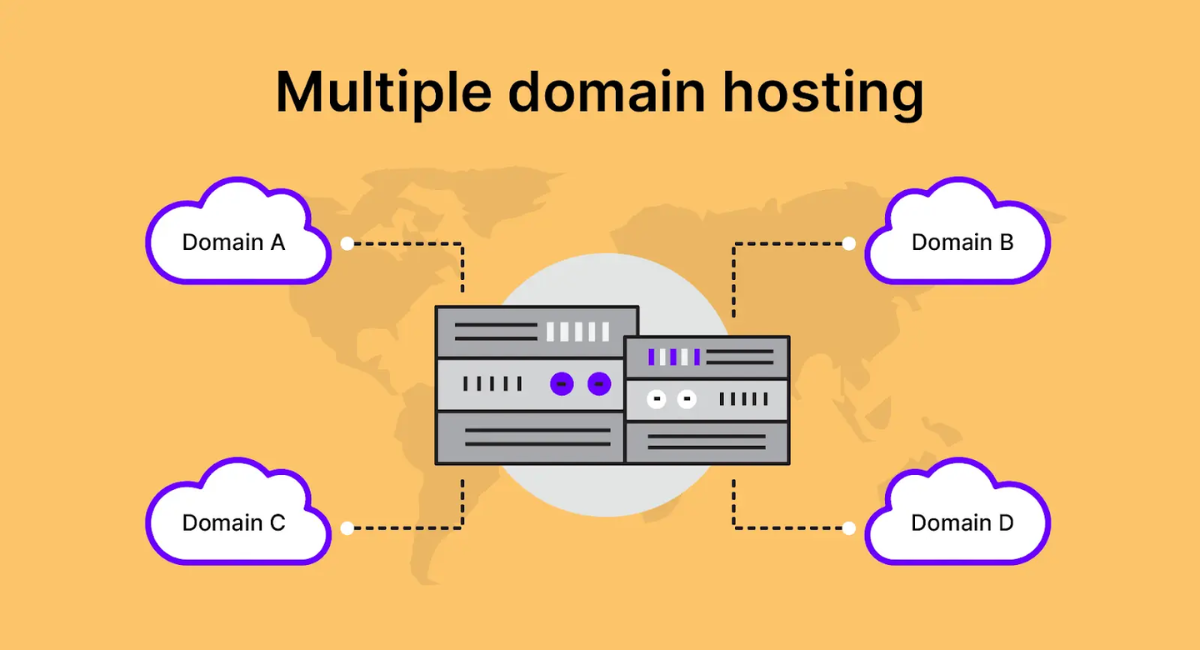
The good news is that multiple domain hosting makes it possible to run several websites from a single hosting plan — saving you time, money, and a whole lot of headaches.
In this post, we’ll walk you through exactly how it works, what to look for in a plan, and which providers actually deliver on their promises. By the end, you’ll know exactly what to do next.
Short on Time? These Are the Best Multi-Domain Hosting Services
Not everyone has time to read a full breakdown. If you need a quick answer, here’s the short version: the providers below are the ones that actually deliver on their promises when you’re hosting multiple websites under one account.
Each one was evaluated on real performance metrics, honest pricing, SSL coverage, domain management tools, and how well they handle multiple sites without slowing down or nickel-and-diming you at renewal. Whether you’re managing two blogs or twenty client sites, one of these will fit.
| Provider | Standout Feature | Sites Supported | Starting Price | Free SSL | Free Domain |
| IONOS | AI resource allocation + 99.99% uptime | Unlimited | $1.00/mo | ✅ Wildcard | ✅ |
| Hostinger | LiteSpeed speed + hPanel | Up to 100 | $2.49/mo | ✅ | ✅ |
| InterServer | Flat-rate, no renewal hike | Unlimited | $2.50/mo | ✅ | ❌ |
| SiteGround | WordPress Multisite + staging | Unlimited | $2.99/mo | ✅ | ✅ |
| HostArmada | Cloud VPS + free cPanel | Unlimited | $3.69/mo | ✅ | ✅ |
| GreenGeeks | Eco-friendly + AI site builder | Unlimited | $1.95/mo | ✅ | ✅ |
| InMotion Hosting | 200 GB NVMe + business tools | Up to 25 | $4.57/mo | ✅ | ✅ |
| Hosting.com | AMD EPYC CPUs + server location choice | Up to 10 | $6.99/mo | ✅ | ✅ |
| Bluehost | WooCommerce tools for multiple stores | Up to 100 | $1.99/mo | ✅ | ✅ |
| FastComet | FastGuard security + 30 restore points | Unlimited | $2.95/mo | ✅ | ✅ |
| SiteGround (Speed/Security) | Global CDN + advanced caching | Unlimited | $2.99/mo | ✅ | ✅ |
| ScalaHosting | Managed VPS + SPanel | Unlimited | $5.95/mo | ✅ | ✅ |
What We Looked for in the Best Web Hosting for Multiple Domains

Choosing the right host for multiple websites isn’t just about picking the cheapest plan. With multiple domain hosting, it’s about finding a setup that holds up when you’re managing DNS settings, SSL certificates, and email inboxes across five domains simultaneously.
Here’s what we focused on:
- Consistent performance across all sites — One busy site shouldn’t slow the others down. We prioritized hosts with resource isolation or AI-powered allocation.
- Transparent renewal pricing — Many hosts triple their rates after the intro period. We flagged every case where that happens.
- Centralized domain management — A clean dashboard (cPanel, hPanel, or a solid custom panel) that handles addon domains, parked domains, subdomains, and DNS in one place.
- SSL coverage for all domains — Wildcard SSL or multi-domain SSL, so every site gets HTTPS without extra cost.
- Email hosting across domains — Managing multiple professional email addresses from one account matters more than most hosts admit.
Beyond those five, we also looked at backup quality, customer support speed, and how easy it is to scale up when you outgrow your current plan.
1. IONOS: Best for Scalable Resources With Quality Support
IONOS earns the top spot for one simple reason: it actually delivers unlimited websites without the performance dips that usually come with that claim.
Its Plus and Ultimate plans give you unlimited addon domains, databases, and NVMe storage — and the platform uses AI-powered resource allocation to make sure every one of your sites gets what it needs, when it needs it.
The DNS management tools here are genuinely impressive. You can update domain forwarding, nameservers, and security settings across all your domains from one clean dashboard.
IONOS also offers a personal support consultant — a real human who can walk you through setup if things get complicated. For agencies and growing businesses, that’s a meaningful differentiator.
That said, IONOS isn’t perfect. CPU and RAM still scale with your plan tier, so if your sites collectively pull over 200 visitors per minute, you’ll want the Ultimate plan. The Essential plan only supports one website, so you need to be on Plus or higher for true multi-domain hosting.
Features
IONOS includes a free Wildcard SSL certificate on every plan, which secures your primary domain and all its subdomains with one certificate — no extra setup needed. Daily automated backups with six-day retention give you a clean restore point if something breaks.
The platform runs entirely on 100% renewable energy, which is a genuine bonus for sustainability-conscious users. And their 99.99% uptime guarantee works out to roughly four minutes of downtime per month — well ahead of the industry-standard 99.9%.
| Plan | Storage | Sites | Price/mo |
| Essential | 10 GB | 1 | $4.00 |
| Starter | 100 GB | 10 | $6.00 |
| Plus | Unlimited | Unlimited | $1.00 |
| Ultimate | Unlimited | Unlimited | $10.00 |
2. Hostinger: Fastest Budget-Friendly Hosting for Multiple Websites
Hostinger is the go-to pick if you want fast loading speeds without paying premium prices. Its Business plan supports up to 50 websites with 50 GB of NVMe storage, and the LiteSpeed servers it runs on consistently outperform hosts still using Apache.
For anyone managing multiple small-to-medium sites, this combination of speed and affordability is hard to beat.
The hPanel control panel makes multi-site management straightforward. You can manage email accounts, install WordPress, monitor performance, and handle DNS across all your domains from one interface.
Hostinger also offers agency-level VPS plans with full website isolation — ideal if you’re managing client sites and can’t afford one customer’s traffic to affect another’s. Just keep in mind that Hostinger’s prices jump substantially after the first billing period, so locking in a longer-term plan upfront saves you real money.
Features
Hostinger’s Kodee AI agent can perform over 350 admin-level WordPress actions — from backups to server health checks — which is genuinely useful when you’re managing multiple WordPress installs.
Nameserver-level DDoS protection via Cloudflare keeps your sites online even when the origin server is under attack. The in-house CDN (available from Business plan up) improves load times for international visitors. The 30-day money-back guarantee gives you enough time to test the setup before committing fully.
| Plan | Storage | Sites | Price/mo |
| Premium | 20 GB SSD | 3 | $2.49 |
| Business | 50 GB NVMe | 50 | $3.29 |
| Cloud Startup | 100 GB NVMe | 100 | $7.49 |
3. InterServer: Cheapest Way to Host Unlimited Websites at a Flat Price
InterServer does something almost no other host does: it charges you the same rate from day one and never raises it.
‘Its Standard shared hosting plan includes unlimited domains, unlimited SSD storage, unlimited email accounts, and unlimited bandwidth — all for $2.50 per month, every month. For agencies or developers managing client sites over the long term, that predictability is invaluable.
The LiteSpeed web server gives InterServer’s WordPress sites better performance than the more common Apache setups. However, InterServer’s data centers are US-only, which can mean slower load times for international audiences.
The good news is that free Cloudflare CDN integration is included, and Cloudflare’s network spans over 330 cities worldwide — which largely closes that performance gap.
Features
InterServer uses DirectAdmin as its default control panel, though you can upgrade to cPanel for an extra fee. The proprietary InterShield Security suite covers firewall protection, virus scanning, malware detection, and anti-hacking measures — and cPanel accounts are isolated so a breach on one site doesn’t spread to others.
Inter-Insurance is InterServer’s free site restoration service, where their team repairs and cleans your site at no charge. Through the Mail Baby partnership, InterServer also guarantees email deliverability — even for Gmail and Outlook inboxes — which is a notable edge if your domains send high volumes of email.
| Plan | Storage | Sites | Price/mo |
| Standard | Unlimited SSD | Unlimited | $2.50 |
| Boost 2 | Unlimited SSD | Unlimited | $9.95 |
| Boost 4 | Unlimited SSD | Unlimited | $19.95 |
4. SiteGround: Advanced WordPress Hosting for Unlimited Websites
SiteGround is the strongest option for WordPress users who need to manage multiple sites with professional-grade tools. Its managed WordPress plans include staging environments so you can test changes safely before pushing them live, automated plugin and core updates, and daily backups.
The Site Tools dashboard is an intuitive alternative to cPanel that handles domains, email, and files cleanly across unlimited websites.
The built-in Speed Optimizer plugin comes pre-installed on all plans and handles caching, image compression, and front-end performance automatically. Full WordPress Multisite support is available too — letting you manage a network of sites from a single WordPress installation.
The main trade-off on SiteGround is storage: even the GrowBig plan only gives you 20 GB of SSD storage, which limits how many media-heavy sites you can realistically host. If your sites are mostly text and light images, GrowBig comfortably handles unlimited sites. For heavier projects, GoGeek at 40 GB is the smarter starting point.
Features
SiteGround uses AI to block bots, junk traffic, and spam comments before they reach your sites — across all your hosted domains simultaneously. Collaborator access lets you add developers or clients without sharing your main login, which is a genuine time-saver for agency workflows.
The developer toolkit includes SSH access, Git integration, WP-CLI, and staging tools all in one place. WordPress Multisite management through Site Tools gives you centralized control over themes, plugins, and user permissions across your entire site network.
| Plan | Storage | Sites | Price/mo |
| StartUp | 10 GB | 1 | $2.99 |
| GrowBig | 20 GB | Unlimited | $4.99 |
| GoGeek | 40 GB | Unlimited | $7.99 |
5. HostArmada: Cloud VPS With cPanel for Easy Multi-Site Management
HostArmada is the right step up when shared hosting starts to feel cramped. Its cloud VPS plans give you dedicated CPU and RAM — meaning your sites don’t compete with hundreds of strangers on the same server.
Every VPS plan supports unlimited websites and includes free SSL certificates, automated daily backups, and five free cPanel accounts. Most hosts give you one cPanel account at most. Getting five from the start is a real advantage for agencies managing separate client environments.
The entry-level Web Shuttle plan starts at $3.69 per month and includes unlimited email accounts, MySQL databases, and up to ten free website transfers. Managed security checks and server updates happen automatically so you’re not doing maintenance by hand. One thing worth noting:
HostArmada’s VPS money-back guarantee is only seven days, compared to the 45-day guarantee on their shared hosting plans. That’s enough time to test performance but not a lot of room to be indecisive.
Features
Every cloud VPS plan includes a dedicated IP address, which helps with email deliverability and avoids blacklisting issues that can occur on shared IPs. NGINX-based static and dynamic caching, combined with Cloudflare integration, can dramatically cut load times even across content-heavy domains.
HostArmada’s domain management tools cover free domain registration, DNS management, domain forwarding, and unlimited subdomains — all from within cPanel. Support is genuinely in-house and available 24/7 via live chat, phone, and ticketing, with knowledgeable agents who don’t just paste from a help doc.
| Plan | Storage | Bandwidth | RAM | Price/mo |
| Spark | 40 GB SSD | 2 TB | 1 GB | $3.69 |
| Flux | 80 GB SSD | 4 TB | 4 GB | $5.18 |
| Fusion | 160 GB SSD | 5 TB | 8 GB | $10.74 |
| Ignition | 320 GB SSD | 8 TB | 16 GB | $16.89 |
6. GreenGeeks: Eco-Friendly Hosting With AI Site Builder for Site Creation
GreenGeeks stands out in a crowded market by combining solid performance with a genuine environmental commitment.
Its Pro and Premium shared hosting plans support unlimited websites, and the built-in AI site builder generates fully responsive, SEO-optimized designs — saving you the time of starting from scratch every time you spin up a new domain.
If you’re managing multiple client sites or personal projects that need to look professional fast, that builder alone is worth the price.
On the sustainability side, GreenGeeks offsets 300% of its energy use through eco-friendly credits and plants a tree for every new customer. That’s not just marketing — the platform delivers solid caching and a free CDN alongside that green promise. The Lite plan is affordable but skips on-demand backups.
If you need to restore a specific version outside the daily backup window, you’ll need to be on Pro or Premium.
Features
GreenGeeks runs LiteSpeed web servers across all shared hosting plans, which outperform Apache in most real-world scenarios. HTTP/3 support and built-in LiteSpeed caching keep page load speeds competitive even under traffic spikes.
The Secure vFS container-based technology isolates each hosting account completely — so if one site on the server gets compromised, yours stays safe. The familiar cPanel dashboard handles multiple domains, email accounts, databases, and files from a single login.
| Plan | Storage | Sites | Price/mo |
| Lite | 25 GB | 1 | $1.95 |
| Pro | 50 GB | Unlimited | $3.95 |
| Premium | 100 GB | Unlimited | $5.95 |
Other Notable Multiple Domain Hosting Services
The six providers above are our top picks, but they’re not the only solid options out there. Depending on your specific situation — your budget, your audience’s location, or the type of sites you’re building — one of the following providers might actually be a better fit.
Each of these hosts does something genuinely well. They just come with trade-offs that kept them out of the top six. Knowing what those trade-offs are will help you decide whether any of them work better for your needs than the leaders above.
7. InMotion Hosting: Best for Business Websites and Growth
InMotion Hosting is built for businesses that need reliability and room to grow. Its Launch plan offers 200 GB of NVMe SSD storage — more than most budget hosts offer — along with support for 25 websites, free SSL for all of them, unlimited email accounts, and unlimited parked domains.
The 99.99% uptime SLA is one of the strongest guarantees in the shared hosting space.
The main limitation is the site cap. Even the top Pro shared hosting plan maxes out at 40 websites, which falls short of hosts that offer genuinely unlimited accounts. For most small-to-medium agencies, 40 is plenty. But if you know you’ll eventually need more, it’s worth factoring that ceiling into your decision now rather than migrating later.
Features
InMotion uses cPanel for multi-site management, so the learning curve is minimal if you’ve used hosting before. Hack and malware protection, DDoS mitigation, and automated backups are included across all plans.
You can also purchase dedicated IP addresses at $72 per year per IP — useful if email deliverability is a priority for specific domains. The 24/7 live chat and ticket support consistently rank among the best in the industry for response quality.
| Plan | Storage | Sites | Price/mo |
| Core | 100 GB | 2 | $2.29 |
| Launch | 200 GB | 25 | $4.57 |
| Pro | 200 GB | 40 | $13.99 |
8. Hosting.com: Best for High-Performance Multi-Domain Hosting
Hosting.com — formerly A2 Hosting — combines NVMe SSD storage, LiteSpeed caching, and AMD EPYC CPUs on cloud-based servers. That’s a strong hardware lineup for anyone who wants reliable performance backed by modern infrastructure.
One feature that stands out is the ability to choose your server location at checkout — with options in Dallas, London, Frankfurt, and Singapore. If your audience is concentrated in a specific region, that matters.
The trade-off is domain management flexibility. The Starter plan doesn’t allow any addon domains or subdomains, and even the Max plan caps addon domains and subdomains at 99 each.
That’s more restrictive than most competitors who offer genuinely unlimited addon domains. If you’re planning to manage a large number of domains, this ceiling could become a problem faster than you expect.
Features
Hosting.com uses cPanel (available at an additional cost, as it’s not installed by default) alongside its own interface. The security stack includes malware scanning, anti-virus, and anti-spam protection built into each plan.
One-click installs cover WordPress, Magento, Joomla, and other major platforms — making initial setup simple even for beginners. Bandwidth is unmetered but capped at 150 MB per second, which is something to know upfront if you expect traffic spikes across multiple domains simultaneously.
| Plan | Storage | Sites | Price/mo |
| Starter | 25 GB NVMe | 1 | $2.99 |
| Plus | 50 GB NVMe | 2 | $4.99 |
| Pro | 50 GB NVMe | 10 | $6.99 |
| Max | 100 GB NVMe | Unlimited | $12.99 |
9. Bluehost: Best for Beginners Managing Multiple Websites
Bluehost is one of the most recognized names in web hosting, and for beginners, it makes a lot of sense. Its e-commerce Essentials plan supports up to 100 websites with 100 GB of NVMe storage and enough capacity for around 400,000 monthly visits.
The WooCommerce-specific tools — built-in subscriptions, memberships, and secure payment processing — make it practical to run multiple online stores under one account.
The Premium e-commerce plan adds advanced selling features like product filtering, wishlists, gift cards, and appointment booking. It’s one of the most feature-rich WooCommerce hosting setups available.
However, the renewal pricing is steep — plans nearly triple in cost after the initial term. That makes Bluehost a better long-term investment for established stores with predictable revenue than for new projects still finding their footing.
Features
Bluehost offers cPanel access alongside its own custom dashboard tools, which makes managing multiple sites fairly intuitive even without prior hosting experience. A free Cloudflare CDN is included across all plans, along with free SSL certificates for every hosted domain.
Static and object caching come built in. AI site creation tools help you get new domains live quickly without starting from a blank page. Daily website backups add a layer of protection across all your hosted domains.
| Plan | Storage | Sites | Price/mo |
| Basic | 10 GB NVMe | 10 | $1.99 |
| Choice Plus | 50 GB NVMe | 50 | $3.99 |
| Essentials (eComm) | 100 GB NVMe | 100 | $6.99 |
10. FastComet: Best for Global Server Locations and Reliability
FastComet takes security seriously — more seriously than most hosts at this price point. Every shared hosting plan comes with FastGuard protection, which bundles account isolation, a web application firewall, two-factor authentication, and automated daily backups with up to 30 restore points.
If something breaks or gets compromised on any of your sites, you have a full month’s worth of snapshots to roll back to.
The cloud-based infrastructure spans multiple global data centers, which helps with load times for audiences outside the US. The trade-off is storage: the Extra plan tops out at 40 GB of NVMe storage.
For lightweight sites — portfolios, blogs, small business pages — that’s workable. But if you’re running multiple media-heavy or e-commerce sites, you’ll hit that ceiling faster than you’d like.
Features
FastComet’s account isolation ensures that even on a shared server, your sites stay protected if another user’s account is compromised. The WAF blocks common attack vectors at the server level before they reach your application layer.
Two-factor authentication adds a layer of access security that many budget hosts skip entirely. Free site migration is included — FastComet handles the transfer from your old host, so you don’t have to do it manually.
| Plan | Storage | Sites | Price/mo |
| FastCloud | 15 GB NVMe | 1 | $2.95 |
| FastCloud Plus | 25 GB NVMe | Unlimited | $4.95 |
| FastCloud Extra | 40 GB NVMe | Unlimited | $6.95 |
11. SiteGround: Best Premium Hosting for Speed and Security
While we’ve already covered SiteGround’s WordPress Multisite capabilities, its performance infrastructure deserves its own spotlight. SiteGround operates across 11 global data centers and uses a custom CDN that caches your content closer to your visitors — regardless of which domain they’re landing on.
When you’re running multiple websites for different regional audiences, that geographic distribution makes a meaningful difference in load times.
The security setup is equally strong. Every hosted domain gets free SSL, daily backups, and AI-powered anti-bot filtering that works across your entire account — not just your primary domain.
Account-level isolation means that even if one of your sites gets hit by malware, the others stay clean. For users willing to pay slightly more for peace of mind, SiteGround’s combination of speed and security is hard to match in the shared hosting category.
Features
SiteGround’s free CDN activates with a single click and improves load times globally across all your hosted domains simultaneously. Staging environments are available on GrowBig and GoGeek plans, letting you build and test changes on any domain before pushing live.
The 30-day money-back guarantee gives you a full month to evaluate performance. With SiteGround, 11 server locations mean you can strategically place your hosting closer to your target audience — a real advantage for geographically diverse site portfolios.
| Plan | Storage | Sites | CDN | Price/mo |
| StartUp | 10 GB | 1 | ✅ | $2.99 |
| GrowBig | 20 GB | Unlimited | ✅ | $4.99 |
| GoGeek | 40 GB | Unlimited | ✅ | $7.99 |
12. ScalaHosting: Best Managed VPS Hosting for Multiple Domains
ScalaHosting is a lesser-known name but a genuinely strong option — especially if you want managed VPS resources without the managed VPS price tag.
Its Start plan supports unlimited websites and unlimited addon domains with 50 GB of NVMe SSD storage, free CDN, unlimited email addresses, unlimited databases, and automated backups. That’s a lot packed into an entry-level plan.
ScalaHosting uses cPanel, which keeps the learning curve low for anyone already familiar with standard hosting environments. The 3-year pricing makes it one of the most affordable ways to get VPS-level features for multiple domain hosting over the long term.
One thing worth noting: the Start plan lists “guaranteed resources” and “guaranteed performance” with a red X rather than a green checkmark, which suggests those guarantees only apply to higher-tier plans.
For most users, it won’t matter — but if guaranteed performance is non-negotiable, stepping up to a mid-tier plan is the safer call.
Features
ScalaHosting’s free CDN covers all hosted domains and improves global delivery without any extra configuration. Unlimited email accounts and databases mean you’re never forced to upgrade just because you added another client domain.
Automated backups run daily and can be restored through the cPanel interface without contacting support. Three server location options — US and Europe — let you align your hosting geography with your primary audience.
| Plan | Storage | Sites | Price/mo |
| Start | 50 GB NVMe | Unlimited | $5.95 |
| Advanced | 100 GB NVMe | Unlimited | $9.95 |
| eCommerce | 150 GB NVMe | Unlimited | $13.95 |
How to Choose the Best Multiple Domain Hosting Plan for Your Needs?
Start by being honest about what you’re building. A portfolio site and a WooCommerce store have completely different resource demands — even if they’re both “just websites.”
Think about how many sites you’ll realistically have in the next 12 months, how much traffic each one gets, and whether any of them are media-heavy or database-intensive. Those answers narrow your options significantly before you even look at a pricing page.
From there, the decision usually comes down to four practical questions:
- How much storage do you actually need per site? Multiply your average site size by the number of domains. Many “unlimited” plans give you 20–50 GB total, which sounds like a lot until you’re running five sites with image libraries.
- What does the renewal price look like? Promo rates are misleading. Always check the year-two price before you commit.
- Do you need wildcard SSL or per-domain SSL? If you’re running subdomains on each domain, wildcard SSL saves you significant time and money.
- How important is email? Some plans give you five mailboxes with 100 MB each. That’s barely functional for a single business, let alone multiple domains.
If you’re running personal projects or small sites, a shared hosting plan like Hostinger Business or GreenGeeks Pro handles 2–10 sites comfortably.
For agencies managing client websites, IONOS Plus or InterServer Standard gives you the unlimited headroom you need. If performance and isolation matter more than cost, HostArmada’s cloud VPS is the upgrade worth making.
The Best Web Hosting for Multiple Domains Doesn’t Have To Be Expensive or Hard To Use
The biggest myth about hosting multiple websites is that you need to spend a lot to do it well. You don’t. You just need to match the right plan to the right set of needs. IONOS gives you the most scalable setup with AI-powered resource allocation and 99.99% uptime — best for businesses that can’t afford downtime.
Hostinger delivers the fastest shared hosting experience at budget prices — best for developers and site owners who prioritize speed. InterServer keeps your costs completely predictable with a flat monthly rate that never changes — best for long-term agency work.
Don’t over-buy. Start with a shared hosting plan that covers your current site count, check that SSL and email are included, and make sure the renewal price won’t double on you.
As your traffic grows, VPS options like HostArmada or ScalaHosting give you a clean upgrade path without migrating to a whole new provider. The right setup is simpler than it looks — and it’s a lot more affordable than managing five separate hosting accounts.
Why Host Multiple Domain Names Using a Single Web Hosting Plan?
The most immediate reason is cost. With multiple domain hosting, paying for separate hosting accounts for each domain adds up fast — multiple invoices, multiple renewal dates, and multiple customer support relationships to manage.
A single web hosting plan consolidates all of that into one monthly or annual bill, with one dashboard and one support team. Over the course of a year, that simplicity saves both money and mental energy.
There’s a strategic upside, too. A multi-domain approach can meaningfully boost your organic SEO and expand your business geographically. You can register country-specific domain extensions — like .fr, .be, or .ch — and tailor each version of your site to a specific regional audience.
That kind of linguistic and geographic expansion is genuinely difficult to pull off when your domains are spread across different hosting accounts. One plan keeps everything connected and manageable.
Choose the Most Suitable Hosting for Multiple Domains and Multiple Sites
The right multiple domain hosting tier depends entirely on what you’re building and how much traffic you expect.
For personal projects, small blogs, or professional websites that don’t receive particularly high visitor volumes, a solid shared hosting plan comfortably handles two to five different websites without any performance dip. Plans like GreenGeeks Pro or SiteGround GrowBig sit squarely in this category.
For anything more complex — a growing agency, multiple e-commerce stores, or sites with significant traffic — you’ll want a Performance or VPS-level plan. These are designed to host a larger number of websites and handle higher traffic volumes without resource contention.
The key is to assess your objectives before you buy: a blog, a WooCommerce store, and a redirect page all have different resource profiles, and understanding that upfront saves you from either overpaying or hitting a wall six months in.
Activate Your Multisite SSL Certificates for Added Security
Security becomes more critical — not less — when you’re using multiple domain hosting across several sites. Every domain you add is another potential entry point for attackers, and without proper HTTPS coverage, you’re leaving your visitors exposed and your SEO rankings on the table.
Google actively penalizes sites without SSL, so activating secure certificates across all your domains isn’t optional anymore. It’s the baseline.
A wildcard SSL certificate is the cleanest solution for multi-domain setups. It secures your primary domain and every subdomain underneath it with a single certificate — so you don’t have to manage individual certs for each one.
Most of the hosts on this list include Let’s Encrypt SSL or their own wildcard certificates at no extra cost, and activation is usually a single click through the control panel. Once it’s live, your visitors see the HTTPS padlock, your SEO signals improve, and your entire hosting account is a meaningfully safer place.
Multiple Domain Hosting vs Competitors
Not every web host that claims to support multiple domains actually does it well. Generic shared hosting plans often let you add domains technically, but throttle resources, limit DNS features, or charge per-domain SSL fees that quickly erode any cost savings.
True multiple domain hosting providers offer resource isolation between sites, unified domain management dashboards, wildcard or multi-domain SSL coverage, and email hosting across all your domains from a single account.
The hosts on this list separate themselves from the competition by treating multi-domain management as a core feature — not an afterthought.
Whether that’s IONOS with AI resource allocation, SiteGround with WordPress Multisite support, or InterServer with flat-rate unlimited hosting, each one has been built (or specifically configured) to handle the complexity that comes with managing several domains under one roof.
Who Should Use Multiple Domain Hosting
Multiple domain hosting is the right choice for web design agencies managing client websites, developers working on several projects simultaneously, entrepreneurs running multiple niche businesses, and companies expanding into new geographic markets with country-specific domain extensions.
It’s also ideal for WordPress Multisite users who want centralized theme, plugin, and user management across a network of related sites. If you’re juggling more than two domains and are tired of logging into separate hosting accounts, this is the upgrade that makes your workflow actually sustainable.
Who Should NOT Use Multiple Domain Hosting
If you only have one website and no plans to add more, a multi-domain hosting plan is more than you need — and you’d be paying for features you’ll never use. Hobby bloggers running a single low-traffic site are better served by a basic shared hosting plan.
Some agencies also prefer to keep each client’s site on a completely separate, isolated account for contractual or security reasons — in that case, reseller hosting is a more appropriate structure than a shared multi-domain plan.
Conclusion
Managing multiple websites doesn’t have to mean managing multiple headaches. The right multiple domain hosting plan brings everything into one place — your domains, your SSL certificates, your email accounts, and your billing — so you can focus on building sites instead of maintaining infrastructure.
Whether you’re running two personal blogs or twenty client websites, there’s a provider on this list that fits your budget and your workflow.
Start by being clear about what you actually need: how many sites, how much traffic, and whether email and SSL coverage matter to you. From there, the choice becomes straightforward.
IONOS, Hostinger, and InterServer are the strongest all-around picks for most users. SiteGround and HostArmada step up for more demanding WordPress and agency use cases.
Pick the plan that fits your needs today and leaves room to grow — because the only thing worse than outgrowing your hosting is being locked into a plan that was never right for you in the first place.
FAQs
What is multiple domain hosting?
Multiple domain hosting lets you run two or more completely independent websites under a single hosting account. You manage all your domains, DNS settings, SSL certificates, and email from one dashboard instead of maintaining separate hosting plans for each site
Can I host unlimited websites on a shared hosting plan?
Some shared hosting plans — like InterServer Standard and IONOS Plus — genuinely support unlimited websites. However, “unlimited” refers to the number of sites, not the resources available. Storage, CPU, and RAM are still finite, so the realistic number of sites depends on how resource-heavy each one is.
Do I need a separate SSL certificate for each domain?
Not necessarily. A wildcard SSL certificate covers your primary domain and all its subdomains under one certificate. For completely separate domains (not subdomains), you’ll need individual SSL certificates or a multi-domain (SAN) certificate. Most hosts on this list include free SSL for all hosted domains.
What’s the difference between an addon domain, a parked domain, and a subdomain?
An addon domain is a completely separate website hosted under your account (e.g., newsite.com). A parked domain is a domain that redirects to your main site — it doesn’t have its own content. A subdomain is a prefix of your main domain (e.g., shop.yoursite.com) and can function as a fully independent site or a section of your main one.
Is “unlimited” bandwidth really unlimited?
Technically, no. Hosting providers use “unlimited” or “unmetered” bandwidth as a marketing term. The actual limits are buried in their terms of service. Those limits are high enough that most individual sites never hit them — but if you’re running multiple high-traffic sites simultaneously, it’s worth contacting support and asking for the fair-use cap directly.
What’s the best hosting for a web design agency managing client websites?
IONOS Plus or Ultimate is the strongest option for agencies that need unlimited domains, advanced DNS tools, and reliable uptime. InterServer Standard is the best pick if predictable flat-rate pricing is the priority. HostArmada Cloud VPS is ideal if you need dedicated resources and full site isolation between client accounts.
Should I keep my domain registration separate from my hosting?
It’s a personal preference, but many experienced users keep domains registered separately — often through a dedicated registrar like Cloudflare Registrar — for better portability and sometimes lower renewal costs. That said, registering a domain through your hosting provider is more convenient for beginners and usually doesn’t cause any issues unless you plan to switch hosts frequently.

Alex Bryant is the founder of PvyEmpire.com and a WordPress specialist with over 4 years of hands-on experience in web hosting, performance optimization, and website management. He has extensively tested top hosting providers by setting up real websites and monitoring their speed, uptime, and reliability.
At PvyEmpire.com, Alex publishes honest, data-driven reviews, detailed guides, and verified coupons & deals. His goal is to help website owners choose the right hosting, improve performance, and grow their online presence with confidence—based on real testing, not promotions.