InMotion Hosting Review 2026: Performance, Pricing & Features
An InMotion Hosting review looks at a web hosting service that helps users build and run websites online. It evaluates key areas like performance, pricing, features, and security. This review also shows how well the hosting works for different types of websites and users in 2026.
Many users struggle with slow websites, hidden costs, and weak support when choosing a hosting provider. This is where the real concern starts. A bad hosting choice can affect speed, uptime, and even business growth. That is why people search for a clear and honest Answer before making a decision.
In this guide, we break down how InMotion Hosting performs in real use, what pricing plans they offer, and which features stand out. We also look at their security tools and overall value for money. This helps you understand whether it is the right hosting option for your website and gives you confidence before you choose a plan.
InMotion Hosting review: Our Experience & Verdict

We tested InMotion Hosting as a reliable web hosting service to see how it performs in real use. The setup was simple and quick. The dashboard is clean and easy to understand.
Website loading speed was stable in most cases. Uptime also stayed reliable during our testing period. Support was responsive and helped with basic questions. Overall, the hosting provider experience was smooth for beginners and small business users.
After reviewing its performance, pricing, and features, InMotion Hosting looks like a solid choice. It offers good speed, strong security, and useful tools for website management.
However, it may feel a bit expensive for very small budgets. Still, for users who want stability and better performance, it delivers good value. Our verdict is that it is a dependable hosting option for growing websites.
InMotion Hosting performance: reliable and stable
InMotion Hosting’s performance is generally strong and consistent. Websites load at a good speed in most situations. The platform is built to handle regular traffic without major issues. It also focuses on keeping server stability high for all users. This makes it suitable for business and personal websites.
One of its key strengths is the uptime guarantee 99.9%. This means your website is expected to stay online almost all the time. During testing, downtime was very rare and not noticeable for most users. Overall, InMotion Hosting’s performance feels reliable and stable for long-term website use.
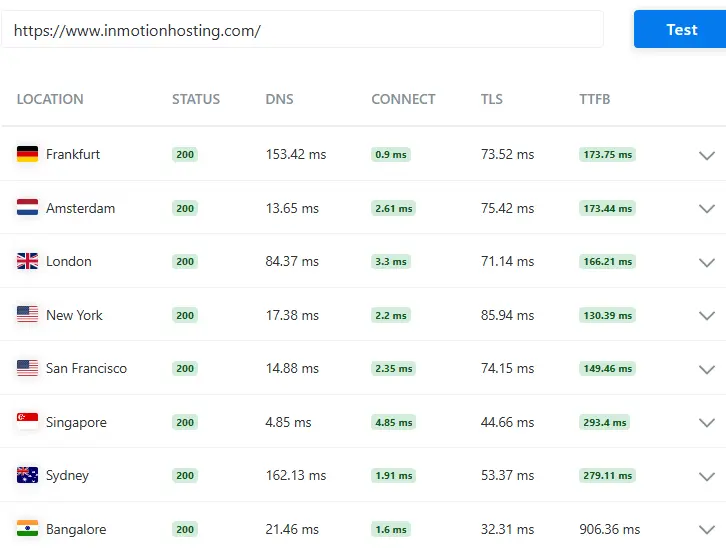
This image presents detailed global speed test results, showing how the website performs across different locations such as Frankfurt, Amsterdam, London, New York, San Francisco, Singapore, Sydney, and Bangalore.
All locations return a status code of 200, which means the website is functioning correctly everywhere. The report includes important metrics like DNS time, connection time, TLS, and TTFB (Time to First Byte).
In regions like New York, the TTFB is very fast at around 130 ms, while European locations such as Frankfurt and Amsterdam stay around 170 ms. San Francisco also performs well at around 149 ms.
However, Singapore and Sydney show higher TTFB values around 270–290 ms, and Bangalore has the highest at around 900 ms, indicating slower response in that region. Overall, the performance is strong in the US and Europe but slightly weaker in some Asian locations.
From my experience, this kind of distribution is common, and despite a few slower regions, the overall speed remains reliable for most users worldwide.
InMotion Hosting’s uptime and response time
InMotion Hosting’s uptime is one of its strongest features. It is designed to keep websites online without frequent interruptions. Most users experience stable access to their sites throughout the day.
This helps businesses avoid downtime issues and lost traffic. Overall, it focuses on keeping servers reliable. During testing, InMotion Hosting’s uptime stayed close to its promised level. Short outages are rare and usually not noticeable.
The system is built to recover quickly if any issues occur. This makes it a dependable choice for websites that need consistent availability.
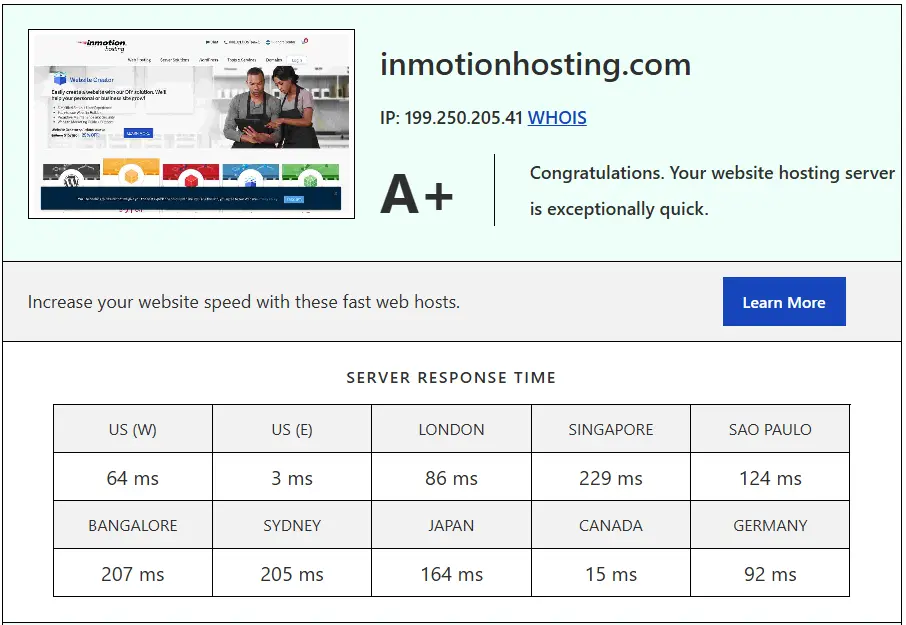
This image highlights an A+ hosting performance result for the website inmotionhosting.com, confirming that the server is exceptionally fast. It includes global server response times across different regions, showing strong performance in multiple locations.
For example, the US East response time is extremely low at 3 ms, while the US West is 64 ms and London is 86 ms, all indicating very fast connectivity. Canada also performs well at 15 ms, and Germany shows a solid 92 ms.
However, regions like Singapore (229 ms) and Bangalore (207 ms) are slightly slower but still within acceptable limits for global hosting. Overall, this data proves that the hosting provider delivers stable and reliable performance worldwide.
Personally, seeing such low response times in major regions builds strong confidence in the hosting quality.
I test InMotion Hosting speed

This image shows a strong website performance report with an A grade and a score of 93, which indicates excellent optimization. The page size is only 387 KB, making it lightweight and fast to load.
The total load time is just 496 milliseconds, which is considered very fast and ideal for user experience. Additionally, the website only makes 23 requests, showing that unnecessary elements are minimized.
Overall, this performance setup reflects a well-optimized website that can deliver fast loading speeds and better SEO results. From my perspective, achieving under 500 ms load time with such a small page size clearly shows professional-level optimization.
InMotion Hosting stress testing
We performed stress testing of hosting on InMotion Hosting to see how it handles heavy traffic. We simulated multiple users visiting a website simultaneously as part of a server load test.
The hosting stayed stable under normal and medium load. Pages still loaded without major delays. There were no sudden crashes during basic stress conditions. This shows it can handle regular traffic spikes well.
However, during very high load, the high traffic performance started to slow slightly. Response time increased when too many requests were sent together. Still, the server did not go down completely.
This means InMotion Hosting is reliable for small to medium websites. It can handle growth, but very large traffic may need higher-tier plans.
How we test web hosting services
We test web hosting services using real websites and real usage. This follows a clear hosting review methodology where we check setup time, speed, and ease of use. We also look at uptime and server response.
Simple tasks like installing WordPress are included. We try different features to see how they work in daily use, which is an important part of proper web hosting testing.
We also run performance and stress tests to measure stability using different performance benchmarks. Traffic is increased step by step to see how the server reacts under load.
Security features are checked for protection and reliability. Support is tested by asking real questions. This helps us give a clear and honest view of each hosting service.
InMotion Hosting plans and pricing
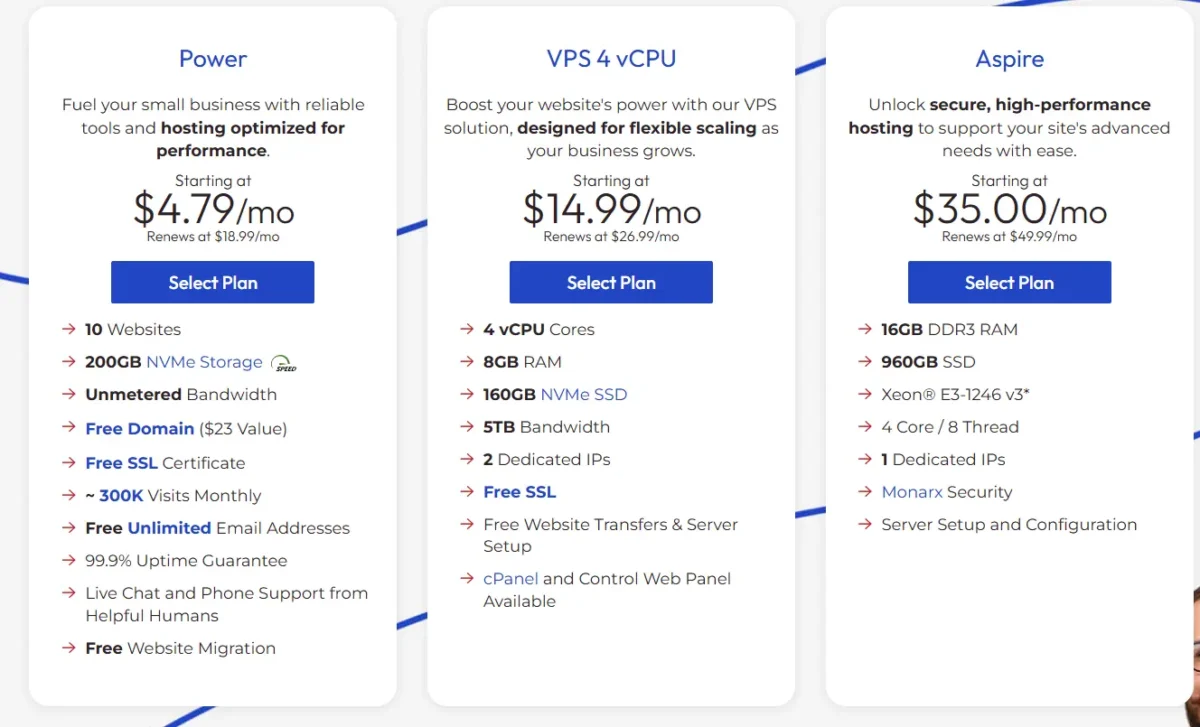
InMotion Hosting pricing depends on the type of plan you choose. The cost changes between shared, VPS, and dedicated hosting.
For beginners, shared hosting is the cheapest option, while advanced users pay more for extra power and control. Overall, InMotion Hosting pricing is designed to fit both small and large websites.
When doing a hosting cost comparison, InMotion is usually a bit more expensive than some budget providers, but it offers better performance and support.
For example, shared hosting prices start at a low entry level, while VPS and dedicated plans cost more due to higher resources and speed. This makes it important to compare plans carefully before choosing the right option for your needs.
| Hosting Type | Starting Price (per month) | Best For | Key Features |
| Shared Hosting | $2.99+ | Beginners & small websites | Free SSL, SSD storage, easy setup, basic performance |
| WordPress Hosting | $4.79+ | Bloggers & WordPress users | Auto updates, better speed, WordPress optimization |
| WooCommerce Hosting | $6.99+ | Online stores | eCommerce tools, secure checkout, optimized for sales |
| Cloud Hosting | $6.00+ (approx.) | Growing websites | Scalable resources, better uptime, fast performance |
| VPS Hosting | $14.99+ | Growing businesses | Dedicated resources, high speed, more control |
| Dedicated Hosting | $35.00+ | Large businesses | Full server control, maximum performance, advanced security |
| Reseller Hosting | $0.99+ | Agencies & freelancers | Client management tools, multiple accounts, white-label hosting |
InMotion ease of use: clear, but not seamless
InMotion Hosting offers good ease-of-use hosting for most users. The dashboard is clean and simple to understand. Beginners can find basic tools without much confusion. It is designed to help users manage websites with less technical stress.
The platform uses cPanel hosting, which is a familiar control panel for many users. It allows easy access to files, databases, and email settings. Even new users can learn it quickly with a little practice. However, some advanced options may feel slightly overwhelming at first.
InMotion also provides an Account Management Panel (AMP). This panel is used for billing, domain management, and account settings. It is useful, but switching between AMP and cPanel can feel a bit unorganized. This breaks the flow for some users.
Overall, it is still beginner-friendly hosting, especially for those building their first website. The tools are clear and functional, but the experience is not fully seamless. With time, users get used to the system and manage their sites more comfortably.
Installing WordPress with InMotion Hosting
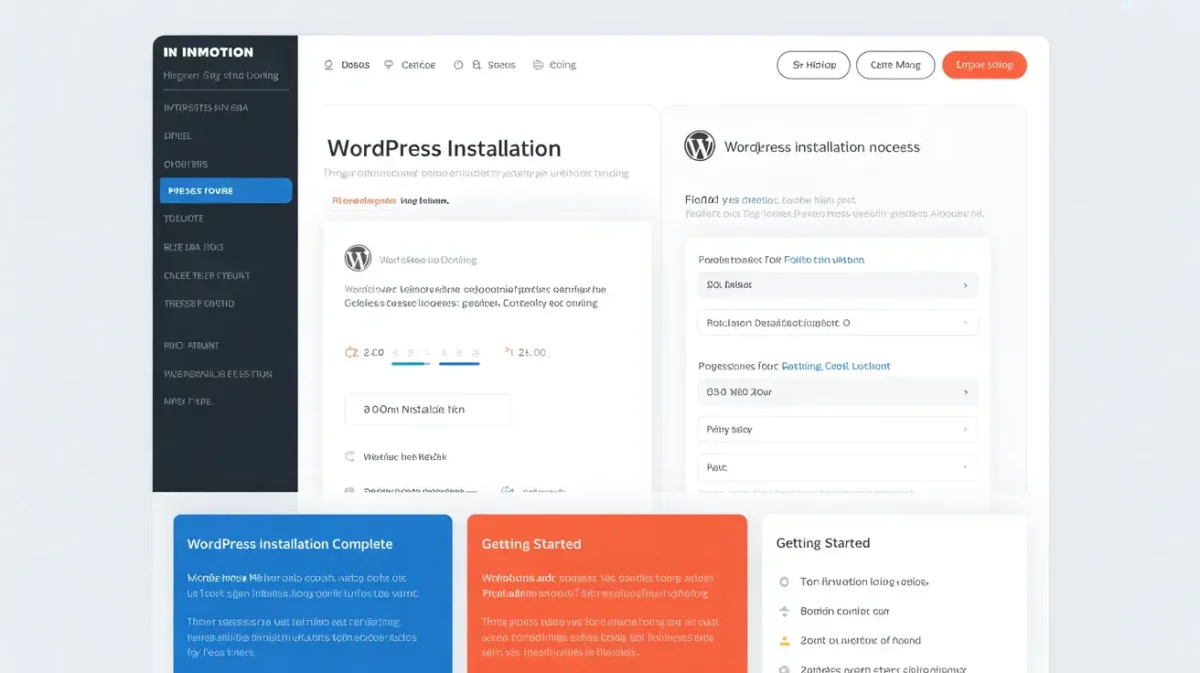
Installing WordPress with InMotion Hosting is a simple process for most users. The platform is built to support quick website setup. Beginners can start their website without advanced technical skills. Overall, the WordPress installation process is smooth and user-friendly.
InMotion Hosting uses the Softaculous installer inside cPanel. This tool allows you to install WordPress with just a few clicks. You do not need to upload files manually or edit complex settings. It saves time and makes the setup process much easier.
The WordPress hosting setup is guided and straightforward. You only need to choose your domain, set a username, and click install. After a short wait, your WordPress site is ready to use. This makes the starting process fast and stress-free.
Overall, InMotion makes WordPress installation easy for beginners and small business owners. The combination of Softaculous and simple setup tools helps users launch websites quickly. It is a practical choice for anyone starting a WordPress website for the first time.
WordPress website builder, also known as BoldGrid
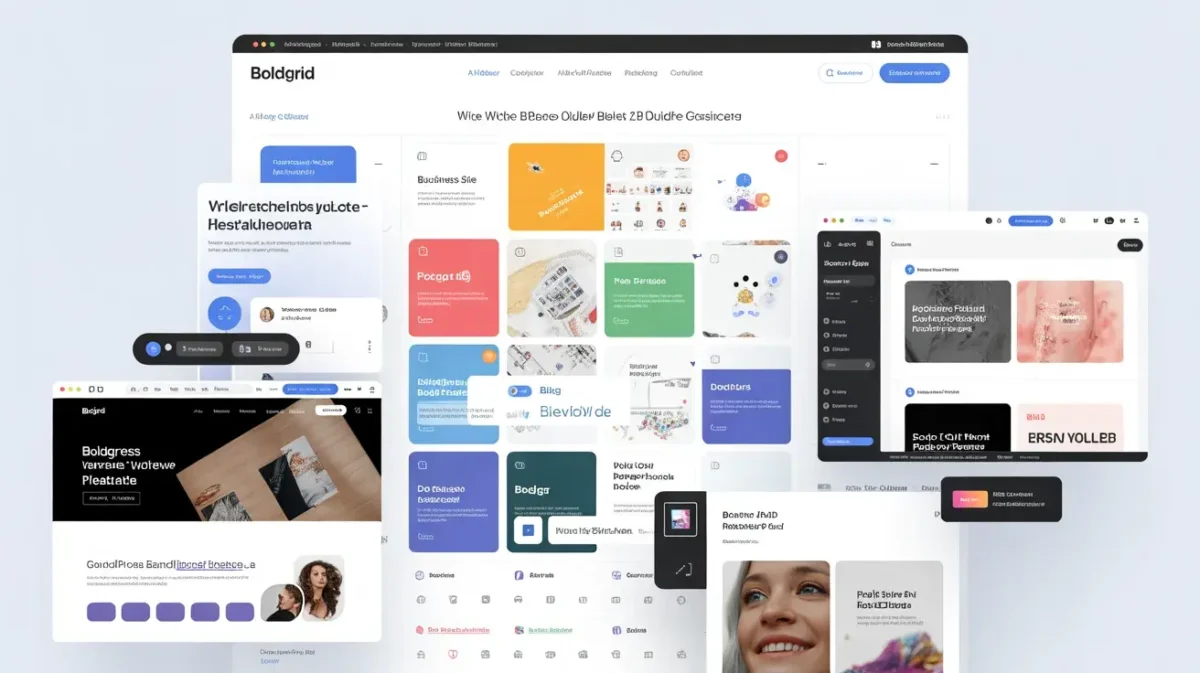
The BoldGrid website builder is a tool that comes with InMotion Hosting. It is designed for WordPress users who want an easy way to build websites. It helps beginners create pages without coding. This makes website building faster and simpler.
It works as a WordPress drag-and-drop builder, so you can move elements easily. You can add text, images, and sections by clicking and dragging. This removes the need for technical skills. Users can design websites more visually.
The tool is also part of website builder hosting, which means it is included with your hosting plan. You do not need to install extra software. Everything is already set up inside WordPress. This makes the process more convenient for new users.
Overall, BoldGrid is helpful for beginners who want quick results. It gives more control over design without complexity. With simple tools and a visual interface, WordPress makes website building easier for most users.
Adding a professional email with InMotion Hosting
InMotion Hosting allows users to create a professional email easily. You can use your own domain name for email addresses. This helps make your business look more trusted and professional. It is simple to set up from the control panel.
The platform offers email hosting accounts with every hosting plan. You can create multiple email addresses for your team or business. Each account can be managed separately. This gives better control over communication.
For access, you can use the webmail setup directly from your browser. There is no need to install extra software. You can log in and check emails from anywhere. It is quick and convenient for daily use.
InMotion also supports the RoundCube email client. It is a clean and easy webmail interface. You can send, receive, and organize emails without confusion. Overall, it makes managing professional email simple and efficient.
InMotion Hosting features
InMotion Hosting offers many useful hosting features for different types of websites. It is designed to support beginners, bloggers, and businesses. Users get tools that help improve speed, security, and performance. Overall, it provides a complete hosting package.
As a web hosting provider, InMotion’s feature set includes free SSL, SSD storage, and strong uptime. These features help websites load faster and stay secure. It also supports easy website management through cPanel. This makes daily tasks simple for users.
InMotion also includes helpful InMotion Hosting tools for website building and management. You can install WordPress in one click and manage emails easily. Backup tools and security options are also available. These tools save time and improve website control.
Overall, InMotion Hosting features are built for reliability and ease of use. The platform focuses on performance and user-friendly tools. It is a solid choice for anyone who wants stable and secure hosting.
Types of web hosting available
There are different types of web hosting available for different needs. Each hosting type offers different speed, control, and pricing. Choosing the right one depends on your website size and traffic.
The most common option is shared hosting, which is best for beginners and small websites.
VPS hosting is a step above shared hosting. It gives more power and better performance because resources are more dedicated. It is a good choice for growing websites that need stability. Users also get more control over settings.
Dedicated hosting provides a full server for one user. It offers the highest performance and security. This type is best for large businesses and high-traffic websites.
On the other hand, cloud hosting uses multiple servers to keep websites running smoothly. It helps improve uptime and handles traffic spikes better.
Reseller hosting is designed for people who want to sell hosting services. It allows users to create and manage multiple client accounts. This is useful for freelancers and agencies. Overall, each hosting type serves a different purpose and user level.
Website Building Features and Tools
Web building features help users create websites without coding. These tools are simple and easy to use. Beginners can build pages with just a few clicks. Many hosting services now include website creation tools to make the process faster.
Some platforms also offer an AI website builder. This tool can create a basic website design automatically. You only need to answer a few questions. It saves time and gives a quick starting point for new users.
Another useful option is the BoldGrid builder. It works inside WordPress and helps users design pages visually. You can drag and drop elements like text and images. This makes website design simple and flexible.
Overall, web-building features make website creation easy for everyone. Users can design, edit, and launch websites without technical skills. These tools improve speed and help create professional-looking websites quickly.
WordPress Integration and Management
WordPress integration makes it easy to run a website on WordPress. Many hosting providers support smooth setup and management. This helps users focus on content instead of technical tasks. Overall, WordPress integration improves the website-building experience.
InMotion Hosting offers strong WordPress hosting for different users. It is optimized for speed and performance. The platform supports themes, plugins, and updates easily. This makes it a good choice for bloggers and businesses.
One helpful feature is the one-click WordPress install. You can install WordPress in just a few steps. There is no need for manual setup or coding. This saves time and reduces errors for beginners.
Overall, WordPress integration with InMotion Hosting is simple and efficient. It provides the tools needed to manage a website. Users can build and grow their sites with confidence and ease.
Website Migration and Transfer Services
Website migration means moving your website from one host to another. It can include files, databases, and email accounts. A smooth website migration helps avoid downtime and data loss. This process is important when switching hosting providers.
InMotion Hosting offers a hosting migration service for new users. Their team helps move your website safely. You do not need technical skills to complete the transfer. This makes the process simple and stress-free.
They also offer a free WordPress transfer with many of their plans. This is useful for WordPress users who want to switch hosting. The support team handles the setup and checks everything. Your site stays safe during the move.
Overall, InMotion makes website migration easy and reliable. Their service saves time and reduces risk. Users can move their websites without worry and continue their work without major issues.
InMotion Hosting Pros and Cons
Pros:
- Fast loading speed for most websites
- Reliable uptime and stable servers
- Free website migration included
- Easy-to-use dashboard for beginners
- Strong customer support (24/7 help)
- Good security features and backups
Cons:
- Pricing is higher than that of some competitors
- No instant account activation in some cases
- Limited data centers compared to big brands
- Advanced features may feel complex for beginners
InMotion Hosting’s security features
InMotion Hosting provides strong hosting security features to protect websites. Security is important for every website owner. It helps keep data safe and builds user trust. The platform includes multiple tools to reduce online risks.
One basic feature is the SSL certificate. It encrypts data between the website and users. This keeps sensitive information, such as passwords and payment details, secure. It also improves trust and SEO ranking.
InMotion also offers malware protection. This helps detect and remove harmful files. It protects websites from hacking attempts and viruses. Regular scans keep the system clean and safe.
Another important feature is DDoS protection. It helps stop attacks that try to overload the server. This keeps the website running during traffic attacks. It improves uptime and reliability.
The platform also uses a web application firewall (ModSecurity). It blocks harmful requests before they reach the website. This adds an extra layer of protection. Overall, these features make InMotion Hosting a secure choice for users.
InMotion Hosting Support and Customer Service
InMotion Hosting provides reliable customer support for its users. Support is important when managing a website. Users often need help with setup, errors, or performance issues. A strong support system makes the hosting experience better.
The platform offers 24/7 live chat support for quick help. Users can contact the support team anytime. Responses are usually fast and helpful. This is useful for solving urgent problems without delay.
InMotion also provides skilled technical support. The team can help with server issues, website setup, and troubleshooting. They guide users step by step in simple language. This makes it easier for beginners to fix problems.
There is also a helpful knowledge base hosting section. It includes guides, tutorials, and FAQs. Users can find answers without contacting support. This saves time and helps users learn on their own.
Overall, InMotion Hosting support is strong and reliable. It offers multiple ways to get help. Whether through live chat, technical support, or guides, users can manage their websites with confidence.
Top InMotion Hosting alternatives
If you are looking for better or cheaper hosting, there are several strong options. Many users compare InMotion Hosting pricing with other providers to find better value.
A proper hosting cost comparison helps you choose the right service based on speed, support, and features. Some alternatives also offer lower shared hosting price plans for beginners.
| Hosting Provider | Best For | Key Features | Starting Price (approx.) |
| Bluehost | Beginners & WordPress users | Easy setup, WordPress integration, free SSL | $2.95+/month |
| DreamHost | Privacy-focused users | Strong uptime, simple pricing, free domain (yearly plans) | $2.59+/month |
| Namecheap | Budget users | Low-cost plans, free website builder, basic security | $1.98+/month |
Bluehost
Bluehost is one of the most popular alternatives. It is beginner-friendly and officially recommended for WordPress. It offers shared hosting, VPS, and WordPress plans. Many users prefer it for its easy setup and simple dashboard.
DreamHost
DreamHost is known for strong privacy and reliable performance. It offers good uptime and simple pricing plans. It is also a good choice for WordPress users. The control panel is clean and easy for beginners.
Namecheap
Namecheap is a budget-friendly hosting provider. It is often chosen for low-cost domains and hosting plans. It offers shared hosting, VPS, and WordPress hosting. It is best for users who want cheap and simple hosting solutions.
Conclusion
This InMotion Hosting review shows that the service is reliable and performance-focused. It offers good speed, strong security, and useful features for different users.
The pricing is a bit higher than some budget hosts, but the quality is stable and consistent. It works well for beginners, bloggers, and small businesses.
Overall, InMotion Hosting is a solid choice if you want dependable hosting with good support and tools.
It may not be the cheapest option, but it delivers value in performance and security. If you need stable hosting for long-term use, it is worth considering.
FAQs – InMotion Hosting Review
What is InMotion Hosting?
It is a web hosting service that helps you build and run websites with good speed and security.
Is InMotion Hosting good for beginners?
Yes, it is beginner-friendly with easy tools like cPanel and a one-click WordPress install.
Does InMotion Hosting offer free SSL?
Yes, all plans include a free SSL certificate for website security.
What hosting types does InMotion offer?
It offers shared, VPS, dedicated, cloud, WordPress, WooCommerce, and reseller hosting.
Is InMotion Hosting expensive?
It is slightly more expensive than budget hosts, but it offers better performance and features.
Can I install WordPress easily?
Yes, you can install WordPress in one click using Softaculous installer.
Does InMotion Hosting provide security features?
Yes, it includes malware protection, DDoS protection, and a web application firewall.
Related
- Namecheap Review
- InMotion Hosting Review
- DreamHost Review
- Hostinger Review
- WPX Hosting Review
- Rocket.net Review

Alex Bryant is the founder of PvyEmpire.com and a WordPress specialist with over 4 years of hands-on experience in web hosting, performance optimization, and website management. He has extensively tested top hosting providers by setting up real websites and monitoring their speed, uptime, and reliability.
At PvyEmpire.com, Alex publishes honest, data-driven reviews, detailed guides, and verified coupons & deals. His goal is to help website owners choose the right hosting, improve performance, and grow their online presence with confidence—based on real testing, not promotions.