Closte Review: Features, Uptime & Support
Choosing a hosting provider sounds simple until your website starts slowing down, your support tickets go unanswered, or your monthly bill keeps increasing without warning. Many WordPress users switch from shared hosting to improve speed, security, and stability. That’s where platforms like Closte start getting attention.
This Closte Review examines its features, uptime, pricing, support, and overall value. I’ll explain everything in simple English so you can decide whether this managed WordPress hosting provider is worth using for your blog, business site, or WooCommerce store.

Overview
Closte is a managed cloud WordPress hosting platform built on Google Cloud Platform. Unlike traditional hosting companies that sell fixed plans, Closte uses a pay-as-you-go hosting model. You only pay for the resources your website actually uses, which makes it different from many competitors in the managed WordPress hosting space.
The platform focuses heavily on performance, scalability, and automation. It combines cloud WordPress hosting with advanced caching, CDN integration, website uptime monitoring, and strong WordPress security features. Because of this, many users compare it with premium hosts like Kinsta and WP Engine.
What is Closte?

Closte is a high-performance managed WordPress hosting solution designed mainly for WordPress websites. It runs on Google Cloud infrastructure and uses a modern hosting stack that includes LiteSpeed Web Server, built-in caching, automatic backups, and CDN support. The platform is designed for users who want strong speed without managing servers manually.
One reason many people search for a Closte hosting review is because of its performance-focused approach. Instead of offering cPanel hosting with crowded servers, Closte provides scalable WordPress hosting with isolated resources. In simple words, your website gets a more stable performance even when traffic spikes suddenly.
Features and Ease of Use
One of the strongest parts of this Closte Review is the feature set. The platform includes many advanced tools that usually require paid plugins or server customization on other hosting providers.
Key Features of Closte
- Managed WordPress hosting environment
- Powered by Google Cloud Platform
- Uses LiteSpeed Web Server for faster loading
- Built-in CDN integration and WordPress support
- Pay-as-you-go hosting pricing model
- Automatic daily backups
- One-click staging environment
- Free SSL certificates
- Advanced website uptime monitoring
- Real-time resource usage tracking
- Automatic WordPress updates
- Malware scanning and security monitoring
- Server-level caching optimization
- HTTP/3 and QUIC support
- WP-CLI integration
- WooCommerce-ready hosting setup
- Fast server response time, WordPress optimization
- Cloudflare and BunnyCDN compatibility
- Flexible scaling for traffic spikes
- Developer-friendly hosting control panel
The dashboard feels clean and modern compared to many old-school hosting panels. However, beginners may need a little time to understand the pay-per-usage structure. If you previously used shared hosting from HostGator or SiteGround, Closte may initially feel more technical.
Still, the platform automates the most important tasks. For example, backups, security updates, caching, and CDN optimization work in the background. Because of this, you spend less time managing hosting issues and more time focusing on your website content or business.
Uptime
Uptime is one area where Closte performs very well. Since it uses Google Cloud hosting infrastructure, websites generally stay stable even during heavy traffic periods. This matters a lot for WooCommerce stores and business websites where downtime can directly affect sales and trust.
Many Closte uptime and speed test results discussions show consistent performance with low downtime percentages. Combined with LiteSpeed optimization and CDN integration, websites often load quickly across different regions. In many cases, server response time and WordPress performance stay lower than standard shared hosting providers.
Another positive point is the built-in website uptime monitoring system. You can track resource usage and monitor potential issues before they affect visitors. That makes Closte attractive for users looking for a secure managed WordPress hosting solution with strong reliability.
Pros and Cons
Every hosting platform has strengths and weaknesses. This Closte Review would feel incomplete without discussing both sides honestly.
Pros of Closte
Excellent Performance
Closte is built for speed. Its high-performance hosting stack combines Google Cloud infrastructure, LiteSpeed technology, advanced caching, and CDN support. Websites usually load much faster than on traditional shared hosting.
Flexible Pay-As-You-Go Pricing
You only pay for the resources you use. For smaller websites, this can become cheaper than premium fixed-plan hosting providers.
Strong WordPress Security Features
Automatic updates, malware protection, isolated environments, backups, and security monitoring help protect WordPress websites from common threats.
Scalable Hosting
Traffic spikes are easier to manage because the platform scales resources dynamically. This makes it useful for viral blogs and WooCommerce stores.
Developer-Friendly Tools
Advanced users benefit from SSH access, WP-CLI support, staging environments, and detailed usage analytics.
Reliable Uptime
The platform delivers stable uptime because it runs on enterprise-level cloud infrastructure instead of overcrowded shared servers.
Cons of Closte
Learning Curve for Beginners
New users may initially feel confused by the dashboard and usage-based pricing system. It’s not as beginner-friendly as basic shared hosting.
No Traditional Fixed Plans
Some users prefer predictable monthly costs. Since Closte uses resource-based billing, costs can rise if traffic increases significantly.
Limited Hand-Holding
Unlike some managed hosts, Closte assumes users already understand basic WordPress hosting concepts. Beginners may need extra learning time.
Premium Features Can Increase Costs
CDN usage, backups, bandwidth, and additional resources may increase the final monthly bill depending on website activity.
Smaller Brand Recognition
Compared to Kinsta or Cloudways, Closte is still less well-known in the hosting market.
How to use Closte
Getting started with Closte is fairly straightforward. After creating an account, you can launch a new WordPress installation within minutes. The platform handles most server-side optimization automatically, which helps beginners avoid technical setup problems.
You can also migrate existing websites using WordPress migration tools. Once the website is live, users can manage backups, staging sites, caching, and resource monitoring directly from the hosting control panel. The dashboard provides clear analytics about storage usage, CDN traffic, and server resources.
One useful feature is the WordPress staging environment. It allows you to test plugin updates, design changes, or WooCommerce modifications before pushing them to your live website. That reduces the risk of accidentally breaking your production site.
Pricing and Support
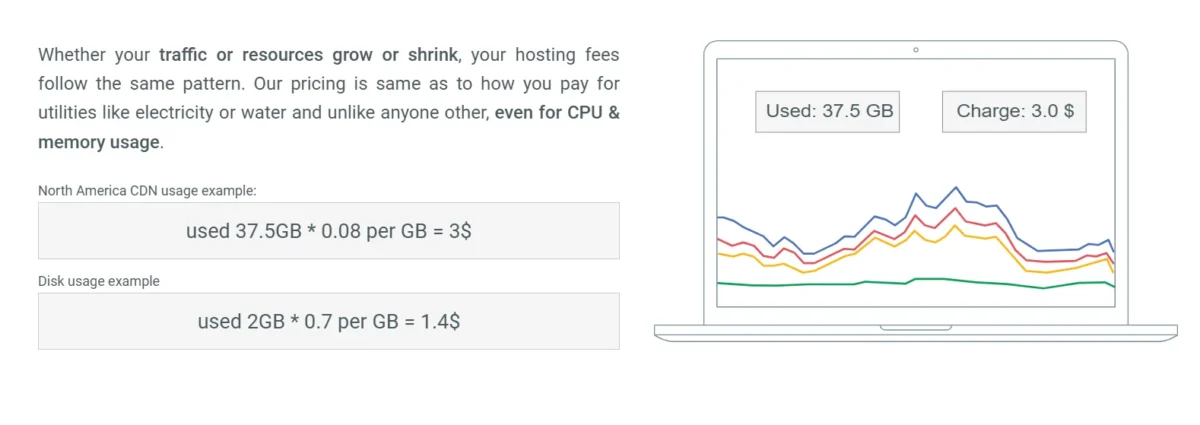
One thing that makes this Closte Review different from many other hosting reviews is the pricing structure. Instead of fixed monthly plans, Closte uses a cloud hosting pay-per-usage model. You pay based on CPU usage, bandwidth, CDN traffic, storage, and backups.
For small websites with moderate traffic, costs can remain surprisingly affordable. However, large websites with heavy traffic or media usage may see higher monthly bills. That’s why understanding Closte pricing, the explained pay-as-you-go model, is important before signing up.
Support is available through tickets and documentation. The knowledge base covers many topics related to WordPress performance hosting, CDN optimization, backups, and caching. However, users expecting instant live chat support similar to premium managed hosts may find the support system less responsive.
| Feature | Closte Pricing Details |
| Pricing Model | Pay-as-you-go hosting |
| Starting Cost | Can start from a few dollars per month for small websites |
| Billing Type | Based on actual resource usage |
| CPU Usage | Charged according to server resources consumed |
| Storage | Pay for the storage your website uses |
| Bandwidth | Traffic and CDN usage affect total cost |
| CDN Pricing | Additional charges based on CDN traffic |
| Backups | Backup storage may add extra cost |
| SSL Certificates | Free SSL included |
| WordPress Installs | No strict limitation on installs |
| Staging Sites | Included |
| Scaling | Resources scale automatically during traffic spikes |
| Hidden Fees | No traditional fixed-plan hidden upgrades |
| Best For | Medium to high-performance WordPress websites |
| Free Migration | Available for many WordPress websites |
| Estimated Monthly Cost | Usually around $5–$30+ depending on traffic and usage |
| Website Type | Estimated Monthly Cost | Traffic Level | Notes |
| Small Websites | $5–$6/month | Very Low Traffic | Best for personal blogs and small business websites |
| Low Traffic Websites | Around $12/month | Less than 25k visits | Good for growing WordPress websites |
| Medium Traffic Websites | Around $37/month | 40k–100k visits | Suitable for WooCommerce stores and active blogs |
| High Usage Websites | $30+/month | Can vary | Costs increase if the site uses heavy resources or poor optimization |
How does Closte match up to the competition?
Closte competes directly with companies like Kinsta, Cloudways, and WP Engine. The biggest difference is the pricing model and infrastructure flexibility.
Compared to Kinsta, Closte often gives more control and potentially lower costs for smaller websites. However, Kinsta provides a more beginner-friendly experience with stronger customer support. In the Closte vs Cloudways performance comparison, Closte usually performs better for WordPress-specific optimization because of its LiteSpeed integration and hosting stack.
Users looking for the best alternative to Kinsta hosting often consider Closte because it offers premium cloud WordPress hosting features without forcing expensive fixed plans. That said, beginners who prefer simplicity may still feel more comfortable with traditional managed hosting providers.
Closte vs Hostinger
Closte focuses on premium cloud WordPress hosting with scalable resources, LiteSpeed optimization, and pay-as-you-go billing. In comparison, Hostinger is more beginner-friendly and cheaper for small websites or personal blogs.
Closte delivers better performance for growing WordPress websites, especially for WooCommerce and high-traffic projects. However, Hostinger is easier to use for beginners who want simple shared hosting with fixed monthly pricing.
Closte vs Ionos
Closte is built mainly for WordPress performance and cloud scalability, while IONOS offers broader hosting services, including VPS, domains, and business hosting plans.
Closte usually provides faster WordPress optimization because of its LiteSpeed web server and Google Cloud infrastructure. On the other hand, IONOS may appeal more to users looking for traditional hosting bundles and lower starting prices.
Closte vs SiteGround
Closte and SiteGround both focus strongly on WordPress hosting performance. SiteGround is easier for beginners because of its simple dashboard, fixed pricing, and responsive customer support.
Closte often performs better for advanced users who want scalable WordPress hosting and lower server response times. SiteGround, however, remains a safer option for users who prefer a simpler hosting experience with more hand-holding support.
Closte vs HostArmada
Closte is designed for high-performance cloud hosting, while HostArmada mainly targets affordable shared and cloud hosting users. HostArmada includes beginner-friendly tools and traditional hosting plans with predictable pricing.
Closte provides stronger WordPress-specific optimization, advanced caching, and better scalability for growing websites. However, HostArmada may suit smaller websites that want cheaper entry-level hosting without resource-based billing.
Closte vs Kinsta
Closte and Kinsta both use Google Cloud Platform, but their approach is different. Kinsta focuses heavily on premium managed hosting with excellent support and a very polished user experience.
Closte offers more flexibility and can become cheaper for smaller or medium-sized websites because of its pay-as-you-go pricing model. Kinsta is usually better for beginners and agencies that want top-tier support without worrying about technical optimization.
Closte vs Cloudways
Closte is more WordPress-focused, while Cloudways supports multiple applications and cloud providers. Cloudways gives users more infrastructure choices, including DigitalOcean, AWS, Vultr, and Google Cloud.
In many WordPress performance tests, Closte performs extremely well because of its LiteSpeed integration and optimized hosting stack. Cloudways, however, provides more flexibility for developers managing different types of web applications.
Closte vs WP Engine
Closte offers a modern pay-per-usage system with scalable cloud resources, while WP Engine focuses on premium managed WordPress hosting with enterprise-level support. WP Engine is known for strong security, developer tools, and agency-focused features.
Closte may provide better value for users who want lower costs and flexible scaling without fixed hosting plans. However, WP Engine remains a stronger option for businesses that prioritize premium support, reliability, and advanced workflow tools.
Do I Recommend Closte?
Yes, I do recommend Closte for users who care about speed, scalability, and modern cloud infrastructure. It’s especially useful for developers, bloggers, agencies, and WooCommerce store owners who want better performance without managing complex servers manually.
However, I wouldn’t recommend it to complete beginners who only want a simple shared hosting setup. The platform works best for users who understand at least the basics of WordPress hosting and resource management. If performance matters more than simplicity, Closte becomes a very strong option.
Customer Support
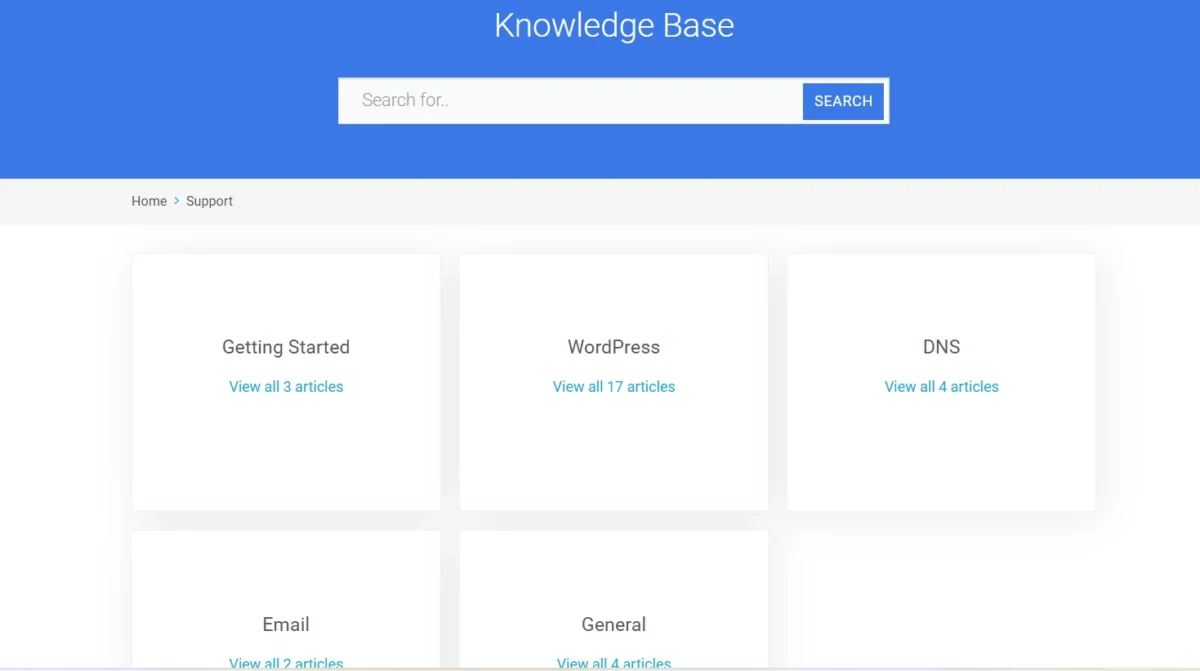
Customer support is decent, but not the strongest area of the platform. The support team is knowledgeable about WordPress optimization, caching systems, CDN configurations, and server performance. Technical users usually appreciate the quality of answers.
However, response times can sometimes vary depending on ticket volume. Unlike some premium hosts that offer instant live chat 24/7, Closte mainly focuses on ticket-based support. The documentation is helpful, though, and covers many common issues clearly.
For users who already understand WordPress basics, the support system should feel sufficient. Beginners who need constant assistance may prefer a hosting company with more hands-on customer service.
Conclusion
Closte stands out because it combines Google Cloud infrastructure, LiteSpeed optimization, flexible pricing, and strong WordPress performance tools in one platform. Its scalable hosting environment makes it suitable for websites that expect traffic growth and need reliable uptime.
Overall, this Closte Review shows that the platform is an excellent option for users who value speed and flexibility more than beginner simplicity. While it may not be perfect for everyone, it remains one of the more interesting managed hosting solutions for modern WordPress websites.
FAQs
Is Closte good for WordPress hosting?
Yes, Closte is considered a strong managed WordPress hosting provider because of its Google Cloud infrastructure, LiteSpeed optimization, and scalable hosting environment.
How much does Closte hosting cost per month?
Closte uses a pay-as-you-go model, so monthly costs depend on bandwidth, storage, backups, and website traffic usage.
Is Closte faster than Kinsta?
In some performance tests, Closte performs very well because of LiteSpeed caching and optimized server response times. However, results can vary depending on website setup.
Does Closte offer staging sites?
Yes, the platform includes a WordPress staging environment that allows users to test updates and changes safely before going live.
Who should use Closte hosting?
Closte works best for bloggers, WooCommerce stores, agencies, and business websites that need scalable WordPress hosting with strong performance.
How to check if reviews are genuine?
Check reviews on trusted websites like Trustpilot or Reddit instead of only reading reviews on the store’s website. Real reviews usually include detailed experiences, product quality, delivery time, and both pros and cons.
Is the Closet online shop legit?
Some Closet online stores are legitimate, while others have mixed customer reviews. Before buying, check the website’s trust score, refund policy, HTTPS security, and customer feedback to stay safe.
Related Posts
- Rapyd Cloud Review
- Nexcess Review
- Rocket.net Review
- WPX Hosting Review
- What Are the 36 Different Types of Web Hosting?

Alex Bryant is the founder of PvyEmpire.com and a WordPress specialist with over 4 years of hands-on experience in web hosting, performance optimization, and website management. He has extensively tested top hosting providers by setting up real websites and monitoring their speed, uptime, and reliability.
At PvyEmpire.com, Alex publishes honest, data-driven reviews, detailed guides, and verified coupons & deals. His goal is to help website owners choose the right hosting, improve performance, and grow their online presence with confidence—based on real testing, not promotions.