Contabo Review: Is This Cheap VPS Hosting Worth It?
If you’ve been hunting for affordable VPS hosting and keep stumbling across the name Contabo, you’re probably wondering — is it actually worth it, or too good to be true?
Cheap pricing sounds great until your site goes down at 2 AM and support is nowhere to be found. That nagging feeling of “what’s the catch?” is exactly why so many people go searching for an honest Contabo Review before handing over their credit card.
Well, you’re in the right place. In this post, we’ll break down everything you actually need to know — performance, reliability, customer support, and whether those jaw-dropping prices hold up in the real world.
No fluff, no sponsored spin — just a straightforward look to help you decide if Contabo is the right fit for your needs.

Contabo Review: A Quick Overview
| Category | Details |
| Company | Contabo GmbH (formerly Giga-International) |
| Founded | 2003 |
| Headquarters | Munich, Germany |
| Data Centers | 11 locations — Germany, USA, UK, Singapore, Japan, India, Australia |
| Virtualization | KVM (Kernel-based Virtual Machine) |
| Storage | NVMe SSD (primary), SSD (storage plans) |
| Starting Price | $4.40/month (Cloud VPS 10) |
| Uptime SLA | 99.996% advertised |
| Managed Hosting | No — fully unmanaged |
| Control Panel | Proprietary Customer Control Panel (no cPanel included) |
| Trustpilot Rating | 4.5 / 5 (225,000+ customers) |
| Best For | Developers, sysadmins, budget-conscious businesses |
| VPSBenchmarks Award | 1st Best Global VPS 2025, 3rd Best Global VPS this years |
What Is Contabo?
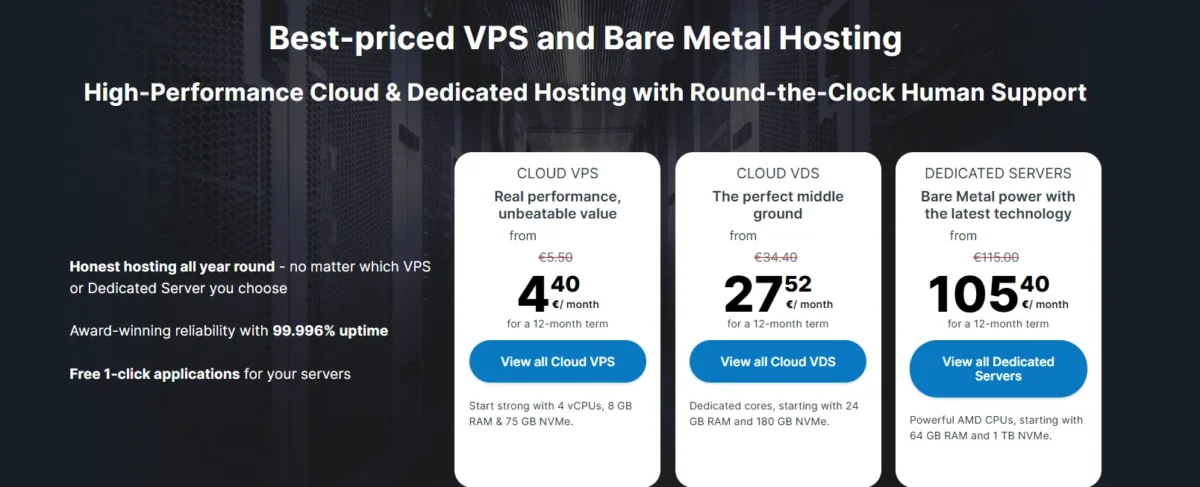
Contabo is a German hosting company that has been operating since 2003, originally founded as Giga-International. Today, it runs under the Contabo GmbH brand and serves over 225,000 customers worldwide.
The company owns and operates its own data centers — a key reason it can price so aggressively. Instead of reselling AWS or Google Cloud infrastructure, Contabo buys hardware in bulk, keeps management lean, and passes the savings on to customers.
Its core philosophy is straightforward: give you more resources per dollar than anyone else. Where most budget VPS providers hand you 1 vCPU and 2GB of RAM for $5 a month, Contabo gives you 4 vCPUs and 8GB of RAM at the same price. That’s a genuinely remarkable difference.
The trade-off is that everything is unmanaged — you’re responsible for server setup, software updates, security hardening, and troubleshooting. It’s not for everyone, but if you know your way around a terminal, it’s hard to beat the value.
What Are the Pros and Cons of Contabo?
✅ Pros
- Exceptional resource allocation — more RAM and CPU per dollar than almost any competitor
- Transparent, stable pricing with no surprise renewal spikes
- KVM virtualization (the same technology AWS and GCP use)
- NVMe SSD storage on all Cloud VPS plans
- 11 global data center locations across Europe, USA, Asia, and Australia
- Free DDoS protection included on all plans
- Unlimited inbound bandwidth with generous fair-use outbound
- Full root access and custom ISO support
- Broad OS support: Ubuntu, Debian, AlmaLinux, Rocky Linux, Windows Server
- Integrated snapshot and auto-backup add-on
- REST API for automation and DevOps workflows
- Competitive object storage (S3-compatible) pricing
- No setup fees on VPS plans
- 4.5/5 Trustpilot rating from 225,000+ verified customers
- VPSBenchmarks “Best Global VPS 2025” award winner
❌ Cons
- No live chat — ticket-only support with 24–48 hour response times
- Fully unmanaged — not beginner-friendly
- No cPanel or Plesk included (paid add-ons)
- TTFB can be slower than managed WordPress hosts (~385ms average)
- No hourly billing — monthly minimum commitment
- “Unlimited bandwidth” has fair-use throttling provisions
- Performance can vary under heavy I/O load during peak hours
- No phone support
- No free trial period
What Are Contabo’s Prices and Plans?
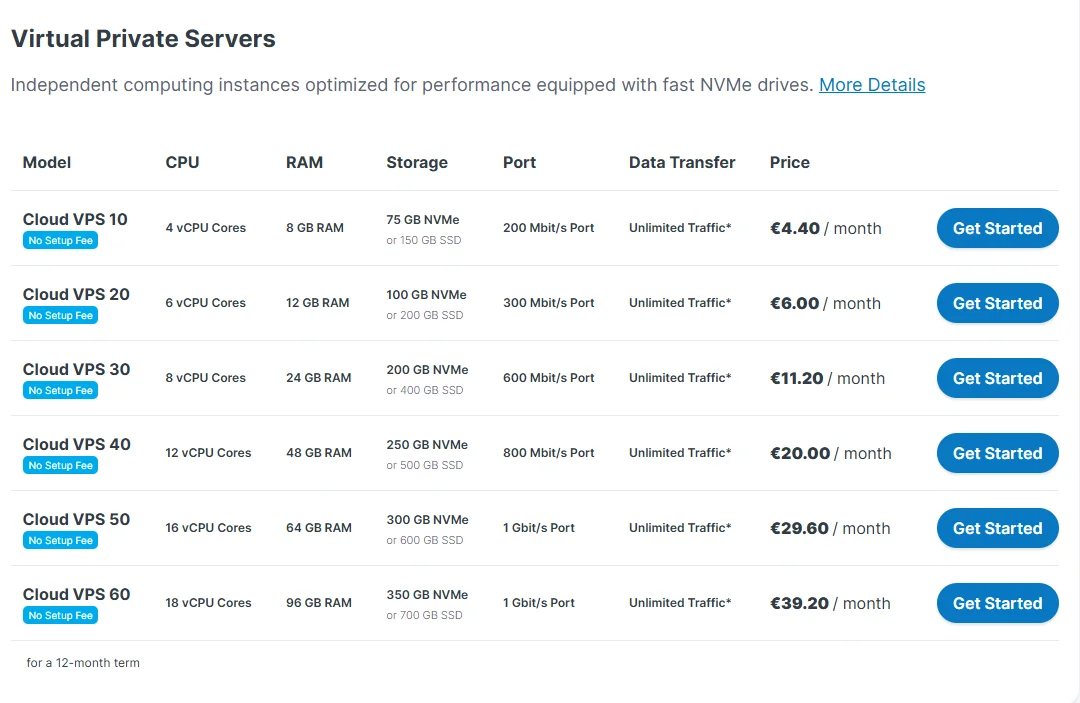
Contabo’s pricing is genuinely one of its biggest selling points. Unlike many providers that jack up renewal rates after the first year, Contabo largely holds its prices steady. That’s a big deal for long-term projects.
Contabo VPS Plans
(Prices as of this years — always verify current pricing on contabo.com)
| Plan | vCPU Cores | RAM | Storage | Monthly Price |
| Cloud VPS 10 | 3 vCPU | 8 GB | 75 GB NVMe | $4.40/mo |
| Cloud VPS 20 | 6 vCPU | 12 GB | 100 GB NVMe | $6/mo |
| Cloud VPS 30 | 8 vCPU | 24 GB | 200 GB NVMe | $11.20/mo |
| Cloud VPS 40 | 10 vCPU | 48 GB | 400 GB NVMe | $20/mo |
| Cloud VPS 50 | 14 vCPU | 72 GB | 800 GB NVMe | $29.60/mo |
| Cloud VPS 60 | 18 vCPU | 96 GB | 1200 GB NVMe | $39.20/mo |
All Cloud VPS plans include: free DDoS protection, IPv4 + IPv6, unlimited inbound traffic, and full root access. Windows Server is available as a paid add-on. Auto-backup can be toggled on at checkout for a small additional fee.
The Cloud VPS 20 is Contabo’s bestseller, and it’s easy to see why. Six vCPU cores and 12GB of RAM for under $8 a month is an incredible deal for running multiple WordPress sites, small APIs, or a development staging environment.
Contabo Dedicated Server Plans
(Prices as of this years— verify current pricing at contabo.com)
| Plan | CPU | RAM | Storage | Monthly Price |
| Dedicated S | AMD Ryzen (6 cores) | 64 GB | 1.6 TB NVMe | $27.52/mo |
| Dedicated M | AMD Ryzen (8 cores) | 128 GB | 2 × 1.6 TB NVMe | $35.84/mo |
| Dedicated L | AMD EPYC (16 cores) | 256 GB | 4 × 1.6 TB NVMe | $51.20/mo |
| Dedicated XL | AMD EPYC (32 cores) | 512 GB | 6 × 1.6 TB NVMe | $65.92/mo |
Dedicated servers are bare-metal machines — no virtualization overhead, no noisy neighbors.
They’re ideal for resource-heavy production workloads, large databases, or applications where consistent, guaranteed CPU performance is non-negotiable. Annual billing unlocks meaningful discounts across the board.
What Features Does Contabo Hosting Offer?
Contabo packs a solid feature set for a budget provider. Here are 18 key features you get with a Contabo VPS:
- KVM Virtualization — industry-standard hypervisor used by AWS, GCP, and Azure
- NVMe SSD Storage — faster random read/write than SATA SSDs on all Cloud VPS plans
- AMD EPYC Processors — modern, high-core-count CPUs powering the infrastructure
- Full Root Access — complete control over your server environment
- Custom ISO Support — upload your own operating system image
- Multiple OS Options — Ubuntu, Debian, AlmaLinux, Rocky Linux, CentOS, Fedora, openSUSE, Arch Linux, Windows Server 2016/2019/2022
- Free DDoS Protection — basic volumetric attack mitigation on all plans
- Unlimited Inbound Bandwidth — no charges for incoming traffic
- IPv4 + IPv6 Addresses — dual-stack networking on every server
- Private Networking — connect multiple VPS instances internally
- Server Snapshots — point-in-time restore images for rollback
- Auto-Backup Add-On — scheduled backups with restoration support
- Reverse DNS (rDNS) — edit PTR records without opening a support ticket
- SSH Key Management — secure access without passwords
- Cloud-init Support — automate server provisioning at first boot
- REST API — full API coverage for provisioning, snapshots, start/stop
- Object Storage (S3-compatible) — affordable S3-style storage for backups and assets
- 11 Global Data Center Locations — deploy in Europe, USA, UK, Singapore, Japan, India, or Australia
How Is Contabo’s Performance?
This is where things get honest. Contabo’s performance is solid for the price — but it’s not premium. Understanding the real numbers helps you set the right expectations before you commit.
TTFB (Time to First Byte)
Testing conducted in early on a Contabo VPS 20 plan (Germany data center, no CDN, no caching) showed an average TTFB of around 385ms from US East locations.
Under load at 100 concurrent users, that rose to approximately 680ms — a 77% degradation. During NVMe I/O contention peaks, TTFB spikes between 650–800ms were recorded.
By comparison, premium managed hosts like ScalaHosting achieve around 28ms TTFB, and Kinsta lands near 120ms. Contabo is slower on this metric.
However, pairing Contabo with a CDN like Cloudflare dramatically reduces perceived latency for end users — most visitors won’t be hitting the origin server directly.
Server Response Times
A WordPress site deployed on the VPS 20 showed roughly 520ms for an uncached, dynamic WooCommerce checkout page. Static page loads via GTmetrix from European nodes averaged a more acceptable 1.8–2.5 seconds with proper caching in place.
Uptime
Third-party uptime monitoring over 30 days showed consistently high availability, in line with Contabo’s advertised 99.996% SLA.
In longer 12-month external tests by independent reviewers, Contabo recorded approximately 99.91% uptime — around 473 minutes of total downtime across 7 incidents. That’s decent for a budget host, though it falls short of managed cloud providers.
CPU & Storage Benchmarks
Sysbench CPU tests on AMD EPYC-powered nodes showed competitive single-thread and multi-thread performance at this price tier. NVMe sequential read/write speeds were fast, though random IOPS varied under heavy multi-tenant load.
VPSBenchmarks rated Contabo as the 1st Best Global VPS in 2025 and 3rd, reflecting consistent value-for-performance across their full test suite covering web, sysbench, endurance, geekbench, FIO, and iperf3.
Network Speed
Network throughput from EU data centers is strong. iperf3 tests showed solid upload and download speeds, particularly for server-to-server workloads within the same region.
Latency for intercontinental requests (e.g., a German server serving US users) adds meaningful delay — data center selection matters more with Contabo than with providers that have edge caching built in.
Bottom line on performance: Contabo is fast enough for most web applications, development servers, game servers, and internal tools. It’s not the right choice if you need sub-100ms TTFB on a production WordPress or WooCommerce site without a CDN in front.
How Easy Is Contabo to Use?
Contabo is designed for technically capable users. That said, they’ve made meaningful improvements to the onboarding experience in recent years. Here’s how the experience actually plays out.
1. Registration
Signing up with Contabo is more detailed than with simpler providers, but it’s also more flexible. During checkout, you choose your data center location, operating system, billing cycle, and optional add-ons like auto-backup or cPanel.
You can also add extra storage or upgrade the storage type at this stage. The checkout process walks you through a clear summary page before payment. After clicking “Order & Pay,” you receive an order confirmation email with your VPS access details — usually within minutes.
2. Dashboard
The Customer Control Panel is clean and functional, though it leans technical. Navigation is organized into clear sections: servers, invoices, support, and add-ons.
You can see your server status, manage IP assignments, view usage metrics, and access snapshot tools all from one place.
It doesn’t have the polished feel of DigitalOcean’s interface, but it’s not confusing either. Someone with basic Linux hosting experience will find their way around quickly.
3. VPS Management
From the VPS management screen, you can reboot, shut down, reinstall the OS, create snapshots, and access the VNC console if SSH becomes inaccessible.
Reverse DNS records are editable directly from the panel — no ticket required. The experience is practical, if a bit utilitarian.
What Is Missing
There’s no one-click app marketplace. You won’t find a Softaculous installer or a WordPress auto-deploy button. Everything beyond the base OS is set up manually via SSH. Beginners expecting a guided environment should look elsewhere.
Also notably absent: live performance graphs in the dashboard — for real-time monitoring you’d want to install tools like Netdata or Grafana yourself.
Server Provisioning
Provisioning time is reasonable. In tests, a new VPS became accessible via SSH within 5–15 minutes of order confirmation. This is slower than DigitalOcean’s sub-60-second spin-up, but perfectly acceptable for most use cases.
You’re not billed hourly, so a few extra minutes at setup doesn’t cost you anything.
API and Automation
Contabo provides a REST API that covers provisioning, start/stop, snapshot management, and monitoring hooks. It integrates with Terraform workflows, making it practical for DevOps teams managing infrastructure as code.
The API endpoints are stable with consistent responses, which matters for automation scripts running against production systems.
Customer Support
Support is one of Contabo’s weakest areas — and it’s worth being direct about that. The company has grown enormously, and support response times reflect the strain of serving hundreds of thousands of customers on a budget model.
How to Reach Contabo Support
- Support tickets via the Customer Control Panel (primary channel)
- Email for pre-sales and billing inquiries
- Knowledge Base at help.contabo.com with setup guides and tutorials
There is no live chat and no phone support.
What Contabo Does NOT Offer
Contabo doesn’t offer managed support for anything running on your server. If your Apache config breaks, your PHP-FPM crashes, or your database is corrupted, that’s your problem to solve.
Support will help with infrastructure issues — hardware failures, network outages, billing — but software-level assistance is outside their scope. This is standard for unmanaged hosting, but it catches beginners off guard.
Is Contabo Support Any Good?
Responses on infrastructure and billing issues are generally helpful when they arrive. Some verified users report impressively fast reply times — one review noted a human reply to a 2am ticket in under 6 minutes.
Others have reported 24–48 hour waits during peak periods. The quality of responses tends to be technically solid — reviewers describe actual engineers responding, not scripted tier-one agents.
The inconsistency is the real frustration. You might get a quick, expert answer or a slow generic one, and there’s no live chat to escalate urgently.
Contabo Knowledge Base and Tutorials
Contabo maintains a solid self-help library covering server setup, firewall configuration, SSH key management, OS installation, and common application deployments.
For experienced Linux users, the documentation covers most standard use cases. Community resources (Reddit, YouTube) also fill in the gaps well, given Contabo’s large and active user base.
Security Features
Contabo provides a reasonable baseline of security features, especially for the price. You do need to configure meaningful parts of your security stack yourself, though.
Included Security Features
- Free DDoS protection — volumetric attack mitigation on all plans
- IPv4 + IPv6 with firewall controls — manage inbound rules from the control panel
- SSH key management — set up key-based authentication during or after provisioning
- Server snapshots — quickly restore to a known good state after an incident
- Kernel-based VM isolation — KVM ensures proper tenant separation at the hypervisor level
- Reverse DNS editing — useful for mail servers to pass SPF/DMARC checks
What You Need to Configure Yourself
- Firewall rules beyond basic port blocking (UFW or iptables)
- Fail2ban or equivalent brute-force protection
- SSL/TLS certificates (Let’s Encrypt is free and easy via certbot)
- Automated software updates and patching
- Application-level security (WordPress hardening, PHP settings, database credentials)
- Intrusion detection systems if needed (Wazuh, OSSEC)
Data Center Security
Contabo owns and operates its own data centers, which gives it direct control over physical security. The facilities use standard enterprise safeguards: controlled access, redundant power, cooling systems, and network redundancy.
For most business use cases, this is more than sufficient. If you’re operating under specific compliance requirements (PCI-DSS, HIPAA), evaluate whether Contabo’s data center documentation meets your auditor’s requirements before committing.
Who Should Use Contabo?
Best For
- Developers and sysadmins who want maximum resources without overpaying
- Affiliate marketers managing multiple sites on a single server
- Small businesses needing affordable hosting for internal tools or staging environments
- Game server hosting (Minecraft, Valheim, etc.) where RAM matters more than TTFB
- DevOps teams running automated deployments via the API or Terraform
- Backup and storage workloads using Storage VPS or Object Storage plans
- Self-hosters running Nextcloud, WireGuard VPN, or media servers
Not Ideal For
- Beginners with no Linux command-line experience
- High-performance production WordPress or WooCommerce sites that need sub-100ms TTFB without a CDN
- Teams needing 24/7 managed support with guaranteed fast response times
- Compliance-regulated workloads (PCI, HIPAA) without additional configuration
Who Should Not Use Contabo?
Contabo’s unmanaged model is a hard blocker for certain types of users. If you’ve never configured a web server, set up a firewall, or accessed a VPS over SSH, the learning curve here is steep.
There’s no guided setup, no one-click installations, and no hand-holding if things go wrong. A beginner who gets locked out of their server after a misconfigured firewall rule is going to have a frustrating experience waiting on a ticket response.
Similarly, if your business depends on a website that needs to be fast everywhere without technical optimization, Contabo’s raw TTFB numbers will disappoint.
You can mitigate this significantly with Cloudflare or another CDN, but that requires extra setup and expertise.
Customers who need a cPanel environment out of the box should also factor in the additional cost — Contabo offers cPanel and Plesk as paid add-ons, which changes the value equation somewhat.
Contabo vs Competitors: Quick Comparison
| Provider | Starting Price | RAM (Entry) | Managed? | Best For |
| Contabo | $4.95/mo | 8 GB | No | Budget power users |
| DigitalOcean | $6/mo | 1 GB | No | Developers, ease of use |
| Hetzner | ~$4.15/mo | 2 GB | No | European users, performance |
| Vultr | $2.50/mo | 512 MB | No | Hourly billing, flexibility |
| Linode (Akamai) | $5/mo | 1 GB | No | Reliable, good ecosystem |
| Hostinger | $4.49/mo | 1 GB | No | Beginners, UI simplicity |
| Kamatera | $4/mo | 1 GB | Optional | Flexible custom configs |
| UpCloud | $7/mo | 1 GB | No | Speed, SSD performance |
Contabo wins on raw resources per dollar — nothing else in this price range gives you 8GB of RAM at the entry tier. Hetzner is the closest competitor for European users and often beats Contabo on network performance and UI polish.
DigitalOcean and Linode offer richer developer ecosystems with Kubernetes integrations and marketplace apps. Vultr’s hourly billing is better for short-term or variable workloads.
Conclusion
Contabo delivers on its core promise: more server resources per dollar than almost anyone else in the market. The entry-level plan with 8GB of RAM and 4 vCPUs for under $5 is genuinely hard to argue with if you know what you’re doing.
The NVMe storage, KVM virtualization, free DDoS protection, and 11 global data centers round out a compelling package for technical users.
That said, it’s not perfect. TTFB runs slower than premium providers, support response times are inconsistent, and the entire platform assumes you’re comfortable managing your own server.
These aren’t dealbreakers — they’re trade-offs you make in exchange for the price. For developers, sysadmins, affiliate marketers, and self-hosters who want maximum horsepower at a minimum cost, Contabo remains one of the smartest buys in the budget VPS space.
Pair it with Cloudflare and you can close most of the performance gap versus pricier alternatives.
FAQs
Is Contabo good for WordPress hosting?
Yes, with caveats. Contabo works well for WordPress if you’re comfortable configuring Nginx or Apache, a caching layer, and Cloudflare. Without a CDN, raw TTFB is around 385ms — fine for development but not ideal for high-traffic production sites.
Does Contabo offer a free trial or money-back guarantee?
Contabo typically offers a 14-day right of withdrawal, but this varies by region. There is no free trial. Always check current terms on the checkout page before purchasing.
How long does Contabo take to set up a VPS?
Most VPS plans are provisioned within 5–15 minutes of order confirmation. It’s slower than DigitalOcean’s near-instant droplets but perfectly workable for most use cases.
Does Contabo support cryptocurrency payments?
No. As, Contabo does not accept cryptocurrency. Accepted payment methods include credit/debit cards and PayPal.
Is Contabo’s “unlimited bandwidth” really unlimited?
Inbound traffic is unlimited and unmetered. Outbound traffic is subject to a fair-use policy — Contabo reserves the right to throttle servers using bandwidth at a level significantly above normal server workloads. For typical website or application use, you won’t hit this limit.
Can I use Contabo for game servers?
Absolutely. Contabo is popular for Minecraft, Valheim, and other game servers precisely because of the generous RAM allocations at low prices. The 12GB or 24GB RAM plans offer excellent value for this use case.
How does Contabo compare to Hetzner?
Both are strong budget VPS options from Germany. Contabo wins on raw resources per dollar and has more global data center locations. Hetzner offers a cleaner interface, often better network performance, and hourly billing. For EU-based users who prioritize speed and UX, Hetzner is competitive. For maximum specs at minimum cost, Contabo wins.
Related Posts
- Verpex Review
- Pagely Review
- Flywheel Review
- Best cheap web hosting: top picks from $1.00 to $2.95
- The Best Web Hosting: 25 Tested, 13 Recommended
- ChemiCloud Review

Alex Bryant is the founder of PvyEmpire.com and a WordPress specialist with over 4 years of hands-on experience in web hosting, performance optimization, and website management. He has extensively tested top hosting providers by setting up real websites and monitoring their speed, uptime, and reliability.
At PvyEmpire.com, Alex publishes honest, data-driven reviews, detailed guides, and verified coupons & deals. His goal is to help website owners choose the right hosting, improve performance, and grow their online presence with confidence—based on real testing, not promotions.