Bluehost vs Squarespace: Which Is Better for You?
Picking a home for your website usually comes down to two very different philosophies.
Bluehost hands you the engine and the toolbox — a powerful hosting environment built around WordPress, where you assemble the pieces yourself.
Squarespace hands you a finished car — a polished, all-in-one website builder where the hosting, design, and security are already sorted for you.
This Bluehost vs Squarespace comparison breaks down pricing, performance, features, and support so you can figure out which one actually fits how you want to build and run your site.
What is Bluehost?
Bluehost is a web hosting provider that also gives you the tools to build a site, mainly through WordPress. It’s officially recommended by WordPress.org and has been since 2005, which says a lot about how tightly the two are integrated.

You get shared hosting, WordPress hosting, WooCommerce hosting, VPS, and dedicated server options, plus an AI site builder (WonderSuite) that’s now included on every plan.
Every tier ships with a free domain for the first year, a free SSL certificate, and 24/7 support. Because Bluehost is fundamentally a hosting company, you get access to cPanel, staging environments, and full control over your codebase — features a pure website builder simply doesn’t offer.
What is Squarespace?
Squarespace is an all-in-one website builder where hosting, design, domains, and security come bundled into a single subscription.
You don’t manage servers, install software, or think about backups — Squarespace handles the infrastructure in the background while you focus on content and design.

It’s built for people who want a professional-looking site fast, without touching code. Templates are genuinely striking — a big reason Squarespace has become the go-to for photographers, designers, and small creative businesses.
The trade-off is flexibility: you’re working inside Squarespace’s own content management system rather than an open platform like WordPress, so third-party customization is more limited.
Bluehost vs Squarespace: Quick Comparison
| Feature | Bluehost | Squarespace |
|---|---|---|
| Starting price | ~3.99/month (intro) | ~$12/month (annual billing) |
| Type | Web hosting provider + WordPress | All-in-one website builder |
| Uptime guarantee | 99.9%–99.99% | 99.9% |
| Free trial | None | 14 days |
| Storage | 10GB SSD to unlimited (by plan) | Unlimited on all plans |
| Best for | WordPress users, developers, scaling sites | Beginners, designers, creatives |
| Money-back guarantee | 30 days | Refund within 14-day trial |
Pricing and Value Comparison
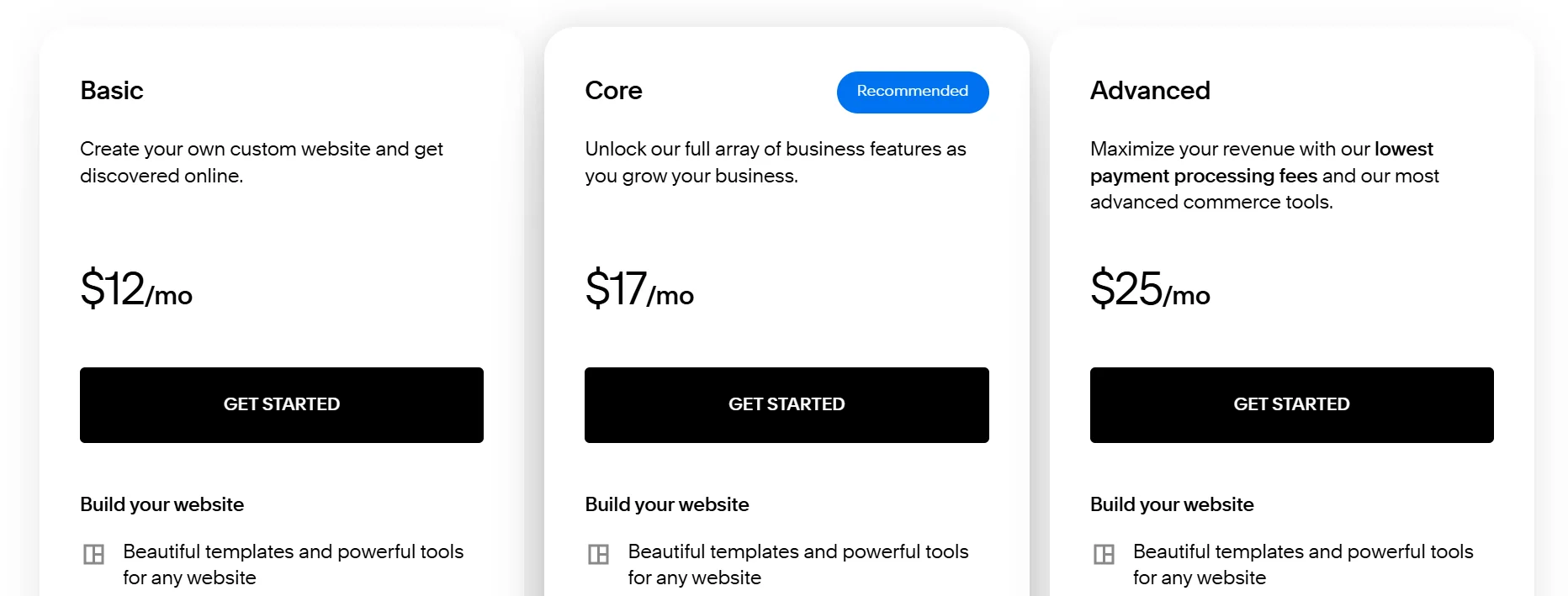
On the sticker price alone, Bluehost wins easily — its cheapest plan starts well under $5 a month, while Squarespace’s entry tier starts around $16 to $19 a month on annual billing.
But sticker price isn’t the whole story, since renewal pricing changes the math over time for both platforms.
Hosting Plans and Renewal Costs
Here’s how the two line up plan-by-plan, based on current published rates:
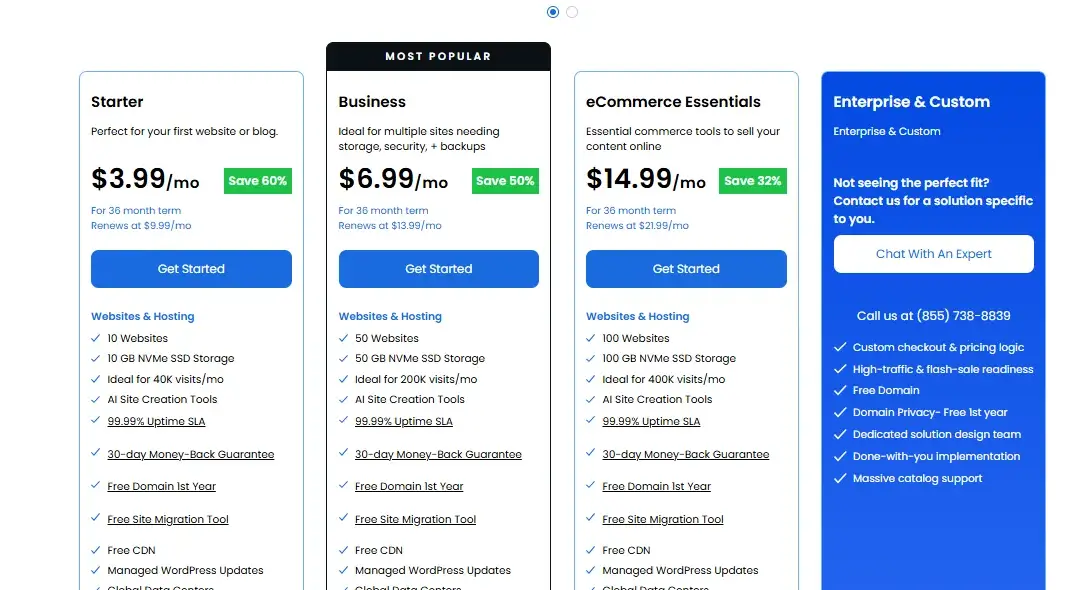
| Bluehost Plan | Intro Price | Typical Renewal | Squarespace Plan | Annual Price | Monthly Price |
|---|---|---|---|---|---|
| starter | $3.99/mo | ~$9.99/mo | Basic | ~$12/mo | ~$25/mo |
| Business | $6.99/mo | ~$13.99/mo | Core | ~$17/mo | ~$33/mo |
| eccomerce | $14.99/mo | ~$21.99/mo | |||
| Advanced | ~$25/mo | ~$139/mo |
Bluehost’s renewal jump is steep in percentage terms — some entry plans increase by more than 150% after the first term — but the dollar amount still lands well below Squarespace’s equivalent tiers.
Squarespace’s pricing is more transparent up front since there’s no dramatic introductory-versus-renewal gap; what you see is close to what you’ll keep paying.
Which Is Cheaper: Bluehost or Squarespace?
Bluehost is cheaper, both at signup and at renewal, for anyone comparing like-for-like entry plans. If budget is your main constraint and you’re comfortable with WordPress, Bluehost gives you more for less.
Squarespace costs more because the price includes design, hosting, and builder tools as one bundle — you’re paying for convenience, not just server space.
Bluehost vs Squarespace pricing really comes down to whether you’d rather pay less and build more yourself, or pay more and have less to manage.
Features and Website-Building Tools Comparison
Both platforms cover the basics — templates, drag-and-drop editing, ecommerce, email — but they get there through very different architectures.
Bluehost gives you WordPress’s open ecosystem; Squarespace gives you a closed, curated one.
Website Builder and Templates
Bluehost includes an AI-powered builder called WonderSuite, plus access to thousands of free and premium WordPress themes.
Squarespace’s own template library is smaller but more design-forward — its templates tend to look more cohesive and “designed” right out of the box, which is why photographers and portfolio sites gravitate toward it.
WordPress and Content Management
This is Bluehost’s home turf. It offers one-click WordPress installation, managed updates, staging sites on higher tiers, and full access to WordPress’s plugin marketplace — tens of thousands of free and paid add-ons for SEO, forms, membership sites, and more.
Squarespace runs on its own proprietary CMS, which is simpler to use but doesn’t support WordPress plugins or themes at all, since it’s a closed system by design.
Ecommerce Features
Both platforms support online stores, but they handle transaction fees differently:
- Bluehost (via WooCommerce): Free plugin, no forced transaction fees, full control over payment processors, product subscriptions, and courses on eCommerce-tier plans
- Squarespace: Built-in commerce tools with a transaction fee (commonly 2–3%) on lower tiers, waived on Plus and Advanced plans; includes abandoned cart recovery and gift cards on higher tiers
- Bluehost: Supports unlimited product types through WooCommerce extensions
- Squarespace: Native point-of-sale integration and donation tools baked in without extra plugins
If you want zero transaction fees from day one and full control over your payment stack, Bluehost with WooCommerce is the stronger pick.
If you want ecommerce that works immediately with no setup, Squarespace’s built-in tools win on convenience.
Domains, Email, and Other Included Features
Both include a free domain for the first year and free SSL certificates across all plans.
Bluehost adds free automated backups on select tiers (daily via CodeGuard on higher plans) and offers professional email starting around $3.99/month per mailbox.
Squarespace bundles Google Workspace-style professional email on some plans and includes marketing tools like email campaigns as paid add-ons starting around $12/month.
Ease of Use and Website Management
Squarespace is easier to use, full stop — that’s the platform’s entire reason for existing. You sign up, pick a template, and start editing visually with no separate hosting dashboard, cPanel, or server settings to worry about.
Bluehost, by contrast, splits your experience across a custom account dashboard for hosting settings and a separate WordPress admin panel for building your actual site, which adds a learning curve for total beginners.
In my experience testing both, Bluehost’s setup wizard has gotten noticeably smoother with WonderSuite’s AI onboarding, but it still can’t match the one-screen simplicity of Squarespace’s editor.
If you’ve never built a website before and don’t want to learn any hosting terminology, Squarespace will get you live faster.
Performance and Reliability
Independent testing shows both platforms are reliable, but Bluehost consistently edges ahead on raw speed.
Neither will give you a bad experience day-to-day — the differences show up mainly under heavier traffic or in Core Web Vitals scores that matter for SEO.
Website Speed and Response Time
Testing from multiple independent reviewers backs this up with hard numbers:
| Metric | Bluehost | Squarespace |
|---|---|---|
| Average response time | ~118.59 ms | ~595 ms |
| Time to First Byte (TTFB) | ~138–197 ms | ~360 ms |
| Largest Contentful Paint (LCP) | Under 600 ms | ~2.0 seconds |
| Full page load time | Under 1 second | ~2.25 seconds |
Bluehost’s advantage comes largely from its NVMe SSD storage, built-in Cloudflare CDN, and caching layer, all of which reduce server response time before the page even starts rendering.
Squarespace’s numbers are still well within acceptable ranges for good user experience — a 2-second load time isn’t going to tank your rankings — but if speed and Core Web Vitals are a priority for your SEO strategy, Bluehost has the technical edge.
Uptime and Performance Under Load
Both platforms report 100% uptime in independent two-month monitoring windows, though guaranteed SLAs differ slightly: Bluehost promises 99.9%–99.99% depending on the plan, while Squarespace guarantees 99.9%.
In practical terms, a 99.9% guarantee still allows for up to roughly 44 minutes of downtime a month, versus about 4 minutes for a 99.99% guarantee — a gap that matters more for high-traffic ecommerce sites than for a personal blog.
Under simulated traffic spikes, Bluehost held a 140ms response time at 50 concurrent virtual users with zero failed requests in recent stress testing, showing it handles sudden load well without buckling.
SEO Capabilities
Both platforms give you the tools to rank, but Bluehost’s WordPress foundation offers more depth.
Through plugins like Yoast SEO or Rank Math, you get granular control over meta tags, schema markup, sitemaps, and technical SEO settings that go well beyond what a closed-platform builder typically allows.
Squarespace includes solid built-in SEO settings — clean URL structures, automatic sitemaps, and basic meta tag editing — which cover the fundamentals well for most small business sites.
If you’re planning serious content marketing or need advanced technical SEO control, WordPress on Bluehost gives you more room to grow into.
Security and Backups
Security is one area where the two platforms are closer than you’d expect. Both include free SSL certificates, DDoS protection through Cloudflare, and 24/7 server monitoring as standard.
Bluehost adds a web application firewall and malware scanning on most plans, with automated daily backups available through CodeGuard (free on some tiers, a paid add-on on others).
Squarespace handles backups and security patching entirely on the backend with no user configuration needed — you don’t get a WAF dashboard to tweak, but you also don’t have to think about it, since Squarespace manages the entire security stack behind the scenes.
Customer Support
Both offer 24/7 live chat and phone support, so you’re not left waiting days for a response on either platform.
Bluehost separates its WordPress-specific support team from general hosting support, which means WordPress questions get routed to specialists — a genuinely useful setup if you’re troubleshooting a plugin conflict at 2 a.m.
Squarespace’s support leans more on its extensive knowledge base and community forum alongside live chat, with phone support available but slightly less emphasized than Bluehost’s three-channel approach (phone, chat, email).
Response times for live chat tend to run under five minutes on both platforms during business hours, based on user-reported testing.
Flexibility and Scalability
Bluehost is the more scalable option by a wide margin. Because it’s built on WordPress and open hosting infrastructure, you can move from shared hosting to VPS to dedicated servers as your traffic grows, switch themes, add virtually unlimited plugins, or even migrate your entire site to a different host if you ever want to leave.
Squarespace, being a closed platform, doesn’t allow that kind of portability — your site is built inside Squarespace’s proprietary system, so migrating away later usually means rebuilding from scratch on a new platform.
For a small business that expects to stay small, that’s not a dealbreaker. For anyone planning to scale into a serious ecommerce operation or content site, Bluehost’s WordPress architecture gives you more room to grow without hitting a platform ceiling.
Bluehost vs Squarespace: Pros and Cons
Here’s the full picture side-by-side, since a fair comparison means weighing more than just price or speed.
Bluehost Pros and Cons
Pros:
- Lower starting price across every plan tier
- Full WordPress access with one-click install
- Faster average response times and TTFB
- Higher uptime guarantee (up to 99.99%)
- Free domain and SSL on every plan
- Massive plugin ecosystem for extending functionality
- WordPress-trained support team available 24/7
- Full site portability — you can migrate away anytime
- AI-powered WonderSuite builder for faster setup
- Scales from shared hosting to VPS to dedicated servers
Cons:
- Steep renewal price increases after the intro term
- Steeper learning curve for total beginners managing both hosting and WordPress
Squarespace Pros and Cons
Pros:
- Genuinely simple, beginner-friendly editor
- Award-winning, design-forward templates
- Hosting, security, and backups fully managed for you
- 14-day free trial before you commit
- Transparent, predictable pricing with no renewal shock
- Built-in ecommerce tools with no plugin installation
- Strong customer support knowledge base and community forum
- Unlimited storage and bandwidth on all plans
- Native scheduling, email marketing, and analytics tools
- Consistent 100% uptime in independent monitoring tests
Cons:
- Higher monthly cost across every comparable tier
- No portability — leaving Squarespace usually means rebuilding your site elsewhere
Choose Bluehost If You Want More Flexibility and WordPress
Go with Bluehost if you want full control over your website’s code, plugins, and long-term hosting costs, and you don’t mind a slightly steeper learning curve to get there.
It’s the better fit for developers, growing ecommerce stores, and anyone who wants the option to scale or migrate freely down the road.
Choose Squarespace If You Want an All-in-One Website Builder
Go with Squarespace if you want to launch a polished, professional-looking site quickly without touching code or managing separate hosting settings.
It’s the stronger choice for photographers, consultants, and small creative businesses that value design and simplicity over deep customization.
Bluehost vs Squarespace Alternatives
If neither platform feels like the right fit, a few other options are worth a look:
Wix is a true all-in-one builder like Squarespace, but with more design freedom through its drag-and-drop editor and a larger app marketplace.
Paid plans start around $17/month, making it pricier upfront than Bluehost but comparable to Squarespace. It’s a solid pick if you want more creative control than Squarespace offers without diving into WordPress.
Hostinger is one of the cheapest hosting providers around, with shared plans starting near $2.99/month on long-term contracts.
It runs on fast infrastructure across multiple global data centers and includes an AI site builder, making it a strong budget alternative to Bluehost for WordPress users.
HostGator offers shared hosting starting around $3.75/month for its Hatchling plan, with cPanel access and unmetered bandwidth included.
It’s a reasonable middle-ground option if you want Bluehost-style flexibility at a slightly different price point, though its standalone website builder has been phased out for new signups.
Bluehost vs Squarespace: Which Is Better for You?
There’s no universal winner here — the right choice depends on how hands-on you want to be.
Choose Bluehost if you want lower costs, WordPress flexibility, and room to scale on your own terms.
Choose Squarespace if you’d rather pay a bit more for a polished, fully managed builder that gets you live in an afternoon with zero technical setup.
Match the platform to your comfort with tech and your growth plans, not just the price tag, and you’ll end up with a site that actually fits how you work.
FAQs
Is Bluehost cheaper than Squarespace?
Yes, Bluehost is cheaper both at signup and renewal for comparable plan tiers. Its entry-level plans start under $3.99/month, while Squarespace starts around $12/month on annual billing.
Can I move my Squarespace site to Bluehost later?
Not directly — Squarespace’s proprietary CMS doesn’t export cleanly to WordPress. You’d need to rebuild your site’s design and content manually on Bluehost’s WordPress environment.
Which platform is better for SEO, Bluehost or Squarespace?
Bluehost offers deeper SEO control through WordPress plugins like Yoast, while Squarespace covers the essentials with built-in settings. For advanced technical SEO, Bluehost has the edge.
Does Squarespace include hosting?
Yes, hosting is fully bundled into every Squarespace plan — there’s no separate hosting purchase or server management required.
Is Bluehost good for beginners?
It can be, especially with its AI-powered WonderSuite builder, but it has a steeper learning curve than Squarespace since you’re managing both hosting settings and WordPress separately.
Which is better for ecommerce, Bluehost or Squarespace?
Bluehost with WooCommerce gives you more control and no forced transaction fees, while Squarespace’s built-in commerce tools are faster to set up but charge a transaction fee on lower-tier plans.
Does Bluehost or Squarespace have better uptime?
Both report near 100% uptime in independent testing. Bluehost’s guaranteed SLA goes up to 99.99% on some plans, slightly higher than Squarespace’s standard 99.9% guarantee.

Alex Bryant is the founder of PvyEmpire.com and a WordPress specialist with over 4 years of hands-on experience in web hosting, performance optimization, and website management. He has extensively tested top hosting providers by setting up real websites and monitoring their speed, uptime, and reliability.
At PvyEmpire.com, Alex publishes honest, data-driven reviews, detailed guides, and verified coupons & deals. His goal is to help website owners choose the right hosting, improve performance, and grow their online presence with confidence—based on real testing, not promotions.