Bluehost vs InMotion: Which One Should You Choose?
Trying to pick between Bluehost and InMotion can feel like standing in a store aisle staring at two boxes that look almost identical. Both promise fast speeds, easy setup, and rock-solid support, so how do you know which one actually delivers?
If you’ve spent the last hour reading conflicting reviews and just want a straight answer, you’re definitely not alone.
That’s exactly what this guide is here to clear up. This Bluehost vs InMotion hosting comparison walks you through pricing, performance, features, and customer support, so you can see where each one shines and where it falls short.
By the end, you’ll know exactly which host fits your website’s needs, without the guesswork.
A Quick Overview: Bluehost vs InMotion
Bluehost is the safer pick for beginners and WordPress users who want a guided setup, while InMotion suits people who want more built-in security and don’t mind a slightly steeper learning curve.
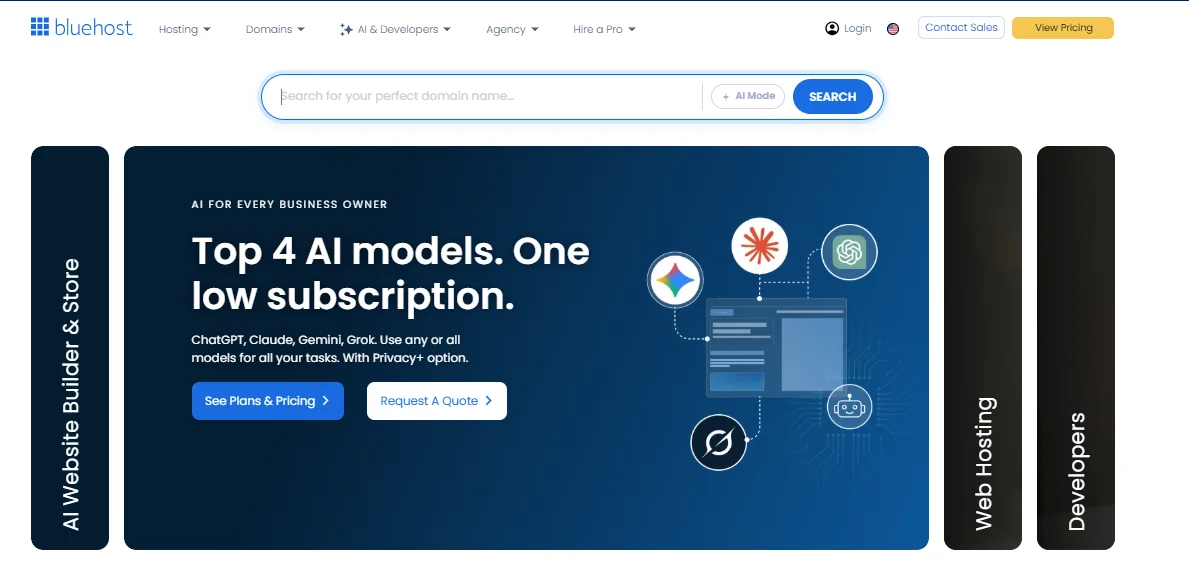
Bluehost is the only host currently listed on WordPress.org’s official recommended providers page, and it bundles an AI site builder plus Cloudflare’s CDN into most plans.
InMotion, on the other hand, is an independently owned, founder-run company that leans on strong developer tools, generous refund terms, and a choice of U.S. or European data centers.

| Bluehost | InMotion Hosting | |
|---|---|---|
| Founded | 2003 | 2001 |
| Best for | Beginners, WordPress sites | Developers, agencies, security-conscious users |
| Website builder | AI-powered builder | BoldGrid drag-and-drop |
| Money-back guarantee | 30 days | 90 days (shared/WP), 30 days (VPS/dedicated) |
| WordPress.org recommended | Yes | No |
Neither host is objectively “bad,” and both run on cPanel, so switching between them later isn’t painful. The real differences show up once you start comparing plan limits and renewal pricing, which is where most people get surprised.
Hosting Plans and Pricing
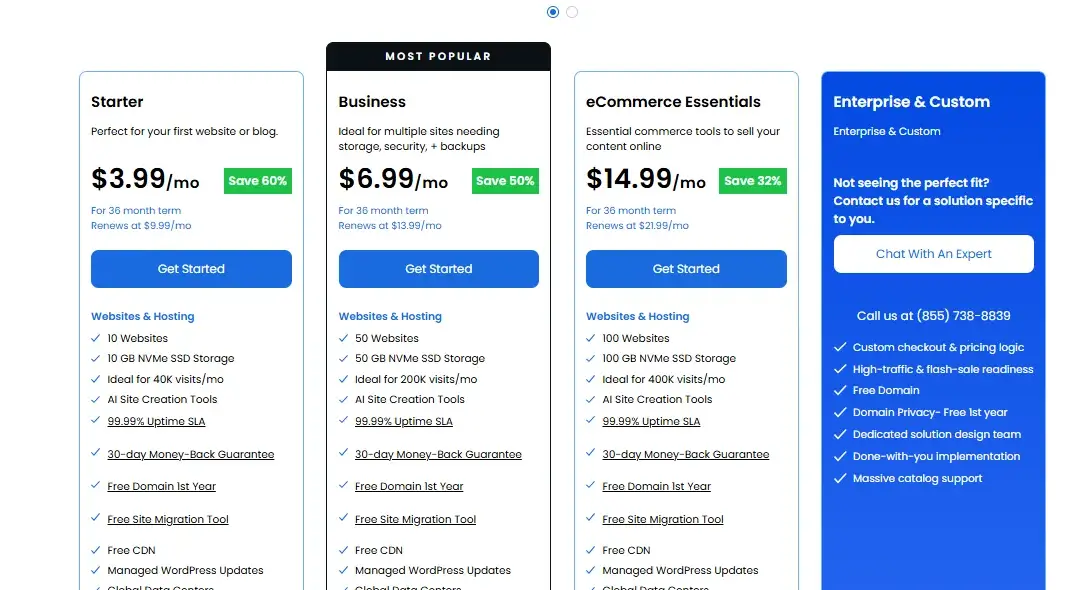
When people dig into Bluehost vs InMotion pricing, the first thing they notice is that both hosts use the same industry playbook: a cheap introductory rate that renews at two to four times the price once your first term ends.
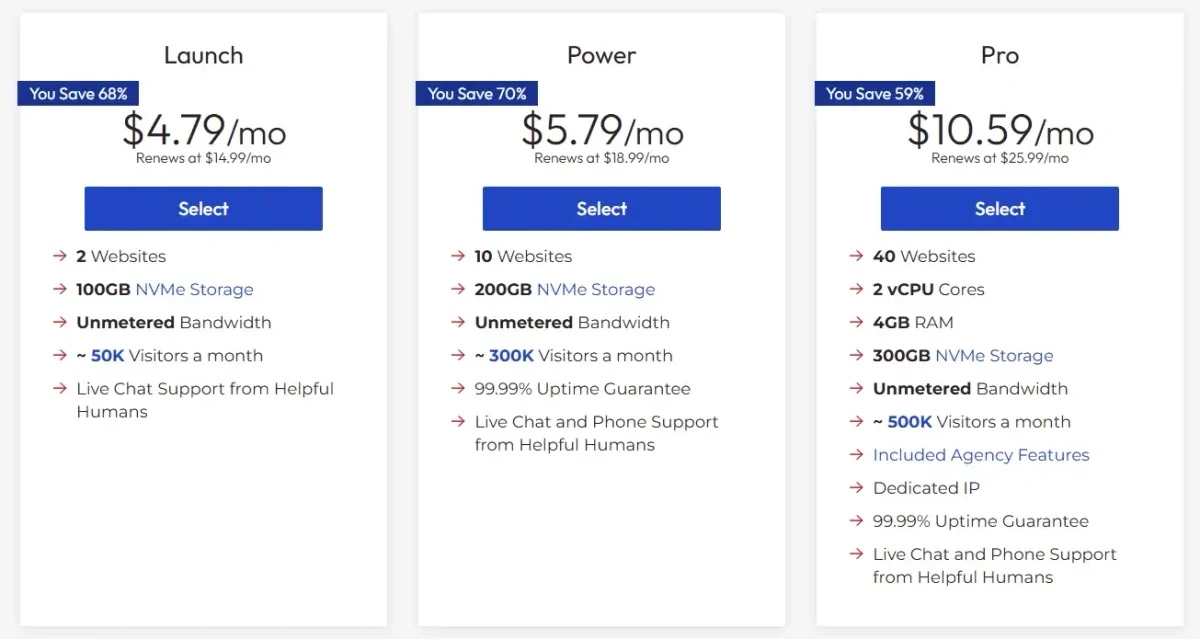
Bluehost’s shared hosting starts around $3.99/month on a 36-month term and renews between $9.99 and, depending on the tier. InMotion’s Core plan starts a little lower, around $4.79 month, and renews between $14.99/month.
| Plan tier | Bluehost | InMotion |
|---|---|---|
| Entry plan | Basic — up to 10 websites, 10GB NVMe | Core — 1–2 websites, 100GB SSD |
| Mid tier | Plus — more storage, unlimited email | Launch — 2–25 websites, 100GB NVMe |
| Business tier | Choice Plus/Business — up to 50 websites, 50GB NVMe | Power — 10+ websites, 200GB NVMe, phone support |
| Top tier | eCommerce/Pro plans | Pro — up to 40 websites, WHM access, dedicated IP |
Bluehost’s Business plan technically allows more websites per account (50 vs. InMotion’s 40 on Pro), which matters if you’re hosting several small sites under one login.
InMotion counters with more generous storage on its entry-level Core plan and NVMe (a faster type of solid-state storage) across more of its lineup, even at lower tiers.
Long-Term Value and Renewal Costs
If you’re planning to keep your site for more than a year or two, renewal pricing matters far more than the flashy introductory rate.
Bluehost’s own comparison materials claim its WordPress plans renew around $13.99/month versus roughly $19.99/month for InMotion’s equivalent tier — a difference of about $72 a year if that pricing holds for your specific plan choice.
Since that figure comes from Bluehost’s own marketing page, it’s worth double-checking against InMotion’s live pricing page before you commit, since promotions shift throughout the year.
A few things that affect your real long-term cost either way:
- Longer terms (24 or 36 months) lock in lower renewal rates on both hosts.
- Bluehost’s free domain and free SSL apply only to 12- and 36-month signups.
- InMotion’s free domain credit works the same way, tied to 12-, 24-, or 36-month terms.
Performance, Speed, and Uptime
Bluehost tends to edge out InMotion in independent speed tests, but the gap is smaller than either company’s marketing suggests.
A November 2025 hosting comparison from WPShout found Bluehost delivering some of the fastest load times among the hosts it tested, clocking in at just 0.35 seconds for U.S. visitors. That’s a genuinely fast number for shared hosting.
InMotion doesn’t lose on every front, though. Some independent reviewers have found InMotion pulling ahead on initial page load and Largest Contentful Paint (LCP, a Core Web Vitals metric that measures how fast the main content of a page appears).
When testing under simulated traffic loads, largely because InMotion runs its own UltraStack caching layer (a custom stack combining NGINX, Redis, and PHP-FPM) rather than relying purely on shared cloud infrastructure.
Both companies advertise uptime guarantees north of 99.9%, with Bluehost specifically promising a 99.99% SLA and offering a service credit if it falls short.
Load Handling and Performance Consistency
In plain terms, Bluehost tends to feel faster for average traffic on a typical blog or small business site, while InMotion tends to hold up more consistently once you throw a traffic spike at it. That’s a reasonable trade-off to expect:
Bluehost optimizes for the common case, and InMotion optimizes for stability under stress, partly because it isolates hosting accounts more aggressively even on shared plans.
Features and Included Tools
Both hosts cover the basics — free SSL, one-click WordPress installs, and unmetered bandwidth — but they diverge on the extras.
Bluehost leans into AI-assisted tools and CDN integration, while InMotion leans into raw storage and developer-friendly extras.
| Feature | Bluehost | InMotion |
|---|---|---|
| Free SSL | Yes | Yes |
| CDN | Cloudflare, included | Not included by default |
| AI site builder | Yes | No (BoldGrid is template-based, not AI-driven) |
| Storage type | NVMe on most plans | SSD on entry plan, NVMe from Launch tier up |
| Staging environments | Business plan and up | Power plan and up |
| Free professional email | Yes | Yes, unlimited on most plans |
Website Builders and Site Creation Tools
If you want to describe your site in a sentence and have something usable appear in minutes, Bluehost’s AI builder is the more modern option.
InMotion’s BoldGrid builder is still a solid drag-and-drop tool with hundreds of templates, but it asks you to make more design decisions yourself rather than generating a starting point for you.
Email Hosting and Business Communication Options
Both hosts include professional email addresses tied to your domain at no extra cost, which covers most small business needs without paying for a separate email provider.
Bluehost manages email through its own webmail and cPanel-based system, with the option to upgrade to Google Workspace for a monthly fee if you need a more robust inbox.
InMotion offers unlimited email accounts on most of its shared plans, also managed through cPanel, with similar upgrade paths to third-party providers like Google Workspace when a business outgrows basic webmail.
Neither company’s built-in email tool matches a dedicated service like Google Workspace for spam filtering or storage, but for a small business that just needs a handful of “@yourdomain.com” addresses, either host handles it fine.
WordPress Hosting Experience
Bluehost has a structural advantage here: it’s the host WordPress.org itself lists as an officially recommended provider, a distinction InMotion doesn’t hold.
That recommendation isn’t just a badge — it reflects Bluehost’s long history of pre-configuring servers specifically for WordPress’s requirements and maintaining close ties with the WordPress core team.
That said, InMotion isn’t a weak WordPress host by any measure. It offers automatic core updates, optimized caching through UltraStack, and support staff trained specifically on WordPress troubleshooting.
If official recommendation status matters to you (for instance, if you’re building a client site and want to point to a trusted authority), Bluehost wins this one outright. If you just want solid day-to-day WordPress performance, both hosts deliver it.
Security and Backup Protection
Security is one area where InMotion arguably out-features Bluehost on paper, bundling more protection tools into its base plans rather than treating them as paid add-ons.
Bluehost includes:
- Free SSL certificate
- Firewall and DDoS protection via Cloudflare
- Optional SiteLock malware scanning (extra cost on lower tiers)
- Automatic daily backups on Business plan and above (not guaranteed on entry-level plans)
InMotion includes:
- Free SSL certificate
- Monarx malware detection and automatic removal, built in at no extra cost
- Brute force defense and hosting account isolation
- 24/7 security monitoring and a web application firewall
- Two-factor authentication for account access
If security is your top priority and you don’t want to pay extra for malware protection, InMotion’s Monarx integration gives it a real edge over Bluehost’s paid SiteLock add-on.
Ease of Use and Control Panel Experience
Bluehost is the friendlier option for someone who has never managed a hosting account before.
Its onboarding wizard walks you through domain setup, WordPress installation, and its AI builder in a fairly linear flow, and its customized cPanel dashboard hides a lot of the technical clutter beginners don’t need to see.
InMotion uses a more standard cPanel layout, which developers tend to appreciate for its familiarity but which some beginners describe as more confusing to navigate at first.
If you already know your way around cPanel from a previous host, this difference won’t matter much. If this is your first hosting account ever, Bluehost’s guided setup will likely save you some frustration in week one.
Customer Support and Documentation
Both hosts offer 24/7 support, but the channels and depth differ slightly by plan tier.
- Bluehost: 24/7 live chat, phone support, and email/ticket support across all plans, plus an extensive self-service knowledge base.
- InMotion: 24/7 live chat and ticket support on every plan, with phone support specifically included on the Power and Pro tiers (not the entry-level Core or Launch plans), along with a large knowledge base, community forums, and video tutorials.
InMotion has reported a Net Promoter Score of 54 in 2026, compared to an industry average of 40 for the cloud and hosting sector, which suggests its customer satisfaction tends to run above average for the space.
Bluehost doesn’t publish a comparable public NPS figure, so that specific comparison isn’t apples-to-apples, but its support is generally well-reviewed for responsiveness on live chat.
Data Centers and Global Performance
Where your visitors are located should genuinely influence which host you pick, since physical distance to the server still affects load times even with caching in place.
InMotion operates data centers in Los Angeles, Ashburn (Virginia), and Amsterdam, and lets you choose the location closest to your target audience during signup — a useful option if most of your traffic comes from Europe, since the Amsterdam center is also GDPR-compliant for EU data residency needs.
Bluehost’s shared hosting infrastructure is primarily U.S.-based, but it leans on Cloudflare’s global CDN network to cache and serve static content from edge locations worldwide, which narrows the gap for international visitors even without a local data center.
In short: if most of your audience is in Europe or you need EU data residency, InMotion’s Amsterdam option is the more direct solution. If your audience is scattered globally but mostly reading static content (blogs, portfolios, marketing pages), Bluehost’s CDN coverage does a reasonable job compensating.
Scalability and Growth Potential
Bluehost’s Business plan supports up to 50 websites and 50GB of NVMe storage under a single account, making it the better pick if you’re managing a growing collection of small sites or client projects on shared hosting.
InMotion’s Pro plan tops out at 40 websites but adds WHM (Web Host Manager) access and multi-account isolation, which separates each client’s site into its own contained environment — a meaningful advantage for agencies that need to keep client sites walled off from each other for security and performance reasons.
Once you outgrow shared hosting entirely on either platform, both offer a clear upgrade path to VPS and then dedicated servers, so you’re not forced to migrate to a different company as your traffic grows.
Developer Tools and Supported Software
InMotion is the more developer-oriented host of the two, and it shows in what it supports out of the box:
- SSH access on shared plans
- Git version control
- Node.js and Python support
- PostgreSQL databases alongside MySQL
- WP-CLI (command-line WordPress management)
- PHP 8.4
Bluehost supports the essentials — PHP, MySQL, and SSH access on higher-tier plans — but doesn’t market itself as heavily toward developers on shared hosting, reserving full root access and broader language support for its VPS and dedicated tiers.
If you’re a developer who wants Git deployment and database flexibility without upgrading to VPS, InMotion’s shared plans give you more to work with immediately.
eCommerce and Online Store Support
Both hosts can run a WooCommerce store without issue, but they approach it differently. Bluehost offers dedicated eCommerce Essentials and Premium plans built around WooCommerce, with integrated payment gateways like PayPal, Stripe, and Razorpay set up during onboarding.
InMotion doesn’t have a dedicated eCommerce plan tier in the same way; instead, it supports one-click installs for WooCommerce, PrestaShop, and other cart software through Softaculous on its standard shared and WordPress plans, alongside BoldGrid’s built-in store tools.
If you want a more guided, purpose-built eCommerce setup, Bluehost’s dedicated store plans are the more turnkey option. If you’d rather install and configure your cart software yourself with more platform choice, InMotion gives you that flexibility.
VPS Hosting Comparison
Once shared hosting isn’t enough, both companies offer VPS (Virtual Private Server) hosting, which gives your site dedicated CPU, RAM, and storage instead of sharing a server with other accounts.
| Bluehost VPS | InMotion VPS | |
|---|---|---|
| Starting price (self-managed) | Around $4.69/month on long terms | Around $10.99–16.99/month |
| Fully managed starting price | Around $9.99/month | Higher, varies by resource tier |
| Processor | AMD EPYC | Varies by plan |
| Storage | NVMe SSD across all plans | NVMe on most current plans |
| Onboarding help | Standard setup | Launch Assist onboarding included |
InMotion tends to undercut Bluehost slightly on entry-level VPS pricing while including a free guided onboarding service (Launch Assist) that Bluehost doesn’t offer at the same tier.
Bluehost’s managed VPS plans lean on newer Oracle Cloud infrastructure for reliability, which may appeal to businesses that want a more enterprise-branded backend.
Pricing on both sides shifts often with promotions, so treat these as ballpark figures and check each provider’s current VPS pricing page before buying.
Website Migration Options
Moving an existing site is free with both hosts, though the process looks a little different. Bluehost provides self-service migration tools and plugins for WordPress sites, letting you move your content over without contacting support in most straightforward cases.
InMotion offers free migration when you provide a full cPanel or WordPress backup, and for more complex setups — think multi-app stacks or large eCommerce stores — its Launch Assist team can handle a white-glove migration for a fee.
If your site is a standard WordPress install, expect a smooth, mostly self-serve migration on either platform.
If you’re moving something more complex, InMotion’s paid migration assistance is worth considering even if you ultimately choose Bluehost for other reasons, since Bluehost’s migration support tends to lean more toward WordPress-specific tools rather than full-stack custom migrations.
Pros and Cons of Bluehost vs InMotion
Bluehost
✅ Pros:
- Officially recommended by WordPress.org
- AI website builder included at no extra cost
- Cloudflare CDN bundled with hosting plans
- Supports up to 50 websites on its Business plan
- Beginner-friendly onboarding and dashboard
❌ Cons:
- Shorter 30-day money-back guarantee
- Automatic backups not included on entry-level plans
InMotion Hosting
✅ Pros:
- 90-day money-back guarantee on shared and WordPress plans
- Built-in Monarx malware protection and account isolation
- Stronger developer tool support (Git, Node.js, Python, PostgreSQL)
- Choice of U.S. or Amsterdam data centers
- Independently founder-owned, not part of a larger hosting conglomerate
❌ Cons:
- No AI website builder
- Phone support limited to Power and Pro plans
Conclusion: Which Host Should You Choose?
If you’re a beginner, a blogger, or building a WordPress site and want the smoothest possible setup, Bluehost is the safer choice — its WordPress.org recommendation, AI builder, and guided onboarding are built for exactly that situation.
If you care more about built-in security, developer flexibility, or want a longer window to test the service risk-free, InMotion’s 90-day guarantee and Monarx-backed protection make a stronger case, especially for agencies managing multiple client sites.
Neither host is a bad pick; the right one really comes down to whether you value simplicity and AI-assisted tools (Bluehost) or security depth and developer control (InMotion) more for your specific project.
FAQs
Is Bluehost or InMotion better for beginners?
Bluehost is generally easier for first-time website owners thanks to its guided onboarding and AI site builder. InMotion’s standard cPanel setup is more developer-friendly but has a slightly steeper learning curve.
Which host offers a longer money-back guarantee?
InMotion offers a 90-day money-back guarantee on shared and WordPress hosting plans, compared to Bluehost’s 30-day window.
Does InMotion have an AI website builder like Bluehost?
No. InMotion uses BoldGrid, a template-based drag-and-drop builder, rather than an AI-generated site builder.
Which host is officially recommended by WordPress.org?
Bluehost is currently listed as an officially recommended host on WordPress.org; InMotion does not hold that same distinction.
Can I host multiple websites on one plan with either host?
Yes. Bluehost’s Business plan supports up to 50 websites, while InMotion’s Pro plan supports up to 40 websites with added account isolation for agencies.
Which host has better built-in security?
InMotion includes more security tools by default, such as Monarx malware protection and account isolation, without extra fees. Bluehost offers similar protection mostly through paid add-ons on lower-tier plans.
Is it easy to migrate my site from InMotion to Bluehost, or vice versa?
Yes, both hosts offer free migration for standard WordPress sites. Bluehost relies more on self-service migration plugins, while InMotion offers a paid white-glove migration option for complex sites.
Which is better, InMotion vs Bluehost?
There’s no single winner — Bluehost is better for beginners and standard WordPress sites, while InMotion is better if you want stronger built-in security, developer tools, or a longer refund window. Your specific priorities decide the answer, not one host being universally superior.

Alex Bryant is the founder of PvyEmpire.com and a WordPress specialist with over 4 years of hands-on experience in web hosting, performance optimization, and website management. He has extensively tested top hosting providers by setting up real websites and monitoring their speed, uptime, and reliability.
At PvyEmpire.com, Alex publishes honest, data-driven reviews, detailed guides, and verified coupons & deals. His goal is to help website owners choose the right hosting, improve performance, and grow their online presence with confidence—based on real testing, not promotions.