Bluehost vs WebHostingPad: Which Web Host is Best for You?
So you’ve narrowed your hosting options down to two names and now you’re stuck staring at pricing tables, trying to figure out which one actually deserves your money.
That’s the exact spot most people land in when comparing Bluehost vs WebHostingPad — both look decent on paper, both promise fast speeds and easy setup, but the details that actually matter tend to get buried under marketing fluff.
That’s exactly what this post is here to clear up. We’ll break down how these two hosts stack up on price, performance, support, and features that actually affect your site day to day — no jargon, no guesswork.
By the end, you’ll know which one fits your needs without having to dig through ten other tabs to figure it out.
What is Bluehost?
Bluehost is one of the largest web hosting companies in the world, powering over two million websites and holding an official recommendation from WordPress.org.
It’s owned by Newfold Digital and runs on Linux-based servers with cPanel, and it’s built around making WordPress hosting approachable for beginners while still offering room to grow into VPS, dedicated, and cloud hosting.
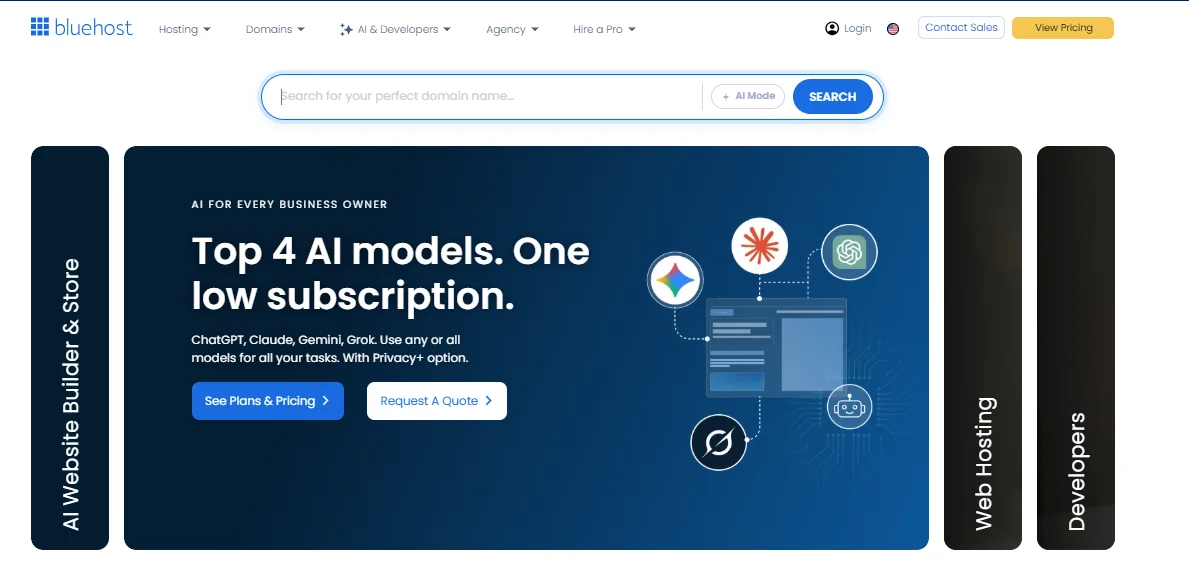
What sets Bluehost apart isn’t just its size — it’s the amount of polish that goes into the onboarding experience.
From AI-assisted site building to one-click WordPress installs, everything is designed so a first-time site owner doesn’t feel lost. That said, Bluehost sits on the pricier side once you factor in renewal costs, so it’s worth reading past the flashy intro price.
What is WebHostingPad?
WebHostingPad is a budget shared hosting provider founded in 2005 and headquartered in Rolling Meadows, Illinois, with its server infrastructure based in a single Chicago data center.
It’s built for people who want the absolute lowest entry price and don’t need multiple data center regions or enterprise-grade performance.

The pitch here is simple: unlimited storage, unlimited bandwidth, and unlimited email accounts, all for a couple of dollars a month.
It’s a solid fit for a personal blog, a hobby project, or a first website where you’re testing an idea rather than running a business. Where it tends to fall short is speed consistency and support quality once your site starts getting real traffic.
Bluehost vs WebHostingPad: Quick Comparison
If you only have thirty seconds, here’s the Bluehost vs WebHostingPad breakdown in one table.
| Category | Bluehost | WebHostingPad |
|---|---|---|
| Starting price | $3.99/month | $1.99/month |
| Overall rating | 4.5/5 | 4.1/5 |
| Uptime (real-world average) | 99.96%–99.98% | 99.35%–99.89% |
| Average load time | 0.35–0.97 seconds | Noticeably slower, often 2x competitors |
| Data centers | US-based, with global CDN via Cloudflare | Single data center (Chicago, US) |
| Free domain | Yes, first year | Yes, first year |
| Best for | WordPress sites, small businesses, growing projects | Ultra-budget personal sites, hobby projects |
Pricing and Value
Bluehost costs more overall, but you’re paying for better infrastructure and support depth. WebHostingPad wins purely on sticker price, especially if your project doesn’t need much beyond basic shared hosting.
The real difference shows up at renewal — both hosts raise their rates after the first term, so it’s worth checking that math before you commit long-term.
Bluehost Pricing and Plans
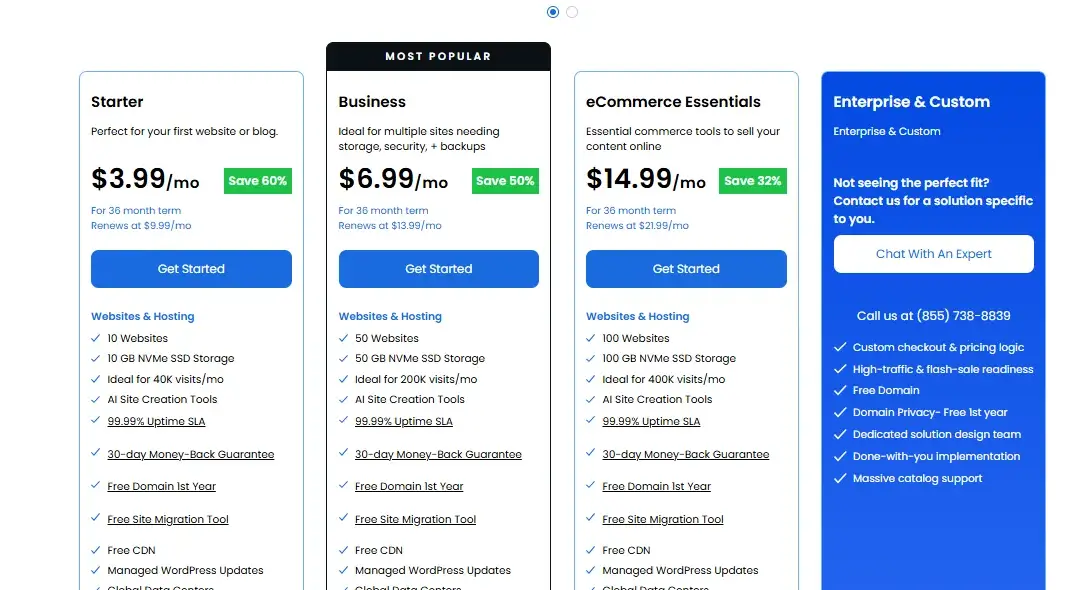
Bluehost’s shared hosting comes in three main tiers, and pricing is based on a 36-month term:
- Starter plan – $3.99/month, 10 GB SSD storage, supports up to 10 websites, includes cPanel, free domain, and free SSL
- Business Essentials plan – $6.99/month, 50 GB storage, up to 50 websites, adds domain privacy and automated backups
- High Performance Pro plan – $14.99/month, 100 GB storage, up to 100 websites, built for higher-traffic sites needing more resources
Bluehost also runs frequent promos that drop the Starter plan as low as $3.99/month for new signups, though renewal rates jump significantly — often by 100% to 400% — once your initial term ends.
WebHostingPad Pricing and Plans
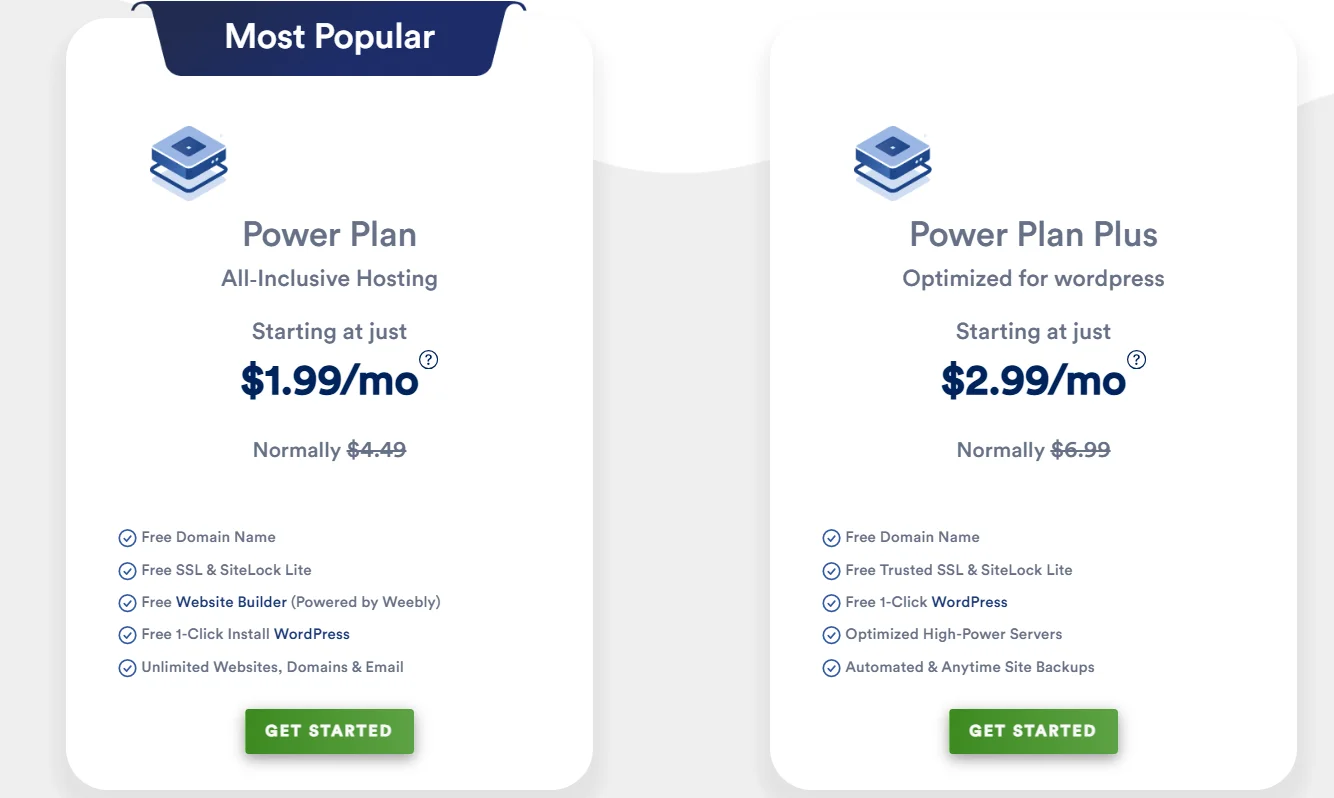
WebHostingPad keeps things simpler with two core plans:
- Power Plan – starting at $1.99/month (on longer terms), unlimited storage and bandwidth, unlimited websites, free domain for the first year
- Power Plan Plus – around $2.99/month, adds automated backups, server optimization, and a stronger SSL setup aimed at WordPress users
There’s also a Power Plan Mini at a flat $2.99/month with fixed renewal pricing — a nice option if you’re tired of surprise renewal hikes, though it comes with fewer resources.
Features and Hosting Options
Both hosts cover the basics you’d expect — free domain, free SSL, cPanel, and one-click app installs — but Bluehost’s feature set runs deeper the further up its plan tiers you go, especially for WordPress-specific tools and ecommerce.
Bluehost also offers a fuller range of hosting types beyond shared hosting, including VPS, dedicated servers, and cloud hosting, which gives you somewhere to grow without switching providers.
WebHostingPad, by comparison, is mostly a shared-hosting specialist; it doesn’t offer dedicated server plans at all.
Website and WordPress Features
Bluehost is officially recommended by WordPress.org, and every plan includes managed WordPress updates, one-click installs, and an AI site builder that generates a full layout from a short description.
WebHostingPad also supports one-click WordPress installs through Softaculous, along with Joomla, Drupal, and PrestaShop, but it lacks the deeper WordPress-specific tooling — like staging environments — that Bluehost offers on its higher tiers.
Storage, Bandwidth, and Freebies
WebHostingPad’s biggest selling point is genuinely unlimited storage, bandwidth, and email accounts across its plans, with a free domain (up to $1.99 in value) included for the first year.
Bluehost caps storage by plan — 10 GB on Starter, scaling up to 100 GB on High Performance Pro — but throws in free SSL, a CDN, and weekly backups as standard, even on its entry-level plan.
Website Builder and Ecommerce Tools
Bluehost includes an AI-powered website builder on every plan and offers a standalone “Get Online” builder plan for around $6.99/month if you just need a simple site without full hosting.
WebHostingPad bundles a free website builder (via Weebly) with all its hosting plans, which covers basic drag-and-drop needs but isn’t built for anything beyond a simple brochure site or starter online store.
Performance and Reliability
Here’s the honest answer: Bluehost is noticeably faster and more consistent than WebHostingPad.
Independent testing places Bluehost’s average load time around 0.35–0.97 seconds with a Time to First Byte between roughly 200–550 milliseconds, while multiple WebHostingPad reviews report load times running twice as long on heavier pages, particularly once a site gets real traffic.
Speed and Server Performance
Bluehost runs NVMe SSD storage and AMD EPYC processors across its infrastructure, along with HTTP/3 support and a Cloudflare CDN bundled into every plan — a combination that’s helped it score 98%+ on PageSpeed Insights in recent independent tests.
WebHostingPad relies on more basic shared-server infrastructure, and while some plans include SSD storage, several reviews flag inconsistent performance during traffic spikes as a recurring weak point.
Uptime and Reliability
Bluehost advertises a 99.99% uptime SLA on shared hosting, and independent monitoring over 12-month windows has recorded real-world uptime in the 99.96%–99.98% range — with credits issued if it dips below guarantee.
WebHostingPad advertises a 99.9% uptime guarantee too, but real-world numbers reported across different review sites vary a lot more, ranging anywhere from roughly 98.19% to 99.97% depending on the testing period, which suggests less consistency than Bluehost delivers.
Data Centers and Server Locations
Bluehost primarily operates out of US-based data centers but layers a global Cloudflare CDN on top, which helps distribute content closer to visitors regardless of where they’re located — a real advantage if you expect international traffic.
WebHostingPad, on the other hand, runs a single data center in Chicago, Illinois, with no additional global regions, so visitors outside North America may notice slower load times.
Ease of Use
Both hosts use cPanel, so if you’ve used any shared hosting before, neither will feel unfamiliar.
Bluehost edges ahead with a more guided setup flow and AI tools that walk beginners through launching a site from scratch, while WebHostingPad keeps things functional but more bare-bones.
Setup and Hosting Management
Bluehost’s onboarding wizard handles domain connection, WordPress installation, and even design suggestions in a few clicks, which makes it a genuinely good pick if this is your first time hosting a site.
WebHostingPad’s cPanel dashboard is straightforward and includes Softaculous for app installs, but it doesn’t hold your hand the way Bluehost does — you’ll want at least some comfort navigating hosting settings on your own.
WordPress and Website Migration
Bluehost includes a self-service WordPress migration tool on all plans, making it relatively painless to move an existing site over.
WebHostingPad doesn’t offer a dedicated free migration tool in the same way, so moving a site over often means more manual work or paying for a migration service.
Customer Support
Bluehost generally comes out ahead here too, though it’s not spotless — 24/7 live chat tends to get quick first responses on both platforms, but Bluehost’s team handles complex troubleshooting more reliably based on recent reviews.
WebHostingPad’s support is available around the clock as well, but response quality is where multiple reviewers report inconsistency.
Support Channels and Availability
- Bluehost: 24/7 live chat, phone support, extensive knowledge base, video guides
- WebHostingPad: 24/7 live chat, phone support, email/ticket support, knowledge base
Support Quality and Response Times
Bluehost’s live chat and phone support are typically fast, and reviewers note that agents can walk through more technical issues — like SSH configuration or server-side troubleshooting — without escalating every time.
WebHostingPad’s team responds quickly too, often within minutes, but several reviews describe replies as vague or under-detailed for more advanced problems, which can mean back-and-forth tickets before anything’s actually resolved.
Pros and Cons
Neither host is perfect, but weighing the strengths against the drawbacks makes the decision a lot clearer.
Bluehost Pros and Cons
Pros:
- Officially recommended by WordPress.org
- Fast average load times (0.35–0.97 seconds in independent tests)
- Strong real-world uptime (99.96%+)
- Free domain, SSL, and CDN on every plan
- AI-powered website builder included
- Self-service WordPress migration tool
- Scales into VPS, dedicated, and cloud hosting
- 24/7 live chat and phone support
- 30-day money-back guarantee
- NVMe storage and modern server hardware (AMD EPYC, HTTP/3)
Cons:
- Renewal prices can jump 100%–400% after the first term
- Storage is capped by plan, unlike WebHostingPad’s unlimited approach
WebHostingPad Pros and Cons
Pros:
- Extremely low entry price ($1.99/month)
- Unlimited storage, bandwidth, domains, and email accounts
- Free domain for the first year
- Power Plan Mini offers fixed renewal pricing
- cPanel with Softaculous one-click installs
- Supports multiple CMS platforms (WordPress, Joomla, Drupal, PrestaShop)
- 24/7 live chat, phone, and email support
- 30-day money-back guarantee
- Free website builder included on all plans
- Simple, no-frills plan structure that’s easy to compare
Cons:
- Inconsistent uptime and slower load times, especially under traffic
- Only one data center (Chicago), limiting performance for international visitors
Alternatives to Bluehost and WebHostingPad
- Hostinger – Consistently among the cheapest hosts with strong speed benchmarks and an included AI website builder, making it a solid middle ground between price and performance.
- SiteGround – Pricier than both options here, but known for excellent customer support and reliable uptime, especially for WordPress-heavy sites.
Final Word: Which One Should You Choose?
If you’re building something you actually care about — a business site, a client project, or a blog you plan to grow — Bluehost is the safer bet. It costs more, especially after renewal, but the speed, uptime, and support quality genuinely justify the price difference for anything beyond a hobby project.
If you’re just testing an idea, need a dirt-cheap personal site, or want unlimited storage without worrying about plan tiers, WebHostingPad’s low entry price makes sense — just go in knowing that performance and support can be hit-or-miss once your site starts getting real traffic.
In short: pick Bluehost for reliability and room to grow, and pick WebHostingPad only if budget is your top priority and your site’s needs stay simple.
FAQs
Which is cheaper, Bluehost or WebHostingPad?
WebHostingPad is generally cheaper at the entry level, with plans starting around $1.99/month and unlimited storage. Bluehost starts around the same price during promos but typically renews higher.
Which host is better for WordPress sites?
Bluehost is the better pick for WordPress — it’s officially recommended by WordPress.org and includes managed updates, migration tools, and an AI site builder on every plan.
Does WebHostingPad offer unlimited storage?
Yes, WebHostingPad’s Power Plan and Power Plan Plus include unlimited disk space and bandwidth, subject to a fair-use policy.
Which host has better uptime?
Bluehost has more consistent real-world uptime, averaging 99.96%–99.98% in independent tests, compared to WebHostingPad’s more variable 99.35%–99.89%.
Can I host multiple websites on either plan?
Bluehost allows multiple sites depending on your plan tier (10 to 100 websites). WebHostingPad allows unlimited websites on its Power Plan and Power Plan Plus.
Does either host offer a money-back guarantee?
Yes, both Bluehost and WebHostingPad offer a 30-day money-back guarantee on hosting plans.
Is Bluehost worth the higher price compared to WebHostingPad?
For most growing websites, yes — Bluehost’s faster load times, stronger uptime, and deeper WordPress tools make the higher renewal cost worthwhile if your site needs to perform reliably under traffic.

Alex Bryant is the founder of PvyEmpire.com and a WordPress specialist with over 4 years of hands-on experience in web hosting, performance optimization, and website management. He has extensively tested top hosting providers by setting up real websites and monitoring their speed, uptime, and reliability.
At PvyEmpire.com, Alex publishes honest, data-driven reviews, detailed guides, and verified coupons & deals. His goal is to help website owners choose the right hosting, improve performance, and grow their online presence with confidence—based on real testing, not promotions.