Bluehost vs iPage: Which Web Host is Best for You?
Picking a web host can feel like standing in the cereal aisle — too many boxes, too many promises, and no real way to tell what’s actually good until you’ve already bought it.
If you’ve been going back and forth between Bluehost and iPage, trying to figure out which one won’t leave your site crawling or your wallet lighter than expected, you’re definitely not alone.
That’s exactly what we’re breaking down in this post. We’ll walk through how Bluehost vs iPage compare on the stuff that actually matters — pricing, speed, customer support, and ease of use — so you can skip the guesswork and pick the one that fits your site. By the end, you’ll know exactly which host makes more sense for you.
What is Bluehost?
Bluehost is one of the largest shared hosting providers in the world, officially recommended by WordPress.org and used to power millions of sites.
It launched in 2003 and has since grown into a full-service host offering shared, WordPress, VPS, and dedicated hosting, along with domain registration, email, and website-builder tools.
If you’ve read almost any “how to start a blog” guide, there’s a good chance Bluehost showed up in it — that’s how deeply it’s embedded in the beginner hosting space.
It runs on cPanel, the industry-standard control panel, so if you’ve used any other host before, the interface will feel familiar.
What is iPage?
iPage is a budget web host that’s been around since 1998, originally built around the same “everything unlimited, dirt cheap” pitch that made shared hosting popular with first-time site owners.
Here’s the thing you need to know before going any further, though: iPage has stopped accepting new customers and now redirects new signups to Bluehost, since the two brands sit under the same parent company.
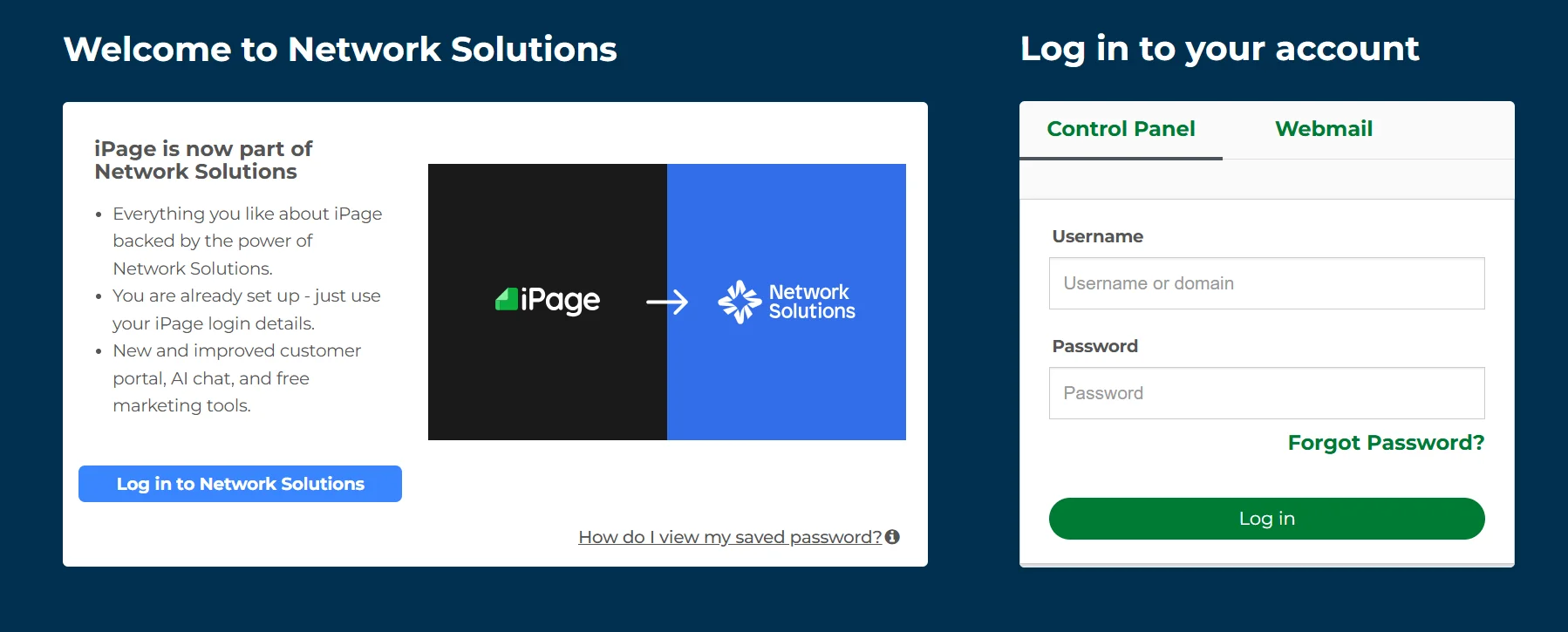
Existing iPage customers can still log in and get support as usual, but if you’re a new site owner comparing the two right now, you genuinely can’t open a fresh iPage account today.
That changes how this comparison plays out — I’ll cover pricing and features for context (useful if you’re already on iPage or researching historically), but for anyone starting from scratch, Bluehost is really the only live option between the two.
Bluehost vs iPage: Quick Comparison
| Feature | Bluehost | iPage |
|---|---|---|
| Founded | 2003 | 1998 |
| Accepting new signups? | Yes | No — redirects to Bluehost |
| Starting price (shared) | ~$3.99/mo | ~$1.99/mo (existing customers) |
| Control panel | cPanel | Customized dashboard (vDeck-style) |
| Free domain | Yes, first year | Yes, first year |
| Hosting types | Shared, WordPress, VPS, Cloud, Dedicated | Shared, WordPress, VPS (legacy) |
| Best for | Beginners who want room to grow | Existing users only |
When you put Bluehost vs. iPage side by side like this, the practical winner is obvious for anyone signing up today — but let’s look at why, category by category.
Pricing and Value for Money
On paper, both hosts advertise rock-bottom entry prices, but the real cost shows up at renewal, and that’s where the two diverge.
Bluehost Pricing and Plans
Bluehost’s shared hosting starts cheap and scales up cleanly as your site grows. Its Basic plan runs about $3.99/month on a 3-year term, renewing around $9.99/month, while the Plus and Choice Plus plans start near $6.99/month and renew between $10.99 and $14.99/month.
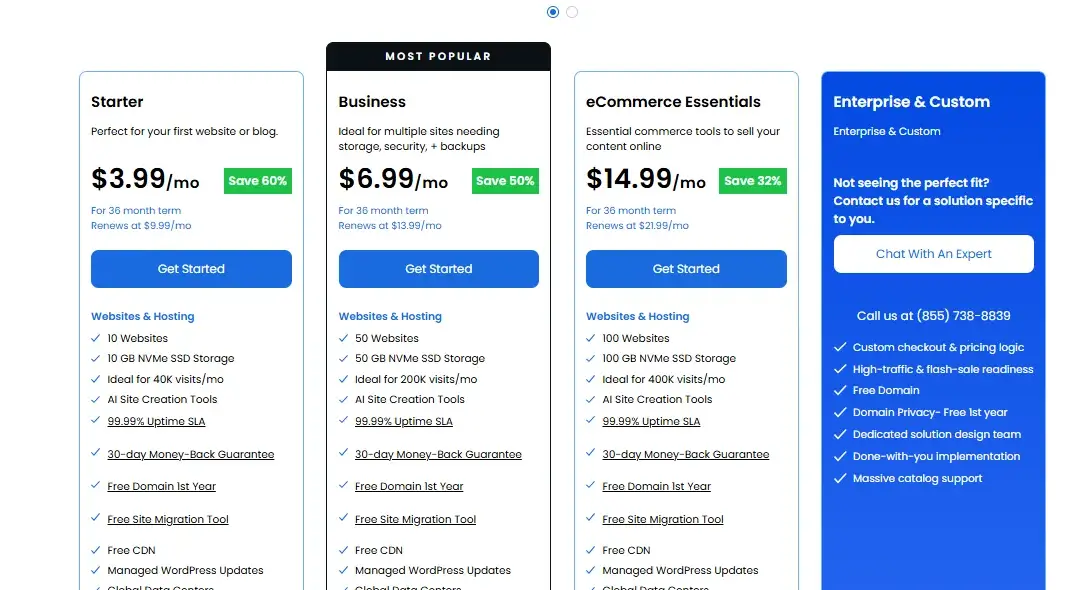
The Pro plan, aimed at higher-traffic sites, starts around $14.99/month and renews near $21.99/month. Every tier includes a free domain for the first year, a free SSL certificate, and unmetered bandwidth, so even the entry plan isn’t as bare-bones as some competitors’ starter tiers.
| Plan | Intro Price | Renewal Price |
|---|---|---|
| Starter | ~$3.99/mo | ~$9.99/mo |
| Business | ~$6.99/mo | ~$10.99/mo |
| eCommerce Essentials | ~$14.99/mo | ~$21.99/mo |
| Enterprise & Custom | Custom checkout & pricing logic |
(Bluehost frequently runs promos, so treat these as ballpark figures and check bluehost.com for the live rate before buying.)
iPage Pricing and Plans
For existing customers, iPage keeps things simple with essentially one all-in-one shared plan rather than a tiered lineup. It starts at roughly $1.99/month for the initial term and renews around $7.99/month afterward.
That renewal jump — sometimes described as climbing to nearly four times the original rate — is worth flagging, since it’s steeper than what you’ll typically see with Bluehost’s tiered renewals.
iPage plans still include unlimited storage and bandwidth, a free domain, and a free SSL certificate, so the core value is decent if you’re already locked in — it’s just not something a new buyer can act on.
Features and Hosting Options
Feature-for-feature, Bluehost simply offers more breadth, while iPage keeps its lineup narrow and beginner-focused.
WordPress and Website Features
Both hosts support one-click WordPress installs and come with WordPress pre-integrated into their dashboards, which matters since WordPress powers a huge share of the web.
Bluehost goes further with managed WordPress hosting tiers, a staging environment for testing changes safely, and an AI-assisted site builder for people who don’t want to design from scratch.
iPage’s WordPress option is more basic — you get WordPress and some plugins pre-installed, but not the deeper managed-hosting perks like automatic staging or dedicated WordPress performance tuning.
Storage, Domains, Email, and Website Builder
Both hosts include unlimited storage on their shared plans and throw in a free domain for the first year, so there’s no meaningful gap there. Where they differ is depth:
Bluehost’s higher-tier plans add unlimited websites, unlimited parked domains, and professional email accounts, while iPage’s single-plan structure keeps everything bundled together but with fewer upgrade paths if you outgrow the basics.
Bluehost also pairs its website builder with drag-and-drop customization and Google Analytics integration baked in, which is handy if you want to track visitors without installing a separate plugin.
Security, Backups, and Freebies
Bluehost includes a free SSL certificate on every plan and offers add-on security through SiteLock for malware scanning and removal, plus a web application firewall on its higher tiers.
iPage matches the free SSL and unlimited-everything approach, and its WP Essential plan throws in SiteLock security for free, which is a nice touch for a budget host.
Neither is going to out-secure a dedicated security-first host, but for a typical blog or small business site, both cover the basics adequately.
Performance and Reliability
Performance is where the gap between these two becomes more obvious, especially since Bluehost has invested more recently in newer infrastructure.
Speed and Server Performance
Bluehost has generally posted faster page-load benchmarks in independent testing, largely because it’s kept its server infrastructure and SSD/NVMe storage more current.
iPage’s shared servers, being part of an older legacy platform, tend to lag behind on load times — not dramatically for a low-traffic blog, but noticeably once you’re getting real daily visitors.
If speed is a top priority (and for SEO, it should be — Google factors page speed into rankings), Bluehost is the safer bet.
Uptime and Reliability
Bluehost guarantees an industry-standard uptime of 99.9%, and that’s backed by more modern, actively maintained data centers.
iPage’s infrastructure, now folded into Bluehost’s broader network, benefits somewhat from that shared backbone, but its reputation historically ran a touch below Bluehost’s on independent uptime monitors.
In practice, both are “good enough” for most small sites, but Bluehost has the stronger, more consistently verified track record.
Ease of Use
Both hosts aim squarely at beginners, and honestly, neither will overwhelm a first-time site owner. Bluehost uses standard cPanel, which means any tutorial, plugin guide, or support forum built around cPanel will apply directly — that’s a genuine advantage if you ever need to Google your way through a problem.
iPage uses its own customized, simplified dashboard, which some beginners find even friendlier at first glance, but it’s less transferable if you ever migrate to a different host down the line, since you’d be relearning a non-standard interface.
Control Panel and Website Setup
Setup on both hosts follows the same basic flow: pick a plan, register or connect your domain, and use a one-click installer to get WordPress (or another CMS) running in a few minutes.
Bluehost’s setup wizard leans a bit more guided, walking new users through goal-based prompts (blog, business site, online store) before landing them in the dashboard — a small but useful touch if you’re not sure where to start.
Customer Support
Bluehost offers 24/7 support across live chat, phone, and a ticketing system, and reviewers generally rate its response times as solid, especially for account and billing questions.
iPage also offers round-the-clock support through the same channels, but user reviews have more consistently flagged longer wait times and less consistent resolution, particularly for existing customers navigating iPage’s ongoing platform transition.
If responsive support matters to you — and if you’re new to hosting, it probably should — Bluehost has the more dependable track record.
Scalability: Which Host Can Grow With You?
Bluehost is built for growth in a way iPage simply isn’t anymore. You can start on Bluehost’s cheapest shared plan and move up through WordPress hosting, VPS, cloud, or fully dedicated servers without ever switching providers — useful if your site goes from a hobby blog to a business generating real monthly traffic.
iPage’s hosting lineup, by contrast, is essentially frozen for new users; since it’s not accepting new signups, there’s no meaningful upgrade path to plan for. If long-term scalability matters at all, that alone tips the decision toward Bluehost.
Bluehost vs iPage: Pros and Cons
Here’s the honest breakdown of where each host holds up and where it falls short.
Bluehost Pros and Cons
Pros:
- Wide range of hosting types, from shared to dedicated
- Standard cPanel, widely supported and easy to troubleshoot
- Stronger, more consistently verified uptime and speed
- Actively accepting new customers with ongoing platform updates
Cons:
- Renewal prices jump noticeably after the intro term
- Some useful features (advanced backups, premium security) cost extra
iPage Pros and Cons
Pros:
- Very low historical entry pricing for existing customers
- Simple, beginner-friendly single-plan structure
- Unlimited storage and bandwidth included from the start
Cons:
- No longer accepting new customers — not a viable option if you’re starting fresh
- Slower page-load performance compared to Bluehost
Final Word: Which Host Is Best for You?
If you’re choosing a host today, this one’s straightforward: Bluehost is the practical answer, simply because iPage isn’t available to sign up for anymore.
Beyond that technicality, Bluehost also wins on the merits — better performance, a clearer upgrade path, and more consistent support.
iPage still has a place in this conversation if you’re already a customer and happy with your setup, but for anyone building a new site, there’s no real decision to make between the two.
Choose Bluehost If
- You’re starting a new website, blog, or online store
- You want room to scale into VPS or dedicated hosting later
- You’d rather use standard cPanel with wide community support
- You value strong uptime and faster page-load times
Choose iPage If
- You’re already an existing iPage customer and satisfied with your current plan
- You’re comparing hosts for research purposes rather than signing up new
- You’re fine staying on legacy infrastructure without a growth path
Bluehost vs. iPage Alternatives
If neither host feels like the right fit, a few solid alternatives are worth a look:
- Hostinger — consistently cheaper entry pricing and strong performance benchmarks, popular with budget-conscious beginners.
- SiteGround — pricier but known for excellent support and speed, a good fit if performance matters more than upfront cost.
- InMotion Hosting — a strong middle ground with generous resources on shared plans and solid customer support ratings.
FAQs
Is iPage still available for new customers?
No. iPage is no longer accepting new customers. New users who need hosting are directed to Bluehost, while existing iPage customers can continue to manage their accounts through iPage.
Which is cheaper, Bluehost or iPage?
iPage’s historical entry price was slightly lower, but Bluehost’s renewal pricing is generally more predictable and offers more plan tiers to match your budget.
Does Bluehost or iPage offer better WordPress support?
Bluehost offers deeper WordPress features, including managed hosting and a staging environment, making it the stronger pick for WordPress-focused sites.
Can I switch from iPage to Bluehost?
Yes — since both are under the same parent company, migrating from iPage to Bluehost is a well-supported and common path.
Which host has better uptime?
Bluehost generally posts stronger, more consistently verified uptime numbers thanks to more modern infrastructure.
Is Bluehost good for beginners?
Yes. Its guided setup, standard cPanel interface, and 24/7 support make it approachable even if you’ve never built a website before.
Do both hosts offer a money-back guarantee?
Yes, both offer a 30-day money-back guarantee on hosting, though domain fees are typically non-refundable.

Alex Bryant is the founder of PvyEmpire.com and a WordPress specialist with over 4 years of hands-on experience in web hosting, performance optimization, and website management. He has extensively tested top hosting providers by setting up real websites and monitoring their speed, uptime, and reliability.
At PvyEmpire.com, Alex publishes honest, data-driven reviews, detailed guides, and verified coupons & deals. His goal is to help website owners choose the right hosting, improve performance, and grow their online presence with confidence—based on real testing, not promotions.