Bluehost vs IONOS: Which Is Better for Beginners?
So you’ve narrowed your hosting search down to two names and now you’re stuck comparing Bluehost vs IONOS, wondering which one actually deserves your money.
Maybe you’ve read a dozen “best hosting” lists already, and they all seem to sing a different tune. It’s frustrating when every review claims their pick is the best, yet nobody tells you which one fits your website.
That’s exactly what we’ll sort out here. Below, you’ll find a straightforward, side-by-side look at pricing, speed, customer support, and features—no fluff, no bias. By the end, you’ll know exactly which host makes more sense for your budget and your goals.
Bluehost vs IONOS at a Glance
IONOS generally edges out Bluehost on price and raw speed, while Bluehost pulls ahead on WordPress polish and long-term reliability of its dashboard experience. Neither one is a bad pick — they just serve slightly different priorities.
| Bluehost | IONOS | |
|---|---|---|
| Starting price | ~$3.99/month (intro) | ~$1.00/month (intro) |
| Renewal price | ~$9.99/month | ~$14.00/month |
| Uptime guarantee | 99.9% | 99.99% |
| Average response time | 914.43 ms | 154.71 ms |
| Free domain | Yes, first year | Yes, first year |
| SSL certificate | Free, standard | Free Wildcard SSL |
| Control panel | Customized cPanel | Proprietary dashboard |
| Editorial rating | 4.4/5 | 4.6/5 |
At first glance, the price gap looks tiny. But once you dig into renewal terms, response times, and what each plan actually includes, the picture gets more interesting — and that’s what the rest of this guide covers.
Pricing and Hosting Plans Compared
IONOS wins on pricing, mainly because its entry-level Plus plan starts lower and throws in more unlimited resources than Bluehost’s comparable tier.
That said, both hosts play the classic “cheap intro rate, steeper renewal” game, so you shouldn’t judge either one purely on the first-year sticker price.
Bluehost’s Basic plan starts around $3.99 a month and renews near $9.99 a month, which caps you at a single website and roughly 10GB of SSD storage with limited concurrent visitor capacity.
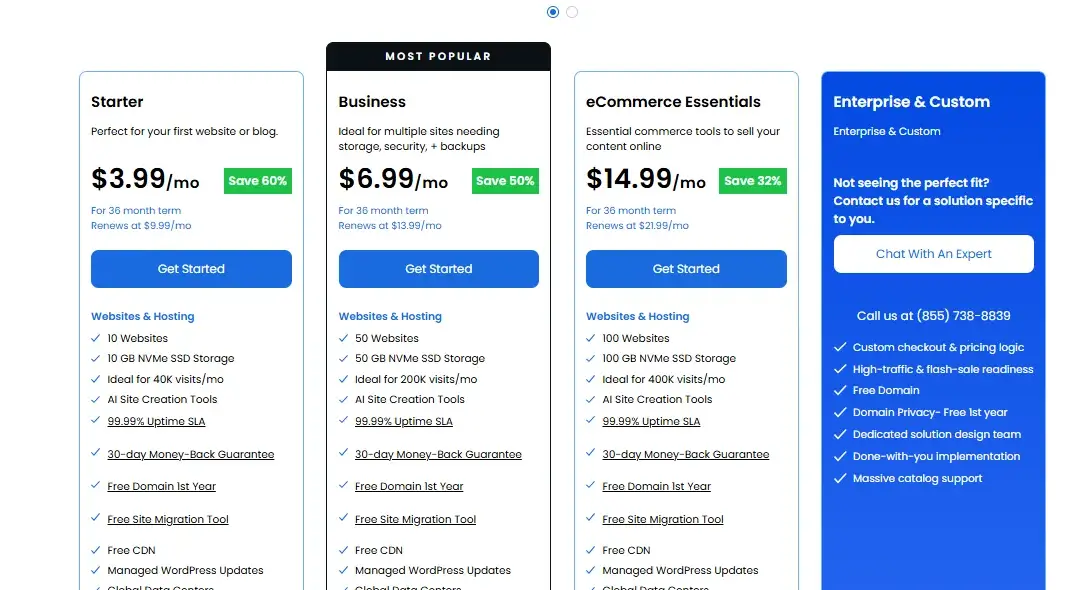
IONOS’s Plus plan, on the other hand, starts near $1.00 a month and renews around $14.00 — but it includes unlimited websites, unlimited storage, and unlimited bandwidth right out of the gate.
That’s a meaningful difference if you plan to launch more than one site down the road, since with Bluehost you’d need to upgrade tiers just to get there.
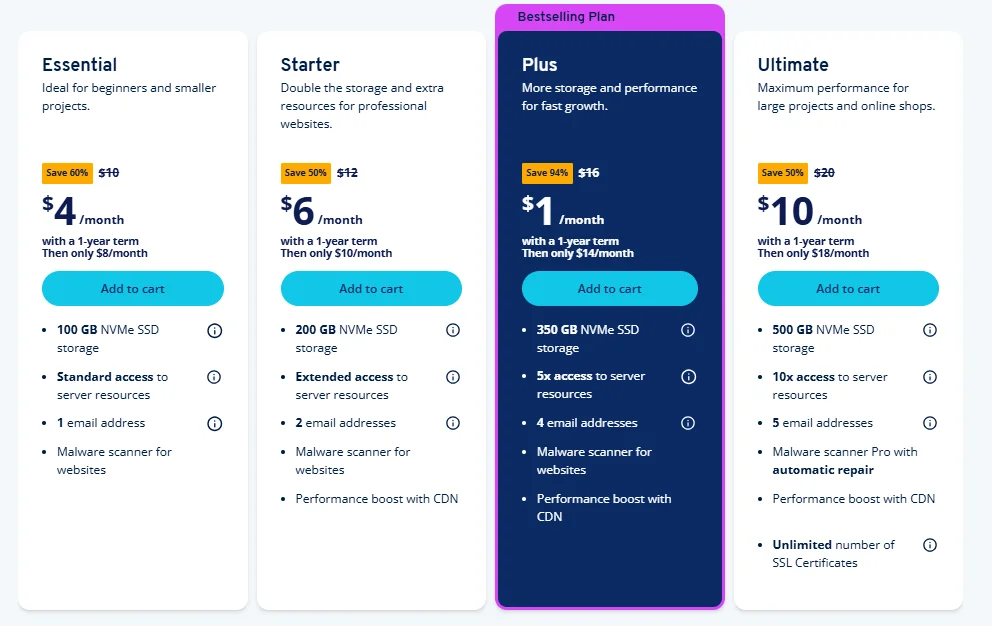
Email allowances differ too. IONOS typically bundles just one free email account with its cheapest plan, while Bluehost includes more mailboxes even on its entry tier. So if branded email matters more to you than unlimited storage, that’s worth factoring in.
Shared Hosting and WordPress Plans
Both hosts offer shared and WordPress hosting at similar price points, with WordPress plans adding CMS-specific tools and features.
Bluehost’s WordPress plans closely match its Basic, Plus, and Choice Plus shared tiers, while IONOS offers Grow and Boost plans with features such as AI-assisted setup and enhanced analytics.
Bluehost shared hosting starts at $3.99/month, while IONOS shared hosting starts at around $1/month for introductory terms. Renewal prices are higher for both providers, so the initial rate shouldn’t be the only factor when comparing long-term costs.
For WooCommerce and online stores, both providers also offer dedicated ecommerce plans with more resources and features, but these cost more than basic shared hosting.
Money-Back Guarantees and Pricing Terms
Both hosts offer a 30-day money-back guarantee, but read the fine print before you cancel. Bluehost typically deducts the cost of your free domain (often around $15) from your refund if you registered one through them, and it doesn’t prorate refunds on longer plan terms.
IONOS applies similar limitations — you’ll get your hosting fees back, but any domain registration or add-ons purchased separately usually aren’t refundable.
In practice, this means the “free” 30 days aren’t entirely risk-free with either provider. If you’re testing the waters, it’s worth skipping the free domain add-on until you’re sure you’re staying.
Hosting Features and Resources Compared
Feature-for-feature, IONOS tends to pack in more for less — unlimited resources, an AI website builder on every plan, and daily backups as standard.
Bluehost counters with a more mature WordPress ecosystem and a widely recognized control panel that a lot of users already know how to navigate.
WordPress Experience
Bluehost has been WordPress.org’s recommended host for years, and it shows: free WordPress migration, one-click installs, managed updates, and staging tools are baked into its plans.
In my experience testing beginner-friendly hosts, that WordPress.org endorsement tends to translate into fewer configuration headaches, since Bluehost tunes its servers specifically around WordPress’s requirements.
IONOS isn’t far behind, though. It offers free WordPress migration too, along with its own AI-powered site builder (branded WonderSuite, including WonderBlocks) that can spin up a working WordPress site from a short text prompt.
It’s a genuinely useful shortcut if you don’t want to fuss with themes and plugins from scratch.
Website Builders, Domains, and Site Migration
IONOS’s WonderSuite builder uses AI prompts to generate a starter site, which is faster than Bluehost’s more traditional drag-and-drop approach — but it’s also a bit more locked into its own templates, and migrating a WonderSuite site elsewhere later can be trickier than exporting a standard WordPress install.
Bluehost leans on its AI builder alongside classic WordPress themes, giving you more flexibility if you expect to switch hosts or platforms down the line.
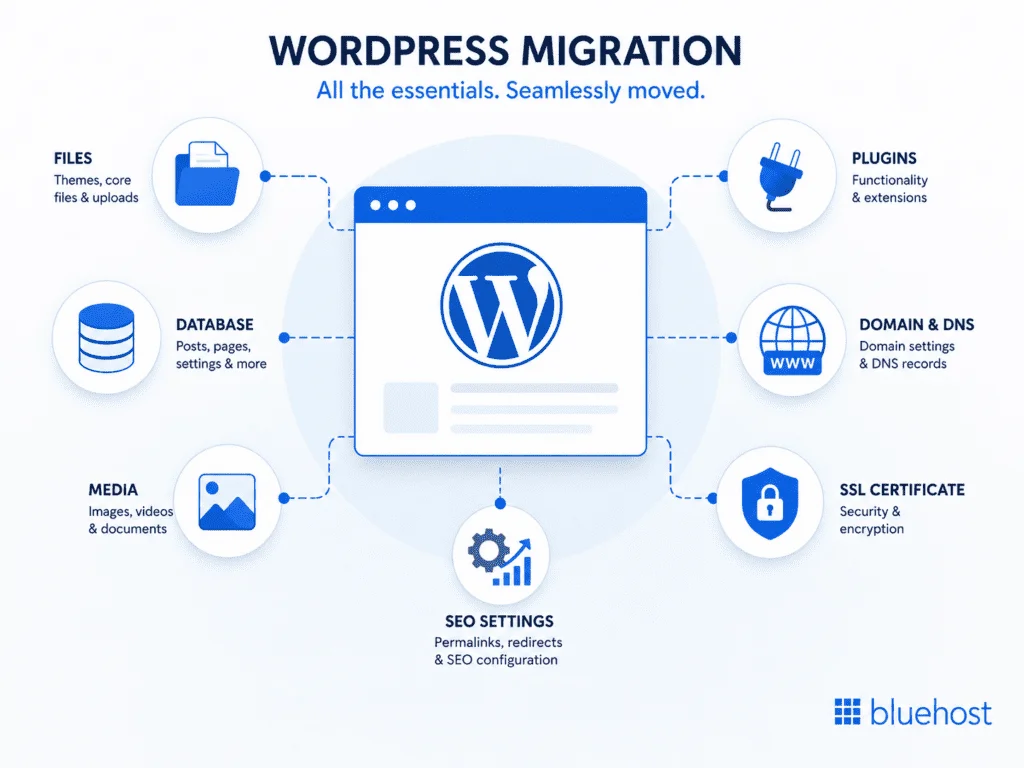
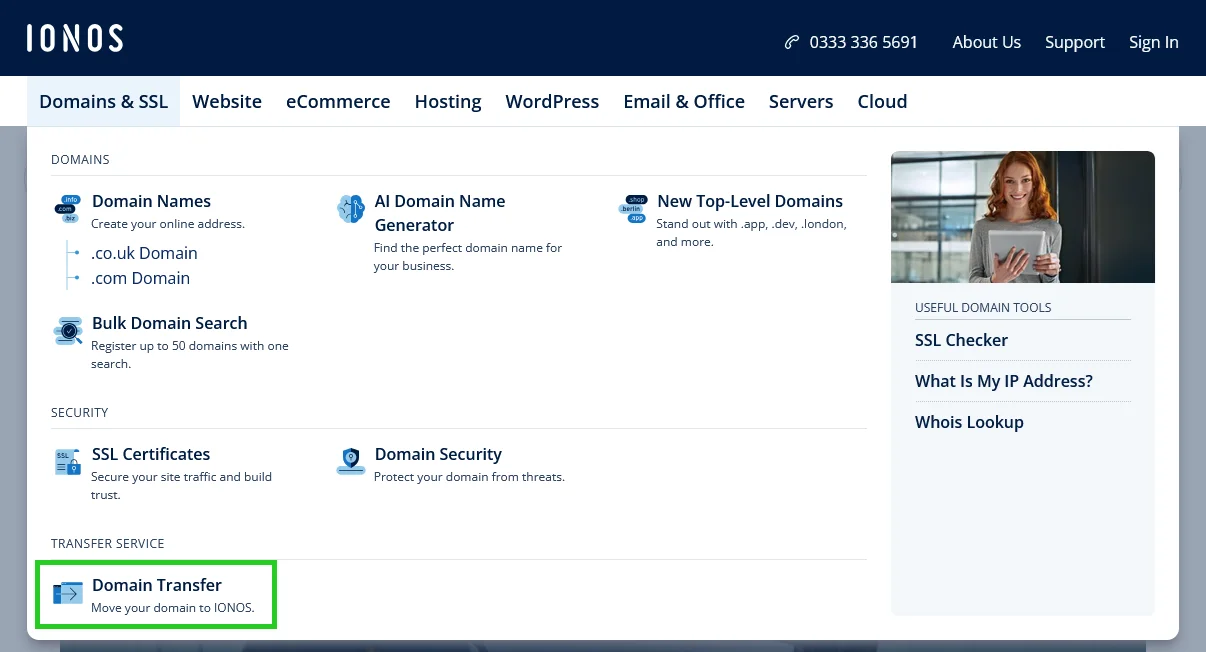
Both providers include a free domain for the first year and offer free site migration assistance, though Bluehost’s migration plugin is specifically built around WordPress, while IONOS’s process covers a broader range of CMS platforms.
Control Panels, Dashboards, and Integrations
Bluehost uses a customized version of cPanel — the industry-standard control panel that’s been around since 1996 — so if you’ve used any other host before, the layout will feel familiar.
IONOS built its own proprietary dashboard instead, organized in a hub-and-spoke layout that groups domains, email, websites, servers, and security into clearly labeled sections.
Neither approach is objectively “better.” cPanel has the edge in name recognition and third-party tutorials, while IONOS’s dashboard feels noticeably more modern and less cluttered for someone who’s never managed a server before.
Performance and Reliability Comparison
IONOS comes out ahead on nearly every performance metric we could find — faster response times, lower latency, and a higher uptime guarantee.
That doesn’t mean Bluehost performs poorly; it just means IONOS currently has the technical edge for sites where speed is a priority, like ecommerce stores or content sites competing on Core Web Vitals.
Uptime and Uptime Guarantees
IONOS backs its hosting with a 99.99% uptime guarantee, while Bluehost commits to 99.9%. That might look like a rounding error, but the math tells a different story: 99.9% uptime allows for roughly 8.7 hours of downtime per year, while 99.99% allows for less than an hour.
For a hobby blog, that gap barely matters. For a business site processing orders, it can.
Independent uptime testing over multi-month periods has generally shown both hosts staying close to their advertised numbers, with occasional short outages on either side — nothing that suggests either host is unreliable, but IONOS’s tighter guarantee gives it a slight statistical edge.
Website Speed and Response Times
This is where the gap widens the most. In head-to-head server response testing, IONOS recorded an average response time around 154.71 milliseconds, compared to Bluehost’s 914.43 milliseconds — well outside the roughly 600ms threshold generally considered acceptable for a responsive server.
| Metric | Bluehost | IONOS |
|---|---|---|
| Average response time | 914.43 ms | 154.71 ms |
| Full page load speed | 2.679 s | 1.664 s |
| Time to First Byte (TTFB) | ~434–539 ms (plan-dependent) | ~539 ms (Plus shared plan) |
| GTmetrix performance score | 91% | 92% |
To be fair, GTmetrix testing on higher-tier plans (Bluehost’s Business WordPress plan vs. IONOS’s Plus shared plan) showed the two much closer together, with Bluehost actually posting a slightly better structure score.
So the real-world gap depends a lot on which plan tier you’re comparing — entry-level Bluehost lags noticeably, but its business-tier plans close most of the distance.
CDN, Data Centers, and Server Locations
IONOS operates data centers across the US, Europe, and other regions, including facilities certified to ISO 27001 and PCI-DSS standards, plus a presence at the Equinix Frankfurt hub — a plus if GDPR compliance or EU-based traffic matters to your project.
Bluehost’s infrastructure is concentrated more heavily in the US, which is fine for a North American audience but can add latency for visitors overseas.
If most of your traffic comes from Europe, IONOS’s regional data centers give it a practical advantage. If your audience is mostly US-based, this difference is largely moot.
Traffic and Load-Handling Performance
Under stress testing that simulated concurrent visitors and traffic spikes, IONOS handled roughly 46 requests per second at peak, compared to Bluehost’s average of around 22 requests per second in similar conditions, over test runs lasting several minutes.
Both providers include some form of anti-DDoS protection, which helps prevent a genuine traffic spike from being mistaken for an attack (or vice versa).
For a brand-new blog, this kind of load rarely matters. But if you’re planning a product launch, a viral giveaway, or seasonal traffic spikes, IONOS’s higher ceiling gives you more breathing room before performance starts to degrade.
Security and Backup Options Compared
Both hosts cover the security basics well — free SSL, malware scanning, and automated backups — but IONOS includes a free Wildcard SSL certificate on every plan, which is a genuinely useful perk if you’re running multiple subdomains.
Backup and Restore Options
- Bluehost: Offers automated backups on select plans, with more frequent or advanced backup options (like CodeGuard) typically available as a paid add-on on lower tiers.
- IONOS: Includes daily backups as a standard feature across its shared hosting plans, with straightforward one-click restore from the dashboard.
If backups are non-negotiable for you and you don’t want to pay extra, IONOS’s daily backups being standard rather than an upsell is a meaningful point in its favor.
SSL and Website Security
IONOS bundles a free Wildcard SSL certificate with every hosting plan, which secures your main domain and all its subdomains under one certificate — handy if you’re running something like a store subdomain or a blog subdomain alongside your main site.
Bluehost includes a standard free SSL certificate as well, though Wildcard coverage typically requires an upgrade.
Both hosts also offer malware scanning and DDoS protection, though the depth of these tools (and whether they’re free or a paid add-on) varies by plan tier on both sides. It’s worth checking the specific plan page before assuming a feature is included.
Ease of Use and Customer Support
Customer support is close to a draw between these two — both offer 24/7 live chat, and both have reasonably deep knowledge bases. Where they differ is in the extras:
IONOS tends to offer more direct phone support options and a personal-consultant-style setup for business customers, while Bluehost leans on its AI chatbot and ticketing system for faster first-touch responses.
Account Setup and WordPress Installation
- Choose your plan and domain. Both hosts walk you through picking a plan and either registering a new domain or connecting an existing one during checkout.
- Select your billing term. Longer terms (12, 24, or 36 months) unlock lower introductory rates on both platforms.
- Complete payment. IONOS supports a wider range of payment methods, including PayPal, Apple Pay, Google Pay, and Klarna, alongside standard credit cards. Bluehost’s checkout is more traditional, centered on card payments.
- Install WordPress. Bluehost auto-installs WordPress during onboarding on WordPress-specific plans. IONOS uses its Click & Build installer or its AI Site Creator, which can generate a starter layout from a short prompt.
- Land on your dashboard. From here, Bluehost drops you into its customized cPanel, while IONOS opens its own account manager interface.
Neither setup process takes more than about 10–15 minutes, and both are genuinely beginner-friendly — you don’t need any technical background to get a site live on either host.
Customer Support and Help Resources
| Channel | Bluehost | IONOS |
|---|---|---|
| Live chat | 24/7 | 24/7 |
| Phone support | Yes | Yes, with personal consultants on business plans |
| Knowledge base | Extensive | Extensive |
| AI assistant | Yes | Yes |
| Average response time | Fast, but variable | Generally fast, less hold time reported |
Both hosts perform well enough here that support shouldn’t be your deciding factor — unless you specifically want a named personal consultant for a business account, which IONOS offers and Bluehost doesn’t really replicate.
Scalability and Resource Limits
Both hosts scale well beyond basic shared hosting, moving from shared plans up to VPS, cloud, and dedicated servers as your traffic grows.
Bluehost’s VPS plans start around $4.69 a month depending on the term, while IONOS’s VPS pricing tends to start lower, often in the $4 range on promotional terms before renewing higher.
Where the two diverge is architecture: IONOS’s VPS lineup includes more granular tiers (NVMe-based plans ranging from small “S” instances up to XXL+ configurations with dedicated CPU cores), which suits users who want to fine-tune resources as they grow.
Bluehost’s VPS and dedicated tiers are simpler to choose from but offer fewer intermediate steps between “shared hosting” and “full dedicated server.”
If you’re starting small but expect serious growth — say, a store that might need to move to VPS within a year or two — IONOS’s more granular scaling path is arguably the smoother upgrade route.
Which Host Is Best for Different Users?
- New bloggers and hobby sites: Bluehost’s WordPress-first setup and familiar cPanel make it an easy, low-friction starting point.
- Small businesses on a budget: IONOS’s unlimited-resource Plus plan and lower renewal-to-feature ratio generally stretch further.
- Ecommerce stores: IONOS’s faster response times and daily backups give it a slight edge, though Bluehost’s WooCommerce-specific plans are also solid.
- Agencies managing multiple client sites: Bluehost’s Choice Plus and Pro tiers, plus its established cPanel workflow, tend to fit agency habits better.
- EU-based businesses or GDPR-sensitive projects: IONOS’s European data centers and certifications make it the more natural fit.
- Users who want the fastest raw performance: IONOS wins this comparison on the numbers.
Conclusion
When you line them up side by side, Bluehost and IONOS both clear the bar for beginner-friendly hosting — but they win in different areas.
IONOS takes the edge on pricing, raw speed, and included resources, while Bluehost holds its ground with a more mature WordPress setup and a control panel most people already recognize.
If budget and performance matter most to you, pick IONOS. If you want the smoothest, most guided WordPress experience and don’t mind paying slightly more at renewal, Bluehost is the safer bet.
Either way, read the renewal terms before you commit — that’s where the real cost difference between these two shows up.
FAQs
Is Bluehost cheaper than IONOS?
Not by much at the intro rate — IONOS often starts around $1/month versus Bluehost’s roughly $3.99/month. At renewal, both land close to $9.99-$14.99/month, so the long-term cost is nearly a wash.
Is IONOS hosting fast?
Yes, generally. IONOS has posted noticeably lower response times and TTFB scores than Bluehost in independent testing, though the gap narrows on Bluehost’s higher-tier plans.
Is Bluehost owned by GoDaddy?
No. Bluehost is owned by Newfold Digital, a hosting company backed by investment firms including KKR, Silver Lake, and TCV. It’s a separate company from GoDaddy, though the two are often confused since both target small business hosting.
Can I transfer a website from IONOS to Bluehost?
Yes. Bluehost offers free WordPress migration tools, and for non-WordPress sites, manual migration is possible, though it typically requires more technical steps or a paid migration service.
Do Bluehost and IONOS both use cPanel?
No. Bluehost uses a customized version of cPanel, while IONOS runs its own proprietary control panel with a different layout and navigation style.
Which host is better for a small online store?
IONOS tends to edge out Bluehost for online stores thanks to faster response times and standard daily backups, though Bluehost’s WooCommerce-specific plans are a solid alternative if you’re already committed to the WordPress ecosystem.
Does Bluehost or IONOS have better customer support?
It’s close to a tie. Both offer 24/7 live chat and phone support, though IONOS’s business plans include a personal consultant option that Bluehost doesn’t directly match.

Alex Bryant is the founder of PvyEmpire.com and a WordPress specialist with over 4 years of hands-on experience in web hosting, performance optimization, and website management. He has extensively tested top hosting providers by setting up real websites and monitoring their speed, uptime, and reliability.
At PvyEmpire.com, Alex publishes honest, data-driven reviews, detailed guides, and verified coupons & deals. His goal is to help website owners choose the right hosting, improve performance, and grow their online presence with confidence—based on real testing, not promotions.