Cloudways Review: Pricing, Features & Performance
Cloudways Review highlights how this platform excels in offering a managed cloud hosting solution that combines simplicity with top-tier performance. Designed for both beginners and professionals, it ensures seamless website management without the usual technical complexities of traditional cloud services.
After thoroughly testing its setup process and evaluating Cloudways’ performance and uptime, this review provides an honest look into the platform’s reliability, scalability, and ease of use. It’s an ideal choice for users seeking fast cloud servers and optimized hosting for business or e-commerce websites.
Cloudways Hosting Overview
Cloudways offers an impressively smooth and user-friendly experience, making website hosting and management effortless. Its performance remains consistently strong thanks to the integrated CloudFlare Enterprise CDN and advanced caching tools that enhance site speed and reliability.
While the pricing might be higher for small-scale users, the platform’s cloud hosting flexibility and simplicity make it a solid option worth exploring for those seeking reliable managed cloud hosting.
- Overall Rating: 4.6/5 – Excellent for managed cloud hosting with strong performance.
- Best For: Websites that need speed, scalability, and flexible cloud options without server management hassle.
- Starting Price: $11/month (DigitalOcean plan)
- Free Domain: ❌ Not included
- Support & Reliability: 24/7 live chat support, solid
- uptime (99.99%), and reliable server infrastructure.
✅ Pros:
- Fast performance
- Managed hosting control
- Strong security
- Easy SSL setup
- Auto scaling
❌ Cons:
- Expensive plans
- Limited hardware access
- Paid premium features
Get Cloudways hosting under $11/month
Cloudways Managed Cloud Hosting Review
This video gives a complete Cloudways review. It explains what Cloudways is, how easy it is to set up, and how it performs in terms of speed and security. The video also covers pricing, customer support, and the main pros and cons. In the end, it clearly answers whether Cloudways is worth using.
Watch this detailed Cloudways review to see its performance, features, and whether it’s worth your investment. Video by George Vlasyev, providing real-world insights to help you choose the right hosting solution. The full video is available here on our site for easy viewing.
Cloudways Hosting Expert Review
Cloudways continues to stand out as a top managed cloud hosting platform, delivering exceptional server performance and uptime for growing websites. It’s designed for users who want high-speed hosting without dealing with technical server configurations.
The platform supports popular cloud providers and offers pay-as-you-go cloud hosting, ideal for flexibility and cost efficiency. Its optimized environment ensures smooth WordPress site management and scalability across various online projects.
Is Managed Cloud Hosting Worth It?
Managed cloud hosting is a valuable choice for those seeking top performance, strong security, and expert management without handling technical tasks. It’s especially beneficial for users looking for cloud server management and fully managed hosting solutions that save time and boost efficiency.
Despite higher costs, it ensures reliability, constant support, and effortless scaling for growing or busy websites. This makes it ideal for businesses aiming to increase uptime and overall website performance through managed cloud services.
What Cloudways Is and How It Works
Managed Cloud Hosting Explained
Cloudways is a managed hosting service that helps users launch and manage websites on leading cloud providers such as AWS, DigitalOcean, and Vultr. This cloud-based hosting platform simplifies complex tasks, making it ideal for WordPress and eCommerce websites that need reliable performance and scalability.
It offers an intuitive platform with strong security, automated backups, and round-the-clock support to handle technical tasks efficiently. With its managed cloud infrastructure and focus on performance optimization, Cloudways ensures faster load times, high uptime, and seamless website operations for businesses of all sizes.
How Does Cloudways Work for Beginners?
Cloudways helps beginners launch websites with managed cloud hosting. It connects to DigitalOcean, Vultr, and Linode, letting users deploy fast cloud servers without technical skills.
The one-click dashboard makes WordPress installation and easy website deployment simple. With automated backups, updates, and 24/7 support, beginners get a secure, beginner-friendly web hosting experience.
Beginner Friendly or Developer Focused
Cloudways caters to users who want more control than shared hosting for WordPress but less complexity than an unmanaged cloud VPS. While it’s not ideal for complete beginners, those with basic technical skills can manage it with some effort.
The platform strikes a balance between the convenience of managed cloud hosting and the flexibility of developer-level control, making it a smart choice for growing websites.
Ownership and Strategic Partnerships Explained
Cloudways is an independent managed cloud hosting platform that partners with leading cloud providers such as DigitalOcean, AWS, Google Cloud, and Vultr.
It is not owned by any single provider, allowing businesses to enjoy multi-cloud flexibility, scalable performance, and developer-friendly server management. This approach ensures high website reliability and aligns with the latest cloud hosting trends.
Cloudways vs Shared Hosting Explained
This table compares Cloudways managed hosting with traditional shared hosting, highlighting key differences in performance, scalability, and security. Use it to choose the best hosting solution for your WordPress website or high-traffic blog.
Feature | Cloudways | Shared Hosting |
Performance | Fast, stable | Can slow down |
Scalability | Easy to scale | Limited |
Uptime | High | Single server risk |
Management | Managed | Basic cPanel |
Pricing | Pay-as-you-go | Low fixed cost |
Security | Secure | Less secure |
Cloudways Key Features Overview
Performance Features That Improve Speed
Cloudways achieves fast load times by combining high-performance infrastructure with an optimized software stack. Its ThunderStack efficiently manages web requests using Nginx, Apache, PHP-FPM, and MariaDB/MySQL, while enabling HTTP/2 for quicker connections.
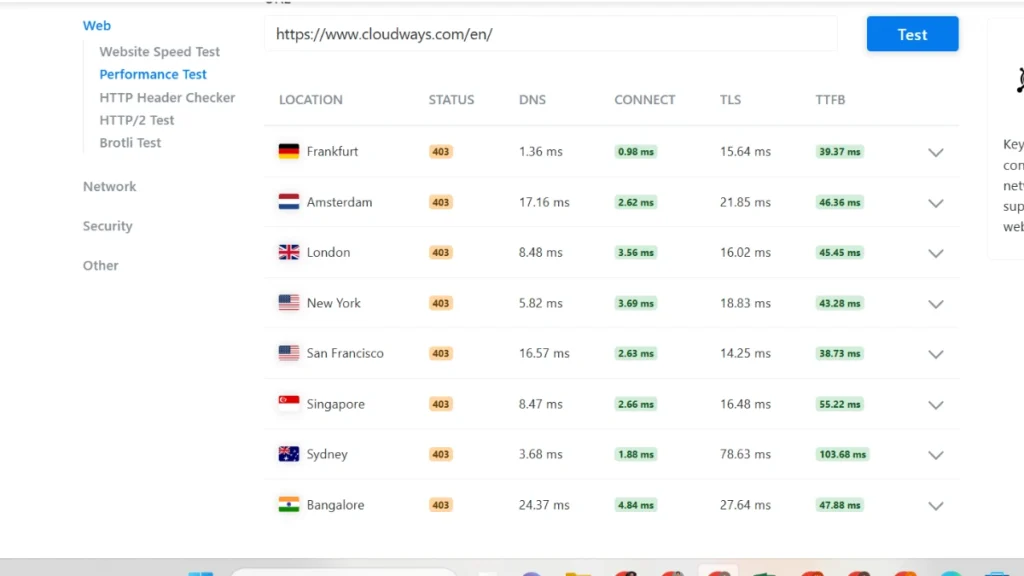
Multi-layered caching with Varnish, Redis, Memcached, Object Cache Pro, and Breeze speeds up content delivery. Users can select top cloud providers, benefit from NVMe SSDs, dedicated resources, and global data centers to minimize latency.
Integrated CDNs, including CloudwaysCDN and Cloudflare Enterprise, enhance international performance.
Advanced features like auto-scaling, auto-healing servers, and PHP 8+ support maintain speed during traffic spikes. Overall, these optimizations can produce sub-2-second load times, 3–5x faster page loads, and 30–40% improved WooCommerce performance.
Security Features Keeping Sites Safe
Cloudways offers a robust security framework tailored for managed cloud hosting environments, making it a reliable choice for business websites and high-traffic applications. Its security architecture focuses on proactive threat prevention rather than reactive fixes.
Key security features include:
- 24/7 server monitoring for real-time threat detection
- Dedicated firewalls and infrastructure-level DDoS protection
- Automated backups and OS-level updates to safeguard data integrity
- Application and account isolation to prevent cross-site vulnerabilities
- Free SSL certificates for encrypted data transmission
Scalability Features for Growing Traffic
Cloudways can easily handle traffic growth through vertical scaling, one-click server upgrades, and Cloudways Autonomous autoscaling, which automatically adjusts CPU, RAM, and PHP workers during high-traffic periods with no performance loss.
Managed Cloud Stack Overview
ThunderStack is a managed cloud hosting stack built for high-performance PHP applications like WordPress and Magento. It combines modern caching and optimized servers to deliver faster speeds and better website performance under heavy traffic.
Nginx works as a reverse proxy server, while Varnish Cache handles quick content delivery. Redis caching improves data access speed, and PHP-FPM and MariaDB ensure smooth execution and stable server performance.
This managed stack provides automatic server management, stronger website scalability, and reliable real-time processing, making it ideal for high-traffic eCommerce websites and growing online businesses.
WordPress Security Features Explained
Cloudways ensures strong web hosting security through managed protection, advanced server firewalls, SSL, and continuous monitoring. It guards against DDoS, bots, and unauthorized access while offering automatic backups and Imunify360-based malware defense.
Still, privacy depends on users keeping their software up to date and using secure passwords. As a managed cloud hosting platform, Cloudways offers proactive website protection but requires user-side vigilance for complete safety.
Automatic Backups and Recovery Explained
Cloudways offers secure server backups with automated and manual options, stored off-site. Enjoy scheduled and on-demand backups with one-click recovery, plus instant snapshot backups for 14 days.
Restore your website quickly and reliably directly from the Cloudways dashboard.
Cloudways Performance and Speed Tests
✓Speed Features

This image shows a strong website performance result, with a B grade (89) and a fast load time of 2.27 seconds, even with 120 requests.
Bitcatcha Server Response Time
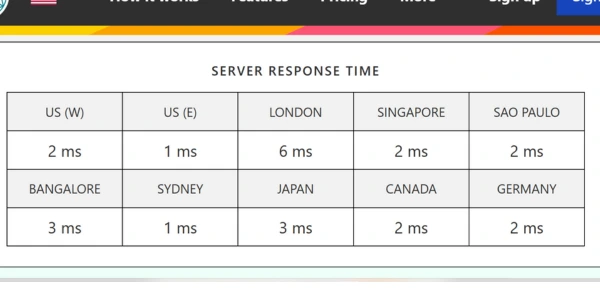
Bitcatcha results show Cloudways delivers fast and reliable server response times globally, with most locations responding within 1–3 ms.
Uptime and Load Handling Results
Cloudways uses cloud hosting infrastructure with auto-healing servers and vertical scaling to ensure high website uptime and handle heavy traffic smoothly. It improves Core Web Vitals like LCP, INP, and CLS through advanced caching and a built-in CDN, boosting page speed and overall SEO performance.
Recommended Cloud Server Providers
Cloudways recommends leading cloud infrastructure providers—DigitalOcean, Vultr, AWS, Google Cloud Platform (GCP), and Linode—to match different performance and budget needs.
DigitalOcean on Cloudways is best for startups and small websites looking for affordable managed cloud hosting with fast setup. Vultr High Frequency servers are ideal for eCommerce stores and high-traffic sites that need superior CPU performance.

For enterprises and global projects, Cloudways AWS vs GCP offers highly scalable cloud hosting with worldwide data centers and advanced reliability. Linode on Cloudways delivers a balanced mix of cost-effective cloud hosting and stable performance for mid-sized websites.
This flexibility makes Cloudways one of the best managed cloud hosting platforms for businesses of all sizes.
Cloudways Ease of Use Review
Dashboard Walkthrough and Setup Guide
Cloudways provides a clean, beginner-friendly dashboard that allows users to deploy a cloud server in minutes. After logging in, you can choose an application like WordPress, select a cloud provider, set server size and location, and launch instantly.
Once deployed, the dashboard lets you manage domains, enable free SSL, activate caching, monitor performance, scale resources, and schedule backups—all from one place. This makes Cloudways ideal for fast and hassle-free managed WordPress hosting.
WordPress Hosting Pros and Limits
Managed WordPress hosting is ideal for beginners who want an easy, hassle-free website setup. It automates updates, improves security, and optimizes performance, so users can focus on content instead of technical tasks.
Pros:
- Automatic WordPress core, theme, and plugin updates
- Strong security with SSL, firewalls, and malware protection
- Fast performance with caching and CDN support
- 24/7 expert customer support
Limitations:
- Higher cost compared to shared hosting
- Some restrictions on plugins or advanced customizations
Cloudways Pricing and Plans Explained
Their pricing plans depend on server specs such as RAM, storage, and bandwidth, making them suitable for both beginners and growing businesses. Key features across all plans include 24/7 support, automated backups, free SSL, staging environments, and easy migration, offering excellent value for managed WordPress hosting.
Despite its transparency, there are potential hidden costs. Extras like off-site backups, CloudwaysCDN, Rackspace email, Safe updates, premium support, and bandwidth overages can increase monthly expenses.
For high-traffic sites, Cloudways Autonomous WordPress hosting provides auto-scaling and built-in Cloudflare Enterprise, starting at $35/month, ideal for e-commerce and LMS websites.
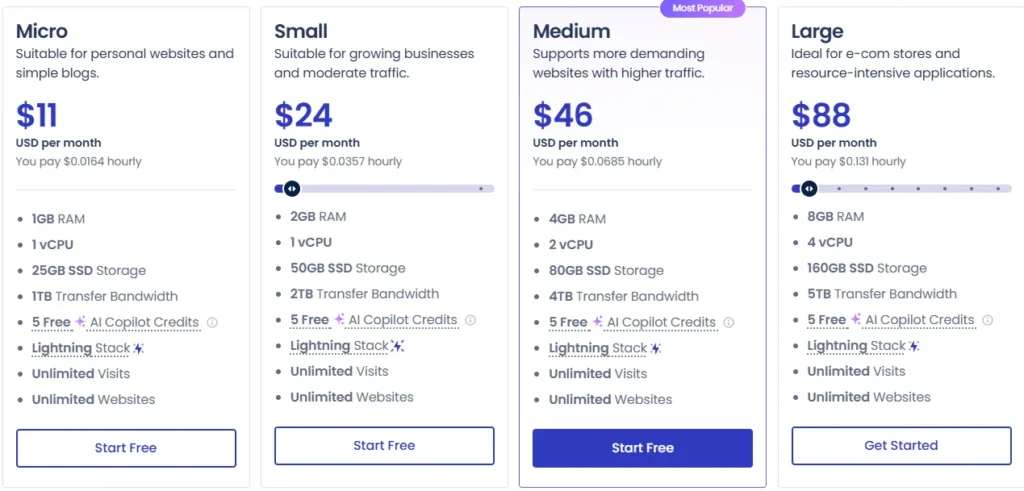
Cloudways provides flexible managed cloud hosting with pay-as-you-go billing, allowing users to choose from top providers including DigitalOcean, AWS, Vultr, Linode, and Google Cloud.
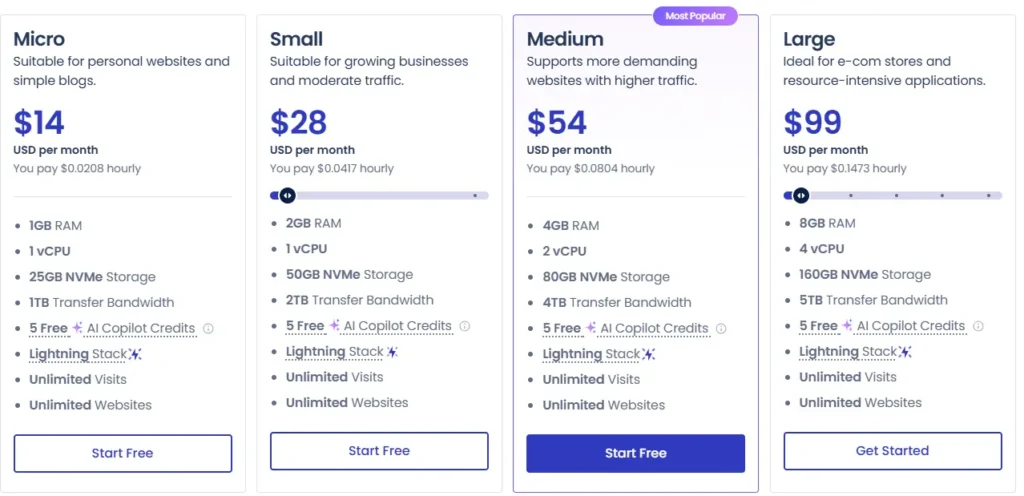
Plan | Monthly Price (Standard) | Monthly Price (Premium) | Hourly Price |
$11 | $14 | $0.0164/hr | |
$24 | $28 | $0.0357/hr | |
$46 | $54 | $0.0685/hr | |
$88 | $99 | $0.131/hr |
Cloudways offers flexible cloud hosting plans with both standard and premium pricing options, allowing users to choose based on performance needs and budget. Hourly billing makes it easy to scale resources without long-term commitments.
Standard vs Premium Pricing Comparison
Cloudways provides flexible managed cloud hosting with Standard and Premium plans across top providers like DigitalOcean, Vultr, Linode, AWS, and Google Cloud. Standard plans use SSD storage and offer cost-effective hosting for most websites.
In contrast, Premium plans feature NVMe storage, faster CPUs, and are designed for high-traffic sites or resource-intensive applications.
Provider | Plan | Price 12 month | RAM / CPU | Storage | Key Features |
Standard | $11–$130+/mo | 1–64GB / 1–16 Core | SSD | Budget-friendly, managed hosting | |
Premium | $14–$160+/mo | 1–64GB / 1–16 Core | NVMe | High-speed, ideal for heavy traffic | |
Standard | $16–$265+/mo | 1GB+ / varies | SSD | Balanced performance | |
High-Frequency (Premium) | $30–$375+/mo | 1GB+ / varies | NVMe | Optimized for resource-heavy apps | |
Standard | $14–$230+/mo | varies | SSD | Cost-effective | |
Premium | $28–$390+/mo | varies | NVMe | High-performance | |
Small / Large | $36.51–$995+/mo | varies | NVMe | Enterprise-grade, scalable | |
Google Cloud | Premium | $33.18+/mo | varies | NVMe | High-performance hosting |
All plans include: free SSL, managed backups, staging environments, and 24/7 support. Optional add-ons like Cloudways AI Copilot, auto-scaling, CDN, or advanced support enhance hosting flexibility.
Hidden Fees and Add-On Costs
Hidden fees, essential add-ons, and scaling costs can quickly raise a product’s total price. Knowing these upfront helps avoid surprises and manage expenses effectively.
Hidden Fees
- Unexpected charges that increase the total cost
- Examples: setup fees, maintenance fees, transaction processing fees
- Often appear late in the buying process
Add-ons
- Frequently essential despite being marketed as optional
- Examples: advanced analytics, AI modules, integration fees
- Can turn a basic product into a costly solution
Scaling Costs
- Costs rise as usage grows
- Examples: seat-based pricing, volume-based charges, tier upgrades
- Vendor lock-in can escalate expenses
- Flat-rate pricing negotiation helps minimize surprises
Cost to Value Comparison Guide
Choosing between Cloudways managed cloud hosting, SiteGround WordPress hosting, and shared hosting plans depends on budget, performance, and scalability. Shared hosting is low-cost and beginner-friendly, but slower and less reliable.
SiteGround offers fast WordPress hosting with excellent support for small to medium businesses. Cloudways provides high-performance VPS hosting, ideal for high-traffic sites or growing websites needing scalable resources.
Feature | Shared Hosting | SiteGround | Cloudways |
Price | Low | Moderate | Higher |
Performance | Low | High | Very High |
Ease of Use | Very Easy | Very Easy | Moderate |
Best For | Beginners | SMB/Woo | Developers/High-Traffic |
Scalability | Low | Moderate | Excellent |
Scalability | Shared Hosting |
Verdict: Choose Shared Hosting for tight budgets, SiteGround for ease-of-use and fast WordPress performance, and Cloudways for speed, scalability, and high-traffic sites.
Cloudways Use Cases and Audience
MS Hosting Reviews Overview

Cloudways is a managed cloud hosting platform ideal for e-commerce websites and developers seeking high-performance hosting without managing servers. It runs on top providers like DigitalOcean, Vultr, and AWS, offering an easy-to-use cloud control panel.
Performance & Features :
Load times range from 40 to 00ms, with optimized Thunderstruck (Nginx, Varnish, Redis) for fast website performance. Users can choose server locations and scale RAM/CPU with one click, making it perfect for scalable cloud hosting.
WordPress: One-click setup, WP-CLI, Git integration, and excellent PageSpeed scores; ideal for WooCommerce stores and high-traffic blogs.
Magento: Handles resource-intensive stores with Varnish caching and Full Page Cache, achieving sub-1.3-second load times for online shops.
Other Platforms: Supports PHP apps like Drupal, Laravel, and Joomla with one-click deployment for custom web applications.
Notes: Support is mostly positive (4.6/5 Trustpilot) despite the DigitalOcean acquisition. The optional Cloudflare Enterprise add-on boosts load speed by up to 70%, while pay-as-you-go billing is ideal for freelancers and agencies.
Startup Hosting Performance Feedback
Cloudways provides managed WordPress hosting and cloud hosting for startups, perfect for small businesses and e-commerce platforms. It simplifies server management while leveraging top providers like DigitalOcean, Vultr, AWS cloud hosting, and the Google Cloud platform for reliable performance.
WooCommerce and Magento Hosting Review

Cloudways is a managed cloud hosting provider known for high performance and scalability, supporting WooCommerce hosting and CMS platforms like WordPress, Joomla, and Drupal.
Users can select top cloud server providers such as DigitalOcean, Vultr, Linode, AWS, and Google Cloud.
Reviews highlight fast website loading, specialized caching for speed, 24/7 live chat support, and an intuitive dashboard. Pricing is flexible with a pay-as-you-go hosting plan starting around $14/month.
WooCommerce hosting is ideal for high-traffic online stores, offering one-click staging and easy scaling during holiday sales periods. Magento hosting provides optimized stacks with Varnish and Redis caching for better performance.

CMS hosting includes one-click CMS installation, pre-configured server environments, and automatic website backups, making it suitable for small businesses and agencies.
Use Cases for Agencies and Developers
Cloudways is a managed cloud hosting platform connecting users to top IaaS providers like DigitalOcean, AWS, Google Cloud, Vultr, and Linode. It offers high-performance WordPress hosting and scalable cloud servers with SSD/NVMe storage, built-in caching, and an optimized stack.
The proprietary control panel simplifies server management, and 24/7 cloud support ensures reliability. Flexible pay-as-you-go hosting avoids long-term contracts.
For agencies, Cloudways allows unlimited applications on one server, with team management, staging environments, and white-label options. It supports multi-client website management and easy scaling on demand.
The main limitation is no built-in email hosting, requiring third-party SMTP integration.
For developers, Cloudways provides root access, Git integration, SSH/SFTP, WP-CLI, Composer, and one-click staging/cloning. It supports custom server configurations and developer-friendly cloud tools, making testing and deployment efficient.
For high-traffic sites, Cloudways leverages premium infrastructure with optimized caching, autoscaling via Kubernetes, and Cloudflare Enterprise integration. Features like automatic backups, SSL certificates, dedicated firewalls, and protection ensure secure, high-traffic website hosting.
Cloudways Pros and Cons
Pros
- High-speed SSD hosting with top uptime (~99.99%)
- Flexible pay-as-you-go pricing for easy scaling
- User-friendly control panel for non-technical users
- Developer tools: staging, SSH/SFTP, Git integration
- Managed security: firewalls, backups, free SSL
Cons
- No native email hosting; requires a third-party solution
- Higher costs than raw VPS servers
- Limited basic support; advanced support costs extra
👉Get Started with Cloudways Now
⚠️Limitations / Common Complaints
- Support quality has declined since the DigitalOcean acquisition
- Free migration may not cover complex setups
- High CPU usage on smaller plans due to the managed stack
Comparison With Other Hosting Providers
Cloudways excels by offering true cloud flexibility with multiple top-tier cloud hosting providers like DigitalOcean, Vultr, and Linode. Its global server network ensures low latency and strong international website performance.
The platform provides a managed cloud hosting experience on high-performance servers, removing the need for DevOps skills while keeping costs lower than premium hosts.
Cloudways also offers pay-as-you-go pricing and supports PHP-based applications, ideal for flexible, custom web projects.
Common Downsides to Know
Cloudways can be more expensive than direct cloud hosting and may face managed server performance issues, especially with Apache and Varnish instead of LiteSpeed.
Users often need technical server management skills, lack full root access, and face restrictions like no email hosting or domain registration support.
Support quality has reportedly changed after the DigitalOcean Cloudways acquisition, while critical account management problems include a zero grace period for account deletion.
Features like off-site backup add-ons are pricey, and the difficulty in down-scaling server resources can frustrate small business websites.
Cloudways User Reviews and Trust
Customer Feedback and Trust Signals
Cloudways is widely seen as a reliable managed cloud hosting provider, especially for WordPress hosting for agencies and SMBs. Users praise its high performance, fast server speed, and easy-to-use dashboard for managing multiple websites efficiently.
Some users report inconsistent customer support and occasional billing issues, while noting the lack of free email or domain services. It’s ideal for those needing scalable cloud hosting solutions rather than typical shared hosting.
Key trust factors include strong Trustpilot and G2 ratings, DigitalOcean-backed stability, and a 3-day free trial for testing cloud servers. This ensures businesses can verify the platform’s managed hosting reliability before committing.
Managed Hosting Review Summary
Cloudways is a managed cloud hosting solution with DigitalOcean, AWS, Vultr, and more. Users praise speed, custom control panel, automated backups, staging, Git integration, and 24/7 support. Pricing starts at $14/month; premium add-ons may increase costs.
Key Highlights (List Form):
- Platform & Rating: Cloudways — managed cloud hosting, 4.4/5 stars
- Cloud Providers: DigitalOcean, Vultr, Linode, AWS, Google Cloud
- Performance: Faster website loading speed and server response
- User Experience: Easy cloud server management via custom control panel
- Pricing: Pay-as-you-go starting at ~$14/month
- Features: Automated backups, staging environments, Git integration
- Support: 24/7 live chat (quality may vary)
- Considerations: Premium add-ons can increase costs
Cloudways vs Other Hosting Options
Shared Hosting Comparison Guide
- Cloudways hosting—High-performance cloud servers, scalable WordPress hosting, ideal for growing businesses, e-commerce stores, and high-traffic websites. Flexible pay-as-you-go pricing
- Shared hosting—budget-friendly web hosting, beginner blogs, suitable for low-traffic sites and small personal websites. Simple setup; long-term contracts are often required
Premium vs Standard Plan Guide
Premium plans offer faster NVMe SSD hosting and better cloud server performance, perfect for high-traffic websites or e-commerce stores. Standard plans suit small business websites and personal blogs needing affordable managed cloud hosting.
Premium costs more but delivers higher page speed and server reliability, while both plans include 24/7 support, free SSL certificates, and a user-friendly control panel. Standard is ideal for low-traffic sites or budget-friendly hosting, whereas Premium is best for WooCommerce stores and sites exceeding 100k monthly visits.
Cloudways Case Study Insights
Traffic, Scaling, and Cost Scenarios
Traffic growth, server traffic patterns, and scaling are closely linked in cloud infrastructure management. Predictable traffic allows planned scaling, while sudden spikes from marketing campaigns or viral events need fast, dynamic adjustments.
Scaling strategies include vertical scaling (upgrading servers), horizontal scaling (adding instances), auto-scaling solutions, and predictive scaling using machine learning traffic forecasts to handle load efficiently.
Cost control relies on cloud cost optimization, using auto-scaling to reduce idle resources, spot instances for budget savings, target tracking for efficient performance, and monitoring tools to prevent overspending.
Conclusion
Cloudways managed hosting delivers high-performance, scalable cloud servers, perfect for e-commerce websites and growing businesses.
This Cloudways review highlights simplified cloud infrastructure management, reliable uptime, and advanced caching solutions, making it an ideal choice for online stores needing fast and secure hosting.
How to Test Cloudways Safely
Cloudways offers a free Cloudways trial that allows users to test the platform for 3 days without adding payment details, making it ideal for risk-free cloud hosting testing.
You can quickly deploy a server, install WordPress, and evaluate Cloudways performance testing before spending any money.
During the trial, you can explore the dashboard, check managed cloud hosting features, and test speed, support, and scalability to see if it fits your needs. If satisfied, you can upgrade easily and continue on a pay-as-you-go hosting plan without long-term commitments.
Start Your Free Trial on Cloudways Now
FAQs – Cloudways Review
Is Cloudways Good for Beginners?
Cloudways is beginner-friendly cloud hosting with a user-friendly control panel and one-click setups, ideal for small business websites needing high-performance hosting.
How Much Does Cloudways Cost Monthly?
Cloudways managed hosting starts at $14/month, with costs rising based on server resources and cloud provider choices.
What Type of Websites Is Cloudways Best For?
Cloudways is perfect for websites needing high-performance hosting and scalable cloud servers, offering managed VPS hosting with ease and reliability for resource-intensive sites.
Which Cloud Server Is Best Recommended by Cloudways?
Cloudways recommends servers based on hosting needs and performance, offering DigitalOcean, AWS, Vultr, GCP, and Linode for different budgets and websites.
Affiliate Disclosure
This article contains affiliate links. If you purchase through these links, we may earn a small commission at no additional cost to you.
Related:
- Scalahosting Review
- WP Engine Review
- GreenGeeks Review
- Hostinger vs HostGator
- Cloudways vs Hostinger
- HostGator Review
- Pressable Review

Alex Bryant is the founder of PvyEmpire.com and a WordPress specialist with over 4 years of hands-on experience in web hosting, performance optimization, and website management. He has extensively tested top hosting providers by setting up real websites and monitoring their speed, uptime, and reliability.
At PvyEmpire.com, Alex publishes honest, data-driven reviews, detailed guides, and verified coupons & deals. His goal is to help website owners choose the right hosting, improve performance, and grow their online presence with confidence—based on real testing, not promotions.