Hostinger vs HostGator: Speed Test Winner — Hostinger
Hostinger vs HostGator are two of the top web hosting providers offering affordable VPS hosting and shared hosting plans. They cater to beginners and businesses looking for reliable dedicated servers at a reasonable cost.
Both brands deliver fast website performance and receive excellent user feedback, but they differ in features, pricing, and hosting support. This comparison explores their plans, server resources, and uptime reliability to help you decide which provider suits your website’s needs.
Hostinger vs HostGator Hosting Comparison
Hostinger is the top choice for affordable web hosting and smooth site management. It offers better traffic handling, an intuitive control panel, and stronger performance for growing websites. HostGator works well for multi-site hosting, but Hostinger delivers superior value and reliability for most users.
Feature | Hostinger | HostGator |
Rating | 4.9/5 | 4/5 |
Price | From $1.99/month | From $3.75/month |
Uptime Guarantee | 99.9% | 99.9% |
Storage Space | 20GB SSD | 10GB SSD |
Free Domain (1st Year) | Yes | Yes |
Free SSL | Yes | Yes |
Site Migration | Free unlimited (WordPress & open-source) | HostGator Site Migration Tool |
Automated Backups | Free weekly | Daily |
Email Accounts | Free (first year) | Unlimited |
24/7 Live Support | Yes | Yes |
Money-Back Guarantee | 30-day | 30-day |
Quick Overview for Beginners and Budget Users
Hostinger web hosting is the top choice for most users due to its affordable hosting plans, fast performance, and beginner-friendly interface. NVMe SSDs and LiteSpeed servers boost speed and reliability.
HostGator remains a solid option for those who need 24/7 phone support or prefer traditional cPanel hosting. Overall, Hostinger delivers the best value for small business websites, while HostGator fits users with specific support needs.
Feature | Hostinger | HostGator | Winner |
Starting Price | $1.99–$2.99/mo | $3.75/mo | Hostinger |
Performance | NVMe SSD + LiteSpeed (Faster) | Standard SSD + Apache (Good) | Hostinger |
Control Panel | hPanel (Modern & Intuitive) | cPanel (Classic & Reliable) | Hostinger |
Ease of Use | Excellent for beginners | Good | Hostinger |
Support | 24/7 Live Chat (Fast) | 24/7 Phone + Chat (Very fast) | HostGator |
Backups | Weekly (Premium), Daily (Business) | Daily (Most plans) | HostGator |
Key Differences Between Both Hosts
Hostinger and HostGator serve different hosting needs. Hostinger web hosting focuses on affordability and ease of use, offering a single hPanel dashboard, faster response times, and extra WordPress management tools while covering all essential hosting features.
HostGator hosting prioritizes speed and reliability, with quicker site loading, daily backups, and support for high-traffic websites, though its split control panel can feel complex.
Feature | Hostinger | HostGator |
Control Panel | Unified hPanel, easy to navigate | Split cPanel and native panel, less intuitive |
Performance | Faster average response (246.19ms), slower full load (3.561s) | Slower average response (422.16ms), faster full load (0.995s) |
Price-to-Value | Lower cost, includes essential features, and WordPress extras | Higher cost, offers all core features, supports multiple websites |
Common Features of Both Providers
Hostinger and HostGator are easy-to-use web hosting providers with intuitive dashboards and guided setup, perfect for beginners. Both deliver 100% uptime reliability in performance tests, ensuring consistent website availability.
Hostinger offers a free domain with first-year shared hosting and extra features, while HostGator includes a similar domain bundle for new users. For those seeking stable hosting with simple management and predictable pricing, either provider is a strong choice.
Feature | Hostinger | HostGator |
Control Panel | Beginner-focused interface with guided setup and clear navigation | Visual dashboard with standard cPanel, familiar to many users |
Performance | 100% uptime, no HTTP failures, ideal for small business websites | 100% uptime, no HTTP failures, supports personal blogs and projects |
Price & Value | Free domain and extra features first year; renewal ~$10.99/month | Free first-year domain; renewal ~$10.99/month, suitable for budget hosting |
Pricing Comparison and Renewal Costs
Compare introductory rates, renewal pricing, and long-term hosting costs for each provider.
Overview of Hosting Plans
- Hostinger: Low signup rates, moderate renewals, ideal for predictable multi-year budgets.
- HostGator: Competitive entry, steeper renewal, suited for multi-site flexibility upfront.
Pricing Factors to Consider
- Renewals: HostGator rises faster post-introductory term.
- Included Features: Both include domain and SSL; Hostinger adds backups, and HostGator may charge extra.
- Contract Length: Multi-year plans are most cost-effective.
Money-Back Guarantee and Refund Policy
- Both offer 30-day refunds on shared hosting.
- Hostinger: Refund to original payment or account credit; excludes free domains, renewals.
- HostGator: Refund mainly for first-time hosting; excludes setup fees and free domains.
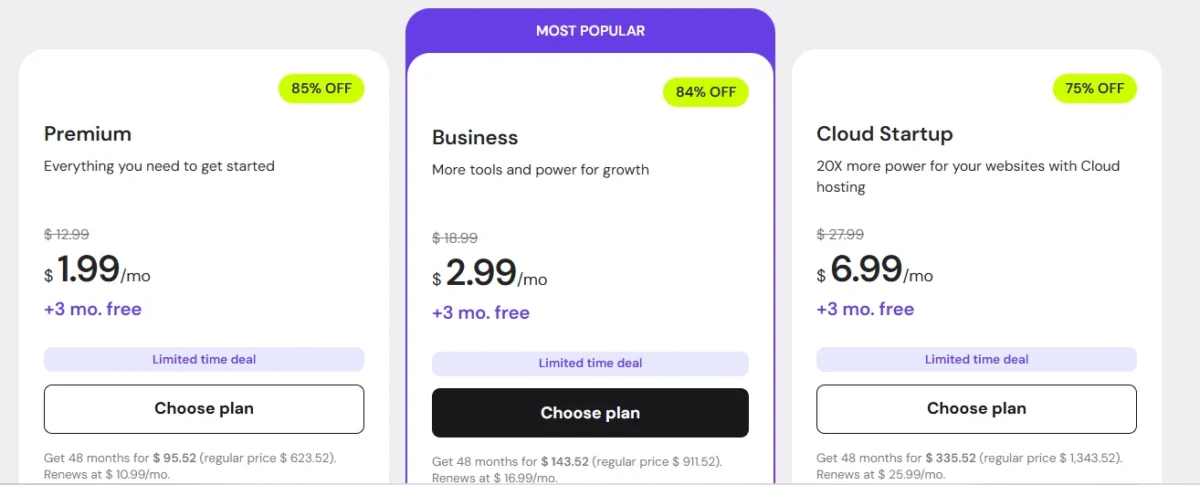
Hostinger and HostGator Starter Plan Costs
Feature | Hostinger Premium | HostGator Hatchling |
Starting Price | $1.99–$2.99/mo | $3.75–$4.50/mo |
Renewal Price | ~$10.99/mo | ~$10.99/mo |
Website Limit | 100 | 1 |
Storage | 100GB SSD | Unmetered |
Free Domain | 1 Year | 1 Year |
SSL | Yes | Yes |
Support | 24/7 Chat | 24/7 Chat & Phone |
Control Panel | hPanel | cPanel |
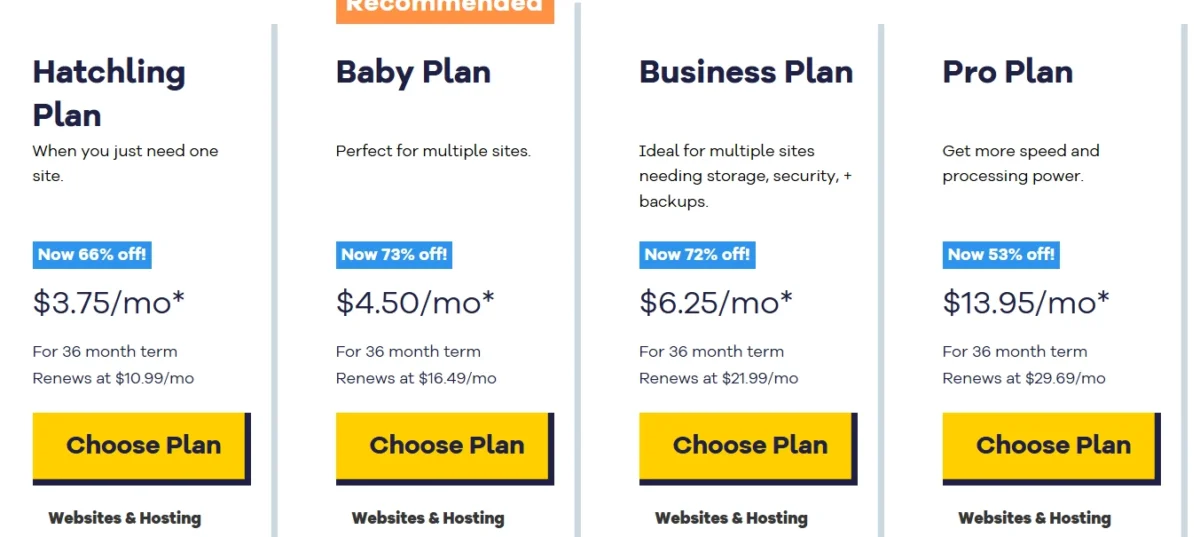
Renewal Pricing and Long-Term Cost
- Hostinger: Moderate post-renewal increase; lower total cost.
- HostGator: Steeper post-renewal jump; higher multi-year cost.
Hidden Fees and Upsells
- Watch for domain renewals, premium SSL, backup add-ons, and support upgrades.
- Introductory pricing is temporary; plan for higher post-renewal costs.
Comparing Key Hosting Features
Hostinger and HostGator target different priorities, but when evaluated on modern hosting needs, Hostinger generally provides stronger overall value. While HostGator emphasizes unlimited resources and phone-based support, Hostinger focuses on performance efficiency, integrated features, and cost predictability.
Performance & Speed:
Hostinger’s NVMe storage, combined with LiteSpeed servers, delivers faster load times and better response performance. HostGator’s standard SSD infrastructure, while reliable, typically produces slower page delivery under comparable conditions.
Ease of Use & Management:
Hostinger’s custom hPanel offers a streamlined, beginner-friendly interface designed for simplicity and faster workflow. HostGator’s traditional cPanel setup is functional but feels more segmented and less intuitive for newer users.
Backups & Security:
Hostinger includes automated backups and stronger default security protections without additional charges. HostGator provides free SSL but commonly treats automated backups as a paid add-on, increasing long-term operating costs.
Support & Resource Strategy:
HostGator remains appealing for users who require phone support and prefer “unlimited” storage positioning. However, for most typical websites, performance, stability, and built-in features outweigh raw capacity claims.
Overall Value:
For speed, usability, integrated protection, and predictable pricing, Hostinger delivers greater practical value. HostGator is better suited for users prioritizing traditional support channels and high resource ceilings.
Control Panel and Interface Comparison
Hostinger stands out with a more intuitive control panel compared to HostGator. Its proprietary hPanel is user-friendly and offers all the standard features you’d expect from a hosting dashboard. Both hosts support WordPress, but Hostinger provides enhanced tools for WordPress management and overall website performance.
For general hosting, HostGator relies on the classic cPanel, the industry-standard interface for managing websites. Hostinger’s hPanel, however, simplifies navigation and integrates advanced tools like a drag-and-drop website builder, AI-powered templates, and performance boosters. This makes it easier for beginners and professionals alike to manage hosting tasks efficiently.
When it comes to WordPress hosting, Hostinger provides added benefits such as LiteSpeed caching, a WordPress vulnerability scanner, and even an AI agent for higher-tier plans. These tools improve site speed, security, and management efficiency. HostGator offers standard WordPress features but lacks some of Hostinger’s specialized optimization tools.
Migration and scalability are also more convenient with Hostinger. Unlike HostGator, which restricts free migrations to the first 30 days, Hostinger allows more flexible website transfers without strict time limits, making it easier to switch or upgrade plans.
Side-by-Side Comparison: Control Panel & Tools
Feature | Hostinger | HostGator |
Types of Hosting | Shared, WordPress, VPS, Cloud, Reseller | Shared, WordPress, VPS, Reseller, Dedicated |
Free Domain Name | ✔️ | ✔️ |
Free SSL | ✔️ | ✔️ |
Number of Sites | 1–100 | 10-50 |
Storage | 20 GB SSD – 100 GB NVMe SSD | 10 GB – 50 GB SSD |
Bandwidth | Unmetered | Unmetered |
Control Panel | hPanel | cPanel |
Free CDN | Business plan and above | ✔️ |
Email Accounts | 2–100 | Pro email free trial (1 month) |
Money-Back Guarantee | 30 days | 30 days |
Takeaway: Hostinger’s hPanel and WordPress tools provide a smoother, more flexible experience than HostGator. Beginners and professionals alike benefit from its intuitive interface, superior migration support, and performance-enhancing features.
Storage, Bandwidth, and Scalability
Both providers handle core resources differently. One prioritizes speed and modern infrastructure, while the other emphasizes flexible capacity. The better option depends on performance needs versus storage-heavy usage.
Storage & Performance:
Hostinger relies on NVMe SSD storage, delivering faster read/write speeds and lower latency. This architecture benefits website speed optimization and high-performance WordPress environments. HostGator advertises unlimited disk space, which is attractive for media-intensive websites, though governed by fair usage constraints.
Bandwidth Allocation:
Both companies provide unmetered bandwidth, making them effectively equivalent for normal traffic patterns. This suits growing websites and typical business workloads without immediate transfer limitations. Real-world performance differences are minimal under standard conditions.
Scalability & Growth:
Hostinger’s ecosystem is engineered for performance-focused scaling, especially when upgrading to cloud solutions. Its modern stack supports handling traffic spikes and resource efficiency. HostGator offers broader vertical upgrades, including dedicated servers, aligning with large-scale hosting expansion strategies.
Which Hosting Model Fits Best?
Choose Hostinger for speed-centric hosting, modern storage technology, and consistent responsiveness. Select HostGator when maximum storage flexibility and traditional server progression matter more than raw performance gains.
Website Builder and AI Tools
Hostinger focuses on intelligent automation with its proprietary builder. The platform uses AI-driven design tools to simplify website creation. Users can generate layouts, images, and content quickly. Built-in AI features reduce manual work and speed up deployment. This approach suits beginners and efficiency-focused users.
HostGator takes a traditional route with its Gator drag-and-drop builder. The editor supports manual customization and flexible design control. Users adjust elements and layouts directly. While functional and user-friendly, the workflow requires more time. This setup suits users who prefer hands-on design management.
Backup, Security, and Extra Features
Backups:
Hostinger emphasizes recovery reliability. Entry plans include weekly backups, while higher tiers provide daily backups and flexible restore options. This approach strengthens data protection and disaster recovery readiness. HostGator also offers automated backups, but availability and restore conditions may vary depending on plan limitations.
Included Extras (Hostinger):
Hostinger bundles value-focused features, including a free first-year domain, SSL, and the proprietary hPanel. LiteSpeed optimization improves performance, while AI tools streamline management tasks. Automated migration further simplifies platform switching.
Included Extras (HostGator):
HostGator centers on familiar essentials. Plans commonly include a free domain, SSL, and unmetered bandwidth. The cPanel interface appeals to users preferring a traditional dashboard. Migration support exists, though eligibility constraints may affect onboarding flexibility.
Hosting Performance and Speed Results
Hostinger Speed Test Pingdom:
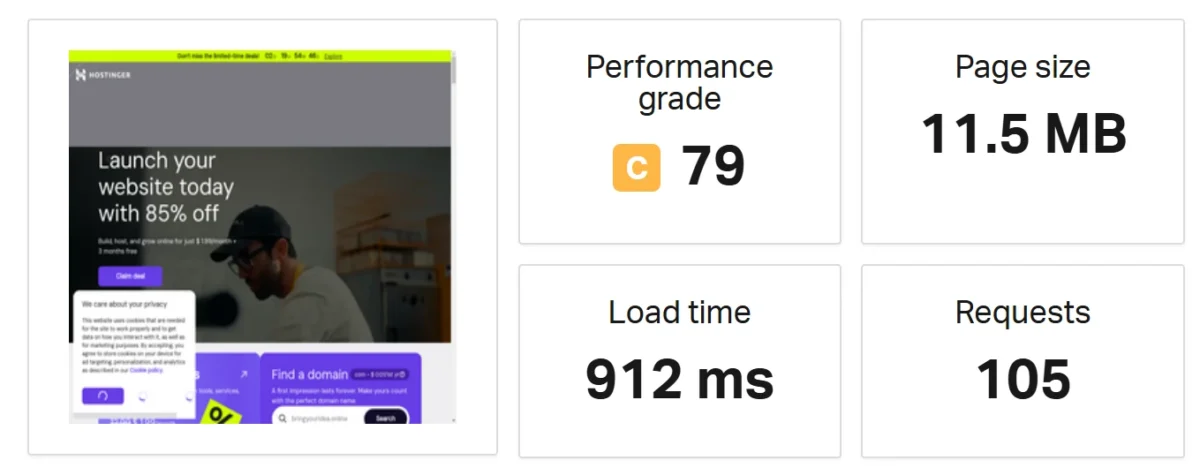
Hostinger delivers faster website performance thanks to modern LiteSpeed servers and NVMe SSD hosting, making it ideal for speed-focused websites and WordPress optimization.
HostGator Speed Test Pingdom:

HostGator remains stable and reliable, but generally slower in page load speed. Both maintain strong uptime, yet Hostinger’s global server infrastructure ensures quicker content delivery worldwide.
Key Points:
- Speed & Technology: Hostinger often loads pages faster due to LiteSpeed caching and advanced storage, though HostGator can outperform in some server response tests.
- Reliability & Uptime: Both hosts maintain ~99.9% uptime, ensuring website availability and minimal downtime.
- Infrastructure & CDN: Hostinger leverages proprietary content delivery networks (CDN) and modern hardware, while HostGator relies on traditional setups.
- Server Locations: Hostinger spans four continents, improving global website reach, whereas HostGator is primarily US-focused hosting.
Data Center Locations and Coverage
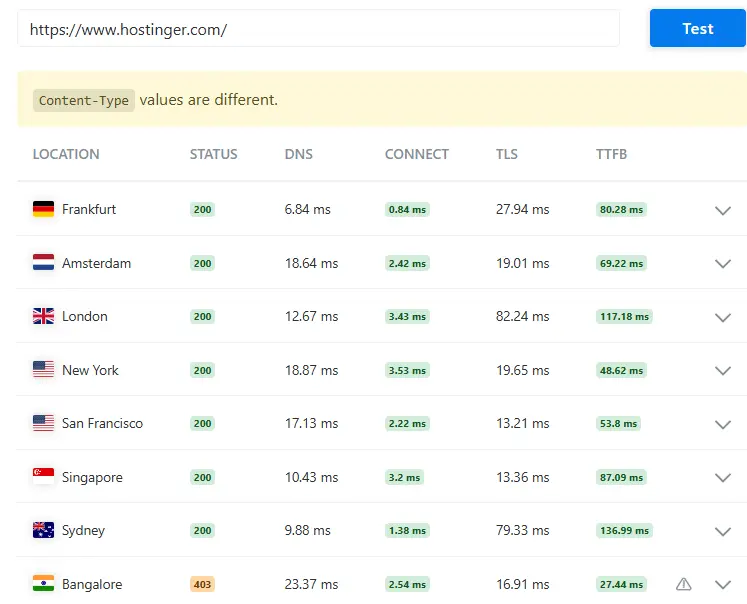
Hostinger offers a wider global hosting network than HostGator, ensuring faster load times for international websites. Its decentralized infrastructure and LiteSpeed technology make it ideal for reaching users worldwide.
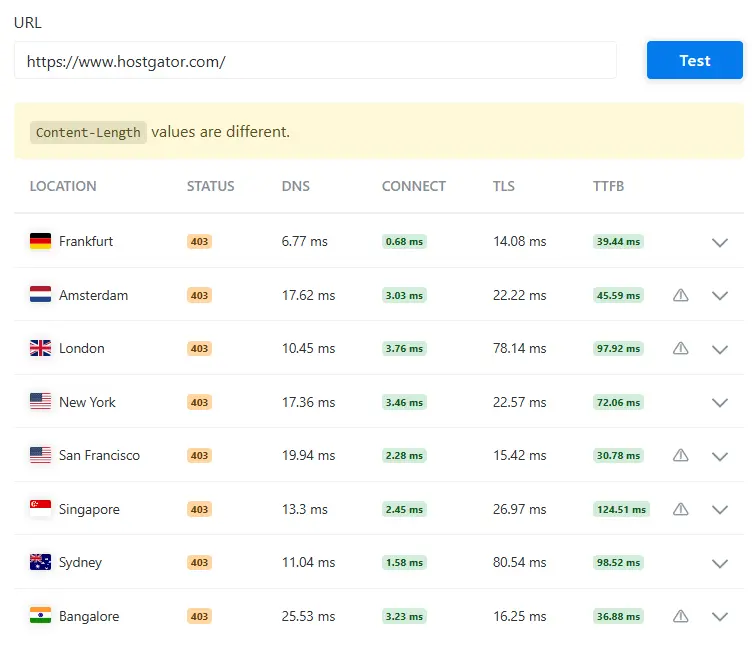
HostGator, in contrast, is best for US-based hosting with reliable servers but limited global server distribution. The choice depends on whether your target audience is international or US-focused.
Key Points:
Hostinger: Operates over 10 data centers across four continents, including Brazil, Indonesia, India, Lithuania, the Netherlands, Singapore, the UK, and the USA. Users can easily select server locations and switch them later.
Its combination of NVMe SSDs and LiteSpeed ensures high-speed web hosting for global audiences and reduces website latency.
HostGator: Servers are concentrated in Houston, Texas, and Provo, Utah, designed for American website traffic. Asian users are served through separate local or Singapore-based servers.
Using SSDs and Apache, HostGator provides stable hosting performance, particularly for US-targeted websites.
Global Reach: Hostinger excels in international website optimization, delivering consistent speed across continents.
HostGator relies on Cloudflare CDN integration for non-US traffic, which can improve access but may not match Hostinger’s direct global presence.
Uptime and Hosting Stability
Hostinger and HostGator both promise strong website uptime and server reliability, but Hostinger pulls ahead in overall performance optimization and consistent results. Its use of NVMe hosting and LiteSpeed technology boosts loading speed and operational stability.
While HostGator remains a dependable option, Hostinger often delivers faster page loads and smoother server response.
Uptime & Reliability: Hostinger maintains nearly perfect 99.9–100% uptime, leveraging high-performance SSD hosting for quick data access and minimal downtime.
HostGator sticks to 99.9%, providing reliable web hosting, but its performance can be slightly less consistent under heavy traffic.
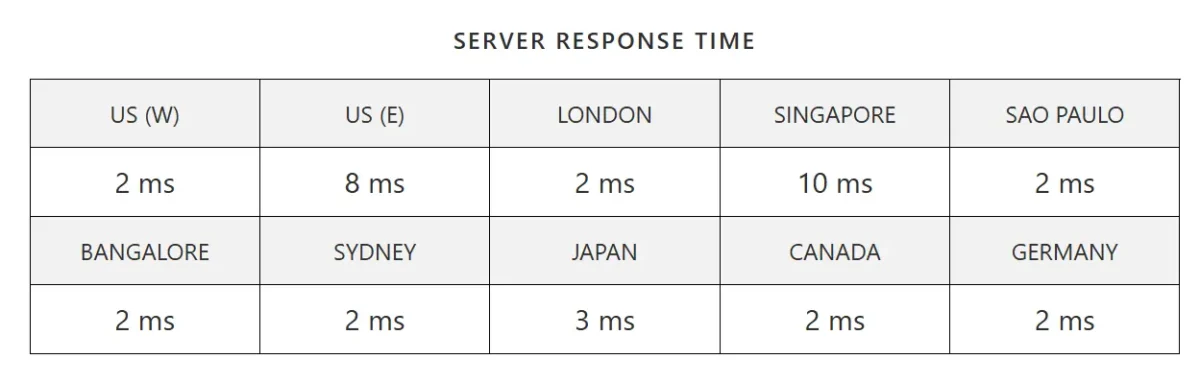
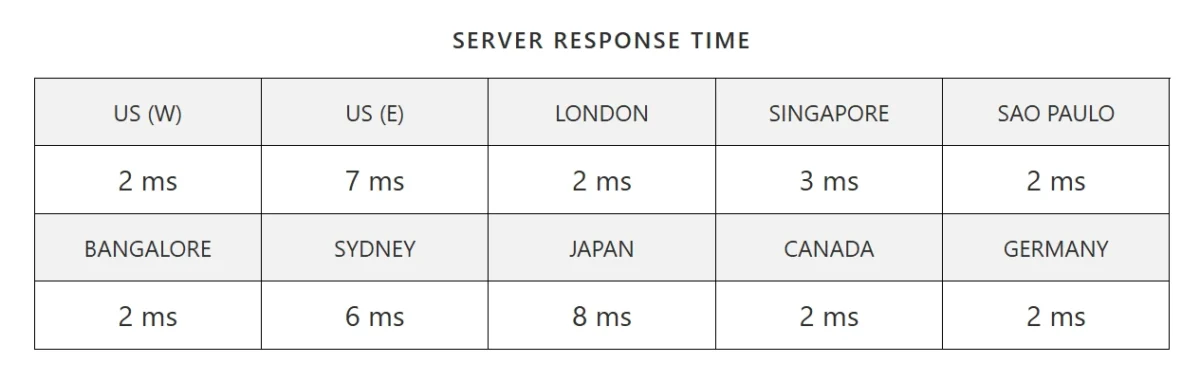
Server Response Time Results
Hostinger Server Response Time bitcatcha:
HostGator Server Response Time bitcatcha:
Real-World Website Speed Tests
Hostinger delivers faster website performance and more consistent server response times in real-world scenarios. It is especially effective for WordPress hosting and handling high-traffic websites. Small or simple sites run well on both hosts, but Hostinger feels noticeably more responsive.
Real-World Usage Details:
- WordPress Users: Pre-installed LiteSpeed cache plugins on Hostinger provide instant website speed optimization for WordPress blogs and business sites.
- Traffic Spikes: Business and Cloud plans handle sudden traffic surges and peak-load periods with minimal slowdowns, ensuring better site reliability.
- Small/Simple Sites: Both hosts manage low-traffic websites effectively, but Hostinger offers slightly better end-user responsiveness and faster page loading for lightweight sites.
Ease of Use and Beginner Experience
Hostinger is more beginner-friendly than HostGator because of its intuitive hPanel dashboard, guided setup, AI tools, and one-click installations.
HostGator is reliable but uses the traditional cPanel, which can be less intuitive for novices.
Dashboard Design and Initial Setup
Hostinger provides a faster, more intuitive setup with its modern hPanel, guided wizards, and built-in WordPress tools, making it beginner-friendly.
HostGator uses traditional cPanel, which is powerful but less streamlined, requiring more manual steps for setup.
Managing Websites and WordPress
Hostinger leads in WordPress management by offering faster performance, beginner-friendly tools, and cost-effective plans. Its hPanel interface, LiteSpeed optimization, and one-click features make setup and site management smoother.
HostGator remains reliable, with traditional cPanel hosting and robust support, especially for users needing unlimited storage.
For WordPress hosting, Hostinger includes free migration, staging environments, and automated management even on entry-level plans.
HostGator provides standard WordPress tools, making it suitable for users who are comfortable with classic hosting setups.
Overall, Hostinger is ideal for beginners and speed-focused websites, while HostGator fits those prioritizing storage flexibility and a familiar cPanel environment.
Learning Curve for Beginners
Hostinger is clearly easier for beginners, offering a modern, intuitive interface and simplified tools. Non-technical users can quickly navigate the platform, set up websites, and manage content without confusion.
HostGator, while powerful, leans on the traditional cPanel and may feel more complex to new users.
Hostinger’s hPanel dashboard is icon-based and clean, designed to resemble smartphone settings, which reduces the learning curve for beginners. Its automatic setup wizard and AI-powered website builder make onboarding fast and straightforward.
In contrast, HostGator relies on cPanel and the Gator Builder, which can feel cluttered and moderately technical for novices.
Regarding setup and management, Hostinger streamlines tasks like WordPress installation, domain handling, and security through centralized tools.
HostGator uses Softaculous for one-click installs, but overall management can be less unified, increasing complexity. Website setup optimization is therefore stronger on Hostinger for small projects and personal sites.
Customer support differs in approach. HostGator offers 24/7 live chat and phone assistance, which is ideal for those who prefer direct human guidance.
Hostinger emphasizes AI-bot support and chat/email, which works well, but can slow immediate human interaction.
Backups and security are beginner-friendly on Hostinger, with automated backups included across all plans, reducing the risk of losing data.
HostGator requires manual configuration or paid add-ons for consistent backup routines, which may complicate site recovery for non-technical users. Automated site recovery is therefore simpler with Hostinger.
Hosting Security Comparison Overview
Hostinger provides stronger website security than HostGator. Its plans include automated backups, proactive malware scanning, and integrated firewall protections at no extra cost.
HostGator offers essential protections like SSL and DDoS, but often requires paid add-ons for full security. Website security features and automated malware protection make Hostinger ideal for beginners and small business owners.
Security Feature | Hostinger | HostGator |
SSL Certificate | Free & Automatic | Free & Automatic |
Automated Backups | Free (Weekly/Daily) | Paid Add-on (CodeGuard) |
Malware Scanner | Built-in (Proactive) | Basic Scan (Paid SiteLock needed) |
DDoS Protection | Included (Cloudflare) | Included |
WAF (Firewall) | Proprietary | Custom Firewall |
2FA Authentication | Yes | Yes |
Key Takeaways:
- Backups: Hostinger includes them automatically; HostGator requires payment.
- Malware Protection: Hostinger detects and removes threats proactively; HostGator needs SiteLock for full protection.
- Server Security: Hostinger’s hPanel integrates BitNinja and advanced firewall tools; HostGator relies on cPanel and manual setup.
- Best Choice: Hostinger for all-in-one security; HostGator only if you prefer cPanel and are willing to pay extra.
- E-commerce Note: Neither host offers PCI compliance by default.
SSL, Backups, and Basic Protections
Both providers cover essential protections, but Hostinger offers more built-in security features. Its unlimited SSL coverage, automated backups, and layered defenses create stronger baseline protection. HostGator remains secure, yet relies more on limits and optional add-ons.
Advanced Security Features Explained
Hostinger offers more comprehensive built-in protection, with most security mechanisms enabled by default. HostGator delivers dependable core defenses but depends more heavily on paid enhancements. The primary distinction lies in bundled security versus upgrade-driven functionality.
Hostinger follows an integrated security architecture designed for minimal user intervention. Its infrastructure incorporates a web application firewall, proactive threat detection, and automated malware scanning.
Continuous server monitoring combined with routine backups enhances attack resistance and data recovery reliability. Additional controls, such as two-factor authentication and domain privacy, reinforce account integrity.
HostGator adopts a conventional control-panel security framework centered around configurable safeguards. Users can manage protections like IP blocking and access controls through cPanel.
However, critical services, including malware remediation and advanced backup solutions,s generally require separate purchases. This upgrade-dependent model may influence long-term security flexibility and cost efficiency.
Common Security Limitations
Both HostGator and Hostinger provide basic security, but each has notable limitations. HostGator often requires paid add-ons for automated backups, lacks consistent two-factor authentication, and mainly focuses on malware detection rather than full remediation.
Hostinger’s constraints depend on plan tier, with less frequent backups, limited malware cleanup, and chat-based support that may slow incident response. Users managing sensitive data should consider add-ons and independent backups to ensure stronger protection.
Customer Support and Reputation Review
Both hosting companies provide round-the-clock help, but their support quality and accessibility are not the same. One focuses on modern chat-based assistance, while the other delivers more traditional contact options. Your choice depends on whether you prefer speed, variety, or long-term brand trust in reliable web hosting support.
Customer Support Comparison

Hostinger centers its service around 24/7 live chat and email. Its support team is known for strong technical skills and clear troubleshooting guidance. However, users sometimes experience delays during busy hours.
There is no phone channel, which may matter for urgent cases. Still, its streamlined system works well for beginners seeking WordPress hosting help and fast technical troubleshooting assistance.
HostGator provides live chat, email, and direct phone access at all times. This broader coverage makes it easier to reach a human agent quickly. Many customers prefer speaking to a representative instead of navigating automated prompts.

For users who value immediate voice communication, this setup strengthens its position in 24/7 hosting customer service and dependable phone-based tech support.
Reputation & Trust
Hostinger has gained strong credibility in recent years. It receives positive feedback for its modern dashboard and cost-effective plans, especially on platforms like Trustpilot. Customers often highlight ease of use and performance.
This growing brand image supports its standing in affordable hosting reviews and beginner-friendly web hosting solutions.
HostGator, on the other hand, is a long-established name in the industry. Its decades of operation reflect stability and experience. However, some clients question pricing increases after the first term and report mixed results with advanced issues.
While the company still benefits from legacy recognition, its reputation depends on improving consistency in long-term hosting reliability and overall service quality management.
Support Channels and Availability
Both hosting providers offer 24/7 customer support, but their delivery models differ significantly. While Hostinger prioritizes chat-based and self-service assistance, HostGator adds phone support for users who prefer direct verbal communication.
Hostinger provides round-the-clock live chat as its primary support channel. An AI-powered assistant first screens incoming queries before routing them to a human agent. Although this may add a brief wait time, it often ensures more accurate issue handling.
Email support is available for complex matters. One of Hostinger’s strongest assets is its extensive knowledge base, featuring detailed step-by-step tutorials and visual guides. However, it does not offer phone support.
In contrast, HostGator also operates a 24/7 live chat with generally fast access to human representatives. Its standout advantage is 24/7 phone support, making it ideal for users who prefer real-time conversation.
HostGator additionally includes a structured ticketing system for organized issue tracking and maintains a comprehensive library of tutorials for self-service troubleshooting.
Response Quality and Expertise
When comparing web hosting customer service quality, both Hostinger and HostGator offer reliable support, but their response time and technical expertise differ.
Hostinger provides AI-powered live chat with fast initial responses, helping improve overall hosting support efficiency. However, connecting with a human support agent may require additional steps in some cases.
HostGator delivers 24/7 phone support, live chat, and ticket assistance, making it a strong option for users who prefer direct communication. Their customer service team is known for clear explanations and beginner-friendly troubleshooting guidance.
In terms of hosting knowledge and expertise, both providers maintain detailed knowledge bases and step-by-step tutorials.
Hostinger focuses more on modern website optimization and performance-related topics, while HostGator covers broader shared hosting support and general web hosting fundamentals.
Overall, if you prioritize faster response time and modern technical support tools, Hostinger may suit you better. If you value traditional multi-channel customer service and direct phone assistance, HostGator is a solid choice.
Brand Reputation and User Reviews
Hostinger is highly rated for its fast website loading speeds and intuitive hPanel dashboard, making it ideal for beginners and developers seeking modern hosting tools. Its budget-friendly plans and automated daily backups enhance overall website security and reliability.
HostGator has a long-established reputation for stable web hosting and offers 24/7 customer support, including phone and live chat, catering to users familiar with traditional cPanel and flexible billing. Its extensive knowledge base and proven hosting reliability ensure consistent performance for diverse website needs.
WordPress Hosting Performance Comparison
Hostinger is the top choice for WordPress hosting, offering LiteSpeed servers and a beginner-friendly hPanel at $2.99/month.
HostGator provides reliable service with more storage and fast support, but Hostinger gives better value and advanced WordPress optimization tools.
Hostinger: Speed and Value
- Performance: LiteSpeed servers with NVMe storage boost site loading speed and SEO.
- Pricing: Affordable starting plans with high hosting value for small businesses.
- Ease of Use: Intuitive hPanel simplifies website management for beginners.
- WordPress Features: Includes managed WordPress, staging sites, and AI site builders.
HostGator: Reliability and Support
- Support: 24/7 phone and live chat ensure fast customer assistance.
- Storage & Resources: Higher initial SSD storage and traffic capacity.
- Interface: Familiar cPanel for experienced users.
- Backup: Daily automated backups improve site security.
Key Considerations
- Speed: Hostinger’s LiteSpeed boosts SEO performance.
- Ease of Use: hPanel is simpler and faster than cPanel.
- Reliability: Both maintain 99.9% uptime for WordPress sites.
Hostinger excels in speed, affordability, and beginner tools, while HostGator suits users who prefer traditional cPanel and instant phone support.
WordPress Speed and Reliability
Hostinger delivers stronger results for most WordPress websites. It offers faster loading and modern server architecture. For users focused on managed WordPress hosting and fast WordPress performance, Hostinger is usually the better option.
Hostinger uses LiteSpeed servers and NVMe storage to improve speed and Core Web Vitals. This setup boosts WordPress page speed optimization and enhances Largest Contentful Paint (LCP) scores.
HostGator runs on standard SSD servers, which are stable but less advanced for high-traffic WordPress sites.
Both providers promise solid uptime, but Hostinger often performs more consistently in real tests. It also includes built-in tools for WordPress website management and beginner-friendly hosting control panels. Lower starting pricing further improves its overall value.
WordPress-Specific Features Offered
Hostinger outperforms HostGator for WordPress speed and beginner-friendly hosting, while HostGator favors users seeking traditional cPanel hosting with more storage. Hostinger’s tools simplify setup and management, ideal for modern workflows.
WordPress-Specific Features:
- Performance & Speed: Hostinger uses LiteSpeed Enterprise servers and NVMe SSDs for faster load times and improved SEO. HostGator mainly relies on standard SSD storage.
- Installation & Management: Hostinger offers a WP Starter wizard and pre-installed optimization plugins. HostGator provides one-click WordPress setup via cPanel.
- Backups & Security: Hostinger includes weekly backups, free SSL, and malware protection. HostGator supports daily automatic backups on select plans.
- Dashboard & Interface: Hostinger’s hPanel dashboard is intuitive for beginners. HostGator’s cPanel interface suits experienced users preferring traditional hosting.
- Pricing & Value: Hostinger has lower entry-level plans with strong performance. HostGator offers more storage, ideal for websites needing high resource capacity.
Beginner-Friendly WordPress Hosting
For beginners using WordPress, Hostinger WordPress hosting excels with its modern hPanel, faster site performance, and affordable plans starting at $2.99/month. It also includes essential features like a free domain, SSL certificate, and weekly backups for better website security.
HostGator provides reliable cPanel hosting with unlimited storage, but its interface feels outdated and less intuitive for new users. Its shared hosting plans work well, yet beginners may find setup and management slower compared to Hostinger.
Pros and Cons of Each Host
Hostinger Pros & Cons
Hostinger offers budget-friendly hosting with strong performance and a modern, easy-to-use interface. Users get useful features like free SSL, a domain, and weekly backups, plus 24/7 live chat support.
Pros:
- Affordable pricing, especially for long-term plans
- Fast load times and reliable uptime
- Intuitive custom hPanel for beginners
- Free SSL, domain, weekly backups, WordPress optimization
- 24/7 responsive live chat support
Cons:
- No phone support
- Higher renewal rates after the first term
- Limited resources on entry-level plans
HostGator Pros & Cons
Pros:
- Low starting prices and easy setup.
- Free SSL and sometimes a free domain.
- 45-day money-back guarantee.
- Unmetered bandwidth and reliable 99.9% uptime.
Cons:
- High renewal rates.
- Mixed customer support.
- Frequent upselling of paid features.
- Extra costs for backups and advanced security.
- Performance can vary
Choosing Hostinger or HostGator
Hostinger is great for beginners and budget-conscious users seeking fast web hosting and AI website tools. It offers NVMe storage, LiteSpeed caching, and intuitive hPanel for easy management.
HostGator suits those needing traditional cPanel hosting and scalable web resources. It provides unmetered bandwidth, higher storage, 24/7 support, and reliable long-term service.
Best Use Cases for Hostinger
Hostinger is perfect for budget-friendly web hosting and users seeking fast website deployment. It suits small businesses, portfolios, blogs, and low-to-medium traffic sites.
Key use cases include shared hosting for multiple domains, an AI website builder for non-technical users, managed WordPress hosting with automatic updates, WooCommerce e-commerce optimization, agency dashboard management, and VPS/Node.js hosting for developers
Best Use Cases for HostGator
HostGator suits beginners, small businesses, and budget-friendly web hosting users seeking reliable, flexible plans. It works well for WordPress blogs, small eCommerce stores, and developers needing easy cPanel control.
- Beginner Websites & Blogs: One-click WordPress setup and affordable hosting plans make it ideal for first-time website owners.
- Small to Medium Business Sites: With 99.9% uptime and 24/7 customer support, businesses stay online reliably.
- Affordable eCommerce (WooCommerce): Includes SSL certificates and scalable hosting for secure online shops.
- Website Migrations: Free migration simplifies moving existing WordPress sites from other providers.
- Resource-Intensive Small Sites: Unmetered bandwidth and storage allow growth, with VPS upgrades for more power.
- Marketing-Focused Projects: Built-in SEO tools and email marketing features boost visibility and engagement.
Final Verdict on Hosting Choice
Hostinger stands out as the top budget web hosting choice, delivering faster website loading speeds and a more intuitive hPanel for just $1.79/month. Its reliability and performance optimization make it perfect for beginners and small businesses seeking efficient hosting solutions.
HostGator, priced at $3.75/month, is better suited for users who need traditional cPanel hosting and unlimited storage plans. Its strong customer support, including phone assistance, appeals to those managing larger websites or requiring conventional hosting management tools.
Pricing and Value Summary
Hostinger offers affordable web hosting with strong site performance, ideal for beginners and small to medium websites. Entry plans start below $2/month with ample SSD storage, while HostGator’s rates begin higher.
It delivers better long-term value with faster speeds, free domain inclusion, and cost-effective renewals, making it a top choice for budget-conscious hosting.
Performance and Reliability Summary
Hostinger delivers faster website speeds with LiteSpeed servers and NVMe storage, ensuring smooth performance for high-traffic sites. HostGator offers consistent page load times and dependable hosting infrastructure.
Both maintain 99.9% uptime, supporting reliable website availability. Hostinger has a global data center network, while HostGator focuses mainly on US-based servers.
Hostinger includes free SSL and automated backups, making site management secure and easy. HostGator is known for 24/7 phone support and overall hosting reliability.
Expert Tips for Hosting Success
Avoid Common Low-Price Traps
Many beginners are drawn to cheap introductory hosting rates, but renewal fees can quickly become expensive. Always check the long-term hosting costs before committing to a plan to avoid surprises later.
Planning Scalability and Migration
Consider your website’s future growth, including higher traffic and resource needs. Choose a host that supports easy plan upgrades and smooth website migration, ensuring your site can expand without downtime or technical hurdles.
Related:
- Scalahosting Review
- WP Engine Review
- Hostinger vs SiteGround
- Cloudways vs Hostinger
- Hostinger vs Bluehost
- Best WordPress Hosting
- Hostinger Review
- Hostinger Shared Hosting Review
- Hostinger Pricing
- Hostinger WordPress Hosting Review
- Hostinger Alternatives
FAQ: Hostinger vs HostGator
Which is better, Hostinger or HostGator?
Hostinger offers fast, affordable hosting with an intuitive hPanel for beginners. HostGator suits users needing classic cPanel and phone support, but is slower.
Is Hostinger better than HostGator for beginners?
Yes, Hostinger web hosting is ideal for beginners. Its intuitive control panel and fast website performance make setup simple.
It offers affordable WordPress hosting with quick loading speeds, giving better value than HostGator for small websites
How does Hostinger compare to HostGator?
Hostinger is faster, more affordable, and has a modern interface, ideal for beginners on a budget. HostGator offers stronger support and more storage, suited for users who value traditional customer service.
What is cheaper than Hostinger?
IONOS ($1/mo) and AccuWeb Hosting ($1.99/mo) are the cheapest. Namecheap, GoDaddy, and DreamHost also offer affordable shared hosting for beginners.
Do Hostinger and HostGator both use cPanel?
No, Hostinger and HostGator use different control panels. HostGator relies on traditional cPanel, while Hostinger offers its custom, beginner-friendly hPanel. Each provides website management but with distinct interfaces.
Which host is better for long-term affordability?
Hostinger offers the best long-term value due to its balance of price and performance. AccuWeb Hosting and Nexcess help avoid steep renewal increases. Focusing on renewal costs is key for true affordability.

Alex Bryant is the founder of PvyEmpire.com and a WordPress specialist with over 4 years of hands-on experience in web hosting, performance optimization, and website management. He has extensively tested top hosting providers by setting up real websites and monitoring their speed, uptime, and reliability.
At PvyEmpire.com, Alex publishes honest, data-driven reviews, detailed guides, and verified coupons & deals. His goal is to help website owners choose the right hosting, improve performance, and grow their online presence with confidence—based on real testing, not promotions.