What Is NodeJS Hosting and How Does It Work?
If you’ve been looking for a fast and reliable way to run your web applications, you’ve probably come across the term NodeJS Hosting.
At first, it can seem confusing because not every hosting service is designed to handle Node.js applications properly. Finding the right setup can feel overwhelming, especially when performance and scalability matter.
In this guide, you’ll learn what NodeJS Hosting is, how it works, and why it matters for modern web applications. We’ll break everything down in simple terms, helping you understand the key features, benefits, and factors to consider when choosing the right hosting solution.
What is Node.js?
Node.js is a JavaScript runtime built on Chrome’s V8 engine. It allows developers to run JavaScript outside the browser and build server-side applications.
It uses an event-driven model and non-blocking I/O, which makes it efficient for handling multiple requests at the same time. This is why it is widely used for real-time applications like chat apps, APIs, and streaming platforms.
What Is NodeJS Hosting and How Does It Work?
Modern application hosting for JavaScript-based backends involves running code on servers optimized for runtime execution environments rather than static websites. It provides the infrastructure needed to execute scripts, manage processes, and handle incoming requests efficiently.
Unlike traditional setups, this environment relies on process managers, reverse proxies, and scalable compute resources to ensure applications stay online and responsive.
It also supports environment variables, automated deployment pipelines, and scaling features that help developers push updates without downtime.
Why Node.js Hosting Requires the Right Environment
JavaScript-based backend systems are sensitive to runtime conditions. They depend heavily on asynchronous processing and continuous event handling, so even small misconfigurations can lead to performance issues.
A properly configured environment ensures smooth process management, stable memory usage, and reliable request handling. Without it, applications may crash under load or behave unpredictably during traffic spikes.
Choosing the Right Hosting Architecture for Your Business Stage
Shared Hosting: Testing and Development
Shared environments are affordable and simple, but limited in flexibility. They are suitable for early testing or learning purposes where performance demands are low.
However, they often restrict background processes and resource allocation, making them less ideal for production-grade applications.
VPS Hosting: Production-Ready Performance
Virtual private servers provide dedicated resources such as RAM and vCPU allocation. This setup gives developers more control over runtime behavior and system configuration.
It is the most common choice for growing applications that need scalability, stability, and better performance under load.
Dedicated Servers: Enterprise-Scale Infrastructure
Dedicated machines offer full hardware control and maximum performance. They are used by large-scale systems that require high bandwidth throughput and advanced load balancing.
This setup is ideal for enterprise applications, high-traffic platforms, and systems with strict compliance requirements.
Common Challenges and How to Solve Them
Apps Won’t Start After Deployment
This usually happens due to missing dependencies or incorrect environment variables. Checking logs and verifying runtime configuration often resolves the issue.
Error Pages Instead of Your Website
Incorrect routing or reverse proxy settings can cause this problem. Configuring NGINX properly helps ensure requests reach the application correctly.
Apps That Keep Stopping
Memory leaks or poor process management are common causes. Using a process manager like PM2 helps keep applications running consistently.
Slow Performance Over Time
Unoptimized caching layers or inefficient database queries can degrade performance. Implementing caching strategies and monitoring memory usage can help.
Sites That Can’t Handle Traffic Spikes
Without load balancing or scaling, servers may crash under heavy demand. Cloud-based scaling and CDN integration improve resilience.
Missing or Incorrect Security Configuration
Improper SSL setup or weak access control can expose systems to risks. Enforcing HTTPS, validating inputs, and enabling automated backups improve security.
Setting Up Node.js on Your Hosting Platform
A. Setting Up on VPS or Dedicated Servers
Start by installing the runtime environment using version managers like NVM. Then configure dependencies, set environment variables, and use PM2 for process control.
Finally, integrate NGINX as a reverse proxy to manage incoming traffic and improve performance.
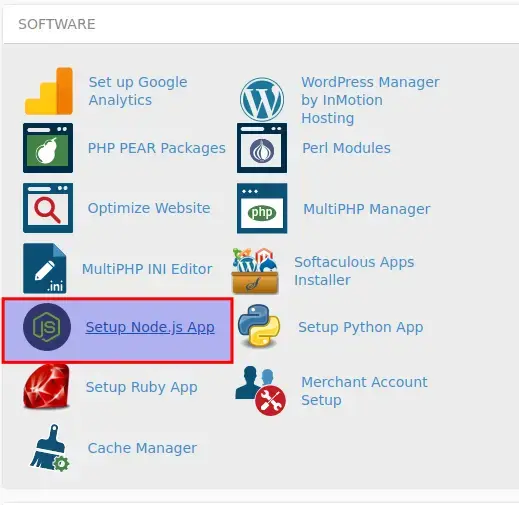
B. Setting Up in cPanel (Shared Hosting)
Some shared platforms allow limited runtime execution through application managers. You can upload your project, install dependencies, and configure startup scripts.
However, resource limitations may restrict advanced features like clustering or background workers.
Performance Optimizations That Actually Impact Your Bottom Line
Storage Speed: The Foundation of Fast Sites
NVMe SSD storage significantly reduces read and write latency. This directly improves response times for data-heavy applications.
Asynchronous Architecture: Doing More with Less
The system uses non-blocking operations to handle multiple requests simultaneously. This reduces bottlenecks and improves scalability.
Caching: Serving Content Instantly
Caching layers reduce repeated database queries and speed up content delivery. This is essential for high-traffic applications.
Reverse Proxy: Separating Simple from Complex
NGINX handles static requests while forwarding dynamic ones to the application server. This improves efficiency and load distribution.
Compression and Content Delivery
Using compression techniques and CDN integration reduces bandwidth usage and improves global performance.
How Businesses Actually Use Node.js
Companies use this runtime environment to build scalable APIs, real-time dashboards, and e-commerce systems. It is especially popular in SaaS platforms and collaboration tools.
Its asynchronous design makes it ideal for handling concurrent users efficiently, which is critical for modern digital products.
Keeping Your Application Secure
Protect Data in Transit and at Rest
Always use SSL/HTTPS encryption to secure communication. Encrypt stored data to prevent unauthorized access.
Validate Everything and Keep Systems Current
Input validation prevents injection attacks. Regular updates ensure vulnerabilities are patched quickly.
Plan for Disaster Recovery
Automated backups and recovery strategies help restore systems after failures or breaches. Access control further limits exposure.
The Future of Node.js: What’s Coming Next
Upcoming Technical Improvements
Future runtime updates focus on better performance, faster execution, and improved memory handling. These enhancements make applications more efficient.
Emerging Deployment Patterns
Serverless and container-based deployments are becoming more common. They offer flexibility and automatic scaling capabilities.
Integration and Frameworks
Modern frameworks like Express, Next.js, and Nuxt continue evolving to support complex applications with simpler architecture.
Why This Matters for Your Business
Faster deployment cycles and scalable infrastructure directly impact user experience and operational cost. Businesses that adopt modern hosting strategies gain a competitive advantage.
Conclusion
Modern backend systems require more than just basic hosting. They need environments designed for scalability, performance, and reliability. Choosing the right setup ensures your application can handle real-world traffic without breaking under pressure.
As digital products grow more complex, understanding infrastructure becomes just as important as writing code. With the right foundation, you can build applications that scale smoothly and perform consistently under any load.
FAQs
What is Node.js hosting?
It is a server environment designed to run JavaScript backend applications efficiently.
Can I host Node.js on shared hosting?
Yes, but it is limited and not ideal for production workloads.
How do I deploy a Node.js application?
You typically install dependencies, configure environment variables, and use a process manager like PM2.
What is PM2 and why is it useful?
It is a process manager that keeps applications running and restarts them if they crash.
Does Node.js need NGINX?
Not always, but NGINX improves performance and handles traffic routing efficiently.
How much RAM does a Node.js application need?
It depends on workload, but most small apps run well with 1–2 GB RAM.
What is the best hosting option for Node.js?
VPS or cloud-based infrastructure is usually the best balance of performance and cost.

Alex Bryant is the founder of PvyEmpire.com and a WordPress specialist with over 4 years of hands-on experience in web hosting, performance optimization, and website management. He has extensively tested top hosting providers by setting up real websites and monitoring their speed, uptime, and reliability.
At PvyEmpire.com, Alex publishes honest, data-driven reviews, detailed guides, and verified coupons & deals. His goal is to help website owners choose the right hosting, improve performance, and grow their online presence with confidence—based on real testing, not promotions.