Bluehost Hosting Review 2026: Is It Worth Using?
Bluehost Hosting: Quick Overview
Bluehost hosting review, established in 1996, has become one of the most recognized web hosting providers and holds official WordPress.org recommendation status.
The platform delivers solid performance with 99.97% uptime and offers beginner-friendly features, including integrated site builders and templates. While introductory pricing is competitive, users should note that renewal rates increase after the initial period.
Customer feedback consistently highlights the exceptional 24/7 support team. Users praise representatives for their technical expertise, patience, and ability to explain complex issues clearly through phone, email, and live chat channels.
Despite mixed opinions on interface navigation, Bluehost remains a practical choice for beginners and small businesses seeking reliable, affordable hosting with strong customer support.
Our Current Picks for Best WordPress Hosting for Beginners 2026: 17 Tested Options.
Performance Metrics

Is Bluehost Really That Good?
Bluehost serves as a solid starting point for beginners and small WordPress sites because of its straightforward setup, official WordPress endorsement, and bundled essentials like free domains and SSL certificates. The platform maintains strong uptime performance and offers scalable hosting options as websites grow.
However, significant drawbacks include steep renewal price increases, inconsistent customer support quality, and frequent upselling of add-ons that should be standard features. The cheapest plans impose storage and email limitations while charging extra for domain privacy and backups, and US-only data centers create slower load times for international visitors, making it less ideal for high-traffic or global websites.
Who Should Use Bluehost and Who Should Avoid It
Bluehost works well for newcomers to web hosting, small business owners, and content creators who value simplicity and affordability during their initial setup phase. The platform excels at making WordPress deployment straightforward with integrated AI tools and guided setup processes, while providing essential security certificates and reasonable uptime for standard websites.
Its bundled approach to domains, email, and hosting appeals to those who prefer managing everything through a single provider rather than coordinating multiple services. This host isn’t ideal for enterprise-level sites handling substantial visitor volumes, developers seeking granular technical control, or anyone concerned about long-term costs, as renewal fees climb considerably after the promotional period ends.
Support quality varies according to user feedback, and fundamental features like daily backups come at additional expense rather than being standard inclusions, making it less suitable for operations where consistent performance and comprehensive built-in protections are non-negotiable requirements.
How Bluehost Compares to Other Hosting Providers
Bluehost excels as a beginner-oriented WordPress host with straightforward setup, bundled SSL certificates, and first-year domain inclusion, though performance metrics trail budget competitors like Hostinger, which delivers faster speeds at lower entry prices.
The platform’s US-only servers create latency for international users, and recent pricing increases have diminished its value proposition compared to rivals offering superior infrastructure.
Against competitors, Bluehost’s simplified WordPress interface appeals to newcomers but falls short on technical performance—Hostinger provides better speed and innovation, GoDaddy offers stronger management tools and backups, while SiteGround and DreamHost outperform in overall capabilities.
It remains ideal for first-time WordPress users prioritizing ease of performance, but those requiring global reach, advanced features, or maximum speed should consider alternatives with better infrastructure and competitive pricing.
Bluehost Hosting Plans and Pricing
Bluehost provides diverse hosting options ranging from affordable shared and WordPress plans to high-end VPS, dedicated, and cloud services tailored for varying site needs. Costs depend on the hosting type, contract duration, and renewal rates, making it important to consider both introductory and long-term pricing before committing to a plan.
Shared, WordPress, WooCommerce, VPS, and Cloud Hosting Plans
Bluehost offers a variety of hosting solutions tailored to different needs — from beginners’ websites to high-traffic business sites:

Shared & WordPress Hosting: Best for beginners and small websites. Includes one-click WordPress installation, AI-powered site builders, free SSL, and a free domain for the first year. Plans start around $3.99–$14.99 per month, depending on promotions and plan tier.
WooCommerce Hosting: Pre-configured for online stores with integrated payment gateways, inventory tools, and booking features. Ideal for small to medium eCommerce businesses, starting around $14.99–$21.99 per month.
VPS Hosting: Offers dedicated resources, root access, and NVMe storage powered by AMD EPYC processors. Suitable for developers or growing businesses needing more control. Starting at $4.99 – $49.99 per month.
Cloud Hosting: Provides enterprise-level performance with distributed server networks, high uptime, and multi-region redundancy. Perfect for high-traffic websites that require reliable performance. Pricing typically ranges from $65–$230 per month, depending on the plan.
Hosting Type | Starting Price (Monthly) | Ideal For | |
1 | Shared / WordPress | $3.99 – $14.99 | Beginners, small sites, and new blogs |
2 | WooCommerce | $14.99 – $21.99 | Online stores and small e-commerce businesses |
3 | VPS | $4.99 – $49.99 | Developers and growing companies need resources |
4 | Cloud | $65.00 – $230.00 | High-traffic websites requiring reliable uptime |
Standard Pricings

Advanced Pricings

Bluehost WooCommerce Pricing Breakdown
Bluehost currently provides two managed WooCommerce hosting plans: eCommerce Essentials and eCommerce Premium. The Essentials plan begins around $6.95 per month, while the Premium option starts at $9.95 per month for introductory terms. Renewal pricing rises to roughly $21.99 and $30.99 per month, depending on plan length and promotions.
Both plans include key features such as free SSL, CDN, one-year free domain, AI-powered tools, malware protection, 24/7 support, and the Yoast SEO plugin. The Premium tier enhances these with Yoast SEO Premium, priority support, advanced security tools, and premium WooCommerce extensions.
Plans require long-term commitments of 12 to 36 months to access the lowest rates, and actual costs may vary with ongoing discounts.
Additional potential expenses include payment processing fees (around 2.9% + $0.30 per transaction via Stripe or PayPal), premium themes or plugins (ranging from $49 to $279+ per year), domain renewals ($12–$20 annually), and optional email marketing or security add-ons.
For current pricing and features, users should check Bluehost’s official WooCommerce hosting page.

Plan | Starting Price | What You Get | Best For |
eCommerce Essentials | Entry‑level fee | WooCommerce pre‑installed, free SSL, basic store tools | New/small stores |
eCommerce Premium | Higher monthly fee | More advanced features and better performance | Growing stores |
Hidden Costs, Add-Ons, and Renewal Fees
Hidden Costs: Many products and services come with expenses that aren’t immediately apparent. Hidden costs often appear through setup charges, data transfer fees, training programs, or mandatory integration tools. Customers may also face added taxes or operational surcharges, especially in sectors like healthcare.
Add-Ons: Add-ons usually refer to optional upgrades or enhanced features that increase functionality but raise overall costs. These can include advanced support packages, extended warranties, or customized solutions tailored to specific user needs.
Renewal Fees: Renewal fees apply when continuing services, such as subscriptions, maintenance plans, or website domains. These recurring charges often exceed the introductory rates, making it essential to evaluate long-term financial commitments beforehand.
Would you like me to include recommendations on how businesses can minimize these hidden fees?
Free Trial, Refund, and Guarantee Policies
Bluehost provides a 30-day money-back guarantee for Shared, VPS, and Dedicated hosting plans purchased in 2026. Customers canceling within this window receive full refunds on hosting fees.
The guarantee excludes cloud hosting, monthly plans, domain registrations, and add-on services. When canceling a plan with a bundled domain, Bluehost deducts approximately $15.99 while customers keep domain ownership.
Renewal payments are non-refundable except within a 15-day pre-billing period. Credit card payments qualify for refunds, while other payment methods may face restrictions. Processing takes 5-7 business days, or 24 hours for PayPal.
Bluehost doesn’t offer traditional hosting trials—the 30-day guarantee serves this purpose. Some plans include a one-month free trial of Professional Email Standard.
To request refunds, contact Bluehost support via chat on their support page or call 888-401-4678 (US) or 1800-419-4426 (India). Disabling auto-renewal prevents future charges but doesn’t trigger automatic refunds—direct contact with representatives is required.
Step-by-Step Migration to Bluehost in 2026
Transferring your website to Bluehost involves choosing between automated WordPress tools or manual processes for other platforms. Here’s how to execute a seamless migration in 2026:
1. Automated WordPress Migration (Recommended)
Install the Migrator Plugin: Access your current WordPress admin panel and add the Bluehost Site Migrator plugin.
- Run Compatibility Check: Input your domain within the plugin interface to confirm server compatibility.
- Authorize Connection: Sign into your Bluehost Account Manager, locate the “Websites” area, choose Transfer an Existing WordPress site, and grant permission for connecting both platforms.
- Review and complete: After the automated system duplicates your content and database, examine everything using a temporary URL before completing the process.
2. Manual Migration (Non-WordPress or Custom Sites)
For non-WordPress platforms or those wanting direct oversight, this alternative works best.
- Backup and Download Files: Connect via an FTP application such as Filezilla to retrieve all content from your existing host’s public_html folder.
- Export Database: Navigate to phpMyAdmin on your current hosting service and download your database in .sql format.
- Create a New Database on Bluehost: Within your Bluehost Account Manager, access MySQL Databases to establish a fresh database and user credentials.
- Upload Files and Import Database: Transfer your content through FTP to Bluehost and use Bluehost’s phpMyAdmin for importing the .sql document.
- Update Configuration: Change your wp-config.php (or similar settings file) by adding the updated Bluehost database details, username, and password.
Note: Access your Bluehost dashboard for account management. For guidance, visit the Bluehost Help Center.
3. Domain and DNS Updates
Making your migration visible requires directing your domain toward the Bluehost servers.
- Update name servers: Access your domain registrar account (such as GoDaddy or Namecheap) and change the name servers to: 1( ns1.bluehost.com ), 2 ( ns2.bluehost.com)
- Wait for Propagation: DNS changes typically require 24–48 hours to distribute globally.
- Optional Domain Transfer: Should you wish to move your domain registration to Bluehost, verify it’s been registered for a minimum of 60 days and request an EPP/Authorization code from your existing registrar.
For a detailed guide, check GoDaddy’s instructions on updating nameservers.
4. Post-Migration Checklist
- Test Site Functionality: Confirm all navigation links, media files, and plugins operate properly.
- Activate SSL: Access the Bluehost Account Manager to enable your complimentary SSL certificate for enhanced security.
- Save Permalinks: For WordPress installations, navigate to Settings > Permalinks and press “Save Changes” twice to update your URL configuration.
Free WordPress Transfers Explained

Bluehost offers multiple free methods for transferring your WordPress website to their platform, catering to different skill levels and technical preferences. Here’s what’s available in January 2026:
Step 1: Automated Migration Tool
The company’s primary transfer solution uses a plugin-based system designed for users without technical expertise. You’ll begin by adding the Bluehost Migrator plugin to your existing site’s dashboard. Next, access your Bluehost Account Manager to create a unique transfer key through the “Transfer an Existing WordPress” option under Websites.
Input both your current site address and the generated key into Bluehost’s interface, which triggers an automatic copying process for all files and databases. Progress tracking is available throughout the operation.
Step 2: Cloud-Specific Transfer Option
Customers who’ve selected the Bluehost Cloud hosting tier can use a specialized migration system. This approach lets you configure data center location and storage capacity before establishing a direct connection that pulls content onto its high-performance cloud infrastructure.
Step 3: Self-service transfer method
Those comfortable with technical processes or experiencing issues with automated tools can handle the migration independently without additional fees. Using FTP software such as FileZilla, download all website files from your previous host and extract the database through phpMyAdmin.
Within the Bluehost control panel, establish a new database and import your exported data. After uploading files to the Bluehost servers, change the wp-config.php file to reflect your updated database credentials.
Step 4: Domain Registration Transfer
Moving your domain name registration represents a distinct procedure from site content migration. Domains must meet a 60-day minimum age requirement and be unlocked at their current registrar.
Several Bluehost hosting packages include a complimentary one-year domain registration that applies to both new domains and incoming transfers.
Step 5: Important Details
The standard automated service handles one WordPress installation per transfer. Complex configurations like multi-site networks or multiple websites may require paid professional services or manual execution.
Round-the-clock support from WordPress specialists is available should complications arise. After completing the migration, DNS records need updating to direct traffic to Bluehost’s servers, with worldwide propagation typically requiring 24-48 hours.
Manual Migration: Beginner-Friendly Guide
Moving your website to Bluehost manually in 2026 gives you full control over the transfer process.
Step 1: Retrieve Your Current Site
Access your existing host’s control panel and use the file manager to compress all website content into an archive. Download this to your computer. Then, export your database through phpMyAdmin in SQL format.
Step 2: Set Up Bluehost Environment
In your Bluehost account, create a fresh database with a new user, granting full permissions. Record these credentials carefully.
Step 3: Transfer Everything
Upload your compressed site files to the Bluehost file manager and extract them in the root directory. Next, import your SQL database file through Bluehost’s phpMyAdmin into the newly created database.
Step 4: Configure and Launch
Edit your wp-config.php file to match your new Bluehost database credentials—update the database name, username, password, and host details. Log into WordPress admin, refresh permalinks by re-saving them, and finally update your domain’s name servers at your registrar to point to Bluehost’s servers, making your site live.
Common Migration Pitfalls and How to Avoid Them
Website migrations often fail because of inadequate preparation, where businesses rush into transfers without mapping out application dependencies, evaluating data integrity, or calculating true costs. Testing shortcuts represent another critical weakness—many site owners skip verification steps that would reveal broken functionality, damaged links, or performance degradation before going live.
Security vulnerabilities emerge when data transfers occur without encryption or proper access restrictions, potentially exposing sensitive information or violating regulations like GDPR and HIPAA. The absence of comprehensive backups creates a catastrophic risk, as corrupted files or incomplete database transfers become irreversible once old systems are decommissioned.
DNS configuration errors cause particularly frustrating problems, with mistimed or incorrect updates creating accessibility issues and extended outages that damage user trust and business operations.
Effective Prevention Strategies
Success requires a comprehensive assessment phase, identifying every dependency and creating structured timelines with contingency options. Complete backups of files and databases must precede any transfer activity. Whether using Bluehost’s automated WordPress migration tool or manual FTP and phpMyAdmin approaches, thorough validation at each stage prevents data corruption.
Security demands encryption during transit, along with robust permission management. Multiple testing rounds should simulate actual traffic conditions to catch performance issues before users encounter them. DNS transitions need careful coordination, with old sites remaining operational until new environments prove stable.
Maintaining rollback capabilities prevents disasters, allowing quick reversions if critical problems surface post-migration. For Bluehost users specifically, keeping both hosting environments active during transition provides essential safety, while ensuring complete access credentials (beyond just WordPress logins) enables smooth technical execution.
Performance, Speed & Reliability

Bluehost maintains a 99.9% uptime guarantee, keeping your website accessible and operational consistently. The platform uses SSD and NVMe storage technology to speed up data access and reduce page loading times.
Built-in server caching and content delivery network support further enhance speed by distributing your site content across multiple locations. This reduces the distance between your server and visitors, ensuring faster content delivery regardless of their geographic location.
The infrastructure adapts to different traffic volumes, supporting everything from small blogs to high-traffic online stores without performance drops. Monitoring tools let you track loading speeds and mobile responsiveness, helping you identify optimization opportunities.
Fast loading times and reliable uptime directly benefit search engine rankings. Search engines prioritize websites that deliver quick, consistent experiences, making Bluehost’s performance features valuable for both user satisfaction and SEO results.
Bluehost Speed, Uptime, and Stress Testing Results

Bluehost demonstrates solid performance across key hosting metrics.
Speed Performance

Testing shows page load times ranging from 440ms to 770ms, outperforming most competitors. The platform consistently scores A+ to B grades (83/100+) in performance tools. Speed is powered by NVMe SSDs, AMD EPYC processors, and Cloudflare CDN integration.
Uptime Reliability
Bluehost offers a 99.99% uptime guarantee, exceeding the standard 99.9% industry benchmark. Real-world monitoring frequently records 100% uptime over 30-day periods, with one test showing 99.9955% uptime across 350,000+ requests.
Traffic Load Handling
Stress tests confirm shared hosting handles 100 simultaneous users without performance drops. For sites expecting sustained high traffic, upgrading to Pro Shared, VPS, or dedicated hosting is recommended. The platform supports easy scaling as website demands grow.
Downtime Analysis and Real-World Performance
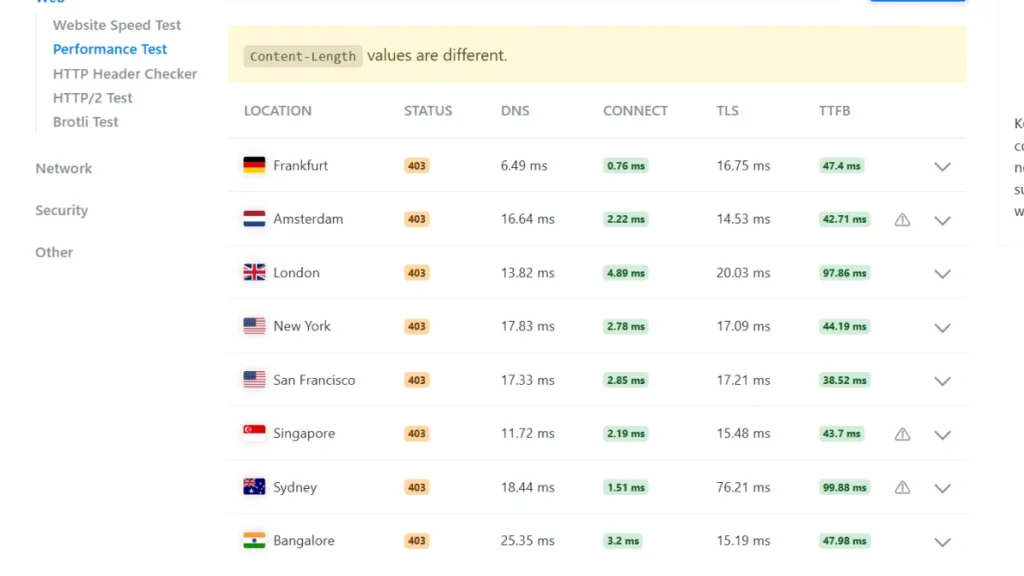
Bluehost maintains service availability through tiered uptime commitments: 99.99% for shared hosting, 99.9% for dedicated servers, and complete network availability for cloud solutions via redundant infrastructure with automatic failover. Service disruptions typically resolve within 15 minutes, and eligible customers receive monthly credits up to 5% if availability falls below guaranteed thresholds.
Performance optimization includes NVMe and SSD storage for faster data access, Cloudflare CDN integration for reduced global loading times, and multi-layer caching systems. The platform uses current PHP versions and CPU allocation safeguards to prevent resource overconsumption on shared servers.
Independent testing shows adequate traffic handling during moderate visitor surges. Company-owned data centers enable direct infrastructure control, making the service suitable for WordPress sites seeking balanced cost-effectiveness and stability.
Advanced Performance Protections & CPU Resource Handling
Bluehost maintained server stability in 2026 through continuous monitoring of processing power and memory usage. The platform ensures each account receives its designated resource share while identifying and addressing excessive consumption that could impact other users.
Premium shared plans offer enhanced processing capabilities for demanding applications. The infrastructure automatically scales resources as websites grow, adjusting capacity based on traffic demands.
Real-time security monitoring blocks malicious traffic before it affects server performance. Automatic software updates maintain system efficiency, while server-side caching and content delivery networks reduce processing loads by efficiently serving static content.
Performance diagnostic tools include a management dashboard for configuring server parameters, database query logs for identifying slow operations, and traffic analysis to monitor bandwidth consumption.
Websites that consistently exceed shared hosting limits should transition to isolated server environments, where resources operate independently without shared constraints.
Comparison: Bluehost vs SiteGround vs Other Competitors
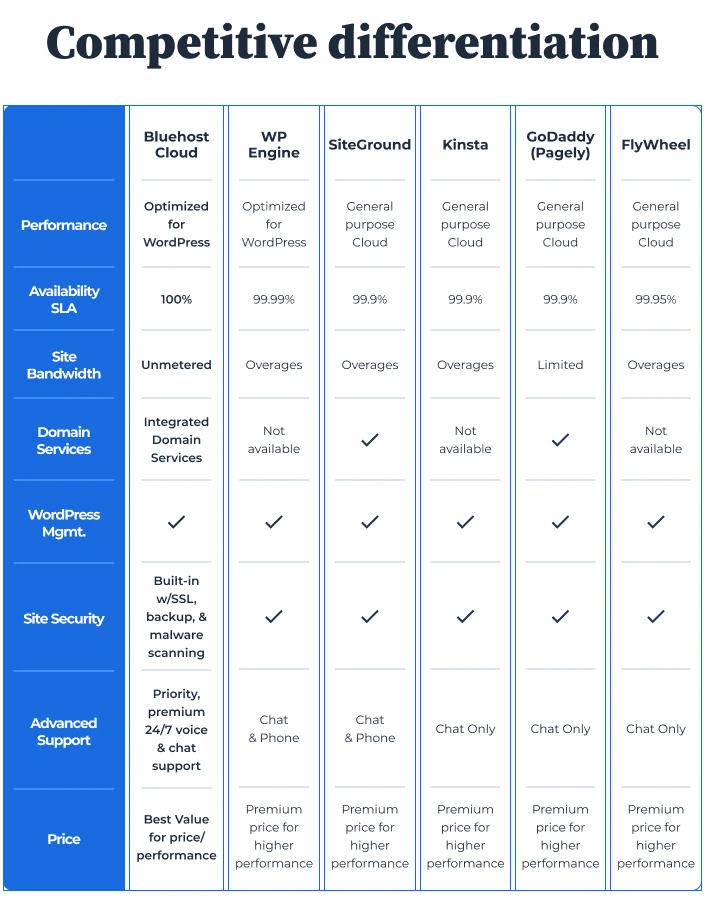
SiteGround delivers superior speed, security, and technical capabilities, ideal for growing businesses. Bluehost, on the other hand, offers budget-friendly hosting with lower costs and beginner-focused features.
Key Differences
Bluehost provides cheaper entry pricing, generous storage, free domain registration, and VPS/dedicated server options for scalability. SiteGround counters with faster Google Cloud infrastructure, 99.99% uptime, free daily backups across all plans, and unlimited email accounts—though at higher renewal rates.
Performance testing shows SiteGround handles traffic spikes better, while Bluehost offers earlier access to staging environments and more disk space. Support quality remains comparable between the two providers.
Alternative Options
Hostinger combines affordability with NVMe-powered performance, rivaling both competitors at lower prices. HostGator targets beginners with multi-site plans but shows inconsistent performance. InMotion Hosting balances reliability with free backups and CDN inclusion. GoDaddy provides comprehensive features, though pricing and performance vary.
Bottom Line
Choose Bluehost for minimal upfront investment, inclusive features, and long-term affordability. Select SiteGround when premium performance, daily backups, and advanced tools justify higher costs. Consider Hostinger for optimal value, combining powerful performance with budget pricing.
SEO, WordPress Tools & Features
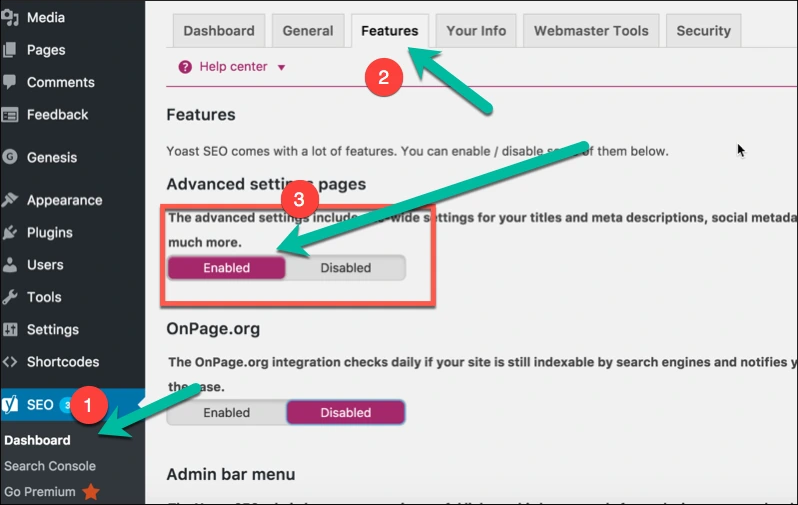
Bluehost delivers robust SEO capabilities and WordPress functionality through its hosting infrastructure and plugin ecosystem. The platform operates on NVMe SSD storage with built-in caching systems and Cloudflare CDN support, maximizing page speed—a crucial search ranking factor. Security measures include SSL certificates, malware scanning, firewall protection, and DDoS mitigation at no extra cost.
As an officially endorsed WordPress hosting provider, Bluehost enables quick WordPress deployment with automatic system updates and an intuitive drag-and-drop site builder. The platform leverages artificial intelligence for website creation, content refinement, and metadata generation. A complimentary SEO analysis tool examines your site and delivers practical improvement recommendations.
The hosting service works natively with leading WordPress SEO extensions. Yoast SEO frequently comes preloaded, offering live content evaluation, readability scoring, automated sitemap creation, and structured data implementation for enhanced search appearances. Premium tiers provide internal linking recommendations.
Users can alternatively deploy Rank Math or AIOSEO for capabilities like granular SEO metrics, competitive analysis, and position monitoring. Monster Insights facilitates Google Analytics and Search Console integration, enabling performance tracking directly through your WordPress interface.
For those seeking managed SEO support, Bluehost provides professional marketing packages featuring monthly optimization work, keyword analysis, and local citation development handled by SEO specialists. Each client receives a dedicated account manager who conducts regular strategy sessions and reports on ranking performance.
Built-in SEO and Marketing Tools
Bluehost offers an integrated collection of optimization and promotional features accessible to website owners regardless of their technical expertise. The platform’s native capabilities work alongside compatibility with widely used WordPress extensions to enhance online visibility.
The hosting provider’s proprietary optimization system delivers comprehensive website assessments with specific recommendations for improvement. Users receive an overall performance score reflecting multiple ranking factors. The dashboard enables monitoring of search term performance metrics, including impression counts, click-through rates, and position tracking across search results.
Automated submissions to leading search platforms come standard, along with self-generating XML sitemaps that connect with Google’s webmaster tools. The system continuously scans for technical problems affecting rankings, such as slow loading speeds or missing security certificates, while evaluating mobile device compatibility and responsiveness.
For promotional activities beyond search optimization, the service includes email campaign management capabilities and an analytics interface showing visitor numbers, page engagement, and audience demographics. Those seeking expert help can purchase comprehensive packages where specialized teams handle design work, optimization strategies, and ongoing support.
WordPress users benefit from seamless integration with premium extensions. The eCommerce Premium tier includes Yoast SEO pre-configured, which assists with content refinement, metadata creation, heading structure organization, image descriptions, and link-building suggestions. Alternative extensions like All in One SEO or The SEO Framework remain available through WordPress’s plugin library.
This combination of proprietary diagnostics and WordPress ecosystem compatibility creates a complete environment for managing web presence and promotional efforts.
WordPress Hosting Features Deep Dive
Bluehost’s 2026 WordPress hosting delivers specialized infrastructure built around AI integration, NVMe storage technology, and WordPress-specific security protocols. As an officially endorsed provider by WordPress.org, their service portfolio spans entry-level configurations through enterprise cloud solutions.
Core Platform Capabilities
The platform centers on Wonder Suite AI, an intelligent onboarding framework that constructs professional websites through custom design modules and AI-driven content generation. WordPress deployment happens automatically via the Bluehost Account Manager, handling installation and ongoing updates without manual intervention.
A staging environment allows safe testing of modifications before deployment. First-year domain registration and Let’s Encrypt SSL certificates come standard.
Performance Infrastructure
The hosting architecture uses NVMe storage across most service tiers, paired with WordPress-optimized server configurations that speed up page rendering. Cloudflare CDN integration with Argo Routing minimizes geographic latency. Uptime commitments reach 99.99% on standard offerings, which speed up while the Cloud tier delivers 100% network availability guaranteed.
Security & Maintenance Protocols
Backup frequency ranges from weekly to continuous real-time protection depending on plan selection. The security suite incorporates automated malware scanning with removal capabilities, DDoS mitigation, and Web Application Firewall protection against external vulnerabilities.
2026 Plan Specifications
The Starter plan accommodates 40,000 monthly visitors with 10 GB SSD storage for single sites, featuring AI Builder tools. The business tier expands to 200,000 visits monthly, 50 GB NVMe storage across 50 websites, and adds malware removal services. eCommerce Essentials supports 400,000 visits with 100 GB NVMe storage for 100 sites, including specialized WooCommerce functionality.
The Starter plan accommodates 40,000 monthly visitors with 10 GB SSD storage for single sites, featuring AI Builder tools. The business tier expands to 200,000 visits monthly, 50 GB NVMe storage across 50 websites, and adds malware removal services. eCommerce Essentials supports 400,000 visits with 100 GB NVMe storage for 100 sites, including specialized WooCommerce functionality.
Recommended Plugins and Add-Ons for Beginners
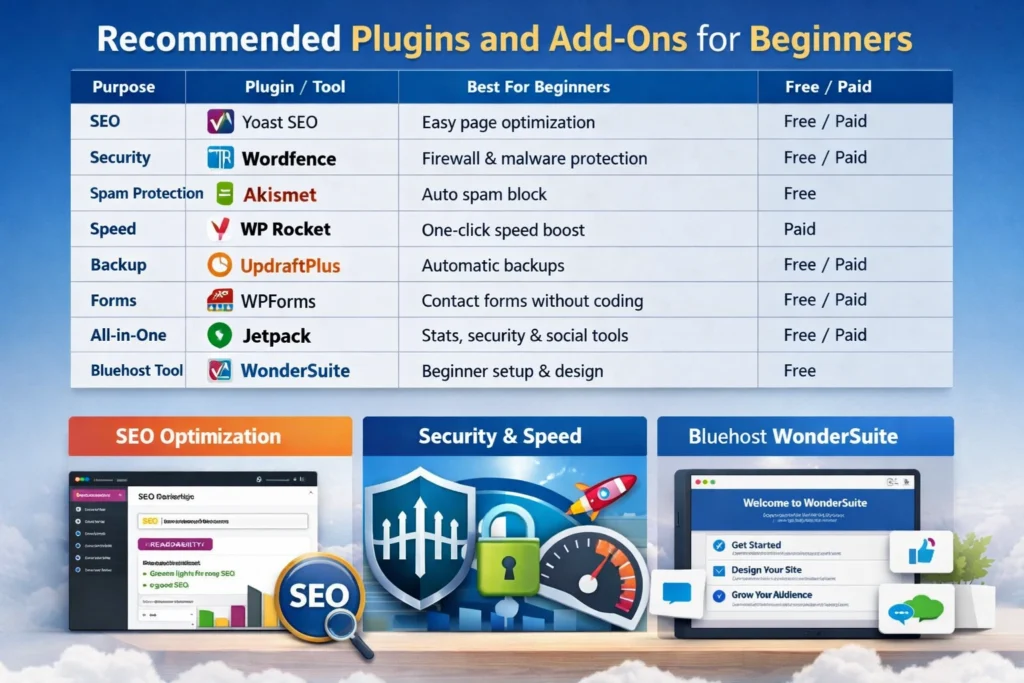
When starting with WordPress on Bluehost, selecting the right tools can significantly streamline your website management.
Search Engine Optimization Tools
Yoast SEO stands out as an excellent choice for those looking to enhance their website’s visibility in search results. This tool simplifies optimizing individual pages by providing intuitive controls for adjusting page titles, web addresses, and descriptions that appear in search results. It auto-generates the technical file that helps search engines index your site properly.
Website Protection
Securing your website from the start is crucial. Word fence Security provides comprehensive protection through its firewall system and automated threat detection capabilities. In comment sections, Akismet Anti-Spam works automatically to filter out unwanted messages, maintaining your site’s professional appearance.
Speed and Data Management
Site performance directly impacts visitor satisfaction. WP Rocket offers straightforward speed optimization through file compression and content delivery network integration, making it ideal for those without technical expertise. Alternatively, W3 Total Cache provides similar functionality at no cost. Updraft Plus handles automated backups seamlessly, connecting with popular cloud storage services for convenient data protection.
User Interaction Features
Since WordPress doesn’t include native contact capabilities, WPForms fills this gap with its intuitive interface that requires no coding knowledge. Jetpack serves as a comprehensive toolkit, combining analytics, social connectivity, and protection features in one package.
Bluehost’s Native Solutions
The hosting provider includes Wonder Suite, which contains specialized features designed specifically for newcomers. Wonder Start guides you through initial configuration with a simple questionnaire. WonderBlocks provides ready-made design components that snap together easily. Wonder Help functions as an intelligent assistant, offering relevant suggestions as you work on different sections of your dashboard.
Feature Category | Tool / Plugin | What You Get | Ideal For |
Website Setup | WonderStart | Step-by-step guided setup | Absolute beginners |
Design Builder | WonderBlocks | Ready-made page sections | Fast website design |
SEO Optimization | Yoast SEO | Page titles, meta & sitemap | Search visibility |
Security | Wordfence Security | Firewall & malware protection | Website safety |
Spam Protection | Akismet | Automatic spam filtering | Clean comments |
Speed Optimization | WP Rocket / Cache | Faster loading & caching | Better performance |
Backups | UpdraftPlus | Automated cloud backups | Data protection |
Forms | WPForms | Drag-and-drop contact forms | User interaction |
All-in-One Tools | Jetpack | Stats, social & protection | Easy management |
Security, Backups & Support
Bluehost ensures powerful protection, dependable data recovery, and round-the-clock customer help for all hosting users. Its security system includes free SSL encryption across plans, advanced firewall defense for cloud users, DDoS mitigation, malware scanning, and continuous network monitoring.
For data safety, Bluehost provides automatic and manual backup options depending on the hosting plan. Users can enhance reliability with premium services like CodeGuard for daily automated backups, instant restores, and change alerts. It also recommends maintaining off-site copies to ensure full data redundancy.
Customer support operates 24/7 through live chat and phone, with dedicated technical teams available for premium customers. Users can access extensive self-help resources via the Bluehost Knowledge Base and Academy for tutorials, troubleshooting, and hosting guidance.
Would you like me to tailor this summary for a website review page or a professional report format?
Bluehost Security Features and Backups
Bluehost provides a layered security framework across all hosting plans, offering both built-in protections and optional premium upgrades. Core security tools include free SSL certificates for encrypted connections, DDoS mitigation to handle attack traffic, and a web application firewall that blocks malicious requests.
The platform also conducts daily malware scans, supports secure SFTP for file transfers, and allows two-factor authentication to safeguard user accounts.
In terms of data protection, Bluehost includes automatic weekly backups but advises customers to maintain their own copies, as these backups aren’t guaranteed. For advanced needs, users can subscribe to services like CodeGuard or Jetpack, which enable daily or real-time backups along with easy data restoration.
These measures collectively ensure stronger website security and reliable recovery options for both personal and business sites.
Support Channels: Live Chat, Phone, and Ticket System

Bluehost offers 24/7 customer support through live chat and phone. Chat is accessible through the contact page or account dashboard. Phone support includes dedicated US lines (888-401-4678 for support, 844-303-1730 for sales) and an international number (+1 801-765-9400).
The company no longer offers a public ticket system, focusing instead on direct communication. Complex issues can be escalated internally by support agents and tracked via email.
For faster service, have your account username or domain, password digits or validation PIN, and specific issue details ready before contacting support.
Real User Feedback: Reddit, TrustPilot, and Google Reviews
Source | Rating / Score | Positive Feedback | Negative Feedback |
N/A | Easy setup, WordPress-friendly | Price increases, sales tactics | |
TrustPilot | 4.6 / 5 | Helpful support, site migrations | Cancellation issues, domain transfer |
Google / Capterra | 4.3–4.4 / 5 | Simple account setup, updated control panel | Confusing money-back policy, premium features |
Bluehost’s standing in early 2026 reveals a platform that works well for newcomers but faces criticism from experienced users regarding costs and service quality.
Reddit Community Insights
Community forums consistently point to dramatic price increases once introductory offers expire. Users launching their first websites or personal blogs appreciate the straightforward setup and WordPress integration.
Customer service experiences vary widely—some members report efficient problem-solving through live chat, while others encounter pushy sales tactics for additional services. Most contributors confirm reliable uptime hovering near the 99.9% mark, though tech-savvy members recommend alternatives for sites handling substantial traffic volumes.
TrustPilot Ratings Analysis
The platform currently holds a 4.6-star rating from approximately 27,000 customer evaluations on TrustPilot. Satisfied customers frequently mention helpful support staff who assist with site migrations and technical configurations. Dissatisfied reviewers make up 15–20% of responses, typically complaining about complicated cancellation procedures and restrictions on transferring domains. Current feedback continues highlighting successful support interactions as a notable strength.
Google and Business Directories
Aggregate scores across Google and Capterra settle around 4.3–4.4 stars. Customers appreciate the updated control panel and straightforward account setup process, particularly those without technical backgrounds. The WordPress.org endorsement keeps it popular among users wanting minimal setup requirements. Several reviews mention confusion about the money-back policy, specifically regarding domain purchases and premium features not covered by the guarantee.
2026 User Sentiment Overview
Installation processes earn widespread approval for simplicity and speed. Pricing generates the most complaints, with attractive starting rates giving way to renewal fees that drive customers elsewhere. Support quality divides opinion—many find live assistance dependable, but some criticize offshore handling of complex technical issues. Performance satisfies smaller websites but falls short for demanding applications.
Pros and Cons of Bluehost hosting review
Pros
- Easy for beginners to use
- Recommended by WordPress.org
- Free domain and SSL for a year
- Includes backups, CDN, and security tools
- 24/7 support available
Cons
- High renewal costs
- Paid expert migrations
- No uptime guarantee
- Performance issues
on basic plans - Frequent upselling prompts
Summary
Bluehost is a beginner‑friendly and affordable web hosting provider that works well for small to medium websites and WordPress projects, though it has some drawbacks with renewals and support.
Bluehost
Bluehost provides robust hosting solutions designed for WordPress users and businesses seeking reliable performance. With official WordPress.org recommendations and comprehensive support services, it offers integrated tools and scalable infrastructure that accommodate everything from personal blogs to enterprise-level websites.

Advantages for Beginners and Small Businesses
Bluehost appeals strongly to newcomers and small enterprises by combining simplicity, affordability, and reliability. Its intuitive dashboard and automated setup tools remove technical barriers, allowing users with no prior experience to launch websites effortlessly. Plans remain cost-effective with transparent pricing, including perks like a free domain, SSL certificate, and a money-back guarantee that minimizes startup expenses.
The platform’s deep WordPress integration—endorsed by WordPress.org—ensures stable performance and easy customization. Built-in tools, including an AI-driven website builder and one-click installations, streamline site creation for non-technical users. Security features, automatic backups, and a global CDN enhance speed and protection without requiring manual configuration.
As businesses grow, Bluehost supports smooth scaling to advanced hosting options such as VPS and dedicated servers. WooCommerce-ready packages further empower small retailers to build online stores with secure transactions and essential e-commerce functions. Comprehensive 24/7 customer support ensures users receive consistent technical and operational assistance.
Would you like me to tailor the language for a marketing summary or an analytical comparison?
Common Complaints and Drawbacks
Bluehost faces criticism for its pushy sales tactics, with users frequently encountering promotions for extra features and upgrades throughout their dashboard and checkout experience. The advertised introductory pricing structure becomes notably more expensive when contracts come up for renewal, often surprising budget-conscious customers.
Website loading speeds and server reliability present challenges for some clients, particularly those using shared hosting environments where resources are distributed among multiple sites. Support quality remains a contentious issue, with numerous customers reporting delayed responses, unhelpful guidance, and repetitive diagnostic procedures that fail to resolve their technical problems.
The platform’s basic packages don’t include comprehensive daily backup functionality at no charge, requiring customers to invest in additional protection services such as CodeGuard. Transferring existing websites to Bluehost involves a $149 fee, as the company doesn’t provide complimentary migration assistance like several competing hosts do.
Geographic limitations exist since all data centers operate exclusively within the United States, potentially affecting site performance for international visitors. The absence of a formal Service Level Agreement means customers won’t receive compensation during extended outages, despite generally reliable uptime performance. Additionally, shared hosting subscribers must commit to annual contracts at a minimum, with no availability for flexible monthly billing arrangements.
Hidden Limitations You Should Know
Bluehost advertises unlimited storage and bandwidth on shared hosting plans, but enforces usage restrictions in practice. The company limits inodes—the total count of files and folders your account can store—which means you might reach this cap despite unlimited storage claims.
CPU and memory usage also need to be monitored. Websites generating high processing demands or unusual traffic patterns may experience throttling or suspension warnings. Email accounts consuming excessive resources can trigger similar restrictions.
These fair usage policies typically don’t impact standard websites or small blogs. However, rapidly expanding sites, large online stores, or content-heavy projects may hit these boundaries unexpectedly. When shared hosting proves insufficient, Bluehost recommends upgrading to VPS or dedicated server options.
Bluehost vs Competitors
Bluehost faces competition from multiple hosting providers, each offering different strengths in performance, cost, and specialized services.
- Hostinger undercuts Bluehost on price while delivering superior load speeds and broader infrastructure through 10 global data centers. The platform features a proprietary control panel that many users find easier to navigate than traditional options. However, Bluehost maintains WordPress.org’s official endorsement and provides the WonderSuite builder specifically designed for WordPress users.
- HostGator appeals to budget-conscious customers with aggressive promotional rates and reseller hosting capabilities. While both platforms share similar administrative interfaces, Bluehost incorporates additional tools like website builders and backup systems in standard packages—features HostGator typically monetizes separately. Bluehost also delivers dedicated WooCommerce solutions not matched by HostGator.
- InMotion Hosting targets professionals and growing businesses with comprehensive features, daily automated backups, and complimentary site transfers. Their performance metrics consistently rank high, though Bluehost typically offers more accessible entry-level pricing.
- SiteGround commands industry respect for WordPress optimization and overall reliability, holding WordPress.org recommendation status alongside Bluehost. Cost differences position SiteGround as the premium alternative between the two.
Additional market players include A2 Hosting, which frequently surpasses Bluehost in speed benchmarks and feature generosity, Wix, which combines hosting with simplified drag-and-drop design tools rather than pure hosting services, and WP Engine, an enterprise-focused managed WordPress platform emphasizing advanced security and performance capabilities at premium price points.
See Fastest WordPress Hosting👉
Provider | Strengths | Best For |
Bluehost | WordPress-endorsed, includes site builder & WooCommerce tools | WordPress users |
Hostinger | Low price, fast speed, global servers | Budget users |
HostGator | Cheap plans, reseller options | Small sites & resellers |
InMotion | Free transfers, daily backups | Business sites |
SiteGround | Top reliability, WordPress-optimized | Performance seekers |
A2 Hosting | Very fast, feature-rich | Tech users |
Wix | Drag-and-drop site builder | Beginners |
WP Engine | Premium managed WordPress hosting | Enterprises |
Extended Competitor Comparison (Hostinger, A2, Cloudways)
These three providers serve different audiences: Hostinger targets budget-conscious beginners, A2 Hosting focuses on speed enthusiasts, and Cloudways review caters to developers needing advanced scalability.
Feature Comparison
Feature | Hostinger | A2 Hosting | Cloudways |
Best For | Beginners & small projects | Speed-focused users | Developers & agencies |
Hosting Type | Shared, VPS, Cloud | Shared, VPS, Dedicated | Managed Cloud (AWS, GCP, DigitalOcean) |
Control Panel | Custom hPanel with AI tools | cPanel | Custom dashboard |
Performance | Good LCP scores, LiteSpeed | Turbo plans with NVMe SSDs | Excellent speed, Redis caching |
Pricing Model | Fixed-term with intro discounts | Fixed-term with competitive pricing | Pay-as-you-go (hourly/monthly) |
Scalability | Moderate | Moderate | Highly scalable |
Support | 24/7 live chat (customers only) | 24/7 chat, phone, tickets | 24/7 chat/tickets (advanced support extra) |
Email Hosting | Included | Included | Not included (external required) |
Key Differences
- Ease of Use & Pricing: Hostinger offers the most beginner-friendly interface and the lowest costs. Cloudways requires technical knowledge. A2 Hosting uses familiar cPanel.
- Performance: Cloudways leads with premium cloud infrastructure. A2 Hosting’s “Turbo” servers deliver exceptional speeds. Hostinger provides solid budget performance.
- Scalability: Cloudways excels with flexible resource adjustments. A2 and Hostinger use traditional upgrade structures.
- Support: A2 Hosting offers comprehensive multi-channel support. Hostinger provides quality live chat. Cloudways offers variable support quality across its paid premium tiers.
Bluehost vs WordPress.com – Key Differences for Beginners
These two platforms operate on entirely different models that beginners should understand before making a choice. Bluehost functions as a hosting service, where you’ll use WordPress.org software to create your site, giving you complete ownership and flexibility from the start.
WordPress.com takes a different approach by combining hosting and software into one streamlined package that requires minimal technical knowledge.
Bluehost with WordPress.org: This combination puts you in the driver’s seat of your website. You’re essentially renting server space and installing free WordPress software to build whatever you envision.
Advantages for newcomers:
- You gain immediate access to thousands of themes and plugins without restrictions, enabling unlimited creative possibilities and revenue generation strategies
- Entry-level pricing typically undercuts WordPress.com’s comparable offerings while delivering superior storage capacity—think 50GB versus just 6GB—plus a complimentary domain for twelve months
- Your site can evolve alongside your ambitions through straightforward hosting upgrades without platform migrations
- Round-the-clock assistance through multiple channels, including phone calls, live messaging, and email
Challenges to consider:
- Greater freedom means shouldering more responsibility for technical management, though automated tools handle numerous routine tasks like updates and backups.
WordPress.com: This service delivers everything pre-packaged, prioritizing simplicity over customization for users wanting minimal involvement in technical details.
Benefits for beginners:
- Zero technical maintenance required—the platform automatically manages security patches, software updates, and data protection
- A no-cost tier exists for testing purposes, though it comes with platform advertisements and a subdomain format
- Launch your site immediately without installation procedures or configuration steps
Drawbacks to note:
- Accessing the complete plugin and theme ecosystem demands upgrading to premium Business or eCommerce subscriptions
- Revenue-generating capabilities face restrictions until you invest in higher-priced plans
- Customer assistance varies by subscription tier, with phone consultations typically unavailable and live chat access limited on budget plans
Making Your Decision: Choose Bluehost when you’re committed to building a professional online presence with maximum flexibility and cost-effectiveness over time. Opt for WordPress.com when you need a straightforward blogging platform without immediate customization or monetization requirements.
SiteGround vs Bluehost: Detailed Comparison
Both hosting providers have earned WordPress’s official recommendation, yet they serve distinct audiences with contrasting strengths. SiteGround delivers superior speed and sophisticated tools backed by knowledgeable support staff, making it ideal for developers and expanding websites. Bluehost focuses on affordability and simplicity, targeting newcomers who need straightforward solutions without breaking the bank.
Speed and Reliability
SiteGround operates on Google Cloud infrastructure, employing Nginx servers combined with proprietary SuperCacher technology. This technical foundation produces noticeably quicker load times and maintains stability during traffic surges.
Bluehost maintains approximately 99.9% uptime using contemporary hardware. However, its conventional architecture typically trails behind SiteGround’s optimized framework in independent speed evaluations.
Cost Structure
Bluehost wins on affordability with lower initial fees and more stable renewal pricing. New customers receive a complimentary domain for twelve months, enhancing the overall value proposition.
SiteGround’s introductory rates appear competitive initially, but substantial price increases at renewal make it considerably more expensive over time. Many users justify these higher costs through improved performance and expanded functionality.
User Interface and Capabilities
Bluehost targets absolute newcomers with its streamlined dashboard, incorporating traditional cPanel functionality. The platform includes WonderSuite, an AI-driven website builder that simplifies site creation.
SiteGround’s proprietary Site Tools interface offers a contemporary design favoring users seeking advanced configuration options. Developer-focused features include Git integration and staging environments on premium packages.
Protection and Data Recovery
SiteGround incorporates robust security measures across all tiers, including Web Application Firewall protection, AI-powered bot prevention, and complimentary automated daily backups.
Bluehost supplies fundamental security like SSL certificates, but premium features such as daily backup automation and malware detection require additional purchases or upgraded plans.
Customer Service Quality
SiteGround earns consistent praise for responsive, expert assistance available 24/7 through multiple channels, including live chat, telephone, and ticket systems.
Bluehost maintains round-the-clock support availability, though customer feedback varies. Some users report extended wait periods or encounters with sales-focused representatives.
Final Recommendations
- Select Bluehost when: You’re starting your first website, working within tight financial constraints, want a no-cost domain, and prefer guided setup processes.
- Select SiteGround when: Website speed matters critically for your project, you require professional development tools, and you’re comfortable investing more for cutting-edge technology and superior technical assistance.
Bluehost vs GoDaddy: Which is Better?
Bluehost remains the stronger choice for WordPress users, offering better performance, lower initial pricing, and more built-in features such as free SSL and CDN across all plans. It also provides seamless WordPress integration and faster support response times.
GoDaddy, however, suits users who need easy website creation tools, domain management, or all-in-one business solutions like marketing and professional email. Overall, for most users—especially those focused on WordPress—Bluehost provides better value and flexibility, while GoDaddy is ideal for beginners and domain-focused services.
Feature | Bluehost | GoDaddy |
Best For | WordPress users, site performance, value | Beginners, domain management, all-in-one tools |
Starting Price | Around $2.49/month | Around $5.59/month |
Free Domain | Included on all plans | Included in annual plans |
Free SSL | Available on all plans | Available on premium plans only |
Performance | Faster and more reliable for WordPress | Decent, but may slow under heavy traffic |
Ease of Use | cPanel with WordPress optimization | Intuitive website builder |
Support | 24/7 chat and phone, faster responses | 24/7 chat and phone, slower at times |
Backups | Available on higher plans or add-ons | Daily automatic backups included |
Other Top Hosting Alternatives
Hosting Provider | Best For | Key Highlights |
Hostinger | Low-cost performance hosting | Offers fast LiteSpeed servers, a custom hPanel interface, and global data centers for reliable worldwide speed. |
SiteGround | Premium support and WordPress hosting | Built on Google Cloud with advanced security, daily backups, and expert 24/7 assistance. |
DreamHost | Contract-free flexibility | Provides monthly billing, transparent pricing, and a leading 97‑day refund policy. |
HostGator | Beginner‑friendly shared hosting | Includes unmetered bandwidth, simple setup, and a free first‑year domain. |
WPX Hosting | High‑speed WordPress hosting | Delivers outstanding load times, free CDN, and rapid live chat help in under a minute. |
GreenGeeks | Environmentally responsible hosting | Balances performance with eco‑friendly operations powered by 100% renewable energy credits. |
Domain Services & Additional Products
Provider | Domain Services | Additional Products |
Hostinger | Domain registration with competitive renewal rates | Offers website builder, email hosting, and VPS services. |
Namecheap | Affordable domains with free privacy protection | Includes SSL certificates, VPN access, and professional email options. |
IONOS | Low-cost domain packages with bundled hosting tools | Provides business email, website builder, and eCommerce tools. |
DreamHost | Domain registration with simple management tools | Features cloud storage, professional email hosting, and WordPress website builder. |
SiteGround | Domains integrated into hosting plans | Delivers managed WordPress features, site migration, and staging tools. |
A2 Hosting | Domain purchase integrated with hosting | Supplies turbo servers, reseller hosting, and developer tools. |
Cloudways | Domain mapping for managed cloud setups | Partners with multiple cloud providers and offers built-in CDN integration. |
GreenGeeks | Domain registration with eco‑friendly operations | Provides site builder, email hosting, and green energy offset programs. |
Buying and Managing Domains on Bluehost
Process | Description | Key Features |
Domain Purchase | Register a new domain or transfer one directly from the Bluehost Account Manager | Offers a free domain for the first year with hosting, various extensions (.com, .net, .store), and WHOIS privacy options |
Availability Check | Use the domain search tool to find available names and alternatives | Suggests multiple extensions and related domains |
Checkout & Payment | Add the domain to the cart and complete payment securely | Transparent pricing with optional add-ons like Domain Privacy + Protection |
Domain Dashboard | Centralized panel for all domain operations | Manage renewals, DNS settings, privacy, and transfers in one place |
Auto-Renewal | Keeps domains active without manual renewal | Reduces the risk of accidental expiration and loss of ownership |
DNS & Hosting Setup | Easily connect standalone domains to hosting or external builders | Supports custom name servers and advanced DNS controls |
Email Integration | Create branded email accounts linked to your domain | Available through the “Email & Office” section within your account |
Extra Services: Email, Cloud Storage, and Marketing Tool
Bluehost delivers professional communication and promotional capabilities through partnerships with Titan and Google Workspace, along with built-in marketing automation through CreativeMail.
Email and Cloud Storage Solutions: Two distinct email configurations are available for business domains:
Professional Email via Titan
- Webmail interface with calendar and contact management
- Security features, including spam filtering, virus protection, and encrypted data transmission
- Storage capacity reaching 80 GB
- Premium tier includes unlimited message templates, follow-up scheduling, and two-factor authentication
Google Workspace Integration
- Complete access to Gmail, Drive, Docs, Sheets, Calendar, and Meet using your business domain
- Storage begins at 30 GB per account, scaling to 5TB in higher packages
- Full administrative control through Bluehost’s control panel
Marketing Capabilities
- CreativeMail Platform Powered by Constant Contact, this native tool enables campaign management, lead capture forms, and automated messaging without external services. All operations run directly within the Bluehost or WordPress interfaces.
- Third-Party Compatibility The platform supports integration with Mailchimp and HubSpot, offering campaign tracking, performance analytics, split testing, and audience targeting to optimize promotional efforts.
Final Verdict and Recommendations
This Bluehost hosting review explains how Bluehost stands as a dependable hosting platform that works exceptionally well for newcomers and smaller WordPress sites where budget-friendliness and straightforward operation matter more than sophisticated capabilities or premium support channels.
Overall Assessment
The hosting service earns favorable feedback thanks to its accessible dashboard design and seamless WordPress connectivity, strengthened by WordPress.org’s official endorsement. Initial pricing structures deliver strong market competitiveness, frequently bundling complementary domain registration and security certificates.
System reliability, including server availability and page response speeds, consistently meets expectations for standard website operations.
The most notable concern involves substantial cost escalation when initial contracts expire. Support quality varies between interactions, and certain standard features—such as domain identity protection or routine backup automation—may carry additional charges or remain absent from entry-level packages.
Who Should Choose This Host
- Newcomers and Content Creators: This platform excels for those just starting. Streamlined account setup, guided WordPress deployment, and AI-powered site construction tools enable individuals without technical backgrounds to establish their online presence quickly and economically.
- Growing Enterprises: Companies seeking comprehensive management solutions under a single provider will find this option suitable, provided traffic demands remain within moderate ranges.
- Cost-Conscious Projects: The attractive first-year pricing makes this hosting service particularly appealing for fresh ventures or those managing restricted financial resources initially.
Who Might Look Elsewhere
- Traffic-Heavy Operations: Websites anticipating substantial visitor volumes, demanding applications, or requiring guaranteed maximum uptime specifications may benefit from exploring alternative providers with superior performance metrics.
- Advanced Feature Requirements: Users should note that enhanced security measures beyond basic certificates, professional email accounts, or automated daily backup systems may incur supplementary expenses—features that competing services sometimes include in their standard offerings.
Before committing, thoroughly review the post-renewal pricing structure to ensure the long-term financial commitment aligns with your project’s sustainability goals.
Who Should Choose Bluehost
This hosting provider suits newcomers, bloggers, and small business owners seeking an affordable, straightforward solution. WordPress.org officially endorses it, making it particularly strong for WordPress sites.
Beginners benefit from the simple dashboard and guided setup process. WordPress users enjoy optimized performance, one-click installations, and WooCommerce support. Content creators appreciate automated backups, while entrepreneurs value essential features such as first-year domain registration, security certificates, and email hosting.
24/7 phone and live chat support help non-technical users resolve issues quickly.
However, it may not suit developers needing extensive customization, high-traffic sites on entry-level plans, or budget-conscious users concerned about higher renewal rates after introductory pricing ends.
Who Should Consider Alternatives
Bluehost alternatives may better serve specific user needs
Performance Requirements
Sites requiring guaranteed uptime should seek hosts with formal service commitments, as Bluehost lacks explicit uptime guarantees despite maintaining approximately 99.9% availability. Speed-critical websites—especially media-heavy platforms and competitive online stores—may find Bluehost’s moderate performance insufficient. Resource-heavy sites with complex databases or high traffic might quickly exceed basic storage limits.
Features and Flexibility
Beginners wanting integrated visual design tools won’t find built-in website builders. Users preferring email support for technical documentation face limitations, as only phone and live chat options exist. Monthly billing isn’t available due to mandatory annual commitments. Developers seeking advanced security features, operating system choices, or specialized server configurations may find options limited.
Cost Considerations
Long-term value seekers should evaluate total costs beyond introductory pricing, as renewal rates increase substantially and standard features elsewhere appear as paid add-ons. Those wanting extended evaluation periods beyond 30 days will find longer money-back guarantees with competing providers.
Maximizing Your Hosting Experience with Bluehost
Get the most from Bluehost in 2026 by utilizing their WordPress integration, cloud infrastructure, and AI tools.
Select the Right Plan
Choose Bluehost Cloud for high-traffic websites needing superior speed through CDN and edge caching with continuous uptime across multiple regions.
Managed WordPress automates core updates, theme maintenance, and plugin management for hassle-free security.
VPS hosting offers full administrative access and scalable resources for managing multiple sites.
Use Integrated Features
The AI website builder creates professional designs instantly, accelerating your development workflow.
Yoast SEO Premium is included in most 2026 plans, enabling search optimization directly from your dashboard.
Domain-branded email accounts strengthen your professional image and centralize communications.
Boost Security and Performance
Enable free SSL certificates and DDoS protection. Premium tiers include Jetpack daily backups and automated malware scanning.
Activate PHP 8.2 and NVMe SSD storage for faster data access and improved site performance.
Test changes safely using one-click staging environments before deploying to your live site.
Get Support
Cloud and Pro users access priority support with WordPress-certified technicians.
Explore the Bluehost Knowledge Base and blog for tutorials on email setup and server configuration.
- Scalahosting Review
- Hostinger vs Bluehost
- Cloudways vs Hostinger
- Hostinger vs SiteGround
- Hostinger vs HostGator
Bluehost Hosting Review FAQs
Is Bluehost good for beginners?
Yes, Bluehost is great for beginners. It features an easy-to-use dashboard, instant WordPress setup, step-by-step guidance, and round-the-clock customer assistance. This makes starting your first site straightforward, even without technical knowledge. WordPress officially endorses it, and it includes perks like a complimentary domain for the initial year plus SSL security.
Is Bluehost worth the price in 2026?
Yes, Bluehost remains a worthwhile choice in 2026 for beginners and small WordPress websites. It offers affordable plans, a user-friendly setup, and free perks like domain registration and SSL certificates. However, renewal rates are higher than introductory pricing, and storage options are more limited compared to some budget competitors.
Does Bluehost offer free migration?
Yes, Bluehost provides free WordPress migration for one website with eligible hosting plans. As highlighted in our pvyempire web hosting reviews, this service is especially helpful for beginners switching from another provider. The migration is usually completed within 30 days of signup, though email transfers or complex sites may involve extra charges.
Is Bluehost good for WooCommerce?
Yes, Bluehost works well for WooCommerce, particularly for newcomers and expanding online shops. It features instant installation, enhanced speed through integrated caching and content delivery networks, solid security measures, and included premium tools. It’s an affordable and reliable option, though some users report service concerns and performance constraints as their stores grow substantially.
Are backups free on Bluehost?
Yes, Bluehost includes complimentary weekly backups on most plans, particularly those purchased after mid-2024. These cover websites under 30GB and require manual restoration requests through your dashboard. For more frequent daily backups or automated one-click restoration, you’ll need premium add-ons. Manual backup creation remains free regardless of your plan.
Can I cancel Bluehost anytime?
Yes, you can cancel Bluehost whenever you choose. However, refunds aren’t prorated—you only qualify for their 30-day money-back guarantee on new accounts. After that window, you pay for the time already used. All website data gets permanently erased upon cancellation, so create backups first. To cancel, turn off automatic renewal, and reach out to their support team through phone or live chat.
Can I cancel Bluehost anytime and get a refund?
Yes, you can cancel anytime, but refunds apply only within 30 days of purchasing a new hosting plan. Domain fees are non-refundable. To cancel, turn off automatic renewal and contact Bluehost support.
How reliable is Bluehost’s uptime?
Bluehost guarantees 99.99% uptime and typically delivers around 99.98% in practice, which exceeds industry standards. This makes it dependable for small to medium websites. They employ real-time monitoring and backup systems to maintain stability. Some users occasionally experience performance issues or slower support responses for technical problems, though overall feedback has improved recently.

Alex Bryant, founder of PvyEmpire.com, is passionate about WordPress and specializes in web hosting, performance optimization, and site management. With extensive experience testing top hosting providers, he created PvyEmpire.com to share honest, data-backed reviews, expert guides, and verified coupons & deals, helping website owners save money, boost performance, and grow their online presence with confidence.