DreamHost Review 2026: Hidden Pros, Cons & Speed Test
In this DreamHost review, the platform stands out for offering a wide range of hosting solutions, from basic shared plans to scalable cloud infrastructure. Independent testing and industry recognition suggest strong reliability, consistent uptime, and a clear focus on security and privacy.
The company also provides VPS, dedicated servers, domain registration, and managed WordPress hosting through DreamPress. Its WordPress-focused environment is designed for performance and simple setup, which is one reason it’s recommended by the official WordPress project.
DreamHost Review 2026 – Quick Verdict You Can Trust
Based on our testing and experience, DreamHost is a reliable hosting provider with affordable pricing, an easy setup process, and strong WordPress support.
It delivers stable performance, useful security features, and one of the longest money-back guarantees in the hosting industry. Overall, it’s a solid option for bloggers, startups, and small business websites looking for dependable hosting in 2026.
- Overall Rating: 8.5 / 10 ⭐
- Best For: Beginners, bloggers, and WordPress websites
- Starting Price: $2.89 / month
- Renewal Price: $10.99/ month
- Uptime Guarantee: 100% uptime guarantee
- Standout Feature: 97-day money-back guarantee
- Free Domain: Yes (1 year with annual plans)
- Free SSL: Yes (unlimited SSL certificates)
Pros:
- Low starting price ($2.89/month)
- Fast speed with stable uptime
- Easy control panel for beginners
- 30-day refund policy
Cons:
- Some security features cost extra
- Servers only in the US
- Phone support requires a paid callback
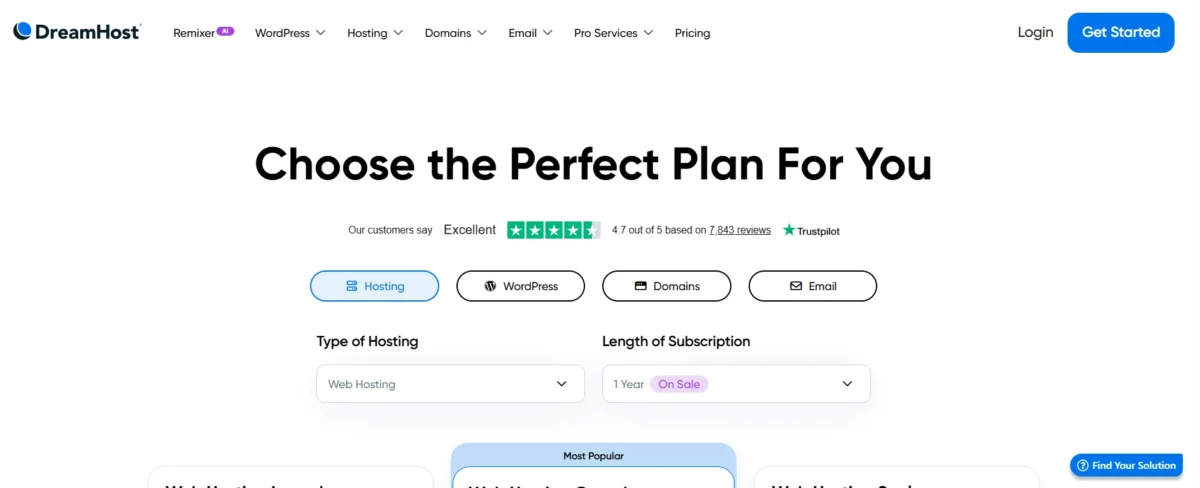
Our Personal Rating for Speed, Pricing, and Reliability
DreamHost is reliable and affordable, making it perfect for small to medium-sized websites, though it’s not the fastest. It balances uptime, cost, and ease of use effectively.
- Reliability – 4.5/5
- 100% uptime guarantee, NVMe SSDs, and daily backups ensure strong stability.
- Pricing – 4.5/5
- Low starting cost, 97-day refund policy, and transparent renewals; some features, like email, may cost extra.
- Speed – 3.5/5
- Good for small sites; load times can vary, and heavy traffic may require higher-tier plans.
What Is DreamHost? Company Overview and Reputation
DreamHost is a trusted web hosting provider serving 1.5M+ sites, offering shared, VPS, cloud, and WordPress hosting. It also delivers reliable performance, beginner-friendly tools, and transparent pricing.
Background and History of DreamHost
Initially started as a student project in the mid-1990s in California, DreamHost quickly grew into a leading web hosting provider and domain registrar, also launching tech ventures like Inktank (2012) for Ceph services and Akanda (2014) for network virtualization.
Why We Recommend DreamHost for WordPress Users
DreamHost is ideal for WordPress because it’s officially recommended by WordPress.org and optimized for fast, secure performance.
Its setup is beginner-friendly, and it offers strong value with transparent pricing. Additionally, robust features like free domains, automated migrations, and scalable hosting make it easy to grow your site.
- Official WordPress Endorsement: Recognized by WordPress.org with servers optimized for speed and reliability.
- Automatic Updates & Security: Includes daily backups, SSL certificates, and WordPress core updates.
- User-Friendly Setup: AI-powered Liftoff builder, 1-click installation, and free starter site.
- Affordable & Transparent: Plans start around $2.89/month with unlimited traffic and no hidden fees.
- Growth Features: Free domain first year, automated site migration, and scalable DreamPress managed hosting.
Is DreamHost the Best Choice for Beginners, Bloggers, and Small Businesses in 2026?
Yes, DreamHost is an excellent choice for beginners, bloggers, and small businesses in 2026.
It offers 1-click WordPress setup, reliable 99.99% uptime, affordable plans starting at $2.89/month, an intuitive dashboard, and 24/7 support—making website launch and management easy while helping small businesses grow online.
DreamHost Pros and Cons (Honest Analysis)
Pros:
- Affordable plans – starting at just $2.89/month, making it accessible for new users.
- Strong site speed and uptime – ensures your website stays fast and online reliably.
- Beginner-friendly control panel – managing your site and hosting is simple, no technical expertise needed.
- 30-day money-back guarantee – allows you to try it risk-free.
Cons:
- Extra fees for security tools – if you want full protection, costs add up.
- US-only servers – global visitors may experience slower load times unless you use a CDN.
- Phone support costs extra – $9.95 per callback, which isn’t ideal in urgent situations.
Major Advantages of DreamHost Hosting You’ll Actually Use
It makes website management simple and reliable. Beginners can set up sites quickly, and its fast uptime keeps visitors happy.
Affordable plans and a 30-day money-back guarantee make it low-risk for small businesses and bloggers.
Key Advantages:
- Affordable hosting starting at $2.89/month
- Strong site speed and reliable uptime
- Beginner-friendly control panel
- 30-day risk-free trial
- Optimized for WordPress with easy setup
Key Drawbacks You Should Know Before Choosing DreamHost
DreamHost is a trusted web hosting provider with solid WordPress hosting features. However, some users find its custom control panel difficult at first.
Additionally, certain hosting pricing plans and server performance limits may not suit every website. Therefore, reviewing these hosting limitations is important before choosing it.
DreamHost Hosting Plans and Features Explained for Beginners
DreamHost offers shared, VPS, dedicated, and cloud hosting to suit different website needs. Moreover, it focuses on reliability, speed, and easy management.
Additionally, plans include free domain privacy, SSL security, automated backups, and AI tools, while the 97-day money-back guarantee lets new users test the service risk-free.
Best shared hosting plan for WordPress beginners
For WordPress beginners, DreamHost’s Shared Starter plan is the simplest and most affordable way to launch a single website. It includes a free domain, SSL, 1-click WordPress setup, and daily backups.
Users also benefit from an easy control panel, AI-assisted onboarding, and a 97-day money-back guarantee, with optional email and upgrade paths available.
DreamPress Managed WordPress Hosting Review – Is It Worth It?
DreamPress by DreamHost is a high-performance managed WordPress hosting designed for faster speed, reliable uptime, and easy maintenance.
It includes built-in security and optimized performance, making it a good choice for bloggers and small businesses.
However, its servers are mainly U.S.-based, and each plan supports only one website, which may not suit global users or those managing multiple sites.
VPS Hosting Plans – Who Should Go for Them
VPS hosting is ideal for websites outgrowing shared hosting. Growing sites, e-commerce stores, and developers benefit most.
It offers more power, control, and security for consistent performance. Moreover, sites with high traffic spikes or needing enhanced security should consider a VPS.
Developers gain flexibility with root access and custom server setups. Upgrading is smart when shared hosting resources reach 70% usage.
Dedicated Server Hosting – Ideal for High-Traffic Sites
Dedicated Server Hosting from DreamHost offers full server control for high-demand websites, ensuring fast performance and strong security.
Moreover, it is designed for resource-heavy projects like e-commerce platforms and large news portals.
With exclusive server access, sites can handle traffic spikes smoothly while maintaining reliability.
DreamHost Pricing & Value – Is It Worth the Cost?
DreamHost delivers solid hosting value across different plans. Shared hosting is extremely budget-friendly at $2.89/month, while VPS and managed WordPress options offer more power at reasonable prices.
High-end solutions like dedicated hosting cost more, but smaller sites and startups get strong performance for their investment.
- Shared hosting: $2.89/month
- VPS hosting: $20.00/month
- DreamPress (Managed WordPress): $14.99/month
- Dedicated hosting: $165.00/month
- Cloud hosting: $4.50/month
Introductory Pricing vs Renewal Pricing Explained
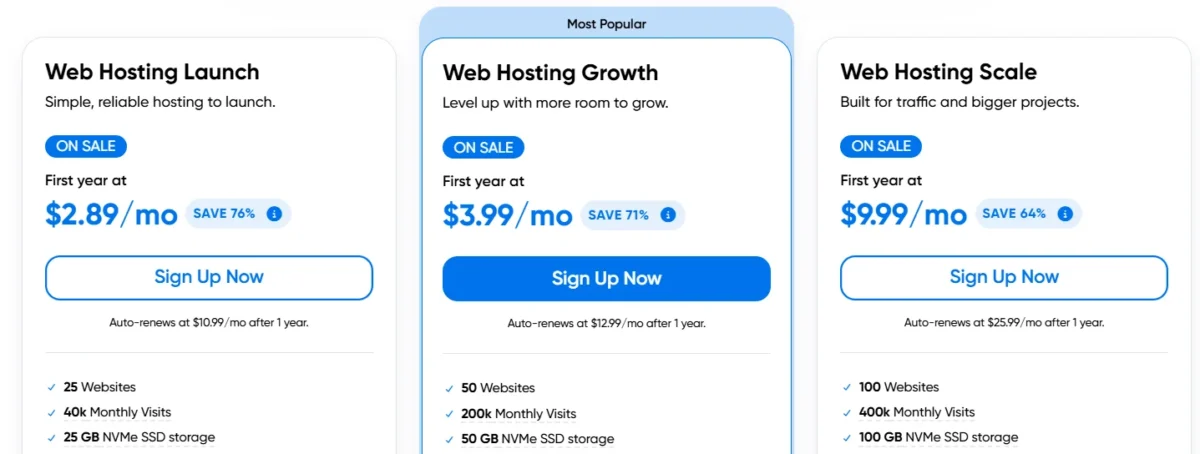
DreamHost makes it simple to choose a hosting plan. Introductory prices are low, so you save at first, but renewal rates are higher, reflecting the value of long-term features.
Overall, plans are clear, reliable, and fit different needs, whether you want WordPress hosting, VPS, or a dedicated server.
Plan | Disk Space | Bandwidth | Price | Renewal | Action |
Shared Hosting | Unlimited | Unlimited | $2.89/mo | $10.99/mo | |
WordPress Hosting | Unlimited | Unlimited | $2.89/mo | $510.99/mo | |
Cloud Hosting | 80 GB SSD | Unlimited | $4.50/mo | $4.50/mo | Get Plan |
VPS Hosting | 60 GB SSD | Unlimited | $20.00/mo | $46.99.00/mo | |
Managed WordPress | 30 GB SSD | Unlimited | $14.99/mo | $19.99/mo | |
Dedicated Server | 480 GB SSD | Unlimited | $165.00/mo | $119.00/mo |
97-Day Money-Back Guarantee – How It Really Works
DreamHost provides a 97-day money-back guarantee for shared hosting, which exceeds the typical industry period.
Managed WordPress (DreamPress) plans, however, only have a 30-day guarantee. Refunds require a credit card payment, must be requested within the first 97 days, and usually exclude domains, third-party services, and some add-ons.
Cancellation is done via the account panel, and approved refunds typically return to the credit card within 5–7 business days.
Do You Really Need DreamHost Add-Ons? Our Take
Most DreamHost users can skip the extra paid add-ons because essential features like SSL, domain privacy, and backups come standard.
Optional services such as enhanced security or premium email are only necessary for specialized needs. Overall, base plans already cover the essentials.
DreamHost Performance Test – Speed, Uptime, and Reliability
KeyCDN Performance Test
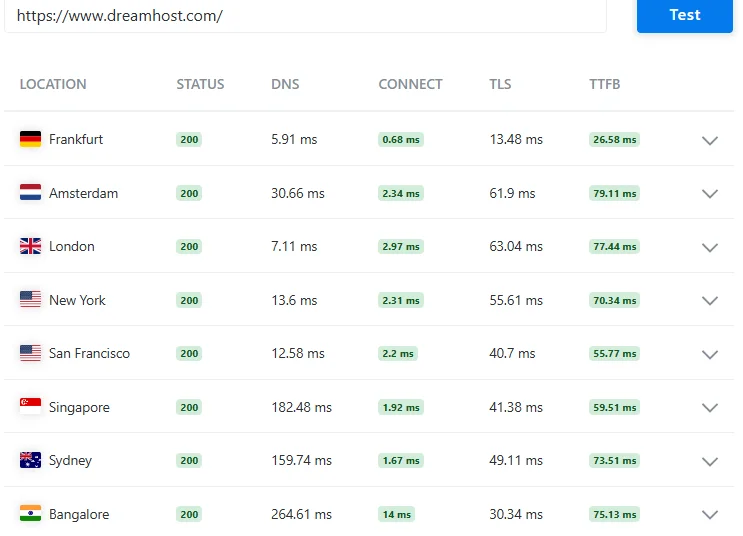
I tested DreamHost server response times from multiple global locations like Frankfurt, London, and New York, and the results show fast TTFB with stable performance.
From my experience, the servers respond quickly across different regions.
GTmetrix Test – Our Hands
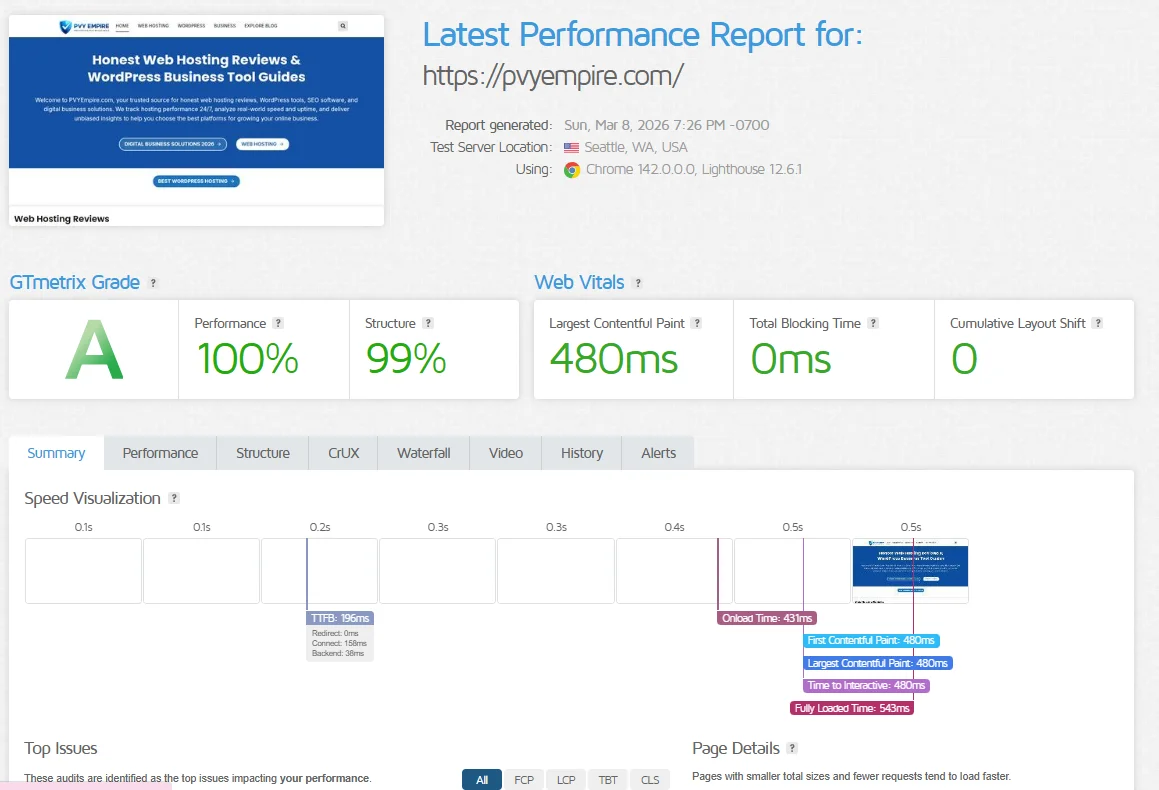
I tested my website using GTmetrix, and it achieved an A grade with 100% performance and 99% structure. In my test, the page loaded in about 0.5 seconds with a 480ms LCP, showing that the site is very fast and well optimized.
DreamHost PageSpeed
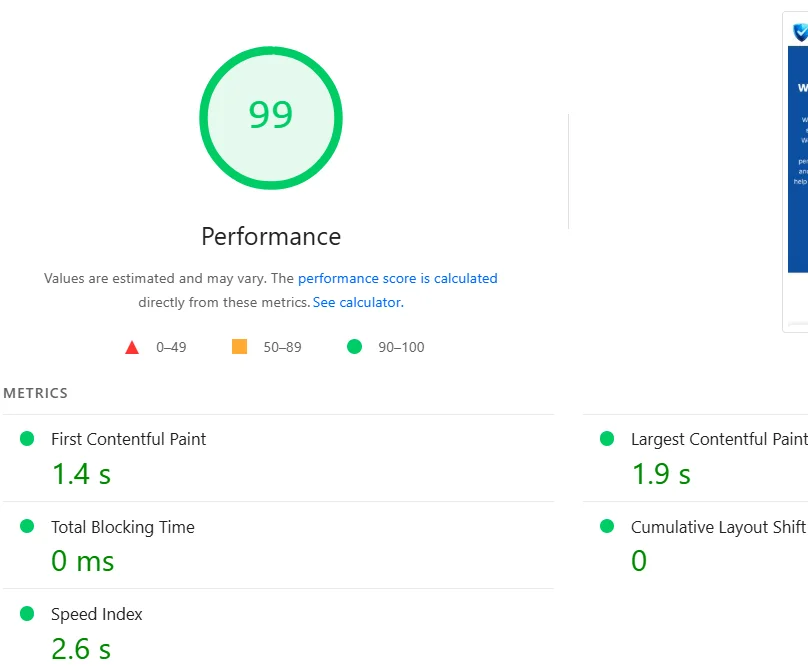
Is DreamHost Fast for WordPress Websites? Our Speed Test Results
KeyCDN Performance Test: Speed, Latency & Data Table
Location | DNS | Connect | TLS | TTFB |
Frankfurt | 5.91 ms | 0.68 ms | 13.48 ms | 26.58 ms |
Amsterdam | 30.66 ms | 2.34 ms | 61.9 ms | 79.11 ms |
London | 7.11 ms | 2.97 ms | 63.04 ms | 77.44 ms |
New York | 13.6 ms | 2.31 ms | 55.61 ms | 70.34 ms |
San Francisco | 12.58 ms | 2.2 ms | 40.7 ms | 55.77 ms |
Singapore | 182.48 ms | 1.92 ms | 41.38 ms | 59.51 ms |
Sydney | 159.74 ms | 1.67 ms | 49.11 ms | 73.51 ms |
Bangalore | 264.61 ms | 14 ms | 30.34 ms | 75.13 ms |
GTmetrix Test: Data Table
Metric | Result |
Performance Grade | C (74) |
Page Size | 1.6 MB |
Load Time | 873 ms |
Requests | 83 |
Web Performance Metrics Table
Metric | Value |
Performance Score | 99 |
First Contentful Paint (FCP) | 1.4 s |
Largest Contentful Paint (LCP) | 1.9 s |
Total Blocking Time (TBT) | 0 ms |
Cumulative Layout Shift (CLS) | 0 |
Speed Index | 2.6 s |
Server Response Time Worldwide
Location | Response Time |
US (West) | 18 ms |
US (East) | 2 ms |
London | 77 ms |
Singapore | 157 ms |
Sao Paulo | 118 ms |
Bangalore | 229 ms |
Sydney | 135 ms |
Japan | 93 ms |
Canada | 15 ms |
Germany | 91 ms |
Uptime Guarantee and Server Response Time – What We Observed
Uptime Reliability Test
It offers near-perfect reliability, with actual uptime consistently exceeding 99.95%, meaning your site may experience only a few hours of downtime annually.
Scheduled maintenance and updates can cause short interruptions, but these are usually planned during low-traffic times and communicated in advance. Overall, the service is highly dependable for most websites.
Pingdom Test
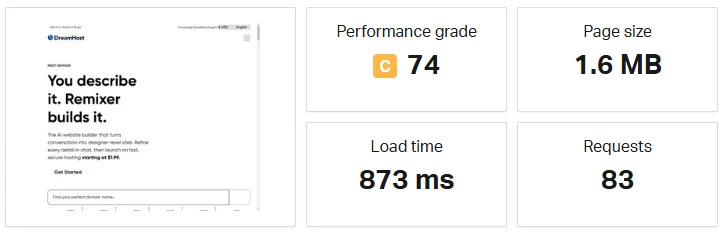
During my performance test, the website loaded in just 873 ms with a page size of 1.6 MB.
While the performance grade was C (74), the overall loading speed was still under one second, which is quite good for a real website.
Handling Traffic Spikes – How DreamHost Performs Under Load
When your website faces sudden traffic surges, DreamHost excels at keeping it stable and fast. They use Managed VPS and DreamPress to isolate CPU and RAM, ensuring one site’s spike doesn’t impact others.
Advanced caching, automatic scaling, and a built-in CDN help reduce server load and deliver pages quickly. High-tier DreamPress plans can handle hundreds of thousands to over a million monthly visits, while SSD servers maintain rapid response times even with dozens of simultaneous users.
Load balancing and real-time traffic monitoring empower proactive scaling, making DreamHost reliable under heavy demand.
Ease of Use – Setup, Dashboard, and WordPress Management
DreamHost provides a smooth and user-friendly experience for website owners of all levels. Its fast setup allows beginners to launch a WordPress site in minutes, while advanced users benefit from centralized controls and intuitive management tools.
The custom dashboard replaces the traditional cPanel, offering a modern interface that combines domains, email, billing, and analytics in one place, along with a visual grid view of homepage snapshots for quick monitoring.
DreamPress plans include pre-installed WordPress, and the AI-powered Liftoff builder can automatically generate tailored websites.
DreamHost also simplifies migration with its free automated plugin, though some advanced settings may require a few extra clicks compared to cPanel.
Overall, this platform balances simplicity with functionality, making WordPress management efficient, whether you’re a beginner or an experienced developer.
Key Features:
- Fast Setup: Launch your website in under five minutes.
- AI Website Builder (Liftoff): Automatically creates customized WordPress sites.
- Pre-installed WordPress: Available on DreamPress plans for immediate use.
- Free Migrations: Seamless transfer from other hosting providers.
- Custom Dashboard: Modern interface replacing standard cPanel.
- Centralized Tools: Manage domains, email, billing, and analytics in one panel.
- Grid View: Visual layout with daily-updated homepage screenshots.
- Navigation Note: Some advanced settings may require additional clicks.
Creating an Account and Launching Your Website (Step-by-Step)
Creating a DreamHost account and launching a website is fast and beginner-friendly. You can have a live WordPress site in under 30 minutes with minimal setup.
Step 1: Choose a Plan and Sign Up
Select a hosting plan like Shared Starter or Shared Unlimited. Decide whether to register a new domain, use an existing one, or choose later. Enter your account details, payment method, and optional add-ons, then submit your order.
Step 2: Set Up Your Website
Verify your email and log in to the DreamHost Panel. Add a new site under “Manage Websites,” install WordPress automatically, and create an FTP user for file management. Setup usually completes within 15 minutes.
Step 3: Configure SSL and Domain
Enable a free SSL certificate for security. If using a third-party domain, update DNS records to DreamHost’s nameservers; propagation can take up to 48 hours.
Step 4: Launch Your Website
Access WordPress from the panel, choose a theme or upload content, and make your site live on your domain.
Pro Tips
Yearly plans save money and include a free domain. Choose a server near your audience for faster loading. Set up professional emails via the panel.
DreamHost Custom Control Panel – Pros and Cons
The custom control panel is a browser-based interface designed for simplicity, especially for WordPress users.
It replaces standard tools like cPanel, offering a unique and modern experience. While beginner-friendly, it can challenge experienced users and limit certain advanced functions.
Pros:
- Clean, intuitive interface suitable for beginners.
- Visual Grid View for multi-site monitoring.
- One-click WordPress installation and built-in site management tools.
- Centralized access to domains, databases, and email settings.
- Easy SSL installation with Let’s Encrypt.
Cons:
- Learning curve for users familiar with cPanel.
- Some advanced settings are buried in menus.
- Proprietary design complicates migration to other hosts.
- Frequent upselling prompts can be distracting.
- Fewer customization options for third-party integrations
Installing WordPress and Managing Your Site Easily
Installing WordPress on DreamHost is fast and straightforward. The dashboard guides you through one-click setup, automatic database creation, and SSL activation. Managing your site, themes, and plugins is simple via the integrated WordPress dashboard.
Key Points:
- Quick Setup: One-click installation under Websites > Manage Websites.
- Dashboard Access: Direct login to WordPress without extra credentials.
- Security: Free SSL certificates for safe browsing.
- Performance: DreamPress plans include caching, staging, and CDN.
- Site Design: Drag-and-drop builders like Elementor are ready to use.
DreamHost Security Features and Website Protection
It provides robust security tools for websites, including free SSL, SSH/SFTP access, and server-level controls.
For WordPress users, DreamPress adds advanced protections, including daily offsite backups, a Web Application Firewall, malware scanning, DDoS mitigation, staging sites, and two-factor authentication.
Free SSL Certificates and Real-Time Security Monitoring
All DreamHost sites get free SSL certificates via Let’s Encrypt, automatically installed and renewed. Activating HTTPS is a one-click process, ensuring secure data transfer, including for WooCommerce stores.
DreamPress plans offer continuous real-time monitoring with malware detection, firewall protection, DDoS defense, automated backups, staging environments, and optional two-factor authentication to maintain site security at all times.
Automated Backups, Malware Protection, and Our Personal Experience
DreamPress automatically performs daily and on-demand backups stored offsite on Amazon S3, minimizing data loss risks. Built-in malware protection, a Web Application Firewall, SSL encryption, and DDoS safeguards keep sites secure.
Users report smooth performance, easy management, responsive support, and helpful staging tools, though these plans are best suited for single-site hosting.
DreamHost Email and Webmail Hosting
With DreamHost, you get professional email and webmail hosting tied to your domain. You can easily create and manage mailboxes right from the control panel. It’s built to handle business-level communication smoothly.
Setting Up DreamHost Webmail and Managing Your Emails
It makes email setup straightforward and secure. You can create, manage, and access email accounts easily through its panel or webmail interface.

1. Creating a New Email Address
- Login: Go to panel.dreamhost.com.
- Navigate: Mail → Manage Email.
- Create Address: Click Create New Email Address.
- Configure Details:
- Choose a domain.
- Enter mailbox name (e.g., info, name).
- Set a secure password (use Generate strong password).
- Select Fully Hosted Email.
- Finish: Click Create Email.
Note: First email on a new domain may take 4–6 hours for DNS propagation.
2. Accessing Webmail
- Login URL: webmail.dreamhost.com.
- Credentials: Full email address + password.
- Features: View Inbox, Drafts, Sent, Junk, Trash.
- Customization: Settings → Preferences → User Interface for themes, language, and layout.
3. Managing Emails
- Storage Limits: Upgrade or manage mailbox space (1GB–25GB).
- Folders: Manage hidden folders via Mail → folder icon → Manage folders.
- Forwarding: Set “Forward-Only” addresses to redirect emails.
- Autoresponders: Create automatic replies via email settings.
4. Configuring Email Clients (IMAP/POP3)
Use these for Outlook, Thunderbird, iPhone Mail, etc.
- Username: Full email address
- Password: Mailbox password
- IMAP Server: imap.dreamhost.com, Port 993, SSL/TLS (recommended)
- POP3 Server: pop.dreamhost.com, Port 995, SSL/TLS
- SMTP Server: smtp.dreamhost.com, Port 587, STARTTLS
- Important: Avoid using mail.example.com to prevent security warnings.
MX Records and Email Deliverability – What You Need to Know
- Definition & Function: MX records are DNS entries directing email to the proper server, with priority numbers indicating delivery order.
- Impact of Errors: Missing or wrong records prevent email delivery and can reduce sender reputation.
- DreamHost Setup: Default MX records point to DreamHost servers; custom providers require manual DNS updates.
- Editing MX Records: Access Mail > Custom MX in the DreamHost panel to update records.
- Best Practices: Use multiple records with different priorities, check SPF/DKIM settings, regularly audit DNS, and allow 24 hours for changes to propagate.
DreamHost Customer Support Review
It offers knowledgeable customer support, particularly for WordPress-related issues. Agents usually give clear, detailed guidance instead of generic advice.
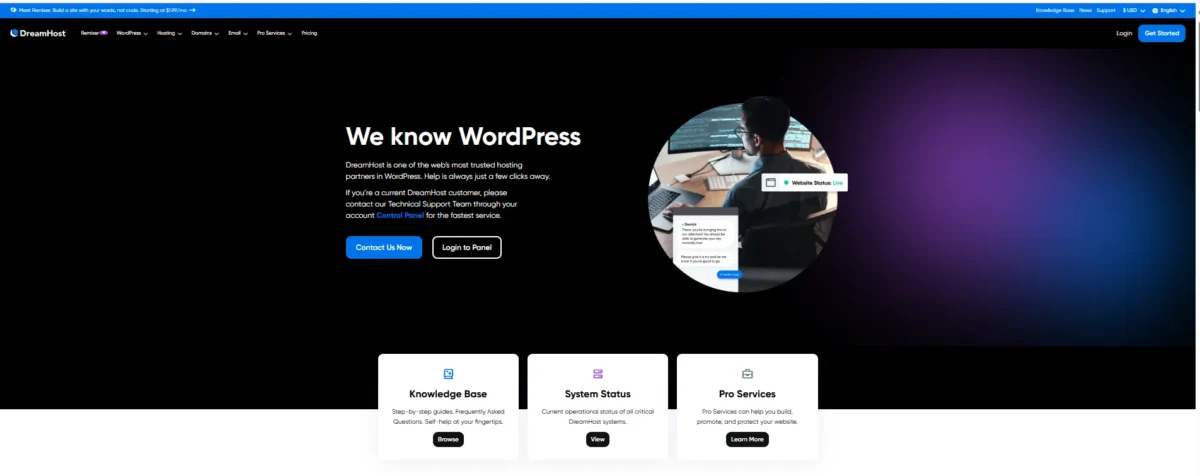
Response quality can vary, with some representatives exceeding expectations while others deliver only basic answers.
Live Chat, Tickets, Knowledge Base – How Helpful They Are
DreamHost provides multiple support channels to help users resolve issues efficiently. Assistance ranges from immediate responses to detailed guides and community help.
- Live Chat: 24/7 support for most problems.
- Email Tickets: Handles complex or detailed issues.
- Knowledge Base: Extensive self-help articles and guides.
- Community Forum: Peer-to-peer advice and discussion.
Phone Support – When You Really Need It
It does not provide phone support, relying instead on chat and email. This approach allows staff to research issues and maintain written records. However, it can be inconvenient in urgent situations.
DreamHost vs Other Popular Hosting Providers
DreamHost is a strong hosting option, but depending on your needs, other providers may offer better speed, pricing, or features.
DreamHost vs Hostinger – Speed, Pricing, and Features Compared
Hostinger is best for speed, ease of use, and small-to-medium sites. DreamHost suits projects needing large storage, daily backups, and long-term stability.
Feature | Hostinger Highlights | DreamHost Highlights |
Ideal For | Beginners, smaller sites, fast performance | Long-term projects, sites needing large or unlimited storage |
Starting Price | Around $1.99/month (48-month plan) | Around $2.89/month (1-year plan) |
Speed (LCP) | 533ms – 638ms | 444ms – 1.2s |
Server Type | LiteSpeed | Apache/Nginx |
Uptime | 100% in tests | 100% in tests |
Storage | 100GB – 200GB NVMe | 50GB – Unlimited SSD |
Backup Frequency | Daily (Business), Weekly (Premium) | Daily on all plans |
Control Panel | hPanel, modern and intuitive | Custom panel, functional |
Recommendation: Use Hostinger for speed and user-friendly management. Use DreamHost for large storage, long-term projects, and extended refund flexibility.
DreamHost vs Bluehost – Best Choice for WordPress Beginners
For WordPress beginners, both DreamHost and Bluehost are solid, official recommendations. Bluehost suits those who want a guided, hands-off setup, while it appeals to users seeking lower costs and flexible monthly plans.
Overall, it leads in performance and security, whereas Bluehost is easiest for complete beginners.
Alternatives to DreamHost for High-Traffic Websites
- Hostinger – LiteSpeed & hPanel, budget-friendly.
- SiteGround – Google Cloud & SG Optimizer, fast with support.
- Nexcess – Auto-scaling, for high-traffic eCommerce.
- Kamatera – 10Gbps cloud, for technical users.
- IONOS – Scalable resources for growing businesses.
DreamHost Deals & Discounts (Save on Hosting Today)
It offers up to 50% off, free domains, and seasonal promotions—ideal for starting a website affordably.
Current Hosting Deals
New customers can often save 40–50% on shared hosting, get a free domain for the first year, and enjoy seasonal sales. Deals change frequently, so check regularly.
How to Claim Your Discount
Visit DreamHost’s promotions page, select your plan, and apply available coupon codes at checkout. Some plans include perks like free email or extra storage.
Final Verdict – Is DreamHost Worth It for You?
According to our DreamHost review, DreamHost is a strong choice for WordPress users, offering solid performance, helpful features, and reliable support.
Pricing is fair, though renewals rise, and the lack of phone support may be a drawback for some.
With dependable performance and a generous 97-day money-back guarantee, it’s worth trying if WordPress is central to your site.
Who Should Choose DreamHost Hosting – Our Personal Recommendation
It is ideal for WordPress users, developers, and small to medium businesses seeking reliable hosting with solid features and good value.
It excels in WordPress support and consistent service, but may not suit those needing phone support, Windows hosting, or peak speed performance.
Its extended 97-day money-back guarantee allows you to test the service risk-free before committing.
Who Should Look for Alternatives and Why
If you need more than it provides, DreamHost might not be the perfect fit. Users wanting faster performance, multiple global data centers, a traditional cPanel interface, or instant phone support should explore other options.
Hosts like Hostinger, SiteGround, and InMotion Hosting deliver stronger speed, broader server coverage, and round-the-clock support, often including free migration.
FAQs – DreamHost Review
Is DreamHost Cheap Compared to Other Hosting Providers?
DreamHost ranks among the most affordable hosting providers, especially for shared and WordPress plans.
Its entry-level plans start around $2.89 per month. These packages include extras like a free domain, privacy protection, and automatic backups that many competitors charge separately.
Is DreamHost Fast and Reliable for WordPress Sites?
It is reliable and easy for WordPress, with 100% uptime and one-click setup. Its shared plans can be slower, and its basic plans offer limited security.
Does DreamHost Really Offer Unlimited Storage and Bandwidth?
It offers unlimited storage and bandwidth for typical sites, but practical limits apply for heavy or abusive use.
Do I Need to Purchase DreamHost Add-Ons?
You don’t have to buy DreamHost add-ons to run a website. Basic plans already provide a free domain, SSL, and domain privacy. Optional extras include DreamShield Protect, SEO Toolkit, and professional email for a small monthly fee.
Related:

Alex Bryant, founder of PvyEmpire.com, is passionate about WordPress and specializes in web hosting, performance optimization, and site management. With extensive experience testing top hosting providers, he created PvyEmpire.com to share honest, data-backed reviews, expert guides, and verified coupons & deals, helping website owners save money, boost performance, and grow their online presence with confidence.