GreenGeeks Review 2026: Is It Really Worth It?
GreenGeeks stands out as a top eco-friendly web hosting provider, running on 300% renewable energy. Based in Southern California, it’s ideal for anyone seeking sustainable shared hosting. In this GreenGeeks review, I share firsthand experience with their carbon-reducing infrastructure—proving that their “green” claim is more than just marketing.
Is GreenGeeks Good?
GreenGeeks Review: GreenGeeks offers reliable hosting with a strong eco-friendly focus. It’s a solid option for bloggers, small businesses, and WordPress users who want stable performance while supporting green energy hosting.
In my testing, I checked speed, dashboard usability, and support responsiveness. The platform includes useful extras like free SSL, daily backups, and free website migration, making setup simple for beginners.
Shared hosting is easy to manage, while VPS plans provide more flexibility for advanced users. Just note that the low introductory price increases after renewal.
- Overall Rating: ⭐ 4.4/5
- Best For: Eco-conscious bloggers, small businesses, WordPress sites
- Starting Price: Around $2.95/month (introductory offer)
- Free Domain: Yes (included with annual plans)
- Support & Reliability: 24/7 support with a 99.9% uptime commitment
GreenGeeks Review and Hosting Overview
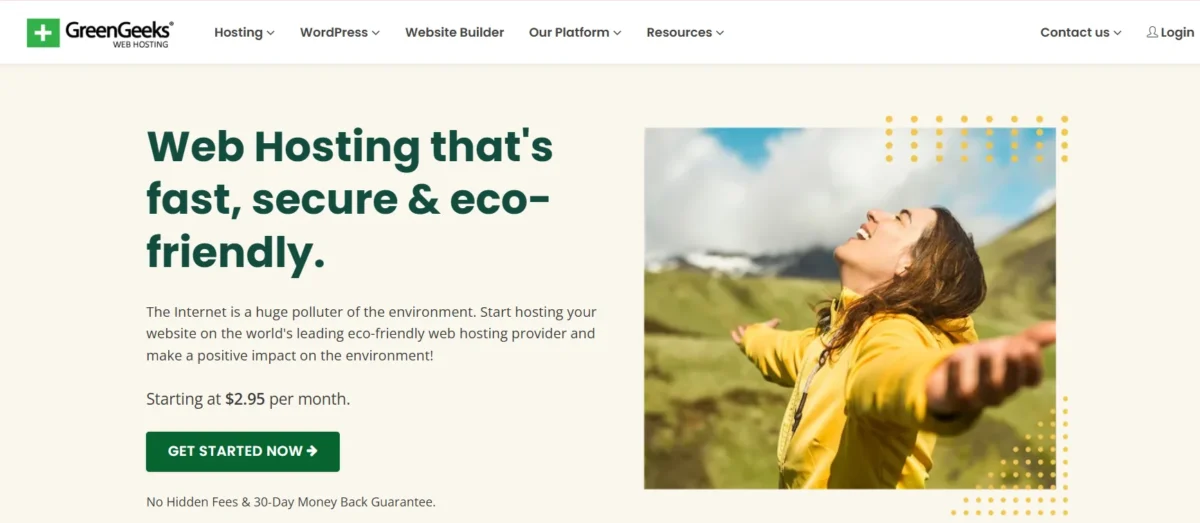
GreenGeeks is a reliable, eco-friendly web hosting provider ideal for small to medium websites and personal blogs. It delivers fast LiteSpeed hosting performance and ensures a smooth user experience. Beginners and environmentally conscious site owners benefit from its intuitive cPanel management and simple account setup.
The platform offers excellent 24/7 customer support, making it a strong choice for those seeking WordPress hosting solutions. Its servers provide high uptime and quick load times, improving website speed and optimizing user engagement. Users should plan for higher renewal rates after the initial discounted term.
What is GreenGeeks used for?
GreenGeeks is used to build sustainable websites and manage online platforms while prioritizing eco-friendly hosting. It supports green web hosting for blogs, portfolios, and small business sites with fast, secure performance.
The platform provides tools for beginners and developers, including WordPress hosting solutions and VPS hosting for developers. It also includes free SSL certificates, automated backups, and CDN integration to enhance site security and speed.
Eco-Friendly Hosting Service Overview
GreenGeeks offers reliable hosting with strong performance, free SSL, and a variety of plan options to suit different needs.
Feature | Details |
Performance | A |
Uptime Guarantee | Yes |
Free SSL | Yes |
Hosting Types | Shared, WordPress, VPS, Reseller |
Basic Plan Storage | 25 GB |
Bandwidth | Unlimited |
Number of Websites | 1 |
Starting Price | $2.95 |
Hosting Plans, Pricing, and Offers
GreenGeeks provides a tiered shared hosting structure, catering to both beginners and growing businesses. Plans range from $2.95/mo to $8.95/mo, with seamless upgrade options from single sites to unlimited hosting. All packages emphasize reliability and daily backups.
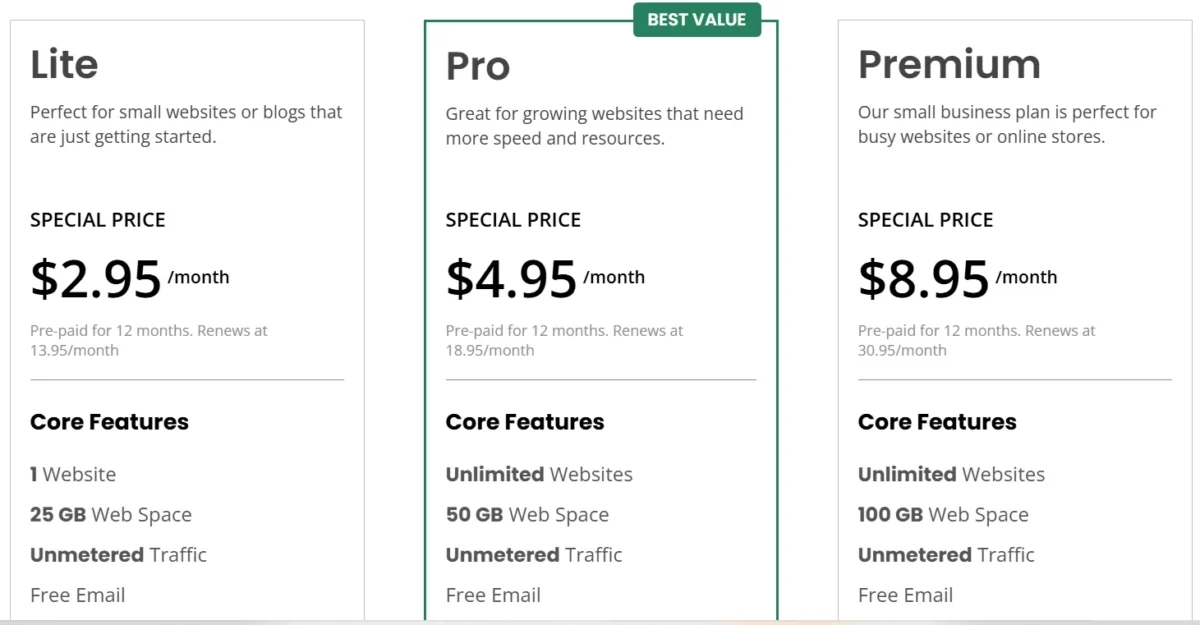
The entry-level Lite plan is ideal for small projects with a single website and 25 GB storage. The Pro plan expands capacity to unlimited websites, 50 GB storage, and offers on-demand backups. The Premium plan adds enhanced security features, including dedicated IPs and advanced SSL certificates, suitable for e-commerce needs.
Features | Lite (Monthly) | Pro (Monthly) | Premium (Monthly) |
Price | $2.95/mo | $4.95/mo | $8.95/mo |
Uptime Guarantee | 99.9% | 99.9% | 99.9% |
Monthly Visits | Unmetered | Unmetered | Unmetered |
Number of Websites | 1 | Unmetered | Unmetered |
Storage | 25 GB | 50 GB | 100 GB |
Bandwidth | Unmetered | Unmetered | Unmetered |
Free Domain (1 year) | Yes | Yes | Yes |
Backup Frequency | Daily | Daily | Daily |
While GreenGeeks’ initial pricing is competitive, renewals increase costs. Compared with alternatives like Hostinger, GreenGeeks offers superior value through unlimited websites, email accounts, and eco-friendly hosting. The Pro plan stands out as the most balanced option, combining affordability with extensive resources and backup features, making it ideal for expanding websites without paying for the highest tier.
Basic Hosting Plan Features
The GreenGeeks Lite (basic) plan is tailored for single-website owners, combining performance, security, and eco-friendly features. It offers essential hosting tools while maintaining sustainability commitments.
Key Features:
- Websites Supported: 1
- Storage: 25 GB SSD
- Bandwidth: Unmetered
- Email Accounts: Unlimited
- Domain: Free for first year (.com, .net, .org)
- SSL: Free Let’s Encrypt Wildcard SSL
- Performance: LiteSpeed Web Server, MariaDB, built-in caching
- Backup: Nightly/Daily Backups
- CDN: Free Cloudflare integration
- Control Panel: cPanel
- Support: 24/7/365
- Migration: Free Website Migration
- Guarantees: 30-Day Money-Back, 99.9% Uptime
Eco-Friendly Benefits:
- 300% Renewable Energy Match
- 1 Tree Planted per Customer
Limitations:
- Only 1 website supported
- On-demand backups are not included (Pro/Premium only)
Hosting Types and Plan Comparison
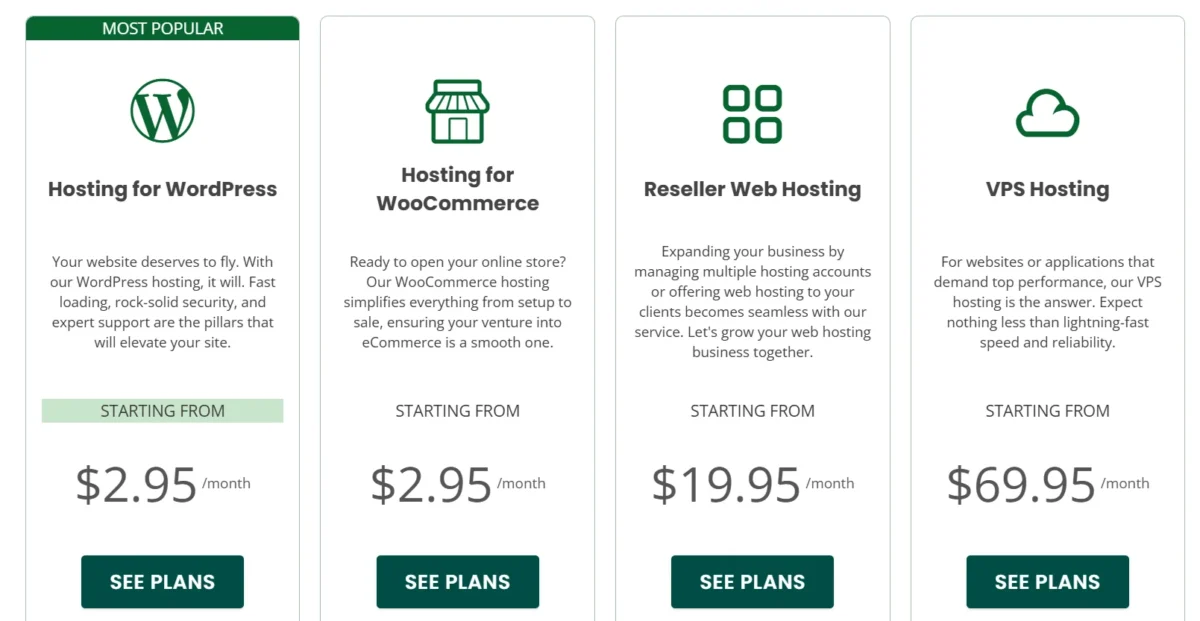
Shared hosting plans
GreenGeeks provides shared web hosting services, letting multiple websites share one server. This keeps affordable hosting costs low, but can affect performance if one site gets high traffic. Plans include Lite, Pro, and Premium, each with increasing storage, email accounts, and perks like a dedicated IP address.
Lite typically starts at $2.95/month for one site with 25GB storage and 50 emails, Pro typically starts at $4.95 offers unlimited sites, 50GB storage, and Premium typically starts at $8.95 includes 100GB storage. All plans offer free SSL certificates, domain registration, backups, and caching for fast website loading. Discounts apply for annual or first-time subscriptions.
Every plan comes with unlimited data transfers and runs on Linux hosting servers. While GreenGeeks is solid, HostGator offers Windows hosting options with unlimited storage, email, and data transfers, making it better for .NET or SQL-based applications.
WordPress and WooCommerce Plans
WordPress and WooCommerce plans from GreenGeeks are built for users who want fast setup and reliable performance. They support managed WordPress hosting and eco-friendly web hosting solutions for modern websites. Pricing aligns with shared hosting tiers. Setup is simple and beginner-friendly.
WordPress powers millions of sites worldwide. GreenGeeks enhances it with speed, security, and automatic updates. Users benefit from WordPress performance optimization and secure website hosting features. WooCommerce adds tools for product listings, payments, and order tracking. It suits small businesses and growing brands.
Both plans mirror shared hosting resources. The standout feature is instant installation for quick launch. This makes them ideal for You can launch WordPress or WooCommerce in one click. While pricing is competitive, A2 Hosting may suit users needing unlimited storage for media-heavy projects.
Vps Hosting Plans
GreenGeeks offers managed VPS hosting for websites that need more power than shared servers. It works well for growing projects and traffic spikes. These plans support managed VPS hosting services and reliable high-traffic website hosting.
Plans are based on RAM and performance levels. Higher tiers increase memory, CPU cores, and SSD space for better speed and stability. This structure fits users looking for a one-click WordPress installation and WooCommerce online store setup.
However, options are limited compared to competitors. Hostwinds provides broader configurations, while Hostinger offers gaming-ready VPS for titles like Minecraft. These alternatives suit those needing custom VPS configurations or advanced game server hosting.
Reseller Hosting Plans
GreenGeeks offers three reseller hosting packages that let you rebrand servers with your own company logo. Each plan includes free SSL certificates, cPanel migrations, and flexible limits on accounts, storage, and bandwidth. These plans are ideal for white-label hosting solutions and small hosting businesses.
The starter plan, RH-25, provides 25 cPanel accounts, 60GB SSD storage, and 600GB monthly transfer. RH-50 increases resources to 50 accounts, 80GB SSD, and 800GB transfer, while RH-80 offers 80 accounts, 160GB SSD, and 1600GB monthly transfer.
GreenGeeks is solid for managed reseller hosting, but competitors like Hostwinds offer unlimited storage and bandwidth, making them a stronger option for scaling hosting businesses.
Renewal Pricing and Refund Policy
- Renewal Pricing: Renewal rates increase significantly after the initial term.
- GreenGeeks does not typically charge setup fees on standard plans.
- Refund Policy: Includes a 30-day money-back guarantee on hosting plans.
Available Discounts and Savings Tips
GreenGeeks offers limited-time deals starting at $2.95/month…
GreenGeeks Features and Hosting Tools
GreenGeeks offers a robust, eco-friendly hosting solution with a strong focus on speed, security, and sustainability.
Plans include unlimited storage, free domains, and AI-powered website tools, making it suitable for both beginners and developers. Their infrastructure is optimized for shared, WordPress, VPS, and reseller hosting, combining performance with renewable energy initiatives.
Key Features & Tools
Eco-Friendly & Core Features:
- 300% renewable energy match for servers
- Tree planting for every hosting account via One Tree Planted
- Optimized for speed using LiteSpeed infrastructure.
- Free Cloudflare CDN and Let’s Encrypt SSL
- Free domain for the first year
Tools & Management:
- AI website builder powered by GPT-4 with drag-and-drop functionality
- cPanel control panel for hosting, emails, and databases
- 1-click app installer (Softaculous) for 150+ apps, including WordPress
- Free migration service from other hosts
- Developer tools: SSH, WP-CLI, Git, multiple PHP versions
- Staging environment for testing changes before going live
Security Features:
- AI-powered Web Application Firewall (WAF)
- Real-time malware scanning and free cleanup of infected sites
- DDoS protection at the network level
- Container-based account isolation to prevent cross-account breaches
GreenGeeks combines green hosting, high-performance tech, and extensive security measures, making it a complete solution for sustainable website management.
AI Builder and Design Tools
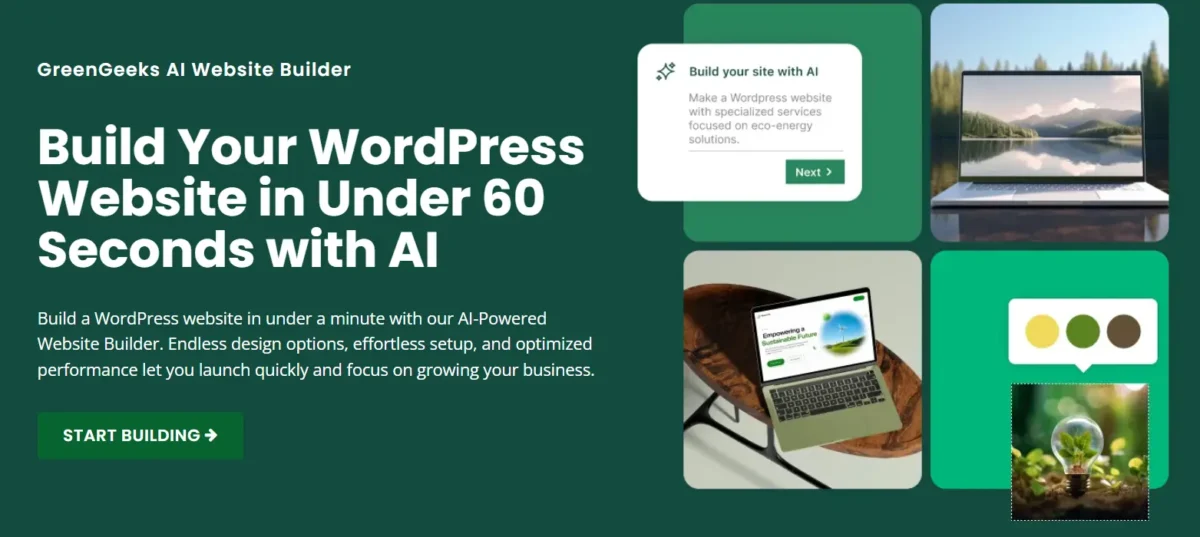
GreenGeeks offers an AI Website Builder that can launch a fully functional WordPress site in under a minute. It combines fast hosting, security, and responsive support for a quick, eco-friendly website setup. GreenGeeks’ AI builder works like other AI builders to create professional, mobile-responsive websites without coding skills.
These platforms generate websites from user prompts, creating layouts, content, images, logos, and SEO elements automatically. Key features include instant site generation, AI text and content creation, AI image and logo makers, drag-and-drop editors, and e-commerce tools with inventory and payment management.
Advantages include speed, cost-effectiveness, low technical barriers, built-in maintenance, and high-quality, responsive designs. Limitations include dependency on prompt quality, occasional need for human editing, and constraints on complex customizations. Popular platforms include Hostinger AI Website Builder, Wix ADI, Elementor AI, and Framer AI.
Category | Details |
Platform | GreenGeeks AI Website Builder |
Purpose | Launch a WordPress site in under a minute with fast hosting, security, and responsive support |
Key Features | Instant site generation, AI text/content creation, AI image & logo maker, drag-and-drop editor, AI SEO assistant, AI e-commerce tools |
Advantages | Fast setup, cost-effective, no coding required, built-in hosting & maintenance, modern mobile-responsive design |
Limitations | Depends on the quality of input prompts; content may need human review, less flexible for complex customizations |
Popular Platforms | Hostinger AI Website Builder, Wix ADI, Elementor AI, Framer AI |
WordPress Setup and Migration
WordPress integration and migration are simplified with specialized plugins that automate complex tasks like backups, database handling, serialized data management, and large file transfers.
Popular tools such as Duplicator, Migrate Guru, and All-in-One WP Migration allow seamless site transfers while minimizing downtime. Integration extends WordPress functionality by connecting to external services like CRMs, email platforms, and payment gateways using plugins or custom code via the WordPress REST API, ensuring secure data exchange and efficient API management.
Following standardized migration steps—backing up the original site, exporting, importing, and verifying the destination site—ensures a smooth and reliable process for any site size.
Feature | Description | Recommended Tools / Notes |
WordPress Migration | Moving a site to a new host, domain, or environment, automating tasks like database search-and-replace and handling serialized data. | Duplicator (backup, clone, staging), Migrate Guru (large sites up to 200GB), All-in-One WP Migration (beginner-friendly), WP Migrate Lite (advanced database handling) |
Migration Steps | Step-by-step plugin-based process. | Backup site2. Install the plugin on source and destination3. Export/backup site4. Import/restore site5. Verify and flush permalinks |
WordPress Integration | Connecting WordPress to external services via APIs to expand functionality. | Plugins (pre-built integration), Custom Code (PHP/JS using REST API), handles authentication, data fetching (GET/POST), and secure data management |
Backup and Recovery Options
GreenGeeks includes automatic daily backups. With about 30 days of retention for shared and reseller accounts. Higher-tier plans allow users to create backups anytime. VPS and dedicated servers are not backed up automatically, so users must manage their own copies.
The system runs nightly backups for disaster recovery and offers one free manual restore each month, with a fee for additional requests. Users can restore files, databases, or full accounts through JetBackup inside cPanel.
Manual backup methods are also available, including full cPanel downloads for smaller accounts, CMS backups via Softaculous, and file transfers through FTP or SSH. WordPress users can rely on plugins such as UpdraftPlus for scheduled or remote storage backups.
Key Points:
- Includes automatic daily backups for shared and reseller plans.
- On-demand backups for Pro and Premium users
- One free restore per month; extra restores cost $25 each
- Self-service recovery through JetBackup
- No automatic backups for VPS or Dedicated servers
- Manual backup options via cPanel, Softaculous, FTP, SSH, or WordPress plugins
- RAID-10 SSD storage for hardware-level data protection
- Free website migration for new customers
Security Features and Protection Tools
GreenGeeks uses layered protection to keep websites safe and stable. It combines encryption, smart threat blocking, and strict user separation. Security systems run automatically to reduce risks and downtime.
SSL & Encryption:
All plans include a free Let’s Encrypt SSL certificate with auto-installation and renewal. Higher tiers also offer AlphaSSL for stronger validation. HTTPS remains active through ongoing certificate management.
Firewalls & Threat Protection:
An AI-powered web firewall filters harmful traffic in real time. The system blocks attacks like SQL injection, malware, brute-force attempts, and DDoS threats at multiple levels. Continuous scanning helps detect and remove risks quickly.
Account Isolation:
Linux Containers (LXC) create secure separation between hosting accounts. Each user operates in an isolated file system. This setup prevents cross-account breaches and limits resource misuse.
Additional Security Measures:
Daily backups are stored for up to 30 days. Servers are scanned frequently, and engineers perform routine checks. Two-factor authentication and secure SFTP access add extra protection.
Hosting Performance and Reliability Results
GreenGeeks delivers strong performance and reliability, with average uptime between 99.96% and 99.98% and fast page load times of 1.2–2.31 seconds. Their infrastructure uses LiteSpeed servers, SSD storage, LiteSpeed Cache, MariaDB, and HTTP/3 to ensure quick content delivery.
Security is robust, featuring real-time scanning, automated patching, and containerized account protection. Their data centers are strategically located in Chicago, Phoenix, Montreal, Amsterdam, and Singapore, supporting consistent speed even under high traffic.
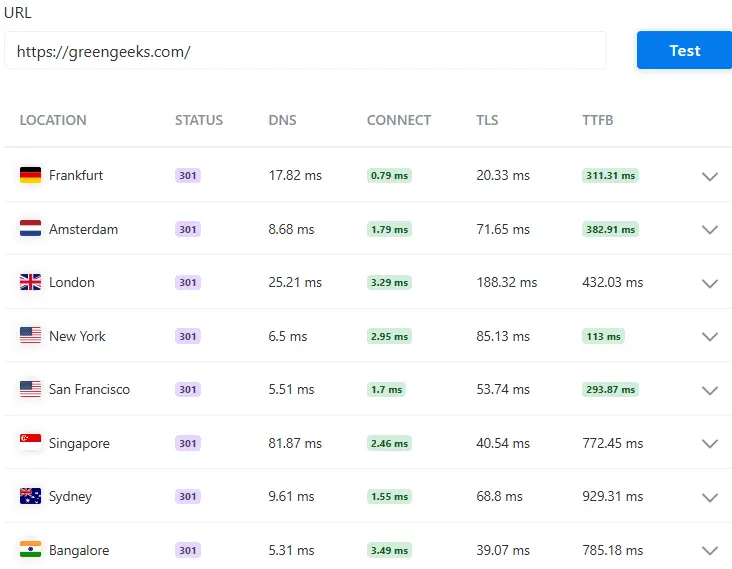
GreenGeeks performs best in North America and Europe with low latency and fast TTFB. Response times are slower in Singapore, Sydney, and Bangalore. This helps users understand global hosting speed distribution.
Website Speed and Load Tests
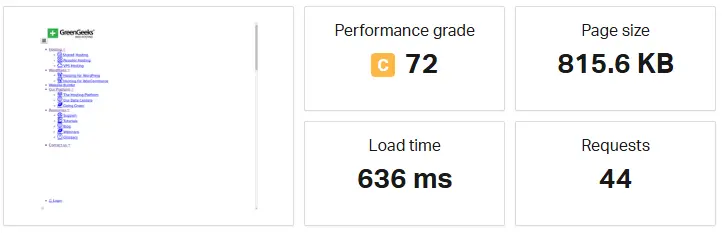
GreenGeeks demonstrates a solid loading speed with a page load of 636 ms. The page size is moderate at 815.6 KB, requiring 44 requests. Overall, its performance grade of 72 (C) shows acceptable speed but indicates room for optimization to improve user experience and efficiency.
Uptime and Server Response Results
GreenGeeks offers highly reliable hosting with a guaranteed 99.9% uptime. Independent tests show performance often surpassing 99.98%. Their container-based infrastructure keeps downtime under 4 minutes per month and ensures strong site security.
Server Response Metrics
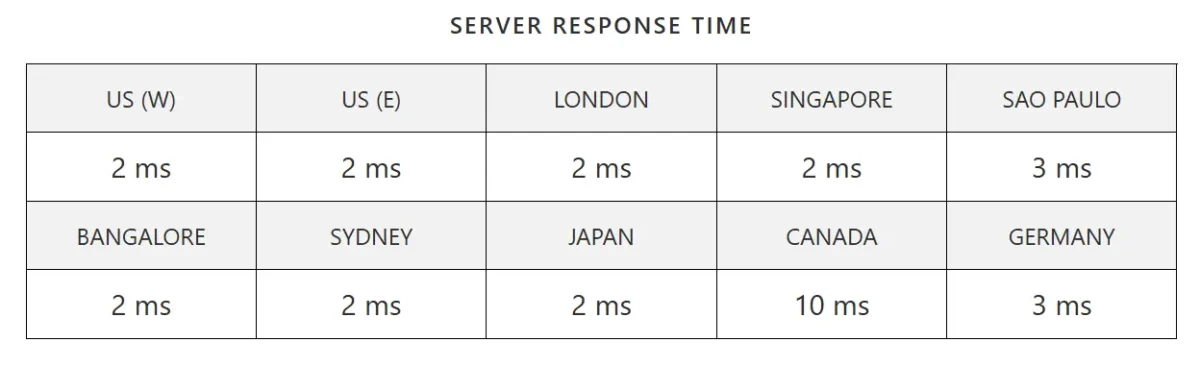
The server response time is consistently fast across most locations, averaging 2–3 ms worldwide. Only Canada shows a slightly higher response time at 10 ms, while all other regions maintain low latency.
Stress Testing Across Hosting Plans
GreenGeeks delivers reliable, eco-friendly hosting with consistent speed across all plans. LiteSpeed servers and container-based technology ensure stability even under heavy traffic. Independent tests show shared hosting handles up to 2,500 simultaneous sessions without major slowdowns.
Entry-level Lite plans support single websites with standard speed, while Pro and Premium plans allow multiple sites, faster performance, larger SSD storage, and dedicated IPs. VPS and Dedicated Servers offer dedicated resources, higher consistency, and control for high-traffic or mission-critical sites.
All plans maintain high uptime (99.96–99.98%) and fast load times (1.2–2 seconds), with container isolation preventing traffic surges from affecting other users.
Key performance metrics include TTFB between 150–260ms, zero errors under 100 concurrent users, and efficient LSCache integration. Overall, GreenGeeks’ architecture ensures scalable performance and reliable handling of high-traffic scenarios across different hosting tiers.
Ease of Use and User Experience
GreenGeeks is beginner-friendly and eco-conscious, offering fast, reliable hosting with an intuitive dashboard. Setup is simple, and 24/7 support ensures smooth management. Advanced users may miss team management features, but overall, it balances performance, usability, and green hosting effectively.
- Onboarding & Setup: Quick Launch Wizard makes starting easy.
- Dashboard & Management: Intuitive cPanel with “Quick Login” for faster access.
- Website Builder: AI-powered builder creates WordPress sites in seconds.
- 1-Click Installation: Softaculous supports WordPress, Drupal, and Joomla.
- Migration: Free, team-handled website migration.
- Performance: Fast loading (~1.29s) using LiteSpeed, MariaDB, HTTP/3.
- Support: 24/7 live chat, email, and phone with rapid responses.
- Security: Automated SSL and daily backups.
- Limitations: Lacks advanced team management features.
- Best for: Eco-conscious users, beginners, and small-to-medium businesses.
Account Setup and Domain Connection
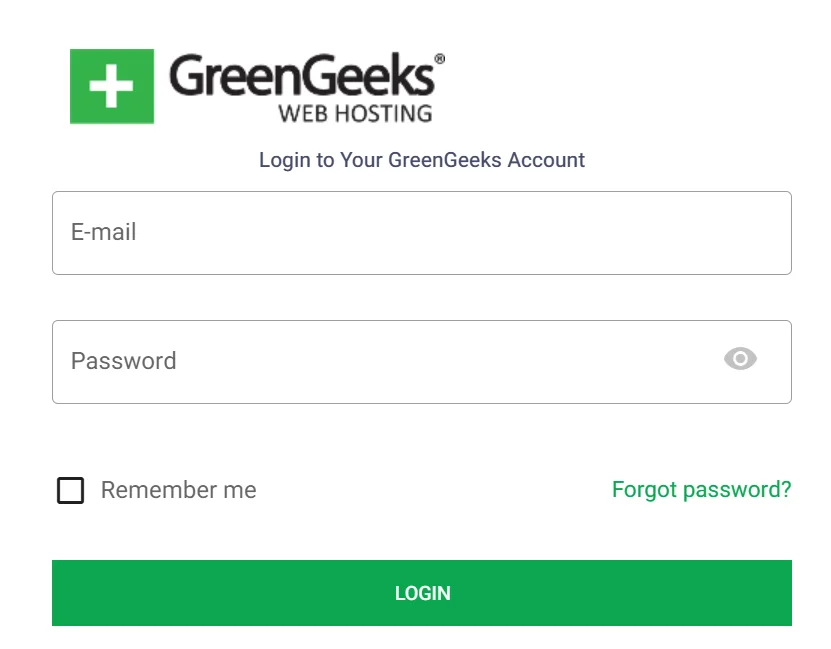
Setting up a GreenGeeks account is fast and simple. Choose a hosting plan, register or connect a domain, get login credentials, and manage domains and SSL from the dashboard. Nameservers, SSL activation, and DNS settings are handled easily in cPanel.
Control Panel and Dashboard Walkthrough
GreenGeeks offers a dual management system with an Account Dashboard for overall control and cPanel for technical site management. The dashboard prioritizes active websites, making domain management, support, and quick cPanel access easy.
cPanel provides file, database, email, and security management along with one-click app installations and website building tools.
Key Features:
- Websites-First Dashboard: Highlights active sites with quick management buttons.
- Domain & DNS Management: Handles domain registration, subdomains, and parked domains.
- Quick Launch Wizard: Guides new site setup or migrations.
- Support & Billing: 24/7 live chat, tickets, and account invoicing.
- cPanel Access: One-click login for advanced management.
- File & Database Management: File Manager and phpMyAdmin included.
- Softaculous Installer: One-click install for WordPress, Joomla, Drupal, and 300+ scripts.
- Email Management: POP3/IMAP, forwarders, and spam filters.
- Security Controls: SSL, IP blocking, SSH access.
- Extras: WordPress installer under 2 minutes, drag-and-drop website builder, Git integration, LiteSpeed, and CDN tools.
Access: my.greengeeks.com/login (JavaScript required) with optional support PIN for identity verification.
This interface balances ease for beginners with full technical control for developers.
Website Building and WordPress Management
GreenGeeks provides fast, eco-friendly WordPress hosting with AI tools to build and manage websites quickly.
The dashboard allows easy WordPress installation, theme and plugin management, and content editing. Users can customize layouts, manage multiple sites, and benefit from performance and security features like LiteSpeed Cache and free SSL certificates.
Key Features:
- AI Website Builder: Launches a WordPress site with pre-generated content and design.
- Installation & Management: Softaculous installer for setup, upgrades, and backups.
- Customization: Edit layouts, sections, and navigation via Elementor and WordPress dashboard.
- Plugin & Theme Control: Install and activate plugins and themes.
- Performance & Security: LiteSpeed Cache for speed and SSL certificates for security.
Customer Support and Brand Reputation
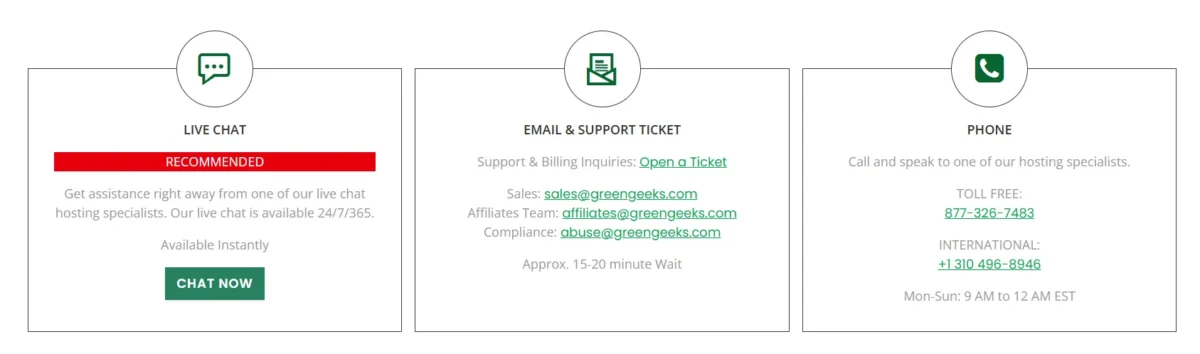
My experience with GreenGeeks customer support has been excellent. They offer 24/7 assistance via live chat, phone, and email, with a team that is knowledgeable and quick to resolve issues.
Customers frequently praise their responsiveness and helpfulness, making GreenGeeks a trusted choice for reliable hosting. Their strong reputation combines technical support, eco-friendly hosting, and overall customer satisfaction.
Support Channels and Help Options
GreenGeeks provides fast, reliable, and eco-friendly support available 24/7. Users can reach help through live chat, email tickets, phone, or an AI chatbot. A detailed knowledge base is also available for self-help and tutorials.
Support Channels Overview:
- Live Chat: Immediate assistance for simple queries, usually connecting within minutes.
- Support Tickets: Handles complex or technical issues, with responses often under an hour.
- Knowledge Base & Tutorials: Guides and videos for WordPress, domains, email, and security.
- Additional Methods: Phone support and an AI chatbot for convenience.
- Expert Staff: Agents can perform hands-on troubleshooting when needed.
- Highlights: Fast resolution, user-focused assistance, and environmentally conscious support.
User Reviews and Feedback Analysis
GreenGeeks receives mostly positive feedback from users, especially for its customer support and eco-friendly approach. Trustpilot shows a 4.6/5 rating, with over 80% giving 5 stars. Some Reddit and G2 users note minor shared hosting performance issues but still value its features and support.
GreenGeeks vs Other Hosting Providers
GreenGeeks provides eco-friendly hosting with unlimited storage and strong security. However, other hosts may suit different needs, like budget, WordPress features, or performance.
Hostinger – Budget-friendly plans start at $2.99/mo. Offers a modern dashboard, an AI website builder, and solid uptime. Lacks unlimited storage included in GreenGeeks.
Bluehost – Great for WordPress integration and cloud hosting. Includes marketing tools and professional features. Costs are higher, and email hosting is extra. No eco-friendly benefits.
DreamHost – Unlimited bandwidth, SSD performance, and a 97-day money-back guarantee. One-click WordPress setup and daily backups. Less beginner-friendly and lacks GreenGeeks’ security and eco-focus.
Best Choice: GreenGeeks balances performance, security, unlimited storage, and eco-friendliness, making it the top pick overall.
Comparison With Popular Hosting Providers
GreenGeeks offers fast, eco-friendly hosting with unlimited resources and strong overall performance. Hostinger is cheaper and slightly faster in some cases. Bluehost excels in WordPress support, while DreamHost focuses on reliability and simplicity.
Comparison Points:
- Performance & Speed: GreenGeeks uses LiteSpeed servers with ~1.29s load times; Hostinger may be slightly faster under heavy traffic.
- Eco-Friendly Focus: GreenGeeks offsets 300% of its energy usage.
- Pricing & Value: GreenGeeks gives better value on higher-tier plans; Hostinger is best for low-cost shared hosting.
- WordPress Management: Bluehost offers AI-powered WP tools; DreamHost provides a stable, simple interface.
- Support & Reliability: All offer 24/7 support; GreenGeeks is praised for speed, DreamHost for consistency.
Verdict:
- GreenGeeks – best balance of speed, resources, and eco-focus.
- Hostinger – budget-friendly and fast.
- Bluehost – superior for WordPress integration.
- DreamHost – reliable and easy to use.
GreenGeeks Pros and Cons
GreenGeeks offers reliable hosting with eco-friendly practices and affordable pricing. It comes with a free domain for the first year and ensures strong uptime. However, storage is limited on basic plans, and phone support isn’t available around the clock.
Pros:
- 99.5% uptime guarantee
- Free domain name for the first year
- Competitive pricing
- Carbon emission offset
Cons:
- Limited storage on basic plans
- No 24/7 phone support
Related:
- Hostinger vs Bluehost
- Hostinger Review
- Bluehost Hosting Review
- HostGator Review
- Cloudways Review
- Scalahosting Review
FAQs – GreenGeeks Review
Is GreenGeeks reliable and fast?
GreenGeeks is reliable and fast, offering 99.9% uptime and eco-friendly hosting. It uses LiteSpeed, MariaDB, and NVMe SSDs to improve performance. Average website load times are 1.2–2 seconds.
Can I buy a domain permanently?
You cannot buy a domain permanently. Domains are leased for 1 to 10 years and must be renewed. You can keep one indefinitely by renewing it on time.
Is GreenGeeks beginner-friendly?
Yes, GreenGeeks is beginner-friendly. It offers an easy setup and a simple dashboard. One-click WordPress installation makes starting a website quick and hassle-free.
How do I cancel or upgrade hosting?
To cancel or upgrade hosting, log in to your provider’s control panel and go to your services or billing section. Choose the upgrade, downgrade, or cancellation option. Always back up your website before making changes.
How many data centers does GreenGeeks have?
GreenGeeks has 5 data centers worldwide, located in Chicago, Phoenix, Montreal, Amsterdam, and Singapore.
Is GreenGeeks truly green?
GreenGeeks is a genuine, eco-friendly web host. It offsets energy use with 300% wind energy credits, plants trees for new accounts, and uses efficient technology. The EPA has recognized it as a Green Power Partner since 2009.
Expert Verdict: Is GreenGeeks the Right Hosting Choice for You?
GreenGeeks delivers a solid, eco-friendly hosting experience with helpful customer support and an easy onboarding process. Shared hosting performance is modest, but pricing is reasonable for new users. Their 30-day money-back guarantee lets you try services risk-free.

Alex Bryant, founder of PvyEmpire.com, is passionate about WordPress and specializes in web hosting, performance optimization, and site management. With extensive experience testing top hosting providers, he created PvyEmpire.com to share honest, data-backed reviews, expert guides, and verified coupons & deals, helping website owners save money, boost performance, and grow their online presence with confidence.