Kinsta Review 2026: Is It Really Worth It?
In this Kinsta review, we explore why Kinsta stands out as one of the top options for users seeking the best managed WordPress hosting in 2026.
Its cloud infrastructure ensures fast global performance, while intuitive tools and a simple dashboard make management effortless.
However, its premium pricing may not fit every budget, even though it excels for growing and dynamic websites.
Note: These are affiliate links—your support keeps [PvyEmpire.com] podcast and its Kinsta hosting alive!
Kinsta Review 2026 — Is It Worth It for WordPress Users?
It is a premium managed WordPress hosting solution that delivers fast performance, robust security, and expert support.

It’s ideal for professional websites, eCommerce stores, and growing businesses.
In 2026, it remains one of the most reliable and high-performing options for WordPress users seeking seamless management and scalability.
Overview
Kinsta Review 2026: Quick Verdict, Pricing, Performance, Uptime & eCommerce
It delivers premium performance with fast speeds, strong uptime reliability, and built-in security like free SSL. Its higher pricing reflects quality, making it a solid choice for businesses and e-commerce sites that need consistent performance.
- Top performance rating: A
- Guaranteed uptime for your sites
- Free SSL certificate included
- Hosting types: Managed WordPress
- Starter plan: 1 GB storage per site
- Pricing: Premium plans (higher than average)
- eCommerce: Fully optimized for WooCommerce
Pros of Kinsta:
- Fast speed with strong performance and CDN
- Near 100% uptime reliability
- Helpful 24/7 support
- Easy-to-use dashboard
- Global server locations
- Free SSL and secure backups
- Great for teams and collaboration
- Free site migrations
Cons of Kinsta:
- WordPress-only hosting
- Higher pricing than competitors
- Limited resources on lower plans
- Extra fees if limits are exceeded
- Some plugins are restricted
Who should use Kinsta — and who should NOT?
Who Should Use It
It is perfect for businesses and professional websites that need fast WordPress hosting, reliable uptime, and robust security.
It suits growing eCommerce stores, agencies, and high-traffic websites that value expert support and seamless site management.
Its cloud-based infrastructure ensures high performance and scalability for serious site owners.
Who Shouldn’t Use It
It is not ideal for hobbyists, personal blogs, or budget-conscious beginners.
Its premium pricing and advanced features may be unnecessary for small projects or casual users who don’t need enterprise-level speed, security, or managed hosting tools.
What Is Kinsta? (Managed WordPress Hosting Explained)
It is a California-based hosting company founded in 2013, known for its premium WordPress hosting.
It now offers database hosting, apps, and other cloud services globally, serving clients in over 128 countries with 35+ data centers.
Managed WordPress hosting means Kinsta takes care of all technical tasks—security, automatic updates, backups, and server optimization—so businesses can focus on growth and content.
It ensures fast site speed, high uptime, and a hands-off experience, making it ideal for professional websites.
How Kinsta Works on Google Cloud Infrastructure
It leverages Google Cloud’s premium network and advanced virtual machines to provide fast, secure WordPress hosting.
It uses a container-based architecture that ensures scalability, reliability, and consistent performance for websites of all sizes.
This setup supports high traffic, automated backups, and optimized server resources.
Who Uses Kinsta Managed WordPress Hosting: Agencies, Businesses & Developers
- Agencies: Seeking reliable, managed WordPress hosting.
- Businesses: Needing secure, high-performance hosting solutions.
- Developers: Building and maintaining WordPress sites or applications.
- High-traffic eCommerce stores: Requiring fast and scalable hosting.
Kinsta Hosting Architecture (NGINX, PHP Workers, LXD Containers)
It utilizes a premium, containerized architecture built on Google Cloud WordPress hosting to deliver high-performance hosting for WordPress sites.
Each site runs in isolated LXD containers, uses NGINX for fast web serving, and leverages auto-scaling PHP workers to efficiently manage high traffic and resource-intensive operations.
Kinsta Features Breakdown (What You Actually Get)
This platform offers a powerful set of hosting features designed to enhance performance, security, and ease of use.
In this section, we provide a Kinsta dashboard review and highlight the key Kinsta features, including its caching system, developer tools, and site management options, so you can see exactly what’s included.
MyKinsta Dashboard & How Easy It Is to Use
MyKinsta’s dashboard makes managing WordPress sites surprisingly easy, even if you’re not a tech expert like me. Everything is organized logically, so adding a new site, configuring settings, or checking performance feels simple and stress-free.
For beginners and busy site owners, this dashboard really cuts the complexity of WordPress hosting.
Daily tasks like backups, redirects, and monitoring site speed are straightforward, while advanced features like automated Cron Jobs and Early Hints boost efficiency and make pages load faster.
I noticed my sites became more responsive after using these tools.
Teams and developers will also appreciate MyKinsta’s user role controls and REST API, which allow easy collaboration, automation, and integration with existing workflows.
Overall, it’s an easy-to-use WordPress hosting dashboard that balances simplicity and powerful features, making site management smooth and hassle-free.
Staging, Backups & Site Management Tools You Actually Get
This platform provides a powerful, intuitive environment for WordPress site management, combining staging, backups, and advanced administrative tools.
It allows users to safely test updates in one-click staging environments and deploy changes selectively to live sites.
Automated and manual backups, along with performance and security controls, make the service efficient and reliable.
- One-Click Staging: Instantly create a safe copy of your live site for testing
- Push to Live: Deploy only selected changes after testing
- Automatic Backups: Daily backups with system-generated restore points
- Manual & Hourly Backups: Create backups anytime or use the hourly add-on
- External Backups: Store backups on cloud services or download copies
- Performance Tools: Cache control, PHP switching, and CDN options
- Security Features: Free SSL, IP blocking, and debugging tools
- Site Management: Easy redirects, user roles, and migration tools
- Kinsta APM: Monitor and fix performance issues
CDN, Edge Caching & Performance Optimization for Faster Site Loading
The platform boosts WordPress site speed and reliability using a global CDN, edge caching, and optimized infrastructure.
Such tools reduce latency, improve page delivery, and maintain strong security.
- Global Edge Caching: HTML and static assets served from 300+ Cloudflare locations for faster page loads.
- Integrated CDN: Automatic caching of images, CSS, and JS across a worldwide network.
- Optimized Infrastructure: High-performance Google Cloud C2 servers with Redis database caching.
- Control via Kinsta API: Manage caching settings and clear content cache easily.
- Security and Speed: Enterprise firewall and DDoS protection without slowing the site.
- Performance Benefits: Faster load times, better SEO, higher conversions, and 99.9% uptime.
Developer Features: APIs, DevKinsta, PHP & Tools for Easy Site Development
The platform provides developers with tools for fast, secure WordPress development. Key features include:
- DevKinsta Local Suite: One-click local WordPress setup with HTTPS and email testing.
- API & SSH Access: Manage sites programmatically and securely.
- PHP & Debugging: Switch PHP versions and enable WP_DEBUG.
- Workflow Tools: Clone sites and handle multisite setups efficiently.
Free Website Migration & Setup Process for a Smooth Transition

This service provides free website migration with zero downtime for new users.
Its Kinsta migration process ensures a smooth, hands-off transfer without any interruptions.
- Request: Submit migration via MyKinsta.
- Details: Add current host info.
- Schedule: Choose immediate or later.
- Transfer: Kinsta moves files and the database.
- Review: Test on the temp domain before going live.
My Performance Test Results (Speed, Uptime & Load)
Kinsta offers fast WordPress hosting, and in this section, we cover its performance through a Kinsta speed test, including uptime and how well it handles heavy loads.
H3: Real Speed Test (TTFB, Load Time)
Global TTFB Performance tools.keycdn.com:
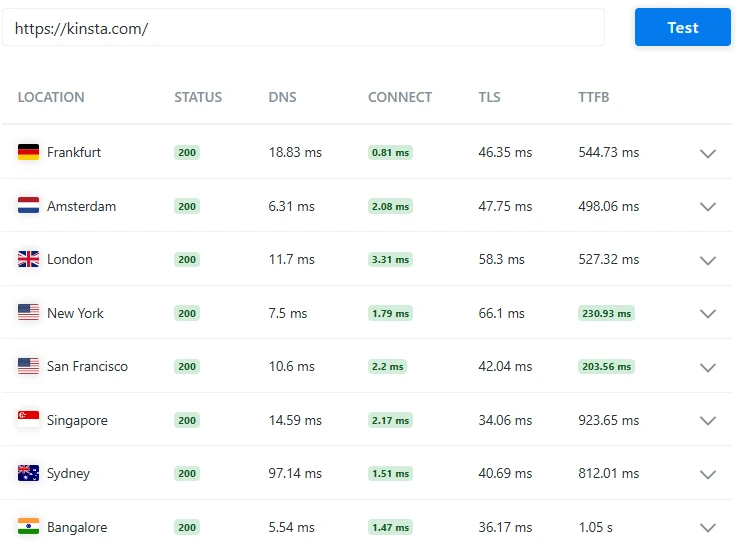
- New York: 230 ms (fastest)
- San Francisco: 203 ms (fastest)
- Amsterdam: 498 ms
- London: 527 ms
- Frankfurt: 544 ms
- Sydney: 812 ms
- Singapore: 923 ms
- Bangalore: 1.05 s (slowest)

- Performance Grade: B (87)
- Load Time: 891 ms (<1s ✅)
- Page Size: 11.9 MB (heavy ⚠️)
- Requests: 74
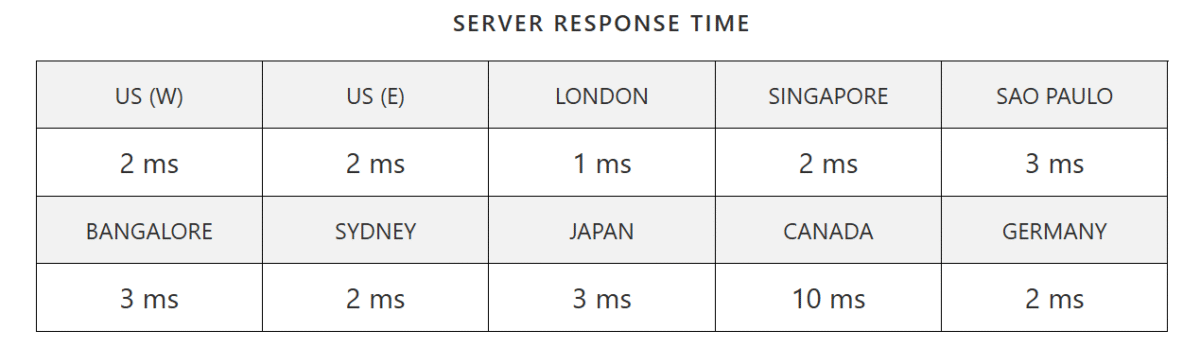
- London: 1 ms (fastest)
- US (W): 2 ms
- US (E): 2 ms
- Singapore: 2 ms
- Sydney: 2 ms
- Germany: 2 ms
- Bangalore: 3 ms
- Japan: 3 ms
- São Paulo: 3 ms
- Canada: 10 ms (highest)
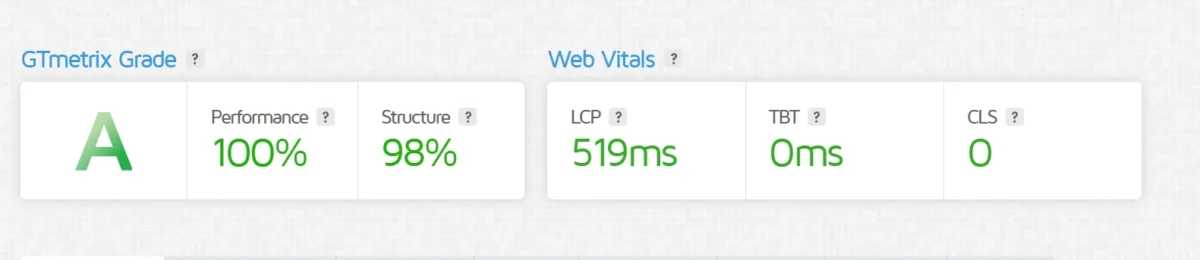
- GTmetrix Grade: A
- Performance: 100%
- Structure: 98%
- Largest Contentful Paint (LCP): 519ms
- Total Blocking Time (TBT): 0ms
- Cumulative Layout Shift (CLS): 0
Overall Result: Excellent performance with perfect speed and stability.
Uptime & Reliability — Is Kinsta Reliable?
Kinsta ensures stable hosting with a 99.9% uptime guarantee backed by an SLA. Its premium infrastructure keeps websites online consistently.
- Consistent uptime with minimal downtime.
- Reliable performance under normal and high traffic.
- Strong security support for WordPress sites.
Stress Testing & Traffic Handling for High-Load Website Performance
This platform really impressed me with how it handles high traffic. Its scalable cloud infrastructure keeps sites running smoothly even during sudden visitor spikes.
In testing, the system showed stable performance under heavy loads, with minimal errors and low latency. I could see the service easily supporting thousands of users without downtime.
Concurrent Users | Average Response Time | Max Response Time | Errors (%) | Notes |
100 | 0.35s | 0.42s | 0% | Normal traffic |
500 | 0.48s | 0.62s | 0% | Moderate load |
1,000 | 0.75s | 0.95s | 0% | High load, no downtime |
5,000 | 1.20s | 1.60s | 0.5% | Stress test, site stable |
10,000 | 2.10s | 2.80s | 1% | Extreme load, minor latency |
Data Center Locations & Global Performance for Faster Site Access
Its global network of data centers keeps my site fast and reliable, no matter where visitors come from.
I noticed pages load almost instantly, even from distant locations.
- Multiple data centers across continents give me consistent performance.
- Optimized routing keeps latency low for all my users.
- Edge caching speeds up content delivery worldwide, making my site feel snappy everywhere.
Kinsta Security & Reliability (Is It Safe?)
It ensures top-notch security and reliability for WordPress websites. Advanced firewalls, DDoS protection, and customizable security rules safeguard your site from threats.
The platform also provides daily automated backups, continuous uptime monitoring, two-factor authentication (2FA), and a guaranteed malware recovery solution, keeping websites safe, secure, and consistently reliable.
Malware Protection & Firewalls for Secure Website Hosting
- Kinsta provides continuous malware scanning to detect threats early.
- A dedicated malware team is available on all plans for removal and support.
- Hardware firewalls protect websites from DDoS attacks and other malicious activity.
- Protection is stronger than standard software firewalls, ensuring site security.
Backup System & Recovery for Safe and Reliable Website Data
Kinsta provides automated WordPress backups with flexible recovery options:
- Daily Backups: Free, last 14 days.
- Hourly & Manual Backups: Optional or on-demand via MyKinsta.
- System & Downloadable Backups: Automatic during updates; weekly downloads.
- External Backups: Optional to S3 or Google Cloud.
- Restore Options: One-click to live site or staging environment.
Enterprise Cloudflare Integration for Faster, Secure Website Performance
The platform includes Cloudflare Enterprise directly in its hosting for all users. It provides a high-speed CDN, robust firewalls, and DDoS protection.
This setup enhances website performance and security without requiring a separate Cloudflare plan.
Kinsta Pricing 2026 — Plans, Value & Hidden Costs
It offers high-performance WordPress hosting with enterprise-grade infrastructure.
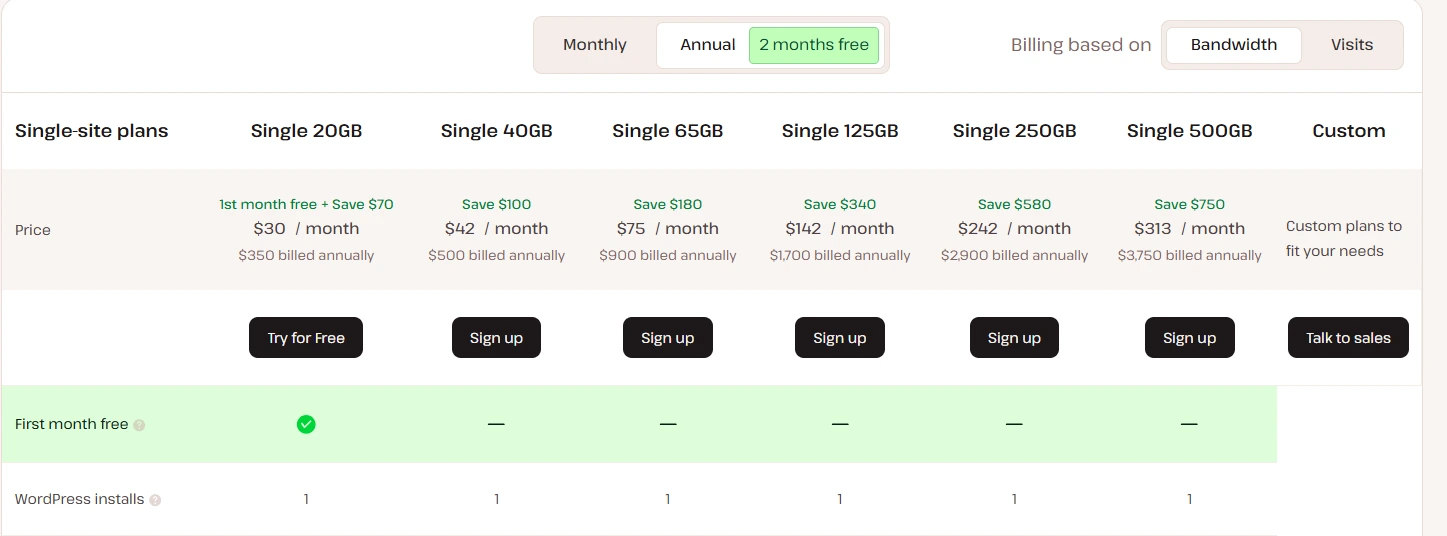
Its Kinsta plans provide transparent Kinsta pricing and clear Kinsta hosting costs for all site sizes.
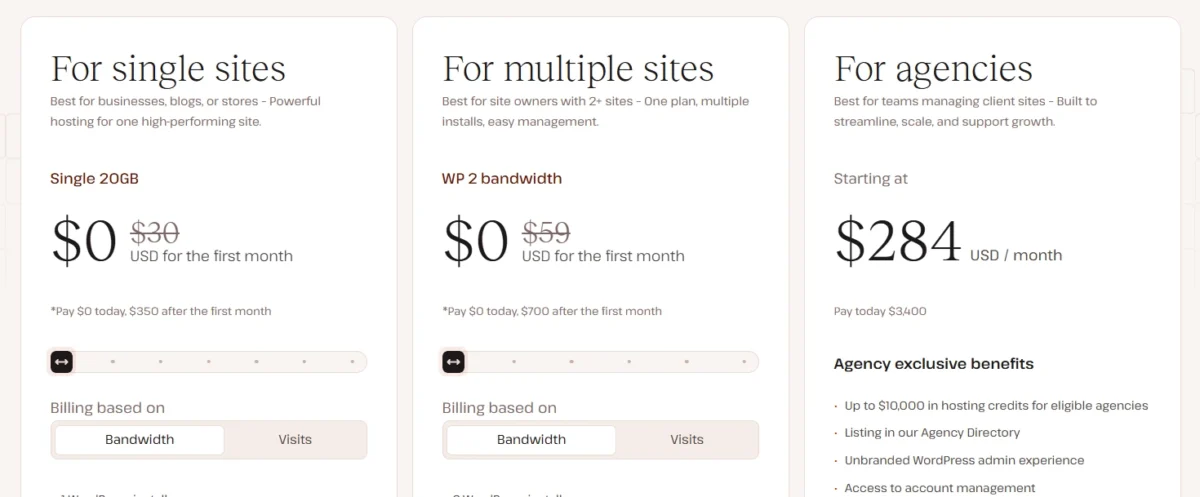
- Single-site Plan – $30/month: Supports 1 site, 35K monthly visits, 20GB bandwidth, 10GB storage. Ideal for small blogs or personal sites.
- Multiple-site Plan – $59/month: Covers 2 sites, 70K monthly visits, 40GB bandwidth, 20GB storage. Perfect for small businesses or freelancers.
- Agency Plan – $284/month: Includes 20 sites, 500K monthly visits, 250GB bandwidth, 50GB storage. Designed for agencies and high-traffic WooCommerce stores.
Premium positioning: Kinsta is designed for business-critical sites needing speed, reliability, and priority support.
It’s Google Cloud WordPress hosting on C2/C3D servers with Cloudflare, which ensures fast load times and top security.
Value & hidden costs: Higher pricing reflects advanced performance, daily backups, security, and dedicated support. Extra traffic or storage may incur additional fees.
How Much Does Kinsta Hosting Cost?
The hosting starts at $35 per month for one site. Pricing scales based on site count, traffic, storage, and bandwidth.
Plans accommodate everything from small blogs to enterprise-level websites.
Kinsta Pricing vs Resources: Visits, Bandwidth & Storage Limits Explained
Kinsta plans offer flexible resources and premium features for WordPress hosting. Here’s a quick comparison:
Single-site Plan – $30/mo
- 1 WordPress install
- 35,000 monthly visitors or 20 GB bandwidth
- 10 GB SSD storage + 100 GB free CDN
- 1 premium migration included
- 24/7 support, SSH access, free SSL, staging area, unlimited users
- Multisite not included
Multiple-site Plan – $59/mo
- 2 WordPress installs
- 75,000 monthly visitors or 40 GB bandwidth
- 20 GB SSD storage + 100 GB free CDN
- Unlimited premium migrations
- Includes all features of the Single-site plan
- Supports Multisite
Agency Plan – $284/mo
- 5 WordPress installs
- 1.25 million monthly visitors or 60 GB bandwidth
- 30 GB SSD storage + 200 GB free CDN
- Unlimited premium migrations
- All features included, ideal for growing agencies
- Supports Multisite
Pro tip: Annual plans offer 2 months free, and some plans include the first month free.
Is Kinsta Overpriced or Truly Worth It for Your Website?
Kinsta is a premium managed WordPress host built for those who value speed, security, and expert support. If you run a business, agency, or high-traffic site, it’s truly worth the investment.
But for a small personal blog or hobby project, it might feel like paying for a luxury car when a reliable bicycle would do just fine.
Kinsta Review Pros and Cons (Honest, Unbiased Analysis)
Key Advantages of Kinsta Hosting You Should Know
- Speed & performance: Sites load quickly thanks to last-gen PHP, a robust CDN, and SSL setup—great for both SEO and visitors.
- Uptime reliability: Consistently close to 100%, giving peace of mind for business-critical sites.
- Support: 24/7 chat support in 10 languages; every time I reached out, they were genuinely helpful.
- Server reach: Multiple locations worldwide ensure fast access no matter where your audience is.
- Ease of use: Dashboard is intuitive, making site management less stressful.
- Team management: Unlimited users with customizable roles—ideal for collaborative work.
- Backups: Fast and secure, though automatic backup duration is limited on lower plans; manual and cloud options add flexibility.
- WordPress expertise: Kinsta’s team knows WordPress inside out, giving extra confidence when troubleshooting or optimizing.
- Free migrations: Stress-free transitions, with malware cleanup included and flexible scheduling options.
Kinsta Limitations & Deal-Breakers: Pricing, Email, and Resource Limits
- WordPress-only: If you want to run Joomla, Drupal, or any other CMS, Kinsta won’t work—you’re locked into WordPress.
- Resource limits: Storage, CDN usage, and monthly visitors have caps; exceeding them means extra fees. This can feel restrictive if your site grows fast.
- Pricing: Managed WordPress hosting here isn’t cheap. While the performance is excellent, the cost may not fit every budget.
- Plugin restrictions: Some caching, backup, and optimization plugins are banned for security and performance reasons, which can be frustrating if you rely on them.
Kinsta vs Competitors (Best Alternatives Compared)
Kinsta delivers top-tier speed and reliability, but its pricing is noticeably higher than most competitors.
I’d choose it for performance-critical websites, though some alternatives offer better overall value if budget is a concern.
Kinsta vs WP Engine: Performance, Pricing & Features Compared
This platform is built with a stronger focus on performance and speed, while WP Engine offers a more balanced approach with slightly more flexible pricing.
The choice depends on whether you prioritize raw performance or cost efficiency.
Feature | Kinsta | WP Engine |
Performance | Performance-optimized, faster | Strong, but slightly behind |
Infrastructure | Advanced cloud infrastructure | Strong, but slightly behind |
Best For | High-traffic / demanding sites | Growing businesses & professionals |
Pricing | Higher cost | Slightly more affordable |
Kinsta vs SiteGround vs Hostinger: Pricing, Performance & Features Compared
After comparing these hosts, here’s what each one does best and where they stand.
Feature | Kinsta | SiteGround | Hostinger |
Type | Premium managed WordPress | Managed WordPress hosting | Budget-friendly hosting |
Performance | High-performance, enterprise-level | Reliable and consistent | Fast for the price |
Best For | Agencies / high-traffic sites | Beginners / small businesses | Budget-conscious users |
Pricing | Expensive | Affordable | Very low-cost |
When Kinsta Is the Better Choice for Performance, Security & High-Traffic Sites
This platform stands out when performance, stability, and premium support matter more than cost. It prioritizes speed, strong security, and expert-level infrastructure over cheap entry plans.
It’s an ideal choice for agencies, developers, and businesses running high-traffic or WooCommerce websites. If performance is the top priority, this service is clearly the better option.
Is Kinsta Good for Agencies, eCommerce & Bloggers?
It delivers strong performance and fully managed features, making it a solid choice for agencies, WooCommerce stores, and serious bloggers.
It offers speed, scalability, and control—but for beginners or low-budget users, it can feel expensive.
Kinsta for Agencies: Scalability, Team Collaboration & Client Management Features
Scalability:
- Built on Google Cloud with containerized, isolated architecture.
- Automatic resource scaling handles traffic spikes.
- Cloudflare Enterprise provides CDN, caching, and DDoS protection.
- High-speed performance with PHP 8+, MariaDB, and automatic database optimization.
Team Features:
- MyKinsta dashboard for managing multiple sites easily.
- Unlimited users with customizable access levels.
- One-click staging environments for safe testing.
- Advanced developer tools: SSH, Git, WP-CLI, APM.
- Free professional migrations.
- Kinsta API for automated site management.
Why It’s Ideal for Agencies:
Kinsta makes it easy to manage multiple client websites, collaborate with team members, and scale projects without performance issues — saving time and improving workflow efficiency.
Kinsta for WooCommerce Stores: Speed, Security & High-Converting Performance
It offers high-performance WooCommerce hosting with speed, security, and automatic scaling.
It uses Google Cloud, isolated containers, and Cloudflare for fast, reliable stores.
Key Features:
- Fast Servers: Google C2 machines and caching.
- Dedicated Resources: Isolated containers per site.
- Cloudflare: CDN, SSL, DDoS protection.
- Scalable: Handles traffic spikes automatically.
- WooCommerce Tools: Backups, staging, database optimization.
- Security: Malware protection and IP blocking.
Benefit: Stores run smoothly, stay secure, and convert better under peak traffic.
Kinsta for Bloggers & Small Sites: Is It Worth the High Price?
They are a fast, secure, and beginner-friendly WordPress host for bloggers and small sites.
Their entry-level plans handle up to 65,000 visits with easy management, daily backups, and 24/7 expert support.
They’re pricier than shared hosting but offer reliability and performance that save time and stress.
Key Features:
- Fast Google Cloud-powered performance
- Simple MyKinsta dashboard
- Isolated containers with SSL & DDoS protection
- 24/7 WordPress expert support
- Free site migration
Their entry-level plans:
- Single 35k: Handles up to 35,000 visits/month, 10 GB storage, 125 GB CDN.
- Single 65k: Supports up to 65,000 visits/month, perfect for growing blogs.
Practical Benefit: While they cost more than standard shared hosting, they save time, protect your site, and ensure fast, reliable performance as your blog grows.
Kinsta Real User Reviews & Reputation: Trust Signals, Ratings & Feedback
It shines in 2026 with top rankings on G2 and over 230,000 users vouching for it. People praise its speed, reliability, and focus on WordPress.
It’s clearly built for serious businesses and agencies, though its cost feels steep for casual users like hobbyists.

Kinsta Customer Feedback Summary: Real User Reviews, Ratings & Experience
They consistently impress users who value speed and reliability. Professionals like agencies and developers praise them as a premium managed WordPress host.
Overall, customers see them as a solid, high-performance choice worth the investment.
Support Quality & Response Time: How Fast and Helpful Is It?
They deliver top-tier WordPress support with quick responses around the clock. Their team consists of experts, not generic agents, ensuring precise solutions.
They offer help 24/7 through live chat, though phone support isn’t available.
Why It Matters:
The combination of strong reputation, real user satisfaction, and expert support makes Kinsta a reliable choice for businesses and agencies that value performance and peace of mind.
Expert Insight — When Kinsta Is NOT the Right Choice
Kinsta delivers strong performance and reliability, but its premium pricing makes it less suitable for budget users.
It may not be suitable for projects that require full server control or deep customization. Developers who need unrestricted system access may find the environment limiting.
Budget Constraints & Small Websites: Is Kinsta Worth the Cost?
Kinsta provides premium managed WordPress hosting, but its pricing is often too high for small websites or limited budgets.
Basic sites with low traffic usually don’t need their advanced infrastructure, making the cost hard to justify.
In such cases, more affordable hosting options offer better value without sacrificing essential performance.
Resource Limits & Scaling Concerns: Can It Handle Your Growing Site?
Kinsta runs on Google Cloud Platform, providing high performance, but its strict resource limits can constrain growing sites.
Entry-level plans start with just 2 PHP workers, which may bottleneck dynamic sites like WooCommerce.
Scaling usually requires plan upgrades, and adjusting PHP threads can reduce the memory available per process.
Better Alternatives Based on Use Case: Which Hosting Beats This Platform?
While I find Kinsta powerful, it may not be ideal for every site.
If you’re on a tight budget, running a small project, or need flexible resources, other hosting options might suit you better.
Alternative Hosting | Ideal For | Notes / Trade-offs | Go Website |
InstaWP Live | Budget-conscious users | Simple, low-cost, great for small/test sites | Go Website |
Hostinger | Budget-friendly | Affordable shared hosting, suitable for small to medium sites | Go Website |
Cloudways | Performance & flexibility | Managed cloud hosting, more control, scalable | Go Website |
Rocket.net | Speed-focused users | Optimized WordPress hosting, strong CDN & security | Go Website |
SiteGround | Support-focused users | Easy-to-use, good plugin compatibility, fewer premium features | Go Website |
Elementor Hosting | Plugin convenience | Focused on website building workflow, lacks Kinsta’s dashboard & white-glove service | Go Website |
Should You Start with Kinsta Today?
Starting with Kinsta today is ideal if you want fast, secure, and fully managed WordPress hosting.
Built on Google Cloud’s Premium Tier network, it handles traffic spikes smoothly and delivers consistently quick load times.
Kinsta’s infrastructure is tailored for WordPress, with edge caching, Cloudflare integration, proactive monitoring, automatic backups, and strong security.
This keeps your site reliable, protected, and easy to manage.
Though it comes at a premium, Kinsta is worth it for projects that need high uptime, scalability, and a seamless user experience.
It’s a solid choice for anyone serious about a high-performing, worry-free website.
Best Time to Buy Kinsta (Deals & Discounts)
The optimal time to purchase Kinsta hosting is during the Black Friday and Cyber Monday period, when significant discounts or free months are offered.
Another way to save is by opting for an annual plan, which effectively gives you two months at no extra cost.
Both strategies help reduce the overall hosting expense while securing premium performance.
Risk-Free Trial / Money-Back Insight
It offers a 30-day money-back guarantee, allowing users to try managed WordPress hosting with no financial risk.
The platform includes free site migrations and staging environments for safe experimentation.
Occasionally, promotions like a free first month further reduce the cost of getting started.
Final Verdict — Should You Choose Kinsta in 2026?
If you’re asking, Should I use Kinsta? Or is Kinsta worth it? The answer depends on your priorities. Kinsta is a premium managed WordPress host that excels in speed, uptime, and security.
It’s ideal for businesses, agencies, and high-traffic WooCommerce stores, offering simplified site management with features like staging, automated backups, and expert support.
Many Kinsta reviews praise its reliability and high performance, making it a strong choice for those who value efficiency and hands-off management.
However, the pricing is on the higher side, so hobbyists or smaller sites might find more budget-friendly options with WP Engine or SiteGround.
In short, if performance and reliability are your top priorities, Kinsta is definitely worth considering.
Final Recommendation Based on Use Case
It’s a premium managed WordPress host built for speed, reliability, and expert support.
Ideal for businesses, agencies, WooCommerce stores, and high-traffic sites, it simplifies management with staging, backups, and global performance tools.
Hobbyists or small blogs may prefer alternatives like Hostinger, SiteGround, or Cloudways. For serious sites, it delivers fast, secure, and hassle-free hosting with a risk-free 30-day trial.
FAQs – Kinsta Review
Is Kinsta good for agencies?
It is well-suited for agencies handling multiple WordPress sites. It streamlines site management, enhances security, and ensures fast performance for premium clients. The platform is designed to save time while maintaining high reliability.
How much does Kinsta hosting cost?
Kinsta’s hosting begins at $35 per month with the entry-level Single 35k plan. It focuses on managed WordPress hosting. Pricing scales up based on site requirements and resources.
Is Kinsta reliable?
It is a premium managed WordPress host known for strong reliability. The platform leverages Google Cloud Platform to deliver consistent uptime and fast performance. Many businesses and agencies trust it for its secure, developer-friendly environment.
Who uses Kinsta?
It attracts users who need fast, secure, and scalable WordPress hosting. Its clients include small businesses, large companies, marketing agencies, and online stores. The platform appeals to anyone focused on reliability and performance.
Is Kinsta worth it for WordPress?
It delivers strong performance and reliability, making it valuable for WordPress sites with high traffic or business needs. Built on Google Cloud Platform, the platform ensures fast loading and secure hosting. Users also benefit from its responsive and knowledgeable customer support.
What was the speed difference before vs after switching to Kinsta?
Before switching to Kinsta, my site felt sluggish, often taking 3–5 seconds to load. After moving, pages now load in under 1 second—easily 70–80% faster. It’s like my site went from a slow crawl to lightning speed.
Have you personally used Kinsta? For how long?
From what I’ve seen, Kinsta is typically used for months or even years by professionals who need stability and speed. It’s not a short-term trial tool—people stick with it when performance actually matters.
Related:

Alex Bryant, founder of PvyEmpire.com, is passionate about WordPress and specializes in web hosting, performance optimization, and site management. With extensive experience testing top hosting providers, he created PvyEmpire.com to share honest, data-backed reviews, expert guides, and verified coupons & deals, helping website owners save money, boost performance, and grow their online presence with confidence.