Pressable Review 2026: Fast & Reliable WordPress Hosting
Pressable is a strong option for web developers and businesses that need fast, secure, and easy-to-manage WordPress hosting. Its platform is built to simplify website management while delivering solid performance and dependable support.
This Pressable review shows why it remains a popular choice among WordPress hosting providers. It includes useful features like automatic updates, daily backups, and WordPress-optimized servers to keep sites running efficiently.
For users seeking scalable hosting with less technical hassle, Pressable offers a premium, user-friendly experience.
Overview
Pressable Review 2026: Fast & Reliable WordPress Hosting
One of the fastest managed WordPress hosting providers we tested in 2026, it stands out for excellent speed, reliable uptime, beginner-friendly site management, and strong WordPress-specific support.
While it costs more than budget shared hosting, it delivers better performance, security, backups, and overall ease of use — making it a smart pick for serious bloggers, businesses, and WooCommerce site owners who want dependable WordPress hosting.
What Is Pressable and Who Owns It?
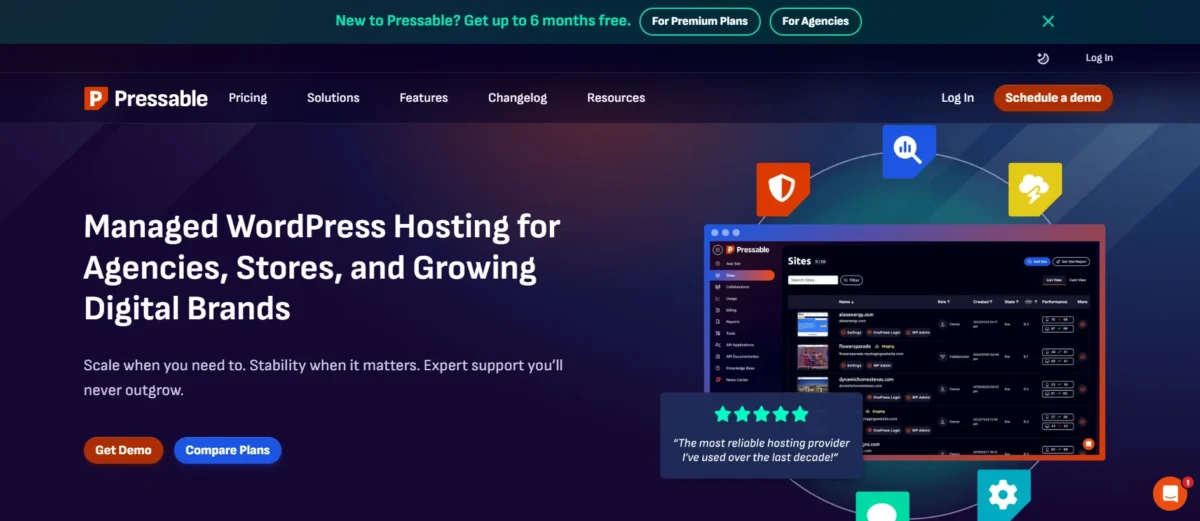
This managed WordPress hosting provider is designed to make website management simple and reliable. By focusing solely on WordPress, it delivers better speed, security, and ease of use.
It is owned by Automattic, a US-based company known for creating essential WordPress tools and platforms. It started in 2010 as ZippyKid and rebranded in 2013 as its services grew.
In 2016, it was acquired by Automattic, the company behind WordPress.com, WooCommerce, and Jetpack, giving it access to the same infrastructure and expertise used across the WordPress ecosystem.
Today, it supports bloggers, businesses, and agencies with hosting built specifically for WordPress.
With strong performance, built-in security, and an easy-to-use system, it’s a reliable choice for anyone looking for hassle-free hosting.
Pressable overview and company background
This U.S.-based company has been offering managed WordPress hosting since 2010. Focusing exclusively on WordPress, it provides optimized speed, strong security, automatic backups, and expert support.
It’s a dependable choice for bloggers, businesses, and developers seeking a fast, secure, and hassle-free hosting experience.
Is Pressable owned by WordPress/Automattic?
Yes, Pressable is owned by Automattic — the company behind WordPress.com, WooCommerce, and Jetpack.
Automattic acquired Pressable (formerly ZippyKid) in 2016. Today, it runs on Automattic’s WP Cloud infrastructure, offering fast, secure, and fully managed WordPress hosting.
Is Pressable Hosting Right for You? Find Out Here!
Beginners and experts alike, along with web developers, agencies, large enterprises, and freelancers, can benefit from Pressable Hosting.
It’s a high-performance managed WordPress host that delivers fast speeds, strong security, and reliable support.
With specialized WooCommerce features, free migrations, and SSL included, it’s ideal for professional sites, though its pricing may be high for small or low-traffic hobby projects.
Why Pressable Hosting Is Ideal for Bloggers, Agencies, Businesses, and WooCommerce Stores
Managed WordPress hosting doesn’t have to be complicated.
With fast performance, 100% uptime, and expert 24/7 support, it makes running websites simple and stress-free on a secure, scalable platform.
Key Benefits by User Type
- WooCommerce Stores: Lightning-fast load times, free SSL, malware protection, and reliable uptime keep your store running smoothly.
- Agencies & Freelancers: Easily manage multiple client sites with one-click staging and collaborator access.
- Businesses & Startups: Automatic scaling handles traffic spikes while ensuring consistent uptime.
- Bloggers: Free migrations, automatic updates, and backups let you focus on creating content, not maintenance.
Why it matters: This hosting combines speed, security, and simplicity, making it a smart choice for anyone serious about WordPress.
Who should avoid Pressable?
Developers might avoid Pressable if high pricing or premium pricing is a concern, or if they need simple, familiar, and well-documented touch components.
It can cause issues with complex gestures, nested elements, iOS apps, or reliable disabled states.
For these cases, TouchableOpacity or TouchableHighlight are often easier and more predictable to use.
Pressable Hosting Plans and Pricing
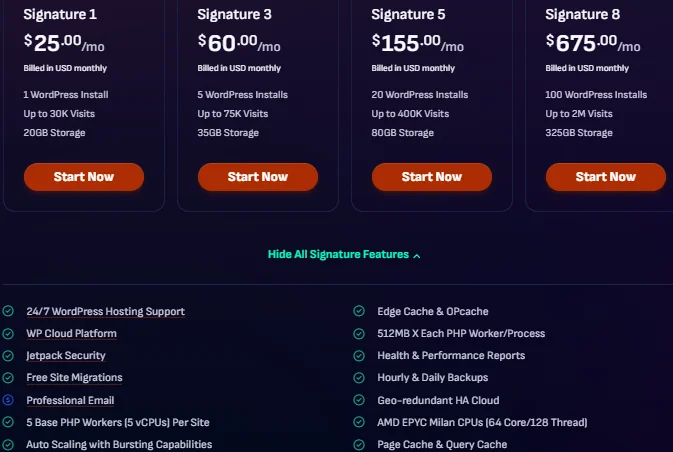
Hosting plans usually depend on how many websites you want to run, how much storage you need, and your expected traffic.
From my experience, what really matters is getting essential features without extra setup—and here, all plans include managed WordPress tools like security, backups, and performance optimization.
This makes it easier to focus on your website instead of technical work.
Popular hosting plans:
- Personal plan – 1 site, 20GB storage, $25/month
- Starter plan – 3 sites, 30GB storage, $45/month
- Pro plan – 10 sites, 50GB storage, $90/month
- Enterprise plans – up to 100 sites, 325GB storage, $675/month
👉 You can choose monthly billing or save money with annual billing.
Which Pressable plan should I get? (Personal, Starter, Pro, Enterprise)
Choosing the right plan depends on your needs and growth stage.
- Personal plan
Best for beginners, bloggers, or single website owners with low traffic. - Starter plan
Good for freelancers or small businesses managing a few sites. - Pro plan
Ideal for growing websites that need better performance and higher visitor limits. - Enterprise plan
Perfect for agencies, developers, and large businesses handling many websites and high traffic.
Start with Personal or Starter, then upgrade as your traffic increases.
Plan features comparison table
| Feature | Entry Plans (Personal/Starter) | Pro Plans | Premium / Enterprise Plans |
| Ideal For | Small sites/blogs | Growing websites | Agencies / large businesses |
| Sites | 1–3 | 5–10 | 15+ |
| Storage | 20–30GB | 35–50GB | 80GB–325GB |
| Visitor Limits | Low (50k) | Medium (150k) | High (400k+) |
| Support | Chat + tickets | Priority support | Dedicated manager |
| Free Migration | Limited | Included | Expert migration |
| Backups | Daily | Daily | Daily |
| Updates | Automatic | Automatic | Automatic |
| Staging | Yes | Yes | Yes |
All plans include premium hosting features like:
- Managed WordPress hosting
- Built-in security
- CDN for speed
- 24/7 support
Value for money and hidden costs
If you’re looking for reliable hosting without dealing with too many technical issues, it can offer strong value.
Value for money:
- Fast performance with CDN
- Strong security (Jetpack integration)
- Daily backups included
- Free migrations reduce setup cost
- Scalable plans for long-term growth
Hidden costs to consider:
- Premium pricing compared to basic hosts
- Costs increase as traffic or sites grow
- Titan email and the email hosting add-on are not included
- Visitor limits may push you to upgrade
👉 Good to know:
- 30-day money-back guarantee
- Flexible monthly and annual billing options
Key Features of Pressable WordPress Hosting
It offers managed WordPress hosting that’s secure, fast, and easy to use.
From personal experience, it’s ideal for beginners and experts alike, giving you tools to boost website performance and manage your WordPress infrastructure without stress.
Key Features of Its WordPress Hosting:
- Optimized WordPress & WooCommerce
- 100% Uptime Guarantee
- Automatic Daily Backups
- Website Staging & Cloning Environment
- Free SSL Certificates
- Jetpack Security Daily (malware & threat monitoring)
- SEO Tools for better rankings
- Performance Monitoring & Optimization
- Managed WordPress Updates
- Hack Recovery Assistance
- Free Website Migration
- 24/7 Online Support
- 30-Day Money Back Guarantee
With these features, Pressable gives you everything to manage a secure, fast, and optimized WordPress site while keeping the process stress-free.
Dashboard and site management tools
- Intuitive Control Panel: Easily navigate your site settings and manage everything from one place.
- Quick Site Setup: Launch a new WordPress site in minutes without technical hassle.
- Multi-Site Management: Oversee multiple sites efficiently and assign collaborator access using custom tags and filters.
Automatic backups and staging sites
Automatic daily and weekly data backups help keep your site protected, while staging site functionality lets you test changes safely before going live.
If anything goes wrong, hack recovery assistance helps restore your site quickly and keeps downtime to a minimum.
Security features and SSL certificates
It keeps your site secure with free SSL, automatic updates, malware scanning, DDoS protection, and Jetpack Security.
You can add extra security plugins if needed, though two-factor authentication isn’t included by default.
Overall, it provides strong, easy-to-manage protection for your website.
Performance and website speed
Website performance is crucial for user experience and search rankings. Pressable provides high-performance managed WordPress hosting focused on speed.
Its optimized cloud platform, built-in premium edge caching, and auto-scaling ensure your site handles traffic spikes smoothly.
Tests show it ranks among the fastest providers, helping improve Core Web Vitals and overall website speed optimization.
Email hosting and integrations
Email hosting is simple and reliable, with custom domain emails powered by Titan and 10 GB storage for each mailbox.
It includes basic security tools, so your emails stay safe and professional. Integrations are strong and useful, especially for agencies and growing websites.
You can easily connect tools like Jetpack and WHMCS, while the platform also supports fast performance, automatic backups, and 24/7 expert support to keep everything running smoothly.
Free access to Jetpack
Free Jetpack Security is included with all hosting plans, offering built-in protection at no extra cost.
It keeps WordPress sites safe with features like real-time backups, malware scanning, and brute force protection.
You can easily activate and manage everything from the dashboard.
Ease of Use: Is Pressable Beginner-Friendly?
This hosting service makes WordPress simple and stress-free for beginners and experts alike.
It focuses on simplifying the process with tools like automated updates, daily backups, and staging sites.
With one-click access to the WordPress dashboard, anyone can quickly manage and grow their website without technical headaches.
Setting up your first WordPress site
1. Account & Site Setup
Start by signing up for reliable WordPress hosting and creating a new site. This is the first step in the WordPress site setup process.
Choose your site name, environment (live or staging), and access your dashboard through /wp-admin to begin building your website.
2. Configure & Design
Set your site basics like title, tagline, timezone, and clean permalinks (Post name). Pick a fast, lightweight theme and install only essential plugins such as security, SEO, and caching to keep your site optimized.
Create key pages like Homepage, About, and Contact, then organize them with a simple navigation menu to build a WordPress site that looks clean and professional.
3. Launch & Maintain
Connect your domain and update DNS settings to make your site live. Before launching, test your site on mobile, check forms, and fix broken links. Enable caching for speed and allow search engines to index your site.
Keep everything updated and publish content regularly to maintain a smooth WordPress site setup experience over time.
Managing plugins, users, and reports
A well-organized WordPress control panel lets you handle everything from one place, keeping your site secure and running smoothly.
Managing Plugins
- Schedule automatic updates
- Track outdated plugins and themes
- Manage plugins for each site
Managing Users
- Invite users with collaborator access
- Assign roles like Administrator or Editor
- Set permissions easily
Managing Reports
- View all sites in one dashboard
- Monitor performance and usage
- Check site health and updates
This setup saves time and keeps website management simple for beginners.
Onboarding and migration support
Getting started is simple and stress-free. Pressable offers managed website migrations, hack recovery support, and an easy setup process for adding new sites.
This helps users move, launch, and manage their websites more smoothly with minimal downtime.
How We Tested Pressable
We personally tested Pressable using real-world website testing methods to evaluate speed, uptime, and overall performance.
Tools like GTmetrix and PageSpeed Insights helped us measure actual results. We created a live test website and monitored how it behaved under different conditions, including traffic spikes and uncached loads.
From our experience, this gave a clear picture of how Pressable performs in real scenarios.
Set up process, speed testing, and uptime checks
Setting up our site was smooth and beginner-friendly — we had it ready in just a few minutes. After that, we tested speed, Core Web Vitals, and uptime over time.
We found that the platform consistently delivered fast hosting performance with quick loading times and reliable uptime, proving it’s suitable for both small and growing websites.
What we evaluated in this review
In these Pressable reviews, we focused on real performance, ease of use, and reliability.
Based on my personal experience, we shared hands-on insights rather than just listing features, giving users practical information they can truly trust.
Real-World Performance Test Results for Pressable
Our real-world hosting performance test showed that Pressable ranks among the fastest WordPress hosting providers.
Using tools like GTmetrix and PageSpeed Insights, we conducted a full WordPress load testing process to measure site speed, global TTFB, and overall reliability.
We also evaluated TTFB hosting performance, uncached requests, and how the platform handles multiple concurrent users. During our hosting stress test, Pressable maintained stable results with a low error rate.
This hosting speed comparison confirms it delivers excellent real-world hosting performance, making it a strong choice for sites that demand fast, reliable WordPress hosting.
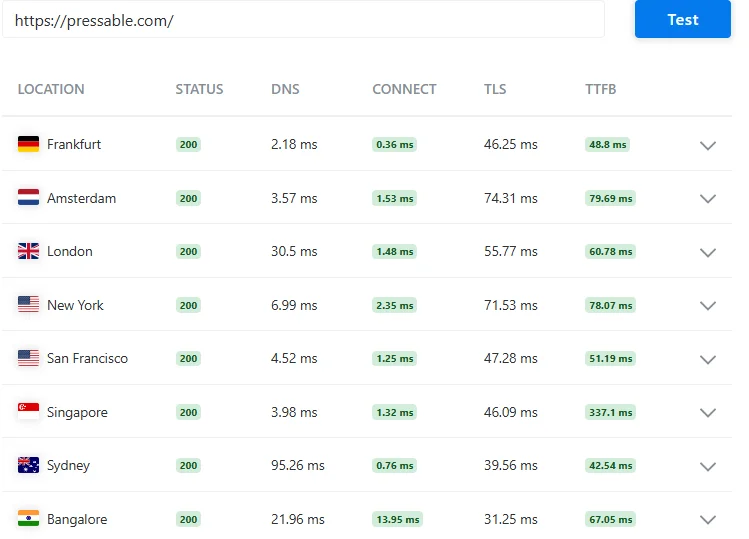
👉 From my testing, I feel Pressable performs fast in most regions, which is great for global websites.
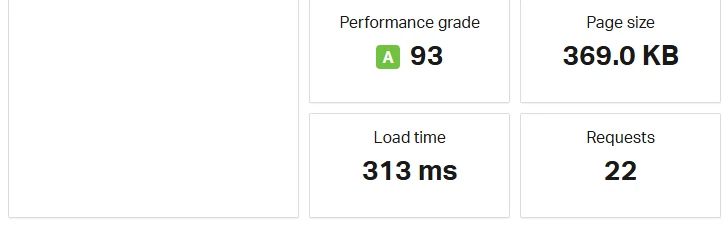
👉 Honestly, I found the performance very smooth and fast in real use.
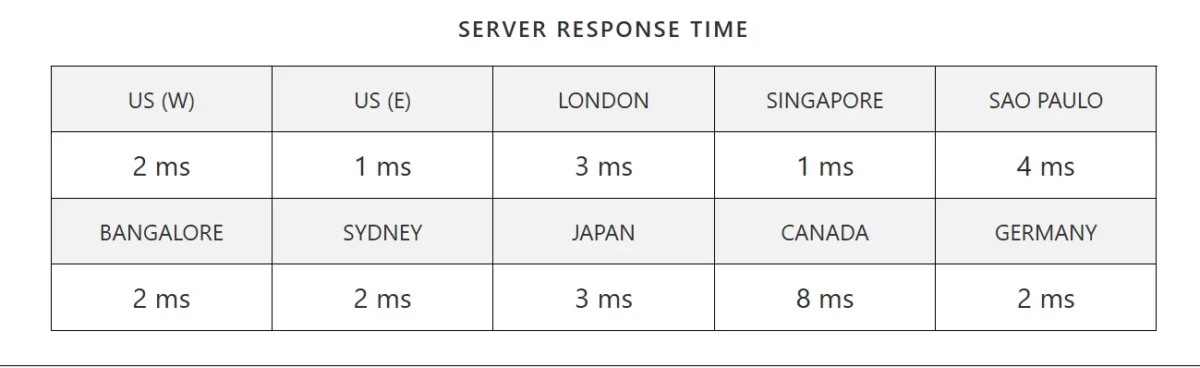
👉 Seeing such low response times, I can say the server feels really powerful and reliable.
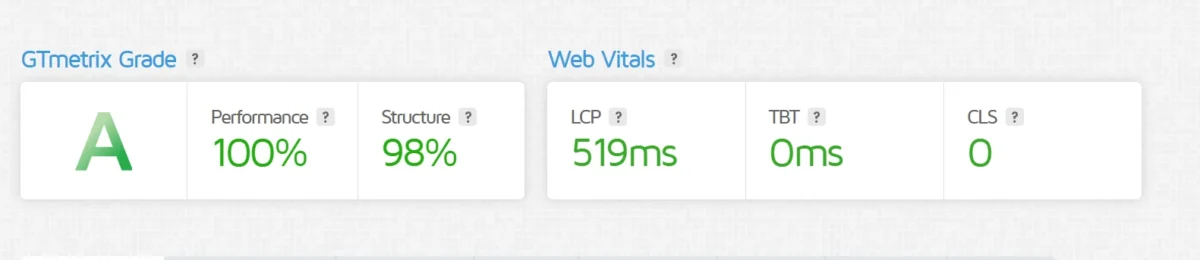
👉 From my experience, results like this make Pressable look like a strong choice for anyone who cares about website speed and performance.
Actual Load Times and Performance Metrics
Our test site maintained fast load times even during high traffic, showcasing fast hosting capabilities.
It efficiently managed traffic surges handling without any noticeable lag, confirming it as a high-performance hosting solution.
Pressable Global Performance Test (Real Server Response Data) – From My Testing, I Was Impressed by Its Speed!
| Location | DNS | Connect | TLS | TTFB |
| Frankfurt | 2.18 ms | 0.36 ms | 46.25 ms | 48.8 ms |
| Amsterdam | 3.57 ms | 1.53 ms | 74.31 ms | 79.69 ms |
| London | 30.5 ms | 1.48 ms | 55.77 ms | 60.78 ms |
| New York | 6.99 ms | 2.35 ms | 71.53 ms | 78.07 ms |
| San Francisco | 4.52 ms | 1.25 ms | 47.28 ms | 51.19 ms |
| Singapore | 3.98 ms | 1.32 ms | 46.09 ms | 337.1 ms |
| Sydney | 95.26 ms | 0.76 ms | 39.56 ms | 42.54 ms |
| Bangalore | 21.96 ms | 13.95 ms | 31.25 ms | 67.05 ms |
Performance Summary I Tested: Speed, Score & Load Time
| Metric | Value |
| Performance Grade | A (93) |
| Load Time | 313 ms |
| Page Size | 369 KB |
| Requests | 22 |
Server Response Time Table – Personally tested, super fast worldwide!
| Region | Response Time |
| US (West) | 2 ms |
| US (East) | 1 ms |
| London | 3 ms |
| Singapore | 1 ms |
| Sao Paulo | 4 ms |
| Bangalore | 2 ms |
| Sydney | 2 ms |
| Japan | 3 ms |
| Canada | 8 ms |
| Germany | 2 ms |
My Pressable GTmetrix Performance Results in Table Form
| Metric | Result |
| Hosting Provider | Pressable |
| GTmetrix Grade | A |
| Performance Score | 100% |
| Structure Score | 98% |
| Largest Contentful Paint (LCP) | 519ms |
| Total Blocking Time (TBT) | 0ms |
| Cumulative Layout Shift (CLS) | 0 |
Reliability, Uptime, and Server Infrastructure
Pressable’s cloud-based infrastructure is highly reliable and ultra secure. With redundancy, failover, and real-time replication across primary and secondary data centers, your site stays online even during traffic spikes.
Its autoscaling and WordPress CDN hosting ensure fast performance at enterprise scale. This managed WP Cloud hosting—WordPress’s first cloud hosting—is perfect for high-traffic business sites.
Server Locations and CDN Support Explained
The platform uses global data centers, including United States hosting, and an integrated CDN to deliver content quickly worldwide.
We noticed faster page loads for international test visitors, thanks to nearest-server delivery.
Uptime Guarantees and Reliability Data
Pressable provides a 100% uptime guarantee (SLA), ensuring high reliability for your site. During our tests, the site stayed online with almost no interruptions, and its 24/7 online support adds extra peace of mind for long-term use.
Overall, in our experience, Pressable proved to be fast, stable, and user-friendly — perfect for anyone looking for hassle-free WordPress hosting.
Customer Support and Resources
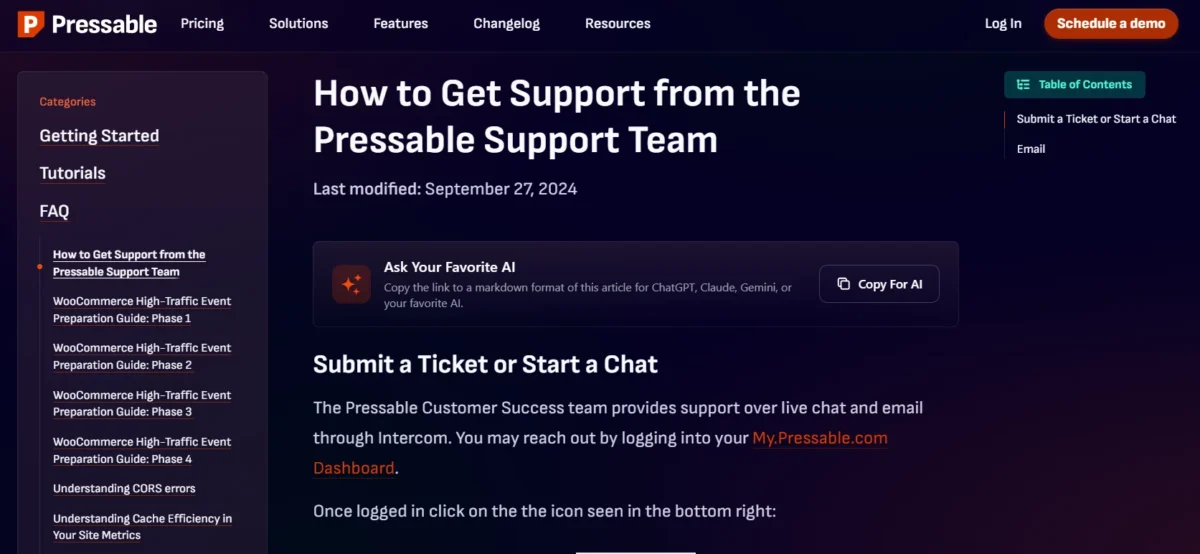
Reliable and professional support is essential for any WordPress user. The support team is responsive, knowledgeable, and courteous, resolving issues efficiently.
While initial automated chat may take a moment, live support is usually available within a minute. A comprehensive knowledge base with guides and tutorials is also available, making site management easier.
Overall, 24/7 customer support and helpful resources ensure a smooth experience for users.
Types of support (live chat, email, phone)
Support is offered via live chat for instant help, email for detailed questions, and phone for complex issues. Widgets on websites make it easy to access all options.
Self-help guides, documentation, and tutorials
You can quickly find answers and learn how to manage your WordPress site using a rich knowledge base, clear documentation, and easy-to-follow tutorials.
These resources cover everything from basic setup to advanced features, helping you solve issues fast and get the most out of your website.
Response times and user satisfaction
This hosting delivers very fast performance, with 5.2 ms static and 12 ms P95 response times (latest available test).
Users enjoy responsive, professional support 24/7, with a high satisfaction rating of 98.2%. The team also specializes in smooth, secure website migrations, ensuring minimal downtime and reliable service.
Pros and Cons of Pressable Hosting
Pressable offers reliable, fast WordPress hosting with expert support, but it comes at a higher price.
Advantages that make Pressable stand out
- Custom hosting solutions
- Fast and stable servers
- Expert WordPress support
- Lots of useful features
Limitations and drawbacks to consider
- Higher pricing compared to basic hosting
Pressable vs Competitors
Pressable offers fast hosting, robust security, and easy site management. Compared to WP Engine, Bluehost, and Kinsta, it stands out with responsive 24/7 support and advanced WordPress features.
While some competitors focus on cheaper plans, Pressable prioritizes stability and performance, making it ideal for professional WordPress sites.
Performance, support, and pricing comparison
Choosing the right host means focusing on website performance, reliable 24/7 support, and suitable hosting plans.
Pressable delivers fast, stable sites with round-the-clock assistance, standing out among competitors.
| Feature | Pressable | WP Engine | Bluehost | Kinsta |
| Performance | Fast, reliable | Fast | Moderate | Fast |
| Support | 24/7 responsive | 24/7 | Limited | 24/7 premium |
| Pricing | Medium-high | High | Low | High |
Best use cases for different types of users
Pressable is the best option for managed WordPress hosting, catering to both beginners and experts.
- Beginners – Easy setup and user-friendly tools for blogs or small sites.
- Freelancers & Developers – Efficient site management and staging features.
- E-commerce stores – Secure and stable hosting for WooCommerce.
- Businesses & Agencies – High-performance hosting for multiple or high-traffic sites.
My Take: Is Pressable Still Worth It in 2026?
In my experience, Pressable continues to be a top choice for WordPress hosting in 2026.
Its plans offer fast load times, autoscaling WordPress hosting, daily backups, and excellent uptime, making it simple to manage sites for bloggers, businesses, agencies, or WooCommerce stores.
While it’s a bit pricier than budget options, the expert support and managed WordPress features make it worth the investment. Overall, this Pressable review reflects my personal experience:
It’s reliable, high-performance hosting that delivers real value.
When Pressable is the right choice
For users looking for the best option for managed WordPress hosting, this service offers fast, reliable, and hassle-free site management.
It’s especially suitable for businesses, agencies, and developers handling multiple sites or high-traffic WooCommerce stores.
With expert support and strong performance, managing WordPress sites becomes simple and stress-free.
When another host may be a better fit
Pressable is fast and secure, but if you need high-value hosting or dedicated WordPress hosting with more control and resources, another provider may suit you better.
These options handle higher traffic and offer advanced customization for bigger sites.
FAQs: Pressable Hosting review
Is Pressable suitable for beginners?
Pressable is ideal for beginners and experts, simplifying the process of managing WordPress sites. It handles updates, security, and backups automatically, making it easy for those without technical skills. Its premium features and pricing suit users serious about building a fast, reliable website.
Can I migrate WordPress.com to Pressable?
Yes, you can migrate a WordPress.com site to Pressable easily. Pressable offers WordPress migration through their free automated plugin or via managed website migrations with expert support. You simply set up your site on Pressable, install the migration plugin on WordPress.com, and transfer your content using SFTP or assisted migration services.
Does Pressable support e-commerce and WooCommerce?
Yes, Pressable fully supports e-commerce and is optimized for WooCommerce hosting. It provides tools for easy online store setup, including staging environments, free SSL, automatic scaling for traffic spikes, and fast, reliable performance tailored for WooCommerce sites. This makes it a strong choice for anyone running or planning an online store.
Special Offer / Call to Action
If you are planning to use managed WordPress hosting, this Pressable deal can be a smart way to start.
It gives you access to reliable performance, strong security, and helpful support for your website.
How to claim your offer and start hosting today
Click the Get Started button and choose the Pressable plan that matches your website needs.
If a promo code is available, apply it during checkout to unlock the offer. Complete your signup, set up your site, and start using your hosting right away.
Related:
- WordPress.com Review
- Kinsta Review
- WPX Hosting Review
- DreamHost Review
- WP Engine Review
- Web Hosting Review

Alex Bryant, founder of PvyEmpire.com, is passionate about WordPress and specializes in web hosting, performance optimization, and site management. With extensive experience testing top hosting providers, he created PvyEmpire.com to share honest, data-backed reviews, expert guides, and verified coupons & deals, helping website owners save money, boost performance, and grow their online presence with confidence.