WordPress.com Review 2026: Is It Worth Your Time?
This WordPress.com review shows why it’s a powerful, flexible website builder worth learning if your site is a big part of your business strategy. Perfect for content-rich sites, it supports website growth with premium features and top-tier plans, making website content management and site optimization easier for any online business.
Overview
- Starting Price: $4/month
- Performance: <1.2s load times
- Security: Managed updates & protection
- Ease of Use: Simple, beginner-friendly, but the editor is less flexible than full drag-and-drop
Verdict: Great for hassle-free hosting and AI-ready CMS. Self-hosted WordPress is better for full control or advanced customization.
Pros:
- Quick and easy setup
- Hosting included
- Affordable compared to certain managed WordPress hosts
- Free trial available
Cons:
- Higher cost than some similar managed hosting plans
- Certain features need an annual subscription
- Premium features come only with pricier plans
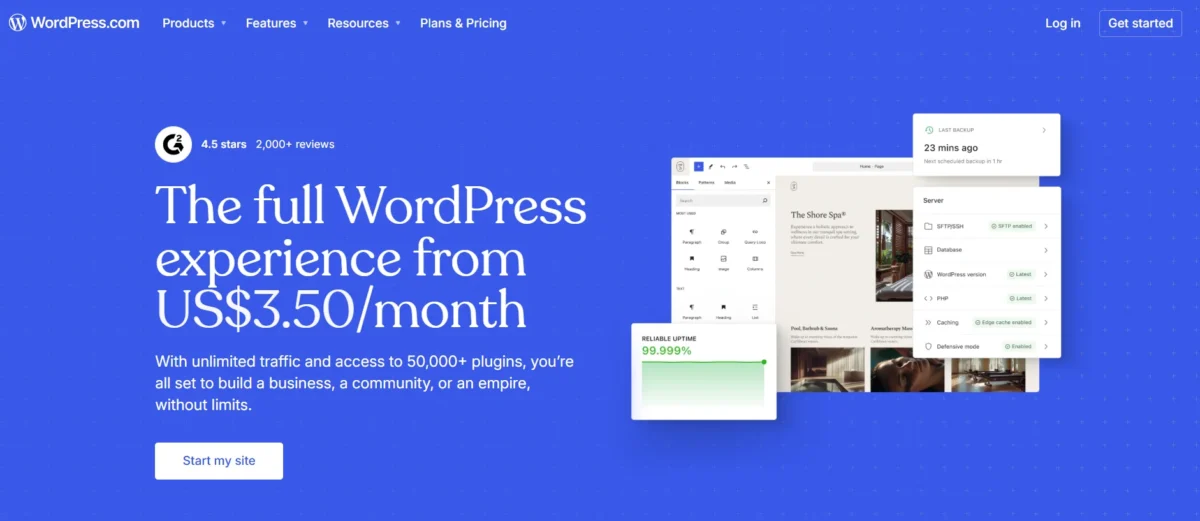
Is WordPress.com worth it in 2026?
I’d say WordPress.com is still a strong choice in 2026 if you want hassle-free hosting and a feature-rich, AI-ready CMS.
It works well for bloggers, creatives, and small businesses like yours looking to grow without managing servers. While it’s not the fastest option, you can rely on it for scalable and reliable performance.
Who should use WordPress.com?
- First-time website builders who want a smooth start – WordPress.com makes starting easy without overwhelm.
- People who want zero technical maintenance – Updates, backups, and security are handled automatically.
- Bloggers and content creators focused on publishing – Focus on writing, videos, or podcasts, not coding.
- Anyone needing reliable hosting without research – No need to compare or test hosting providers.
- Small businesses looking for a simple website – Ideal for consultants, photographers, and designers with basic needs.
- Users who value high-quality support – Paid plans provide expert help when necessary.
- Those who want to launch quickly – Get a site live in hours instead of days.
- People who want to avoid hosting headaches – No need to learn DNS, servers, or databases.
Who should skip WordPress.com?
- Need Specific Plugins for Your Project: Better to go self-hosted if the Business plan is too expensive.
- Running a High-Volume eCommerce Store: Transaction fees on WordPress.com make it costly at scale.
- Want Complete Control Over Your Website? Self-hosted WordPress allows full customization and server access.
- Working With a Tight Budget: Cheaper hosting options outside WordPress.com may fit better.
- Require Email Hosting Included: WordPress.com doesn’t provide built-in email solutions.
- Building Complex Membership Sites: WordPress.com may not support intricate setups.
- Learning WordPress Development Skills: Self-hosted WordPress offers the best hands-on learning environment.
What Is WordPress.com and What Is It Used For?
What WordPress.com Is: I see WordPress.com as a fully managed platform that makes building websites simple. It takes care of all the technical tasks for me, like security, updates, and backups, so I can focus on creating content.
What It’s Used For: Originally, it was created for blogging, but I now use it for many types of websites. I’ve seen it handle online stores, membership sites, media galleries, and even learning platforms, depending on the plan I choose.
It also gives me marketing tools, flexible themes, and plugin options to grow my site.
How WordPress.com works for beginners
- Beginner-Friendly Platform – WordPress.com is designed for people with little to no technical experience.
- All-in-One Website Builder – It hosts your website, manages security, and handles updates automatically.
- No Coding Needed – Users can create blogs or websites without writing any code.
- Simple Onboarding – You start by signing up and choosing a theme for your site.
- Block Editor for Page Building – The platform provides a visual editor to design and organize content easily.
- Automatic Technical Management – WordPress.com takes care of SSL certificates, updates, and other backend tasks.
What websites can you build with WordPress.com?
From blogs to online stores and membership platforms, WordPress.com supports scalable, responsive websites with AI-powered content tools and SEO optimization.
Is WordPress.com a good website builder?
WordPress.com is a reliable website builder, especially strong for blogging and content management. Its flexible block-based editor works well for both beginners and experienced users.
Paid plans unlock full functionality, including plugins, advanced tools, and premium support, making it suitable for businesses, portfolios, and growing websites.
WordPress.com vs WordPress.org: Which One Is Better?
- WordPress.org: Self-hosted, full customization, but requires technical skills.
- WordPress.com: Managed hosting, simple setup, less control, ideal for beginners and creators.
Beginners & Bloggers: WordPress.com
Growing Businesses / High Customization Needs: WordPress.org
Key differences in hosting, control, and customization
| Feature | WordPress.com | WordPress.org |
| Hosting | Built-in hosting, automatic backups, SSL, high-tier plans use WP Cloud. | Self-hosted, full control over server and performance. |
| Control | Limited access, must follow rules, support included. | Full server & database access, full control. |
| Customization | Plugin/theme limits on lower plans, code editing restricted, branding & monetization limited. | Unlimited plugins/themes, full code editing, full branding & monetization freedom. |
Which option is better for beginners, bloggers, and businesses
Beginners (Just Starting)
Best Choice: WordPress.com
Why: It’s ready to use with no need to buy hosting or install software. You can start immediately without a technical setup. The free plan shows ads and uses a subdomain, which looks less professional.
Bloggers (Serious / Monetizing)
Best Choice: WordPress.org (Self-Hosted)
Why: Offers full control over SEO, plugins, and monetization. You can use AdSense, build a professional brand, and customize your site completely. Requires managing hosting, security, and backups.
Businesses (Professional / Growing)
Best Choice: WordPress.org (Self-Hosted)
Why: Provides customization, high performance, and complete ownership. Supports tools like WooCommerce and advanced plugins to scale a business. Setup and maintenance need slightly more effort.
When self-hosted WordPress makes more sense
Self-hosted WordPress is ideal when you want complete control and ownership of your website. It allows unlimited customization, so you can install any theme or plugin, modify code, and create exactly the features you need.
This option is best for technically skilled users, businesses, or creators running high-traffic sites, online stores, or membership platforms.
It also provides advanced security options, full access to backups, and professional oversight, making it perfect for projects that demand reliability, scalability, and flexibility beyond what managed platforms can offer.
WordPress.com Plans and Pricing Explained
Is WordPress.com free?
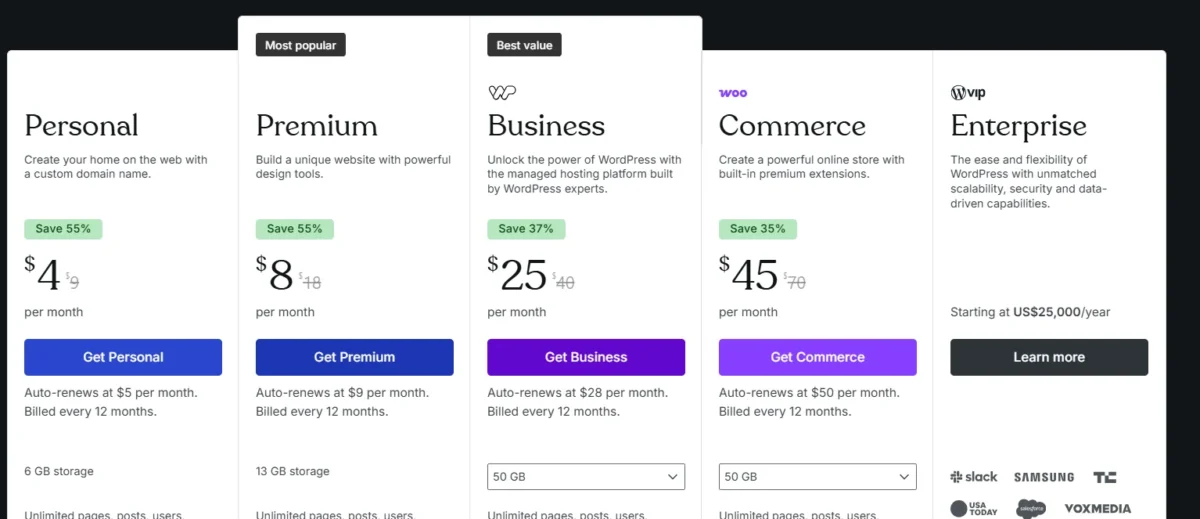
WordPress.com’s free plan includes hosting, a subdomain, and basic security. It shows ads, limits customization, and has 1 GB of storage. Paid plans remove these limits.
Free vs Personal vs Premium vs Business vs Commerce
- Free ($0/month) – Basic, ads shown, hobby blogs.
- Personal ($4/month) – No ads, custom domain, basic blogging.
- Premium ($8/month) – Advanced design, monetization, freelancers.
- Business ($25/month) – Plugin support, SEO tools, growing sites (Best for conversions/affiliate recommendation).
- eCommerce ($45/month) – Small-to-medium online stores.
Which WordPress.com Plan Is Worth Buying?
For most users, the Creator Plan (formerly Business) is the best choice, offering full control, essential plugins, and advanced customization.
Smaller or professional blogs may do well with the Premium Plan, which provides ad-free publishing and a simple setup. Choose a plan that fits your website goals and growth needs.
Hidden costs, renewals, and long-term value
Hidden costs: Free plans show ads, and paid plans may still require extra spending on themes, storage, or advanced features.

Renewals: Intro prices can increase after the first year, so long-term costs may be higher than expected.
Long-term value: You save time with managed hosting and easy setup, but limited control and add-ons can make it more expensive over time compared to self-hosted WordPress.
Getting Started: Is WordPress.com Beginner-Friendly?
Yes, WordPress.com is a beginner-friendly, easy website builder that handles all the technical setup for you.
You can launch a website in minutes without any coding, making it perfect for small businesses, bloggers, or anyone who wants a hassle-free start.
Quick Launch Steps
- Sign up: Create an account and pick a free or custom domain.
- Choose a theme: Select a simple design to get started.
- Add key content: Pages like About, Contact, and your main posts.
- Publish: Go live in minutes with no coding required.
Ease of Use for Non-Technical Users
- Intuitive dashboard: Easily manage pages, posts, and media.
- Block editor: Drag-and-drop page building with simple layout control.
- AI website builder: Generate a ready-to-go site in minutes.
- Pre-designed themes: 140+ mobile-friendly options with easy customization.
- Managed service: Security, backups, and updates handled automatically.
Design, Themes, and Website Customization
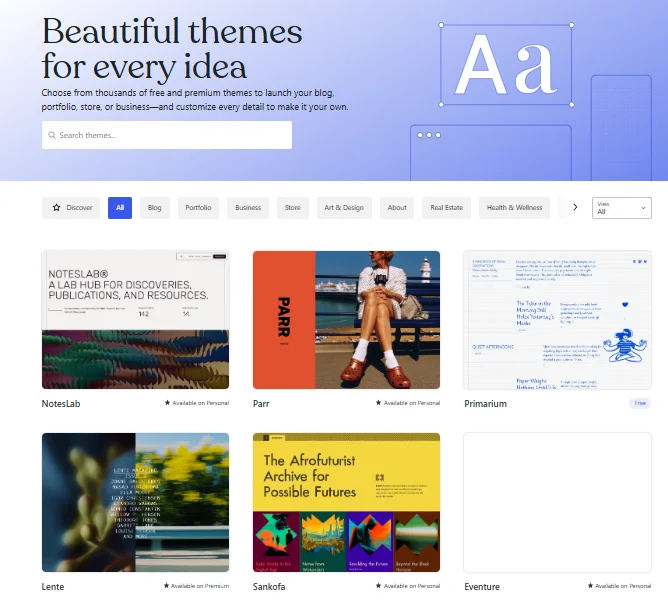
WordPress.com makes website customization easy with a drag & drop editor and thousands of mobile-ready themes, letting you adjust layouts, colors, and fonts with full creative control.
Templates and theme quality
- Wide Selection: Hundreds of free and premium themes for blogs, portfolios, and online stores.
- Customization Options: Adjust layouts, colors, fonts, and other design elements without coding.
- Mobile-Responsive: Themes automatically adapt to phones, tablets, and desktops.
- Optimized Performance: Fast-loading designs that are SEO-friendly.
- Secure & Reliable: Regular updates and built-in security ensure your site stays safe.
- Professional Look: High-qualit Why provides customization, high performance, and complete ownership. Supports tools like WooCommerce and advanced plugins to scale a business. Setup and maintenance need slightly more effort. Your designs give your website a polished, trustworthy appearance.
Block editor, page builder, and customization flexibility
Block Editor – Its block editor lets you design pages using individual blocks for text, images, galleries, buttons, and more. You can edit headers, footers, and templates with a live WYSIWYG view.
Page Builder – It now acts like a full page builder with block patterns, reusable blocks, third-party add-ons, and the query loop builder for dynamic content.
Customization Flexibility – Its global styles and per-block settings let you control fonts, colors, spacing, and visibility. Developers can add custom CSS or HTML for advanced tweaks.
How much design freedom do you really get?
On it, your website design flexibility grows with your plan.
Basic plans limit you to preset themes and simple tweaks, while Business and Commerce plans unlock full customization, letting you add plugins, upload themes, and edit every part of your site for complete creative freedom.
Features That Matter Most in 2026
In 2026, WordPress.com focuses on AI content tools, fast performance, mobile-first design, and accessible, block-based themes.
These WordPress features make website management efficient, offering all-in-one solutions that reduce the need for heavy plugins.
Blogging, content publishing, and media management
It offers easy blogging, secure hosting, intuitive block editing, and smooth media management for growing your online presence.
Plugins, integrations, and advanced website features
You unlock powerful features as your site grows, especially on higher plans. With access to plugins and integrations, you can connect tools, improve SEO, and add advanced functions without touching code.
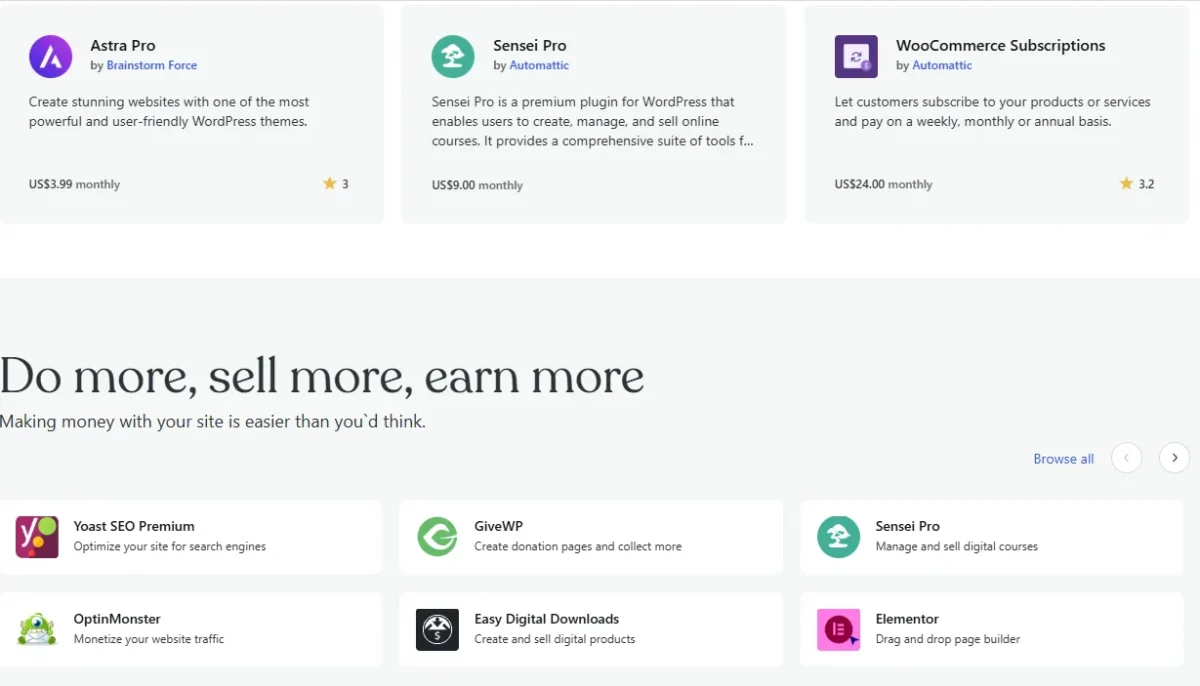
It gives you real flexibility to scale—from simple sites to full-featured platforms.
AI tools and built-in productivity features
It includes powerful AI content generation tools and productivity features right in the dashboard.
They help automate site management, design, and content creation. Users can produce quality content much faster using Jetpack AI and the native block editor.
Memberships, monetization, and creator tools
The platform helps creators grow their audience and learn how to monetize a website.
It simplifies membership management, community building, and monetization while offering analytics to turn engagement into income.
WordPress.com for SEO: Can You Rank on Google?
Yes, WordPress.com sites can rank well on Google. It includes built-in WordPress SEO tools and supports key optimization features.
With the right SEO strategy, your site can gain better visibility in search results.
Built-in SEO tools and limitations
It offers essential SEO tools by default, giving every site a foundational boost. Full control over advanced elements like Schema markup and detailed sitemaps is limited to higher-tier plans or those with plugin support.
Upgrading is necessary for more sophisticated SEO management.
Blogging, indexing, and content optimization
Blogging, indexing, and content optimization focus on creating a clear content hierarchy and making information easily discoverable.
Proper use of headings improves readability and allows search engines to interpret content accurately. Strategic keyword placement boosts visibility and helps content reach the right audience.
Is WordPress.com good for affiliate marketing and organic traffic?
It is easy to use, but it limits monetization and SEO flexibility. Its rules restrict high-volume affiliate promotions, making it less ideal for serious affiliate marketing.
For stronger organic traffic and full affiliate potential, self-hosted WordPress.org performs much better.
Performance Test: Is WordPress.com Fast and Reliable?
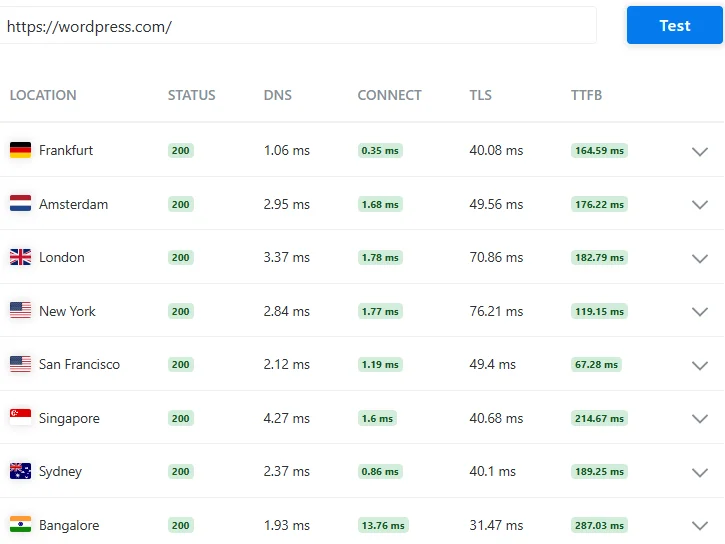
WordPress.com delivers strong speed and reliability, and from what I’ve seen, it performs consistently well in real-world use. Even on basic plans, sites load quickly with solid Core Web Vitals, which is honestly impressive for beginners.
As you move to higher tiers, performance gets even better with features like CDN and edge caching, helping your site load faster across different regions without much effort on your side.
Speed, uptime, and core web performance
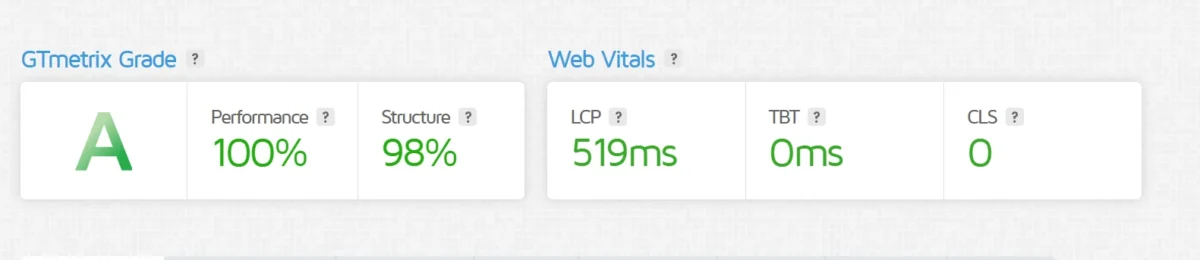
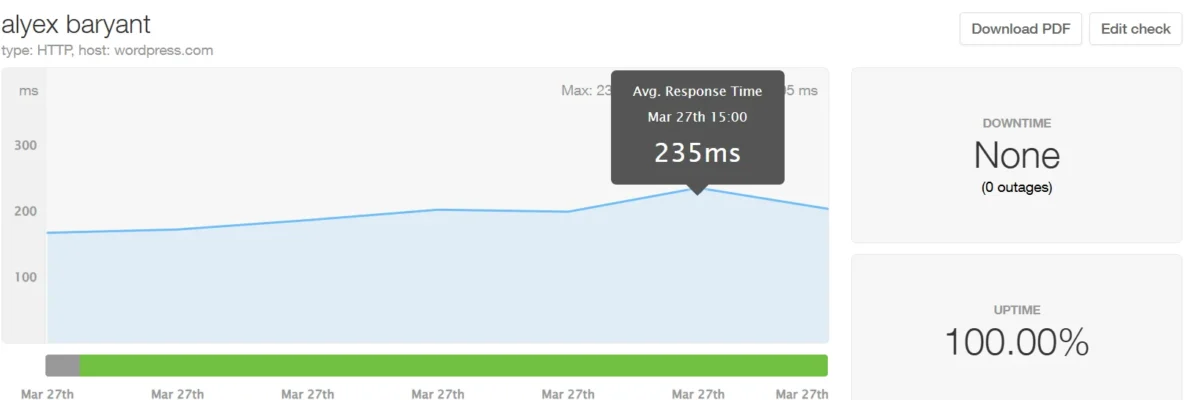
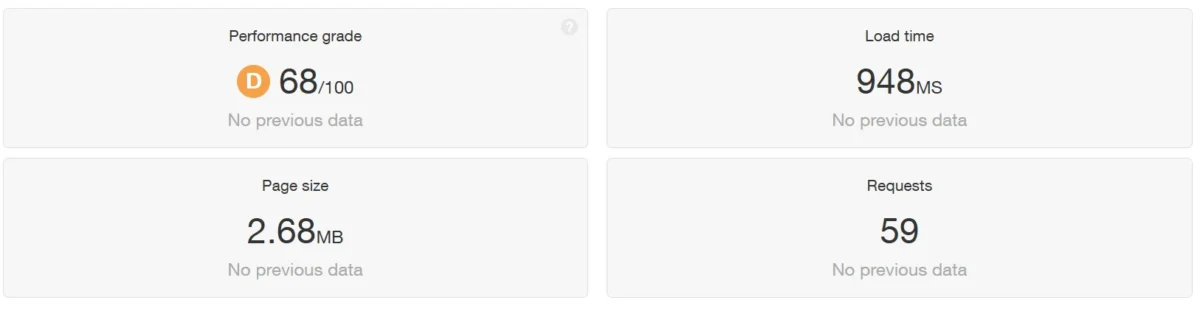
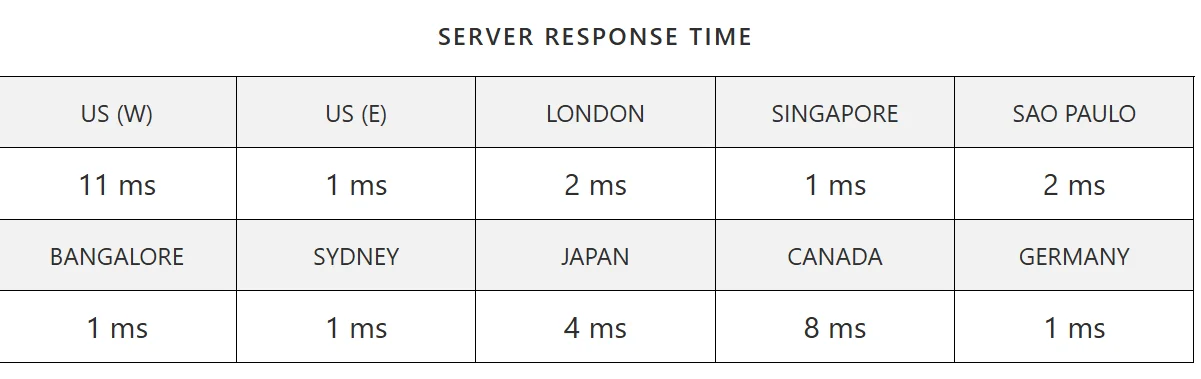
It showed almost flawless uptime in testing, with no recorded outages. Performance remained stable across all checks.
Uptime: Using Pingdom, the site was tested every minute from multiple locations, and it consistently met its 99.999% uptime promise.
Core web performance: Google cares about how your site actually feels to users, not just how it looks. Core Web Vitals measure speed, responsiveness, and stability, and they directly affect rankings.
If your pages load fast, react quickly, and don’t shift around, both users and search engines trust your site more—leading to stronger visibility and engagement.
Tools for website speed optimization
To keep my website fast and responsive, I rely on a mix of testing tools and practical optimization techniques. These help me find issues quickly and improve performance step by step.
Google PageSpeed Insights – I use this to quickly identify what’s slowing down my site and get clear suggestions for fixing it.
GTmetrix – My go-to tool for detailed reports and tracking performance improvements after making changes.
Pingdom Website Speed Test – Helps me monitor real load times and understand how my site performs for actual users.
WebPageTest – Useful for testing speed across different devices, browsers, and locations for deeper insights.
CDN / Edge Caching (e.g., Cloudflare) – Delivers content faster worldwide by serving it from the nearest server.
Caching Plugins (e.g., WP Rocket) – For WordPress sites, this significantly reduces load times by storing static versions of pages.
Image Optimization Tools (e.g., TinyPNG, ShortPixel) – I use these to compress images without sacrificing quality, which improves speed.
Tip: I get the best results by combining these tools with script minification and lazy loading.
How WordPress.com compares for performance in real use
In real-world use, you’ll notice that WordPress.com performs reliably, especially on Business and Commerce plans.
Its cloud infrastructure, built-in caching, and global CDN help your site load faster and stay stable compared to typical shared hosting.
Security, Backups, and Site Management
On WordPress.com, you get strong website security features that keep your site safe and well-maintained.
Built-in security and maintenance
On WordPress.com, I don’t worry about malware—Automattic handles all malware protection for me. Here’s what it covers:
- Automatic WordPress core updates
- 24/7 security monitoring
- DDoS protection
- Brute force attack prevention
- Spam filtering
Backups, updates, and spam protection
On WordPress.com, I never stress about losing my site—daily backups happen automatically. Restoring content is just one click, and it works flawlessly.
- Automatic daily backups
- Easy one-click restore
- Built-in spam protection
- Automatic updates
What WordPress.com handles for you
On WordPress.com, I don’t panic when a post goes viral—managed WordPress hosting handles it all. Their platform scales automatically, keeping my site stable while I focus on content.
- Effortlessly handles sudden traffic surges
- Prevents server crashes during high traffic
- Reliable infrastructure for millions of daily visitors
- No manual scaling or server management needed
Can You Build an Online Store With WordPress.com?
Yes, WordPress.com makes it surprisingly simple to create your own e-commerce website. Personally, I found that even beginners can quickly set up a store, add products, and manage payments through PayPal.
On Business or Commerce plans, you also get tools for inventory, shipping, and taxes, so your store runs smoothly without stress.
Plus, as your business grows, you can customize and enhance your site with plugins, giving your store a truly personal touch that reflects your brand.
Ecommerce features and store setup
Creating a professional e-commerce website is simple with WordPress’s built-in store builder. The Commerce plan gives you all the tools needed for a smooth online store setup, from managing products to accepting payments securely.
Start by installing WooCommerce (Plugins → Add New → WooCommerce) and running its setup wizard to configure currency, payment methods, and store details.
Pick a WooCommerce-compatible theme to make your store visually appealing, then add products with clear images, prices, and inventory. Configure shipping and tax rules to automate operations.
Before launching, test your store thoroughly to ensure everything works perfectly. With this approach, even beginners can complete their online store setup quickly and maintain a personal touch in branding and product presentation.
Payments, products, and online store management
WordPress.com makes running an online store simple and professional. Its Commerce plan, paired with WooCommerce, handles product management, shipping, and inventory automatically.
You can accept secure PayPal payments in 135+ currencies, while taxes and stock tracking are streamlined, giving your store full control with minimal hassle.
Is WordPress.com good enough for selling online?
I can handle online selling on WordPress.com, but I’ve found its real strength shows with the right plan. For content-rich sites that also want to sell, it works well.
In my experience, upgrading to the Business or Commerce plans unlocks key online store features, like using WooCommerce to manage products and sales smoothly—making running a store much easier.
Customer Support and User Experience
WordPress.com support shapes my experience: community help on free plans, email/chat on Personal, and 24/7 priority on higher plans for smoother site management.
Support channels and response quality
I get support based on my plan. I can use community forums on free plans, while paid plans give me email, chat support, and detailed guides.
On higher tiers, I receive faster, more personal assistance, ensuring my issues are resolved efficiently.
Documentation, tutorials, and beginner help
I have plenty of resources to get started and grow my site. I can follow step-by-step tutorials, read detailed guides, and use documentation for the block editor and site settings. Everything is built to help me navigate confidently as a beginner.
Common frustrations users face
Using WordPress.com can be frustrating at times. I sometimes struggle with the block editor, platform limits, and the cost of upgrades. The learning curve and ongoing maintenance also demand extra effort.
WordPress.com Pros and Cons
Biggest advantages
Pros – Benefits of WordPress:
- Quick and easy setup: I love how fast I can get a site live without headaches.
- Hosting included: Everything’s bundled, so I don’t have to worry about separate hosting.
- Affordable compared to some managed WordPress hosts: It won’t break the bank when starting.
- Free trial available: I can test it myself before committing any money.
Biggest limitations
Cons – WordPress Limitations:
- Higher cost than some similar managed hosting plans: I’ve seen cheaper options out there for similar services.
- Certain features need an annual subscription: Some tools only unlock if you pay yearly.
- Premium features come only with pricier plans: Advanced features aren’t free—you have to upgrade.
Deal-breakers before you buy – WordPress disadvantages:
- Cost vs. features: Some tools only come with higher-tier plans, which can affect your budget.
- Annual vs. monthly plans: Certain features require a yearly subscription.
- Customization limits: Not every plugin or tweak is allowed on lower plans.
- Scalability: Growing sites might need more flexible plans.
WordPress.com vs Top Alternatives
Here’s how a few WordPress.com alternatives stack up, based on my own experience.
WordPress.com vs Wix
Wix Advantages:
- Intuitive drag-and-drop website builder.
- Attractive ready-made templates.
- Quick start for beginners.
WordPress.com Advantages:
- Strong long-term scalability for growing sites.
- Flexible SEO options.
- Extensive plugin ecosystem (Business plan and up).
- Freedom from platform lock-in.
My Take:
Wix is great for fast, simple sites. WordPress.com is better for serious business growth and long-term control.
WordPress.com vs Squarespace
Squarespace Advantages:
- Stylish templates with strong visual appeal
- Great for creatives
- Simple all-in-one setup
WordPress.com Advantages:
- More customization options
- Strong blogging tools
- Better for SEO and scaling
My Take:
Pick Squarespace for design. Choose WordPress.com for growth and control.
WordPress.com vs managed WordPress hosting
Self-Hosted WordPress Advantages:
- Full ownership and control over your site
- No platform-based transaction fees
- Better suited for developers and advanced users
- Potentially lower costs over time
WordPress.com Advantages (Managed WordPress Hosting):
- No technical maintenance or updates required
- Reliable support when needed
- Easy and fast setup for beginners
- Consistent performance without manual effort
My Take:
I use both depending on the project. Self-hosted when I want full control, and managed WordPress hosting when simplicity matters more.
Best hosting for WordPress websites if you need more control
If you want full control over your site, the best hosting for WordPress websites is VPS hosting, dedicated servers, or managed cloud hosting with developer access.
These options let you customize the OS, tweak server settings, and use root access—features not available with shared or basic managed plans. They’re perfect for developers or advanced users who need maximum flexibility.
Expert Tip: The Best Use Cases for WordPress.com in 2026
If you want a website that is easy to launch and simple to manage, this platform makes a lot of sense. In my view, it works best for people who care more about convenience, security, and built-in hosting than full technical control.
Best for bloggers, creators, and simple business sites
It is a strong fit for bloggers, writers, creators, portfolios, and small-business websites that do not require heavy customization.
If your main goal is to publish content, build an audience, or create a clean online presence, it keeps the process much easier.
Best for affordable managed WordPress plans
It also works well for users who want managed WordPress hosting without managing updates, backups, performance, or security themselves. For beginners or busy site owners, that kind of simplicity can be worth paying for.
Real-world scenario: when it is the smart choice
From what I’ve seen, it is the better option when you want to launch quickly and avoid ongoing technical work.
It makes the most sense for personal brands, local businesses, service-based sites, and content-focused projects where stability matters more than deep flexibility.
Should You Really Choose WordPress.com in 2026? My Honest Take for Anyone Considering It
From my experience using WordPress.com for multiple projects, here’s my no-nonsense answer to the question: Should you use WordPress.com.
Best for beginners, small businesses, and content creators
- Ideal for beginners who want an easy, guided start without technical overload
- Great for bloggers and content creators focused on publishing, not maintenance
- Perfect for building a small business website with a clean, professional look
- Best for users who value time over money and prefer convenience over troubleshooting
- Suitable for non-technical people who avoid tools like servers or file managers
- Helpful for creators on the go, managing websites from mobile or tablets
When WordPress.com is not the right investment
- Not ideal for high-volume ecommerce stores where platform fees can eat into profits
- Poor fit for developers and agencies needing full server and code-level access
- Avoid if you’re extremely budget-conscious and comfortable handling technical setup to save money
- Limiting to power users who need advanced plugins without upgrading to higher plans
- Not suited for tech enthusiasts who enjoy tweaking hosting environments and server configurations
Final recommendation based on budget and goals
From my experience using WordPress.com, I can say it’s a great choice for beginners, content creators, and small businesses who want hassle-free hosting and built-in security.
Personally, I’ve found the Business plan hits the sweet spot between features and flexibility, letting you grow without stress.
If you want a reliable site without managing every technical detail, this is my final verdict—though power users or high-volume stores might prefer self-hosted WordPress for full control.
Exclusive Deal / Special Offer
If you want a WordPress.com discount, the smartest move is choosing the plan that gives you real value without paying for extras too early.
Best current plan for new users
For most beginners, the best WordPress plan is usually the one that keeps things affordable while still giving enough room to grow.
How to start with the lowest-risk option
The lowest-risk option is to start small, test what you actually need, and upgrade only when your site outgrows the basics.
FAQs WordPress.com review
Is WordPress.com trustworthy?
WordPress.com is secure and reliable, handling updates, backups, and security automatically. It’s ideal for users who prioritize convenience over advanced customization.
Is WordPress.com free forever?
The WordPress free plan lets you run a site indefinitely. It’s great for simple blogs but has limits like storage restrictions and ads. For full features and customization, a paid plan is needed.
Can you move from WordPress.com to self-hosted WordPress later?
You can easily migrate WordPress.com to WordPress.org by exporting your content and importing it into a self-hosted site. This gives full control over design and features.
Does WordPress.com provide customer support?
WordPress.com offers customer support, but what you get depends on your plan. Free users rely on community forums, while Personal and Premium plans add email and limited chat support. For serious help, Business and Commerce plans provide 24/7 priority support, and Enterprise accounts get a dedicated manager.
Related:
- Best WordPress Hosting for Beginners – 17 Tested Picks
- I Tested 17 Fastest WordPress Hosting 2026 Shocking Results!

Alex Bryant, founder of PvyEmpire.com, is passionate about WordPress and specializes in web hosting, performance optimization, and site management. With extensive experience testing top hosting providers, he created PvyEmpire.com to share honest, data-backed reviews, expert guides, and verified coupons & deals, helping website owners save money, boost performance, and grow their online presence with confidence.