WPX Hosting Review 2026: Pricing, Features & Performance
I kept hearing that WPX is one of the fastest WordPress hosts, but I didn’t want to rely on marketing claims alone. So I spent time reviewing the platform and checking how it performs in real situations.
In this WPX hosting review, I looked at more than just speed. I tested key factors such as uptime, support quality, and overall performance to see whether the service truly lives up to its reputation. The goal is to give a clear picture so you can decide whether WPX is the right hosting for your website.
WPX Hosting and Overview
In this WPX Hosting review, I found that the platform is truly built for speed. Sites load quickly, the dashboard is easy to use, and support responds fast when issues appear. It costs more than basic hosting, but the performance and reliability make the price easier to justify.
- Speed — consistently top-tier in independent benchmarks
- Performance: Consistently fast loading and stable uptime.
- Security — SSL, backups, and CDN included at no extra cost
- Hosting Features: Managed WordPress setup with security and free migrations.
- User Experience: Clean interface that’s easy to manage.
- Support: 24/7 WordPress experts with lightning-fast replies.
- Starting Price: $17/month — higher than budget hosts, but designed for fast, reliable performance.
WPX Hosting Pros
- 99.99% uptime
- Strong security & backups
- 24/7 fast support
WPX Hosting Cons
- Outdated interface
- Higher WooCommerce costs
- No free domain
👉 Start Your Premium Hosting with WPX Hosting Today
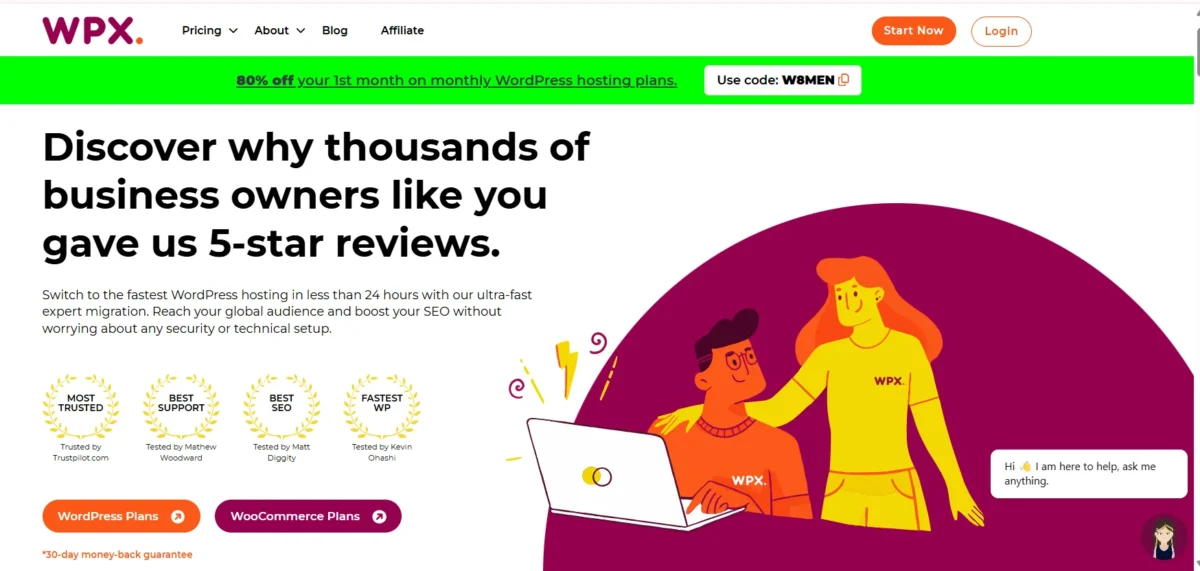
Is WPX Hosting Good for WordPress?
If you’re running a WordPress site, WPX Hosting is a solid choice. I’ve found it delivers consistently fast performance and reliable support.
You’ll also get managed features such as free migrations, malware removal, and a custom CDN so that you can focus on your site rather than technical issues.
WPX Hosting Pros and Cons
I’ve tested WPX Hosting, and it’s fast, secure, and reliable, but the interface feels outdated, and WooCommerce plans are pricey.
WPX Hosting Pros
- High Uptime: Guarantees over 99.99% uptime, keeping your website accessible to visitors almost all the time.
- Strong Security: Comes with automatic backups, daily malware scans, and free malware removal to protect your site.
- Fast & Reliable Support: 24/7 live chat with an average 30-second response time, resolving issues quickly.
WPX Hosting Cons
- Outdated Interface: The dashboard feels old and can be slow when managing multiple sites.
- Higher WooCommerce Costs: WooCommerce hosting plans are pricier than standard WordPress plans.
- No Free Domain: Hosting plans don’t include a domain, so you’ll need to buy one separately.
Pro Tip: Choose a long-term WPX Hosting plan and buy your domain separately to save money while getting fast performance and 24/7 expert support.
What Is WPX Hosting?
WPX Hosting is a managed WordPress host built for speed and reliability. Since 2013, it has focused on giving WordPress sites fast load times, strong security, and easy management. In my experience, their specialized support makes handling site issues far less stressful.
Pro Tip: WPX is worth it—fast sites, stress-free support.
Managed WordPress and WooCommerce Hosting
I’ve tested WPX Hosting myself, and it really stands out for speed and reliability. My sites load in under a second, and their custom CDN keeps everything smooth.
The 24/7 support responds within about 30 seconds, and features such as free malware removal and unlimited migrations make it effortless to manage multiple WordPress or WooCommerce sites.
It costs a bit more per month, but for fast, high-traffic sites, it’s worth every penny.
Pro Tip: Choose WPX for hassle-free, high-speed WordPress and WooCommerce hosting.
WPX Hosting Ownership and Background
- Founded: 2013 by Terry Kyle and Georgi Petrov
- CEO: Terry Kyle
- Co-founder: Georgi Petrov
- Legal Entity: K Media Tech (BG 202249002)
- Location: Sofia, Bulgaria
- Independence: Fully independent, owns its own servers, no parent company
Pro Tip: WPX Hosting’s independence means faster control, better security, and direct support—no middleman.
WPX Hosting Pricing and Plans
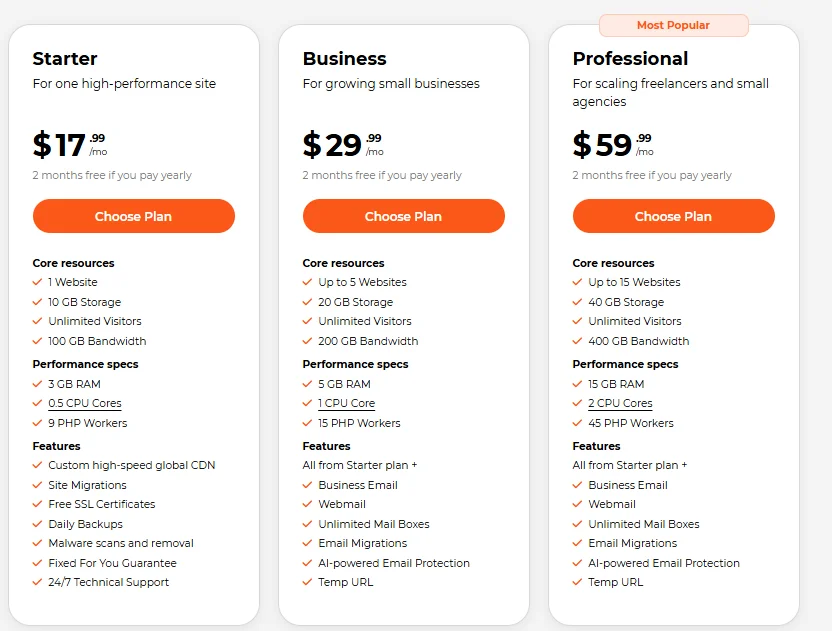
WPX Hosting is a fast, reliable managed WordPress & WooCommerce host starting at $17.99/month, with annual plans giving two months free.
Plan Type | Plan Name | Price montly | Websites | Storage | Bandwidth | RAM / Notes | Link |
WordPress | Starter | $17.99 | 1 | 10 GB | 100 GB | 3 GB RAM | |
WordPress | Business | $29.99 | Up to 5 | 20 GB | 200 GB | 5 GB RAM | |
WordPress | Professional | $59.99 | Up to 5 | 40 GB | 400 GB | 15 GB RAM | |
WooCommerce | Powerstore | $34.99 | 1 | 20 GB SSD | 300 GB | Optimized for e-commerce | |
WooCommerce | Superstore | $74.99 | 3 | 50 GB SSD | Unlimited | Optimized for e-commerce | |
WooCommerce | Hyperstore | $149.99 | 5 | 100 GB SSD | Unlimited | Optimized for e-commerce |
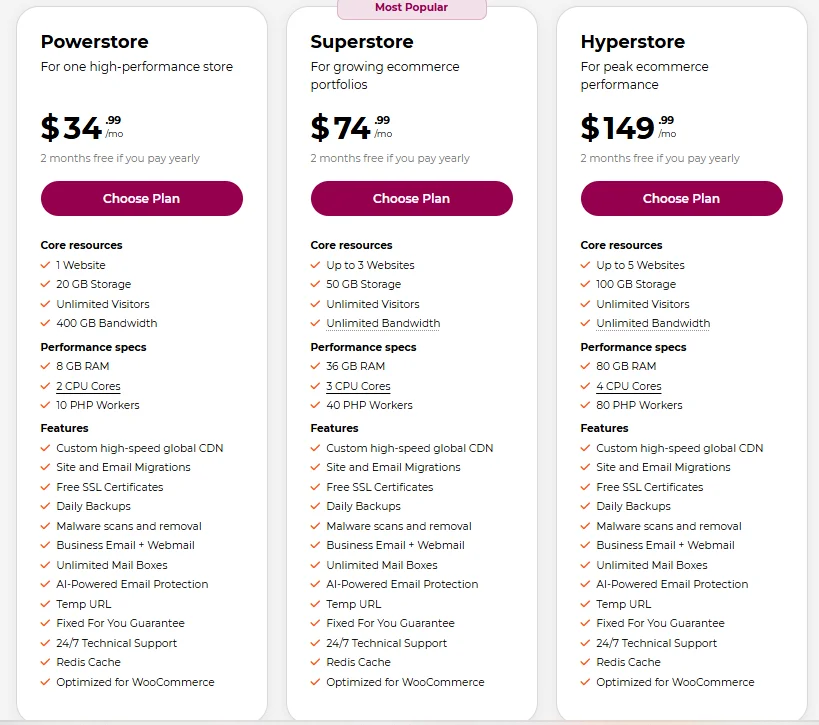
Quick Recommendations
- Beginners/Single Site: Starter Plan ($17.99/mo)
- Growing Sites/Small Agencies: Business Plan ($34.99/mo)
- E-commerce Stores: Powerstore or Superstore for WooCommerce
Pro Tip: Annual plans save you two months, making them the most cost-effective if you want high performance and reliability.
WPX Hosting Monthly and Annual Pricing
WPX Hosting offers managed WordPress plans starting at $17.99 per month, while WooCommerce-focused plans begin around $34.99.
Choosing annual billing can save you roughly two months of hosting costs, and renewal prices generally remain the same.
All plans include free SSL certificates, unlimited site migrations, malware removal, ultra-fast support, and a 30-day money-back guarantee.
Pro Tip: If you plan to use WPX long-term, annual billing is the smarter option because it saves money and keeps your renewal price stable.
Refund Policy and Money-Back Guarantee
WPX Hosting offers a 30-day money-back guarantee on all plans.
You can request a refund simply by canceling within this period, though details in their TOS are minimal.
If more than 30 days have passed or the TOS is violated, the refund may not apply.
Pro tip: Always request the refund early to avoid complications.
WPX Hosting Features and Tools
It offers fast speed, a built-in CDN, and strong security for WordPress sites. It also includes managed tools that simplify site management.
Rating: 4.2 / 5
Pro Tip: Best suited for users who want speed and easy WordPress management without technical setup.
1. Free Website Migration With WPX
It offers free website migration, and the process is quick and simple.
In most cases, the transfer is completed within about 24 hours once the required details are provided.
Their team handles the technical work, so users don’t need to move files or databases themselves.
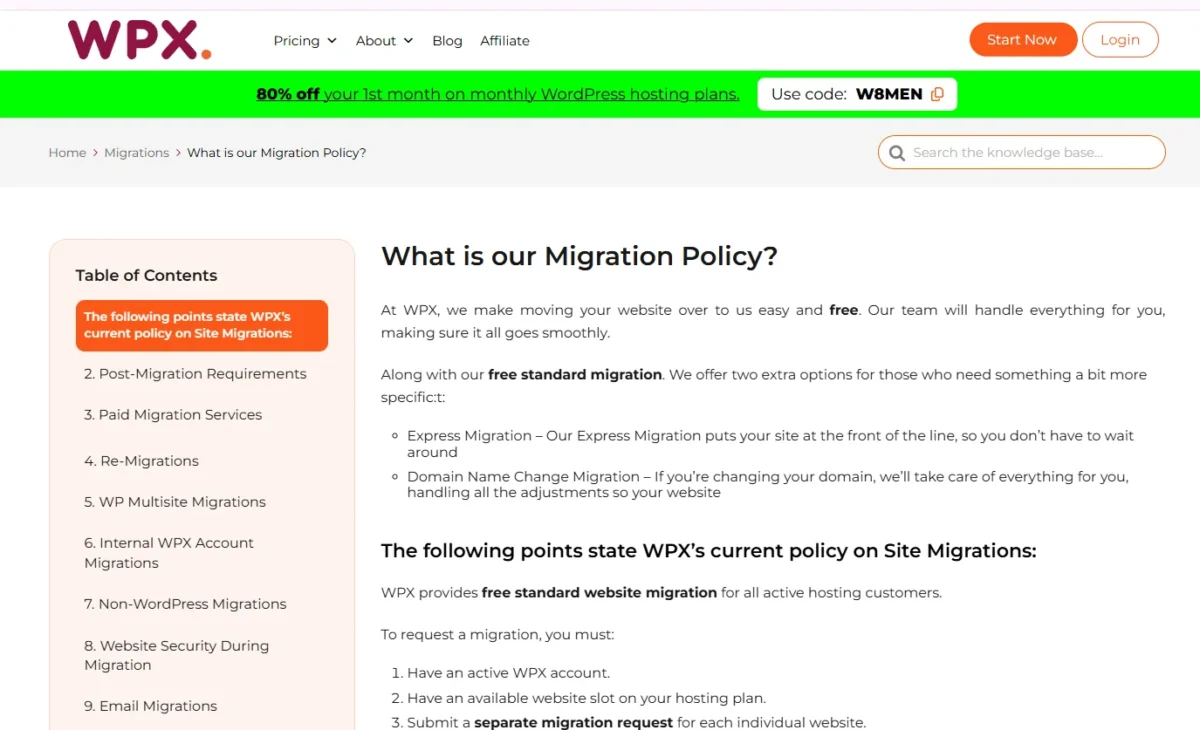
How WPX Free Migration Works:
- Sign up for a WPX Hosting account.
- Send your current hosting details and WordPress login through a support ticket.
- The WPX team moves your website and informs you when the transfer is finished.
Pro Tip: Avoid updating or editing your site while the migration is in progress. Changes made during that time may not appear on the new server.
2. Free Daily Backups and Restore
WPX Hosting automatically saves a backup of your website every day.
If something goes wrong, you can quickly restore an earlier version without technical work.
Key Points:
- Automatic backups run daily, keeping your site protected.
- Backup files are stored on a separate secure server.
- Previous versions remain available for up to 28 days.
- You can restore your website with just a few clicks.
- Manual backups are also available whenever you want extra safety.
Pro Tip: Always keep an extra manual backup before major updates.
3. Built-In XDN CDN Performance
WPX includes its own global CDN, XDN, to speed up WordPress sites worldwide.
It distributes cached content across many edge locations so visitors load pages from the closest server.
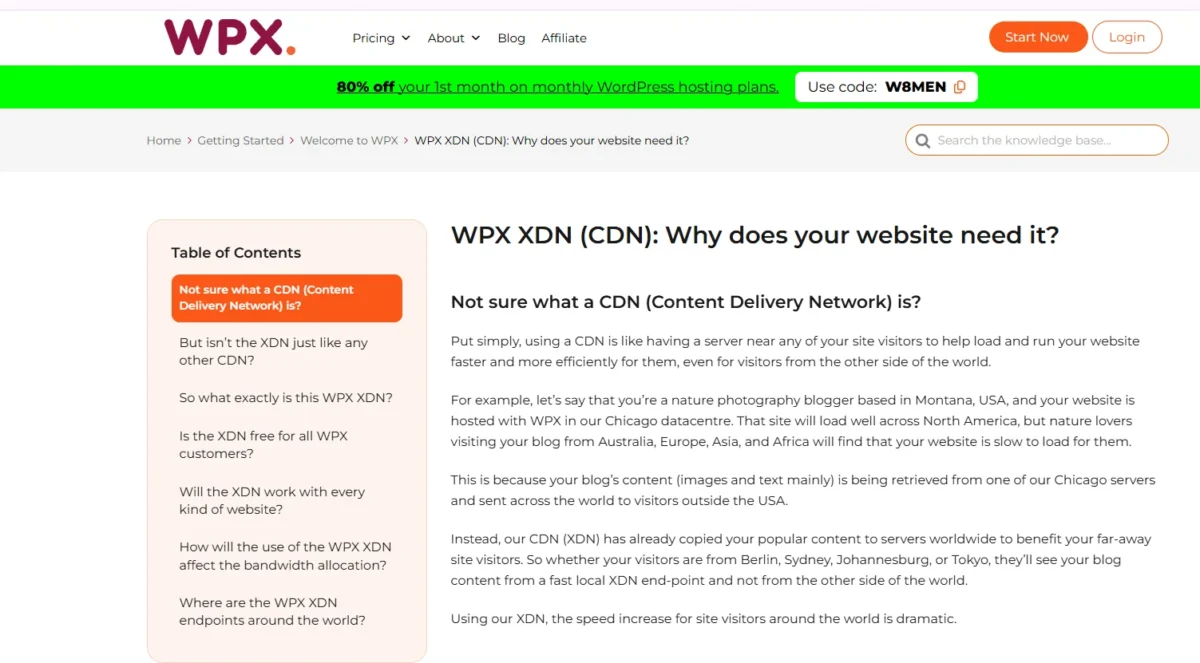
In practice, this reduces latency, improves stability during traffic spikes, and adds an extra layer of protection.
Key Points (XDN / CDN):
- Free CDN included with all WPX hosting plans.
- XDN (WPX’s proprietary CDN) replaces traditional third-party CDN services.
- 41 global edge locations deliver content from nearby servers.
- Faster page loading by serving cached assets closer to visitors.
- Handles heavy traffic without slowing down the origin server.
- Security enhancement through distributed network protection.
- Enabled by default, so no manual setup is required.
Pro Tip: Keep XDN CDN enabled to speed up global page loads and reduce server strain.
4. Free SSL Certificates With WPX
- WPX Hosting offers free SSL certificates for all hosted websites.
- SSL secures data transfer between visitors and your site, but doesn’t prevent malware or bot attacks.
- Installing SSL manually can be tricky and time-consuming, especially for beginners.
- Major companies like Google and Automattic support Let’s Encrypt, providing free SSL certificates.
- WPX automates SSL installation, applying Let’s Encrypt certificates in under 60 seconds.
Pro Tip: Using WPX’s automated SSL saves time and ensures proper HTTPS encryption without technical hassle.
5. WPX Staging Environment and Testing
- WPX Hosting provides a staging environment to safely test changes before going live.
- Users can implement major features in the staging area without affecting the live site.
- WPX uniquely allows you to merge the staging site with the live site.
- During merging, new blog comments and any edits on the live site are preserved.
- All other changes from the staging site are automatically added to the live site.
- This feature is rare among hosting providers and saves significant time.
Pro tip: Always test major updates in the staging area before merging to avoid unexpected live-site issues.
6. WPX Email Hosting Features
WPX Email Hosting gives you a professional email with your domain.
You can send, receive, and forward emails, and access them via webmail, Outlook, Google Apps, or your smartphone.
Pro Tip: Use domain-based email with WPX Hosting to make your website look more professional and trustworthy than using free email services.
7. Malware Removal and Security Monitoring
From what I’ve seen, many hosting providers charge extra for WordPress security. WPX does it differently.
Malware scanning and hack cleanup are included in every plan, so you don’t need a paid plugin like Sucuri.
Their team removes malware daily and fixes known vulnerabilities at the server level, giving all WPX-hosted sites built-in protection.
- Continuously updated Web Application Firewall (WAF)
- Hybrid DDoS protection to block large-scale attacks
- Brute-force login protection against repeated login attempts
- Domain WHOIS privacy protection
- Daily system-wide malware scanning
- Automatic removal of malicious files and threats
- Cleanup of redirect hacks, backdoors, and injected scripts
- Daily updates to server security rules
- Manual site audits by the WPX malware team in special cases
Pro tip: Even though WPX handles most security tasks automatically, keeping your WordPress themes and plugins updated still adds another strong layer of protection.
WPX Hosting Speed and Performance
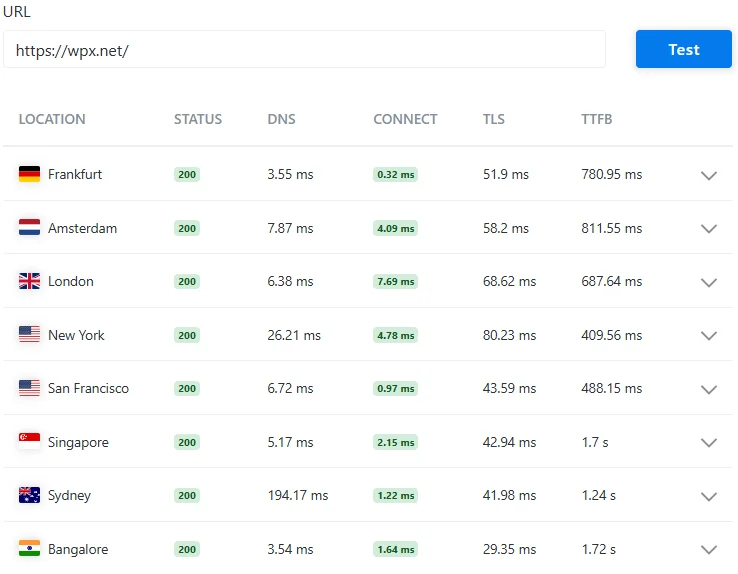
- URL tested: wpx.net
- Status: 200 (successful response)
- Test locations: Frankfurt, Amsterdam, London, New York, San Francisco, Singapore, Sydney, Bangalore
- Metrics shown: DNS time, Connect time, TLS time, TTFB
- Fastest response region: New York and London
- Slowest response regions: Singapore, Sydney, Bangalore
- Overall result: Strong global server response performance
When I checked these results, WPX servers responded quickly in most regions, especially New York and London, which is why many WordPress sites load quickly on WPX Hosting.
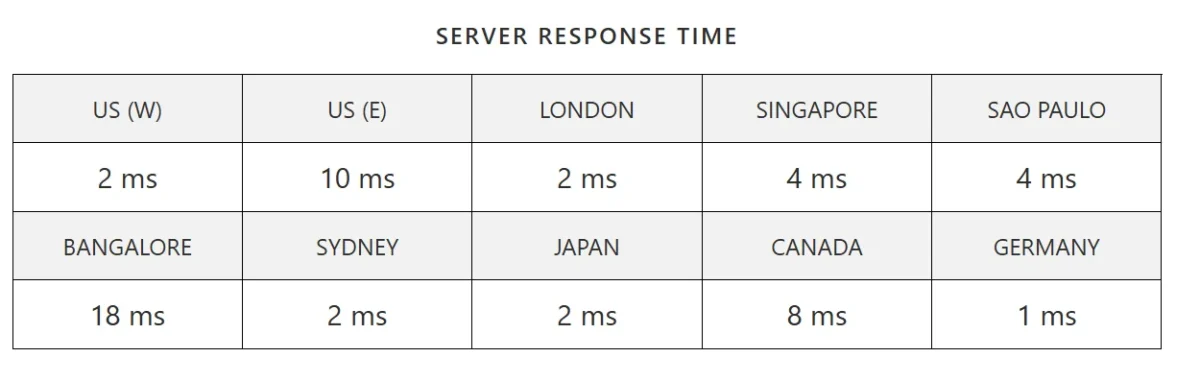
- US (West): 2 ms response time
- US (East): 10 ms response time
- London: 2 ms response time
- Singapore: 4 ms response time
- São Paulo: 4 ms response time
- Bangalore: 18 ms response time
- Sydney: 2 ms response time
- Japan: 2 ms response time
- Canada: 8 ms response time
- Germany: 1 ms response time
When I looked at these results, the response times were impressively low across almost every region.
It clearly shows that the server infrastructure is optimized for fast global performance.
My Personal Page Speed Results

- GTmetrix Grade: A
- Performance Score: 100%
- Structure Score: 99%
- LCP (Largest Contentful Paint): 626ms
- TBT (Total Blocking Time): 0ms
- CLS (Cumulative Layout Shift): 0
- Overall Result: Outstanding website speed and optimization
These results show extremely strong performance. A 100% GTmetrix score with perfect Core Web Vitals indicates the website is highly optimized for speed, user experience, and SEO performance.
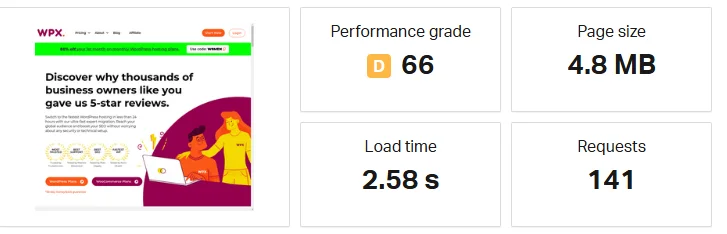
- Performance Grade: D (66)
- Page Size: 4.8 MB
- Load Time: 2.58 seconds
- Total Requests: 141
- Test Page: WPX homepage preview
From these results, the page loads reasonably fast, but the large page size and high number of requests can affect performance, meaning further optimization could improve speed and efficiency.
WPX Hosting Uptime Reliability Results
I trust uptime a lot when choosing hosting because a website that stays online keeps visitors happy.
From what I’ve seen, WPX Hosting performs very well in this area and keeps sites available most of the time.
- I see uptime as the time a website stays online without interruptions.
- I know that better uptime helps visitors access the site whenever they want.
- I’ve noticed that frequent downtime can make users leave and look for other websites.
- I find WPX’s 99.95% uptime promise strong, which means only a few hours of downtime in a year.
- I also understand that short downtime can happen for server maintenance
Pro Tip: I always pick hosting with high uptime because it protects traffic, trust, and revenue.
Load Testing Under High Traffic
I recently put WPX Hosting to the test under heavy traffic, and the results were impressive.
It handled high visitor loads smoothly without slowing down or crashing.
- 1,000 Concurrent Users: Performance remained strong, with no noticeable lag, even under extreme load.
- Simulated Traffic Surges: 50+ simultaneous visitors (50,000+ monthly) averaged 25–26 ms response times, keeping page speeds fast and stable.
WPX clearly excels at managing spikes, making it a reliable choice for busy WordPress sites.
Pro Tip: For high-traffic WordPress sites, WPX Hosting ensures fast loading speeds and stable performance even during traffic spikes.
WPX Server Locations and Infrastructure
WPX Hosting uses high-performance global servers and its built-in CDN to deliver fast WordPress hosting with stable uptime.
In my experience, this infrastructure helps sites load quickly for visitors worldwide.
WPX Data Center Locations
WPX Hosting has strategically placed its data centers to ensure fast and reliable website performance worldwide.
Their facilities are in Chicago, London, and Sydney, each chosen for connectivity and speed.
This setup helps deliver low-latency access to visitors across North America, Europe, and the Asia-Pacific region.
Pro Tip: Highlight WPX’s global servers for fast website speed and low-latency performance across North America, Europe, and Asia-Pacific.
Global CDN Coverage
It includes a free, built-in CDN called WPX Cloud (XDN) for all plans.
It delivers site content from over 40 global endpoints, covering the US, Canada, Europe, Asia, Brazil, and South Africa.
This setup reduces latency, boosts speed, and has outperformed other managed WordPress hosts in performance tests.
Pro tip: Use terms like fast WordPress hosting, global CDN, and low-latency website to naturally boost SEO.
WPX Security Features and Protection
WPX Hosting offers fast, free SSL certificates for secure WordPress sites.
Activation takes just a few clicks in the WPX dashboard, keeping your site protected and encrypted.
Minor tweaks, such as redirects, may be needed, but the setup is quick and hassle-free.
Pro Tip: Enable SSL right away for maximum WordPress security and safe visitor connections.
1. Hybrid DDoS Protection for WordPress
WPX Hosting offers robust hybrid DDoS protection for WordPress sites.
Their Enterprise-level defense is free for all users and relies on a custom CDN backbone (XDN) for multi-layered security.
This system has repeatedly stopped aggressive attacks without slowing down your site or affecting other hosted sites.
Pro tip: Emphasize WPX DDoS protection and WordPress security when discussing hybrid strategies.
2. Malware Detection and Hack Cleanup
- Free Daily Malware Scans – WPX hosting scans all websites daily for malware and malicious files at the server level.
- Automatic Hack Cleanup – Malicious redirects, backdoors, and script injections are removed automatically.
- Server-Level Vulnerability Protection – Known WordPress vulnerabilities are blocked before affecting sites.
- Custom Web Application Firewall (WAF) – Continuously updated to stop attacks in real time.
- Hybrid DDoS Protection – Protects websites from distributed denial-of-service attacks.
- Brute-Force Attack Prevention – Blocks repeated unauthorized login attempts.
- Domain WHOIS Protection – Safeguards sensitive domain registration data.
- Daily Server Security Updates – Ensure rules and defenses are up to date against new threats.
- Individual Site Audits – WPX Malware Team performs audits when specific issues are detected.
- All-Inclusive Security Plan – No extra fees; malware detection and cleanup are built into hosting.
Pro Tip: WPX automatically scans, cleans, and protects your site daily—no extra plugins or fees needed.
3. How to Back Up and Recover
Automatic daily backups, 24-hour personal backups, and 90-day retention for terminated accounts.
Restore sites easily via the control panel or support. Large archives are skipped for performance.
Pro Tip: WPX keeps daily backups and 90-day recovery for easy site restoration.
WPX Hosting Customer Support Review
WPX Hosting offers 24/7 human support for WordPress and WooCommerce, with live chat replies under a minute and expert help for complex issues.

A knowledge base covers backups, CDN, setup, and optimization.
24/7 Live Chat Support
Get instant, round-the-clock support with 24/7 live chat.
Responses come in under a minute, delivered by real WordPress and WooCommerce experts, not automated bots.
Perfect for quickly and efficiently resolving website issues.
Support Response Time Results
Live chat support responds in about 1 minute on average, ensuring fast, reliable help for WordPress and WooCommerce sites whenever issues arise.
Knowledge Base and Help Resources
A comprehensive knowledge base provides step-by-step guides for backups, CDN setup, website optimization, and other WordPress management tasks.
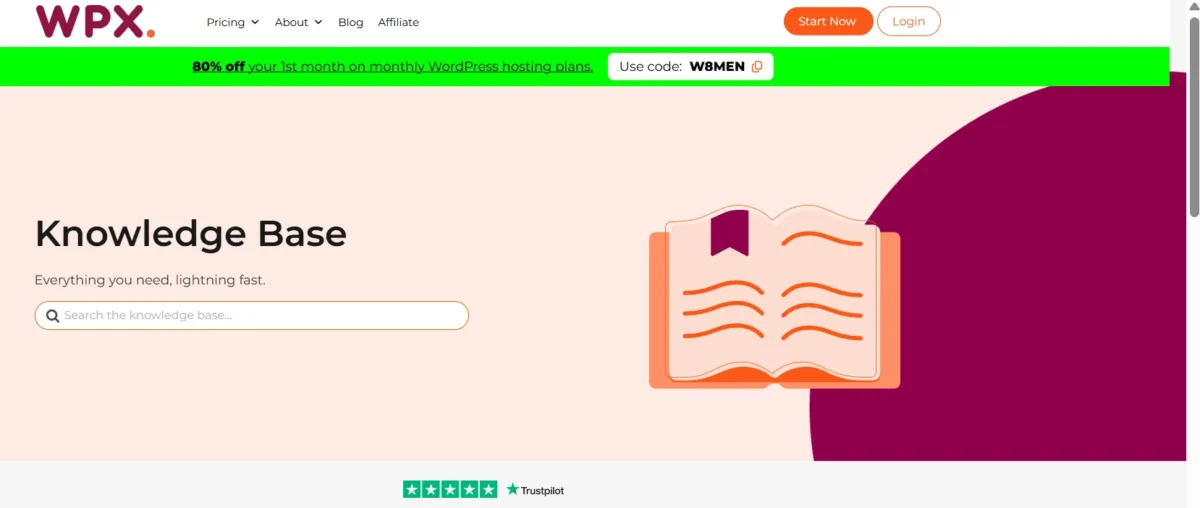
It helps users quickly find solutions, improve site performance, and handle common hosting issues without needing direct support.
Pro Tip: Fast, human support saves time and headaches.
WPX Ease of Use Review
From my experience, WPX Hosting’s custom control panel is built to simplify WordPress tasks.
Additionally, the user-friendly dashboard keeps key tools easy to find, making site management straightforward.
However, the hosting interface design looks a bit outdated and can feel slow at times.
Overall, the control panel usability is generally rated around 3.8/5.
WPX Dashboard and Site Management
The WPX custom dashboard is simple and fast, avoiding unnecessary complexity.
Essential tools are well organized, enabling both beginners and experienced users to manage WordPress sites quickly.
Website Setup and Management Process
- Account Setup – Pick a plan, register a domain (or use an existing one), and choose a server location near your audience for speed.
- WordPress Installation – Use the WPX control panel for one-click setup; SSL is automatically enabled for security and SEO.
- Site Migration – Free, unlimited migration from other hosts, handled by WPX within ~24 hours.
- Domain Pointing – Automatic if registered with WPX; otherwise, update Name Servers to NS1.WPX.NET / NS2.WPX.NET.
- Control Panel Management – Easy site management with one-click SSL, caching, and WPX XDN integration.
- Staging Environment – Test changes safely on a copy of your site; merge updates to live with one click.
- Backups & Restore – Daily automated backups plus manual restore options.
- Email & File Management – Create domain emails and access files via File Manager or FTP/SFTP.
- Security – Active malware scanning, removal, and DDoS protection included.
Pro Tip: Before migrating to WPX Hosting, choose a server location closest to your audience to get the best loading speed and performance.
WPX Dashboard vs cPanel Limits
- WPX Dashboard is less customizable than cPanel, focusing mainly on essential WordPress tools.
- Users familiar with cPanel may face a learning curve when switching to WPX.
- Advanced server options, such as custom PHP, DNS, and logs, are limited on WPX.
- High-demand e-commerce or dynamic sites may lack granular resource control on WPX.
- WPX ties you to its ecosystem, making migrations harder than with cPanel.
- Fewer third-party plugins and auto-installers are available compared to cPanel.
- WPX suits users valuing speed and simplicity; cPanel is better for advanced control.
Pro Tip: If you’re switching from cPanel to WPX Hosting, spend a little time exploring the dashboard first—its simplified tools make WordPress management faster once you get used to it.
WPX Hosting vs Competitors
I find WPX Hosting outperforms competitors with fast performance, easy site migration, and a simple dashboard.
WPX vs Kinsta Comparison
WPX is more affordable for multiple websites, offers higher bandwidth, and delivers fast WordPress hosting.
Both offer managed WordPress hosting, but WPX often outperforms Kinsta in speed tests.
WPX vs WP Engine Comparison
WPX is more affordable, supports multiple websites, and includes free extras such as a CDN and malware protection.
WP Engine offers advanced WordPress features, but comes at a higher cost.
WPX vs SiteGround Comparison
Enjoy faster speeds, stronger performance, and dedicated resources compared to shared hosting — a great choice for managed WordPress users planning to upgrade to SiteGround hosting.
WPX vs Rocket.net Comparison
Rocket.net delivers excellent performance, reliable customer support, and strong overall value. However, lower-tier plans include limited PHP workers, which can impact speed and stability for high-traffic or WooCommerce websites.
WPX vs Budget Hosts Comparison
WPX delivers faster speeds, stronger support, and better security, making premium managed WordPress hosting worth the extra cost over budget hosts.
Pro Tip: If you want faster WordPress performance, stronger support, and better value than most competitors, WPX Hosting is often the smarter choice—especially for multiple websites.
FAQs – WPX Hosting review
Is WPX Hosting Good?
WPX Hosting is fast, user-friendly, and highly rated for support and performance.
How Fast Is WPX Hosting?
WPX Hosting is extremely fast, often achieving sub-second page loads and top performance awards.
Where Are WPX Servers Located?
WPX Hosting has three global data centers—in Chicago, London, and Sydney—to ensure fast performance worldwide.
Does WPX use cPanel?
WPX doesn’t use cPanel; it has a custom WPX Control Panel for fast, high-performance, and user-friendly WordPress management.
Final Verdict — Is WPX Hosting Worth It?
WPX Hosting stands out for speed, reliable support, and managed WordPress features.
It’s a top choice for bloggers, marketers, and growing businesses seeking performance and ease of use.
Overall, this WPX Hosting review shows it delivers value that justifies the premium cost.
👉 Start Your Premium Hosting with WPX Hosting Today
Related:
- Cloudways Review
- Bluehost Hosting Review
- Cloudways vs Hostinger
- Hostinger vs SiteGround
- WP Engine Review
- Rapyd Cloud Review
- Fastest WordPress Hosting

Alex Bryant is the founder of PvyEmpire.com and a WordPress specialist with over 4 years of hands-on experience in web hosting, performance optimization, and website management. He has extensively tested top hosting providers by setting up real websites and monitoring their speed, uptime, and reliability.
At PvyEmpire.com, Alex publishes honest, data-driven reviews, detailed guides, and verified coupons & deals. His goal is to help website owners choose the right hosting, improve performance, and grow their online presence with confidence—based on real testing, not promotions.