What Is Cloud Hosting and Why Growing Websites Need It
Ever felt like your website is holding your business back? Maybe it crashes right when traffic picks up, or your hosting plan feels like it was built for a different era — slow, rigid, and frustratingly limited.
If you’ve been Googling “cloud hosting” at midnight, wondering if there’s a better way, you’re definitely not alone.
That’s exactly what this post is here to help with. We’re breaking down everything you need to know about cloud hosting, what it actually is, why so many businesses are switching to it, and how to figure out if it’s the right move for you.
No confusing jargon, just honest, practical insights to help you make a smarter decision for your website’s future.
TL;DR: Cloud Hosting
Short on time? Here’s the quick version of everything this article covers:
- Cloud hosting spreads your website across multiple servers instead of keeping it on just one.
- If one server fails, another instantly takes over — so your site stays online.
- You only pay for the resources you actually use, making it more flexible than traditional hosting.
- It scales up automatically when your traffic spikes and scales back down when it drops.
- It’s a strong choice for WordPress sites, ecommerce stores, growing businesses, and high-traffic websites.
Keep reading for the full picture — the details actually matter when choosing the right hosting setup.
Understanding Your Web Hosting Needs
Before you pick any hosting plan, it helps to understand what your website actually needs.
A small blog with a few hundred monthly visitors has very different requirements than a WooCommerce store running flash sales. Getting this wrong can cost you both in performance and in money.
Most people start with shared hosting because it’s cheap and simple. That works fine at first.
But as your site grows, you start hitting walls — slow load times, crashes during traffic spikes, limited storage, and support that feels like shouting into the void.
That’s usually the moment people start seriously asking what cloud hosting is and whether it’s worth the switch.
What Is Cloud Hosting? Definition And Core Concept
Cloud hosting is a type of web hosting in which your website runs on a network of connected virtual servers rather than a single physical machine.
Think of it like a power grid — rather than relying on one generator, you’re pulling from a whole network. If one source goes down, the others pick up the slack instantly.
At its core, cloud hosting uses virtualization technology to split physical servers into multiple virtual machines. Each website gets its own dedicated slice of resources — CPU, RAM, and storage — pulled from that larger pool.
This makes the whole setup far more flexible, reliable, and scalable than older hosting models.
How Does Cloud Hosting Work?
When someone visits your website, their request doesn’t go to a single server sitting in one room. Instead, it hits a cloud infrastructure made up of dozens or even hundreds of servers spread across multiple data centers.
A process called load balancing decides which server handles the request — always picking the one that’s least busy at that moment.
This is possible because of virtualization. A hypervisor (software that manages virtual machines) sits on top of physical hardware and creates multiple virtual machines, or VMs, from it.
Each VM acts like its own independent server. If one physical machine has a problem, your website simply shifts to another VM in the cluster — a process called failover — without any interruption. Your visitors never even notice.
Achieving AI-Readiness With Hybrid Cloud
Hybrid cloud setups are becoming especially important as more businesses start using AI-powered tools.
A hybrid cloud combines a private cloud (for sensitive data and core operations) with a public cloud (for burst workloads and AI processing).
This gives companies the security they need without giving up the raw computing power that AI models demand.
If your business is moving toward AI-driven features — personalization, recommendation engines, or predictive analytics — a hybrid cloud architecture gives you the flexibility to scale those workloads without rebuilding your entire infrastructure.
What Is Multi-Cloud Hosting?
Multi-cloud hosting means running your website or application across two or more cloud providers at the same time — for example, using both Amazon Web Services and Google Cloud together.
You’re not locked into one platform. Instead, you pick the best service from each provider and combine them to build a stronger, more resilient setup.
This approach is popular with larger businesses and enterprises because it removes the risk of being too dependent on a single vendor.
If one cloud provider has an outage — and it does happen, even with the big names — your traffic can shift to the other provider without your site going dark.
It also lets you optimize costs by using whichever platform offers the best price for a specific workload.
What Are the Types of Cloud Hosting?
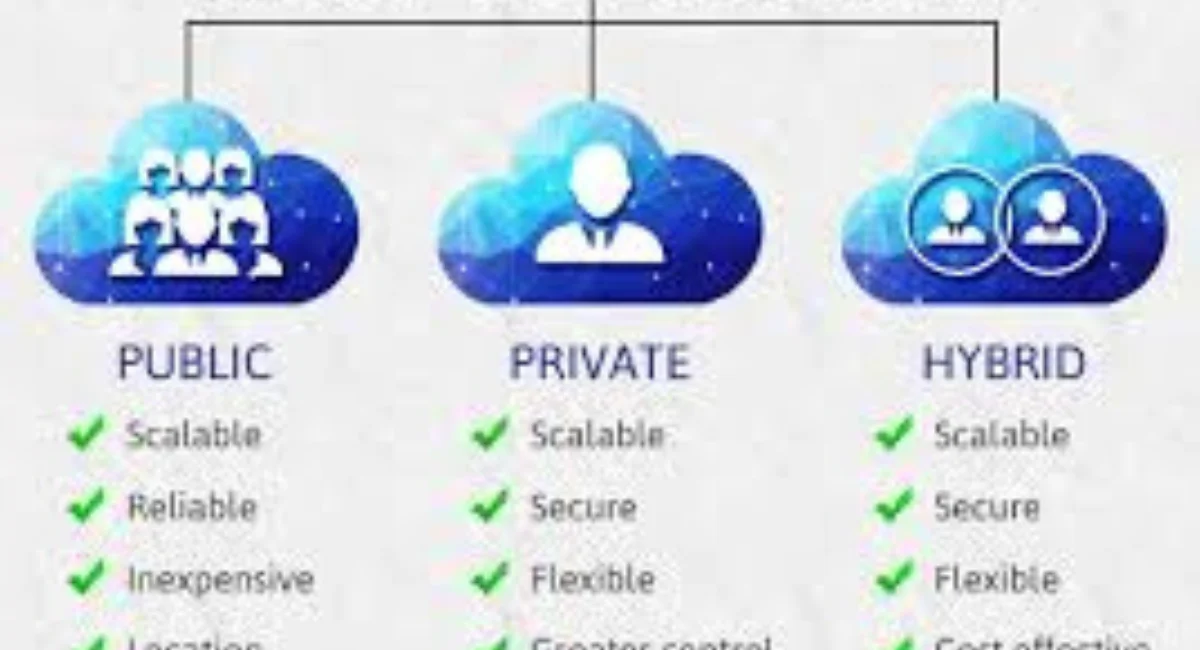
Not all cloud hosting is the same. There are a few different models, and each one suits a different type of business. The right choice depends on your budget, your technical needs, and how much control you want over your server environment.
Here’s a quick look at the main types:
Public Cloud
Public cloud hosting is the most common type. Providers like AWS, Google Cloud, Microsoft Azure, DigitalOcean, and Vultr manage the infrastructure and rent out resources to multiple users.
You share the underlying hardware with others, but your data and environment stay completely separate. It’s cost-effective, easy to get started with, and scales quickly — which makes it a solid choice for most websites and small businesses.
Private Cloud
A private cloud gives your business its own dedicated cloud environment. You don’t share hardware with anyone.
This type of setup is more expensive but offers stronger security, more control, and better compliance options for industries like finance, healthcare, and law. Some businesses build private clouds on-premise; others pay a provider to host one exclusively for them.
Hybrid Cloud
Hybrid cloud hosting blends the best of both worlds. You keep sensitive data and critical systems on a private cloud while using a public cloud for everything else — like handling traffic spikes, running marketing apps, or processing large data jobs.
It’s a popular model for mid-size and enterprise businesses that need flexibility without giving up security or control.
Why Growing Sites Prefer Cloud Hosting
Once a website starts getting real traffic, traditional hosting starts showing its cracks. Pages slow down. Servers crash. Support tickets pile up.
Cloud hosting was built specifically to solve these problems — and it does it in a way that scales right alongside your business.
Here’s why so many growing websites make the switch:
1. Handle Traffic Spikes Smoothly
Imagine your product landing page gets featured on a major news site. Suddenly, thousands of visitors hit your site at the same time. On shared hosting, that kind of spike usually brings the whole thing down.
Cloud hosting handles it differently — because your site has access to a pool of server resources, extra capacity kicks in automatically when demand rises. Your site stays fast even when traffic surges unexpectedly.
2. Lower Risk Of Downtime
Traditional hosting puts your site on one server. If that server goes down, your site goes down too. Cloud hosting uses server redundancy — your data lives across multiple machines simultaneously.
So even if one server has a hardware failure, another one in the cluster takes over within seconds. Most cloud hosts offer an uptime guarantee of 99.9% or higher, and the best ones actually hit it.
3. Scale Instantly
Cloud hosting gives you elastic scaling — the ability to add or remove resources on the fly. You don’t need to call support or migrate to a bigger plan.
Auto scaling watches your resource usage in real time and adjusts CPU, RAM, and bandwidth automatically.
For businesses with seasonal traffic patterns — think Black Friday or back-to-school season — this is a huge advantage.
4. Only Pay For What You Use
Most cloud hosting providers use a pay-as-you-go pricing model. You don’t pay for a fixed amount of resources whether you use them or not.
You pay for what you actually consume. During quiet months, your bill is low. During busy periods, you scale up and pay a bit more — but only for that time.
This is far more cost-efficient than paying for a dedicated server that sits mostly idle.
5. Security Comes Standard
Good cloud hosting providers bake security into their infrastructure from the ground up. You get features like automatic backups, disaster recovery systems, built-in firewalls, DDoS protection, and SSL certificates.
Because your data is spread across multiple servers and data centers, there’s no single point of failure for attackers to target. For e-commerce sites handling payments and customer data, that matters a lot.
6. Faster Global Delivery
Many cloud hosting setups integrate with a Content Delivery Network (CDN). A CDN stores cached copies of your website’s files on servers around the world.
When someone in Tokyo visits your site, they load it from a server in Asia — not from a data center in New Jersey. That reduces latency dramatically and makes your site feel fast, no matter where your visitors are.
Key Features of Multi-Cloud Hosting
Multi-cloud hosting isn’t just about using two providers instead of one. It comes with a distinct set of capabilities that make it a powerful option for businesses that need reliability, flexibility, and performance at scale. Here are the key features you should know about:
- Multi-provider infrastructure — Your site or app runs across two or more cloud platforms (like AWS + Google Cloud) simultaneously.
- Vendor independence — You’re not locked into a single provider’s pricing, uptime, or feature set.
- Workload portability — Move workloads between cloud environments without rewriting your entire application.
- Geographic distribution — Deploy across different regions and data centers worldwide to reduce latency.
- Redundant failover systems — If one provider goes down, traffic automatically reroutes to the other.
- Independent scaling per provider — Scale specific workloads on the cloud platform best suited for them.
- Cost optimization — Use the cheapest provider for storage-heavy workloads and the fastest for compute-heavy ones.
- Centralized management tools — Manage multiple cloud environments from a single dashboard or API layer.
- Compliance flexibility — Store specific data in regions that meet local privacy and compliance laws.
- Distributed computing power — Access massive combined processing resources from multiple cloud networks.
- Backup diversification — Store backups on separate providers to protect against data loss from a single cloud failure.
- Reduced blast radius — A failure or security incident on one cloud doesn’t automatically affect the other.
- Custom SLA management — Negotiate different service agreements with different providers based on workload needs.
- API-level integration — Connect services from multiple clouds using APIs for seamless data flow.
- High availability architecture — Combine uptime guarantees from multiple providers for near-perfect availability.
- Load distribution — Spread traffic intelligently across clouds based on cost, speed, or geography.
- Hybrid compatibility — Easily extends into a hybrid setup by adding a private cloud layer to the mix.
- Faster deployment cycles — Use the best development and CI/CD tools from multiple platforms to ship faster.
Advantages of Multi-Cloud Hosting
Multi-cloud hosting offers some real, tangible benefits — especially for businesses that have outgrown a single provider or need to meet strict performance and compliance requirements. Let’s walk through the major ones.
01. Reliability Plus Scalability
The biggest advantage of multi-cloud is that it dramatically reduces the risk of downtime. When you depend on a single cloud provider, and they have an outage — even a short one — your entire site or application can go offline.
With multi-cloud hosting, your traffic simply reroutes to another provider’s infrastructure automatically. No downtime. No lost revenue. No frustrated customers staring at an error page.
On top of that, multi-cloud gives you nearly unlimited scalability. You can draw compute power, storage, and bandwidth from multiple cloud networks at the same time.
During extreme traffic events — a viral product launch, a major sale, or a live streaming event — you’re pulling resources from more than one source. That means no single provider’s capacity limit becomes your ceiling.
It also lets you scale specific parts of your application independently, sending video processing workloads to one cloud and your database to another based on which provider handles each task better and cheaper.
02. Hands-Off Management
Modern managed multi-cloud platforms take care of a lot of the heavy lifting for you.
Instead of manually monitoring server health across multiple providers, a centralized management layer watches everything — performance metrics, uptime, resource usage, and security alerts — from one place.
You get the benefits of running across multiple clouds without needing a large DevOps team to hold it all together.
This is especially valuable for growing businesses and agencies that don’t have the budget or bandwidth for dedicated infrastructure teams.
Managed cloud hosting services handle updates, patches, backups, and monitoring on your behalf. You focus on building and growing your product while the platform handles the technical operations.
Over time, this can actually save money compared to hiring in-house engineers to manage your own multi-cloud setup manually.
Disadvantages of Multi-Cloud Hosting
Multi-cloud hosting is powerful, but it’s not for everyone. There are some genuine drawbacks you should understand before going all-in on this approach.
Cost and complexity are the two biggest issues
Running infrastructure across multiple providers means paying multiple bills, using multiple management tools, and dealing with multiple support teams.
If you don’t have someone technical managing it, things can get complicated and expensive fast. Data transfer fees between clouds — called egress costs — can also add up quickly if your application moves large amounts of data between providers regularly.
Security management gets harder, too
When your data spans multiple cloud environments, you need consistent security policies across all of them. Each provider has its own security model, compliance certifications, and access controls.
Keeping those aligned takes real effort. A misconfiguration on one cloud can create a vulnerability that affects the whole system.
For businesses in regulated industries, meeting compliance requirements across multiple platforms simultaneously requires careful planning and ongoing auditing.
03. Improved Website Performance
Despite the challenges, multi-cloud hosting can dramatically improve website performance when set up properly.
Because your content can be served from the cloud provider whose data centers are physically closest to your visitor, load times drop significantly.
You’re essentially building a globally distributed hosting environment — similar to how a CDN works, but at the infrastructure level.
For websites with international audiences or latency-sensitive applications like real-time dashboards or live auctions, this performance advantage is hard to match with any single-provider setup.
Is Cloud Hosting Good for WordPress?
Short answer — yes, absolutely. WordPress powers over 40% of websites on the internet, and cloud hosting is one of the best environments you can run it on.
The combination of scalability and server redundancy means your WordPress site stays fast and online even when traffic jumps unexpectedly.
The biggest wins come with WooCommerce stores and high-traffic blogs. These sites need consistent server performance, fast database queries, and reliable uptime. Cloud hosting delivers all three.
Providers like Cloudways let you run WordPress on top of world-class infrastructure from AWS, Google Cloud, or DigitalOcean — with caching, automatic backups, and staging environments built in.
You get enterprise-level performance without needing to be a server expert.
How to Choose a Cloud Hosting Provider
Choosing the right cloud hosting provider isn’t just about picking the cheapest option or the one with the flashiest website. The decision affects your site’s speed, reliability, and long-term costs — so it’s worth thinking through carefully.
Here are the key things to look for:
1. Check the Infrastructure Providers
Not all cloud hosts run their own data centers. Many — like Cloudways — are built on top of established providers like AWS, Google Cloud, Microsoft Azure, DigitalOcean, or Vultr.
These are battle-tested platforms with global infrastructure and strong uptime records. Knowing which cloud network sits underneath your hosting plan matters because that determines the quality of the hardware, the global server locations, and the actual reliability you get.
2. Look for Easy Setup
Cloud hosting used to require a lot of technical knowledge. The good providers have changed that.
Look for hosts that offer a clean control panel, one-click app installs, and straightforward server management — without needing to know Linux commands just to launch a site.
If a platform makes you feel like you need a computer science degree just to get started, keep looking.
3. Prioritize Real Support
Support quality separates good hosts from great ones. Look for 24/7 live chat support with real human agents — not just a help center and a ticket system that takes days to respond.
When your site goes down at 2 am before a product launch, you need someone who can actually fix it, fast. Test their support before you commit — send a question and see how quickly and helpfully they respond.
4. Understand the Pricing Model
Cloud hosting pricing can feel confusing because it’s often usage-based rather than fixed. Make sure you understand exactly what you’re paying for — server size, bandwidth, storage, and any add-ons.
Watch for hidden egress fees (charges for data leaving the server). A good provider is transparent about costs and lets you set spending alerts so your bill never surprises you.
5. Make Sure It Scales
The whole point of cloud hosting is flexibility. Make sure your provider supports easy vertical scaling (upgrading your server size) and horizontal scaling (adding more servers).
Ideally, this should be possible without downtime — just a few clicks and your new resources are live. If scaling requires opening a support ticket and waiting hours, that’s a problem.
6. Look for Built-In Tools
The best cloud hosting plans come with more than just a server. Look for built-in backups, staging environments, SSL certificates, server monitoring, and CDN integration.
These tools save time and reduce the number of third-party services you need to pay for separately. Cloudways, for example, includes all of these out of the box, which makes it genuinely easier to manage a production website.
7. Choose Simplicity Over Complexity
Managing raw cloud infrastructure on AWS or Google Cloud directly can get very technical, very quickly.
Unless you have a dedicated DevOps team, you probably don’t want to deal with IAM roles, VPCs, and billing dashboards that require a spreadsheet to decode. A managed cloud hosting platform simplifies all of that.
You get the power of world-class cloud infrastructure without the headaches of managing it yourself.
What Are the Benefits of Cloud Hosting?
Let’s bring the key advantages together in one place. Cloud hosting consistently outperforms traditional hosting models across several important dimensions.
Performance is one of the most immediate benefits. Because your site draws resources from a distributed server network rather than a single machine, pages load faster and stay fast even under pressure.
Server redundancy means that a single hardware failure doesn’t bring your site down — the cluster absorbs it. Combined with CDN integration, your site performs well for visitors anywhere in the world, not just near your host’s main data center.
Cost efficiency is another major win. You’re not locked into a fixed-resource plan that you either outgrow or overpay for. The pay-as-you-go model means your hosting costs scale proportionally with your actual usage.
Add to that the built-in disaster recovery, automatic backups, and managed security features — and you’re getting a lot more value per dollar than most traditional hosting plans deliver.
For businesses serious about growth, cloud hosting removes the infrastructure ceiling that used to slow everything down.
When Cloud Hosting May Not Be the Right Choice
Cloud hosting is excellent — but it’s not the perfect fit for every situation. It’s worth being honest about when it might not be the right move.
If you’re running a very small personal blog or a simple static website with minimal traffic, cloud hosting is probably overkill.
Shared hosting is cheaper and easier to manage at that scale, and you’re unlikely to hit the limitations that make cloud hosting worth the extra cost.
Similarly, if your budget is extremely tight and you need rock-bottom pricing above everything else, shared hosting or a basic VPS will serve you better for now.
Cloud hosting can also be more complex to manage if you’re not technically comfortable.
While managed platforms like Cloudways simplify things significantly, you still need to understand basics like server sizing, resource monitoring, and deployment workflows.
If that sounds overwhelming and you don’t have a developer to help, starting with a simpler managed WordPress host might be a smarter short-term choice — and you can migrate to cloud hosting later when you’re ready.
Shared vs VPS vs Dedicated vs Cloud Hosting – At a Glance
Here’s a clear side-by-side comparison to help you understand how these hosting types stack up:
| Feature | Shared Hosting | VPS Hosting | Dedicated Hosting | Cloud Hosting |
| Resources | Shared with others | Fixed private slice | Entire server yours | Dynamic pool |
| Performance | Low to moderate | Moderate | High | High to very high |
| Scalability | None | Limited | None (manual) | Instant & automatic |
| Reliability | Low (single server) | Moderate | High (one server) | Very high (multiple) |
| Uptime | ~99.5% | ~99.9% | ~99.9% | 99.9–99.99% |
| Security | Basic | Better | Strong | Strong + redundant |
| Pricing model | Fixed (cheap) | Fixed | Fixed (expensive) | Pay-as-you-go |
| Best for | Small blogs | Growing sites | Large single apps | Growing businesses |
| Technical skill needed | None | Low–moderate | High | Low (managed) |
| Traffic spike handling | Poor | Fair | Good | Excellent |
Cloud hosting wins on flexibility and reliability. Shared hosting wins on price. VPS sits in the middle. Dedicated servers still make sense for very specific, high-control use cases.
Why Cloudways Makes Cloud Hosting Practical
Cloudways is one of the most popular managed cloud hosting platforms on the market — and for good reason.
It takes the raw power of the world’s best cloud infrastructure and wraps it in a clean, manageable platform that almost anyone can use. Here’s what makes it stand out:
1. Choose From Multiple Providers
Cloudways lets you pick from five top-tier cloud infrastructure providers — AWS, Google Cloud, DigitalOcean, Vultr, and Linode. Each offers different strengths in terms of pricing, server locations, and performance.
You choose what fits your needs and budget, and Cloudways handles everything on top.
2. Launch In Minutes Without Technical Work
You don’t need to configure a server from scratch. Cloudways gives you a ready-to-go server environment in just a few clicks.
Choose your app (WordPress, WooCommerce, Magento, Laravel), pick your cloud provider and server size, and you’re live. No terminal commands, no manual configuration, no headaches.
3. Built For All PHP Apps (Including WordPress, WooCommerce & Laravel)
Cloudways is optimized specifically for PHP-based applications. Whether you’re running a WordPress blog, a WooCommerce store, or a custom Laravel application, the platform is tuned for performance.
It ships with a built-in caching stack — Varnish, Redis, and Memcached — that dramatically speeds up PHP apps without any extra setup.
4. Backups, Staging, And Monitoring Built In
Every Cloudways server comes with automated backups, a one-click staging environment, and real-time server monitoring. You can push changes from your staging site to production with one click — without risking your live site.
Backups run automatically on a schedule you set, and you can restore with a single click if anything goes wrong.
5. Support When You Actually Need It
Cloudways offers 24/7 live chat support. Their team knows the platform deeply and can resolve most issues quickly. For more complex problems, they have a premium support option with faster response times and dedicated help.
It’s the kind of support that actually solves problems rather than pointing you to a help article.
6. Pay Only For What You Use
Cloudways uses an hourly billing model. You pay for the exact server time and resources you consume — nothing more. If you spin up an extra server for a traffic spike and shut it down two days later, you only pay for those two days.
This makes it easy to experiment, scale up temporarily, and stay in control of your costs.
7. Consistent High Uptime
Because Cloudways is built on top of enterprise-grade cloud infrastructure providers, it inherits their reliability. AWS, Google Cloud, and DigitalOcean all maintain multiple redundant data centers with strong uptime track records.
Cloudways layers its own monitoring and failover systems on top of that — so your site benefits from multiple layers of availability protection.
Conclusion
Cloud hosting has moved from being a “nice-to-have” for big enterprises to a genuine necessity for any website that’s serious about growth.
It solves the core problems that hold websites back — slow performance, unpredictable downtime, rigid resource limits, and expensive fixed plans.
Whether you’re running a WooCommerce store, a high-traffic blog, or a SaaS product, cloud hosting gives you the flexibility to grow without constantly bumping into infrastructure ceilings.
If you’re ready to make the move, start by identifying what your site actually needs — traffic volume, app type, technical comfort level, and budget.
Then choose a managed cloud hosting platform like Cloudways that puts the power of AWS, Google Cloud, or DigitalOcean in your hands without requiring you to become a server expert.
The switch is easier than most people expect, and the performance difference is something you’ll notice immediately.
FAQs by Cloud Hosting
What is cloud hosting, and how does it work?
Cloud hosting runs your website across a network of virtual servers connected through shared infrastructure. When one server fails, another takes over automatically — keeping your site online and fast.
Is cloud hosting better than shared hosting?
For most growing websites, yes. Cloud hosting offers far better scalability, reliability, and performance. Shared hosting is cheaper, but it can’t handle traffic spikes and gives you no redundancy.
Is cloud hosting good for WordPress?
Yes — it’s one of the best environments for WordPress. You get automatic scaling, fast server response times, and built-in backups, which keep your WordPress site stable even under heavy load.
What are the disadvantages of cloud hosting?
The main downsides are cost and complexity. It’s more expensive than shared hosting, and managing multiple cloud environments can get technically demanding without the right managed platform.
Is cloud hosting the same as VPS hosting?
They’re similar but not identical. VPS hosting gives you a fixed slice of one physical server. Cloud hosting draws resources from a distributed network of servers — making it more scalable and more resilient.
How much does cloud hosting cost?
Costs vary widely depending on the provider and resources used. Most cloud hosts use pay-as-you-go pricing — you might pay anywhere from $10/month for a basic server to hundreds per month for high-resource setups.
What is managed cloud hosting?
Managed cloud hosting means the hosting provider handles server setup, maintenance, updates, backups, and monitoring for you. You focus on your website while they handle the technical infrastructure.
Related Posts
- What Is Dedicated Hosting and How Does It Work?
- What Is Managed Hosting? How It Reduces Your Operational Overhead
- What Is WordPress Hosting? A Practical Guide
- What Is Reseller Hosting? A Complete Guide to Starting Your Own Hosting Business
- What Is Agency Hosting? A Beginner’s Guide
- What Is Bare Metal Hosting? Complete Guide
- What is Colocation Hosting? Complete Guide to How It Works
- What Is Linux Hosting? Complete Beginner’s Guide
- What Is Windows Hosting? Complete Beginner Guide
- What Is NodeJS Hosting and How Does It Work?
- HostGator Review

Alex Bryant is the founder of PvyEmpire.com and a WordPress specialist with over 4 years of hands-on experience in web hosting, performance optimization, and website management. He has extensively tested top hosting providers by setting up real websites and monitoring their speed, uptime, and reliability.
At PvyEmpire.com, Alex publishes honest, data-driven reviews, detailed guides, and verified coupons & deals. His goal is to help website owners choose the right hosting, improve performance, and grow their online presence with confidence—based on real testing, not promotions.