What Are the 36 Different Types of Web Hosting? Guide
Picking the right web hosting can feel overwhelming — especially when every option sounds the same, but the prices are wildly different.
You just want your website up and running, but suddenly you’re drowning in terms like “shared,” “VPS,” “dedicated,” and “cloud,” wondering if you’re about to make an expensive mistake. It’s one of those decisions that feels way more complicated than it should be.
That’s exactly why we put this guide together. We’re breaking down all the main types of web hosting in plain English — what each one actually means, who it’s best for, and how to figure out which fits your needs and budget.
By the end, you’ll know exactly what to look for and feel confident making the right call.
What Is Website Hosting?
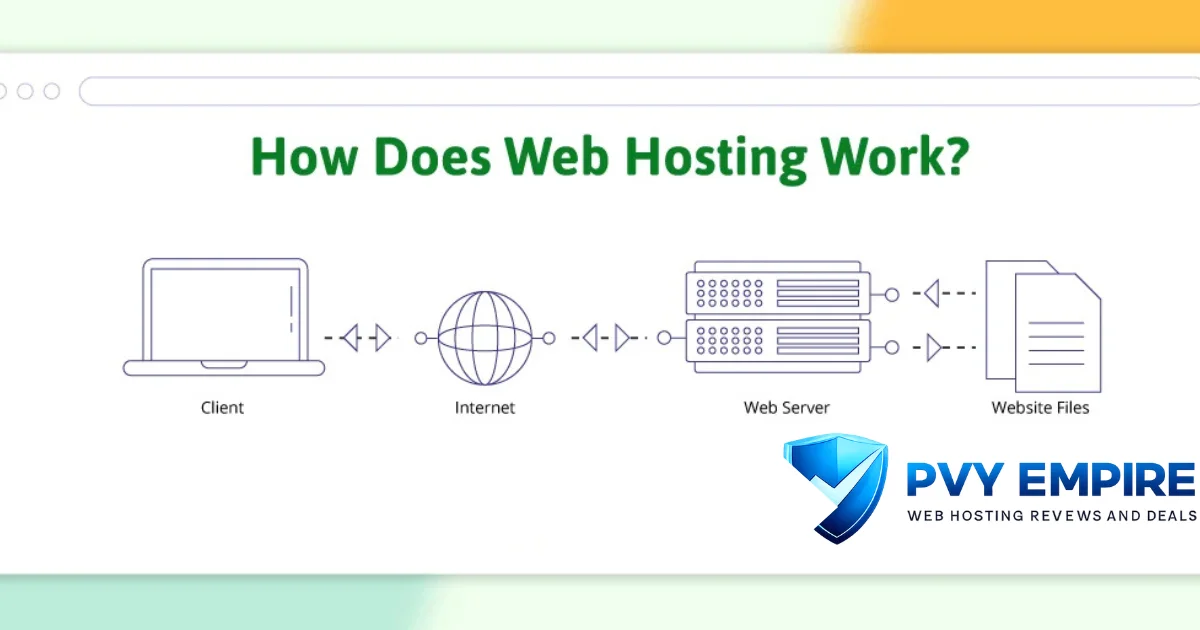
Website hosting is simply a service that stores your website’s files on a powerful computer called a web server. When someone types your domain into their browser, that server sends your files to their screen. Without hosting, your site can’t exist on the internet.
Think of it like renting space in a building. Your website is the shop, and the hosting provider is the landlord who keeps the lights on. You pay a monthly or yearly fee, and they handle the server infrastructure so you can focus on running your site.
Different Types of Web Hosting
Not all hosting solutions are created equal. The types of web hosting vary massively in price, speed, control and complexity. Some are built for total beginners, while others are designed for large enterprises running thousands of transactions a day.
Your choice depends on a few key things: how much traffic you expect, what platform you’re building on, how technical you are and what your budget looks like. Let’s walk through every major option so you can match the right one to your exact needs.
The 36 Main Types of Web Hosting
1. Shared Hosting – Fast, Affordable and Secure Web Hosting
Shared hosting is the most popular entry point for new website owners. You share a single server and its resources — CPU, RAM, storage — with hundreds of other websites.
Providers like Hostinger and Bluehost offer plans starting at under $3/month, making it the most affordable hosting option on the market.
✅ Advantages
- Very cheap — plans start around $1–$5/month
- Easy to set up — cPanel makes managing files simple
- Good uptime and free SSL on most plans
- Perfect for beginners and low-traffic blogs
❌ Disadvantages
- Slow performance during traffic spikes
- You share resources — a noisy neighbour can slow your site
- Limited control and no root access
- Not ideal for e-commerce or high-traffic websites
Who Should Use It?
Bloggers, beginners, small personal websites, and anyone launching their first site on a tight budget.
2. VPS Hosting – A Managed Virtual Server Solution for Pros
VPS hosting gives you a private, isolated portion of a physical server. Unlike shared hosting, your resources aren’t affected by other users.
It’s a step up in power and flexibility — and providers like Bluehost, Vultr and Linode offer both managed and unmanaged VPS options to suit different skill levels.
✅ Advantages
- Dedicated resources — consistent speed and performance
- Root access for full server control
- More scalable than shared hosting
- Good balance of cost and power
❌ Disadvantages
- Costs more than shared hosting
- Unmanaged VPS requires technical knowledge
- Setup can be complex for beginners
Who Should Use It?
Developers, growing businesses, and sites needing more control without the cost of a dedicated server.
3. Dedicated Hosting – Dedicated Servers for Your Site
With dedicated hosting, you get an entire physical server all to yourself. No other websites share your resources.
That means maximum performance, full control and enhanced security. Providers like SiteGround and major data centres offer bare-metal dedicated servers for sites that demand the best.
✅ Advantages
- Maximum performance and server resources
- Full root and admin access
- High security — no shared environment risks
- Customisable hardware and software configuration
❌ Disadvantages
- Expensive — can cost $80–$500+ per month
- Requires server admin skills
- Overkill for small or medium websites
Who Should Use It?
Large enterprises, high-traffic ecommerce stores, gaming servers and businesses with strict compliance needs.
4. Managed Cloud Hosting Platform Simplified
Cloud hosting spreads your website across multiple servers instead of one. If one server goes down, another picks up the load automatically.
Cloudways makes managed cloud hosting easy by giving you a clean dashboard on top of providers like DigitalOcean, AWS and Google Cloud — no command-line knowledge needed.
✅ Advantages
- Highly scalable — add resources on demand
- Excellent uptime thanks to multiple server redundancy
- Pay-as-you-go pricing is cost-efficient at scale
- No single point of failure
❌ Disadvantages
- Pricing can be unpredictable without usage monitoring
- Slightly more complex than basic shared hosting
- Not all cloud providers are beginner-friendly
Who Should Use It?
Startups, SaaS apps, growing ecommerce stores and anyone who needs reliable, scalable cloud infrastructure.
5. Fully Managed Hosting Services & Solutions
Fully managed hosting means the provider handles everything — server updates, security patches, backups, monitoring and performance tuning.
You focus entirely on your business and content. It’s ideal for people who don’t want to think about server management at all.
✅ Advantages
- Zero server management required from you
- Expert support team handles technical issues
- Regular automated backups and security scans
- Great uptime SLAs included
❌ Disadvantages
- More expensive than unmanaged options
- Less control over server configuration
Who Should Use It?
Business owners, marketers and non-technical users who want a hands-off hosting experience.
6. Hosting for WordPress – Lightning Fast, Secure & Affordable
WordPress hosting is a server infrastructure optimised specifically for WordPress. That means LiteSpeed servers, built-in caching, one-click installs and automatic WordPress updates.
Kinsta and SiteGround are leaders in this space with impressive speed benchmarks and tight security setups for WordPress sites.
- How to Fix Hostinger Slow WordPress Sites?
- 14 Best WordPress Hosting for Agencies Compared
- How to Fix Bluehost Slow WordPress Websites?
- Cloudways Increase PHP Memory Limit Easily
- HostGator Review
- WPX Hosting Review
- The Best WordPress Hosting for Beginners – 28 Tested
- The Fastest WordPress Hosting: I Tested 17 Hosts
✅ Advantages
- Optimised stack for WordPress speed and performance
- Auto-updates and managed security built in
- Staging environments on premium plans
- Free SSL and CDN on most plans
❌ Disadvantages
- Only useful for WordPress — not flexible for other platforms
- Premium plans can get expensive
- Less control over server-level settings
Who Should Use It?
Anyone running a WordPress site — bloggers, small businesses and WooCommerce store owners.
7. Reseller Hosting – Blazing-Fast & Flexible Reseller Platform
Reseller hosting lets you buy server resources in bulk and sell them to your own clients as a hosting business.
You get WHM to manage accounts and cPanel for each client. It’s how many web agencies and freelancers create a recurring revenue stream without managing physical servers.
✅ Advantages
- Build your own hosting brand and revenue stream
- WHM and cPanel are included for easy account management
- Scalable as your client base grows
- Good profit margins with the right pricing strategy
❌ Disadvantages
- You’re responsible for client support
- The underlying server is still a shared infrastructure
- Not ideal if you only manage a few sites
Who Should Use It?
Web designers, developers and agencies that manage hosting for multiple clients and want to monetise it.
8. Best Web Hosting for Agencies Managing Multiple Client Sites
Agency hosting is built for teams that manage dozens or hundreds of client websites at once. You need fast onboarding, site staging, white-label dashboards and multi-site management tools.
Cloudways and Kinsta both offer agency-specific plans designed to reduce admin time and impress clients.
✅ Advantages
- Manage multiple client sites from one dashboard
- White-label options to brand the experience
- Staging environments and easy site cloning
- Team access controls and billing automation
❌ Disadvantages
- Higher monthly costs than standard hosting
- Requires onboarding time to set up workflows
- Some platforms have steep learning curves
Who Should Use It?
Digital agencies, freelance web developers and studios handling client websites at scale.
9. Bare Metal Dedicated Servers: What They Are and How to Evaluate Providers
Bare metal servers are single-tenant physical machines with no virtualisation layer between you and the hardware.
You get raw, unshared processing power. AWS Bare Metal and OVHcloud are popular choices for high-performance computing, big data processing and low-latency applications that can’t afford overhead from virtualisation.
✅ Advantages
- Highest possible performance — no hypervisor overhead
- Complete hardware customisation
- Ideal for intensive computing workloads
- Predictable performance with no noisy neighbours
❌ Disadvantages
- Very expensive and complex to manage
- Long provisioning times compared to the cloud
- You handle all maintenance and upgrades
Who Should Use It?
Enterprises, financial institutions, game studios and AI/ML workloads need extreme raw compute power.
10. What is Colocation Hosting | Benefits, Types, and Use Cases
Colocation means you own your physical server hardware but rent rack space inside a professional data centre.
The data centre provides power, cooling, internet bandwidth and physical security. You still manage the server yourself — but it sits in a facility with enterprise-grade uptime guarantees and redundant connections.
✅ Advantages
- Full ownership of hardware — no rental costs
- Enterprise-grade data centre facilities
- Highly reliable power, cooling and network
- Better value than buying your own data centre
❌ Disadvantages
- You must manage and maintain the hardware yourself
- High upfront cost to buy servers
- Physical access to the server requires visiting the data centre
Who Should Use It?
Large enterprises and organisations that already own hardware and want professional data centre facilities.
11. What Is Linux Hosting? Advantages and Differences Explained
Linux hosting runs on the Linux operating system — the most popular choice for web servers worldwide. It supports Apache and NGINX web servers, PHP, MySQL and Python.
Most hosting providers default to Linux because it’s open-source, stable and highly secure. It’s also the best choice for WordPress, Drupal and most CMS platforms.
✅ Advantages
- Free, open-source OS — reduces server costs
- Extremely stable and secure environment
- Supports all major CMS and web languages
- Massive developer community and documentation
❌ Disadvantages
- Doesn’t support Windows-specific apps like ASP.NET
- Command-line management can be intimidating for beginners
- Some proprietary software isn’t compatible
Who Should Use It?
Most website owners — Linux is the default for web hosting and works for nearly every use case.
12. Windows Hosting – Fast, Secure & Reliable
Windows hosting runs Microsoft’s server OS and is ideal when you need ASP.NET, MSSQL, or other Microsoft technologies.
It integrates perfectly with .NET frameworks and Microsoft Azure. If your application is built on Windows-based technology, you’ll need a Windows server to run it properly.
✅ Advantages
- Best choice for ASP.NET and .NET Core apps
- Seamless Microsoft Azure and SQL Server integration
- Familiar interface for Windows users
- Strong enterprise support from Microsoft
❌ Disadvantages
- More expensive than Linux hosting
- Fewer hosting providers offer Windows plans
- Heavier resource usage compared to Linux
Who Should Use It?
Developers building applications with Microsoft technologies like ASP.NET, MSSQL or SharePoint.
13. Node.js Hosting | High-Performance App Hosting
Node.js hosting is configured for running JavaScript on the server side. It’s built for real-time applications like chat platforms, APIs and streaming services.
DigitalOcean, Vultr and Heroku are popular choices. You’ll typically need SSH access, npm support and the ability to run persistent processes on the server.
✅ Advantages
- Perfect for real-time and event-driven applications
- Fast non-blocking architecture for APIs
- Large JavaScript ecosystem via npm
- Scalable for high-concurrency workloads
❌ Disadvantages
- Not ideal for CPU-intensive tasks
- Requires developer knowledge to configure
- Not available on all standard hosting plans
Who Should Use It?
JavaScript and full-stack developers building real-time apps, REST APIs and microservices.
14. eCommerce Hosting to Support Your Business Growth
eCommerce hosting is optimised for online stores. It focuses on speed, SSL certificates, PCI DSS compliance and uptime because even a few seconds of downtime can cost you real money.
WooCommerce and Shopify stores need a hosting environment that can handle product pages, checkout processes and payment gateways reliably.
✅ Advantages
- Optimised for fast loading of product and checkout pages
- PCI DSS-compliant environments for secure payments
- SSL certificates are included for all transactions
- Built-in caching and CDN for global shoppers
❌ Disadvantages
- More expensive than basic hosting
- Requires ongoing management during peak sales periods
- Platform-specific plans may limit your flexibility
Who Should Use It?
Online retailers, WooCommerce store owners and anyone running a transactional ecommerce website.
15. Enterprise Web Hosting Built to Scale With You
Enterprise hosting is designed for large organisations with complex, high-traffic websites. It includes custom SLA agreements, dedicated account managers, advanced security monitoring, and the ability to handle millions of page views.
AWS, Google Cloud and Microsoft Azure dominate this space with robust enterprise-grade infrastructure.
✅ Advantages
- Handles massive traffic without performance issues
- Custom SLAs and 24/7 priority support
- Advanced security, DDoS protection and firewall rules
- Global infrastructure with low latency worldwide
❌ Disadvantages
- Very expensive — enterprise plans start in the hundreds per month
- Complex setup requiring dedicated IT staff
- Overkill for small or medium businesses
Who Should Use It?
Large corporations, government agencies, media platforms and SaaS companies with serious scale requirements.
16. CMS Hosting Made Easy: Deploy WordPress, Drupal, Strapi & More
CMS hosting is pre-configured for content management systems like WordPress, Drupal and Strapi. Instead of setting up a server from scratch, you get one-click installs, optimised server stacks and automatic updates.
It removes the technical barrier so you can focus on creating content instead of configuring servers.
✅ Advantages
- One-click installs for major CMS platforms
- Optimised server stack for each platform
- Automatic updates and security patches
- Beginner-friendly with great support
❌ Disadvantages
- Limited to supported CMS platforms
- Less flexibility than a custom server setup
- Platform-locked — switching CMS is harder
Who Should Use It?
Content creators, bloggers, businesses and developers who want to launch CMS sites without server headaches.
17. Headless CMS Hosting – Offering Easy API Integrations
Headless CMS hosting separates the content backend from the frontend display. The content is delivered via APIs to any frontend — websites, mobile apps, smart TVs, you name it.
Strapi, Contentful and Sanity run on headless setups. It’s the modern way to manage content across multiple platforms from one place.
✅ Advantages
- Deliver content to any device or platform via API
- Greater flexibility in frontend technology choices
- Decoupled architecture improves performance and security
- Ideal for omnichannel content strategies
❌ Disadvantages
- Requires developer expertise to set up properly
- More complex than traditional CMS hosting
- Frontend and backend need separate management
Who Should Use It?
Developers and enterprise teams building omnichannel experiences across websites, apps and IoT devices.
18. Best Blog Hosting of: Our Tests & Reviews
Blog hosting doesn’t need to be complicated or expensive. You want a fast, reliable server with WordPress support, easy content editing and good uptime.
Hostinger and Bluehost consistently top the charts for blog hosting because they offer great performance, beginner-friendly pricing, and strong WordPress integration.
✅ Advantages
- Affordable plans built for content-heavy websites
- WordPress support with one-click installs
- Free domain, SSL and CDN on many plans
- Easy-to-use dashboards for non-technical bloggers
❌ Disadvantages
- Lower-end plans may struggle with viral traffic spikes
- Shared infrastructure means a limited performance ceiling
- Some providers upsell aggressively on renewal
Who Should Use It?
Hobby bloggers, affiliate marketers, niche content creators and personal brand websites.
19. Best Web Hosting for Small Businesses
Small-business hosting needs to balance cost, reliability, and ease of use. You need a professional domain, fast page loads, a business email and good customer support.
SiteGround and Hostinger are strong picks for small businesses because they deliver solid performance without making you pay enterprise-level prices.
✅ Advantages
- Business email hosting is included with most plans
- Professional domain management tools
- Reliable uptime for customer-facing websites
- Scalable as your business grows
❌ Disadvantages
- Entry-level plans have storage and bandwidth limits
- Premium features often cost extra
- Support quality varies across providers
Who Should Use It?
Local businesses, service providers, freelancers and SMEs that need a professional online presence without complexity.
20. Forum Hosting with FREE vBulletin Installation
Forum hosting powers online community platforms. It needs a database-heavy setup, good RAM, fast read/write speeds and solid security since forums generate a lot of user-generated content.
vBulletin and phpBB are popular forum software options, and many providers now offer one-click installs to get communities up quickly.
✅ Advantages
- Optimised for database-heavy forum workloads
- Supports popular forum software like vBulletin and phpBB
- Good caching setups for high-post-volume sites
- User management tools built in
❌ Disadvantages
- Can get expensive as the community size grows
- Requires moderation tools and ongoing management
- Spam and security threats need constant monitoring
Who Should Use It?
Community builders, interest groups, support forums and niche hobby websites.
21. Best Hosting for Multiple Domains: Affordable Options
Multi-domain hosting lets you run several websites from one hosting account. Instead of paying for separate plans, you host everything under one roof.
Hostinger’s Business plan and SiteGround’s GrowBig tier let you add unlimited domains and manage them all from a single cPanel or dashboard.
✅ Advantages
- Manage all your sites from one account
- Much cheaper than buying separate hosting plans
- Shared SSL and backups across all domains
- Easy file and database management per site
❌ Disadvantages
- Resources are still shared across all your sites
- One hacked site could affect others on the same account
- Traffic spikes on one site can affect others
Who Should Use It?
Bloggers running multiple projects, businesses with several brands and portfolio website owners.
22. Free Web Hosting | Launch Your Website Today
Free hosting sounds great, but it comes with serious limitations. You typically get a subdomain, limited storage, slow speeds and ads on your site. It’s fine for testing or learning, but not for anything serious.
Platforms like InfinityFree and 000webhost offer no-cost plans, but don’t expect reliability or support.
✅ Advantages
- Zero cost — great for learning and testing
- No credit card required to get started
- Quick setup for temporary or hobby projects
❌ Disadvantages
- Slow speeds and unreliable uptime
- Ads may appear on your site without your control
- No custom domain — you get a subdomain only
- Limited support and zero SLA
Who Should Use It?
Students, hobbyists and developers are testing ideas before committing to a paid hosting plan.
23. Green Hosting – 100% Powered By Renewable Energy
Green web hosting uses renewable energy to power its data centres. Providers like GreenGeeks offset their carbon footprint by purchasing renewable energy certificates.
If sustainability matters to your brand, it’s a smart choice. It doesn’t compromise on performance — you get the same features as standard hosting with a clean conscience.
✅ Advantages
- Reduces your website’s carbon footprint
- Same performance as regular hosting
- Great PR for eco-conscious brands
- Renewable energy certificates for transparency
❌ Disadvantages
- Slightly fewer providers to choose from
- Premium green plans can cost a bit more
- Not all ‘green’ claims are equal — check certifications
Who Should Use It?
Eco-conscious businesses, environmental organisations and brands that care about sustainability.
24. Cheap Offshore Hosting, Anonymous Domains & VPS Servers
Offshore hosting stores your website’s data on servers in countries with different legal jurisdictions. It’s often used for privacy, content freedom or reduced legal exposure.
Providers in Iceland, the Netherlands and Panama offer offshore VPS and domain services. It’s legal in most cases, but you should always stay within your country’s laws.
✅ Advantages
- Greater privacy and data sovereignty
- Freedom to publish content under different laws
- Anonymous domain registration options available
- Protection from local government data requests
❌ Disadvantages
- Can attract spam and abuse complaints
- Support and legal recourse may be limited
- Latency issues are far from your target audience
Who Should Use It?
Privacy advocates, journalists, and website owners want data sovereignty outside their home country.
25. DMCA-Ignored cPanel Hosting Starting at $15/Year
DMCA-ignored hosting means the provider won’t immediately take your site down in response to a copyright complaint. They’re typically based in offshore jurisdictions.
While this is sometimes misused, legitimate uses include whistleblowing, satire, and commentary content that faces bad-faith DMCA claims. Always use it legally and ethically.
✅ Advantages
- Protection from bad-faith copyright takedown requests
- Offshore jurisdiction offers legal grey areas for some content
- Often includes anonymous domain registration
❌ Disadvantages
- Frequently associated with illegal content — proceed with caution
- Customer support is often poor
- Less reliable infrastructure than mainstream hosts
Who Should Use It?
Content creators facing abusive DMCA complaints, investigative journalists and satirical website owners.
26. Best Practices for Scalable Blockchain Hosting
Blockchain hosting supports the infrastructure needed to run crypto nodes, decentralised apps and blockchain networks. You need high uptime, fast bandwidth and generous storage.
DigitalOcean and AWS are popular for running Ethereum and Bitcoin nodes. The key is a reliable, always-on environment with strong network performance.
✅ Advantages
- Perfect for running full crypto nodes 24/7
- Scalable infrastructure for dApps and Web3 projects
- Full control over node configuration
- High-bandwidth plans available for heavy sync workloads
❌ Disadvantages
- Blockchain nodes require large storage (500GB+)
- High bandwidth usage can increase costs fast
- The technical setup is complex for non-developers
Who Should Use It?
Blockchain developers, crypto node operators and Web3 project builders.
27. HIPAA Hosting: Technical Guide for Developers
HIPAA hosting is required for any healthcare application that handles Protected Health Information (PHI).
The server environment must meet strict regulatory requirements — encrypted storage, access logging, audit trails, and signed Business Associate Agreements (BAA).
AWS, Azure and HIPAA-certified providers offer compliant environments for healthcare apps.
✅ Advantages
- Legally required for healthcare data — keeps you compliant
- Encrypted storage and transmission of patient data
- Audit trails and access logging are built in
- BAA agreements provide legal protection
❌ Disadvantages
- Significantly more expensive than standard hosting
- Requires careful configuration to maintain compliance
- Regular audits and documentation are mandatory
Who Should Use It?
Healthcare app developers, telehealth platforms, medical SaaS companies and hospitals managing digital patient data.
28. PCI Compliant Hosting – All You Need to Know
PCI DSS hosting is required if your website processes, stores or transmits credit card data. The hosting environment must meet Payment Card Industry Data Security Standards.
Features include network segmentation, firewall rules, intrusion detection and encrypted transactions. Kinsta and SiteGround offer PCI-compliant environments for e-commerce stores.
✅ Advantages
- Required by law for credit card processing
- Protects customers from payment data breaches
- Reduces your liability in case of a security incident
- Builds customer trust in your checkout process
❌ Disadvantages
- Compliance maintenance is ongoing and resource-heavy
- Annual audits and reports are required
- Costs more than standard hosting setups
�� Who Should Use It?
e-commerce stores, payment processors and any website that handles cardholder data directly.
29. Not-For-Profit Website Hosting | Non-Profit Hosting
Many hosting providers offer discounted or free plans for registered non-profit organisations. Google offers Google for Nonprofits with access to Google Cloud.
SiteGround and DreamHost also provide reduced pricing. It’s a way to keep operational costs low while still running a professional, fast and reliable website for your cause.
✅ Advantages
- Significant discounts or free tiers for qualifying organisations
- Access to enterprise tools at reduced cost
- Helps stretch limited budgets further
- Often includes email hosting and Google Workspace access
❌ Disadvantages
- Proof of non-profit status is required
- Discounts may only apply to specific plans or features
- Support levels may be lower than paid commercial plans
Who Should Use It?
Charities, NGOs, community organisations and registered non-profits running public service websites.
30. Ultimate Linux PHP Hosting: Fast and Secure Solutions
PHP hosting is the backbone of the web — WordPress, Laravel, Symfony, and thousands of web apps run on PHP. Linux server hosting with PHP support is the most common setup globally.
LiteSpeed servers with PHP-FPM and OPcache can deliver dramatically faster response times compared to traditional Apache and mod_php setups.
✅ Advantages
- Supports all major PHP frameworks and CMS platforms
- LiteSpeed + PHP-FPM = blazing fast response times
- Widely available on almost all Linux hosting plans
- Huge community support and documentation
❌ Disadvantages
- Older PHP versions create security vulnerabilities
- PHP configuration can vary across providers
- Not suitable for non-PHP languages like Python or Ruby
Who Should Use It?
WordPress users, Laravel developers, PHP app builders and anyone running a server-side web application.
31. cPanel: Web Hosting Control Panel & Server Management Tools
cPanel is the world’s most popular web hosting control panel. It gives you a graphical interface to manage files, databases, email accounts, SSL certificates and domain settings without touching the command line.
Most shared and VPS plans include cPanel by default, making it the go-to tool for website management at every skill level.
✅ Advantages
- Beginner-friendly visual interface for server management
- Manage files, email, databases and SSL in one place
- Widely supported across nearly all major hosting providers
- One-click installs for WordPress and other CMS platforms
❌ Disadvantages
- cPanel licensing fees have increased, pushing prices up
- Some newer platforms use alternatives like Plesk or DirectAdmin
- The interface can feel cluttered for simple tasks
Who Should Use It?
Everyone, from beginners to advanced users, manages shared or VPS hosting environments.
32. Private Web Server Hosting
A private web server means you have an isolated hosting environment — either a VPS, dedicated server or private cloud — that no one else shares. It’s the opposite of shared hosting.
Privacy, security and performance are the main benefits. It’s ideal for businesses that handle sensitive data or need consistent server performance.
✅ Advantages
- Complete isolation from other users and websites
- Better security and privacy for sensitive data
- Consistent performance without shared resource issues
- Full control over the server environment
❌ Disadvantages
- Higher cost than shared hosting options
- You’re responsible for server management unless managed
- Requires more technical knowledge to maintain
Who Should Use It?
Businesses handling sensitive client data, SaaS applications and developers needing isolated environments.
33. White-Label Hosting: How to Offer It, What It Costs
White-label hosting lets you sell hosting services under your own brand. You buy wholesale server resources from a provider and resell them with your own logo, pricing and dashboard.
It’s the foundation of the reseller hosting business model. WHM lets you create branded cPanel accounts for each of your clients seamlessly.
✅ Advantages
- Build a recognisable hosting brand for your agency
- No need to own or manage physical server hardware
- Set your own pricing and earn recurring revenue
- Great add-on service for web design agencies
❌ Disadvantages
- You handle all client-facing support
- Thin margins if you don’t price strategically
- Your reputation depends on the upstream provider’s reliability
Who Should Use It?
Web agencies, freelancers and entrepreneurs who want to sell hosting as a service under their own brand.
34. Top Affordable Managed WordPress Hosting Plan
Managed WordPress hosting takes care of every technical WordPress task — core updates, plugin updates, daily backups, security scans and performance caching.
Kinsta uses Google Cloud infrastructure, and Cloudways lets you choose your cloud provider. Both are loved by WordPress professionals for their speed, reliability and developer-friendly tools.
✅ Advantages
- Hands-off WordPress management — everything is automated
- Staging environments for safe testing before going live
- Superior performance with server-level caching
- Expert WordPress support available 24/7
❌ Disadvantages
- More expensive than generic shared WordPress hosting
- Some plans restrict plugin usage for performance reasons
- Overkill for very small or low-traffic WordPress sites
Who Should Use It?
Serious WordPress site owners, WooCommerce businesses and agencies that want zero maintenance headaches.
35. Managed WooCommerce Hosting for eCommerce Stores
WooCommerce hosting is purpose-built for WordPress ecommerce stores.
It combines WordPress optimisation with ecommerce-specific features — PCI compliance, fast checkout pages, high-availability infrastructure and automatic scaling for sales events.
Nexcess and Kinsta both offer outstanding WooCommerce environments for online retailers.
✅ Advantages
- Optimised stack for fast WooCommerce stores
- PCI-compliant environment for secure card payments
- Auto-scaling during flash sales and high-traffic events
- Automated backups and malware scanning
❌ Disadvantages
- More expensive than standard WordPress hosting
- Specific to WooCommerce — not flexible for other platforms
- Overkill for small stores with minimal traffic
Who Should Use It?
WooCommerce store owners, growing online retailers and ecommerce businesses that depend on WordPress.
36. Shared Hosting vs VPS Hosting – Which Is Right for You?
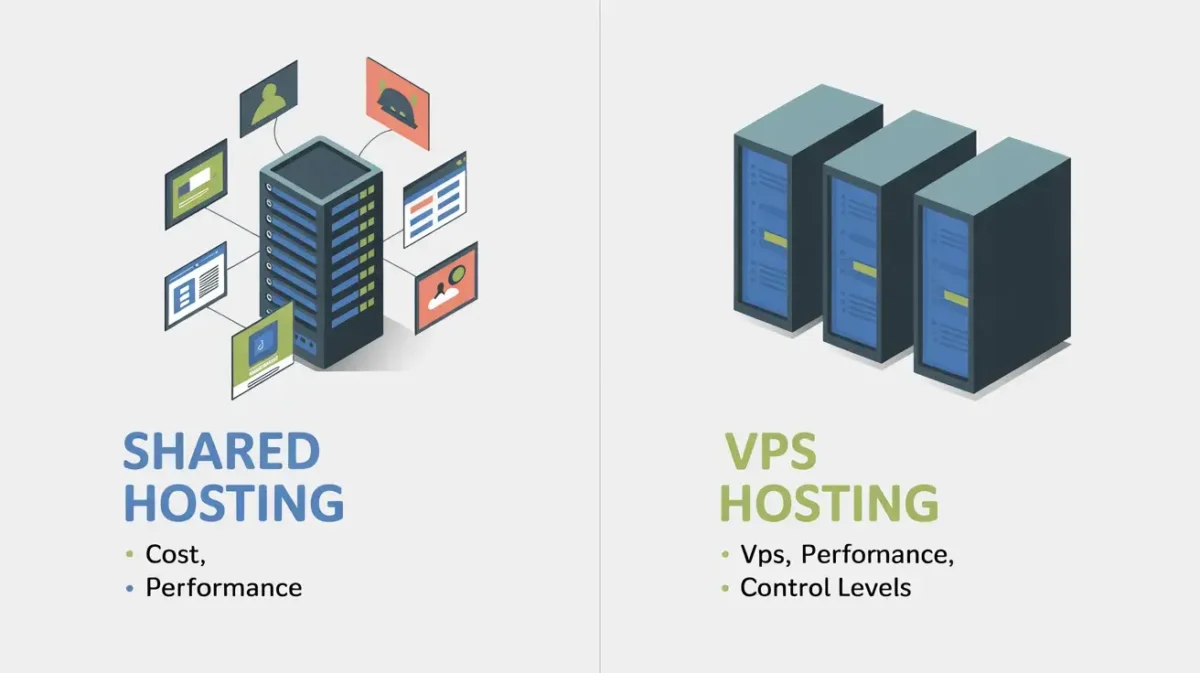
Shared hosting is cheap, easy and perfect for new websites with low traffic. VPS hosting costs more but gives you dedicated resources, better performance and far more control.
The rule of thumb is simple: start on shared hosting and upgrade to VPS once you outgrow it or need more consistent performance.
✅ Advantages
- Shared: cheap, easy, great starting point
- VPS: better performance, more control, root access
- VPS scales better as traffic grows
- Shared is fine for blogs under 10,000 monthly visitors
❌ Disadvantages
- Shared: slow during traffic spikes, noisy neighbours
- VPS: needs technical knowledge to manage
- VPS costs 3–10x more than shared hosting
Who Should Use It?
Anyone deciding between their first hosting plan — start shared, move to VPS when you need more power.
How to Choose the Best Web Hosting?
Choosing the right hosting comes down to five things: your budget, expected traffic, technical skill level, platform (WordPress, custom code, etc.) and any compliance requirements.
Start by asking: how many visitors do I expect per month? If it’s under 10,000, shared hosting is fine. Over that, consider VPS or cloud.
Next, think about management. Do you want to handle server stuff yourself or let someone else deal with it? If you’re non-technical, go managed.
If you’re a developer who wants control, an unmanaged VPS or dedicated server is the way forward. Match the hosting type to where you are now and where you plan to be in the next 12 months.
Quick Hosting Comparison Table
| Hosting Type | Best For | Cost | Performance | Ease of Use |
| Shared | Beginners / Blogs | $1–$5/mo | Basic | Very Easy |
| VPS | Growing Sites | $10–$80/mo | Good | Moderate |
| Dedicated | High-Traffic / Enterprise | $80–$500/mo | Excellent | Advanced |
| Cloud Hosting | Scalable Apps | Pay-as-you-go | Excellent | Moderate |
| Managed Hosting | Non-Tech Users | $25–$150/mo | Very Good | Easy |
| WordPress Hosting | WordPress Sites | $3–$30/mo | Optimized | Very Easy |
| Reseller | Agencies / Freelancers | $15–$60/mo | Moderate | Moderate |
| Colocation | Enterprises w/ hardware | $100–$500/mo | Top-Tier | Expert |
| Free Hosting | Testing / Learning | Free | Poor | Easy |
| Green Hosting | Eco-Conscious Sites | $3–$20/mo | Good | Easy |
Conclusion
There’s no single best hosting type — there’s only the right hosting for your specific situation. A beginner launching a blog has completely different needs than an enterprise running a high-traffic ecommerce store.
The good news is that the types of web hosting available today cover every use case, budget and skill level. You just need to match the right one to where you are right now.
Start simple if you’re new — shared hosting from Hostinger or Bluehost will get you online quickly and cheaply. As your site grows, don’t be afraid to upgrade to VPS, managed WordPress or cloud hosting.
The hosting world has evolved a lot, and the right hosting environment can genuinely transform your website’s speed, security and reliability. Pick wisely, and your website will thank you for it.
FAQs
What is web hosting in simple terms?
Web hosting is a service that stores your website’s files on a server so people can access them online anytime.
How many types of web hosting are there?
There are 36 main types, ranging from shared and VPS to niche options like HIPAA, blockchain, and green hosting.
Which hosting is best for beginners?
Shared hosting is the easiest and cheapest — a great starting point. Hostinger and Bluehost are top picks.
Shared vs VPS — what’s the difference?
Shared means you split server resources with others. VPS gives you your own dedicated slice of a server.
Is cloud hosting better than dedicated?
Cloud is more flexible and scalable. Dedication gives raw power and full control. Choose based on your traffic needs.
What is managed hosting?
The provider handles all technical tasks — updates, backups, security — so you don’t have to worry about server management.
Which hosting is best for WordPress?
Best WordPress hosting from Kinsta or Cloudways. LiteSpeed servers and built-in caching make a huge difference.
What is the cheapest hosting type?
Free hosting costs nothing but has major limits. Shared hosting is the cheapest paid option, starting around $1/month.
Best hosting for high-traffic websites?
Dedicated servers or cloud hosting like AWS or DigitalOcean handle big traffic spikes reliably without downtime.
Do I need HIPAA or PCI-compliant hosting?
Yes — if you handle patient health data or take credit card payments, compliance hosting is legally required.

Alex Bryant is the founder of PvyEmpire.com and a WordPress specialist with over 4 years of hands-on experience in web hosting, performance optimization, and website management. He has extensively tested top hosting providers by setting up real websites and monitoring their speed, uptime, and reliability.
At PvyEmpire.com, Alex publishes honest, data-driven reviews, detailed guides, and verified coupons & deals. His goal is to help website owners choose the right hosting, improve performance, and grow their online presence with confidence—based on real testing, not promotions.