Bluehost vs HostGator: Don’t Buy Until You Read This
Choosing hosting often looks easy until two familiar names keep showing up everywhere. Bluehost vs HostGator is a close comparison because both target beginners, WordPress users, small businesses, and budget-conscious website owners.
The problem is that a low introductory price doesn’t tell the whole story. Renewal costs, storage, migration, backups, performance, support, and upgrade options can change which host offers better value.
This comparison puts those details side by side and uses current plan information plus independent performance measurements to make the decision easier.
Bluehost vs HostGator at a Glance
Bluehost and HostGator both offer shared hosting, WordPress hosting, VPS solutions, dedicated servers, website tools, SSL certificates, and 24/7 support.
They also sit under Newfold Digital, which means the comparison isn’t simply about two completely separate hosting companies. Their product ranges overlap heavily while their pricing structures, interfaces, plan limits, and performance results still differ.

For a typical new website, the biggest differences come down to usability and the details included with each plan. Bluehost currently emphasizes NVMe storage, AI-assisted site creation, staging, malware scanning, free migration, and a 99.99% uptime SLA on its current shared hosting offer.
HostGator emphasizes cPanel, one-click WordPress installation, free transfers, unmetered bandwidth, and scalable shared plans.

Quick comparison table
| Feature | Bluehost | HostGator |
|---|---|---|
| Starting shared price | $3.99/mo on current 36-month offer | $3.75/mo on current offer |
| Starter storage | 10GB NVMe | 10GB SSD |
| Websites | 10 | 10 on current Hatchling tier |
| Free domain | First year | Included on eligible terms |
| Free SSL | Yes | Yes |
| CDN | Free CDN | Free CDN |
| WordPress installation | Managed/automatic tools | One-click installation |
| Website migration | Free migration tool | Free WordPress/cPanel transfer |
| Support | 24/7 chat; phone on higher plan | 24/7 phone and chat |
| Uptime commitment | 99.99% SLA on current shared offer | 99.9% guarantee |
| Money-back period | 30 days | 30 days |
| Best advantage | Modern WordPress and management tools | Lower entry price and cPanel familiarity |
Current pricing and features can change during promotions. Bluehost lists its Starter shared plan at $3.99 per month on a 36-month term while HostGator currently lists Hatchling at $3.75 per month.
Overall winner by category
Bluehost takes the edge for WordPress tools, modern management features, and the current shared-hosting uptime commitment. HostGator has the stronger case when low entry pricing, traditional cPanel management, and straightforward phone support matter most.
| Category | Winner | Why |
|---|---|---|
| Overall | Bluehost | Stronger combination of tools and current performance data |
| Beginner usability | Bluehost | Guided dashboard and WordPress-focused setup |
| Entry price | HostGator | Current Hatchling offer starts lower |
| WordPress tools | Bluehost | AI tools, staging, migration, managed updates |
| Traditional cPanel use | HostGator | Familiar cPanel-centered workflow |
| Independent benchmark | Bluehost | Slightly better US TTFB and identical 9.6/10 WPBench result |
| Uptime benchmark | Tie | Both recorded 99.97% in the same HostingStep monitoring period |
| Security features | Bluehost | Stronger current malware scanning and removal package |
| Migration | Tie | Both provide free migration options on qualifying plans |
| Scalability | Bluehost | Broader current product range and strong VPS/dedicated options |
| Lowest initial cost | HostGator | Lower current shared-hosting starting price |
Which Host Has Better Features?
Core hosting features look similar until the small print enters the picture. Both providers give you SSL, WordPress installation, a domain offer, CDN functionality, and unmetered bandwidth on applicable shared plans.
Bluehost currently adds features such as NVMe storage, staging, malware scanning, managed WordPress updates, and AI site creation to its shared platform. HostGator’s current shared offering focuses on SSD storage, free migration, AI creation tools, managed WordPress updates, and scalable resource tiers.
That difference matters because hosting value comes from what you don’t need to purchase separately. A cheap plan can become expensive when backups, security, migration, or performance tools require additional fees.
Bluehost’s current plans therefore look more complete for users who want several management tools bundled into one account while HostGator remains attractive for people who prefer a familiar traditional hosting environment.
Essential hosting features
| Feature | Bluehost | HostGator |
|---|---|---|
| SSL | Free SSL | Free SSL |
| Storage technology | NVMe on current Bluehost shared plans | SSD on current shared tiers |
| Bandwidth | Unmetered network bandwidth | Unmetered bandwidth |
| CDN | Free CDN | Free CDN |
| Domain | Free first year on eligible plans | Free domain on eligible plans |
| WordPress updates | Managed | Managed on current shared tiers |
| Staging | Included on current Bluehost plans | Plan-dependent |
| Malware scanning | Included | Available through current protection options |
| cPanel | Available through advanced management | Central part of traditional hosting |
| AI creation tools | Yes | Yes |
| Migration | Free migration tool | Free WordPress/cPanel transfer |
Bluehost’s current shared hosting page lists 10GB NVMe storage, free CDN, managed WordPress updates, free migration, staging, malware scanning, and a 99.99% uptime SLA on Starter.
HostGator’s current shared documentation lists 10GB SSD storage on Hatchling plus free CDN, SSL, migration, AI creation tools, and managed WordPress updates.
WordPress and website tools
WordPress users get a more modern toolset from Bluehost. Its current AI-powered WordPress hosting includes AI creation tools, managed updates, free migration, staging, free CDN, malware scanning, and SSL.
HostGator also provides one-click WordPress installation and managed WordPress features, yet its experience leans more heavily toward traditional cPanel management.
For a beginner building a business website, the difference is practical rather than cosmetic. Bluehost’s guided workflow can reduce the number of separate tools you need to learn.
HostGator makes more sense if you already know cPanel and want direct access to familiar hosting controls.
How We Compared Bluehost and HostGator
A useful hosting comparison should measure more than promotional prices. The evaluation considers the actual resources included, renewal costs, WordPress functionality, management tools, migration, security, support, scalability, and independent performance measurements.
That approach prevents a $2 or $3 introductory price from dominating the entire decision.
Performance numbers also need context. A TTFB figure from one test account doesn’t represent every customer or every location. The strongest comparison therefore uses published benchmark data from the same testing methodology where possible.
HostingStep monitored both Bluehost and HostGator from October 1, 2025 through May 31, 2026 with 349,920 tests for each provider’s tested account.
Testing and evaluation criteria
The comparison gives the most weight to the factors that can change your ownership experience:
- Price: introductory cost versus renewal cost.
- Performance: TTFB, global response, load testing, and WPBench.
- Reliability: measured uptime and reported downtime.
- Features: storage, CDN, SSL, staging, backups, migration, and WordPress tools.
- Security: malware protection, backups, SSL, and account security.
- Usability: dashboard, cPanel, setup, and website management.
- Support: chat, phone access, knowledge resources, and practical help.
- Scalability: shared upgrades, VPS resources, and dedicated servers.
- Value: how much useful functionality comes with the plan rather than the headline price alone.
The performance figures below are independent benchmark results rather than invented in-house measurements.
HostingStep reports that its Bluehost and HostGator results came from the providers’ tested shared plans and clearly notes that different plans can produce different results.
Which Hosting Plans Do They Offer?
Both brands cover the normal hosting ladder. You can start with shared hosting and move toward WordPress, VPS, or dedicated infrastructure as your resource requirements increase.
That makes either provider capable of supporting a small blog at first and a more demanding website later.
However, the product architecture has changed over time. Bluehost currently promotes shared, cloud, VPS, dedicated, WordPress, WooCommerce, and agency-oriented solutions.
HostGator offers shared hosting, WordPress products, VPS, dedicated hosting, and scalable shared tiers.
Bluehost hosting plans
| Hosting type | Current positioning | Best for |
|---|---|---|
| Shared | Starter, Business, and higher tiers | Blogs and small businesses |
| WordPress | AI-powered WordPress hosting | WordPress sites |
| eCommerce | Commerce-focused packages | Online stores |
| VPS | Self-managed NVMe VPS | Developers and growing sites |
| Dedicated | NVMe dedicated servers | High-resource workloads |
| Agency | Multi-site management | Agencies and professionals |
Bluehost’s current VPS range includes four NVMe plans with 2, 4, 8, and 16-class resource tiers. Its dedicated range currently includes Standard NVMe 32, Enhanced NVMe 64, and Premium NVMe 128 configurations.
HostGator hosting plans
| Hosting type | Current positioning | Best for |
|---|---|---|
| Shared | Hatchling, Baby, Business, scalable tiers | Beginners and small businesses |
| WordPress | Managed WordPress options | WordPress users |
| VPS | NVMe VPS | Growing websites and developers |
| Dedicated | Dedicated server hosting | Resource-heavy websites |
| Reseller | Reseller hosting | Hosting businesses and agencies |
HostGator’s current scalable shared documentation lists Hatchling, Baby, Business, and Pro tiers with 10GB, 20GB, 50GB, and 100GB storage respectively. Its NVMe VPS options include 4GB, 8GB, and 16GB RAM configurations across the listed plans.
Pricing: Bluehost vs HostGator
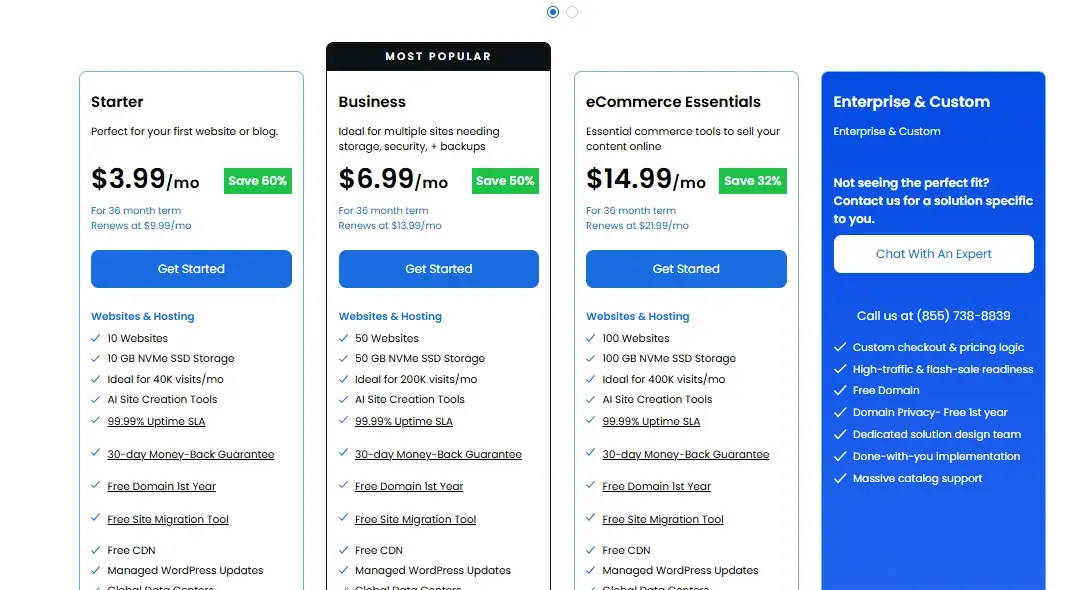
Price is where the comparison gets interesting. HostGator currently advertises Hatchling at $3.75 per month while Bluehost lists Starter at $3.99 per month on a 36-month term. That makes HostGator cheaper at checkout based on the current advertised offers.
Yet the first invoice isn’t the whole cost of hosting. Bluehost currently lists Starter renewal pricing at $9.99 per month for a 36-month renewal term on its main web-hosting page while its pricing documentation also shows different renewal amounts depending on term and plan.

HostGator’s current scalable shared documentation lists post-promotion 36-month renewal totals that vary by tier. Always check the checkout page before paying because promotions and regional pricing can change.
Introductory vs renewal pricing
| Provider | Current introductory example | Renewal example | Key warning |
|---|---|---|---|
| Bluehost Starter | $3.99/mo | $9.99/mo on current 36-month listing | Promotion applies to initial term |
| Bluehost Business | $6.99/mo | $13.99/mo on current 36-month listing | Renewal nearly doubles intro price |
| HostGator Hatchling | $3.75/mo | Varies by term and account | Check Renewal Center |
| HostGator Baby | $4.50/mo | Varies by term and account | Promotional pricing changes |
Bluehost explicitly states that promotional pricing applies to the initial term and renews at the regular rate. HostGator likewise directs customers to its current pricing and Renewal Center because renewal pricing can change.
What you get for the money
For the lowest possible upfront cost, HostGator has the advantage. Hatchling starts below Bluehost Starter on the current US offers and includes one-click WordPress installation, free SSL, a free domain, unmetered bandwidth, and a free WordPress/cPanel transfer.
Bluehost costs more initially yet bundles a stronger set of modern management features. Starter includes 10GB NVMe storage, free migration, CDN, staging, managed WordPress updates, malware scanning, and AI site creation.
For users who would otherwise purchase several of those tools separately, the higher entry price can make sense.
Which Host Has Better Features?
Looking beyond the headline specifications reveals a fairly clear pattern. HostGator remains strong on traditional hosting fundamentals such as cPanel, unmetered bandwidth, free migration, and simple shared hosting.
Bluehost pushes further into managed WordPress workflows, AI-assisted creation, staging, malware scanning, and integrated site management.
Neither platform wins every feature. HostGator can be the better fit for a user who wants traditional cPanel control with a low entry price. Bluehost is stronger when convenience matters more than having the absolute lowest monthly promotional rate.
Essential hosting features
| Feature | Bluehost | HostGator | Better choice |
|---|---|---|---|
| NVMe shared storage | Yes | No on listed shared SSD tiers | Bluehost |
| cPanel | Yes through advanced management | Yes | HostGator for cPanel-first users |
| Free CDN | Yes | Yes | Tie |
| Free SSL | Yes | Yes | Tie |
| Free migration | Yes | Yes | Tie |
| Staging | Yes | Plan-dependent | Bluehost |
| Managed WordPress updates | Yes | Yes | Tie |
| AI site creation | Yes | Yes | Tie |
| Malware scanning | Included on current Bluehost plans | Available depending on plan | Bluehost |
| Unmetered bandwidth | Yes | Yes | Tie |
The most meaningful difference is storage technology and the amount of management functionality included.
Bluehost currently uses NVMe SSD storage on its main shared offering while HostGator’s current shared documentation lists SSD storage. That doesn’t automatically make every Bluehost website faster because application setup, caching, database load, and traffic also matter.
WordPress and website tools
| WordPress feature | Bluehost | HostGator |
|---|---|---|
| One-click installation | Yes | Yes |
| Automatic setup | Yes | Yes |
| AI creation tools | Yes | Yes |
| Managed updates | Yes | Yes |
| Free migration | Yes | Yes |
| Free CDN | Yes | Yes |
| Staging | Yes | Plan-dependent |
| Malware scanning | Yes | Available |
| WooCommerce tools | Yes | Available |
| cPanel access | Advanced option | Core workflow |
Bluehost has the stronger WordPress-focused package for users who want an integrated workflow. HostGator remains perfectly usable for conventional WordPress sites and is especially familiar to people who have already worked with cPanel.
Which Host Is Easier to Use?
Ease of use matters because hosting is a control panel you may open hundreds of times. A complicated interface creates friction every time you add a domain, install WordPress, create an email address, change PHP settings, or troubleshoot a problem.
Bluehost generally aims for a guided WordPress-first experience while HostGator retains a more traditional hosting feel. That doesn’t make HostGator difficult. It simply means Bluehost tends to hide more technical complexity behind a modern dashboard.
Dashboard and control panel
| Task | Bluehost | HostGator |
|---|---|---|
| Main dashboard | Guided account interface | Customer Portal |
| WordPress management | My Sites-style management | Portal + cPanel workflow |
| Advanced controls | cPanel through advanced tools | cPanel |
| Domains | Integrated management | Integrated management |
| Account management tools | cPanel/email tools | |
| Databases | Advanced control | cPanel |
| File management | Advanced controls | cPanel File Manager |
| Beginner experience | Easier | More traditional |
A first-time WordPress user will usually find Bluehost’s guided approach less intimidating. Experienced users may prefer HostGator because cPanel exposes familiar tools without requiring as much navigation through proprietary screens.
Setup and website migration
Migration can be the difference between a painless move and an afternoon spent troubleshooting broken plugins. Bluehost currently promotes a free site migration tool while HostGator includes free WordPress/cPanel website transfer options on its current shared plans.
The important point is to check eligibility before starting. Migration policies can vary by site type, number of websites, control panel, and hosting plan. For a single standard WordPress website, both are reasonably approachable.
Website builder experience
Bluehost’s website-building workflow centers heavily on WordPress and AI-assisted creation. That approach works well if you want a WordPress site that you can customize later rather than a closed website-builder ecosystem.
HostGator also offers AI creation tools and a website builder alongside WordPress. Its advantage is breadth rather than a radically different experience. For a simple brochure website, either platform can get the job done without requiring advanced development skills.
Which Host Performs Better?
Performance is the category where marketing claims need the most skepticism. A host can advertise excellent uptime while delivering mediocre response times under load. Conversely, a server can produce a strong TTFB in one location while performing poorly for visitors thousands of miles away.
The strongest directly comparable 2026 benchmark available in the research comes from HostingStep. Its monitoring covered October 1, 2025 through May 31, 2026 and used 349,920 tests for both Bluehost and HostGator’s tested plans.
The results show a very close hardware computation score but meaningful differences in response and load handling.
Speed and response times
| Metric | Bluehost | HostGator | Edge |
|---|---|---|---|
| US TTFB | 501ms | 496ms | HostGator |
| Global TTFB | 224ms | 426ms | Bluehost |
| WPBench | 9.6/10 | 9.6/10 | Tie |
| Load test | 41ms, 0% errors | 213ms, 2.0% errors | Bluehost |
| Monitoring tests | 349,920 | 349,920 | Same scale |
These results need careful interpretation. HostGator’s 496ms US TTFB narrowly beats Bluehost’s 501ms in the cited benchmark while Bluehost produces a substantially lower global TTFB and a much stronger load-test result. Both scored 9.6/10 in WPBench.
The practical takeaway is straightforward: Bluehost has the stronger overall performance profile in this directly comparable dataset, especially when global response and load testing matter. HostGator isn’t unusably slow. Its measured results remain workable for many small sites.
Uptime and reliability
| Reliability metric | Bluehost | HostGator |
|---|---|---|
| Independent measured uptime | 99.97% | 99.97% |
| Approximate monthly downtime | About 13 minutes | About 13 minutes |
| Current advertised commitment | 99.99% SLA | 99.9% guarantee |
| Monitoring period | Oct. 2025–May 2026 | Oct. 2025–May 2026 |
The independent benchmark produced a statistical tie at 99.97% uptime. That figure means neither provider demonstrated a meaningful reliability advantage in that particular monitoring period.
Bluehost nevertheless has the stronger current advertised SLA on its shared hosting page at 99.99%, while HostGator advertises a 99.9% uptime commitment.
A 99.97% uptime rate still allows roughly 13 minutes of downtime in a 30-day month. That illustrates why an uptime percentage alone can be misleading.
Reliability also depends on short outages, response degradation, traffic handling, and how quickly problems get resolved.
Stress testing results
The load test creates the clearest separation between these two providers. HostingStep recorded a 41ms load-test result with a 0% error rate for Bluehost compared with 213ms and a 2.0% error rate for HostGator.
That doesn’t mean a normal HostGator blog will suddenly collapse when 50 people visit. Benchmark workloads are controlled experiments.
They are most useful for identifying relative behavior under the same test conditions, and in this dataset Bluehost handled the workload more cleanly.
Which Host Has Better Security?
Security should never be reduced to the presence of an SSL certificate. SSL protects data moving between visitors and the website, yet a secure hosting setup also needs account protection, backups, malware detection, patching, monitoring, and sensible access controls.
Both providers offer free SSL and security features on their hosting platforms. Bluehost’s current plans emphasize malware scanning and removal while HostGator combines SSL, account protections, backups, and optional security services across its product range.
SSL, backups, and protection
| Security feature | Bluehost | HostGator |
|---|---|---|
| Free SSL | Yes | Yes |
| CDN | Yes | Yes |
| Malware scanning | Included on current plans | Available depending on plan |
| Malware removal | Included on current Bluehost plans | Plan/service dependent |
| Backups | Weekly on current shared plans | Plan-dependent |
| DDoS protection | Platform protection | Platform protection |
| Two-factor authentication | Available | Available |
| Domain privacy | Included on selected plans | Plan-dependent |
Bluehost currently lists weekly website backups and malware scanning/removal as part of its shared hosting feature set.
HostGator’s current plan documentation shows free SSL, CDN, and migration while backup and protection features can vary by tier or additional service.
Malware and security tools
Bluehost has the stronger bundled security story on its current plans because malware scanning and removal appear directly in the advertised package.
HostGator provides a broader collection of security options yet some advanced protection can depend on the specific plan or add-on.
For either host, the safest approach is still to maintain independent WordPress backups. Hosting backups are useful for recovery but shouldn’t become the only copy of a business website.
Which Offers Better Customer Support?
Support matters most when something breaks at the worst possible moment. A support team that responds quickly but cannot explain the problem is only marginally useful. Good hosting support should identify the issue, explain the next step, and know when a problem requires escalation.
Both companies offer around-the-clock support options. HostGator explicitly advertises 24/7/365 phone and live chat support while Bluehost provides 24/7 chat and phone support on applicable plans.
Support channels and availability
| Support channel | Bluehost | HostGator |
|---|---|---|
| Live chat | 24/7 | 24/7 |
| Phone | Available, plan-dependent | 24/7 |
| Knowledge base | Yes | Yes |
| Tutorials | Yes | Yes |
| Self-service tools | Yes | Yes |
| Support portal | Yes | Yes |
HostGator has a particularly clear advantage for users who want phone support without relying heavily on chat. Bluehost still offers a solid support ecosystem with chat, phone availability, documentation, and a substantial knowledge base.
Support quality and response times
Support quality is harder to measure consistently than TTFB. A chat response can depend on the question, queue, time of day, and the complexity of the problem.
That makes isolated “support was great” or “support was terrible” reviews weak evidence by themselves.
For practical buying purposes, HostGator gets the edge for straightforward phone accessibility while Bluehost gets the edge for its integrated WordPress management experience. If the issue involves DNS, PHP, plugins, migration, or server configuration, technical knowledge matters more than a fast greeting.
Which Host Is Better for Scaling?
A website that starts with 2,000 visitors a month can eventually receive 20,000 or more. That growth changes the hosting requirement because shared resources become less comfortable as traffic, database activity, plugins, and background tasks increase.
Bluehost and HostGator both provide upgrade paths beyond entry-level shared hosting. Bluehost currently offers self-managed NVMe VPS plans and dedicated NVMe servers while HostGator provides NVMe VPS configurations plus dedicated hosting.
Upgrade options and resources
| Growth stage | Bluehost | HostGator |
|---|---|---|
| New blog | Shared | Shared |
| Multiple websites | Business/shared upgrades | Baby/Business/Pro tiers |
| Growing WordPress site | Higher shared/WordPress | Scalable shared/WordPress |
| Developer workload | NVMe VPS | NVMe VPS |
| High-resource site | Dedicated NVMe | Dedicated |
| Agency | Agency tools | Reseller and higher hosting options |
HostGator’s scalable shared platform is particularly interesting because its current documentation allows customers to move to higher CPU and storage tiers.
Bluehost offers a similarly broad upgrade path with shared, cloud, VPS, dedicated, and agency solutions.
VPS and dedicated hosting
Bluehost currently lists VPS configurations with 2, 4, 8, and 16-class NVMe tiers while HostGator’s current NVMe VPS documentation lists 4GB, 8GB, and 16GB RAM options with 2, 4, and 8 AMD EPYC cores.
Dedicated hosting changes the equation because your website gets isolated physical resources rather than competing directly with other accounts on shared infrastructure.
Bluehost currently advertises dedicated NVMe configurations starting at $144.19 per month while HostGator also offers dedicated environments for customers needing substantially more control and resources.
What Do Real Users Say?
User sentiment adds useful context but shouldn’t override measurable evidence. Reviews often reflect billing experiences, migration problems, support interactions, or individual website configurations rather than the hosting platform alone.
Both Bluehost and HostGator have long histories in the hosting market. Because the two brands share the same parent company, customer complaints about pricing, support, or infrastructure can sometimes sound remarkably similar.
hat doesn’t mean every customer receives the same experience.
Bluehost user reputation
Bluehost remains especially recognizable among WordPress beginners because of its long-standing WordPress focus and simplified setup.
Current products reinforce that positioning with AI-assisted site creation, managed WordPress updates, staging, migration tools, and integrated security features.
The main criticism tends to center on renewal pricing and the difference between introductory offers and long-term costs.
That concern is legitimate because Bluehost’s current Starter price can rise from $3.99 to $9.99 per month on the listed 36-month renewal term.
HostGator user reputation
HostGator remains popular with users who value traditional cPanel access, low introductory pricing, phone support, and straightforward shared hosting.
Its current Hatchling offer starts at $3.75 per month and includes free SSL, a free domain, unmetered bandwidth, and one-click WordPress installation.
The main concern is performance consistency relative to newer budget hosts. Independent 2026 testing produced 99.97% uptime and a 496ms US TTFB for Hatchling while also recording 213ms load-test response with a 2% error rate.
Bluehost vs HostGator: Pros and Cons
Neither provider is a universal winner. The better choice depends on whether you value modern WordPress tools, traditional cPanel control, lower entry pricing, or performance under load.
A useful way to think about the comparison is this: Bluehost is the more feature-rich modern package while HostGator is the more traditional budget-oriented package. That distinction becomes clearer when the strengths and weaknesses sit next to each other.
Bluehost pros and cons
Pros
- Modern WordPress-focused dashboard.
- 10GB NVMe storage on the current Starter plan.
- Free site migration.
- Free CDN and SSL.
- AI site creation tools.
- Staging environment.
- Malware scanning and removal on current plans.
- 99.99% uptime SLA on current shared hosting.
- Stronger load-test result in comparable 2026 testing.
- Broad VPS and dedicated upgrade paths.
Cons
- Higher current entry price than HostGator.
- Renewal pricing is substantially higher than promotional pricing.
HostGator pros and cons
Pros
- Lower current introductory shared-hosting price.
- Familiar cPanel environment.
- 24/7 phone and live chat support.
- Free SSL.
- Free domain on eligible plans.
- Free WordPress/cPanel migration.
- Unmetered bandwidth.
- Scalable shared hosting tiers.
- NVMe VPS options.
- 30-day money-back guarantee.
Cons
- Current shared storage uses SSD rather than NVMe on the listed tiers.
- Performance trails Bluehost in the cited load test.
Which Host Is Better for You?
The right host depends less on brand recognition and more on what your website needs today. A personal blog doesn’t need dedicated hardware while a busy WooCommerce store shouldn’t choose hosting solely because the first invoice is cheap.
Bluehost is the stronger general recommendation for most new WordPress users because its current plans combine hosting, migration, staging, security, CDN, and WordPress management in one workflow.
HostGator remains a reasonable choice when lower initial pricing and traditional cPanel support carry more weight.
Best for beginners
Bluehost is the better choice for most beginners. Its guided dashboard, AI site creation, automatic WordPress workflow, migration tool, staging, and managed updates reduce the number of technical decisions you need to make.
HostGator isn’t difficult to use. Its cPanel interface is actually a benefit for people who want traditional controls. However, someone launching a first WordPress site may appreciate Bluehost’s more guided approach.
Best for budget-conscious users
HostGator wins on the current entry price. Its Hatchling plan is advertised at $3.75 per month compared with Bluehost Starter at $3.99 per month on the current 36-month offers.
However, budget buyers should calculate the renewal bill before purchasing. Saving $1.24 per month during the promotional term means little if a higher renewal rate makes the long-term cost considerably larger.
Best for WordPress websites
Bluehost wins for WordPress-focused users. The current platform includes AI creation tools, managed WordPress updates, free migration, staging, free CDN, SSL, and malware scanning.
HostGator still handles WordPress well. Its one-click installation, managed updates, free migration, CDN, and shared hosting tiers make it suitable for blogs and smaller business websites.
Best for high-traffic websites
Bluehost has the stronger performance case in the comparable 2026 data. Its tested load response was 41ms with zero errors while HostGator recorded 213ms with a 2% error rate. Both providers recorded 99.97% uptime in that same monitoring period.
Neither entry-level shared plan should become the permanent home of a demanding high-traffic application.
Once traffic becomes consistently heavy, move toward VPS, cloud, or dedicated resources rather than expecting shared hosting to carry an ever-growing workload.
Do They Offer Money-Back Guarantees?
Both providers offer a 30-day money-back guarantee on qualifying hosting products. The important difference is not the number of days.
It is what the guarantee excludes and how domains, add-ons, monthly plans, and other services are treated.
Bluehost excludes several categories including domain registration, monthly-term services, setup fees, and certain additional services.
HostGator also excludes domain registration, monthly-term services, administrative fees, setup fees, and additional services.
Bluehost refund policy
Bluehost provides a 30-day money-back guarantee for qualifying Shared, VPS, and Dedicated hosting fees.
Domain registrations and many add-ons remain nonrefundable, and renewals generally aren’t refundable after the applicable period. Bluehost states that refunds typically take five to seven business days to appear.
If a free domain came with the hosting purchase, canceling the hosting while retaining that domain can result in a domain fee being deducted from the refund. That detail is easy to overlook during checkout.
HostGator refund policy
HostGator provides a 30-day money-back guarantee for eligible shared, WordPress, VPS, and dedicated hosting products. Domain registration fees, monthly-term services, setup fees, administrative fees, and certain add-ons are excluded.
HostGator also states that the guarantee generally applies to the first package purchased for eligible billing accounts. If a free domain is involved, the standard domain fee can be deducted from the refund.
Bluehost vs HostGator: Final Verdict
The overall winner is Bluehost because it combines stronger current WordPress tools with a more modern management experience and better results in the comparable independent load-testing data.
HostGator remains competitive on entry price, cPanel familiarity, and phone support, so it isn’t a bad choice for every website.
The most important distinction is long-term value. If you want a simple WordPress workflow with migration, staging, malware scanning, NVMe storage, CDN, and integrated tools, Bluehost offers the more complete package.
If you want the lowest current entry price and prefer traditional cPanel hosting, HostGator can still make sense.
Which host wins overall?
Bluehost wins overall for most new website owners. It has the better balance of WordPress functionality, modern management tools, security features, upgrade paths, and performance results in the cited 2026 benchmark.
HostGator wins two important battles: current introductory price and traditional cPanel-oriented hosting. Those advantages can be enough for experienced users who already know their way around cPanel and want to minimize the initial hosting bill.
Which host wins for each use case?
| Use case | Winner | Main reason |
|---|---|---|
| Overall | Bluehost | Best balance |
| Beginners | Bluehost | Guided WordPress experience |
| Budget entry price | HostGator | $3.75/mo current Hatchling offer |
| WordPress | Bluehost | Stronger integrated toolset |
| cPanel users | HostGator | Traditional cPanel workflow |
| Performance | Bluehost | Better load-test result |
| Uptime | Tie | 99.97% in same benchmark |
| Phone support | HostGator | Strong 24/7 phone availability |
| Scaling | Bluehost | Broad VPS and dedicated options |
| High traffic | Bluehost | Better benchmark load handling |
Bluehost vs HostGator FAQs
Is Bluehost better than HostGator?
Yes, Bluehost is the better overall choice for most new WordPress websites because it offers a stronger combination of WordPress tools, security, migration, staging, and performance.
Which is faster, Bluehost or HostGator?
Bluehost performed better in the cited comparable 2026 load test. It recorded 41ms with 0% errors while HostGator recorded 213ms with a 2% error rate.
Which is cheaper after renewal?
The answer depends on the plan and billing term. Current Bluehost Starter pricing renews at $9.99/month on the listed 36-month term while HostGator renewal prices vary by plan and term. Check the final renewal price before purchasing.
Which is better for WordPress?
Bluehost is generally better for WordPress because its current plans include AI creation tools, managed updates, staging, migration, CDN, SSL, and malware scanning.
Do both offer free website migration?
Yes. Bluehost currently advertises a free site migration tool while HostGator offers free WordPress/cPanel website transfers on qualifying shared plans.
Can I switch from one host to the other?
Yes. You can migrate a WordPress website from Bluehost to HostGator or the other way around. Create the new hosting account first, copy the files and database, test the site, then update DNS after confirming everything works.
Which host is better for beginners?
Bluehost is the stronger beginner choice because its dashboard and WordPress tools reduce technical setup work. HostGator is better suited to beginners who specifically prefer traditional cPanel management.

Alex Bryant is the founder of PvyEmpire.com and a WordPress specialist with over 4 years of hands-on experience in web hosting, performance optimization, and website management. He has extensively tested top hosting providers by setting up real websites and monitoring their speed, uptime, and reliability.
At PvyEmpire.com, Alex publishes honest, data-driven reviews, detailed guides, and verified coupons & deals. His goal is to help website owners choose the right hosting, improve performance, and grow their online presence with confidence—based on real testing, not promotions.