Bluehost vs GreenGeeks: Speed, Reliability, & Price Compared
So you’re staring at two tabs right now, one for Bluehost and one for GreenGeeks, and you still have no idea which one deserves your money.
Maybe you’ve read five other “comparison” posts already, and somehow you’re more confused than when you started. That’s the annoying part about hosting decisions. They feel small until your site is slow, support goes quiet, or your bill jumps out of nowhere.
Good news: this Bluehost vs GreenGeeks breakdown is built to end that guessing game. You’ll get a clear look at speed, pricing, support, and eco-friendly hosting perks, without the fluff. By the end, you’ll know exactly which host fits your site and your budget.
Bluehost vs GreenGeeks: Quick Comparison
Both hosts chase the same customer: someone who wants reliable shared hosting without a huge upfront bill. Bluehost leans on its size and its long-standing WordPress.org recommendation.
GreenGeeks leans on renewable energy credits and a security stack that punches above its price. Neither one is a bad pick, but they solve different problems for different people.
If you want the short version, Bluehost vs GreenGeeks really comes down to this: Bluehost wins on onboarding simplicity and AI-assisted setup, while GreenGeeks wins on raw performance numbers and sustainability.
Your final choice depends on which of those two things matters more to your project.
Where Bluehost and GreenGeeks Are Similar
Both hosts offer free SSL certificates, a free domain for the first year, and a 30-day money-back guarantee.

You’ll find cPanel-based management on both platforms, along with one-click WordPress installs and daily or nightly backup options.
Neither host locks you into a single hosting type either. Shared, WordPress-optimized, VPS, and dedicated plans exist on both sides, so you can grow your account without switching providers entirely.
Which Host Wins Each Category?
| Category | Winner | Why |
|---|---|---|
| Speed and response time | GreenGeeks | Faster load times in independent testing |
| Uptime reliability | Tie | Both post 99.9%+ over recent testing windows |
| Beginner-friendliness | Bluehost | Guided AI onboarding and simpler dashboard |
| Security features | GreenGeeks | AI-based firewall, nightly backups included |
| Pricing at signup | Tie | Both sit near $2.95/month on intro plans |
| Renewal pricing | Bluehost | Smaller percentage jump at renewal |
| Customer support | GreenGeeks | Faster live chat response, stronger reviews |
How We Compared Bluehost and GreenGeeks
Ranking two hosting companies fairly means looking past the marketing page and into the actual numbers. This comparison draws on uptime monitoring logs, independent speed tests, and stress testing under simulated traffic spikes.
It also factors in real pricing pages rather than outdated coupon screenshots, since renewal costs change more often than most articles admit.
For performance, testing typically runs over a two-week monitoring window to catch both average conditions and traffic spikes. Response time gets measured from multiple global locations, not just one server room.
That matters because a host can look fast from Los Angeles and feel sluggish from London. Combining uptime data, load speed, and stress test results gives a much more honest picture than a single snapshot ever could.
Which Host Performs Better?
Performance is where these two hosts actually separate from each other. On paper, both promise fast page loads and strong uptime. In practice, the numbers tell a slightly different story, and GreenGeeks pulls ahead in most head-to-head speed tests.
That said, “faster” doesn’t always mean “better for your site.” A photography portfolio and a WooCommerce store have different needs, so the raw numbers below should guide your decision, not replace it entirely.
Speed and Response Time
Recent load testing found GreenGeeks handling 50,000 simulated monthly users with a response time around 26ms at 100 concurrent visitors, alongside a time-to-first-byte figure of roughly 418ms and zero recorded failures during the test window.
Bluehost’s infrastructure, which runs on KVM and OpenStack with its PowerCacher technology, typically posts page load times in the 1.6 to 2-second range for a standard WordPress homepage.
GreenGeeks’ use of LiteSpeed Enterprise with LSCache and free Cloudflare CDN integration explains a lot of that speed advantage, especially under sudden traffic surges.
Uptime and Reliability
Both hosts advertise uptime guarantees north of 99.9%, and both generally deliver on that promise during standard monitoring periods.
GreenGeeks’ data center infrastructure, spread across a smaller number of physical locations, still manages consistent uptime thanks to proactive server monitoring.
Bluehost, backed by a larger network footprint, offers a comparable track record but has occasionally shown brief dips during high-traffic events reported by third-party monitors. For most everyday websites, the difference between the two won’t be something visitors notice.
Features and Ease of Use Compared
Features are where personal preference starts to matter more than raw specs. Bluehost built its reputation on being approachable, and its dashboard reflects that goal at every turn.
GreenGeeks takes a slightly more traditional approach, favoring a classic cPanel experience over a heavily customized interface.
Neither approach is objectively better. If you’ve never managed a website before, Bluehost’s guided setup will likely feel less intimidating. If you’ve used cPanel before on another host, GreenGeeks won’t ask you to relearn anything.
Control Panel and WordPress Tools
Bluehost’s “My Sites” dashboard bundles domain management, security setup, and a bandwidth usage widget into one guided interface, plus a WonderSuite AI website builder that generates a working WordPress site from a short description.
GreenGeeks sticks closer to a standard cPanel layout, giving you direct access to email management, staging tools, and server information without extra wrapping. Both support one-click WordPress installation, so getting a site running takes only a few minutes on either platform.
Security and Backup Features
GreenGeeks includes free nightly backups, an AI-powered Web Application Firewall, malware scanning, and DDoS protection through Cloudflare on every shared plan. Bluehost’s security depth depends more heavily on your plan tier.
The entry-level plan covers free SSL and basic firewall protection, but features like on-demand backups and SiteLock scanning typically require the Choice Plus or Pro plans. If security is your top priority and you’re on a budget plan, GreenGeeks currently offers more protection by default.
Bluehost vs GreenGeeks Pricing
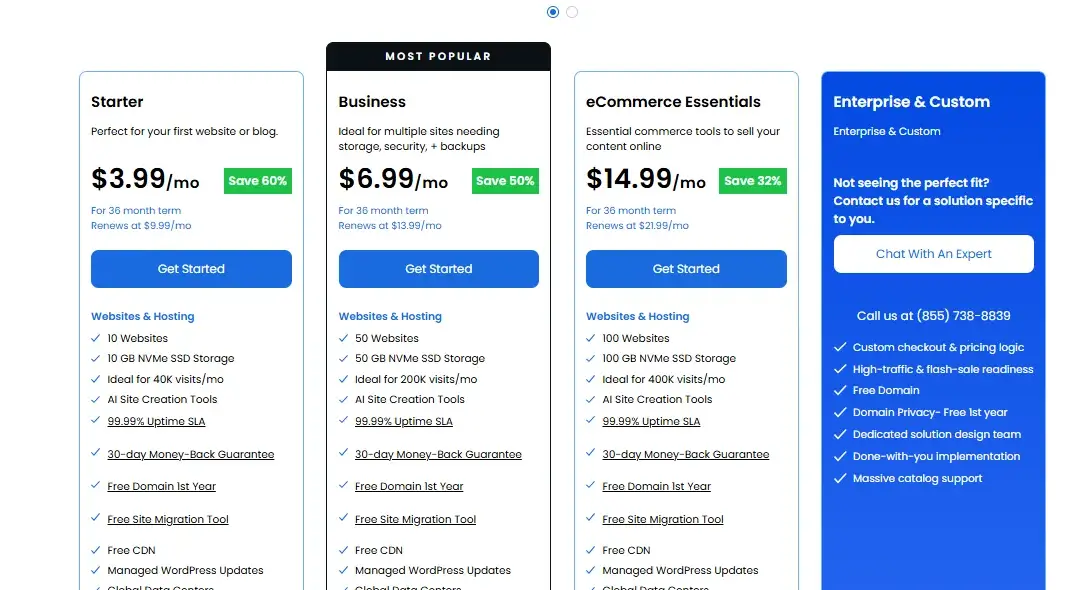
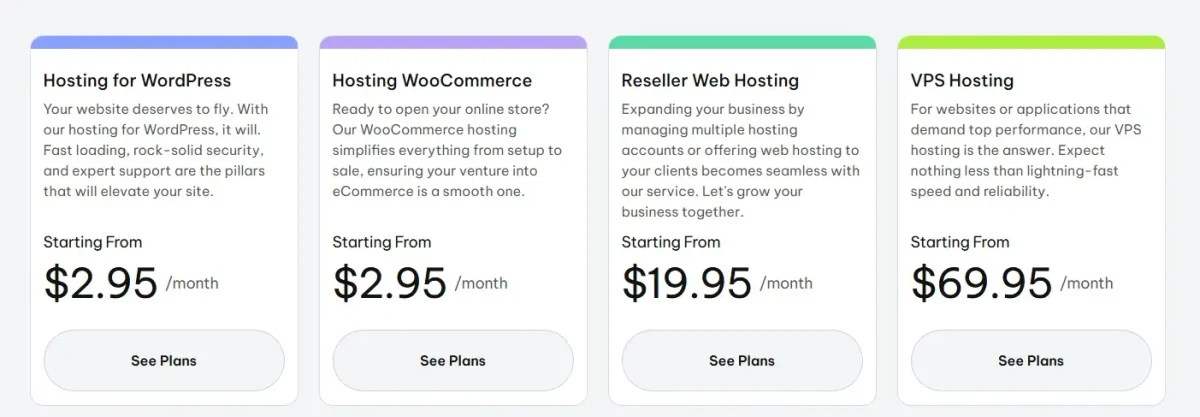
Pricing is where things get interesting, because the headline numbers look almost identical at signup.
Bluehost’s Basic shared plan starts around $2.95 per month on a three-year term, while GreenGeeks’ Lite plan starts at the same $2.95 per month on a one-year term. The catch, as always with budget hosting, sits in the renewal price.
| Plan Type | Bluehost Intro | Bluehost Renewal | GreenGeeks Intro | GreenGeeks Renewal |
|---|---|---|---|---|
| Entry shared plan | $3.99/mo | ~$9.99/mo | $2.95/mo | $13.95/mo |
| Mid-tier shared plan | $6.99/mo | ~$10.99–$14.99/mo | $2.95/mo | $18.95/mo |
| Top shared plan | $14.99/mo | ~$23.99/mo | $19.95/mo | $30.95/mo |
| VPS entry plan | $4.69/mo | Varies by term | $69.95/mo | Varies by term |
| Money-back guarantee | 30 days | — | 30 days | — |
Introductory and Renewal Prices
Bluehost’s introductory pricing depends heavily on your chosen term length, with 36-month contracts unlocking the lowest rate and monthly billing costing significantly more per month.
GreenGeeks keeps things simpler by pricing everything on a 12-month prepaid basis, though its renewal jump tends to be steeper in percentage terms.
A $2.95 GreenGeeks plan renewing at $13.95 represents nearly a 4.7x increase, while Bluehost’s typical jump from $2.95 to roughly $9.99 sits closer to 3.4x. Over a three-year period, Bluehost usually ends up cheaper for budget-conscious buyers.
Money-Back Guarantee Comparison
Both hosts offer a straightforward 30-day money-back guarantee on hosting fees, giving you a full refund window if the service isn’t a fit.
Neither guarantee typically covers domain registration costs, so read the fine print before you cancel. This part of the pricing structure is essentially a tie, and it shouldn’t factor heavily into your final decision either way.
Which Host Offers Better Support?
Support quality often decides how you feel about a host long after the sales page stops mattering.
GreenGeeks has built a stronger reputation here, with reviewers consistently praising quick live chat response times and knowledgeable agents who solve problems on the first contact. Its 24/7 live chat, phone support, and ticket system all report faster average resolution times compared to Bluehost’s support channels.
Bluehost still offers solid coverage through 24/7 live chat, phone support, and an extensive knowledge base, but user feedback skews more mixed.
Some customers report longer wait times during peak hours, along with occasional upselling during support calls. If responsive, no-pressure support ranks high on your list, GreenGeeks currently holds the edge.
Which Host Is Better for Growth?
Scaling a website eventually means outgrowing shared hosting, and both companies plan for that transition.
Bluehost offers a broader range of upgrade paths, including cloud hosting, managed WordPress, and dedicated servers with up to 32 CPU cores and 125GB of RAM on its highest tier. That range gives larger businesses more room to grow without switching hosts entirely.
GreenGeeks focuses more narrowly on shared, WordPress, managed VPS, and reseller hosting, which covers most small-to-midsize business needs but stops short of Bluehost’s dedicated server depth.
For a growing blog, portfolio, or small store, either host scales comfortably. For a business anticipating heavy, resource-intensive traffic, Bluehost’s wider infrastructure options offer more long-term flexibility.
Bluehost vs GreenGeeks: Which Should You Choose?
By now the pattern should be pretty clear: Bluehost wins on ease of use and long-term pricing, while GreenGeeks wins on raw speed, security defaults, and support quality. Your ideal pick depends on what you’re building and how much hand-holding you want along the way.
Think about your priorities before committing to either plan. A brand-new blogger and a growing eCommerce store shouldn’t necessarily make the same choice here, even though both sites could technically run on either host.
Best for Beginners and WordPress
Bluehost’s official WordPress.org recommendation, combined with its guided onboarding and AI website builder, makes it the friendlier starting point for first-time site owners.
You’ll spend less time figuring out where things live in the dashboard and more time actually building your site.
Best for Budget and Long-Term Value
If you’re planning to keep your site running for three years or more, Bluehost’s lower renewal percentage increase generally saves you more money over time.
Run the math on your specific plan and term length before deciding, since promotional pricing changes often.
Best for High-Traffic Websites
GreenGeeks’ stronger stress test results, including zero failures under simulated 50,000-visitor loads, make it a solid pick for sites expecting sudden traffic spikes.
Pair that with its free Cloudflare CDN integration, and busier websites tend to stay responsive even during peak hours.
Conclusion
Choosing between Bluehost and GreenGeeks doesn’t have to feel like guesswork anymore. Bluehost fits beginners and long-term budget planners best, while GreenGeeks fits speed-focused, security-conscious site owners who value fast support. Match the choice to your actual project instead of chasing whichever host has the flashier homepage.
Whichever one you pick, take the 30-day money-back guarantee seriously. Use that window to test real load times, contact support with a genuine question, and see how the dashboard feels for your workflow. That hands-on test tells you more than any comparison article ever could, including this one.
Bluehost vs GreenGeeks FAQ
Which host has better uptime?Is Bluehost or GreenGeeks faster?
GreenGeeks generally posts faster response times in independent testing, particularly under simulated traffic spikes, thanks to its LiteSpeed caching setup and free Cloudflare CDN.
Which is cheaper long term?
Bluehost tends to cost less over a three-year period because its renewal price increase is smaller in percentage terms compared to GreenGeeks.
Which host is better for WordPress?
Bluehost holds the official WordPress.org recommendation and offers a more guided WordPress setup experience for beginners.
Can I switch between Bluehost and GreenGeeks?
Yes. Both hosts offer free or assisted WordPress migration services, so moving your site between them is usually a straightforward process.
Is GreenGeeks more expensive than Bluehost?
At signup, both sit near $2.95 per month, but GreenGeeks renews higher in percentage terms than Bluehost.
Does Bluehost or GreenGeeks offer free migration?
Both hosts offer free or assisted WordPress migration, though GreenGeeks pairs it with a dedicated migration specialist.
Which host has better uptime?
Both consistently report uptime above 99.9% during standard monitoring periods, making this category close to a tie.
Is GreenGeeks actually eco-friendly?
Yes. GreenGeeks matches its energy use with renewable energy credits at a 300% rate, a program Bluehost doesn’t currently offer.
Can beginners use GreenGeeks easily?
Yes, though the interface leans more traditional. Bluehost’s dashboard is generally considered more beginner-friendly overall.
Does either host support eCommerce sites?
Yes. Both offer WooCommerce-ready hosting plans with the storage and email features small stores typically need.
Which host is better for a small blog?
Either works well for a small blog, but Bluehost’s lower cost over time makes it the slightly more economical pick for long-term bloggers.

Alex Bryant is the founder of PvyEmpire.com and a WordPress specialist with over 4 years of hands-on experience in web hosting, performance optimization, and website management. He has extensively tested top hosting providers by setting up real websites and monitoring their speed, uptime, and reliability.
At PvyEmpire.com, Alex publishes honest, data-driven reviews, detailed guides, and verified coupons & deals. His goal is to help website owners choose the right hosting, improve performance, and grow their online presence with confidence—based on real testing, not promotions.