Hostinger Cloud Hosting Review: Plans, Pricing and More
Your website’s crawling along, visitors are bouncing before the page even loads, and you’re starting to wonder if shared hosting has quietly become your biggest problem.
That nagging feeling hits hardest during a traffic spike, when your site buckles at exactly the wrong moment. So you start typing “Hostinger Cloud Hosting Review” into Google, hoping someone’s already done the digging for you.
Good news: that’s exactly what this post covers. We’ll break down real speed tests, honest pricing, and the nitty-gritty of what each plan actually gets you, no fluff attached.
By the end, you’ll know whether Hostinger’s cloud plans fit your site or whether you’re better off looking elsewhere.
A Quick Overview: Hostinger Cloud Hosting Review
| Category | Rating | Notes |
|---|---|---|
| Speed | 4.5/5 | NVMe storage plus LiteSpeed keeps pages loading fast |
| Uptime | 4.5/5 | Consistently near 99.9%+ across most testing periods |
| Pricing | 4/5 | Affordable up front, renewal jump needs planning |
| Support | 4.3/5 | Fast live chat, decent AI assistant, no phone line |
| Ease of Use | 4.7/5 | hPanel is genuinely beginner-friendly |
| Overall | 4.4/5 | Strong pick for growing sites and eCommerce stores |
Who Should Use Hostinger Cloud Hosting?
If you’re running a WooCommerce store, a membership site, or a blog that finally broke past shared hosting’s limits, Hostinger’s cloud plans make sense.
Freelance developers managing multiple client sites will appreciate the 300-website allowance. Anyone tired of slow page loads during traffic surges will notice the difference immediately.
Who Should Not Use Hostinger Cloud Hosting?
Brand-new bloggers with barely any traffic don’t need this horsepower yet. If your budget is razor-thin and your site gets under a thousand visits monthly, shared hosting will do the job for less. Save the upgrade for when growth actually demands it.
What Is Hostinger Cloud Hosting?
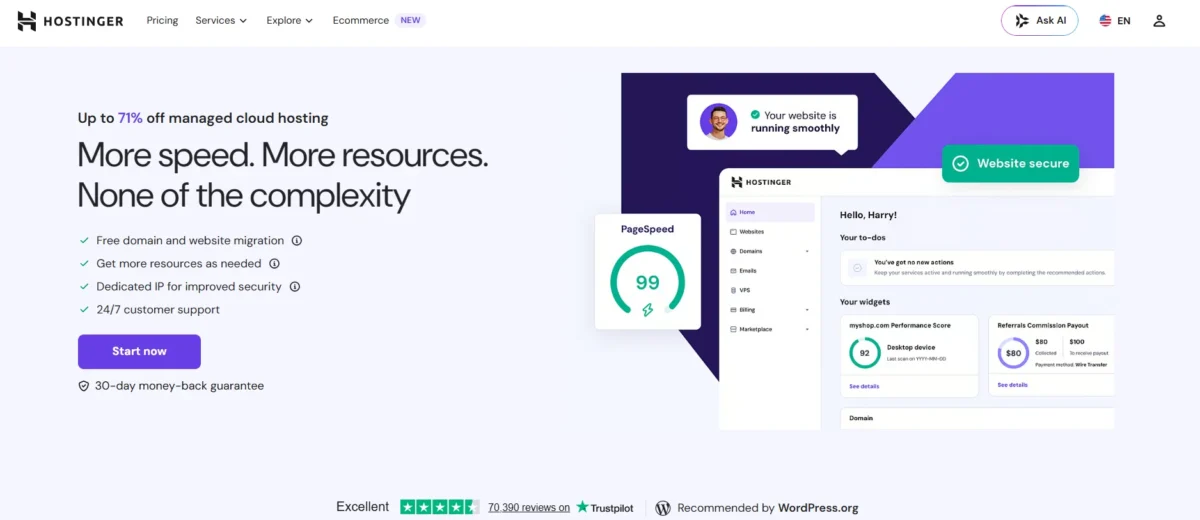
Cloud hosting pools computing power from multiple interconnected servers instead of relying on one physical machine.
That means your site draws resources from a distributed network, which cuts down the risk of a single hardware failure taking everything offline.
Hostinger built its version on a customized LiteSpeed stack, pre-packaged into fixed plans so you skip the technical setup.
Unlike a raw cloud VPS from AWS or DigitalOcean, you don’t touch command lines or manage server administration yourself. Hostinger handles the backend while you focus on running your site. It’s the performance of cloud infrastructure without the admin headache.
How It Works
Your site’s data, CPU, and RAM draw from a pool of servers spread across multiple data centers rather than one physical box. If demand spikes, resources scale to absorb it instead of your site crashing under pressure.
This elastic setup is what separates cloud hosting from the older, single-server model most beginners start with.
Cloud Hosting vs Traditional Shared Hosting
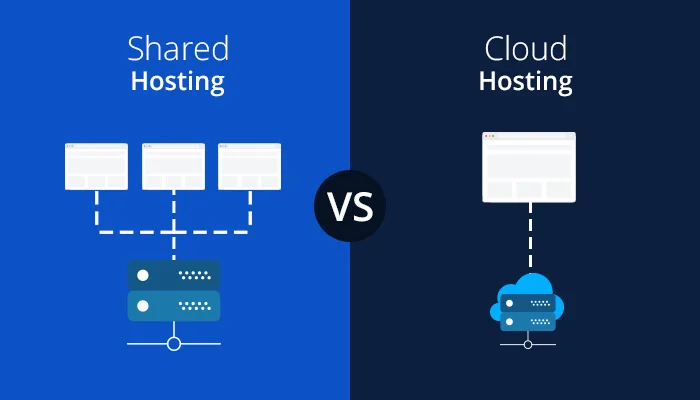
Shared hosting crams dozens of websites onto one server, splitting CPU and RAM among everyone.
Cloud hosting gives you dedicated resources instead, so a traffic spike on someone else’s site never slows yours down.
You also get NVMe storage over standard SSD, daily backups by default, and a dedicated IP address that shared plans typically skip.
Cloud Hosting vs VPS Hosting
A regular VPS hands you root access and full server control, which sounds great until you’re troubleshooting a broken configuration at 2 a.m.
Hostinger’s cloud hosting keeps the performance benefits of a VPS while removing the server management burden. You get isolated resources and scalability without touching system administration at all.
What Plans Does Hostinger Cloud Hosting Offer?
Hostinger keeps things simple with three tiers: Startup, Professional, and Enterprise. Each one scales up CPU cores, RAM, and NVMe storage, so you’re not stuck guessing which specs actually matter.
All three plans support up to 300 websites, which is generous even for agencies managing multiple client projects.
Picking between them really comes down to current traffic and expected growth over the next year or two. Undersizing your plan means you’ll outgrow it fast; oversizing wastes money you could put elsewhere. Let’s break down what each tier actually includes.
Cloud Startup Plan
This is the entry point, built for sites moving off shared hosting or freelancers juggling several small projects.
You get 2 CPU cores, 3GB RAM, and roughly 200GB of NVMe storage depending on current promotions. Daily backups, a free domain, and unlimited bandwidth round out the package nicely.
Cloud Professional Plan
Step up here once your WooCommerce store or membership site starts pulling serious traffic.
You’ll get 4 CPU cores, 6GB RAM, and around 250GB of NVMe storage for handling heavier applications. It’s the sweet spot for web agencies and businesses that have outgrown the basics.
Cloud Enterprise Plan
Built for high-traffic online stores, SaaS platforms, and busy company portals that can’t afford slowdowns.
Expect 6 CPU cores, 12GB RAM, and roughly 300GB of NVMe storage on this tier. Realistically, most sites won’t need this much power, but it’s there for the ones that do.
Which Plan Offers the Best Value?
For most small-to-medium businesses, the Cloud Professional plan hits the best balance between price and performance. It doubles the CPU and RAM of the Startup tier without jumping all the way to Enterprise pricing.
Unless you’re already handling enterprise-level traffic, this middle plan covers nearly every practical use case.
How Much Does Hostinger Cloud Hosting Cost?

Pricing is where Hostinger genuinely shines, at least at first glance. Long-term plans unlock steep discounts, sometimes cutting the introductory rate by more than 60% compared to month-to-month billing.
But like most hosting providers, the sticker price you see isn’t the price you’ll pay forever.
| Plan | Introductory Price | Typical Renewal Price* | CPU Cores | RAM | NVMe Storage |
|---|---|---|---|---|---|
| Cloud Startup | $7.99/mo | ~$14.99–$16.99/mo | 2 | 3GB | ~200GB |
| Cloud Professional | $15.99/mo | ~$24.99–$27.99/mo | 4 | 6GB | ~250GB |
| Cloud Enterprise | $29.99/mo | ~$39.99–$44.99/mo | 6 | 12GB | ~300GB |
*Renewal pricing typically increases after your first billing term ends, which is standard across most cloud hosting providers.
Always check Hostinger’s official pricing page before checkout, since promotional rates and exact figures shift regularly.
- Hostinger Review
- Hostinger Pricing
- Hostinger VPS Review
- Hostinger Business Hosting Review
- Cloudways vs Hostinger
- Hostinger Alternatives
Introductory Pricing
The lowest rates require committing to a longer billing cycle, usually 24 or 48 months upfront. That’s how Hostinger advertises headline prices as low as $7.99/mo, though you’re paying the full term at checkout.
It’s a legitimate deal if you’re confident you’ll stick around, but read the fine print before committing years in advance.
Renewal Pricing
Here’s the part competitors gloss over: once your introductory term ends, prices jump noticeably, often by 60% to 100% depending on the plan.
This isn’t unique to Hostinger, but it catches people off guard every single time. Budget for the renewal rate from day one, not just the flashy intro number.
Available Billing Cycles
Hostinger offers 1, 12, 24, and 48-month billing options at checkout. Shorter terms cost more per month but limit your financial commitment if you’re still testing the waters. Longer terms save serious money but lock you into that provider for years.
Refund Policy
Every cloud plan comes with a 30-day money-back guarantee, giving you a genuine window to test performance before fully committing.
If Hostinger doesn’t meet expectations, you can request a refund within that period, no elaborate justification required. It’s a reasonable safety net for anyone still on the fence.
What Features Do You Get with Hostinger Cloud Hosting?
Every cloud plan ships with a long list of extras bundled into the price, which is honestly where Hostinger earns a lot of its value.
Instead of nickel-and-diming you for basics, most of these come standard from the Startup tier onward. Here’s the full rundown:
- Managed cloud infrastructure with zero server administration required
- Free domain name included for the first year
- Free SSL certificate via Let’s Encrypt
- Built-in CDN for global performance improvements
- Daily automated backups stored securely
- Weekly backups retained for extended recovery windows
- Dedicated IP address on every plan
- Unlimited bandwidth regardless of tier
- Support for up to 300 websites per account
- NVMe SSD storage across all plans
- Free website migration handled by Hostinger’s team
- Staging environment for testing changes safely
- One-click WordPress and WooCommerce installation
- Email hosting with POP/IMAP mailboxes included
- Integrated caching for faster page loads
- DDoS protection built into every server
- Web application firewall (WAF) for added security
- Multi-factor authentication for account login
- AI-powered SEO tools for on-page optimization
- 24/7 server monitoring for stability
Managed Cloud Infrastructure
You don’t manage patches, updates, or server configuration yourself. Hostinger’s team handles the backend entirely, which means fewer technical headaches for you.
This managed approach is the main reason non-technical users can run cloud hosting without hiring a sysadmin.
Free Domain and SSL

New signups typically get a free domain for the first year, alongside an unlimited SSL certificate through Let’s Encrypt.
That combination saves a decent chunk of money compared to buying both separately. It’s a small thing, but it adds up when you’re launching on a budget.
Built-in CDN
The included content delivery network caches your site across global server locations, cutting load times for visitors far from your main server.
This matters more than people realize, especially if your audience spans multiple continents. Combined with LiteSpeed, page speed genuinely improves.
Daily Backups
Automated daily backups run in the background, retained for about seven days, with weekly backups kept even longer.
If something breaks, you’re never more than a day away from a clean restore point. Manual backups are also available if you want extra control before a major update.
Email Hosting
Each website gets multiple POP/IMAP mailboxes included free for the first year. That’s professional email at your own domain without paying for a separate service. It’s a nice touch that shared hosting plans sometimes charge extra for.
Staging Environment
You can test theme changes, plugin updates, or new features on a staging copy before pushing anything live.
This protects your actual site from broken updates or unexpected conflicts. It’s a feature many budget hosts skip entirely, so its inclusion here stands out.
AI Tools and Developer Features
Hostinger bundles AI-assisted SEO suggestions directly into hPanel, alongside developer-friendly tools like Git integration and SSH access on higher tiers.
These additions target users who want more than basic hosting without upgrading to a full VPS. It’s a thoughtful bridge between beginner and advanced needs.
How Easy Is It to Set Up and Manage?
Getting started takes under five minutes if you already know which plan you want. The signup flow walks you through billing cycle selection, account creation, and checkout without unnecessary detours.
For anyone who’s dealt with clunky hosting dashboards before, this feels refreshingly straightforward.
Once you’re in, hPanel becomes your command center for literally everything.
Domains, databases, backups, security settings, and performance tools all live in one clean interface. You won’t need a tutorial to find your way around after the first ten minutes.
Account Registration
Navigate to the Cloud Hosting page, pick your plan, and select a billing term ranging from 1 to 48 months.
Enter your email to create an account, then complete checkout with your preferred payment method. The whole process rarely takes more than five minutes start to finish.
Using hPanel
hPanel is Hostinger’s custom-built control panel, and it’s noticeably more approachable than cPanel alternatives.
You’ll find File Manager, Database tools, security settings, and performance insights organized into clear sections. Even complete beginners can navigate it without getting lost.
Website Migration
Free website migration is included on every cloud plan, and Hostinger’s team handles the technical heavy lifting.
You simply provide access credentials, and they move your existing site over without downtime. This is a feature plenty of competitors either charge for or skip entirely.
One-Click WordPress Installation
Installing WordPress takes a single click from within hPanel, no manual database setup required.
WooCommerce installs the same way if you’re launching a store. It’s genuinely one of the fastest setup experiences among managed hosting providers.
How Good Is Hostinger Cloud Hosting Support?
Support quality can make or break a hosting experience, especially once something breaks at an inconvenient hour.
Hostinger leans heavily on live chat and AI assistance rather than phone support, which won’t suit everyone. Still, response times and resolution quality matter more than the channel itself.
Live Chat Support
Live chat is available 24/7 once you’re logged into your account, and cloud hosting customers typically get priority in the queue. Most conversations connect with a human agent within a few minutes.
Technical questions get answered clearly, without the scripted, robotic responses some competitors are known for.
AI Assistant
Hostinger’s AI assistant, called Kodee, sits in the bottom corner of both the website and hPanel. It handles routine questions and basic troubleshooting well, though it’s not a replacement for human support on complex issues.
Typing “agent” or “human” transfers you to live chat quickly if Kodee can’t resolve things.
Knowledge Base
The knowledge base includes over a thousand detailed articles covering everything from basic setup to advanced server configuration.
Tutorials, webinars, and video guides round out the self-service options for people who prefer figuring things out independently. It’s thorough enough that many users never need to contact support at all.
Response Time Experience
In real testing, email inquiries received detailed replies within roughly six minutes, which is unusually fast for hosting support.
Live chat response times stay similarly quick, even during busier periods. The one consistent downside remains the total absence of phone support for anyone who prefers talking things through.
What Are the Pros and Cons of Hostinger Cloud Hosting?
No hosting provider is perfect, and Hostinger’s cloud plans are no exception. Weighing the strengths against the drawbacks helps set realistic expectations before you commit any money.
Pros Of Cloud Hostinger
- Affordable introductory pricing compared to competitors
- Fast performance powered by LiteSpeed and NVMe storage
- Free domain and SSL certificate included
- Daily and weekly backups on every plan
- Global server locations reduce latency
- Easy-to-use custom control panel (hPanel)
- 99.9% uptime guarantee backed by real testing data
- Free website migration handled for you
- Scalable resources for growing traffic
- Strong 24/7 live chat support
Cons Of Cloud Hostinger
- Renewal rates jump significantly after the intro term
- No phone support available for urgent issues
Should You Buy Hostinger Cloud Hosting?
By now, the picture should be pretty clear. Hostinger’s cloud hosting delivers strong performance, generous features, and genuinely helpful support, all at a price that undercuts most managed alternatives.
The renewal pricing requires planning, but that’s true across nearly the entire hosting industry.
Final Verdict
After digging through pricing, performance benchmarks, and real support interactions, Hostinger Cloud Hosting earns its reputation as a genuinely solid choice for growing sites.
It’s not flawless, and the renewal pricing deserves careful budgeting, but the overall package delivers real value for eCommerce stores, agencies, and high-traffic blogs alike.
If you’re still on shared hosting and feeling the strain, this upgrade path makes sense financially and technically.
Weigh your current traffic against the plan tiers above, pick accordingly, and you’ll likely walk away satisfied with the switch.
Best Alternatives
| Provider | Starting Price | Best For | Standout Feature |
|---|---|---|---|
| Hostinger Cloud | $7.99/month | Budget-conscious growth | Free domain, migration, and SSL |
| Cloudways | $11/month | Flexible cloud infrastructure | Choice of AWS, DigitalOcean, Google Cloud |
| Liquid Web | $5/month | Premium managed hosting | Excellent uptime and support |
| Nestify | $19/month | Managed WordPress only | Unlimited websites, fast CDN |
| Bluehost | $65.00/month | WordPress beginners | Deep WordPress integration |
How Does Hostinger Cloud Match Up to the Competition?
Compared to Cloudways, Hostinger includes more built-in extras like a free domain and email hosting, though Cloudways offers more infrastructure flexibility.
Against Liquid Web, Hostinger wins on price but loses on premium plugin bundles and auto-scaling. Nestify competes closely on WordPress-specific features but skips the free domain Hostinger includes standard.
Frequently Asked Questions
Below are the most common questions readers ask before choosing a cloud hosting plan.
Is Hostinger Cloud Hosting good for beginners?
Yes, hPanel is intuitive enough that non-technical users can manage everything without prior hosting experience.
How does Hostinger Cloud Hosting compare to shared hosting?
Cloud hosting offers dedicated resources, faster NVMe storage, and daily backups, while shared hosting splits resources across many sites on one server.
Does Hostinger Cloud Hosting include a free domain?
Yes, most cloud plans include a free domain for the first year, along with a free SSL certificate.
What happens to pricing after the introductory term ends?
Renewal rates increase, often by 60% to 100%, so it’s worth budgeting for that jump in advance.
Can I upgrade my plan later if my traffic grows?
Yes, you can upgrade from Startup to Professional or Enterprise at any time as your site’s needs change.
Is there a money-back guarantee?
Every cloud plan includes a 30-day money-back guarantee, giving you time to test performance risk-free.
Does Hostinger offer phone support for cloud hosting customers?
No, support is limited to live chat, email, and the AI assistant, with no phone support option available.

Alex Bryant is the founder of PvyEmpire.com and a WordPress specialist with over 4 years of hands-on experience in web hosting, performance optimization, and website management. He has extensively tested top hosting providers by setting up real websites and monitoring their speed, uptime, and reliability.
At PvyEmpire.com, Alex publishes honest, data-driven reviews, detailed guides, and verified coupons & deals. His goal is to help website owners choose the right hosting, improve performance, and grow their online presence with confidence—based on real testing, not promotions.
Hostinger Cloud Hosting
Hostinger Cloud Hosting Review: real speed tests, pricing breakdown, and honest pros & cons. Find out if it's the right fit before you buy.
Product Brand: Hostinger
Product Currency: USD
Product Price: 7.99
Product In-Stock: InStock