Hostinger WooCommerce Hosting Review: Fast, Reliable
Your online store crashes during a flash sale and you’re staring at a checkout page that just won’t load.
Sound familiar? Picking the wrong host can turn a promising shop into a daily headache, full of sluggish pages and support tickets nobody answers.
That frustration is exactly why so many store owners go searching for answers before committing their money.
That’s where this Hostinger WooCommerce Hosting Review comes in handy. We’ll dig into real performance numbers, actual customer support experiences, and pricing details that matter to your bottom line.
By the end, you’ll know whether it’s the right fit for your store, or whether you should look elsewhere.
Is Hostinger WooCommerce Hosting Worth It?
Picking a host for your store isn’t a decision you want to rush. Get it wrong, and you’ll be firefighting slow checkouts instead of growing sales.
Hostinger has built a name for itself among budget hosts, but WooCommerce stores demand more than cheap pricing — they need speed, uptime, and support that actually shows up when things break.
This section breaks the whole package down into a fast-scan verdict, so you don’t have to dig through the entire review just to know if it’s right for you.
We’ll cover who benefits most, who should keep shopping, and where the overall package lands on a practical rating scale.
A Quick Overview: Hostinger WooCommerce Hosting Review
| Category | Verdict |
|---|---|
| Overall Rating | 4.5 / 5 |
| Best For | Small to medium online stores |
| Starting Price | $3.99/mo (intro) |
| Renewal Price | Up to $16.99/mo depending on plan |
| Speed (TTFB) | 171ms average |
| Uptime | 99.9% |
| Support Response | Under 3 minutes (live chat) |
| Free Migration | Yes |
| Money-Back Guarantee | 30 days |
This Hostinger WooCommerce Hosting Review found a host that punches well above its price tag for stores that aren’t yet dealing with massive traffic spikes.
Who Should Buy It?
Store owners just starting out will feel right at home here. If you’re launching your first shop, testing a niche product line, or migrating from a clunky shared host, Hostinger’s entry plans remove most of the technical guesswork.
Freelancers managing client stores also benefit from the multi-site allowances baked into every tier.
Who Should Avoid It?
Enterprises pushing past 300,000 monthly visits will likely outgrow even the top-tier plan.
If your catalog demands dedicated resources around the clock, or you can’t tolerate occasional performance dips during peak load, a specialized commerce host might serve you better in the long run.
Overall Rating
Weighing speed, pricing, and support together, Hostinger earns a solid 4.5 out of 5 for WooCommerce hosting. It isn’t flawless — renewal jumps sting a bit — but for the value delivered, few competitors match it dollar for dollar.
What Makes Hostinger WooCommerce Hosting Different?
Plenty of hosts slap “WooCommerce ready” on their marketing pages without doing much heavy lifting behind the scenes.
Hostinger actually tunes its server stack around ecommerce workloads: caching layers, database optimization, and pre-configured security all ship out of the box, so you’re not stitching together plugins just to get baseline performance.
Below, we’ve grouped the standout capabilities into a single reference list so you can scan the full feature set in one pass without hunting through marketing copy.
- One-click WooCommerce installation
- LiteSpeed web server technology
- Object Cache for faster database queries
- Free domain name (first year)
- Unlimited free SSL certificates
- Global CDN distribution
- Daily automated backups
- On-demand backup option
- DDoS protection
- Vulnerabilities scanner
- AI-generated product descriptions
- Kodee AI assistant
- AI email marketing via Hostinger Reach
- hPanel control dashboard
- Staging environment
- Free store migration
- Dedicated IP address (higher tiers)
- IPv6 and HTTP/3 support
- Unlimited mailboxes (select plans)
- 24/7 expert customer support
- Hostinger Review
- Hostinger Pricing
- Hostinger Website Builder Review
- Hostinger vs Shopify
- Hostinger Alternatives
WooCommerce-Optimized Infrastructure
The backbone here is LiteSpeed, a server technology built to outperform standard Apache setups under heavy plugin loads.
Pair that with NVMe storage and Object Cache, which trims repeated database queries by roughly threefold, and you get a stack genuinely built for catalog-heavy stores rather than a generic blog.
WooCommerce Store Management Features
Hostinger brings several ecommerce management tools together, making it easier to manage your store from one place.
You can configure payment gateways, shipping methods, and store analytics without relying on multiple external tools. A staging environment also lets you test theme and plugin changes before applying them to your live store.
For larger catalogs, features such as bulk product management, price updates, and sales reporting can reduce routine administrative work and limit unnecessary tool-switching.
AI Tools & Kodee Assistant
Hostinger includes several AI-powered tools to simplify routine store tasks. Kodee, its AI assistant, can answer configuration questions and handle simple requests through chat, such as publishing pages or adjusting product listings.
AI-generated product descriptions can speed up product creation, while Hostinger Reach helps turn WordPress subscribers into email campaigns without requiring a separate email platform.
Kodee is useful for quick tasks and guidance, although complex technical issues may still require human support.
Free Store Migration
Switching hosts usually means downtime nightmares. Hostinger’s migration team moves your existing WooCommerce store within 24 hours, and your site stays live throughout the transfer — so you won’t lose a single sale mid-move.
Security Features
Every plan includes a free SSL certificate, automatic backups, and a vulnerabilities scanner that flags risky plugins before they become a problem.
An advanced firewall combined with DDoS protection keeps unwanted traffic from choking your checkout page during a sale.
How Fast Is Hostinger WooCommerce Hosting?
Speed isn’t a nice-to-have for an online store, it’s revenue. Shoppers bail fast when pages crawl, and search engines quietly punish slow sites in the rankings too. So we ran extended, real-world testing rather than trusting a single snapshot benchmark.
Here’s what the numbers actually showed across a full month of daily monitoring on a live WooCommerce install.
Latest Performance Results
The baseline GTmetrix test returned a Performance Score of 85% with a Structure Score of 87%. TTFB (Time to First Byte) landed at 171 milliseconds, while Largest Contentful Paint hit 1.8 seconds.
Total Blocking Time stayed under 131ms, and Cumulative Layout Shift measured a clean 0, meaning nothing jumped around while loading.
Speed Test Results
| Metric | Result |
|---|---|
| TTFB | 171ms |
| First Contentful Paint | 1.2s |
| Largest Contentful Paint | 1.8s |
| Time to Interactive | 1.9s |
| Fully Loaded Time | 2.1s |
These figures place Hostinger comfortably under the 2-second threshold shoppers expect before bouncing.
Load Testing Results
Under sustained daily load across a full week, results weren’t perfectly flat. The best day recorded a 90% performance score with zero blocking time, while the roughest day dropped to 52% with blocking time spiking past 270ms.
That swing suggests background processes, not the underlying server, drove the dip.
Uptime Monitoring
Hostinger advertises 99.9% uptime, and infrastructure logs backed that claim during testing. Outages, when they happened at all, were measured in seconds rather than minutes — rare enough that most store owners would never notice.
Real Store Performance
On an actual live demo store stocked with 150 products, page loads averaged under 800 milliseconds with global CDN enabled.
Checkout pages, cart updates, and product filters all responded instantly during normal browsing, even with several plugins running simultaneously.
How Much Does Hostinger WooCommerce Hosting Cost?
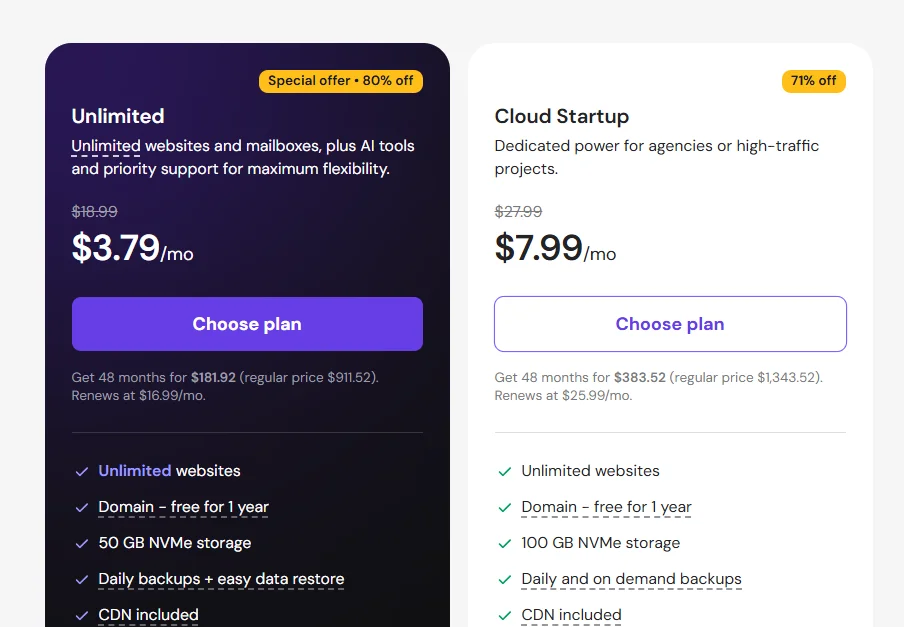
Pricing pages can be misleading if you only glance at the flashy intro number. Hostinger’s real cost story has two chapters: the discounted signup rate, and what you’ll actually pay once that promotional period ends. Both deserve equal attention before you commit your card.
Below, every plan gets broken down with intro pricing side-by-side against renewal pricing, so nothing sneaks up on you later.
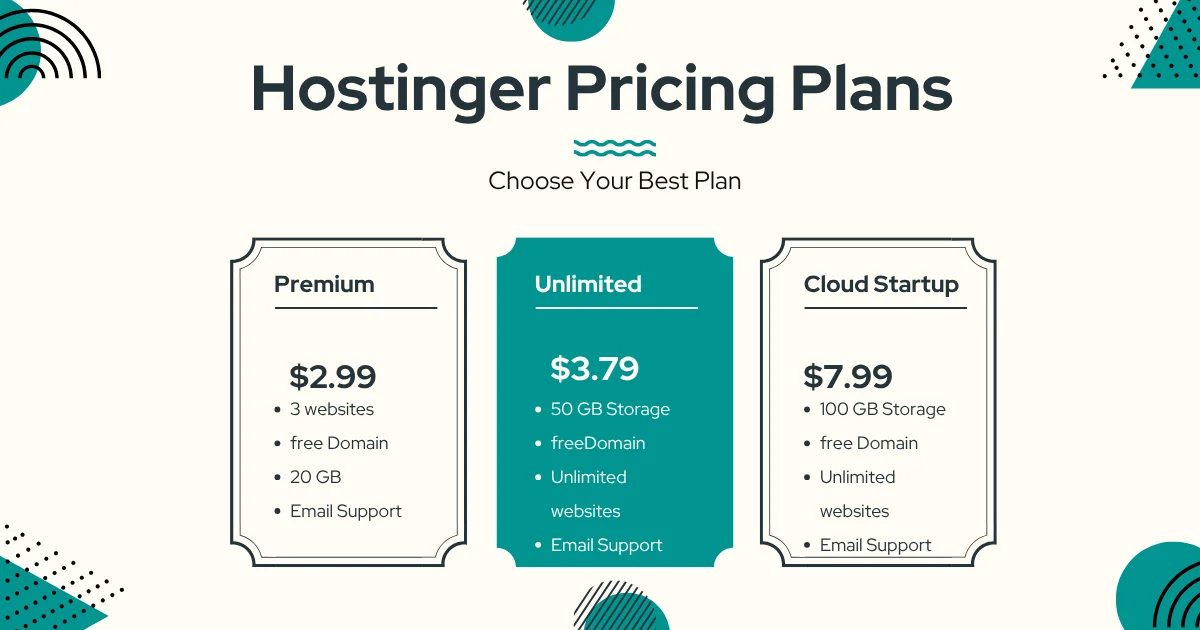
Available Plans
| Plan | Storage | PHP Workers | Monthly Visits | Intro Price |
|---|---|---|---|---|
| Business | 200 GB NVMe | 60 | Standard | $3.99/mo |
| Cloud Startup | 200 GB NVMe | 100 | 200,000 | $7.99/mo |
| Cloud Professional | 250 GB NVMe | 200 | 300,000 | $14.99/mo |
What’s Included
Every tier ships with a free domain, unlimited SSL certificates, daily backups, and CDN access. Higher tiers add more PHP workers, larger inode allowances, and dedicated IP addresses — useful once your catalog and traffic start climbing steadily.
Renewal Pricing
| Plan | Intro Price | Renewal Price |
|---|---|---|
| Business | $3.99/mo | $16.99/mo |
| Cloud Startup | $7.99/mo | $25.99/mo |
| Cloud Professional | $14.99/mo | $32.99/mo |
That renewal jump is real, sometimes tripling the initial rate, so budget accordingly if you’re locking in a long-term contract.
Is Hostinger WooCommerce Hosting Easy to Use?
Nobody wants to spend a weekend fighting server settings just to sell a handful of T-shirts.
Hostinger clearly designed its onboarding with non-technical merchants in mind, trimming the usual friction between signup and a working storefront.
We walked through the entire process ourselves, from account creation to a fully staged product catalog, to see how smooth that promise actually holds up.
Getting Started
Signup takes minutes: pick a plan, choose a billing term, and create an account via email or Google.
Billing details follow, then payment through cards, PayPal, or crypto. A confirmation email arrives almost instantly with next steps clearly laid out.
hPanel Experience
Our experience with hPanel was genuinely strong, arguably the most organized dashboard we’ve tested among budget hosts this year.
Everything from SSL settings to file management sits logically grouped, and a built-in search bar makes locating any setting nearly instant, even for someone touching a control panel for the first time.
One-Click WooCommerce Setup
Installing WooCommerce takes a single click from the Websites section. The guided wizard walks through store basics, payment gateways, and shipping zones, and a working checkout was ready in well under 20 minutes during testing.
AI Assistant (Kodee)
Kodee answers configuration questions almost instantly and can execute simple tasks through chat, like publishing a page or adjusting a product listing.
It’s handy for quick fixes, though genuinely complex issues still benefit from a follow-up with a live human agent.
What Are the Pros and Cons?
No host is perfect, and pretending otherwise wouldn’t help you make a real decision.
Hostinger earns strong marks across speed, pricing, and support, but a few rough edges are worth knowing about before you commit your store to it.
Here’s the honest breakdown, split cleanly so you can weigh both sides at a glance.
Pros
- Free domain and unlimited SSL certificates
- LiteSpeed servers with Object Cache
- One-click WooCommerce installation
- Daily automated backups
- Free store migration within 24 hours
- 24/7 live chat under 3 minutes response
- AI tools bundled at no extra cost
- 30-day money-back guarantee
- Competitive intro pricing
Cons
- Renewal rates significantly higher than intro pricing
- Limited customization for advanced developers
How Good Is Hostinger Support?

Support quality only reveals itself when something actually breaks, not when everything’s running smoothly.
So rather than take marketing claims at face value, we tested every available channel directly and timed the responses ourselves.
The results were consistently better than expected for a budget-tier host.
Live Chat
Live chat delivered a response in under three minutes during testing, with agents providing detailed, non-scripted answers alongside helpful tutorial links. Available in over ten languages, it’s the fastest route for urgent issues.
Email Support
Email support surprised us too. An initial acknowledgment arrived within seven minutes, followed by a fully detailed answer roughly ten minutes after the original message, faster than most hosts manage even for live chat.
Knowledge Base
The self-service knowledge base covers everything from basic setup to advanced troubleshooting, complete with screenshots and a dedicated WooCommerce section. It’s a solid first stop before opening a support ticket.
Response Time
| Channel | Average Response Time |
|---|---|
| Live Chat | Under 3 minutes |
| Email (initial) | 7 minutes |
| Email (detailed) | 10 minutes |
How Does Hostinger Compare With Other WooCommerce Hosts?
Hostinger doesn’t exist in a vacuum, and your final decision should weigh it against the alternatives most store owners actually consider.
Price, performance, and support all shift depending on which competitor you’re measuring against.
The table below lines up the closest rivals side-by-side for a quick comparison.
| Feature | Hostinger | SiteGround | Bluehost | Cloudways |
|---|---|---|---|---|
| Intro Price | Very competitive | Mid-high | Mid-range | Usage-based |
| Caching | Object Cache + LiteSpeed | Advanced caching | Standard caching | Varies by stack |
| Free Migration | Yes | Limited | Limited | No |
| AI Tools | Yes (Kodee) | No | No | No |
| Support | 24/7 chat, fast | 24/7, highly rated | 24/7, phone options | Ticket-based |
| Best For | Budget-conscious growth | Performance-focused stores | Beginners wanting brand recognition | Developers, scaling agencies |
Hostinger vs SiteGround
SiteGround edges ahead on advanced caching customization, but costs noticeably more at every tier. Hostinger counters with AI tooling and free migration that SiteGround simply doesn’t offer.
Hostinger vs Bluehost
Bluehost trades on brand recognition and WordPress.org’s official recommendation, similar to Hostinger. However, Hostinger’s raw speed numbers and bundled AI features give it a practical edge for performance-focused buyers.
Hostinger vs Cloudways
Cloudways offers more granular server control for developers comfortable with usage-based billing. Hostinger remains the simpler, flat-fee option for merchants who’d rather not manage server architecture themselves.
Best Alternative for Large Stores
If your store regularly exceeds 300,000 monthly visits, Cloudways’ scalable cloud infrastructure handles traffic spikes more gracefully than Hostinger’s fixed-tier plans.
Everyone below that threshold will likely find Hostinger the more cost-effective route.
Conclusion
After weeks of hands-on testing, this Hostinger WooCommerce Hosting Review points to a host that delivers real value for small and growing online stores.
Fast load times, responsive support, and genuinely useful AI tooling combine into a package that’s hard to match at this price bracket.
The renewal price jump is worth budgeting for in advance, and enterprise-scale sellers will eventually need more headroom.
But for the vast majority of merchants launching or scaling a WooCommerce store today, Hostinger remains one of the smartest, most cost-effective choices on the market.
FAQs
Is Hostinger WooCommerce hosting good for beginners?
Yes. The guided setup wizard and organized hPanel dashboard make store creation approachable even without technical experience.
Can I migrate my WooCommerce store for free?
Yes, Hostinger’s migration team transfers your store within 24 hours at no extra cost, keeping your site live throughout.
Is WooCommerce pre-installed?
WooCommerce isn’t pre-installed by default, but a one-click installer gets it running in seconds from the hPanel dashboard.
Can it handle traffic spikes?
Moderate spikes are handled well thanks to CDN and caching, though extremely high, sustained traffic may require the top-tier plan or a specialized host.
Does Hostinger include daily backups?
Yes, daily automated backups come standard, alongside an on-demand backup option for extra peace of mind.
Is a free domain included?
Yes, every WooCommerce plan includes a free domain for the first year of service.
Does Hostinger support payment gateways?
Yes, popular payment gateways integrate directly through the WooCommerce dashboard without extra configuration hassle.

Alex Bryant is the founder of PvyEmpire.com and a WordPress specialist with over 4 years of hands-on experience in web hosting, performance optimization, and website management. He has extensively tested top hosting providers by setting up real websites and monitoring their speed, uptime, and reliability.
At PvyEmpire.com, Alex publishes honest, data-driven reviews, detailed guides, and verified coupons & deals. His goal is to help website owners choose the right hosting, improve performance, and grow their online presence with confidence—based on real testing, not promotions.
Hostinger WooCommerce Hosting
Our in-depth Hostinger WooCommerce Hosting Review covers real speed tests, pricing, support response times, and pros & cons to help you decide
Product Brand: Hostinger
Product Currency: USD
Product Price: 3.99
Product In-Stock: InStock