Hostinger Website Builder Review: Does It Deliver?
So you’re staring at a dozen browser tabs, trying to figure out if Hostinger’s website builder is actually worth your money or just another overhyped tool.
Maybe you’ve built a site before and got burned by clunky editors or confusing pricing tiers. You just want a straight answer: does this thing work, or will you regret it in a month?
That’s exactly what this Hostinger Website Builder Review digs into. We’ll walk through the templates, the AI tools, the pricing traps to watch for, and how it stacks up against competitors like Wix and Squarespace. By the end, you’ll know exactly whether it fits your project.
A Quick Overview: Hostinger Website Builder Review
| Category | Verdict |
|---|---|
| Best for | Beginners, bloggers, small businesses, budget-conscious shoppers |
| Starting price | $2.99/month (48-month term) |
| Free plan | No, but a 30-day money-back guarantee applies |
| Ease of use | Excellent, drag-and-drop with AI assistance |
| Design flexibility | Good, though template switching is locked after setup |
| eCommerce | Solid for small shops, capped around 500–1,000 products |
| Support | 24/7 live chat plus an AI assistant |
| Overall rating | 4.5 out of 5 |
Who Should Use It?
Freelancers, bloggers, and small shop owners get the most out of this platform. If your needs are straightforward, a portfolio, a service page, a modest online store, Hostinger handles it without fuss.
Beginners with zero coding background will especially appreciate how little there is to learn.
Who Should Avoid It?
Larger businesses with complex catalogs or highly custom layouts should look elsewhere.
Once you commit to a template, you can’t switch it later without rebuilding from scratch. If scalability matters more than starting price, that’s a real limitation to weigh.
What Are the Pros and Cons of Hostinger Website Builder?
No tool is perfect, and pretending otherwise wastes your time. Here’s the honest breakdown of what stood out during testing, both good and bad.
What I Like
- Genuinely intuitive drag-and-drop editor
- Fast AI website generation from a short description
- Budget-friendly pricing across every tier
- 24/7 live chat support with quick response times
- Free domain and SSL included on yearly plans
- Solid uptime track record
- Built-in AI tools for writing, images, and logos
Where It Falls Short
- No switching templates once you’ve chosen one
- Limited element library compared to Wix or Squarespace
- No third-party app store
- Product cap makes it unsuitable for large catalogs
- Content management tools feel thin for repeat elements like testimonials
How Easy Is Hostinger Website Builder to Use?
Ease of use is where this builder genuinely shines. Even someone who’s never touched a website before can go from blank screen to published homepage in under an hour. That’s not marketing fluff; it’s how the workflow is actually structured.
However, simplicity comes with trade-offs elsewhere, which you’ll notice once you dig into the design and feature sections further down. For now, let’s walk through what setup actually feels like.
Getting Started
Signing up means picking a paid plan right away since there’s no free trial. Once you’re in, Hostinger asks whether you’d rather start with AI generation or pick a pre-made template. Both paths land you inside the same editor within a couple of minutes.
Hostinger AI Website Builder Review
Hostinger’s AI Website Builder is one of the easiest ways to create a website if you want AI to handle the initial design and content setup. Instead of starting from a blank page, you describe your website, business, or project, and the AI generates a starting design that you can customize with Hostinger’s visual editor.
The AI builder is particularly useful for beginners because you don’t need coding or advanced web-design skills. You can modify the generated layout, text, images, colors, fonts, and sections using the drag-and-drop editor. Hostinger also provides AI-powered tools for writing content, generating images, creating logos, and improving SEO.
However, the AI-generated website should be treated as a starting point rather than a finished website. You may still need to edit the text, replace generic images, adjust the layout, and add your own branding before publishing.
Overall, Hostinger AI Website Builder is a strong option for beginners who want to create a professional-looking website quickly, while users who want complete design control may prefer a more advanced website builder.
AI Website Builder vs Templates
The AI route asks for a business description, then builds a first draft using a matching color palette and stock imagery.
It’s genuinely useful for beating a blank page. Template lovers, meanwhile, get to browse a searchable library organized by industry before diving in.
Drag-and-Drop Editor Experience
Moving elements around feels smooth and lag-free, with a snap-to-grid feature that keeps your layout tidy.
You won’t fight the interface trying to align a button or resize an image. It’s one of the more polished editors among budget-tier builders.
Mobile Editing Experience
Hostinger doesn’t offer a dedicated mobile app, but the browser-based editor works reasonably well on a smartphone screen.
You can tweak text, swap images, and check your mobile preview without switching devices. It’s not built for heavy editing on the go, though; save that for a desktop session.
Does Hostinger Offer Enough Design Flexibility?
This is where the budget positioning starts to show. You’ll get attractive results fast, but pushing past the defaults takes more patience than with pricier competitors.
Still, most beginners never hit that ceiling. For anyone building a straightforward personal or small business site, the available flexibility covers the basics comfortably.
Template Quality
With over 150 templates spanning dozens of industries, the design quality holds up well against bigger names.
Layouts look modern, and the AI-generated options add even more variety. The catch? You can’t switch templates mid-project without starting over.
Customization Options
Global style settings let you adjust colors, fonts, button shapes, and animations across your entire site at once.
Local, element-level tweaks are available too, though the total number of design elements trails Wix. It’s enough for a clean, professional look, not for pixel-perfect custom design work.
AI Images and Stock Photos
Built-in access to Unsplash covers most stock photo needs, and the AI image generator handles anything custom.
You can adjust opacity and crop images inside the editor, though deeper photo editing tools aren’t included. For most small sites, this combination is more than adequate.
Responsive Design
Every template adjusts automatically between desktop and mobile views. You can still fine-tune the mobile layout separately using the eye icon to hide specific elements. That extra control helps avoid the cluttered mobile pages that plague some builders.
What Features Do You Actually Get?
Feature depth is where Hostinger separates itself from pure hobbyist tools while still staying behind heavyweights like Wix. Here’s a rundown of the core toolkit you’ll actually be using:
- Drag-and-drop page and section editor
- AI website generator
- AI blog post writer
- AI image generator
- AI logo maker
- AI heatmap for visitor attention prediction
- Built-in blogging platform with categories and SEO fields
- Online store manager with product variations
- Multilingual website support
- Custom domain connection with automatic SSL
- SEO title and meta description editor
- Automatic XML sitemap generation
- Google Analytics and Facebook Pixel integration
- Discount code and coupon creation
- Appointment and booking scheduling
- Email marketing tool through Hostinger Reach
- Mobile-responsive editing controls
- Password-protected pages
- Coming Soon mode before launch
- 24/7 live chat and AI assistant support
- Hostinger Review
- Hostinger Pricing
- Hostinger Ecommerce Website Builder Review
- Hostinger vs Wix
- Squarespace vs Hostinger
Blogging Features
The blogging module covers posts, drafts, categories, and custom URLs without any real friction.
An AI writer can draft posts based on a short prompt and chosen tone. It’s missing comment sections and native monetization tools, so serious publishers may eventually outgrow it.
AI Writing and AI Tools
Hostinger leans hard into AI across the entire builder, not just blogging. You’ll find AI support for SEO titles, product descriptions, and even logo generation.
These tools won’t replace a professional copywriter, but they’re genuinely handy for first drafts.
SEO Settings
Basic SEO coverage includes custom URLs, meta descriptions, focus keywords, and automatic sitemaps.
What’s missing is more advanced control, like editing robots.txt directly or adding structured data manually. For a small business site, the built-in coverage is usually plenty.
Multilingual Website Support
Adding a second language takes a few clicks through the Multiple Languages menu.
Translation itself is manual, though, since there’s no AI translation baked in yet. Visitors pick their preferred language through a simple dropdown menu.
Business Integrations
Native integrations cover the essentials: Google Analytics, Google Ads, Facebook Pixel, and Facebook Messenger.
There’s no app store, so anything beyond that list requires a workaround. Compared to Wix’s marketplace, this is a noticeably shorter list.
Is Hostinger Website Builder Good for eCommerce?
For a first online shop, this builder holds up better than its price suggests. It won’t replace Shopify for a fast-scaling brand, but for a modest catalog, it’s genuinely capable.
Setup takes minutes, and the checkout experience feels polished rather than bolted on. Let’s break down exactly what running a store here looks like.
Store Setup
Adding a store means switching to the Business plan and turning on the Store Manager.
From there, you can list physical products, digital downloads, services, and even bookings. Product pages support images, descriptions, pricing, and variations like size or color.
Payments and Checkout
Hostinger supports over 100 payment gateways along with Express Checkout options like Apple Pay and Google Pay.
There are no transaction fees on top of your plan cost, which keeps margins predictable. Cart abandonment tools are limited compared to dedicated eCommerce platforms.
Product Limits
The ceiling sits around 500 to 1,000 products depending on your plan and digital file sizes cap out near 100 MB.
For a boutique shop, that’s plenty of headroom. Larger catalogs will bump against this limit faster than expected.
Marketing and Discounts
Discount codes support percentage or fixed-amount deals with usage limits and minimum order values.
What’s missing is more advanced logic, like customer-group-specific offers or free shipping rules. It covers standard promotions well without trying to be a full marketing suite.
How Fast, Secure, and Reliable Is Hostinger Website Builder?
Speed and uptime matter more than most people realize until their site starts lagging.
Independent testing across several benchmarking outlets gives a fairly consistent picture here, even if exact numbers vary slightly by tester and region.
Website Speed
Third-party benchmarks generally report Hostinger’s average Time to First Byte (TTFB) landing somewhere between roughly 380ms and 900ms depending on the testing tool, data center, and visitor location, with several independent reviewers clocking sub-500ms averages on optimized setups.
Full page load times typically fall in the 1.1 to 2.5 second range in recent comparisons. That puts it solidly mid-pack against premium managed hosts, and noticeably ahead of many budget competitors.
Security Features
Every plan includes automatic SSL through Let’s Encrypt, so your site gets the padlock icon without any manual setup.
Cloudflare’s CDN activates by default too, adding a layer of protection against basic attacks. There’s no advanced firewall configuration available, but for a small business site, the defaults are appropriate.
Uptime and Reliability
Hostinger backs its hosting with a 99.9% uptime guarantee, and independent monitoring over multiple years has generally tracked close to that figure.
Server response times stay reasonably consistent across regions, though non-local visitors will notice a slight lag depending on data center distance. For everyday small business traffic, reliability isn’t a real concern.
How Much Does Hostinger Website Builder Cost?
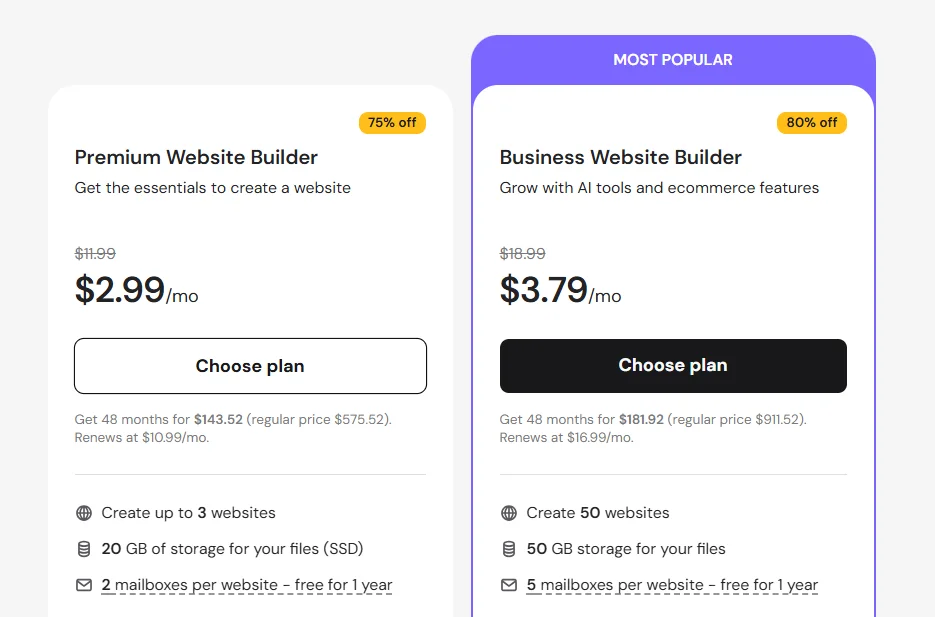
Pricing is arguably Hostinger’s strongest card, and it’s worth checking the current numbers before you commit, since promotional rates shift throughout the year.
Pricing Plans
Updated pricing (this month and this year): the Premium Website Builder plan starts around $2.99 per month on a 48-month term, renewing near $10.99/month afterward.
The Business Website Builder plan, which unlocks the online store, starts around $3.79 per month on the same long-term commitment. Both plans include a free domain and SSL certificate for the first year.
| Plan | Starting Price | Renewal Price | Best For |
|---|---|---|---|
| Premium Website Builder | $2.99/mo | ~$10.99/mo | Portfolios, blogs, personal sites |
| Business Website Builder | ~$3.99/mo | Higher, varies by term | Small online stores |
What Do You Actually Get?
Against Wix’s $17/month starting rate or Squarespace’s similar pricing, Hostinger is dramatically cheaper upfront.
The catch is the steep renewal jump, sometimes over 250% higher once your introductory term ends. Budget for that jump in advance, and the value proposition still holds up well.
Refund Policy
Every plan comes with a 30-day money-back guarantee, so you can genuinely test-drive the builder risk-free.
There’s no free trial beforehand, which means you’ll need to pay first and request a refund if it’s not a fit. Cancellations through the refund window are typically processed without much hassle.
Should You Choose Hostinger Website Builder Over Wix and Squarespace?
Every builder has a lane it’s best suited for, and comparing them side-by-side makes the trade-offs obvious fast.
| Feature | Hostinger | Wix | Squarespace |
|---|---|---|---|
| Starting price | ~$2.99/mo | ~$17/mo | ~$17/mo |
| Ease of use | Excellent | Excellent | Good |
| Template switching | Not allowed | Not allowed | Not allowed |
| App marketplace | None | Extensive | Limited |
| eCommerce cap | ~500–1,000 products | Unlimited (higher plans) | Unlimited (higher plans) |
| Best for | Budget beginners | Feature-hungry users | Designers and creatives |
Hostinger vs Wix
Wix wins on raw feature count and its enormous app marketplace. Hostinger wins decisively on price and keeps things simpler for someone who doesn’t want to sift through hundreds of add-ons. If budget matters more than breadth, Hostinger is the easy pick.
Hostinger vs Squarespace
Squarespace edges ahead on template polish and design sophistication, appealing to creatives and photographers. Hostinger counters with a gentler learning curve and a fraction of the price.
For someone building their first site without design ambitions, Hostinger’s the more practical option.
Final Verdict
Hostinger Website Builder isn’t trying to be everything to everyone, and that focus is precisely why it works.
It nails the essentials: a fast setup, a genuinely easy editor, dependable uptime, and pricing that undercuts nearly every major competitor. For beginners, bloggers, and small shop owners, it’s hard to argue with what you get for the money.
Where it stumbles is scale. Locked templates, a modest element library, and firm product caps mean growing businesses will eventually feel boxed in.
If your ambitions stay modest, though, this builder handles the job without draining your budget or your patience.
Frequently Asked Questions
Is Hostinger Website Builder free?
No, but every plan includes a 30-day money-back guarantee instead of a free trial.
Can I migrate my website later?
You can export content manually, but the design and layout don’t transfer cleanly to other platforms.
Is Hostinger Website Builder good for beginners?
Yes, its drag-and-drop editor and AI generator make it one of the friendlier options for first-time site owners.
Does Hostinger Website Builder include hosting?
Yes, hosting is bundled into every website builder plan automatically.
Is Hostinger Website Builder worth it?
Yes, for beginners and small businesses seeking an affordable, easy-to-use option, it remains one of the better value picks on the market.
How does Hostinger’s AI website generator work?
You describe your business in a short prompt, and the AI builds a first-draft site with matching colors, layout, and stock imagery within minutes.
Can I switch templates after publishing my site?
No, template selection is locked in early, so choose carefully before committing to a design.
Is customer support available around the clock?
Yes, Hostinger offers 24/7 live chat along with an AI assistant for quick, common questions.
How many languages does Hostinger support for websites?
You can build multilingual sites, though translation between languages is done manually rather than automatically.
Is Hostinger’s website builder good for online stores?
It works well for small to mid-sized shops, though the product cap makes it less suited to large, fast-scaling catalogs.

Alex Bryant is the founder of PvyEmpire.com and a WordPress specialist with over 4 years of hands-on experience in web hosting, performance optimization, and website management. He has extensively tested top hosting providers by setting up real websites and monitoring their speed, uptime, and reliability.
At PvyEmpire.com, Alex publishes honest, data-driven reviews, detailed guides, and verified coupons & deals. His goal is to help website owners choose the right hosting, improve performance, and grow their online presence with confidence—based on real testing, not promotions.
Hostinger Website Builder
Hostinger Website Builder Review: is it worth your money? See pricing, real speed tests, features, and pros and cons before you sign up.
Product Brand: Hostinger
Product Currency: USD
Product Price: 2.99
Product In-Stock: InStock