Nexcess Vs Bluehost: Which One is Actually Better?
You’re staring at your screen, trying to pick between Bluehost and Nexcess, and honestly, it’s more confusing than it should be. Maybe your current host is driving you crazy with slow load times, or you’re just starting out and don’t want to make the wrong call from day one.
Either way, you’ve probably read a dozen “top hosting” lists that all say something different, and now you just want a straight answer.
That’s exactly what this post is here for. We’ll break down how these two actually compare on the things that matter — price, speed, ease of use, and support — so you can figure out which one fits your website, your budget, and your sanity. No fluff, just a clear picture to help you make a decision you won’t regret.
Nexcess vs Bluehost: Overview
Nexcess and Bluehost both host millions of websites, but they’re built for different kinds of users. Bluehost leans toward beginners and small businesses who want an affordable, all-in-one starting point.
Nexcess, on the other hand, is a fully managed host built for people who already know they need speed, scalability, and hands-off maintenance — especially for WordPress, WooCommerce, and Magento stores.
Nexcess Overview
Nexcess is a managed hosting provider that’s part of the Liquid Web family, and it’s built around one idea: let the host deal with the technical stuff so you can focus on your site.
It became part of Liquid Web back in 2019, and the two brands still run mostly independently while sharing some backend infrastructure.
Nexcess specializes in managed WordPress, WooCommerce, and Magento hosting, and it backs that up with a custom control panel, autoscaling PHP workers, a built-in CDN, and Redis caching baked into most plans.
If you run an online store or a high-traffic WordPress site and don’t want to babysit server settings, this is where Nexcess earns its keep.
Bluehost Overview
Bluehost has been around since 2003, and it’s one of the most recognized names in web hosting, largely because WordPress.org officially recommends it. It’s built for small and medium-sized businesses that just want to get a website live without a steep learning curve.
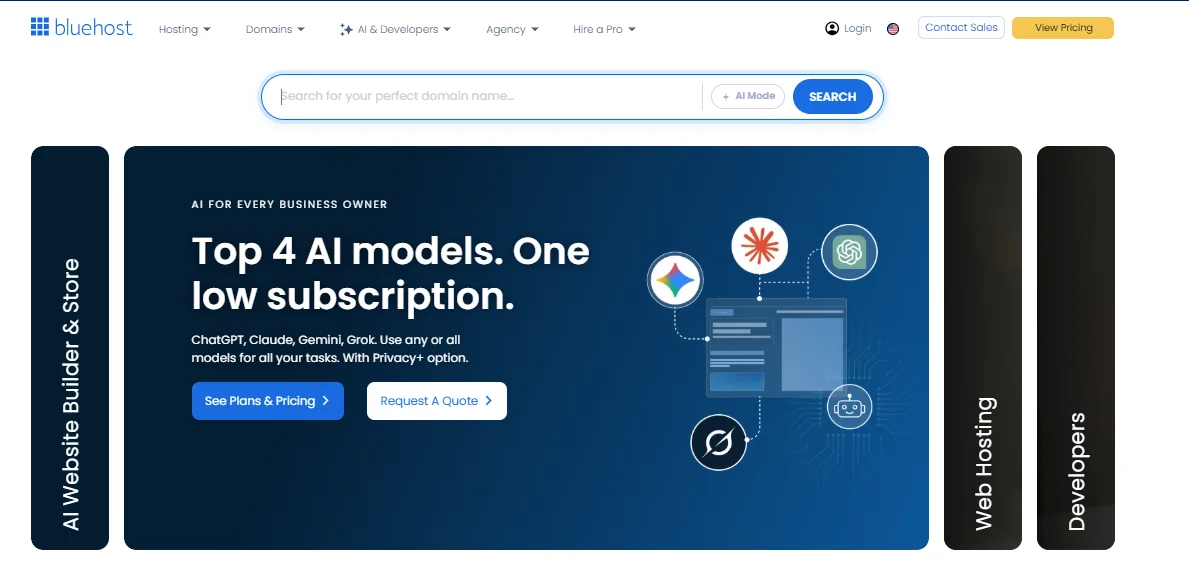
Bluehost covers shared hosting, WordPress hosting, VPS, and dedicated servers, plus a newer Agency Hosting line aimed at freelancers and agencies managing several client sites.
Every plan comes with a free domain for the first year, a free SSL certificate, and an easy one-click WordPress install — which is exactly why it’s such a common pick for first-time website owners.
Nexcess vs Bluehost: Key Features and Technical Capabilities
When you compare on raw features, Nexcess pulls ahead for performance-focused extras, while Bluehost wins on beginner-friendly tools.
Nexcess highlights:
- Auto-scaling PHP workers to absorb sudden traffic spikes
- Plugin performance monitoring, even on mid-tier plans
- Disaster recovery support included — usually an extra cost elsewhere
- Built-in tools focused on keeping an already-built site running fast
Bluehost highlights:
- Drag-and-drop AI website builder for building from scratch
- Daily backups included on nearly every plan
- Free SSL certificates across all plans
- Cloudflare-powered CDN for faster global load times
Both hosts support current PHP versions and offer free SSL and CDN access, but they get there differently. Bluehost’s builder is designed so a non-technical user can go from blank page to a professional-looking website in an afternoon.
Nexcess, on the other hand, focuses less on the “build it yourself” experience and more on performance — keeping a site you’ve already built fast and stable under load.
CMS, Server, and Database Support
Here’s a quick side-by-side of the technical stack each host supports:
| Category | Nexcess | Bluehost |
|---|---|---|
| CMS Support | WordPress, WooCommerce, Magento, Drupal, Joomla, PrestaShop, OpenCart | WordPress, WooCommerce, Joomla, Drupal |
| Web Servers | NGINX, Apache, LiteSpeed | Apache, NGINX |
| Databases | MySQL, MariaDB, Redis | MySQL, MariaDB |
| Programming Languages | PHP, Node.js, Python (select plans) | PHP |
| Caching | Object Cache Pro, Redis, integrated CDN | Cloudflare CDN, basic caching |
If you’re running Magento or a database-heavy WooCommerce store, Nexcess’s stack is simply built for that job in a way Bluehost’s isn’t.
Performance and Reliability Comparison
Both hosts advertise strong uptime, but they get there through different infrastructure. Bluehost’s Agency Hosting plans run on multiple data centers across different regions with SSD storage throughout, and the company backs its higher-tier plans with a 100% network uptime commitment.
Nexcess builds its performance around dual quad-core processors on larger plans, NVMe or SSD storage depending on the tier, and integrated caching that’s tuned specifically for WordPress and WooCommerce — and Nexcess advertises a 99.99% uptime guarantee on its managed plans.
In practice, I’d put it this way: Bluehost’s entry-level shared hosting is perfectly fine for a low-traffic blog or portfolio site, but you’ll notice the difference once real traffic hits.
Nexcess’s auto-scaling PHP workers exist precisely for that moment — say your site gets featured somewhere and traffic spikes overnight, Nexcess can absorb that surge without your site buckling, while a shared Bluehost plan might slow to a crawl. That’s the trade-off: Bluehost is cheaper to start, but Nexcess is engineered for growth from day one.
Server Locations and Datacenters
Both providers run infrastructure across multiple global regions to keep latency low for visitors, no matter where they’re browsing from:
- North America — primary data centers for both hosts
- Europe — available on higher-tier and Agency plans
- Asia — supported through CDN edge locations
- Oceania — covered via CDN rather than dedicated data centers for most plans
If most of your visitors are in one specific region, it’s worth checking which provider has a data center (not just a CDN edge node) closest to them, since that affects your baseline load time before caching even kicks in.
Ease of Use and Hosting Management
Bluehost is generally the easier host to pick up if you’ve never managed a website before, mainly because it uses the widely familiar cPanel dashboard.
Nexcess uses its own proprietary control panel called Maestro, which is genuinely well-designed but does come with a small learning curve if you’ve only ever used cPanel.
Bluehost’s one-click WordPress installation and drag-and-drop site builder mean you can be up and running within minutes, with almost no technical knowledge required.
Nexcess’s Maestro dashboard, on the other hand, is built for people managing performance rather than building from scratch — it gives you direct visibility into site performance monitoring, plugin updates, backups, and site access all in one place.
If you’re the type who wants to peek under the hood and understand exactly how your site is performing, Maestro actually gives you more useful information than cPanel does out of the box. It just takes a bit longer to feel at home in.
Security Features Compared
Both hosts include free SSL certificates as standard, but their security depth diverges the moment you look past the basics.
| Security Feature | Nexcess | Bluehost |
|---|---|---|
| Free SSL | Yes (Domain Validation) | Yes (Domain Validation) |
| Malware Scanning | Ongoing scanning included | Available, often as an add-on |
| Malware Cleanup | Included on managed plans | One-time cleanup around $200 if not on higher tiers |
| WAF/CDN Protection | Standalone CDN/WAF included | Cloudflare-based CDN protection |
| Premium SSL Options | Wildcard, EV, OV, Multi-Domain available | Wildcard, EV, Multi-Domain SSL available |
| Database Security | Application patching, database scanning | Basic hosting-level protection |
Nexcess bakes more security into its core plans, which makes sense given it’s aimed at eCommerce stores that genuinely can’t afford downtime from a hacked checkout page.
Bluehost covers the essentials well, but if you want features like ongoing malware scanning or database-level protection, you’ll likely need to pay extra or move up to a higher-tier plan.
Customer Support and Service
Both Nexcess and Bluehost offer 24/7 support, but the experience feels different depending on what plan you’re on.
Bluehost provides phone support, 24/7 live chat, and a large self-serve knowledge base with guides, tutorials, and even a dedicated YouTube channel — solid for beginners who want to troubleshoot things themselves first.
Nexcess offers 24/7 live chat, phone, and email support, and because it’s fully managed hosting, the support team tends to get more hands-on with actual server-level issues rather than just pointing you to an article.
From what real users report, this is where the two hosts really split. Nexcess earns consistent praise for quick escalation on technical issues and knowledgeable support staff, which matters a lot if your site goes down and every minute of downtime costs you sales.
Bluehost’s support gets more mixed reviews — some users report fast, helpful responses, while others describe longer wait times during peak periods.
If uptime and quick fixes are non-negotiable for your business, that difference in support quality is worth weighing as heavily as the price tag.
Nexcess vs Bluehost: Hosting Plans and Pricing
Pricing is where these two hosts look the most different on paper, and it’s worth breaking down carefully because introductory prices rarely tell the whole story.
Bluehost is the cheaper entry point by a wide margin, with shared hosting plans starting as low as $3.99 a month depending on the current promotion and contract length, though renewal prices typically jump significantly — sometimes over 100% higher — once your term ends.
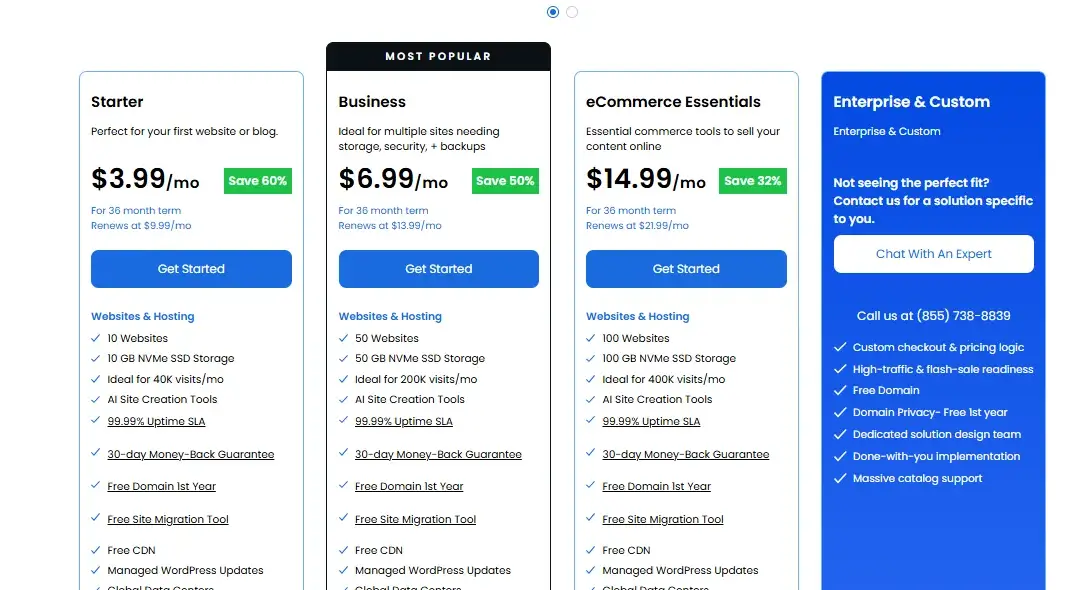
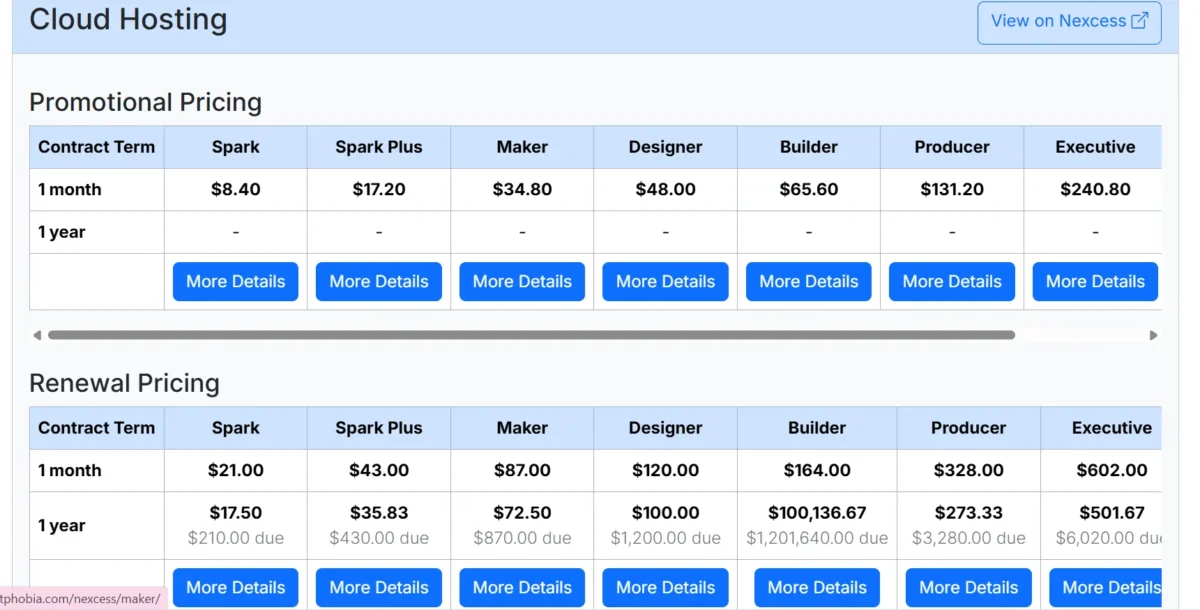
Nexcess doesn’t try to compete on rock-bottom entry pricing; instead, its plans start around $21 a month for managed WordPress hosting, reflecting the fact that you’re paying for a fully managed environment rather than basic shared hosting.
Shared and Managed WordPress Hosting
| Plan | Nexcess | Bluehost |
|---|---|---|
| Entry Plan | Spark — from ~$8.40/mo, 15GB storage, 2TB bandwidth, 1 site | Basic — from ~$3.99/mo, 10GB SSD, 1 site |
| Mid Plan | Spark+ — 25GB storage, 2.5TB bandwidth, 3 sites | Plus — 100GB SSD, unlimited sites |
| Higher Plan | Maker — from ~$34.80/mo, 40GB storage, 3TB bandwidth | Pro — from ~$14.99/mo, 100GB SSD, database management |
| Renewal Pricing | Relatively stable, fewer aggressive jumps | Renews significantly higher than intro rate |
Cloud, VPS, and Dedicated Hosting
| Plan Type | Nexcess | Bluehost |
|---|---|---|
| Cloud Hosting | XS from ~$57/mo (11 sites, 50GB SSD) up to XXL near $900–1,000+/mo (51 sites, 800GB SSD) | Cloud plans from ~$65 |
| VPS Hosting | Self-managed and standard NVMe VPS plans from roughly $5–$47/mo | VPS plans typically priced separately, scaling with cores and RAM |
| Dedicated Servers | Standard NVMe 32 from ~$141/mo up to Enhanced NVMe 64 at ~$217/mo | Dedicated plans available, generally comparable in the higher range |
The honest takeaway on cost: Bluehost wins on sticker price, especially for a simple first website.
Nexcess costs more upfront, but you’re not paying separately for things like autoscaling, malware cleanup, or performance monitoring that Bluehost may charge extra for down the line.
Always check the current pricing pages directly, since both hosts run frequent promotions that shift these numbers.
Which Hosting Provider Is Better for Your Needs?
There isn’t a universal winner here — the right pick depends entirely on what stage your website is at and what you actually need it to do.
Which Is Better for Beginners?
Bluehost is the better choice if you’re building your first website. Its one-click WordPress install, drag-and-drop builder, and familiar cPanel interface mean you won’t need any technical background to get a professional-looking site live.
The lower starting price also makes it easier to test the waters without a big financial commitment.
Which Is Better for High-Traffic and Growing Websites?
Nexcess is the stronger pick once your site starts seeing real traffic or handling transactions, especially if you’re running WooCommerce or Magento.
Auto-scaling PHP workers, built-in caching, and a support team that specializes in eCommerce mean your site is less likely to slow down or go dark during a traffic spike — which matters a lot more than a few dollars saved on hosting when you’re losing sales every minute a store is down.
Pros and Cons of Nexcess vs Bluehost
Nexcess
- Pros: Strong performance for WordPress/WooCommerce/Magento, auto-scaling, proactive security, praised customer support
- Cons: Higher starting price, steeper learning curve with Maestro, overkill for a simple personal blog
Bluehost
- Pros: Very affordable entry pricing, beginner-friendly cPanel and website builder, official WordPress.org recommendation
- Cons: Renewal prices jump significantly, mixed support reviews, fewer built-in performance tools for larger sites
Nexcess vs Bluehost: Which One Should You Choose?
Choose Bluehost if you’re launching your first website, working with a tight budget, or you just need reliable shared hosting without a lot of technical decisions to make.
Choose Nexcess if you’re running (or planning to run) an eCommerce store, a WordPress site with real traffic, or a Magento build where downtime and slow load times would actually cost you money.
Think of it less as “which host is better” and more as “which stage of website ownership are you at right now” — that question usually answers itself.
What Should You Check Before Switching Hosting Providers?
If you’re already hosted somewhere else and considering a move, run through this checklist first:
- Confirm migration support — does the new host offer free site migration, or will you need to do it yourself?
- Check your current contract term — cancelling early with your existing host may trigger fees or forfeit prepaid time.
- Back up everything — export your database, files, and media library before touching anything.
- Review DNS propagation time — expect 24–48 hours where your site could be intermittently unavailable during the switch.
- Test the new environment — use a staging URL to confirm the site works before pointing your domain over.
- Compare renewal pricing, not just intro pricing — the sticker price you see today isn’t what you’ll pay next year.
Nexcess vs Bluehost: Final Verdict
Both Nexcess and Bluehost are legitimate, reliable hosting providers — they’re just built for different jobs. Bluehost is the more versatile, budget-friendly option for beginners and small sites, backed by an easy setup process and a comprehensive suite of starter tools. Nexcess is the better fit once performance, uptime, and eCommerce-specific needs move from “nice to have” to “business-critical.” Neither one is objectively better across the board; the right one depends entirely on where your website is headed.
FAQs
Which is cheaper, Nexcess or Bluehost?
Bluehost is cheaper to start, with shared hosting plans from around $3.99/month, compared to Nexcess’s managed WordPress plans starting near $8.40/month.
Is Bluehost good for beginners?
Yes. Bluehost’s one-click WordPress install, drag-and-drop builder, and familiar cPanel dashboard make it one of the easiest hosts for first-time website owners.
Is Nexcess better for WooCommerce and Magento?
Yes. Nexcess is purpose-built for WooCommerce and Magento, with auto-scaling, integrated caching, and eCommerce-focused support that Bluehost doesn’t specialize in.
Does Nexcess offer 24/7 customer support?
Yes, Nexcess provides 24/7 support via live chat, phone, and email, with a team experienced in managed WordPress and eCommerce hosting issues.
Which host has better uptime?
Both advertise strong uptime — Bluehost commits to 100% network uptime on higher-tier plans, while Nexcess advertises 99.99% uptime on its managed plans.
Can I switch from Bluehost to Nexcess later?
Yes. Most migrations involve backing up your site, checking DNS propagation time, and confirming whether your new host offers free migration support.
Which hosting provider is older, Nexcess or Bluehost?
Bluehost was founded in 2003, while Nexcess was founded in 2000, making Nexcess the older of the two companies.

Alex Bryant is the founder of PvyEmpire.com and a WordPress specialist with over 4 years of hands-on experience in web hosting, performance optimization, and website management. He has extensively tested top hosting providers by setting up real websites and monitoring their speed, uptime, and reliability.
At PvyEmpire.com, Alex publishes honest, data-driven reviews, detailed guides, and verified coupons & deals. His goal is to help website owners choose the right hosting, improve performance, and grow their online presence with confidence—based on real testing, not promotions.