Bluehost vs FatCow: Which Host Wins?
So you’ve narrowed your hosting search down to two names and now you’re stuck comparing Bluehost vs FatCow, wondering which one actually deserves your money.
Maybe you’ve read a dozen “best hosting” lists already, and they all seem to say something different. It’s frustrating when every review sounds like an ad, and you just want a straight answer before you commit.
That’s exactly what this post is here to sort out. We’ll break down how these two hosts stack up on pricing, performance, features, and support, so you’re not left guessing.
By the end, you’ll know which one actually fits your website’s needs — no fluff, just a clear comparison.
What Is Bluehost Hosting?
Bluehost is a web hosting company that powers everything from personal blogs to full WooCommerce stores, using shared hosting, WordPress hosting, VPS, cloud, and dedicated servers.
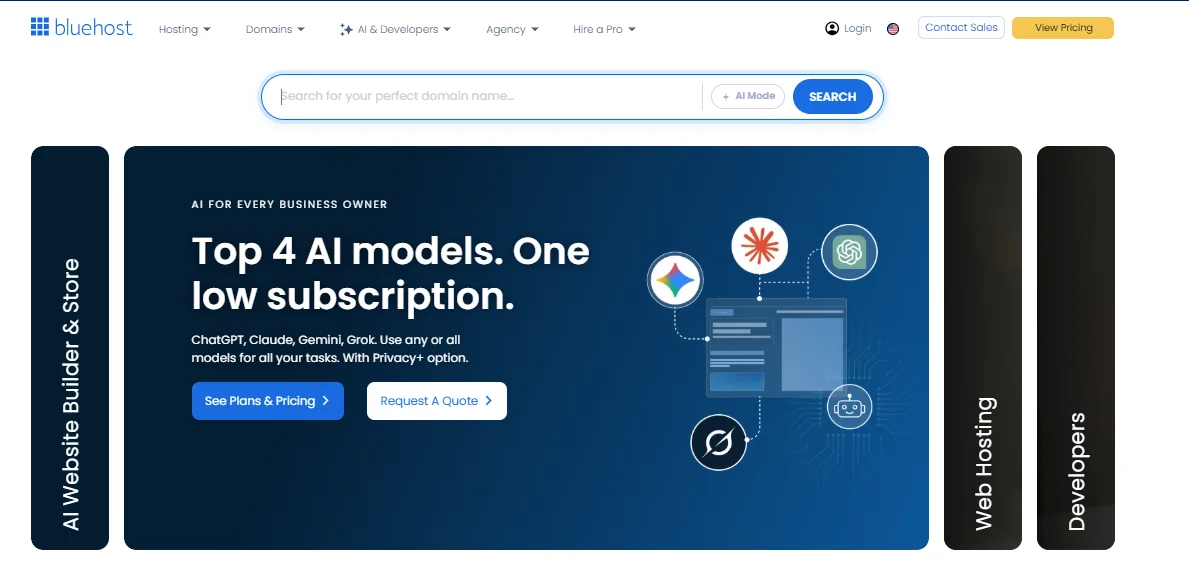
It’s owned by Newfold Digital (formerly known as Endurance International Group, or EIG), and it’s one of the hosts officially recommended by WordPress.org. What sets Bluehost apart is choice — you’re not locked into one package.
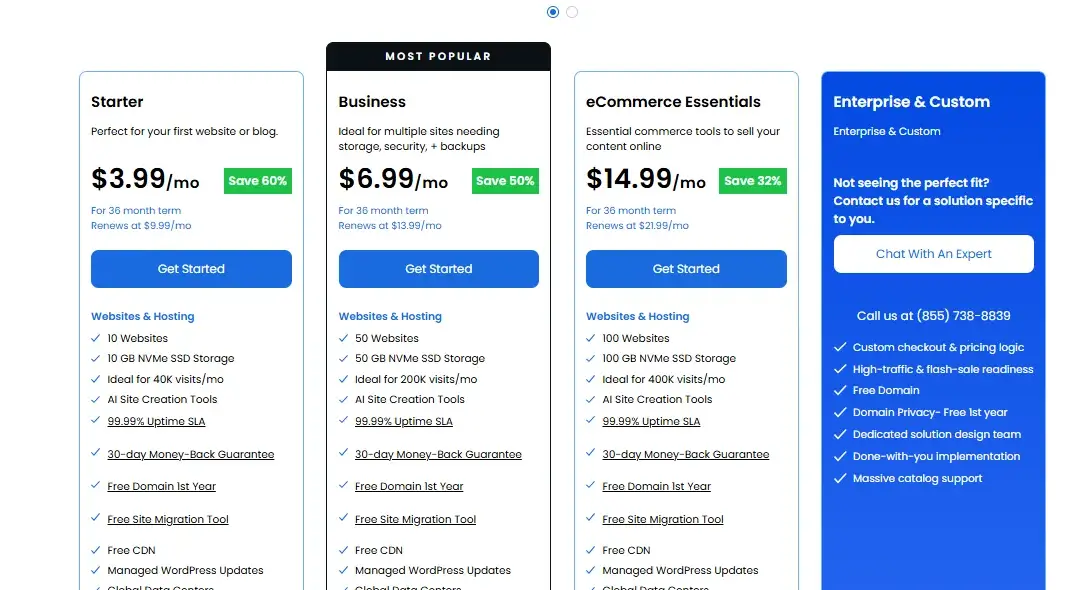
You can start on a $3.99-a-month shared plan and move up to VPS or a dedicated server as your traffic grows, all without switching providers.
What Is FatCow Hosting?
FatCow is a budget-friendly web host, founded back in 1998 in Massachusetts, and — like Bluehost — now under the Newfold Digital umbrella.
Instead of offering multiple shared hosting tiers, FatCow keeps it simple with a single “Original FatCow Plan” that includes unlimited storage, bandwidth, and domains.
It also offers WordPress hosting, VPS, and dedicated servers, but the shared plan is really the star of the show. If you want zero decision fatigue when signing up, that’s the appeal here.
Bluehost vs FatCow: Quick Comparison
Before you get into the weeds, here’s how Bluehost vs FatCow stacks up at a glance:
| Category | Bluehost | FatCow |
|---|---|---|
| Starting price | $3.99/mo (Starter, 36-mo term) | ~$4.08/mo (Original Plan) |
| Renewal price | $9.99/mo | ~$10.99/mo |
| Storage | 10GB NVMe (Starter) up to 100GB NVMe | Unlimited disk space |
| Uptime guarantee | 99.99% SLA | No published SLA |
| Control panel | cPanel | cPanel or vDeck |
| Support | 24/7 live chat + phone (higher tiers) | 24/7 chat and phone |
| Best for | Growing sites, WordPress, eCommerce | First-time site owners wanting simplicity |
Pricing and Renewal Costs
Bluehost currently starts at $3.99 a month for its Starter shared plan on a 36-month term, renewing at $9.99 a month afterward.
FatCow’s Original Plan runs about $4.08 a month to start, renewing around $10.99 a month — so the two are close on paper, but Bluehost gives you noticeably more for a similar price.
Here’s where it gets interesting: Bluehost’s Business plan ($6.99/mo, renewing at $13.99) unlocks 50 websites and 50GB of NVMe storage, while its eCommerce Essentials plan ($14.99/mo) brings WooCommerce tools built right in.
FatCow, on the other hand, doesn’t really have tiers to move up through on the shared side — you either take the Original Plan or jump straight to VPS, where pricing starts around $24.99 a month for 40GB of storage and a single CPU core.
That gap between shared and VPS is a real consideration if your site outgrows the basics.
Features and Hosting Options
Both hosts cover the essentials — free SSL, a free domain for the first year, and a decent set of email tools — but Bluehost pulls ahead once you look past the entry-level plan.
Bluehost includes a free CDN, malware scanning and removal (starting at the Business tier), weekly automated backups, and staging environments for testing changes before they go live.
FatCow leans on its “unlimited everything” pitch: unlimited storage, unlimited bandwidth, and unlimited email addresses, plus a built-in Weebly-style website builder for people who’d rather drag-and-drop than code.
Bluehost features:
- Shared, WordPress, WooCommerce, VPS, cloud, and dedicated hosting under one roof
- Free CDN included on Business and eCommerce Essentials plans
- Weekly automated website backups on every plan
- Malware scanning and removal from the Business tier up
- Free staging environment to test changes before going live
FatCow features: 6. One “Original Plan” with unlimited disk space and bandwidth 7. Unlimited email addresses on the shared plan 8.
Built-in Weebly-style drag-and-drop website builder 9. Daily backups included with the Original Plan 10. VPS and dedicated server options for sites that outgrow shared hosting
If you think you’ll eventually need more than a basic website — say, an online store or a site with real traffic — Bluehost’s tiered structure makes that transition a lot smoother than FatCow’s more limited lineup.
Performance and Reliability
Bluehost generally performs better under load, backed by a formal uptime guarantee and NVMe storage across its plans.
FatCow gets the job done for small, low-traffic sites, but user reviews consistently point to it lagging behind on speed and consistency compared to newer hosts.
Uptime and Speed
Bluehost backs its shared hosting with a 99.99% uptime SLA, and if it falls short, you can claim a service credit.
FatCow doesn’t publish a formal uptime guarantee, and several independent reviews note it trails competitors on both uptime and page-load speed — not a dealbreaker for a hobby blog, but worth knowing if uptime is non-negotiable for your business.
Server and Resource Performance
Because FatCow’s shared servers rely on hard-disk-era infrastructure in places rather than NVMe drives across the board, sites hosted there can feel noticeably slower under traffic spikes than a comparable Bluehost plan.
Bluehost’s NVMe storage — even on its cheapest Starter tier — tends to translate into snappier load times, which matters more than people realize since page speed affects both user experience and search rankings.
Ease of Use and WordPress Experience
Both hosts use the familiar cPanel, but Bluehost also layers on one-click WordPress installs, AI-assisted site creation, and a smoother path for staging and updates.
FatCow gives you a choice between cPanel and its own vDeck panel, which feels a bit more dated but is still workable for beginners.
If your main goal is running WordPress well, Bluehost is the more purpose-built option — it’s the host WordPress.org itself recommends, and its migration tools make moving an existing site far less painful.
Security and Backups
Bluehost includes free SSL certificates across every plan, plus malware scanning and removal on its Business and eCommerce tiers, along with weekly automated backups baked in.
FatCow also throws in a free SSL certificate and daily backups on its Original Plan, though its security add-ons feel a bit more bare-bones by comparison.
Neither host makes premium security bundles mandatory, but if you’re running anything with customer data or payments, Bluehost’s built-in malware protection gives you a stronger baseline without extra spending.
Customer Support
Both hosts offer 24/7 live chat, and both provide phone support, so you’re never totally on your own. Bluehost’s support tends to get better marks for responsiveness and technical depth, especially for WordPress-specific issues, since its agents are trained around that ecosystem.
FatCow’s support is friendly and available around the clock too, but it’s geared more toward guiding total beginners through setup than solving deeper technical problems — which lines up with who FatCow is really built for.
Pros and Cons of Bluehost and FatCow
Here’s a quick rundown of where each host shines and where it falls short.
Bluehost Pros and Cons
Pros
- Fast NVMe storage across every plan, including the cheapest tier
- 99.99% uptime SLA with service credits if it’s not met
- Scales cleanly from shared hosting to VPS, cloud, or dedicated servers
- Officially recommended by WordPress.org
- Free CDN and malware scanning on higher-tier plans
- Weekly automated backups included at no extra cost
- Free staging environment for testing site changes safely
- Built-in WooCommerce tools for eCommerce sites
- 24/7 live chat and phone support
- AI-assisted site-building tools for faster setup
Cons
- Renewal prices jump significantly after the first term ends
- Entry-level Starter plan caps you at one website
FatCow Pros and Cons
Pros
- One simple plan with unlimited storage and bandwidth
- Friendly, beginner-focused customer support
- Competitive introductory pricing near Bluehost’s
- Unlimited email addresses included
- Free domain name for the first year
- Daily backups included on the Original Plan
- Built-in Weebly-style website builder for non-coders
- cPanel or vDeck available, depending on preference
- VPS and dedicated server options for future growth
- No confusing tiers to compare before signing up
Cons
- No formal, published uptime guarantee
- Limited plan flexibility if you outgrow shared hosting
Which Host Is Better for Different Users?
The right choice really comes down to what you’re building and how much you expect it to grow over the next year or two.
Best for Beginners and WordPress Users
If you’re just starting out or building on WordPress, FatCow’s single, no-fuss plan removes the guesswork of picking between tiers — you get one package with unlimited resources and friendly support to walk you through setup.
That said, if WordPress is central to your plans, Bluehost is worth a close look too: it’s the host WordPress.org itself recommends, with one-click installs and migration tools that make getting a WordPress site running even easier than FatCow’s approach.
Best for Growing Websites
Bluehost is the clear pick once your site starts gaining traction. Its tiered plans let you move from shared hosting to VPS, cloud, or dedicated servers without switching providers, and features like a free CDN, malware scanning, and built-in WooCommerce tools all become more valuable as traffic and complexity increase.
FatCow’s jump from its Original Plan straight to VPS is a steep one, which makes scaling up less seamless if your website outgrows the basics.
Bluehost vs FatCow: Which Host Wins?
Bluehost wins this comparison for most people. It offers faster storage, a real uptime guarantee, stronger security tools, and room to grow — all without forcing you to switch providers later.
FatCow isn’t a bad host, and its no-tiers pricing model genuinely appeals to first-timers who want to avoid decision paralysis. But once you factor in performance, scalability, and long-term value, Bluehost simply gives you more to work with for close to the same money.
If you’re building anything beyond a small personal page — a business site, a blog you plan to grow, or an online store — Bluehost is the safer long-term investment.
FAQs
Is Bluehost more expensive than FatCow?
Not really — both start around $4 a month. Bluehost’s entry plan is actually slightly cheaper at $3.99/mo, though FatCow’s unlimited storage looks appealing on paper.
Which host has better uptime, Bluehost or FatCow?
Bluehost publishes a 99.99% uptime SLA with service credits if it’s not met. FatCow doesn’t offer a formal guarantee, and reviews suggest its uptime is less consistent.
Can I run WordPress on both hosts?
Yes, both support WordPress, but Bluehost is officially recommended by WordPress.org and includes more WordPress-specific tools like staging and one-click migration.
Does FatCow really offer unlimited storage?
Yes, FatCow’s Original Plan includes unlimited disk space and bandwidth, though “unlimited” is still subject to fair-use policies in the terms of service.
Which host is better for an online store?
Bluehost, hands down. Its eCommerce Essentials plan includes built-in WooCommerce tools, while FatCow’s shared plan isn’t optimized for eCommerce traffic or checkout tools.
Do Bluehost and FatCow use the same company behind the scenes?
Yes — both are owned by Newfold Digital, formerly known as Endurance International Group (EIG), though they operate as separate brands with different plans and pricing.
Is FatCow a good choice for beginners?
Yes, if your needs are simple. Its one-plan structure removes the guesswork, and its support team is geared toward walking first-timers through setup step by step.

Alex Bryant is the founder of PvyEmpire.com and a WordPress specialist with over 4 years of hands-on experience in web hosting, performance optimization, and website management. He has extensively tested top hosting providers by setting up real websites and monitoring their speed, uptime, and reliability.
At PvyEmpire.com, Alex publishes honest, data-driven reviews, detailed guides, and verified coupons & deals. His goal is to help website owners choose the right hosting, improve performance, and grow their online presence with confidence—based on real testing, not promotions.