Bluehost vs Shopify: Which Is Better for Ecommerce?
So you’ve got a business idea (or maybe an existing one) and you’re stuck trying to figure out where to actually build it online.
You type “Bluehost vs Shopify” into Google, and suddenly you’re drowning in comparison charts and jargon that don’t really answer your question.
Sound familiar? You just want to know which one fits your situation — not a generic “it depends” answer.
Here’s the good news: you’re about to get a clear, no-nonsense breakdown of both platforms.
We’ll walk through what each one does best, where they fall short, and which type of website owner each is really built for. By the end, you’ll know exactly which platform deserves your time (and your money).
What is Bluehost?
Bluehost is a web hosting company, not an ecommerce platform in itself. It rents you server space and, when you want to sell online, pairs that hosting with WordPress and the WooCommerce plugin to turn a regular website into a full-fledged store.
Think of it less like a ready-made shop and more like a plot of land where you build exactly the store you want, brick by brick.
Founded in 2003 and now part of Newfold Digital, Bluehost has built its reputation on affordable shared hosting and its official endorsement from WordPress.org.
For ecommerce, it sells dedicated WooCommerce hosting plans that come with WordPress and WooCommerce pre-installed, along with a Storefront theme, an SSL certificate, and a free domain for the first year.
What is Shopify?
Shopify is a hosted, all-in-one ecommerce platform. You don’t need separate hosting, a CMS, or a checkout plugin — Shopify bundles everything into one subscription, from the storefront to the shopping cart to the servers it runs on.
It’s the “just build the store” option, where the technical plumbing is handled for you behind the scenes.
Launched in 2006, Shopify now powers millions of stores worldwide, ranging from solo sellers to major brands like Allbirds and Gymshark.

Its core appeal is simplicity: sign up, pick a theme, add products, and you’re selling — no server management, no plugin updates, no separate hosting bill.
Bluehost vs Shopify: Quick Verdict
If you want the short answer: Shopify is the better choice for most people who want to start selling online quickly, thanks to its all-in-one setup, built-in payment processing, and dedicated ecommerce tools.
Bluehost with WooCommerce is the better pick if you want full control over your site’s code, lower long-term hosting costs, and you’re comfortable (or willing to get comfortable) with WordPress.
- Choose Shopify if: you want a fast, guided setup with no server maintenance
- Choose Bluehost + WooCommerce if: you want content flexibility, lower hosting fees, and full customization freedom
- Choose Shopify if: you’re selling across multiple channels (social, marketplaces, in-person POS)
- Choose Bluehost if: you already run a WordPress site and want to add a store to it
Bluehost vs Shopify: Key Differences at a Glance
| Feature | Bluehost (with WooCommerce) | Shopify |
|---|---|---|
| Type of platform | Web hosting + WordPress + WooCommerce plugin | Hosted, all-in-one ecommerce platform |
| Starting price | ~$14.99–$21.99/month (WooCommerce plans, promo pricing) | $39/month (Basic), $29/month billed annually |
| Transaction fees | None from Bluehost itself; depends on payment gateway | 2.9% + 30¢ (Basic) down to ~2.5% on higher tiers via Shopify Payments |
| Ease of setup | Moderate — manual WordPress/WooCommerce configuration | Easy — guided, no-code setup |
| Customization | High — full code-level access | Moderate — theme editor plus Liquid code for deeper changes |
| Best for | Content-heavy sites, blogs, developers, WordPress users | Product-first stores, beginners, multichannel sellers |
| Hosting included | Yes (that’s the product) | Yes (bundled into the subscription) |
| App/plugin ecosystem | WordPress plugin repository (60,000+) + WooCommerce extensions | Shopify App Store (8,000+ apps) |
Pricing and Value for Ecommerce
Bluehost looks cheaper on paper, but the real comparison depends on what you actually need once you factor in apps, themes, and transaction fees. Let’s break down each platform’s numbers.
Shopify Pricing and Plans
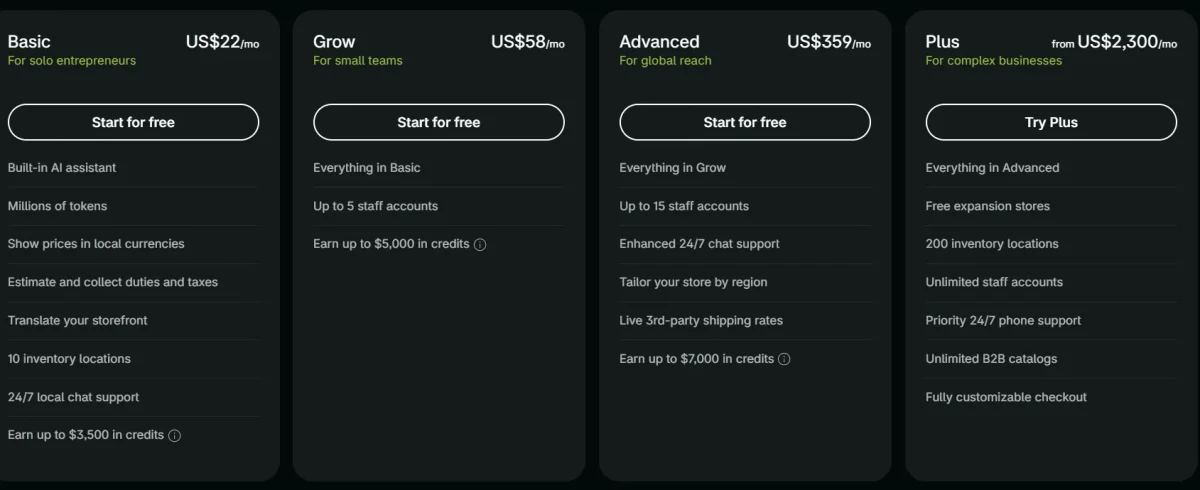
Shopify runs five plans: Starter, Basic, Grow, Advanced, and Plus. Each step up buys you lower transaction fees and more built-in features, not just extra storage or bandwidth.
| Plan | Monthly Price | Annual Price (per mo) | Best For |
|---|---|---|---|
| Starter | $5 | — | Selling via social/link-in-bio, no full storefront |
| Basic | $22 | ~$29 | New stores, solo sellers |
| Grow | $58 | ~$79 | Stores with $8,000–$10,000+ in monthly sales, needs staff accounts |
| Advanced | $359 | ~$299 | High-volume stores needing advanced reporting |
| Plus | $2,300+ | Custom | Enterprise brands, $2M+ annual revenue |
On top of the subscription, Shopify charges credit-card processing fees through Shopify Payments — 2.9% + 30¢ per transaction on Basic, dropping to roughly 2.7% on Grow and 2.5% on Advanced.
If you use a third-party gateway like PayPal or Stripe instead of Shopify Payments, you’ll also pay an extra platform fee (2% on Basic, 1% on Grow, 0.6% on Advanced).
Bluehost WooCommerce Pricing and Plans
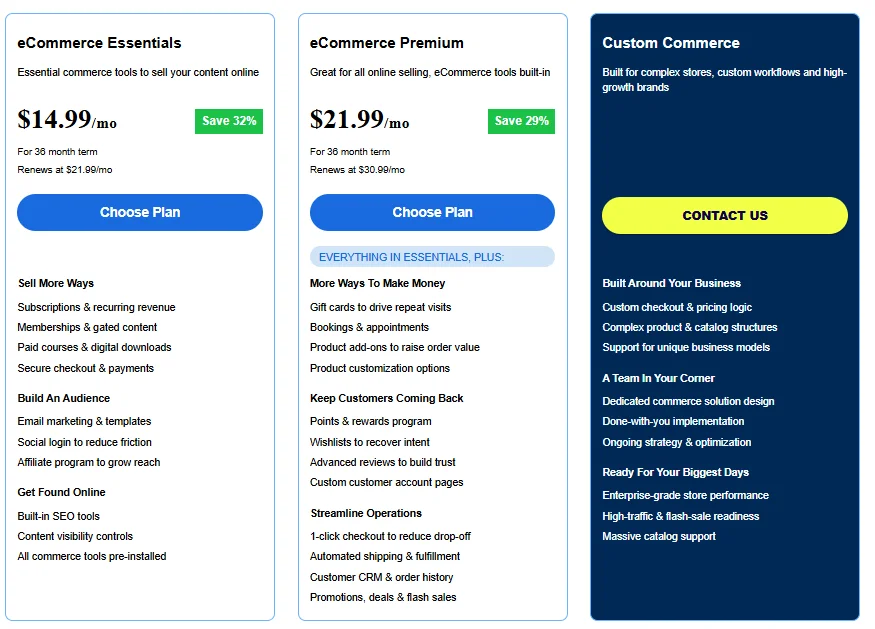
Bluehost sells two dedicated WooCommerce hosting plans, and their promotional pricing is genuinely low compared to Shopify’s entry point.
Expect the eCommerce Essentials plan to start around $14.99/month and the higher tier around $21.99/month, both on a 36-month commitment — with renewal rates jumping noticeably once that term ends, sometimes by well over 100%.
Unlike Shopify, Bluehost itself doesn’t take a cut of your sales. Your actual transaction costs come from whichever payment gateway you connect — Stripe and PayPal are the most common, and both charge roughly 2.9% + 30¢ per transaction, similar to what you’d pay through Shopify Payments.
So the “no transaction fee” pitch is a bit misleading: you’re still paying card-processing fees, just through a different company.
Which Is Cheaper for Ecommerce?
Bluehost is cheaper upfront, but the gap narrows — and can even reverse — once you add WooCommerce extensions, a premium theme, and ongoing maintenance time.
A bare-bones WooCommerce setup on Bluehost’s cheapest ecommerce plan can genuinely run less than $22/month, versus Shopify’s $58/month Basic plan.
However, that WooCommerce site usually isn’t “done” out of the box. You’ll likely need paid extensions for things Shopify includes by default — subscriptions, abandoned cart recovery, or advanced shipping rules — and those can add $12–$58/month depending on your stack.
Shopify’s price tag looks higher, but it’s closer to a true all-in-one number since most core selling features are already included. If you’re the type who’ll happily spend a weekend configuring plugins to save money, Bluehost wins.
If your time is worth more than the price difference, Shopify usually pays for itself.
Ecommerce Features and Selling Tools
This is where the two platforms diverge the most. Shopify was built from day one to sell products; WooCommerce was built to publish content and had ecommerce bolted on later — and it shows in how each handles selling.
Shopify Ecommerce Features
- Built-in, PCI-compliant hosted checkout — no separate SSL or security plugin needed
- Shopify Payments for accepting cards without a third-party processor
- Shopify POS for syncing online and in-person retail sales
- 8,000+ apps in the Shopify App Store covering shipping, marketing, and accounting
- Native multichannel selling — Instagram, TikTok, Amazon, and Etsy integrations
- Shopify Magic and Sidekick, Shopify’s built-in AI tools for product descriptions and store setup guidance
Bluehost and WooCommerce Ecommerce Features
- WooCommerce plugin handles products, cart, and checkout on top of WordPress
- Full server and database access for custom development
- Massive plugin ecosystem (WordPress.org repository plus WooCommerce extensions) for subscriptions, bookings, and memberships
- Native blogging and content tools, since WordPress is a CMS at its core
- One-click WordPress and WooCommerce installs through Bluehost’s dashboard
- AI-assisted site creation via Bluehost’s WonderSuite
Payments, Checkout, and Multichannel Selling
Shopify’s checkout is consistently rated one of the highest-converting in ecommerce, largely because it’s fast, mobile-optimized, and fully hosted — you don’t manage SSL certificates or PCI compliance yourself.
WooCommerce checkout, by contrast, depends on your theme, your payment plugin, and how well you’ve configured everything, which means the experience varies a lot from store to store.
For selling beyond your own website, Shopify has the edge with tighter native integrations into social platforms and marketplaces, plus its own POS hardware for physical retail.
WooCommerce can do multichannel selling too, but it usually takes stitching together separate plugins for Facebook, Google Shopping, or Amazon — more flexible in theory, more hands-on in practice.
Ease of Use and Store Setup
Shopify wins here, and it’s not close. If you’ve never built a website before, Shopify’s guided setup will get you from zero to a live store in a single afternoon.
Shopify Setup and Store Management
Shopify’s onboarding walks you through picking a theme, adding products, and setting up payments with a section-based editor that doesn’t require touching code.
In my experience testing store builders, the admin dashboard is genuinely intuitive — inventory, orders, and customer data all live in one place, and even tax setup is guided rather than left for you to research on your own.
Bluehost With WooCommerce Setup and Management
Bluehost pre-installs WordPress and WooCommerce, which removes the initial technical hurdle, but you’re still responsible for picking a theme, configuring the cart, setting up payment plugins, and keeping everything updated.
Plugin conflicts are a real and recurring headache with WooCommerce — install the wrong combination of plugins and you can break your checkout without an obvious error message telling you why.
It’s more rewarding once you know your way around WordPress, but there’s a genuine learning curve for beginners.
Design and Customization
Shopify gives you faster, cleaner design out of the box. WooCommerce gives you more room to build something truly custom, if you’re willing to put in the work.
Shopify Themes and Customization
Shopify offers around 200 themes (roughly two dozen free, the rest priced $100–$500), all built specifically for ecommerce layouts like product grids and collection pages.
The section-based editor covers most design changes without code, and developers can go deeper using Shopify’s Liquid templating language when needed.
WooCommerce Design Flexibility
WooCommerce, running on WordPress, has access to a far larger universe of themes — Astra, Flatsome, and the default Storefront theme are popular starting points — plus page builders like Elementor for drag-and-drop layouts.
The trade-off is that design consistency depends entirely on you: nothing is purpose-built for ecommerce the way Shopify’s themes are, so you (or a developer) have to make sure everything looks and works well together.
Performance and Reliability
Both platforms perform well enough for most stores, but Shopify has a structural edge simply because it controls the entire stack — servers, CDN, and app — while Bluehost’s performance depends heavily on which plan and how much shared-server traffic you’re competing against.
Page Speed and Server Performance
Shopify runs on Google Cloud Platform with a global CDN baked into every plan, and its checkout and product pages are optimized by Shopify’s own engineering team rather than left to individual store owners.
Independent testing of Bluehost’s WooCommerce hosting through GTmetrix and Google PageSpeed Insights shows solid results for shared infrastructure — typically sub-two-second load times and a Cumulative Layout Shift score of zero, meaning buttons and prices don’t jump around while a page loads.
That said, because WooCommerce plans run on shared servers, a traffic spike from a flash sale or viral post can slow response times for every store sharing that server, a limitation Shopify’s architecture is built to avoid.
Uptime and Reliability
Here’s a number worth knowing: Bluehost publishes a 99.99% uptime guarantee for its shared hosting, measured at the OS and Apache server level, and offers a credit coupon (up to 5% of that month’s hosting fee) if it falls short — though several independent SLA reviews note Bluehost’s shared-hosting terms describe this more as “best efforts” than a strictly enforced contract, with issues sometimes taking “more than 15 minutes” or, in rare cases, up to a day to resolve.
Shopify targets 99.99% uptime as well — about 52 minutes of allowable downtime a year — but only Shopify Plus merchants get a contractual SLA with financial credits;
Basic, Grow, and Advanced plans have no formal, compensated uptime guarantee. In practice, both platforms are reliable for the vast majority of stores, but neither guarantee is as ironclad as the marketing headline suggests, so it’s worth reading the fine print rather than assuming 100% protection either way.
SEO and Marketing
WordPress has long had a reputation as the stronger SEO platform, and that reputation still mostly holds — but Shopify has closed a lot of the gap with built-in tools and AI-assisted marketing features.
Shopify SEO and Marketing Tools
- Editable title tags, meta descriptions, and URL slugs on every page
- Automatic sitemap generation and canonical tags to avoid duplicate content issues
- Shopify Email and native discount codes, gift cards, and abandoned-cart recovery
- App Store access to tools like Klaviyo and Semrush’s Ecommerce Booster for guided SEO recommendations
- Built-in social integrations for Instagram, TikTok, Facebook, and Pinterest
Bluehost With WooCommerce SEO and Marketing
- Full control over permalinks, schema markup, and site structure
- Access to top-tier SEO plugins like Yoast SEO and Rank Math
- Native WordPress blogging tools, which give content-first stores a real edge for organic traffic
- Email marketing plugins like MailPoet, plus HubSpot integration
- More manual setup required — nothing here is guided the way Shopify’s marketing tools are
Security and Maintenance
Both platforms cover the basics — SSL certificates and PCI compliance for handling customer payment data — but the maintenance burden lands very differently.
Shopify handles security patches, server updates, and PCI compliance automatically as part of your subscription, so there’s genuinely nothing for you to maintain on that front.
Bluehost provides SSL (via Let’s Encrypt), a web application firewall, and optional add-ons like SiteLock for malware scanning, but keeping WordPress core, your theme, and every WooCommerce plugin updated and compatible with each other is on you (or whoever manages your site) — and outdated plugins are one of the most common ways WooCommerce stores get compromised.
Customer Support
Shopify offers 24/7 live chat and support advisors across all plans, with Shopify Plus merchants getting priority, higher-touch support.
Bluehost also provides 24/7 phone and chat support for hosting and server-level issues, but if your problem is actually a WooCommerce plugin conflict or a theme bug, Bluehost’s support can only go so far — you’re often pointed toward the plugin developer or WordPress community forums instead.
That fragmented support model is one of the most common frustrations WooCommerce store owners report, simply because no single company owns the whole stack the way Shopify does.
Scalability and Growing Your Store
Shopify scales by upgrading plans — Basic to Grow to Advanced to Plus — with each tier unlocking lower transaction fees, more staff accounts, and higher-volume features without you touching any infrastructure.
Bluehost scales differently: you outgrow shared WooCommerce hosting and move to VPS (roughly $49.99/month) or dedicated servers (around $144.19/month) for more raw computing power.
Shopify’s scaling path is simpler because it’s just a plan change; Bluehost’s requires more technical decision-making, but it also gives you more granular control over exactly how much server power you’re paying for at each stage.
Pros and Cons of Bluehost vs Shopify
Bluehost Pros and Cons
Pros:
- Lower starting price for ecommerce hosting
- No platform-level transaction fees
- Full code-level access and customization freedom
- Massive WordPress plugin ecosystem
- Strong native blogging and content management
- Choice of shared, VPS, or dedicated hosting as you grow
- One-click WordPress and WooCommerce installs
- AI-assisted setup tools (WonderSuite)
- Free domain and SSL included on most plans
- Great fit if you already run a WordPress site
Cons:
- Steeper learning curve and ongoing plugin maintenance
- Renewal pricing jumps significantly after the introductory term
Shopify Pros and Cons
Pros:
- Fast, guided setup with no coding required
- All-in-one platform — hosting, checkout, and security bundled together
- Purpose-built, high-converting checkout experience
- Strong native multichannel and POS integration
- Large, ecommerce-specific app ecosystem
- Built-in AI tools (Shopify Magic and Sidekick)
- Reliable infrastructure on Google Cloud with global CDN
- 24/7 customer support across all plans
- Simple upgrade path as your store grows
- Well-suited to dropshipping and DTC brands out of the box
Cons:
- Higher starting price plus ongoing transaction fees
- Less design and code-level flexibility than WooCommerce
Which Should You Choose for Your Online Store?
The right platform really comes down to what you value more: speed and simplicity, or control and customization.
Choose Shopify If You Want an All-in-One Ecommerce Platform
Go with Shopify if you want to launch quickly, sell across multiple channels, and avoid managing any technical infrastructure yourself.
It’s the stronger option for DTC brands, dropshipping businesses, and anyone who’d rather spend their time on marketing and product than on server maintenance.
Choose Bluehost If You Want More Control and WooCommerce Flexibility
Go with Bluehost if you’re already running (or planning to run) a content-heavy WordPress site — a blog, membership community, or online course — and want to add a store to it without switching platforms.
It’s also the better call if you want full customization freedom and are comfortable managing plugins and updates yourself, or have a developer who can.
Bluehost vs Shopify: Final Verdict
There’s no universal winner here — just a better fit depending on your priorities. Bluehost vs Shopify ultimately comes down to this: if you want the fastest path to a working, professional store with the least ongoing maintenance, Shopify is worth the higher price tag.
If you’re building a content-first brand, already know your way around WordPress, or want maximum control over every part of your site, Bluehost with WooCommerce gives you that flexibility at a lower starting cost.
Whichever you pick, both platforms are established, well-supported, and capable of running a serious ecommerce business — the real question is which trade-off (cost and control vs. speed and simplicity) fits how you actually want to run your store.
FAQs
Is Shopify or Bluehost better for beginners?
Shopify is easier for beginners since it’s a guided, no-code platform. Bluehost with WooCommerce requires more setup and a WordPress learning curve.
Does Bluehost charge transaction fees like Shopify?
No, Bluehost itself doesn’t charge transaction fees. You’ll still pay standard card-processing fees (around 2.9% + 30¢) through whichever payment gateway you connect, like Stripe or PayPal.
Can I migrate my store from Bluehost/WooCommerce to Shopify later?
Yes. Shopify offers built-in import tools and third-party migration apps that can move your products, customers, and order history, though large or heavily customized catalogs may need extra setup.
Which platform is better for SEO?
WooCommerce generally offers more granular SEO control through plugins like Yoast and Rank Math, but Shopify has closed much of that gap with built-in SEO features and app integrations.
Is Bluehost really cheaper than Shopify overall?
Bluehost’s starting price is lower, but once you add premium themes, WooCommerce extensions, and maintenance time, the total cost gap narrows considerably.
Can I use Bluehost without WordPress?
Yes, Bluehost is a general web host and can run other content management systems or custom-built sites, though its ecommerce tools are built around WordPress and WooCommerce.
Which platform scales better for a growing store?
Shopify scales more simply through plan upgrades (Basic to Grow to Advanced to Plus). Bluehost scales through infrastructure upgrades like VPS or dedicated servers, which require more technical decision-making but offer more granular control.

Alex Bryant is the founder of PvyEmpire.com and a WordPress specialist with over 4 years of hands-on experience in web hosting, performance optimization, and website management. He has extensively tested top hosting providers by setting up real websites and monitoring their speed, uptime, and reliability.
At PvyEmpire.com, Alex publishes honest, data-driven reviews, detailed guides, and verified coupons & deals. His goal is to help website owners choose the right hosting, improve performance, and grow their online presence with confidence—based on real testing, not promotions.