Bluehost for Beginners: Build Your First Website in 15 Minutes
You open a hosting comparison site, see five different logos promising “the best host for beginners,” and have no idea which one to trust — or what happens to that low advertised price once your first term runs out.
That’s the exact confusion Bluehost for beginners searches are trying to solve, since Bluehost is one of only three hosts WordPress.org itself recommends, and that endorsement carries more weight than most marketing claims when you’re choosing where to build your first site.
Below, you’ll get the actual current-year pricing (including what it renews at), independent speed and uptime data instead of marketing claims, a step-by-step walkthrough for getting your first WordPress site live, and an honest read on where beginners tend to get caught out at checkout. If you’re deciding whether it’s worth building your first site here, the renewal math alone is worth sticking around for.

Affiliate Disclosure: This post contains affiliate links. If you sign up through them, we may earn a commission at no extra cost to you. Our reviews and pricing are independently researched.
Is Bluehost Good for Beginners?
Yes — for a first WordPress site, Bluehost is a reasonable pick. It’s the longest-running host on WordPress.org’s official hosting recommendations page (recommended since 2005), it includes a guided, code-free setup, and its entry plan starts at $3.99/month, which is competitive for what’s included.
Founded in 2003 and now owned by Newfold Digital (since 2021), Bluehost hosts millions of websites and remains listed on WordPress.org’s hosting page alongside Pressable and Hostinger as.
That’s a genuine technical endorsement, not paid placement — WordPress.org vets these hosts for compatibility and baseline performance with WordPress itself.
That said, “good for beginners” doesn’t mean “good for everyone.” Bluehost fits first-time site owners, bloggers, and small businesses who want a guided setup and don’t need enterprise-grade performance on day one.
It’s a weaker fit if you already know you’ll get heavy traffic fast, need advanced server control, or want the rock-bottom lowest possible entry price — Hostinger, SiteGround, and A2 Hosting all advertise slightly lower intro rates.
How Much Does Bluehost Cost Per Month?
Bluehost’s shared hosting has three beginner-relevant tiers: Starter, Business, and eCommerce Essentials.
The advertised price only applies to your first term — it’s important to know what each plan renews at before you commit to a 36-month contract.
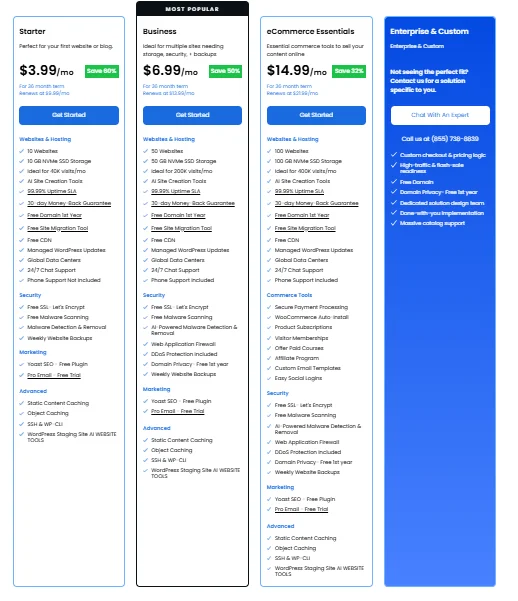
Plan | Intro Price (36-mo term) | Renews At (36-mo term) | Renewal (12-mo term) | Renewal (Monthly) | Websites | Storage | Traffic |
|---|---|---|---|---|---|---|---|
Starter | $3.99/mo | $9.99/mo | $11.99/mo | $15.99/mo | 10 | 10 GB NVMe SSD | ~40K visits/mo |
Business | $6.99/mo | $13.99/mo | $15.99/mo | $20.99/mo | 50 | 50 GB NVMe SSD | ~200K visits/mo |
eCommerce Essentials | $14.99/mo | $21.99/mo | $23.99/mo | $32.99/mo | 100 | 100 GB NVMe SSD | ~400K visits/mo |
Source: bluehost.com/pricing/web-hosting, live pricing verified.
A few things worth doing the math on before you check out:
- The Starter plan’s renewal jump is real. Going from $3.99/mo to $9.99/mo on a 36-month renewal term is a 151% increase. Pay for the full 36 months upfront on Starter and you’re paying $143.64 at signup, then roughly $359.64 for the following 36-month renewal if you don’t switch plans or providers.
- A free domain is included for the first year — but only on 12-month or 36-month terms, and only for specific TLDs (.com, .net, .org, .co, .blog, and a handful of others). It must be redeemed within 90 days of purchase, and after year one it renews at Bluehost’s standard domain rate.
- All plans include free SSL (Let’s Encrypt), a free CDN, a free WordPress migration tool, and AI-assisted site creation tools — you’re not paying extra for any of these regardless of tier.
- Phone support is not included on Starter. You get 24/7 chat on every plan, but phone support only kicks in from Business and up.
- Every plan carries the same 30-day money-back guarantee on hosting fees (domain registration fees are non-refundable if you cancel).
What Are the Pros and Cons of Bluehost?
Pros
- WordPress.org’s longest-running officially recommended host (since 2005), independently listed on wordpress.org/hosting alongside Pressable and Hostinger
- Starter plan allows 10 websites on one account at $3.99/mo intro — more headroom than many competitors that cap the entry tier at a single site
- Free domain (first year, on 12/36-month terms), free SSL, free CDN, and a free migration tool bundled at no extra cost
- 30-day money-back guarantee on hosting charges
- AI site-builder tools included on every plan, genuinely reducing the technical barrier for a first site
Cons
- Starter’s 36-month renewal price is 151% higher than the intro rate ($3.99/mo → $9.99/mo) — you need to budget for this, not just the sign-up price
How to Build Your First Website With Bluehost in 15 Minutes
Getting a basic WordPress site live on Bluehost follows the same general flow the host has used for years.
The steps below reflect Bluehost’s current signup and setup process; exact button labels and screens can shift with UI updates, so treat this as the sequence rather than a pixel-exact script.
Choose a Bluehost Hosting Plan
Go to Bluehost’s pricing page and pick a term length and plan. For a first personal site or blog, Starter covers the basics; if you already know you’ll run more than one site or want phone support included, Business is the safer starting point.
Register or Connect Your Domain
During checkout, you’ll be asked to either register a new domain (free for the first year on eligible terms) or connect a domain you already own.
If you’re not sure about a name yet, Bluehost’s domain search will show available options and pricing for eligible TLDs.
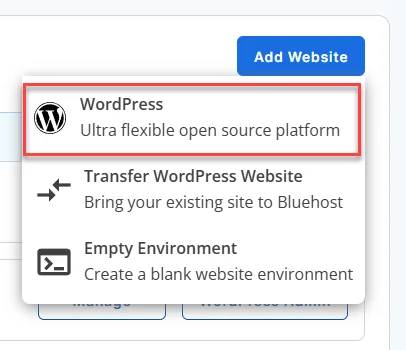
Install WordPress With Bluehost
Once your account is active, Bluehost provisions WordPress automatically as part of setup — there’s no separate manual installation step for a standard account, unlike some hosts that route you through cPanel’s MOJO Marketplace first.
Build Your Website With Bluehost AI
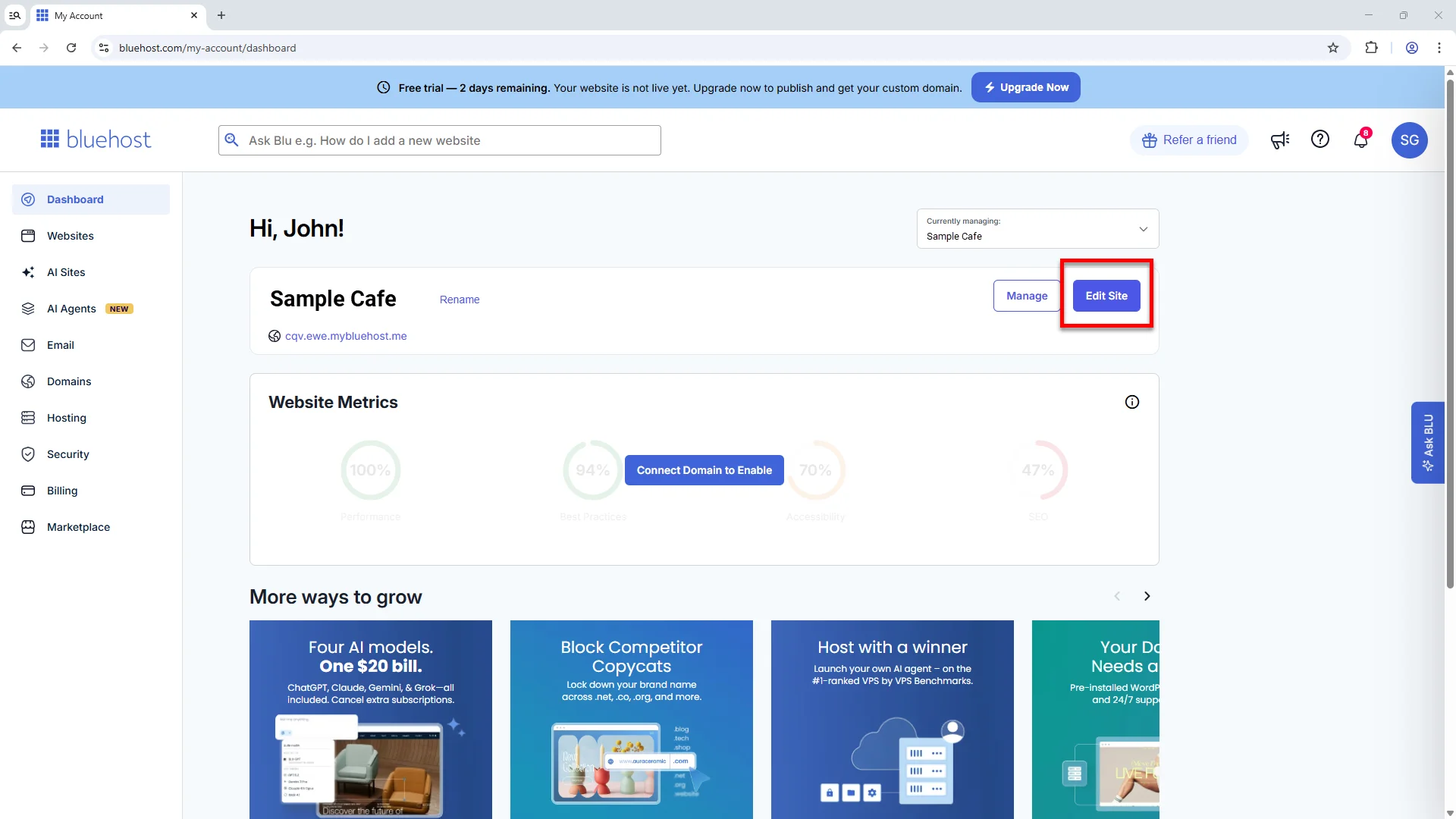
Bluehost’s AI site-creation tool asks a few questions about your site’s purpose and generates a starting layout, pages, and placeholder copy you can edit.
This is optional — you can skip it and start from a blank WordPress install with a standard theme instead.
Choose a Theme and Customize Your Site
If you skip the AI builder, you’ll land in the WordPress dashboard where you can browse free themes under Appearance > Themes, or start editing whatever the AI tool generated. Customize colors, fonts, and layout through the WordPress Customizer or the theme’s own settings panel.
Add Essential Pages and Content
At minimum, most beginner sites need a Home page, an About page, and a Contact page. Add these under Pages > Add New in the WordPress dashboard, and link them into your site’s main navigation menu under Appearance > Menus.
Check Your Site and Publish It
Preview your site on desktop and mobile view before making it public, check that your contact form (if added) actually delivers a test message, and confirm your domain is pointing correctly.
What to Do After Launching Your Bluehost Website
Getting the site live is only the first milestone — a few configuration steps in the days after launch protect the site and its search visibility.
Set Up SSL and Basic Security
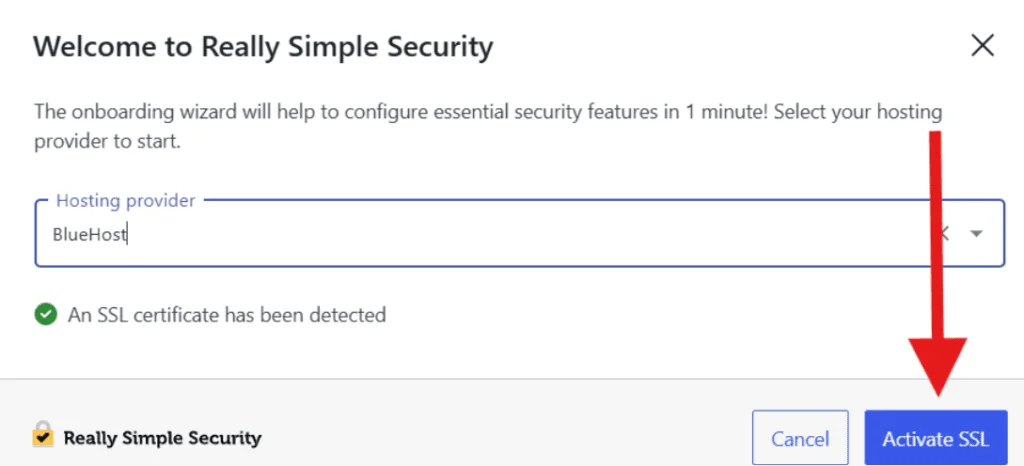
Bluehost issues a free Let’s Encrypt SSL certificate automatically on new accounts, but it’s worth confirming it’s active under the Security tab of your Bluehost dashboard so your site loads as https:// rather than showing a “not secure” warning.
Install Essential WordPress Plugins
A small, focused plugin set covers most beginner needs without slowing the site down:
- Yoast SEO — on-page SEO guidance, already bundled free with Bluehost plans
- WPForms — for a working contact form
- A caching or performance plugin, if not already handled by Bluehost’s built-in caching layer
Avoid installing more than a handful of plugins at once; each one adds server load, and shared hosting has finite resources per account.
Set Up Basic SEO and Performance
Connect Google Search Console and Google Analytics early so you have baseline data from day one, submit your XML sitemap (Yoast SEO generates one automatically), and confirm your site’s CDN is active in the Bluehost dashboard for faster load times to visitors outside your primary region.
Bluehost Support for Beginners
Bluehost includes 24/7 live chat on every plan and 24/7 phone support starting at the Business tier and above; Starter plan customers do not get phone support included. [NEEDS: verified current support response-time data — e.g., average chat wait time from an independent test or Bluehost’s own published SLA]
For self-service, Bluehost maintains a searchable knowledge base with setup guides and troubleshooting articles, which is often the faster route for common questions like DNS propagation or WordPress login issues.
What the Numbers Actually Show: Speed and Uptime
Bluehost advertises a 99.99% uptime SLA, but that’s a marketing claim, not independent proof. Hostingstep, which has run continuous paid testing on Bluehost since 2021, logged 349,920 individual tests between October 2025 and May 2026 and recorded an average uptime of 99.97% and an average Time to First Byte (TTFB) of 501ms domestically, with a 224ms average on global TTFB tests.
That’s a solid, real-world uptime figure, though the domestic TTFB is on the slower side compared with premium managed hosts — other independent testers monitoring Bluehost have recorded TTFB anywhere from roughly 198ms to over 900ms depending on plan tier, caching configuration, and test location, so treat any single number as a snapshot rather than a guarantee for your specific site.
The practical takeaway: for a typical beginner blog or small business site with modest traffic, this performance range is unlikely to be noticeable. For a site chasing every Core Web Vitals point for SEO, or expecting sudden traffic spikes, it’s worth knowing shared hosting has a performance ceiling that managed or cloud hosting doesn’t share.
Final Takeaway
Bluehost earns its beginner-friendly reputation honestly: WordPress.org’s own endorsement, a low entry price, and genuinely code-free setup make it a sound place to build a first website. The catch isn’t the setup experience — it’s the renewal math.
If you go in knowing the Starter plan jumps from $3.99/mo to $9.99/mo after your first term, and you check your cart for pre-selected add-ons before paying, Bluehost is a solid, low-risk starting point for a first WordPress site.
If your priority is the lowest possible long-term cost or maximum raw speed, it’s worth comparing renewal pricing against Hostinger or SiteGround before you commit to a multi-year term.
FAQs About Bluehost for Beginners
Does Bluehost have any hidden fees?
Not hidden exactly, but easy to miss: checkout often pre-selects add-ons like SiteLock or CodeGuard backups, and the free first-year domain has a retention fee if you cancel early. Review your cart before paying.
Why is Bluehost so cheap?
The advertised price is a new-customer introductory rate for the first term only (12 or 36 months). It’s a standard hosting-industry pricing model — the plan renews at a higher rate afterward, which is listed on Bluehost’s pricing page.
Does Bluehost include a free domain?
Yes, for the first year, on 12-month or 36-month hosting terms, for a limited set of TLDs. It must be redeemed within 90 days of signup and renews at the standard domain rate after year one.
Can I build a Bluehost website without coding?
Yes. Bluehost’s AI site-creation tool and the standard WordPress dashboard are both designed for non-technical use — no code is required for a basic site with pages, a menu, and a contact form.
How long does it take to build a website with Bluehost?
For a simple site using the AI builder or a pre-made theme, the core setup (plan purchase, domain, WordPress provisioning, basic pages) can realistically be done in under an hour. More custom design work will take longer.

Alex Bryant is the founder of PvyEmpire.com and a WordPress specialist with over 4 years of hands-on experience in web hosting, performance optimization, and website management. He has extensively tested top hosting providers by setting up real websites and monitoring their speed, uptime, and reliability.
At PvyEmpire.com, Alex publishes honest, data-driven reviews, detailed guides, and verified coupons & deals. His goal is to help website owners choose the right hosting, improve performance, and grow their online presence with confidence—based on real testing, not promotions.