Bluehost Without WordPress: What You Need To Know!
Signing up for Bluehost usually means one thing to most people: WordPress. But what if you’d rather build something else — a static HTML site, a Joomla project, or a custom PHP app — and you’re not sure if your hosting plan even allows it?
That question sends a lot of people searching for answers about using Bluehost without WordPress, and the confusion is fair. Bluehost markets itself so heavily around WordPress that it’s easy to assume the two are locked together.
Here’s the short version: they’re not, and this guide walks you through exactly what you can host instead, how to set it up through cPanel, and what limitations to watch for depending on your plan.
By the end, you’ll know whether your current setup supports a non-WordPress site — and what to check before you start building.
This post contains affiliate links. If you sign up for Bluehost or another host through a link on this page, we may earn a commission at no extra cost to you. This doesn’t influence which platforms we cover or how we describe them — our recommendations are based on independent research, not commission size.
Can You Use Bluehost Without WordPress?
Yes, you can absolutely use Bluehost without WordPress. Bluehost’s shared hosting plans give you full cPanel access, and cPanel doesn’t care what software runs on it — you can upload plain HTML files, install a different content management system, or run your own PHP scripts, all without ever touching a WordPress install.
The confusion comes from how Bluehost sells itself. WordPress.org has officially recommended Bluehost since 2005, and Bluehost’s checkout flow nudges nearly every new customer toward a one-click WordPress setup.
That’s a marketing choice, not a technical restriction. Underneath the WordPress branding, you’re still renting server space with standard hosting tools — file storage, a control panel, database access, and an app installer called Softaculous that can set up Joomla, Drupal, Magento, and dozens of other platforms just as easily as it sets up WordPress, according to Bluehost’s own support documentation.
Bluehost vs. WordPress: What’s the Difference?
Bluehost and WordPress solve two different problems, even though people often say the names in the same breath. Bluehost is the hosting company — it owns and maintains the physical servers that store your website’s files and serve them to visitors.
WordPress is free, open-source software that runs on top of a host like Bluehost to help you build and manage a site without writing code from scratch.
Think of it like renting an apartment (Bluehost) versus choosing how to furnish it (WordPress). You can fill that apartment with WordPress furniture, or you can bring in a completely different setup.
Bluehost | WordPress | |
What it is | A web hosting company | A content management system (CMS) |
What it does | Stores your files, serves your site, provides cPanel, databases, and email | Lets you build and manage pages, posts, and media through a dashboard |
Cost | Paid hosting plans starting around $3.99/mo | Free to download and use |
Relationship | Recommended host for WordPress since 2005 | One of many CMS options you can install on Bluehost |
What Can You Host on Bluehost Without WordPress?
Because Bluehost’s shared hosting is built on standard cPanel infrastructure, it supports far more than WordPress sites. Here’s what actually runs on it.
Custom HTML, CSS, and JavaScript Websites
If you’ve hand-coded a site, or exported one from a design tool, you can upload the files directly to Bluehost’s server using File Manager or FTP.
There’s no CMS involved at all — just static HTML, CSS, and JavaScript files sitting in your hosting account’s root directory, served exactly as you built them.
This is often the simplest and fastest-loading option, since there’s no database or CMS overhead to slow things down.
Other CMS Platforms
WordPress isn’t the only content management system Bluehost supports. Through Softaculous — the app installer built into cPanel — you can one-click install several alternatives:
- Joomla — a flexible CMS often used for more complex, multi-user websites
- Drupal — favored for corporate and highly customizable sites with strong security needs
- Magento — a dedicated eCommerce platform for online stores
- PrestaShop and OpenCart — lighter-weight eCommerce CMS options
Bluehost’s help documentation confirms that installing any of these takes the same basic steps: log into cPanel, open Softaculous Apps Installer, and choose the CMS you want instead of WordPress.
Custom PHP Websites and Applications
If you’re a developer building something from scratch — a custom PHP application, a small web tool, or a script-based project — Bluehost’s shared hosting supports that too.
You get PHP support, MySQL database creation through phpMyAdmin, and FTP access for deploying your own code. It’s not a specialized developer platform like a VPS, but for lightweight PHP projects, it covers the basics.
How to Use Bluehost Without WordPress
Setting up a non-WordPress site on Bluehost follows a fairly predictable path, whether you’re uploading static files or installing a different CMS.
Choose a Suitable Bluehost Hosting Plan
Start with a plan that supports your storage and traffic needs. All three of Bluehost’s Web Hosting tiers include cPanel, so none of them lock you into WordPress-only tools. Here’s what’s currently listed on Bluehost’s official pricing page:
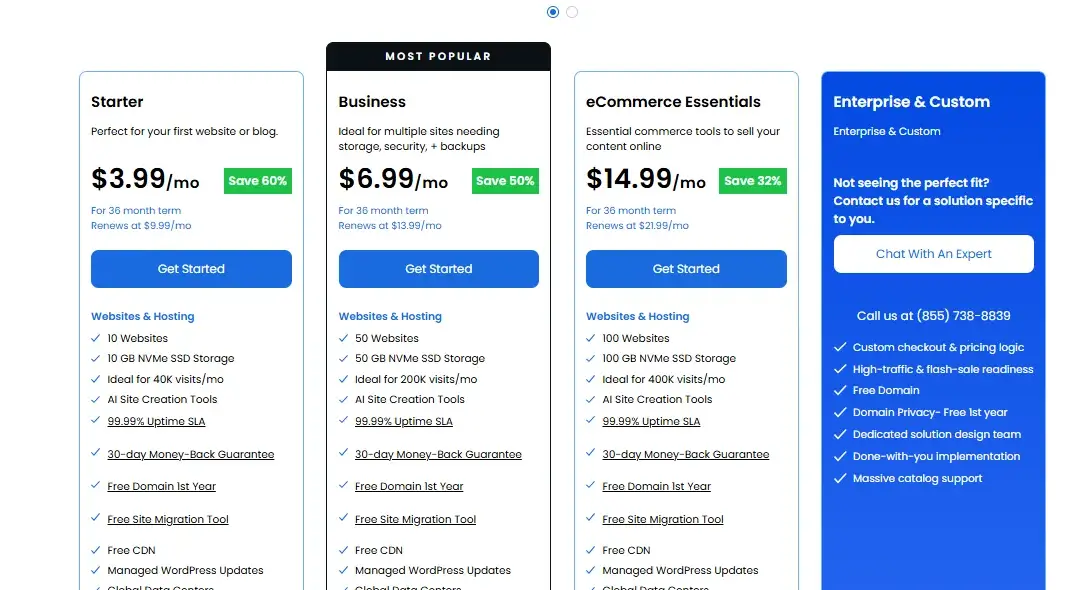
Plan | Intro Price | Renews At | Storage | Websites | Uptime SLA |
Starter | $3.99/mo | $9.99/mo | 10 GB NVMe SSD | 10 | 99.99% |
Business | $6.99/mo | $13.99/mo | 50 GB NVMe SSD | 50 | 99.99% |
eCommerce Essentials | $14.99/mo | $21.99/mo | 100 GB NVMe SSD | 100 | 99.99% |
Pricing shown reflects the 36-month term and includes a free domain for the first year, according to Bluehost’s official web hosting page. Shorter terms cost more upfront, and renewal rates apply once your initial term ends — always check the checkout page for current numbers before buying, since hosting promotions change often.
If your project is a simple HTML site or a single non-WordPress CMS install, the Starter plan’s 10 GB is usually plenty.
If you’re planning multiple sites or a store built on Magento or PrestaShop, Business or eCommerce Essentials gives you more headroom.
Upload Your Website With File Manager or FTP
- Log into your Bluehost account and open cPanel from your hosting dashboard.
- Choose your upload method. For a handful of files, File Manager (found in cPanel’s Files section) works fine. For larger projects, an FTP client like FileZilla connects using the FTP credentials shown in your Bluehost account.
- Navigate to the public_html folder. This is your site’s root directory — anything placed here loads when someone visits your domain.
- Upload your files. If your project is zipped, upload the archive first, then use File Manager’s built-in extract tool to unpack it directly on the server.
Set Up a Database for Dynamic Websites
Static HTML sites don’t need this step, but any dynamic CMS or custom PHP application will.
- In cPanel, open MySQL Databases.
- Create a new database and a database user, then assign that user full privileges on the database.
- Note the database name, username, and password — you’ll need to enter these into your CMS or application’s configuration file during setup.
- If you’re installing a CMS through Softaculous, this step is often handled automatically during the install wizard.
Connect Your Domain and Configure SSL
- Point your domain’s nameservers to Bluehost, or register a new domain through your Bluehost account if you don’t already have one.
- Wait for DNS propagation, which can take anywhere from a few minutes to 24-48 hours.
- In cPanel’s SSL/TLS section, activate the free Let’s Encrypt SSL certificate included with your plan.
- Confirm your site loads over HTTPS before sharing the link publicly.
What to Consider Before Using Bluehost Without WordPress?
Bluehost handles non-WordPress hosting well in most cases, but a few things are worth checking before you commit.
Hosting Plan and Platform Limitations
Bluehost’s standard Web Hosting plans — the ones covered in the pricing table above — give you full cPanel access and support any CMS through Softaculous.
That said, Bluehost also sells separately branded Managed WordPress plans built specifically around WordPress workflows.
If you’re comparing plans, double-check which product page you’re on: the general “Web Hosting” plans are the ones built for flexibility, while WordPress-specific tiers may lean more heavily into WordPress-only tooling.
When in doubt, confirm cPanel and Softaculous access with Bluehost support before purchasing if your project depends on a non-WordPress CMS.
Technical Skills and Website Management
WordPress’s one-click install exists because it removes almost all the technical setup work. Skip WordPress, and you take some of that back on yourself.
Installing Joomla or Drupal through Softaculous is still relatively simple, but a custom-coded HTML or PHP site requires comfort with FTP, file structure, and — for dynamic sites — basic database setup.
If you’re not familiar with any of that, budget extra time to learn the basics or consider hiring help for the initial setup.
Performance, Security, and Maintenance
Independent testing gives a mixed but broadly reasonable picture of Bluehost’s shared hosting performance.
Hostingstep, which buys and monitors hosting accounts directly rather than relying on vendor-supplied numbers, recorded a 501 ms average time-to-first-byte and 99.97% uptime across roughly 350,000 tests run between October 2025 and May 2026, placing Bluehost among the more consistent hosts in their tracking.
Other independent Bitcatcha-based tests have shown more variability, with faster response times in North America and slower results in regions like Singapore or India — a common pattern for hosts without a global CDN activated by default.
If your audience is international, pairing your Bluehost account with a CDN like Cloudflare can help even out those gaps.
Security-wise, non-WordPress sites don’t get the same automatic plugin updates WordPress users rely on.
If you install Joomla or Drupal, you’ll need to manually keep the CMS and its extensions updated, since Bluehost’s automated update tools are built primarily around WordPress.
Is Bluehost a Good Choice for a Non-WordPress Website?
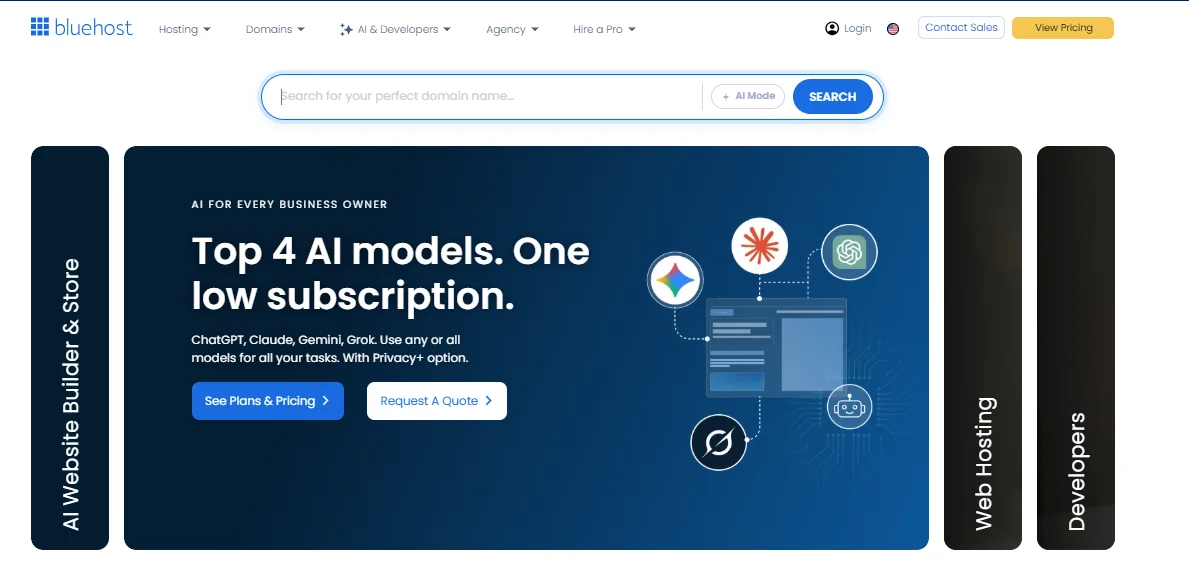
For most small to mid-sized non-WordPress projects, Bluehost is a reasonable choice, mainly because you’re not really paying for WordPress-specific infrastructure in the first place — you’re paying for standard cPanel shared hosting that happens to also support one-click WordPress installs.
The pricing is competitive with other budget hosts, the NVMe storage and 99.99% uptime SLA apply regardless of what CMS you run, and Softaculous covers most of the popular alternatives without extra cost.
The trade-off is that Bluehost’s account dashboard, marketing, and support documentation are all optimized around WordPress first.
You’ll need to dig a little to find cPanel and Softaculous rather than have it handed to you, and if something breaks on a Joomla or Drupal install, support may be less specialized in troubleshooting it compared to WordPress.
If your project is straightforward — a static site, a smaller CMS install, or a basic PHP app — that trade-off is minor. If you need deep platform-specific support for something like Magento at scale, a specialized eCommerce host might serve you better long-term.
Bluehost Alternatives for Non-WordPress Websites
If Bluehost doesn’t feel like the right fit, a couple of other options are worth comparing, depending on what kind of “non-WordPress” project you have in mind.
Bluehost | GoDaddy | Wix | |
Type | cPanel shared hosting | cPanel shared hosting | All-in-one website builder |
Starting price | $3.99/mo (Starter, 36-mo term) | $5.99/mo (Economy, 36-mo term) | $17/mo (Light, annual billing) |
Custom CMS support | Yes, via Softaculous | Yes, via cPanel/Softaculous | No — Wix is a closed builder, not traditional file hosting |
Best for | Developers and CMS users who want file-level control | Similar cPanel-based flexibility, more plan tiers | Non-technical users who don’t want to touch code or files |
GoDaddy is the closer comparison, since it’s also cPanel-based shared hosting with Softaculous support — GoDaddy’s own shared hosting plans start at $5.99/mo for its Economy tier, a bit higher than Bluehost’s entry price. Wix is a different category entirely.
It’s not a hosting provider you upload files to — it’s a closed website builder where Wix controls the backend, and its paid plans start at $17/mo for the Light tier. If you specifically want the freedom to install your own CMS or upload custom code, Wix isn’t built for that use case at all, regardless of price.
Conclusion
Bluehost’s WordPress branding is mostly marketing, not a technical wall. Underneath it, you’re getting standard cPanel shared hosting that supports static HTML sites, alternative CMS platforms like Joomla and Drupal, and custom PHP projects just as readily as it supports WordPress.
If your goal is a non-WordPress website, pick a standard Web Hosting plan (rather than a WordPress-specific tier), confirm cPanel and Softaculous access, and follow the same upload, database, and SSL steps outlined above.
For most small to mid-sized projects, that setup works well — just go in expecting to handle a bit more manual setup than WordPress users get by default.
Frequently Asked Questions
Can I host an HTML website on Bluehost?
Yes. Upload your HTML, CSS, and JavaScript files directly to the public_html folder using File Manager or FTP — no CMS or database required.
Can I install Joomla or Drupal on Bluehost?
Yes, both are available through the Softaculous Apps Installer in cPanel, alongside other CMS options like Magento, PrestaShop, and OpenCart.
Do I need a WordPress account to use Bluehost?
No. WordPress.org accounts aren’t required to use Bluehost hosting — you only need one if you choose to install and use WordPress specifically.
Can I upload a custom website to Bluehost?
Yes. Any Bluehost shared hosting plan gives you File Manager and FTP access, so you can upload custom-coded HTML or PHP projects directly.
Is Bluehost the same as WordPress?
No. Bluehost is a web hosting company; WordPress is free CMS software that can run on Bluehost’s servers, but the two are separate products from separate companies.
What are alternatives to Bluehost?
GoDaddy offers similar cPanel-based shared hosting with Softaculous support, while Wix takes a different approach as an all-in-one website builder rather than traditional file hosting.
Which is better, Wix or Bluehost?
It depends on your goal. Wix suits people who want a guided, code-free builder, while Bluehost suits anyone who wants file-level control to install their own CMS or custom code.

Alex Bryant is the founder of PvyEmpire.com and a WordPress specialist with over 4 years of hands-on experience in web hosting, performance optimization, and website management. He has extensively tested top hosting providers by setting up real websites and monitoring their speed, uptime, and reliability.
At PvyEmpire.com, Alex publishes honest, data-driven reviews, detailed guides, and verified coupons & deals. His goal is to help website owners choose the right hosting, improve performance, and grow their online presence with confidence—based on real testing, not promotions.