What is Bandwidth in Web Hosting: (Complete Guide)
Your website crashed right when traffic finally picked up, and now you’re staring at a hosting plan wondering what went wrong.
Somewhere in that error message or support chat, someone mentioned bandwidth, and suddenly you’re Googling this term at midnight. You’re not alone here.
Most site owners don’t think about this stuff until something breaks, and that’s exactly when the confusion hits hardest.
Good news: you’re about to get a straight answer, no tech-jargon overload. This post breaks down what bandwidth actually means for your hosting plan, why it matters more than you’d expect, and how to figure out how much you really need.
By the end, you’ll know exactly what to look for next time you pick a plan, and that spike in traffic won’t feel so scary anymore.
What is Bandwidth in Web Hosting?
Picture a highway connecting your website to every visitor who types in your URL. Bandwidth measures how much traffic the highway can handle at once and how much data moves across it over time.
A wider highway lets more cars through without a jam, and more bandwidth lets more visitors load your pages without a slowdown.
Every hosting plan comes with a bandwidth allowance, whether it’s labeled clearly or buried under a vague “unlimited” tag. This number decides how many visitors, page views, and file downloads your server can support in a given month.
Get the number wrong, and you’ll either overpay for capacity you never use or run short right when your site starts gaining momentum.
Simple Definition of Bandwidth
In plain terms, bandwidth is the amount of data your server can send to visitors within a set period, usually measured monthly. It’s expressed in units like MB, GB, or sometimes Mbps for connection speed.
Think of it as your site’s data allowance, similar to how a phone plan caps how much you can stream or download each billing cycle.
How Bandwidth Works in Web Hosting
Every time someone visits your site, their browser requests files: images, scripts, text, videos. Your server sends those files back, and each transfer eats into your bandwidth allowance.
More visitors, heavier pages, or media-rich content all pull from the same pool. Once you understand this flow, the whole concept stops feeling abstract.
Why is Bandwidth Important for a Website?
Bandwidth isn’t just a technical spec buried in your hosting dashboard. It directly shapes whether visitors have a smooth experience or hit frustrating delays.
A site that runs out of capacity during a busy period can slow to a crawl or, in worse cases, go offline entirely, right when people are trying to reach it.
For growing businesses, this matters even more. A product launch, a viral post, or a seasonal sales rush can send website traffic soaring overnight.
Without enough bandwidth in reserve, that surge turns into a liability instead of an opportunity. Planning here isn’t optional if you care about uptime.
How Bandwidth Affects Website Performance
When your site nears its bandwidth ceiling, pages start loading slower, images stall, and forms may fail to submit.
Visitors rarely stick around to find out why. Search engines notice sluggish performance too, which can quietly hurt your rankings over time. Enough headroom keeps things running the way they should.
Why Every Website Needs Enough Bandwidth
Even a small blog benefits from a comfortable buffer. Traffic doesn’t grow in a straight line; it spikes unpredictably around holidays, mentions, or shares.
Having extra capacity means you’re never caught off guard. It’s cheap insurance against the day your content finally takes off.
Bandwidth vs Data Transfer: What’s the Difference?
These two terms get mixed up constantly, and hosting providers don’t always help.
Bandwidth technically refers to the maximum capacity of your connection, while data transfer describes the actual amount of data moved during a specific period. They’re related, but they answer different questions entirely.
Knowing the distinction matters when you’re comparing plans. A provider might advertise generous bandwidth but cap your monthly data transfer somewhere else in the fine print. Reading both terms carefully before signing up saves you from nasty surprises down the road.
Understanding Bandwidth
Bandwidth is the ceiling, the theoretical maximum your connection could handle if pushed to its limit. It’s a capacity measurement, not a record of usage.
Providers often use it loosely, so don’t assume the word always means the same thing across different hosting companies.
Understanding Data Transfer
Data transfer is what actually happened: the real volume of information sent between your server and visitors over a billing cycle.
This is the number that shows up on your usage reports. It’s tracked, tallied, and sometimes capped, unlike raw bandwidth capacity.
Key Differences
Bandwidth describes potential, while data transfer describes actual consumption. One’s a speed limit, the other’s your odometer reading.
Providers sometimes advertise “unlimited bandwidth” while quietly enforcing fair usage limits on data transfer instead. Always check both figures, not just the headline number on the pricing page.
Bandwidth vs Website Speed: Common Misconceptions
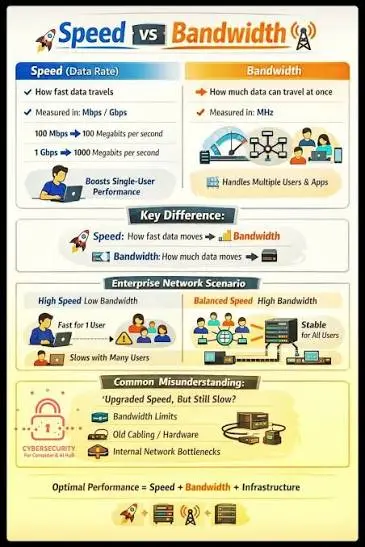
A lot of site owners assume buying more bandwidth automatically makes their site faster. It’s an understandable mix-up, but it’s not accurate. Bandwidth affects how much traffic your server can handle simultaneously, not how quickly individual pages render for a single visitor.
Website speed depends on a completely different set of factors, and lumping them together with bandwidth leads to wasted spending. You could double your bandwidth allowance and see zero improvement in load times if the real bottleneck sits elsewhere, like unoptimized images or a slow server response.
Does More Bandwidth Mean a Faster Website?
Not necessarily. More bandwidth prevents slowdowns during traffic surges, but it won’t shave milliseconds off a single page load. If your site feels sluggish even with low traffic, bandwidth probably isn’t the culprit. Look at other performance factors before upgrading your plan.
What Really Affects Website Speed?
Page load speed depends on server response time, image sizes, code efficiency, and whether you’re using caching or a CDN. Core Web Vitals, a set of metrics Google uses to judge user experience, weigh heavily on these factors too. Optimizing these areas usually beats simply buying more bandwidth.
What Affects Website Bandwidth Usage?

Several variables combine to determine how much bandwidth your site actually consumes each month. Some you control directly, like image sizes and file formats. Others depend on factors outside your control, such as how many people decide to visit on any given day.
Understanding these drivers helps you predict usage more accurately and avoid nasty overage surprises. It also points you toward practical fixes, since most bandwidth problems trace back to a handful of common, fixable causes rather than some mysterious technical limitation.
Number of Visitors
More visitors mean more page requests, and every request pulls data from your server. A blog with a hundred monthly visitors uses far less bandwidth than a store welcoming thousands. Traffic volume remains the single biggest factor behind overall bandwidth consumption.
Page Size
Heavier pages, loaded with large images, fonts, or scripts, consume more data per visit than lean, optimized ones. Average page size has crept upward across the web for years. Trimming unnecessary elements shrinks bandwidth usage without sacrificing how your site looks or functions.
Media Files
Videos, high-resolution photos, and audio files are bandwidth-hungry by nature. A single unoptimized video can outweigh dozens of text-based page views combined. Sites leaning heavily on rich media should budget bandwidth accordingly, or lean on external hosting for the heaviest files.
Downloads and Streaming
Offering downloadable PDFs, software, or streaming content pushes bandwidth usage up fast. Each download counts as a full data transfer, and popular files get requested repeatedly. Sites offering these features need considerably more headroom than a typical brochure-style website.
CDN and Caching
A CDN distributes your content across multiple servers worldwide, cutting the load on your primary server. Caching stores frequently requested files closer to visitors, reducing repeat transfers. Both tools trim your effective bandwidth consumption significantly, often without any noticeable drawback.
How Much Bandwidth Does Your Website Need?
There’s no single number that fits every site, since needs vary wildly by content type and audience size. However, you can estimate fairly closely by looking at your average page size, expected visitor count, and how many pages each visitor typically views per session.
Getting this estimate right prevents both overpaying for unused capacity and underestimating your way into a slowdown. Below is a rough breakdown by website type, useful as a starting point before you run your own numbers.
For Personal Blogs
A modest blog with a few thousand monthly visitors and lightweight pages usually gets by comfortably on 5- 10 GB of bandwidth monthly. Text-heavy content with modest images keeps demand low. Most shared hosting plans handle this range without any strain.
For Business Websites
Small business sites with product pages, contact forms, and moderate media typically need somewhere between 25- 50 GB monthly. Traffic tends to be steadier but still manageable. A mid-tier hosting plan usually covers this comfortably, with room to grow.
For eCommerce Stores
Online stores juggle product images, customer accounts, and checkout processes, all of which add up fast. Expect to need 100GB or more, depending on catalog size and traffic. VPS hosting or cloud hosting often makes more sense here than basic shared plans.
For High-Traffic Websites
Sites pulling tens of thousands of daily visitors, or those hosting video and downloadable content, can easily exceed several hundred GB monthly. Dedicated hosting or a robust cloud setup becomes almost necessary at this scale, both for bandwidth and overall stability.
How to Calculate Website Bandwidth Requirements
Rather than guessing, you can calculate a reasonably accurate bandwidth estimate using a straightforward formula. This removes much of the uncertainty and helps you choose a plan that actually matches your site’s real-world demands, instead of relying on vague marketing labels.
Most hosting experts recommend adding a buffer, sometimes called a redundancy factor or fudge factor, to account for traffic spikes and unexpected growth. Skipping this step is one of the most common planning mistakes site owners make.
Simple Bandwidth Formula
The basic formula: average page size × average daily visitors × average pages viewed per visit × 30 days. This gives you a baseline monthly figure. Multiply the result by a redundancy factor, typically 1.3 to 1.5, to leave room for growth and unexpected surges.
Example Calculation
Say your average page size is 2MB, you get 500 daily visitors, and each views 3 pages. That’s 2 × 500 × 3 × 30, which equals 90,000MB, or roughly 88GB monthly. Add a 1.5 redundancy factor, and you’d want a plan offering around 130GB.
Types of Web Hosting Bandwidth
Not all bandwidth arrives packaged the same way. Hosting providers structure their offerings differently, and the labels they use, shared, unmetered, unlimited, or dedicated, carry real implications for how your site behaves under pressure. Knowing these categories helps you read the fine print correctly.
Choosing the wrong type can leave you either overpaying for capacity you’ll never touch or stuck with a plan that throttles you the moment traffic picks up. A little research here goes a long way toward avoiding both outcomes.
Shared Bandwidth
With shared hosting, your bandwidth pool is split among multiple websites on the same server. It’s budget-friendly and fine for smaller sites, but a neighbor’s traffic spike can occasionally affect your own performance. It’s a trade-off worth understanding before you commit.
Unmetered Bandwidth
Unmetered bandwidth means your provider doesn’t track or bill based on exact usage numbers. That doesn’t mean truly infinite capacity, though. Providers still enforce practical ceilings through server capabilities and fair usage policy terms buried in the contract.
Unlimited Bandwidth
“Unlimited” sounds appealing, but it almost always comes with invisible strings attached. Providers rely on the fact that most sites never approach genuinely limitless usage. It’s more marketing language than a literal promise, so read the acceptable use policy closely.
Dedicated Bandwidth
Dedicated hosting reserves a fixed bandwidth allocation exclusively for your site, with no sharing involved. It costs more, but you get predictable, consistent performance regardless of what other customers on the network are doing. High-traffic or mission-critical sites often need this level of control.
What Does Unlimited Bandwidth Really Mean?
The word “unlimited” gets thrown around loosely in hosting marketing, and it rarely means what it implies at first glance. Nearly every provider offering unlimited bandwidth still operates within technical and contractual boundaries that kick in once usage climbs unusually high.
Understanding these hidden boundaries protects you from an unpleasant surprise later. It’s worth digging into a provider’s terms of service before assuming “unlimited” gives you complete freedom to use as much bandwidth as you want without consequence.
Fair Usage Policies
Most unlimited plans operate under a fair usage policy, which quietly caps usage at a level far beyond typical customer needs. These policies exist to prevent abuse, but they also mean your site could get flagged if traffic grows dramatically. Reading this policy before signing up avoids confusion later.
Common Limitations
Even generous unlimited plans often restrict server resources like CPU and RAM alongside bandwidth. Hitting these limits can throttle your site’s performance even if bandwidth technically remains available. True unrestricted capacity is rarer than the marketing copy suggests.
What Happens If You Exceed Your Bandwidth Limit?
Exceeding your allotted bandwidth doesn’t always mean instant disaster, but the consequences range from mildly annoying to genuinely damaging. What actually happens depends heavily on your provider’s policies and the hosting plan tier you’ve chosen from the start.
Some hosts handle overages gracefully with automatic upgrades, while others react far more harshly. It pays to know your provider’s specific policy before you find yourself over the limit during a critical traffic moment.
Website Slowdowns
The most common consequence is throttling, where your provider deliberately slows your connection speed once you exceed the cap. Visitors experience longer load times and possible timeouts. It’s frustrating, but usually temporary until the next billing cycle resets things.
Extra Charges
Many providers bill overage fees for usage beyond your plan’s allowance, sometimes at steep per-GB rates. These charges can add up fast during unexpected traffic spikes. Checking your plan’s overage pricing beforehand prevents an unwelcome bill at the end of the month.
Account Suspension
In more severe cases, particularly with budget shared hosting, providers may suspend your account entirely until you upgrade or the cycle resets. This is the worst-case scenario, since it takes your site fully offline. It’s rare, but it does happen with strict low-tier plans.
How to Reduce Website Bandwidth Usage
Cutting bandwidth consumption doesn’t require sacrificing your site’s quality or functionality. Most reductions come from smarter technical choices that visitors won’t even notice, aside from things loading a bit quicker than before. A handful of adjustments typically make a measurable difference.
These techniques also tend to improve overall site speed as a welcome side effect, since lighter, better-optimized pages load faster regardless of the bandwidth angle. It’s a rare case where the fix helps two problems at once.
Optimize Images
Compressing images before uploading dramatically cuts their file size without a noticeable quality drop. Tools handling image compression automatically can shave significant weight off every page. This single change often delivers the biggest bandwidth savings for media-heavy sites.
Enable Caching
Browser and server-side caching store static content locally so repeat visitors don’t re-download the same files. This reduces server strain and bandwidth consumption simultaneously. Most hosting control panels offer simple caching toggles that take just minutes to enable.
Use a CDN
A CDN spreads your content across servers globally, serving visitors from the location nearest them. This cuts the direct load on your primary server and shortens delivery distances. Many CDN services offer free tiers suitable for smaller sites.
Compress Files
Beyond images, compressing scripts, stylesheets, and downloadable files reduces their transfer size. Modern compression methods can shrink file sizes considerably before they reach the visitor’s browser. It’s a technical step, but most hosting platforms handle it with minimal setup.
Remove Unnecessary Media
Auditing your site for outdated, oversized, or rarely-viewed media files frees up bandwidth that’s currently going to waste. Old promotional videos or unused image galleries often linger longer than they should. A periodic cleanup keeps consumption lean and intentional.
How to Monitor Your Website Bandwidth Usage
Tracking your bandwidth consumption regularly helps you catch problems before they escalate into slowdowns or surprise charges. Most hosting providers offer built-in tools for this, though third-party options provide deeper insight for sites that need more detailed reporting.
Making bandwidth monitoring a habit, rather than an afterthought, means you’ll spot growth trends early and can upgrade your plan proactively instead of scrambling after an outage has already happened.
Using Your Hosting Control Panel
Most hosting accounts include a dashboard, often cPanel, showing current bandwidth usage against your plan’s allowance. Checking this monthly takes just a few minutes. It’s the simplest starting point for anyone wanting a quick usage snapshot.
Using Analytics and Monitoring Tools
Beyond your control panel, tools tracking site traffic and server performance offer richer context around usage patterns. These platforms can alert you to unusual spikes in real time. Combining both approaches gives a fuller picture than relying on one source alone.
Common Bandwidth Mistakes to Avoid
Even experienced site owners fall into predictable traps when it comes to bandwidth planning. Recognizing these mistakes ahead of time saves both money and headaches, and most of them are easy to sidestep once you know what to watch for.
A little proactive planning here beats reactive scrambling every time. The mistakes below show up repeatedly across sites of every size, from personal blogs to growing online stores.
Choosing the Wrong Hosting Plan
Picking a plan based on price alone, without considering actual bandwidth needs, sets sites up for trouble later. A plan that fits today might fall short in six months. Matching your hosting plan to realistic projected usage avoids this trap entirely.
Ignoring Traffic Growth
Sites that succeed tend to grow, and bandwidth needs grow right alongside them. Failing to plan for this expansion means scrambling for an upgrade mid-crisis instead of ahead of time. Building in headroom from the start makes scaling far less stressful.
Confusing Bandwidth with Storage
Bandwidth and storage measure entirely different things, yet they get mixed up constantly. Storage holds your files; bandwidth moves them to visitors. A site can have plenty of storage space while still running short on bandwidth, and vice versa.
Conclusion
Bandwidth might have sounded like abstract tech jargon at the start, but it boils down to something simple: how much data your site can deliver to visitors without breaking a sweat. Getting this right means fewer slowdowns, fewer surprise charges, and a lot less stress when traffic finally picks up.
Take a look at your current plan, run the numbers using the formula above, and check whether your allowance actually matches your site’s real needs. A little planning now saves a lot of scrambling later, and your visitors will notice the difference either way.
FAQs – What is bandwidth in web hosting?
Does bandwidth affect website speed?
Not directly. Bandwidth prevents slowdowns during high traffic, but individual page speed depends more on server response time, image optimization, and caching.
Is unlimited bandwidth really unlimited?
Rarely. Most “unlimited” plans operate under a fair usage policy that caps usage well beyond typical needs, despite the marketing language.
How much bandwidth does a small website need?
Most personal blogs and small sites run comfortably on 5- 10 GB monthly, depending on page size and visitor count.
What is the difference between bandwidth and storage?
Storage holds your website’s files; bandwidth moves those files to visitors. They’re separate resources with separate limits.
Can I upgrade my bandwidth later?
Yes, nearly all hosting providers allow plan upgrades as your traffic grows, often without any downtime during the switch.
How do I check my website’s bandwidth usage?
Log into your hosting control panel, typically cPanel, where usage stats are displayed against your plan’s allowance.
What happens if my ecommerce store suddenly exceeds its bandwidth during a sale?
Depending on your provider, you’ll either face throttled speeds, overage charges, or a prompted upgrade. Choosing a scalable plan ahead of major sales events avoids this scramble entirely.

Alex Bryant is the founder of PvyEmpire.com and a WordPress specialist with over 4 years of hands-on experience in web hosting, performance optimization, and website management. He has extensively tested top hosting providers by setting up real websites and monitoring their speed, uptime, and reliability.
At PvyEmpire.com, Alex publishes honest, data-driven reviews, detailed guides, and verified coupons & deals. His goal is to help website owners choose the right hosting, improve performance, and grow their online presence with confidence—based on real testing, not promotions.