Bluehost Free Trial: Is It Available? (Guide)
You’ve heard that Bluehost is one of the best web hosting options out there, and now you’re wondering if you can try it out before making a commitment.
Maybe you’re building your first website and don’t want to commit your card details until you know it’s the right one. That’s exactly the question a Bluehost free trial survey should answer.
Here’s the thing: what Bluehost actually offers may surprise you, and it’s worth understanding before signing up.
In this post, we’ll share exactly what you can get in place of a traditional free trial, how it works, and whether it’s enough to help you make a confident decision. By the end, you’ll know exactly what to expect and how to try Bluehost risk-free.

Does Bluehost Offer a Free Trial?
No, Bluehost doesn’t offer a free trial. You can’t sign up, poke around the dashboard, and walk away without paying if you’re not into it — every hosting plan requires payment upfront, along with a valid card or PayPal account.
What Bluehost offers instead is a 30-day money-back guarantee, and honestly, it works out to almost the same thing. You pay for a plan, use it for up to 30 days, and if it’s not for you, you cancel and get your hosting fees back.
I’d argue this setup is actually more useful than a typical trial, since you get full access to every feature — no watered-down “trial version” with limits on storage, email, or WordPress installs.
You’re using the real product from day one, which is exactly what you want when you’re deciding whether to build your business on it.
How to Try Bluehost Without a Free Trial
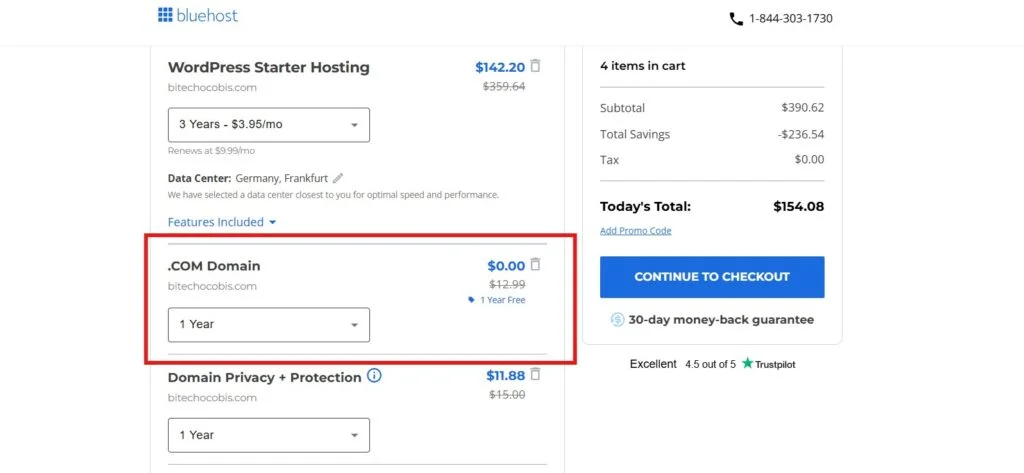
Since there’s no free-trial button to click, “trying” Bluehost really means signing up for a plan and using the refund window as your test period.
It sounds like a bigger commitment than it is — the process takes about 10 minutes, and you’re not locked in the way the word “purchase” might suggest.
Sign Up for a Bluehost Hosting Plan
Here’s how the sign-up flow works in practice:
- Go to Bluehost’s website and pick a hosting category — Shared, WordPress, or WooCommerce are the most common starting points for new sites.
- Choose a plan tier (Basic, Plus, Choice Plus, or Pro). For a first website, Basic or Plus covers most needs.
- Pick your domain. You can register a new domain (free for the first year on most annual plans), use one you already own, or add it later.
- Review add-ons at checkout. Bluehost bundles things like domain privacy, SiteLock, and Microsoft 365 email — uncheck anything you don’t need, since these usually sit outside the refund policy.
- Enter payment details and confirm your billing term. Longer terms (12–36 months) get you the lowest advertised rate.
- Complete the purchase. You’ll get a confirmation email, and your hosting account activates almost immediately, so you can start building right away.
From here, the clock on your 30-day window starts ticking, so it’s worth diving in and testing things — page speed, the dashboard, customer support responsiveness — sooner rather than later.
What Do You Get With Bluehost Hosting?
Even on the entry-level plan, Bluehost gives you a fairly complete hosting toolkit rather than a stripped-down starter package.
That’s part of why the money-back guarantee feels like a real trial — you’re not missing out on anything by not paying for a “premium” tier just to evaluate the platform.
Here’s what’s typically included:
- A free domain name for the first year (on annual or longer plans)
- A free SSL certificate for every site
- One-click WordPress installation
- NVMe or SSD-based storage, depending on the plan
- An AI-assisted website builder for quick setup
- 24/7 customer support via live chat and phone
- A staging environment on higher-tier plans, useful for testing changes before they go live
- cPanel access for managing files, databases, and email
One thing worth knowing: unlimited bandwidth and storage claims on the entry plans usually come with a “reasonable use” clause, so a site pulling in unusually heavy traffic could get flagged.
It’s rarely an issue for a new blog or small business site, but it’s good to know before you scale.
Bluehost Pricing and What You’ll Pay
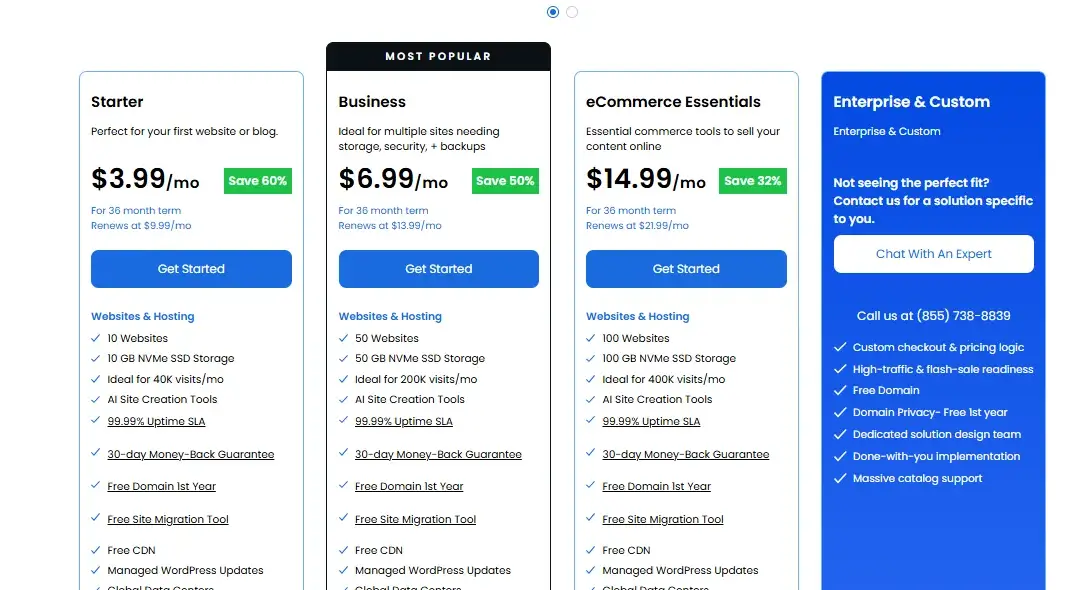
Bluehost’s pricing follows a common industry pattern: a low introductory rate for your first term, followed by a higher renewal rate once that term ends.
The gap between the two can be significant, so it pays to look past the homepage number.
| Plan | Best For | Intro Price (per month)* | Typical Renewal Price (per month) |
|---|---|---|---|
| Starter | Single site, personal blogs | ~$3.99 | ~$9.99 |
| Business | Multiple sites, growing traffic | ~$6.99 | ~$13.99 |
| eCommerce Essentials | Multiple sites, extra security tools | ~$14.99 | ~$21.99 |
| Enterprise & Custom | Not seeing the perfect fit? Contact us for a solution specific to you. |
*Introductory pricing is tied to longer prepaid terms (typically 12–36 months) and can shift with ongoing promotions, so it’s worth checking Bluehost’s official pricing page for the exact current rate before you buy.
If you go month-to-month or choose a shorter term, expect to pay noticeably more per month from the start. The trade-off is flexibility — you’re not locked into a multi-year contract if your plans change.
How Bluehost’s 30-Day Money-Back Guarantee Works
The guarantee is straightforward: cancel your hosting plan within 30 days of purchase, and Bluehost refunds your hosting fees in full. It applies to both new and returning customers, and it covers Shared, WordPress, and WooCommerce hosting.
This is really the mechanism that lets you “trial” Bluehost with real money on the table but very little actual risk. You get a full billing cycle to test uptime, site speed, and how quickly support responds when something breaks — details you’d never get from marketing copy alone.
What Is Eligible for a Refund?
- Base hosting fees for Shared, WordPress, and WooCommerce plans
- Payments made by credit or debit card (this matters — some payment methods have different refund timelines)
- Both first-time purchases and renewals within the 30-day window, in most cases
What Is Not Covered by the Guarantee?
- Domain registration fees — if your plan came with a free domain, Bluehost deducts a $15.99 non-refundable fee to cover the cost of registering it, according to Bluehost’s own money-back guarantee page
- SSL certificates, SiteLock, domain privacy, and other security add-ons
- AI products and services, PPC services, and QuickStart setup services
- Design services, SEO packages, and website transfer services
- Premium or already-registered domains
The takeaway: your core hosting bill comes back, but anything layered on top at checkout generally doesn’t. If you’re trying to keep your refund clean and simple, it’s smart to skip the extra add-ons at signup and add them later only if you decide to stay.
How to Cancel Bluehost and Request a Refund
Canceling within the guarantee period is a fairly quick process, especially compared to some hosts that require a phone call and a retention pitch before they’ll let you go.
- Log in to your Bluehost account and head to the hosting management section, or open a live chat if you’d rather talk it through with support.
- Select the plan you want to cancel and choose the cancellation option.
- Answer a short cancellation survey. Bluehost typically asks why you’re leaving — this doesn’t affect your refund eligibility.
- Confirm the cancellation. You should get an email confirming the request has gone through.
- Wait for the refund. Credit card refunds usually land back in your account within 5 to 7 business days; refunds by check can take 10 to 14 business days.
Keep your domain in mind before canceling. You’ll keep ownership of it even after your hosting ends, but you’ll want to either transfer it to another registrar or point it elsewhere so your site (or a placeholder) stays live.
Bluehost Free Trial Pros and Cons
Weighing the guarantee-as-trial approach against a “real” free trial comes down to what you actually value: full functionality versus zero financial commitment.
Pros
- You test the complete, unrestricted version of the hosting — nothing is gated behind a paid upgrade
- The 30-day window is long enough to genuinely evaluate speed, uptime, and support quality
- Refunds are processed quickly and without excessive back-and-forth
- You still keep your domain name even if you cancel
Cons
- You have to pay upfront and wait for a refund, rather than paying nothing at all
- The domain fee ($15.99) isn’t refundable if you used the free domain offer
Bluehost Free Trial Alternatives
If having zero money on the table during your evaluation period matters to you, a few competitors offer longer refund windows that give you more breathing room, even though none of them offer a true free trial either.
| Host | Guarantee Length | Notes |
|---|---|---|
| InMotion Hosting | 90 days | One of the longest standard windows in the industry; applies to annual shared plans |
| DreamHost | Up to 97 days on eligible shared plans | Terms have shifted before, so confirm the exact window at signup |
| SiteGround | 30 days (14 for cloud) | Straightforward refund process through the client dashboard |
| Hostinger | 30 days | Refunds handled directly through the account dashboard, no support ticket needed |
| GreenGeeks | 30 days | Similar terms to Bluehost, including a domain fee deduction |
If a longer evaluation period is your top priority, InMotion or DreamHost gives you noticeably more runway than Bluehost’s 30 days.
If you’re more focused on price, features, or WordPress-specific tools, Bluehost’s guarantee is still competitive with most of the industry standard.
Conclusion
Bluehost doesn’t offer a free trial, and it’s worth going in with that expectation set correctly. What it does offer — a 30-day money-back guarantee on full-featured hosting — is a reasonable stand-in, as long as you skip the non-refundable add-ons at checkout and keep the 30-day clock in mind.
For most beginners and small business owners building a first website, that’s more than enough time to know whether Bluehost is worth sticking with.
If you specifically want a longer window to stress-test a host before committing, it’s worth comparing InMotion or DreamHost, both of which offer refund periods well beyond Bluehost’s standard month.
FAQs
Does Bluehost ever run free trial promotions?
Not currently. Bluehost’s marketing occasionally uses the phrase loosely, but the actual offer is always the 30-day money-back guarantee, not a payment-free trial period.
Can I get a full refund if I used the free domain offer?
Mostly, yes — you’ll get your hosting fees back, but Bluehost deducts a $15.99 non-refundable domain fee, and you keep the domain either way.
How does Bluehost’s money-back guarantee compare with other hosts?
Bluehost matches Hostinger, SiteGround, and GreenGeeks at 30 days — shorter than InMotion (90 days) and DreamHost (up to 97 days).

Alex Bryant is the founder of PvyEmpire.com and a WordPress specialist with over 4 years of hands-on experience in web hosting, performance optimization, and website management. He has extensively tested top hosting providers by setting up real websites and monitoring their speed, uptime, and reliability.
At PvyEmpire.com, Alex publishes honest, data-driven reviews, detailed guides, and verified coupons & deals. His goal is to help website owners choose the right hosting, improve performance, and grow their online presence with confidence—based on real testing, not promotions.