FatCow review 2026: Pricing, Speed & Features Tested
Searching for a FatCow review usually means you’re either confused about whether this hosting service is actually worth it or frustrated with so many mixed opinions online. Maybe you’re trying to figure out if it’s beginner-friendly, or if it can really handle your website without slowing things down. Either way, it’s normal to feel unsure before choosing a hosting provider that could affect your entire online project.
In this post, you’ll get a clear and simple breakdown of FatCow—its features, performance, pricing, and overall value. The goal is to help you quickly understand whether it fits your needs or if you should look for better alternatives. By the end, you’ll have enough real insight to make a confident decision without wasting time on guesswork.
FatCow Hosting Overview
When people first hear about a hosting provider like FatCow, they usually wonder if it’s actually reliable or just another budget option that looks better on paper. Many beginners search for a FatCow review because they want a simple, honest answer before spending money on a platform that will run their website. It’s normal to feel unsure when every hosting company claims to be the fastest, cheapest, and easiest.
In this guide, we’ll break everything down in plain English so you can decide without confusion. We’ll explore features, pricing, performance, and real usability so you understand what you’re really getting. By the end, you’ll know whether this hosting service fits your needs or if a better alternative makes more sense.
What is FatCow Hosting?
FatCow is a long-running web hosting provider known mainly for its simple and budget-friendly hosting plans. It started with a focus on small websites and personal projects, offering a straightforward way to get online without technical complexity. Many users looking for a beginner-friendly platform end up considering it because the setup is quick and the dashboard is easy to understand.
In simple terms, FatCow is a shared hosting service that bundles basic tools like domain registration, email hosting service, and a website builder into one package. It is designed for users who don’t want to deal with advanced server configurations. You can manage everything from a single hosting control panel (cPanel), which keeps things simple for beginners.
How Good is FatCow Hosting?
FatCow is often discussed as a beginner-friendly web hosting platform, especially for users launching their first website. It offers essential features like website builder tools, email accounts, and basic security options that make starting a site less intimidating. However, it may not be the best choice for high-traffic or advanced projects.
When evaluating its real value, a typical FatCow review highlights that it works best for small blogs, portfolio sites, or simple business pages. It doesn’t compete strongly with premium services in areas like VPS hosting or dedicated server hosting, but it keeps things affordable and easy to manage. That balance is what attracts most of its users.
Our Official FatCow Hosting Review
After testing features and usability, this FatCow review 2026 pricing, speed, and features tested shows a mixed but honest result. The platform is simple and beginner-focused, but it doesn’t deliver top-tier performance for demanding websites. Still, it performs well enough for basic use cases.
Overall, FatCow feels like a reliable entry-level option rather than a powerful enterprise solution. It covers the essentials like domain setup, email services, and basic SEO marketing credits. But users expecting advanced scalability or strong cloud storage hosting options may feel limited.
FatCow Hosting Pricing and Plan

FatCow is often positioned as a budget-friendly hosting option, and its pricing reflects that. The entry plan is usually cheaper compared to many competitors, making it attractive for beginners or small business owners. Many users searching for a FatCow review are mainly interested in whether the low price comes with hidden limitations.
The platform also includes renewal pricing that can be higher than the initial discount, which is common in the industry. While it offers decent value at the start, long-term users should carefully evaluate FatCow’s pricing plans and review details before committing. Overall, it remains a budget hosting with unlimited features and service style, but with some trade-offs.
FatCow VPS Hosting Pricing
FatCow offers different VPS hosting plans based on performance and resources. These plans are designed for users who need more power than shared hosting but still want a managed solution.
| Plan Name | Monthly Price |
| Basic | $24.99/month |
| Business | $59.99/month |
| Optimum | $99.99/month |
FatCow Dedicated Hosting Pricing
For users who need full server control and maximum performance, FatCow also offers dedicated hosting plans. These are more expensive but provide higher speed, security, and reliability.
| Plan Name | Monthly Price |
| Startup | $149.99/month |
| Professional | $194.99/month |
| Enterprise | $239.99/month |
Dedicated servers are best for large websites, business applications, and high-traffic projects that need strong server performance.
Other Hosting Options and Payment Methods
FatCow also provides WordPress hosting plans, which are designed specifically for WordPress websites. These plans make installation and management easier for bloggers and small business owners.
FatCow supports multiple payment options to make purchasing simple and flexible:
- Credit Card (Visa and MasterCard are accepted for international payments)
- PayPal
- Check or Money Order
These options help users from different regions pay easily without restrictions.
I tested performance, Speed Test, and Server Response Time
Performance is one of the most important factors when choosing a hosting provider. FatCow offers acceptable site speed performance for small websites, but it is not built for heavy traffic or resource-intensive applications. Load times are decent, but not industry-leading.
In terms of reliability, FatCow’s uptime and performance review results show stable uptime for basic websites, although it may not match high-end providers. It works fine for blogs and simple business sites, but users needing advanced server performance or cloud-level speed may need alternatives.
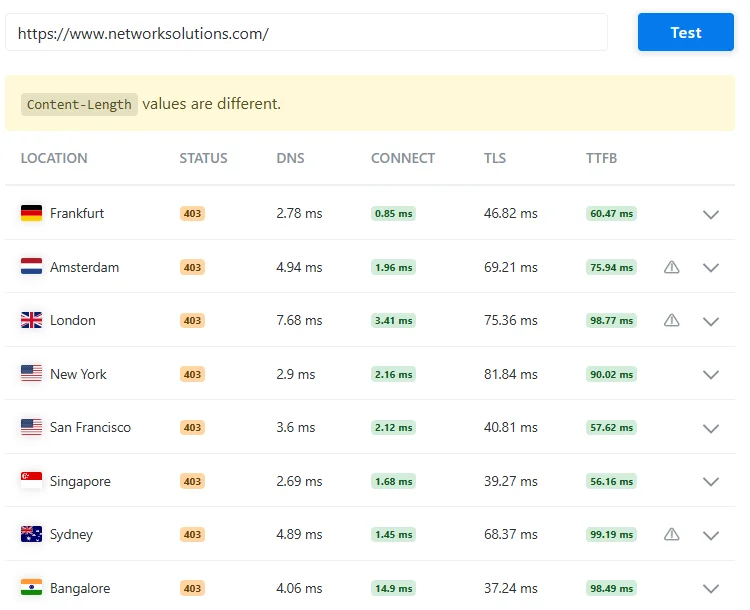
This image shows the performance test results of the website https://www.networksolutions.com/ from different locations around the world. At the top, there is a warning saying “Content-Length values are different,” which means the size of the data coming from the server is not the same in every test.
Below that, there is a table with different cities like Frankfurt, Amsterdam, London, New York, San Francisco, Singapore, Sydney, and Bangalore. In all locations, the status code is 403, which means access to the page is forbidden.
The table also shows technical details such as DNS time (how fast the domain is found), Connect time (how quickly the connection is made), TLS time (secure connection setup), and TTFB (time to receive the first byte from the server). Most values are quite fast, generally under 100 ms, which shows good speed performance, but the 403 status indicates a restriction issue.

This image shows the overall performance summary of the same website test. The website has a Performance Grade of A with a score of 92, which means it is performing very well. The page size is 443.9 KB, which is considered lightweight and good for fast loading.
The total load time is 620 milliseconds, meaning the website loads in less than a second, which is excellent for user experience. It also shows that the page makes 24 requests to load completely. Overall, this image tells us that the website is optimized and fast, even though there might be access issues shown in the first image.
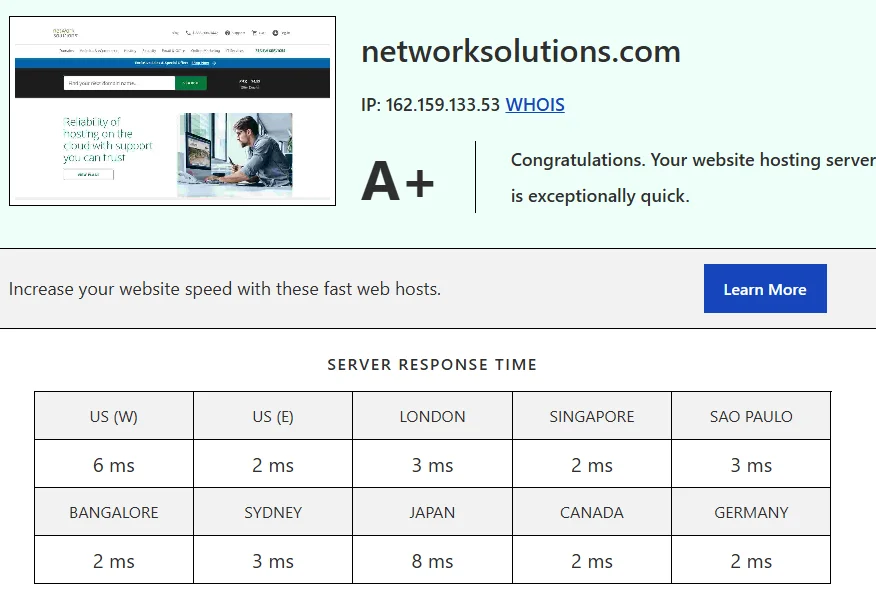
This image shows the performance report of the website networksolutions.com. The server has received an A+ grade, which means it is extremely fast and performs very well. The report says that the hosting server is “exceptionally quick,” indicating high reliability and speed.
The server response time is very low across different locations around the world. In the US (West), it is 6 ms, and in the US (East), it is only 2 ms. In London, the response time is 3 ms, while Singapore shows 2 ms, and São Paulo has 3 ms. In other regions like Bangalore, Canada, and Germany, the response time is also very fast at around 2 ms, while Sydney is 3 ms, and Japan is slightly higher at 8 ms.
Overall, this means the website loads very quickly for users in most parts of the world, which is great for performance and user experience.
Tools & Features
FatCow provides a simple set of tools that help users build and manage websites without technical skills. It includes website builder tools, application installers, and basic marketing integrations. These features are designed to make website creation fast and beginner-friendly.
However, compared to advanced hosting providers, its feature set is more basic. It still includes essentials like email hosting service, cPanel access, and security tools, but lacks deeper customization options found in VPS hosting or dedicated environments.
Usability
Usability is where FatCow performs quite well. The dashboard is clean, and users can easily manage domains, emails, and website settings without confusion. Even someone with no technical background can get started in minutes.
The platform also includes simple website management tools that reduce complexity. From installation to setup, everything is designed to be intuitive, which is why many beginners prefer it over more complicated hosting platforms.
Money-back Guarantee
FatCow offers a money-back guarantee, which helps reduce risk for new users. This allows customers to test the service before fully committing. It’s a standard feature in most hosting companies, but still useful for beginners.
The refund process is fairly straightforward, although users should always read the terms carefully. It gives peace of mind, especially for those trying hosting for the first time and unsure about long-term performance.
Features and Ease of Use
FatCow focuses heavily on simplicity, making it a strong choice for beginners who want everything in one place. The platform combines hosting, domains, and website tools into a single system that is easy to navigate. It avoids technical complexity and prioritizes convenience.
Website Hosting
Website hosting on FatCow is built around shared infrastructure, making it affordable and simple. It’s ideal for small websites that don’t require heavy resources. Users can launch quickly without server management knowledge.
Point and Click Site Building Tools
The platform includes easy drag-and-drop tools for building websites. These tools help beginners design pages without coding. It’s one of the reasons FatCow is often labeled as an easy website builder hosting option.
Application Installation Wizards
FatCow also provides one-click installation for popular apps like WordPress. This makes it easier to set up blogs or business sites quickly. It removes the need for manual installation steps.
Online Store And Selling Tools
For small businesses, FatCow offers basic eCommerce hosting tools. You can set up simple online stores, manage products, and accept payments. However, it is not designed for large-scale eCommerce operations.
Email Customization
Users can create custom email accounts linked to their domain. This helps businesses look more professional. The email hosting service is simple but effective for basic communication needs.
Marketing And Advertising Tools
FatCow includes some SEO marketing credits and basic promotional tools. These help new websites get initial visibility. However, advanced marketing features are limited compared to premium platforms.
FatCow Benefits
Affordable Pricing
One of the biggest advantages is its low starting cost. It remains attractive for users looking for the best cheap web hosting for small business projects.
Bonus Features
It includes extra tools like domain registration and email services, which add value. These bundled features simplify website setup.
Simple Backend
The control panel is easy to use, even for non-technical users. Everything is organized clearly, reducing confusion.
Solid Support Console
Customer support is available through multiple channels. While not perfect, it helps resolve basic issues effectively.
Downsides Of FatCow
Despite its simplicity, FatCow has limitations. It may not satisfy users who need high-performance hosting or advanced customization. Speed and scalability are also not its strongest areas.
Some users also report that advanced features are limited compared to modern cloud hosting platforms. This makes it less suitable for growing businesses.
FatCow Pros and Cons
Pros
- Affordable pricing for beginners
- Easy-to-use dashboard
- Includes website builder tools
- Basic email and domain features included
Cons
- Limited advanced hosting options
- Not ideal for high-traffic sites
- Basic performance compared to competitors
- Fewer modern cloud features
Poor Customer Support Reputation
Some users report mixed experiences with support response times. While basic issues are handled, complex problems may take longer to resolve.
How does FatCow match up to the competition?
When compared to major providers like FatCow vs GoDaddy, FatCow is simpler but less powerful. GoDaddy offers more advanced tools, while FatCow focuses on ease of use.
Against the FatCow vs A2 Hosting comparison, A2 Hosting delivers better speed and performance. Meanwhile, the FatCow vs GreenGeeks comparison shows GreenGeeks as a more eco-friendly and performance-focused option. Overall, FatCow is best for beginners, not advanced users.
| Feature | FatCow | GoDaddy | A2 Hosting | GreenGeeks |
| Ease of Use | Very simple and beginner-friendly | Moderate, more advanced dashboard | Easy but more technical options | Easy with modern UI |
| Pricing | Budget-friendly starter plans | Higher renewal costs | Mid-range pricing | Slightly higher but value-focused |
| Features | Basic hosting, website builder, email tools | Advanced tools, strong ecosystem | High-speed hosting, advanced features | Eco-friendly hosting with strong features |
| Best For | Beginners & small websites | Businesses needing scalability | Speed-focused users & developers | Performance + eco-friendly users |
Easy Explanation (FatCow vs GoDaddy)
FatCow is a beginner-friendly web hosting platform that focuses on simplicity. It is easier to use than GoDaddy because everything is straightforward, including its hosting control panel (cPanel), domain setup, and basic website management tools. However, it does not offer as many advanced features or integrations as GoDaddy.
GoDaddy is more powerful and better suited for users who want to scale their website or use advanced tools like marketing automation and eCommerce systems. So, FatCow is better if you want something simple, while GoDaddy is better for long-term business growth.
FatCow vs A2 Hosting
When comparing FatCow vs A2 Hosting, the biggest difference is performance. A2 Hosting is known for strong site speed performance, optimized servers, and a reliable hosting uptime guarantee, which makes it ideal for growing websites and WordPress users.
FatCow, on the other hand, focuses more on affordability and ease of use. It works well for basic websites, but cannot match A2 Hosting in server performance, scalability, or advanced hosting features like VPS hosting and dedicated server hosting. So, if speed matters, A2 Hosting is the better choice.
FatCow vs GreenGeeks
In the FatCow vs GreenGeeks comparison, GreenGeeks clearly leads in performance and modern hosting technology. It offers better hosting security features, faster loading speeds, and more optimized cloud storage hosting solutions.
FatCow is still good for beginners who want a simple setup and low cost, but GreenGeeks is better for users who care about performance, reliability, and eco-friendly infrastructure. Overall, GreenGeeks is a more advanced, reliable shared hosting provider, while FatCow stays entry-level.
Conclusion
FatCow is a simple and affordable hosting option designed mainly for beginners and small websites. It offers essential tools like domain registration, email hosting, and a basic website builder without overwhelming users with technical details. In this FatCow review, it’s clear that the platform focuses more on simplicity than advanced performance.
If you want a budget-friendly starting point, it can work well. However, if you expect high speed, scalability, or advanced features, you may need a more powerful hosting provider.
FAQs
Is FatCow good for beginners?
Yes, it is designed mainly for beginners who want a simple hosting setup without technical complexity.
Does FatCow offer WordPress hosting?
Yes, it supports WordPress hosting with one-click installation for easy setup.
Is FatCow hosting fast?
It offers decent speed for small websites but is not ideal for high-performance needs.
Can I build an online store with FatCow?
Yes, but it is best for small or basic eCommerce stores only.
Does FatCow include a website builder?
Yes, it includes easy drag-and-drop website builder tools.
Is FatCow worth it for long-term use?
It depends on your needs. It is good for small sites but may not scale well for larger projects.
Related

Alex Bryant is the founder of PvyEmpire.com and a WordPress specialist with over 4 years of hands-on experience in web hosting, performance optimization, and website management. He has extensively tested top hosting providers by setting up real websites and monitoring their speed, uptime, and reliability.
At PvyEmpire.com, Alex publishes honest, data-driven reviews, detailed guides, and verified coupons & deals. His goal is to help website owners choose the right hosting, improve performance, and grow their online presence with confidence—based on real testing, not promotions.