Bluehost vs Flywheel: Which Is Better for WordPress?
Picking a host for your WordPress site sounds simple—until you actually start comparing options and realize how different they can be.
Maybe you’re outgrowing your current setup, or you just want something that won’t crash the moment your traffic spikes. Either way, you’ve probably landed on the Bluehost vs Flywheel debate, and you’re not alone in feeling a little stuck.
That’s exactly what this post is here to sort out. We’ll break down how each platform handles performance, pricing, support, and ease of use, so you can see which one actually fits the way you work.
By the end, you’ll have a clear answer instead of a dozen open tabs and more questions than you started with.
Bluehost vs Flywheel: Quick Comparison
Bluehost is the better pick if you want cheap, general-purpose hosting with room to grow, while Flywheel is built specifically for WordPress professionals who need speed and polish out of the box. Here’s how they stack up at a glance.

| Bluehost | Flywheel | |
|---|---|---|
| Starting price | $3.99/mo (intro, shared plans) | $25/mo (Tiny plan) |
| Hosting type | Shared, WordPress, WooCommerce, VPS, dedicated | Managed WordPress only |
| Best for | Beginners, small businesses, budget projects | Designers, agencies, client sites |
| Uptime (real-world) | ~99.97–99.98% | ~99.9%+ (Google Cloud infrastructure) |
| Support | 24/7 chat and phone | Live chat, limited phone hours |
| Standout feature | One-click WordPress install, low entry cost | Free staging, nightly backups, no renewal price hikes |

Bluehost vs Flywheel: Features and WordPress Hosting Capabilities
Both hosts support WordPress well, but they approach it from opposite directions. Bluehost treats WordPress as one of several hosting options it supports, while Flywheel builds its entire platform around it. That difference shows up in almost every feature you’ll actually use day to day.
| Bluehost | Flywheel |
|---|---|
| One-click WordPress install | One-click staging sites |
| Free domain (first year) | Nightly automatic backups |
| cPanel interface | Free unlimited-site migrations |
| Multiple hosting types (shared, VPS, dedicated, WooCommerce) | Built-in firewall and free malware cleanup |
| Free SSL certificate | Visual, thumbnail-based dashboard |
| 24/7 chat and phone support | CDN with speed-optimized servers on Google Cloud |
| Marketing credits and add-ons | Collaborator access and client billing handoff |
WordPress Management and Ease of Use
Bluehost gives you a familiar cPanel interface plus a one-click WordPress installer, which makes it approachable even if you’ve never set up a site before.
Flywheel, on the other hand, replaces cPanel entirely with its own clean, visually driven dashboard where every site shows up as a card with a thumbnail—something I’ve found genuinely useful when managing more than a handful of client sites, since you can spot the right one at a glance instead of hunting through a list of domain names.
If you’re brand new to hosting, Bluehost’s setup wizard holds your hand more. If you’re already comfortable with WordPress and just want a faster, prettier way to manage multiple installs, Flywheel’s interface feels less like software and more like a tool designed by people who actually build websites for a living.
Website Migration, Backups, and Security
Both platforms offer free migrations and daily backups, but the depth of what’s included differs by plan. Bluehost bundles a free domain, free SSL, and a basic malware scanner into its entry plans, though features like CodeGuard automated backups and SiteLock security often cost extra depending on the tier.
Flywheel includes free SSL certificates, a built-in firewall, and free malware cleanup across all its plans—there’s no upsell for basic security, which is one area where the flat, all-inclusive pricing genuinely pays off.
- Bluehost: Free SSL and domain (year one), CodeGuard backups (often add-on), SiteLock malware scanning (often add-on)
- Flywheel: Free SSL, built-in firewall, free malware cleanup, nightly automatic backups, one-click staging included on every plan
Customer Support and Developer Tools
Bluehost offers 24/7 live chat and phone support, which matters if you run into a billing issue at 2 a.m. or need help at odd hours.
Flywheel’s support team is smaller and more specialized—you’re talking to people who only work with WordPress, so technical questions about plugin conflicts or staging environments tend to get answered faster and with more specificity, though phone support runs on limited hours (9am–5pm CST) rather than around the clock.
For agencies and developers, Flywheel also throws in collaborator invites, a site-cloning “Blueprint” feature, and one-click add-ons for CDN and multisite—tools that Bluehost simply doesn’t offer at any price point.
Bluehost vs Flywheel: Performance Comparison
Flywheel edges out Bluehost on raw speed and consistency, mainly because it runs exclusively on optimized, WordPress-tuned infrastructure rather than shared servers. That said, Bluehost’s numbers are genuinely solid for the price, and most everyday sites won’t notice a dramatic difference unless traffic gets heavy.
Speed and Server Performance
Independent testing puts Bluehost’s average load time around 500–975ms depending on the test tool and caching setup, with TTFB (time to first byte) averaging roughly 500ms on shared plans.
Flywheel-hosted sites, running on Google Cloud Platform since the WP Engine acquisition, typically load in the 300–500ms range thanks to multi-layer caching and a global CDN spanning around 200 edge servers.
In practice, that gap becomes more noticeable the moment your traffic grows—Bluehost’s shared hosting environment means your site shares resources with other accounts, so performance can dip during peak load in a way that Flywheel’s isolated, WordPress-optimized servers are built to avoid.
Uptime and Reliability
Both hosts perform well here, though Flywheel’s dedicated infrastructure gives it a slight edge under sustained traffic. Bluehost advertises a 99.9% uptime guarantee, and independent monitoring over extended periods has recorded real-world figures around 99.97–99.98%.
Flywheel doesn’t publish a single blanket number but benefits from Google Cloud’s redundant, globally distributed infrastructure, which tends to produce comparable or better consistency—particularly for sites that see unpredictable traffic surges, since Flywheel’s servers are provisioned specifically for WordPress workloads rather than a mix of hosting types.
Bluehost vs Flywheel: Plans and Pricing
Bluehost is the far cheaper option at every tier, while Flywheel charges a premium for specialization, better performance, and features baked into every plan instead of gated behind upsells. Which one actually costs less depends heavily on how long you plan to stay and how many add-ons you need.
Bluehost Pricing and Plans
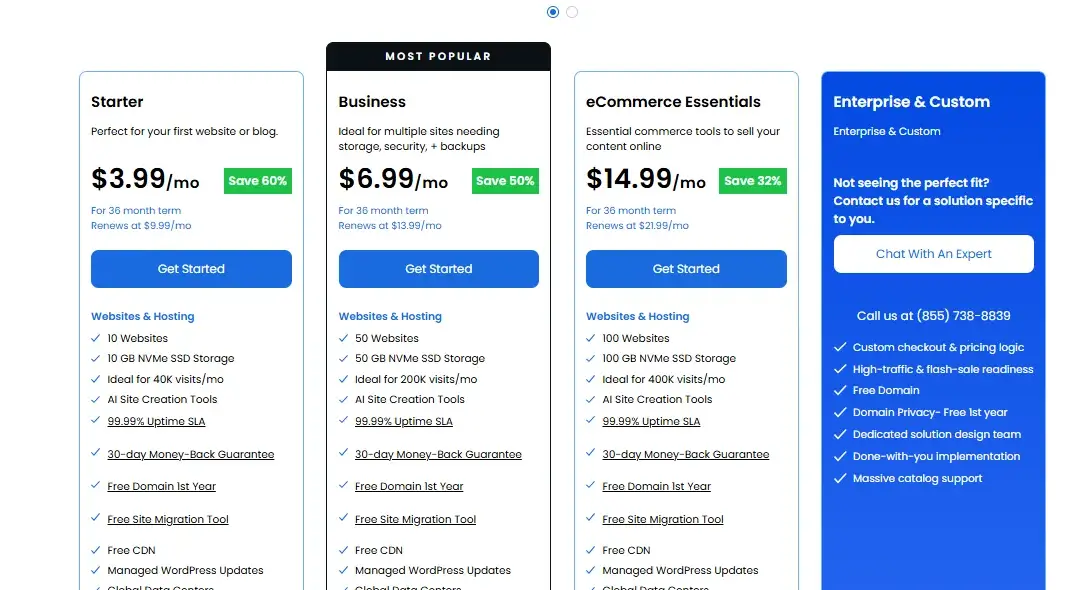
Bluehost’s shared hosting starts cheap but renews significantly higher—something worth budgeting for before you commit to a long-term contract.
| Plan | Intro Price | Renewal Price | Key Features |
|---|---|---|---|
| Starter | $3.99/mo | 9.99/mo | 1 website, free domain (1st yr), free SSL |
| Business | $6.99/mo | $13.99/mo | Unlimited websites, unlimited storage |
| ecommerce | $14.99/mo | $21.99/mo | Adds domain privacy, CodeGuard basic backup |
| custom | Not seeing the perfect fit? Contact us for a solution specific to you. |
Prices reflect current promotional rates on longer-term (24–36 month) contracts; actual renewal costs can be up to 150% higher than intro pricing.
Flywheel Pricing and Plans

Flywheel prices by site count and monthly visitors rather than by feature tier, and—unlike most hosts—it doesn’t raise prices at renewal.
| Plan | Price/mo (billed annually) | Sites | Monthly Visits | Storage |
|---|---|---|---|---|
| Tiny | $13 | 1 | 5,000 | 5GB |
| Starter | $25 | 1 | 25,000 | 10GB |
| Freelance | $96 | 10 | 100,000 | 30GB |
| Agency | $242 | 30 | 400,000 | 50GB |
Flywheel’s flat renewal pricing is a genuine differentiator—what you pay on day one is close to what you’ll pay two years in, which isn’t the norm in this industry.
Which Host Offers Better Value for Money?
Bluehost wins on pure affordability, especially for a single small site where you don’t need premium performance. Flywheel wins on value once you factor in what’s included by default—free migrations, staging, backups, and security without add-on fees—because those same features often cost extra on Bluehost.
If you’re comparing total cost of ownership rather than sticker price, Flywheel’s all-inclusive model can actually work out more predictable, even though the upfront number looks higher.
Which Host Offers Better Scalability?
Flywheel scales more cleanly for WordPress-specific growth, since its plans are structured around visitor counts and site numbers rather than forcing a jump to an entirely different hosting type.
Bluehost technically scales further—you can move from shared hosting to VPS to dedicated servers—but that means migrating to a different product line as your needs change, which can involve more friction than simply upgrading a Flywheel tier.
Which Hosting Provider Is Better for Different Users?
Neither host is universally “better”—it comes down to what you’re building and who’s building it. Here’s a straightforward breakdown of who tends to get the most out of each.
Who Should Choose Bluehost?
- You’re launching your first website and want a low-cost, beginner-friendly starting point
- You need flexibility beyond WordPress (e-commerce stores, custom apps, or non-WordPress sites)
- You want the option to scale into VPS or dedicated hosting later without switching providers
- Budget matters more than premium performance right now
Who Should Choose Flywheel?
- You’re a designer, developer, or agency managing multiple WordPress client sites
- You want staging, backups, and migrations included without hunting for add-ons
- Site speed and a polished workflow matter more to you than saving a few dollars a month
- You value predictable renewal pricing over a low introductory rate
Bluehost vs Flywheel for Agencies and Client Websites
Flywheel is the stronger choice for agencies, largely because it was built with that workflow in mind from day one.
Its Agency plan supports up to 30 sites for $242/month—working out to roughly $8 per site—and includes collaborator invitations, one-click billing handoff to clients, and a dashboard that visually organizes every site under management.
Bluehost can technically host multiple client sites too, especially on its Plus and Choice Plus plans, but it lacks the client-handoff tools and per-site visual management that make Flywheel’s agency tier feel purpose-built rather than repurposed shared hosting.
Bluehost vs Flywheel: Pros and Cons
Both hosts have clear strengths and equally clear trade-offs, and seeing them side by side makes the decision easier than reading feature lists in isolation.
Bluehost Pros and Cons
Pros:
- Very low intro pricing, starting under $3.99/mo
- 24/7 phone and chat support
- Flexible hosting types beyond WordPress
- Free domain and SSL included
Cons:
- Renewal prices jump significantly (up to 150%)
- Advanced security and backups often cost extra
Flywheel Pros and Cons
Pros:
- No renewal price hikes
- Free staging, backups, migrations, and security on every plan
- Faster average load times on WordPress-optimized infrastructure
- Clean, visual dashboard built for managing multiple sites
Cons:
- Higher entry price than general shared hosting
- No email hosting included on any plan
Bluehost vs Flywheel: Which One Is Better for WordPress?
If you’re weighing Bluehost vs Flywheel purely on WordPress performance and workflow, Flywheel comes out ahead—it’s faster, more consistent, and bundles in tools that Bluehost charges extra for.
But “better” depends on your budget and stage. Bluehost remains the smarter starting point if you’re building your first site on a tight budget or need hosting flexibility beyond WordPress.
Flywheel makes more sense once you’re managing client work, need reliable staging environments, or simply want performance and security handled without constant add-on decisions.
Bluehost vs Flywheel Alternatives
If neither host feels like quite the right fit, a few other providers are worth a look depending on what you’re optimizing for.
- SiteGround – A strong middle ground with solid WordPress performance and support quality that often beats Bluehost at a similar price point.
- WP Engine – Flywheel’s parent company; offers similar managed WordPress hosting with more enterprise-level features and higher pricing.
- Hostinger – Consistently among the cheapest entry points for shared hosting, useful if budget is your primary concern over specialization.
What Should You Consider Before Choosing Between Bluehost and Flywheel?
Before you commit to either host, run through these questions to match the platform to your actual needs rather than just the price tag.
- What’s your budget, including renewals? Factor in Bluehost’s renewal jump and Flywheel’s flat pricing over a 2–3 year horizon, not just the first month.
- Is your site WordPress-only, or might you need other platforms later? Flywheel locks you into WordPress; Bluehost doesn’t.
- How many sites are you managing? Agencies and freelancers benefit more from Flywheel’s per-site visual dashboard and client tools.
- How much traffic do you expect? High-traffic or client-facing sites benefit from Flywheel’s dedicated, optimized infrastructure.
- Do you need email hosting bundled in? Bluehost includes it; Flywheel doesn’t, so you’ll need a separate provider like Google Workspace.
- How important is 24/7 phone support to you? Bluehost offers round-the-clock phone access; Flywheel’s hours are more limited.
Conclusion
There’s no single winner in the Bluehost vs Flywheel comparison—just two hosts built for different priorities. Bluehost makes sense if you’re starting out, watching your budget, or need hosting flexibility beyond WordPress.
Flywheel makes sense once performance, staging, and a polished multi-site workflow matter more to you than shaving a few dollars off your monthly bill. If you’re a beginner or small business owner, start with Bluehost.
If you’re a designer, developer, or agency managing client sites where speed and reliability directly affect your reputation, Flywheel’s premium pricing is easier to justify.
FAQs
Which Is Better for Beginners, Bluehost or Flywheel?
Bluehost is better for beginners thanks to its low entry price, guided setup, and 24/7 support for troubleshooting. Flywheel’s interface is easier once you know WordPress, but its pricing and WordPress-only focus make more sense for users past the beginner stage.
Is Flywheel Worth the Higher Price Than Bluehost?
For agencies and WordPress professionals, yes—the included staging, backups, and consistent performance offset the higher monthly cost. For a single low-traffic personal site, Bluehost’s cheaper plans are usually enough.
Can I host non-WordPress sites on Flywheel?
No, Flywheel is a managed WordPress-only host, so it won’t support other platforms or custom applications. Bluehost supports WordPress alongside other hosting types like shared, VPS, and dedicated servers.
Does Bluehost or Flywheel offer better security by default?
Flywheel includes free SSL, a built-in firewall, and free malware cleanup on every plan without upsells. Bluehost includes basic security in its lower tiers but often charges extra for tools like SiteLock and CodeGuard backups.
Which host is cheaper long-term?
Bluehost is cheaper upfront but its renewal prices can climb sharply, sometimes up to 150% higher than the intro rate. Flywheel costs more from the start but keeps pricing flat at renewal, which can make it more predictable over 2–3 years.
Do either Bluehost or Flywheel include email hosting?
Bluehost includes email hosting options with its plans, while Flywheel does not offer email on any tier. If you choose Flywheel, budget separately for a provider like Google Workspace or Microsoft 365.
Is Flywheel a good choice for e-commerce sites built on WordPress?
Flywheel can host WooCommerce sites well, especially with its caching and CDN included by default, though it lacks WooCommerce-specific plans that some competitors offer. Bluehost has dedicated WooCommerce hosting plans if e-commerce is your primary focus.

Alex Bryant is the founder of PvyEmpire.com and a WordPress specialist with over 4 years of hands-on experience in web hosting, performance optimization, and website management. He has extensively tested top hosting providers by setting up real websites and monitoring their speed, uptime, and reliability.
At PvyEmpire.com, Alex publishes honest, data-driven reviews, detailed guides, and verified coupons & deals. His goal is to help website owners choose the right hosting, improve performance, and grow their online presence with confidence—based on real testing, not promotions.