Free Web Hosting Services for Beginners – Full Guide
Ever stared at your laptop wondering how you’re going to launch your website without spending a dime? You’re not alone. So many people dream of starting a blog, a portfolio, or a small online store, but the moment they see hosting prices, that excitement turns into a “wait, how much?!” moment.
That’s probably how you ended up searching for free web hosting in the first place — you just want to get your site up and running without worrying about your wallet.
Good news: you’re in the right place. In this post, we’ll break down everything you need to know about free web hosting, including the best options out there, what to watch out for, and how to pick one that actually fits your needs.
By the end, you’ll have a clear idea of where to start — no confusing tech jargon, no hidden surprises, just simple, honest guidance to help you get your site online today.
Overview
Starting a website used to feel like a project reserved for tech experts with deep pockets. Things have changed a lot since then. Today, anyone with an idea and a laptop can get a site live in minutes, often without spending a single rupee.
That’s the appeal of free hosting platforms — they remove the biggest barrier (cost) and let you focus on building something you actually care about.
This guide walks you through everything beginners need to know before picking a free hosting service in 2026. We’ll cover what it actually means, how to create your first site, the features you should expect, and the pros and cons of going free.
By the time you finish reading, you’ll know exactly whether a free plan fits your project or whether it’s time to look at something more robust.
What is Free Web Hosting?
Free web hosting is a service that lets you store your website’s files on a server without paying a monthly or yearly fee. Instead of renting space the way you would with shared hosting or premium hosting plans, you get a smaller slice of server resources at no cost.
It’s a bit like a trial that never expires, except this “trial” comes with limits on storage and bandwidth.
Most providers make money in other ways, whether through occasional ads, optional paid upgrades, or the hope that you’ll eventually outgrow the free plan.
In exchange, you usually get a working subdomain, access to a control panel, and enough disk space to run a small blog, portfolio, or business page. Some hosts even throw in a free domain or basic email hosting, depending on the plan.
Create Your First Website
Getting your first site online is far simpler than most beginners expect. You sign up for an account, pick a subdomain (or connect your own domain name if you have one), and choose how you want to build your site.
Most free hosts offer a one-click CMS installer for platforms like WordPress, Joomla, or GRAV, plus a drag-and-drop website builder if you’d rather skip the technical stuff entirely.
Once your site is set up, you’ll land on a dashboard where you can upload files, manage your database, and tweak settings. From there, it’s just a matter of adding content, choosing a template, and hitting publish. Within an hour, you can go from “I have an idea” to “my site is actually live.”
Free Hosting Features
Most free web hosting providers pack in more than people expect, especially for beginners testing the waters. Here’s what you’ll typically find on a solid free plan:
- A free subdomain (yourname.hostprovider.com) to get started instantly
- Reasonable disk space for small to medium-sized websites
- A monthly bandwidth quota that covers light to moderate traffic
- One-click installers for WordPress, Joomla, and GRAV
- A built-in drag-and-drop website builder for non-coders
- MySQL databases for dynamic sites and CMS platforms
- A web-based file manager for uploading and editing files
- FTP access for more advanced file management
- Free email hosting tied to your domain or subdomain
- Basic SSL certificates for secure (HTTPS) browsing
- A custom control panel for managing your whole account
- PhpMyAdmin access for database management
- Traffic and visitor tracking tools
- Anti-spam protection for contact forms and email
- Regular backups to protect your content
- 24/7 support tickets or a searchable knowledge base
- Uptime guarantees, often around 99.9%
- An easy upgrade path to paid hosting if you grow
Not every host includes all of these, but the better free hosting sites usually cover most of this list. Free web hosting works best when you treat it as a starter kit rather than a permanent home — it gives you everything needed to learn, build, and test before committing to anything bigger.
Getting Started With Free Website Hosting
Signing up is usually the easiest part. You create an account using your email or a connected account like Google or Facebook, confirm your email address, and your hosting account gets activated almost instantly. No waiting days for approval, and no awkward sales calls.
Once you’re in, you’ll land on your control panel, where everything lives in one place. From here, you can connect a free domain and hosting bundle, install a CMS, or start building with the website builder. Most beginners find the whole process takes less time than setting up a new phone.
Shared Hosting Features
Free plans almost always run on shared hosting, meaning your website sits on the same server as hundreds of other sites. Each account gets a slice of the server’s resources, including CPU cycles, memory, and storage. It’s an efficient setup, and it’s exactly why providers can offer hosting at no cost.
The trade-off is that your bandwidth quota and processing power are limited compared to a dedicated or VPS setup. For a personal blog, portfolio, or small business page, this is rarely a problem. However, if your site suddenly goes viral, you might notice slower load times until traffic settles down.
One-click signup, and instant account activation
Most free hosts have streamlined their signup process to remove friction. You fill in a short form, verify your email, and your account activates within seconds. There’s no need to enter payment details or wait for manual approval from a support team.
This instant activation matters more than people realize. For example, if you’re building a quick landing page for an event tomorrow, waiting two days for account approval just isn’t an option. With instant activation, you can go from signup to a working dashboard in under five minutes.
One-click CMS installation
Installing a content management system used to require technical know-how, FTP uploads, and database configuration.
Now, most providers include a one-click installer (often called something like the Zacky Installer) that handles all of this automatically. You pick WordPress, Joomla, or GRAV, click install, and the system sets everything up behind the scenes.
This single feature saves beginners hours of frustration. Instead of digging through tutorials on database connections, you simply choose your platform and start customizing. It’s one of the biggest reasons free hosting has become so approachable for non-technical users.
Website Builder
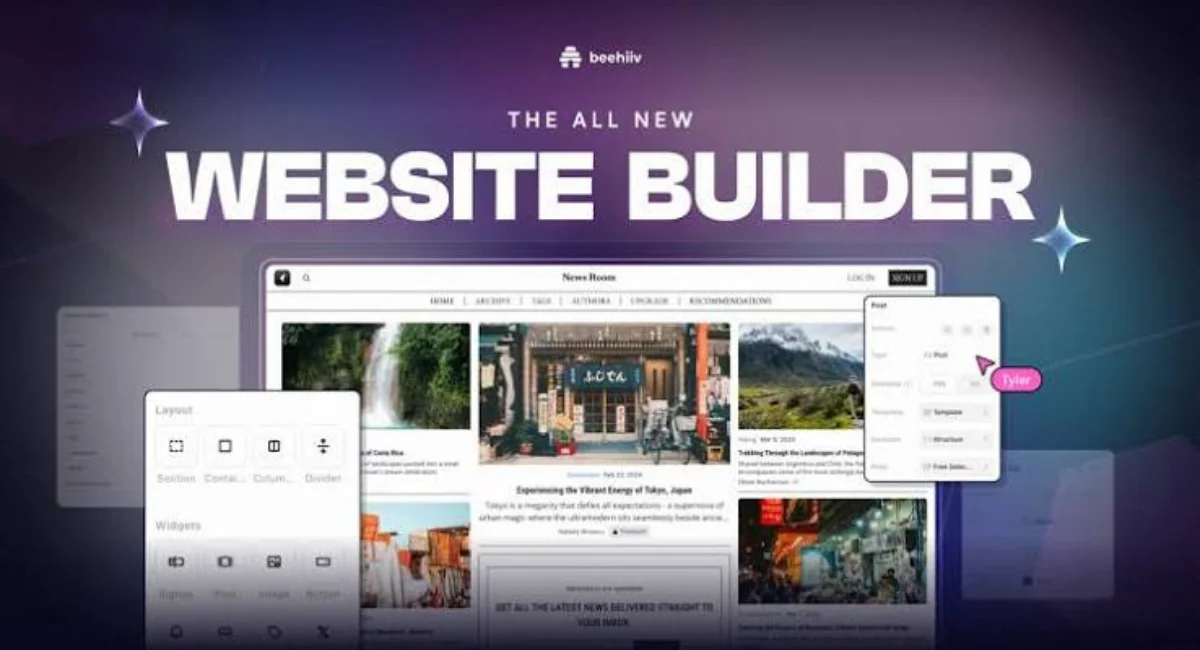
If installing a CMS still feels like too much, a built-in website builder (often branded as something like the Zacky Website Builder) is the simplest path forward. You choose a template, drag elements around, and edit text directly on the page. No code, no plugins, no learning curve.
These builders work well for portfolios, small business pages, and simple landing pages. The visual editor shows you exactly how your site will look as you build it, which removes a lot of the guesswork. For many beginners, this is the fastest way to go from blank page to finished website.
Bandwidth usage transparency
Bandwidth refers to how much data your site transfers to visitors each month, and free hosts are usually upfront about these limits. Your dashboard typically shows a live meter, so you can see exactly how much of your quota you’ve used and how much remains. This transparency helps you avoid surprises.
If you’re running a personal blog or small portfolio, you’ll rarely come close to your limit. But if you start sharing large images, videos, or downloadable files, it’s worth keeping an eye on your usage. Traffic and visitor tracking tools built into the dashboard make this easy to monitor without any extra setup.
Our own control panel
Instead of relying solely on third-party software, many free hosts build their own simplified control panel. It brings together file management, database access, email setup, and domain settings in one clean interface. You won’t need to jump between multiple tools just to manage your site.
A built-in file manager lets you upload, edit, and organize files directly from your browser, while PhpMyAdmin access gives you full control over your databases. For beginners coming from more complex platforms like cPanel or Plesk, this streamlined approach feels refreshingly straightforward.
Customizable dashboard
Your hosting dashboard isn’t just a control panel — it’s also a personalized hub. Most providers let you rearrange widgets, pin frequently used tools, and get a quick snapshot of your disk space, bandwidth, and account status the moment you log in. This makes day-to-day management much faster.
Beyond the basics, a good dashboard usually links directly to a knowledge base and support tickets. So if something goes wrong, help is never more than a click away. Over time, you’ll start customizing the layout to match exactly how you work.
Firewall protection
Security might not be the first thing beginners think about, but it matters from day one. Most free hosting plans include basic firewall protection that filters out malicious traffic before it ever reaches your site. This adds a meaningful layer of website security without any setup on your end.
On top of the firewall, providers typically include anti-spam protection for contact forms and email accounts, plus regular automated backups. So if something does go wrong, whether it’s a spam flood or accidental file deletion, you’ve got a safety net already in place.
Free Website Hosting Advantages
The biggest advantage is obvious: cost. You get a working website, often bundled with a free domain and hosting package, without spending anything upfront. This makes it perfect for students, hobbyists, and anyone testing a new idea before committing real money to it.
Beyond cost, free plans are genuinely beginner-friendly. One-click installers, visual website builders, and simplified control panels mean you don’t need any technical background to get started. It’s also a low-risk way to learn how websites work, practice with a CMS, and figure out what you actually need before upgrading.
Free Website Hosting Disadvantages
Of course, free hosting comes with trade-offs. Storage, bandwidth, and server resources are limited compared to paid hosting, so larger or high-traffic sites may run into performance issues. Some providers also display ads on your site, which you can’t always remove without upgrading.
Support can be another sticking point. While many free hosts offer a knowledge base and ticket system, response times are often slower than what you’d get with premium hosting plans. And if your project grows quickly, you’ll likely need to migrate to a paid plan with more server resources and dedicated support.
Free Hosting vs Competitors
Not all free hosting providers offer the same package, and it’s worth comparing before you commit. Some give you a free domain and hosting bundle right out of the gate, while others stick to subdomains only. Others lean heavily on advertising to cover costs, which can affect how your site looks to visitors.
When you compare free plans to premium hosting plans, the differences become clearer. Paid plans typically offer more disk space, higher bandwidth limits, dedicated IP addresses, and faster response times from support.
Free hosting gives you the essentials to get started, but competitors at the paid tier focus on scalability and performance for growing websites.
Who Should Use free Hosting
Free hosting is a great fit for students working on class projects, hobbyists experimenting with their first site, and anyone who wants to learn how WordPress or Joomla works before investing money. It’s also ideal for personal blogs, simple portfolios, and small community pages that don’t need heavy traffic support.
If you’re testing a business idea before fully committing, free web hosting lets you build a working prototype without financial risk. Freelancers, writers, and small creators often start here simply to prove their concept works before scaling up.
Who Should NOT Use Free Hosting
If you’re running an online store, free hosting probably won’t cut it. Ecommerce sites need reliable uptime, more storage for product images, and stronger security than most free plans provide. The same goes for sites expecting heavy daily traffic or running resource-intensive applications.
Businesses that rely on professional email addresses, advanced security features, or guaranteed support response times should also look elsewhere. In these cases, a paid plan or even free VPS hosting trial (where available) tends to be a better long-term fit than a standard free hosting account.
Conclusion
Free web hosting gives beginners a real, working website without any upfront cost, making it one of the easiest ways to get started online. With one-click installers, drag-and-drop builders, and a control panel that brings everything together, you don’t need technical experience to launch something today.
That said, it’s worth thinking ahead. As your site grows, keep an eye on your bandwidth, storage, and support needs. When you outgrow the free tier, upgrading to a paid plan is usually simple and lets your site keep its content, design, and momentum without starting over.
FAQs
Is free web hosting really free, or are there hidden costs?
Most reputable free hosts don’t charge hidden fees, though some display ads or limit features unless you upgrade.
What’s the difference between free hosting and paid hosting?
Paid hosting offers more storage, bandwidth, and support, while free hosting covers the basics for small or starter sites.
Can I use a custom domain with a free hosting plan?
Yes, many providers let you connect your own domain, though some only offer a free subdomain by default.
Will my site show ads if I use free web hosting?
It depends on the provider — some are completely ad-free, while others display ads to cover their costs.
Is free hosting good enough for an online store?
Generally, no. Ecommerce sites need more resources, security, and reliability than most free plans offer.
How much storage and bandwidth do free hosting plans usually offer?
Most plans include enough disk space and bandwidth for small to medium sites, though exact limits vary by provider.
Can I upgrade from a free plan to a paid plan later without losing my site?
Yes, most hosts offer a straightforward upgrade path that keeps your files, database, and settings intact.
Related Posts
- 20 PHP Hosting Providers for Fast Website Performance
- Free Web Hosting Services for Beginners – Full Guide
- 12 Best Multiple Domain Hosting: Affordable Options
- What Is Business Hosting: Choosing The Best For Your Brand
- Headless CMS Hosting – Modern Web Development Approach
- 10 Best CMS Hosting Providers
- What Is Linux Hosting? Complete Beginner’s Guide

Alex Bryant is the founder of PvyEmpire.com and a WordPress specialist with over 4 years of hands-on experience in web hosting, performance optimization, and website management. He has extensively tested top hosting providers by setting up real websites and monitoring their speed, uptime, and reliability.
At PvyEmpire.com, Alex publishes honest, data-driven reviews, detailed guides, and verified coupons & deals. His goal is to help website owners choose the right hosting, improve performance, and grow their online presence with confidence—based on real testing, not promotions.