What Is SSD Hosting (& Why Do You Need It)?
Your website’s crawling along, and you’re tired of watching that loading wheel spin. Somewhere in your research, you stumbled across the term SSD hosting and thought, “Wait, is this the fix I’ve been missing?” You’re not alone. Most people land on this question after a slow site has already cost them visitors, sales, or just their patience.
So let’s clear things up. This post breaks down exactly what is SSD hosting, how it actually speeds things up, and why it beats the old-school hard drive storage most budget plans still run on. By the end, you’ll know if it’s the right move for your site, and what to look for before you switch.
What Is SSD Hosting?
So let’s get specific. SSD hosting means your hosting provider runs its servers on solid-state drives rather than traditional spinning hard disks. Instead of a needle physically moving across a disk to find your data, an SSD pulls information straight from flash memory chips. There’s no waiting on moving parts, so everything happens almost instantly.
This matters more than it sounds like it should. Your website’s speed, your database queries, even how your CMS loads the admin panel — all of it depends on how fast the underlying storage can retrieve data.
Solid-state drives remove the mechanical bottleneck that’s plagued hosting infrastructure for decades, and that’s the whole story in a nutshell.
How SSD Hosting Works
Here’s the mechanics, simplified. An SSD stores data on interconnected flash memory chips instead of magnetic platters. When your site requests a file, the drive accesses it electronically, with no physical arm scanning for the right spot.
That’s why read and write speeds jump so dramatically compared to a hard disk drive. It’s the difference between flipping a light switch and lighting a candle.
SSD Hosting vs Traditional HDD Hosting
Traditional hosting still relies on HDDs in many budget plans, and there’s a reason it matters. A hard disk drive relies on spinning platters and a mechanical read/write head, both of which introduce delay.
SSDs skip that step entirely. The result? Faster page loads, quicker backups, and noticeably snappier database performance across the board.
Types of SSDs Used in Web Hosting (SATA vs NVMe)
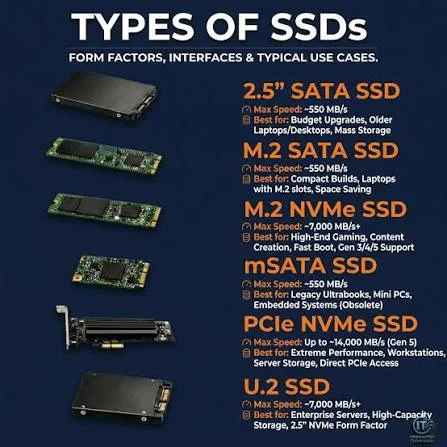
Not all SSDs perform equally, and hosts don’t always mention which kind they use. SATA SSD drives use an older interface originally built for HDDs, so they’re fast but capped.
NVMe SSD drives connect through PCIe instead, unlocking dramatically higher throughput. Most premium hosting plans now lean toward NVMe for exactly this reason.
Who Should Use SSD Hosting?
Honestly? Almost everyone benefits, but some sites need it more urgently. If you’re running an eCommerce store, a busy blog, or anything with a database, slow storage will hurt you daily.
Agencies, SaaS platforms, and high-traffic publishers see the biggest gains. Even a small business site feels the difference the moment visitors stop bouncing.
Why Do You Need SSD Hosting?
You might be wondering if this is just marketing fluff dressed up as tech talk. It isn’t. Website speed directly affects whether visitors stick around, whether search engines rank you fairly, and whether your server can survive a sudden traffic spike without buckling.
Think about the last time a site took more than three seconds to load. You probably left. That’s the reality your own visitors are living through if you’re still running on outdated storage.
Switching to SSD web hosting isn’t a luxury upgrade anymore — it’s closer to a baseline expectation for anyone serious about their site’s performance.
Faster Website Loading Speed
This is the headline benefit, and it’s not exaggerated. Because SSDs eliminate mechanical delay, your web server retrieves files in a fraction of the time HDDs need.
Pages render faster, images load quicker, and scripts execute without the sluggish drag users notice immediately. Speed, in hosting, compounds into everything else.
Better User Experience
Fast sites simply feel better to use, and people notice even when they can’t explain why. Visitors don’t consciously clock load times, but they absolutely feel frustration when pages stall.
A snappy, responsive site builds trust before a single word gets read. That trust translates into longer visits and fewer abandoned carts.
Improved SEO Performance
Google has been rewarding speed for years, and that trend isn’t slowing down. Faster server response time contributes directly to Core Web Vitals scores, particularly metrics like Largest Contentful Paint.
Slow TTFB (Time to First Byte) drags your entire page experience score down. SSD infrastructure gives you a real, measurable edge here.
Higher Reliability and Stability
Reliability often gets overshadowed by speed talk, but it deserves equal attention. SSDs have no moving parts, so there’s dramatically less to mechanically fail over time.
That translates into fewer crashes, less unexpected downtime, and steadier website uptime during traffic surges. Stability, quietly, is half the value proposition.
SSD vs HDD Hosting: What’s the Difference?
Let’s put these two side by side, because the differences run deeper than speed alone. SSD vs HDD hosting comes down to how each drive physically stores and retrieves your data.
One uses electronic flash memory; the other relies on spinning magnetic disks and a mechanical arm. That fundamental design gap shapes everything downstream.
| Factor | SSD Hosting | HDD Hosting |
| Speed | Very fast, no moving parts | Slower, mechanical delay |
| Reliability | High, fewer failure points | Lower parts wear down |
| Cost | Higher upfront | Cheaper per GB |
| Best for | Dynamic sites, databases | Static, low-traffic sites |
Performance Comparison
SSDs consistently outperform HDDs across nearly every measurable metric. Read and write speeds can be several times faster on flash-based storage.
For resource-intensive applications like WordPress with heavy plugins, that gap becomes obvious fast. HDDs simply weren’t built for today’s dynamic, database-driven websites.
Speed and Latency
Latency is where SSDs really flex their advantage. Because there’s no physical seek time, I/O operations complete almost instantly on flash storage.
HDDs, by contrast, introduce noticeable lag every time the read head repositions. Over thousands of requests, that lag adds up into real, felt slowness.
Durability and Failure Rate
Moving parts wear out — it’s just physics. HDDs contain spinning platters and mechanical arms that degrade with use and are vulnerable to shock damage. SSDs, lacking those components, tend to last longer under sustained load.
Fewer failure points generally mean fewer 3 am emergency restores for site owners.
Storage Capacity
HDDs still hold an edge in raw capacity per dollar, and that’s worth acknowledging honestly. If you need massive archival storage, HDDs remain cheaper at scale.
However, most websites don’t need that kind of bulk capacity. Speed and reliability usually matter more than sheer storage headroom.
Cost Comparison
SSDs cost more per gigabyte; there’s no getting around that fact. Hosting providers price SSD plans higher to offset the manufacturing cost. That said, the performance return on investment often justifies the premium quickly.
A faster site converts better, which tends to pay the price difference back.
Which One Should You Choose?
For most modern websites, SSD wins without much debate. Unless you’re hosting a purely archival, low-traffic static site, the speed and reliability gains outweigh the extra cost.
Budget-conscious beginners with tiny, simple sites might tolerate HDD hosting. But growth-focused site owners should default to SSD from day one.
NVMe vs SATA SSD Hosting
Once you’ve decided on SSD, there’s a second decision waiting: which SSD interface? NVMe vs SATA SSD hosting isn’t just a technical footnote — it changes real-world performance substantially.
SATA was designed years before NVMe and carries legacy bandwidth limitations baked into its architecture.
NVMe, by comparison, connects through the PCIe bus, bypassing SATA’s throughput ceiling entirely. That architectural difference means NVMe drives can move data several times faster under heavy load.
For high-traffic or database-heavy sites, this distinction genuinely matters and shouldn’t get glossed over.
What is a SATA SSD?
A SATA SSD still uses flash memory, but it connects through the older SATA interface built for spinning disks. That legacy connection caps its maximum throughput regardless of how fast the flash chips themselves are.
It’s still a solid upgrade over an HDD. It just isn’t the fastest option available today.
What is an NVMe SSD?
NVMe hosting relies on drives connected via PCIe lanes instead of the SATA bus. This unlocks dramatically higher bandwidth and lower latency for read and write operations.
NVMe was purpose-built for flash storage, not adapted from older disk standards. That design difference is exactly why it performs so much better.
Performance Differences
The gap between these two isn’t subtle. NVMe drives can deliver several times the throughput of SATA SSDs under equivalent conditions.
For database-heavy workloads with constant I/O operations, this translates into noticeably faster query responses. SATA remains fast next to HDD, but NVMe operates in a different league entirely.
Is NVMe Worth the Extra Cost?
For high-traffic sites, eCommerce stores, or anything database-intensive, yes — the upgrade pays off. If you’re running a small brochure site with minimal traffic, the difference may go unnoticed.
Weigh your actual workload honestly before paying the premium. Growth-stage businesses, though, tend to outgrow SATA fairly quickly.
Best Use Cases for Each
SATA SSDs suit smaller blogs, portfolios, and low-traffic business sites just fine. NVMe shines for eCommerce platforms, SaaS applications, and anything running frequent database queries.
If you’re scaling or expect traffic spikes, NVMe future-proofs your infrastructure. Otherwise, SATA offers a reasonable middle ground on cost.
Key Benefits of SSD Hosting
By now, the pattern should be clear, but let’s break down the concrete wins individually. Each benefit compounds on the others, creating a hosting environment that simply performs better under real-world pressure.
These aren’t abstract technical perks — they translate into measurable business outcomes.
From faster checkouts to fewer support tickets about downtime, the benefits ripple outward. Hosting performance touches nearly every part of running a website, whether you’re managing a blog or a full eCommerce website. Let’s go through what actually improves once you switch.
Faster Database Performance
Databases live and die by I/O speed, and SSDs excel here specifically. Every query, every login, every product search hits the database and waits for a storage response.
With SSD hosting, those queries return dramatically faster than on mechanical drives. For MySQL-driven sites like WordPress, this improvement is especially noticeable.
Better Server Response Time (TTFB)
TTFB measures how long your server takes to send the first byte of data back. Slower storage directly inflates that number, delaying everything downstream.
SSDs shrink TTFB substantially by removing the mechanical wait time from the equation. Google factors this metric into its ranking signals too.
Handles Traffic Spikes More Efficiently
Nothing exposes weak infrastructure like a sudden traffic surge. HDD-based servers often choke under simultaneous requests, since the mechanical read head can only do one thing at a time.
SSDs handle high IOPS far more gracefully under concurrent load. That resilience matters most during your busiest, highest-stakes moments.
Lower Latency
Latency is the delay between a request and a response, and it stacks up fast at scale. Reduced downtime and quicker data access both trace back to lower latency at the storage layer.
SSDs cut that delay dramatically compared to spinning disks. Every millisecond saved adds up across thousands of daily visitors.
Improved Uptime and Reliability
Fewer moving parts mean fewer things that can physically break. That translates into measurably better server reliability over the drive’s lifespan.
Hosting providers running SSD infrastructure typically report stronger uptime statistics as a result. For businesses, uptime isn’t a nice-to-have. It’s revenue protection.
Energy Efficiency
SSDs consume noticeably less power than HDDs, since there’s no motor spinning constant platters. That efficiency reduces a data center’s cooling demands and overall energy footprint.
It’s a smaller line item than speed or reliability, admittedly. But it’s a genuine, often-overlooked advantage worth mentioning.
Are There Any Downsides to SSD Hosting?
No technology is perfect, and pretending SSD hosting has zero tradeoffs wouldn’t be honest. The drawbacks are real, though they’re shrinking every year as manufacturing costs continue dropping.
Knowing them helps you make a genuinely informed decision instead of just following hype.
The core tension boils down to cost versus performance, as it usually does in hosting decisions. Storage capacity limitations and pricing remain the two sticking points worth understanding before you commit. Let’s walk through both honestly.
Higher Cost Than HDD Hosting
There’s no dodging this one. SSD manufacturing remains pricier than HDD production, and that cost gets passed to hosting customers.
Budget shared hosting plans sometimes still default to HDD, specifically to hit lower price points. If cost is your only constraint, this tradeoff is worth weighing carefully.
Storage Space Can Be More Expensive
Per gigabyte, SSD storage costs noticeably more than mechanical alternatives. Sites needing enormous archival storage, like massive media libraries, might find SSD pricing steep at scale.
Most typical websites, though, never approach storage limits that would make this a real concern. It mostly matters for edge-case, storage-heavy projects.
When HDD Hosting May Still Make Sense
HDD hosting isn’t entirely obsolete, despite everything said so far. Purely archival storage, backup repositories, or extremely low-traffic static pages might tolerate HDD’s slower speeds fine.
If budget is razor-tight and performance genuinely doesn’t matter, HDD remains a valid, cheaper option. It’s a shrinking use case, but not a nonexistent one.
How to Choose the Best SSD Hosting Provider
Picking a hosting provider takes more than glancing at a “Powered by SSD!” badge on a pricing page.
Marketing language varies wildly between companies, and not every SSD claim means the same thing. Some hosts blend SSD caching with HDD storage, which isn’t the same as full SSD infrastructure.
Look past the buzzwords and check the specifics instead. The details below separate genuinely fast, reliable hosting infrastructure from providers just riding the SSD marketing wave without substance behind it.
Check the SSD Type (NVMe or SATA)
Ask directly which SSD type powers your plan, since providers don’t always volunteer this. NVMe SSD infrastructure outperforms SATA substantially for database-heavy or high-traffic sites.
If the answer is vague or unclear, that’s usually a signal worth noting. Transparent hosts will happily specify their drive technology upfront.
Look for High Uptime Guarantees
Uptime commitments reveal how confident a provider is in its own infrastructure. Look for guarantees around 99.9% or higher, backed by an actual SLA.
Website reliability depends heavily on the underlying hardware quality, not just marketing promises. A vague or missing uptime guarantee should raise questions.
Evaluate Speed and Performance Features
Beyond raw SSD specs, check for extras like caching layers, CDN integration, and server-level optimization tools. These features compound with SSD speed to meaningfully improve overall website performance.
Some hosts bundle LiteSpeed or similar server software for additional gains. Ask specifically what’s included, not just implied.
Compare Backup and Security Options
Speed matters, but data protection matters just as much in the long term. Check how frequently backups run and whether restoration is straightforward if something breaks.
Security features like firewalls, malware scanning, and SSL provisioning should come standard. A fast host with weak backup policies is still a risky choice.
Consider Scalability and Support
Your hosting needs today won’t match your needs in two years, realistically. Choose a provider offering clear upgrade paths from shared to VPS hosting or dedicated resources.
Responsive, knowledgeable support matters enormously when something goes wrong at 2 am. Read recent reviews, not just testimonials on the provider’s own site.
Is SSD Hosting Worth It?
Cutting through everything covered so far, the honest answer is yes for the vast majority of websites.
The performance, reliability, and SEO gains from SSD hosting consistently outweigh the modest price premium over HDD alternatives. For anything beyond a hobby project, it’s become close to a non-negotiable baseline.
The real question isn’t whether SSD hosting is worth it broadly. It’s whether your specific site, traffic level, and growth plans justify NVMe over SATA, or dedicated over shared. That’s a more nuanced call, and it depends entirely on your situation.
Best Websites for SSD Hosting
eCommerce stores, SaaS platforms, membership sites, and anything database-driven benefit most immediately. High-traffic blogs and news publishers also see substantial gains from faster database performance.
Even smaller business sites benefit from the reliability improvements alone. Realistically, there’s barely a website category that doesn’t benefit somehow.
When You Should Upgrade to SSD Hosting
If your current HDD-based site feels sluggish, that’s your first clear signal. Rising traffic, growing databases, or frequent timeout errors all point toward an overdue upgrade.
Don’t wait for a crisis, like a crashed site during a big sales event. Proactive upgrades cost far less than reactive emergency fixes.
Conclusion
So, what is SSD hosting really, at the end of the day? It’s the difference between a website that feels instant and one that makes visitors wait. Solid-state drives remove the mechanical bottlenecks that have slowed hosting down for years, replacing them with fast, reliable flash memory.
If your site’s been dragging, or you’re planning for real growth, this is one of the simplest upgrades with an outsized payoff. Whether you land on SATA or NVMe, shared or dedicated, moving to SSD hosting is rarely a decision people regret making.
FAQs – What is SSD hosting
What does SSD hosting mean?
It means your website’s files are stored on solid-state drives rather than mechanical hard disks, giving you faster read and write speeds.
Is an SSD better than an HDD for web hosting?
Yes, in almost every practical scenario. SSDs offer faster speeds, better reliability, and lower latency than traditional HDDs.
Do all hosting providers use SSD now?
No. Many budget shared plans still use HDDs or SSDs with blended caching to keep prices low, so it’s worth confirming directly.
What’s the difference between SSD and NVMe hosting?
NVMe is a faster SSD interface using PCIe lanes, while standard SATA SSDs use an older, more limited connection standard.
Does SSD hosting improve SEO?
Indirectly, yes. Faster load times and lower TTFB improve Core Web Vitals scores, which Google factors into search rankings.
Does SSD hosting cost more than HDD hosting?
Generally, yes, since SSD manufacturing costs more. However, the performance gains often justify the price difference for most sites.
How long do SSD drives last in servers?
With no moving parts to wear down, SSDs typically outlast HDDs, though lifespan varies by usage intensity and drive quality.

Alex Bryant is the founder of PvyEmpire.com and a WordPress specialist with over 4 years of hands-on experience in web hosting, performance optimization, and website management. He has extensively tested top hosting providers by setting up real websites and monitoring their speed, uptime, and reliability.
At PvyEmpire.com, Alex publishes honest, data-driven reviews, detailed guides, and verified coupons & deals. His goal is to help website owners choose the right hosting, improve performance, and grow their online presence with confidence—based on real testing, not promotions.