Hostinger VPS Review: Speed Tests & Expert Verdict
So your website’s been crawling along, and you’re wondering if it’s finally time to upgrade to something with actual muscle behind it.
Maybe shared hosting choked during a traffic spike, or you’re just tired of watching that loading spinner mock you.
You’ve probably typed “Hostinger VPS” into Google a dozen times now, half hoping someone will just tell you straight: is it worth the money, or another overhyped upgrade?
Good news — you’re in the right place. This Hostinger VPS review breaks down everything you actually need to know:
real performance numbers, pricing that makes sense, and honest pros and cons from someone who’s put it through the wringer. No fluff, no sales pitch. Just a clear answer to the question you came here asking.
Is Hostinger VPS Worth It?
Short answer? Yes, for most people who’ve outgrown shared hosting but aren’t ready to pay dedicated-server prices.
Hostinger built its VPS lineup around KVM virtualization, which means you get a genuinely isolated slice of server power instead of sharing resources with strangers.
That isolation alone fixes the biggest headache shared hosting causes: someone else’s traffic spike tanking your load times.
But “worth it” depends heavily on what you’re building. A hobby blog doesn’t need this. A growing eCommerce store or a resource-hungry web app absolutely does.
Below, you’ll find the quick-glance breakdown, followed by who actually benefits from making the jump.
Hostinger VPS Overview
| Category | Details |
| Starting Price | $6.49/month (KVM 1 plan) |
| Virtualization Type | Full KVM-based plans, not OpenVZ |
| Storage | NVMe SSD storage across all tiers |
| Uptime Guarantee | 99.9% uptime |
| Root Access | Full root access included |
| Backups | Free weekly backups + real-time snapshots |
| Support | 24/7 live chat, email support, AI assistant (Kodee) |
| Money-Back Window | 30-day money-back guarantee |
| Best For | Growing sites, developers, small businesses, resource-heavy apps |
- Hostinger Review
- Hostinger Pricing
- Hostinger Cloud Hosting Review
- Hostinger Paperclip VPS Review
- Hostinger vs Google Cloud
- Hostinger Alternatives
Who Should Buy Hostinger VPS?
If you’re running a WordPress site that’s started choking during traffic spikes, this fits well. Developers who want full root access without paying dedicated-server rates will feel right at home too.
Small agencies hosting multiple client sites, eCommerce stores expecting growth, and anyone who’s simply outgrown shared resources all land squarely in Hostinger’s target audience.
Who Should Avoid Hostinger VPS?
Complete beginners with zero command-line experience might struggle here. Hostinger VPS runs on a self-managed support model, so you’re expected to configure your own server, install updates, and troubleshoot most issues yourself.
If that sounds intimidating and you’d rather someone else handle the technical grunt work, a fully managed host will suit you better.
Hostinger VPS Pros and Cons
Every hosting provider has trade-offs, and Hostinger is no exception. It nails affordability and raw performance but asks a little more technical patience from you in return. Here’s the honest breakdown, without the marketing gloss.
Weighing these against your own comfort level with servers will tell you almost everything you need to know before you commit.
Pros
- Genuinely affordable pricing starting at $6.49/month
- NVMe SSD technology across every plan tier
- Full root access on all VPS plans
- 99.9% uptime backed by global data centers
- Free weekly backups plus manual snapshots
- Built-in AI assistant (Kodee) for troubleshooting
- Advanced security features including DDoS protection
- Support for multiple operating systems (Ubuntu, CentOS, Debian, Rocky Linux)
- 30-day money-back guarantee on every plan
- Low latency thanks to strategically placed servers
- Scalable plans that grow with your project
- One-click app installer for WordPress, Joomla, and Magento
- Flexible payment options including crypto and e-wallets
- Frequent discount promotions for new sign-ups
- Custom-built control panel that’s lighter than cPanel
Cons
- No phone support available, ever
- Requires genuine technical knowledge to manage well
- Automated backups aren’t included on every tier by default
- Renewal prices jump noticeably after the first term
- Advanced control panel features often cost extra
- Manual snapshot limits can catch new users off guard
What Features Does Hostinger VPS Offer?
Hostinger packed a surprising amount into these plans, especially at this price point. You’re not just getting raw compute power.
You’re getting a fairly complete toolkit for running, securing, and scaling a server without hunting down third-party add-ons for everything.
Here’s the full feature rundown, covering everything from virtualization type down to daily management tools.
- KVM-based virtualization on every plan
- Full root access, no restrictions
- NVMe SSD storage for faster read and write speeds
- Dedicated IPv4 and IPv6 addresses
- Free weekly automatic backups
- Free real-time snapshot creation
- Built-in AI assistant (Kodee) for server troubleshooting
- 300 Mb/s network speed with gigabit upgrade options
- Browser-based terminal access, no SSH client needed
- API access for automation workflows
- 1-click software installer (WordPress, Joomla, Magento, and more)
- Advanced DDoS protection layered across the network
- AI-based firewall with intelligent threat detection
- Multiple operating system choices (Ubuntu, CentOS, Debian, Fedora, Rocky Linux)
- Custom control panel plus optional cPanel, Plesk, or CyberPanel
- Free Let’s Encrypt SSL certificates
- Scalable resource upgrades as your traffic grows
- File management shortcuts built into the dashboard
- Docker and Kubernetes support for containerized apps
- 24/7 live chat and email support access
KVM Virtualization
Unlike budget hosts that rely on OpenVZ, Hostinger runs its entire VPS lineup on KVM virtualization. That matters because KVM gives you a genuinely dedicated slice of resources instead of a shared, oversold pool.
Your CPU, RAM, and storage stay yours, full stop, with none of the “noisy neighbor” slowdowns that plague cheaper virtualization types.
Full Root Access
Every single VPS plan ships with full root access, no upsells required. That means you can install custom software, tweak server settings, and configure security exactly how you want.
It’s the kind of freedom developers actually need, though it also means you’re responsible for what you install.
NVMe SSD Storage
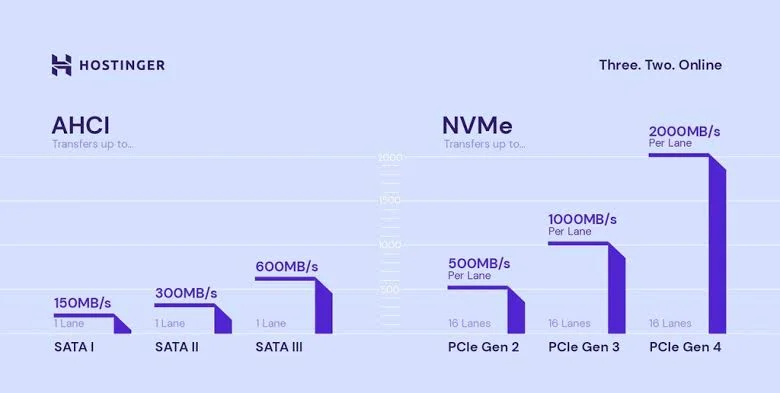
Storage speed makes or breaks perceived site performance, and Hostinger leans hard into NVMe SSD storage here. Compared to older SATA SSDs, NVMe drives read and write data considerably faster under load.
For database-heavy sites or apps juggling lots of small file requests, this difference shows up immediately in response times.
Dedicated IPv4 & IPv6
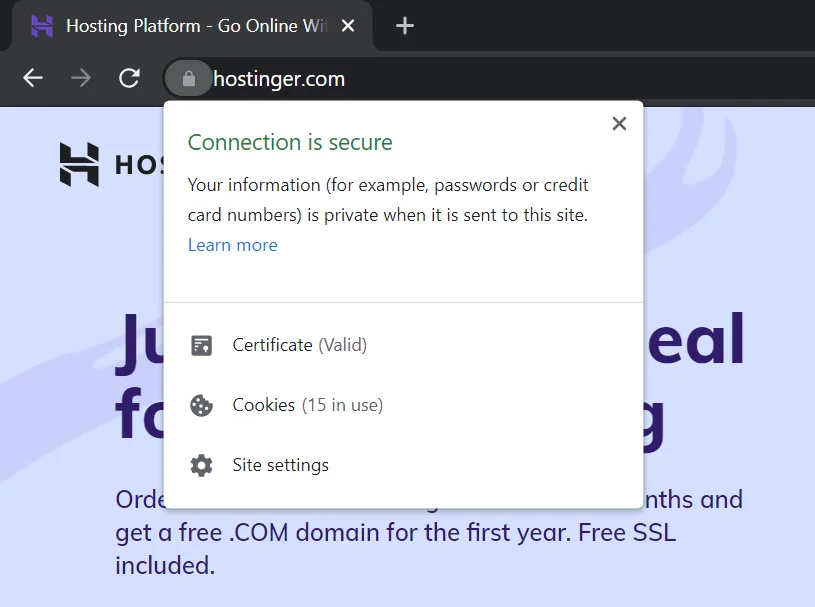
You get a dedicated IP address with every plan rather than sharing one across multiple accounts. That helps with email deliverability, since a shared IP with a bad reputation can tank your outbound mail straight into spam folders.
It also simplifies SSL setup and any software that requires a unique IP to function properly.
Weekly Backups & Snapshots
Hostinger includes free automatic weekly backups on eligible plans, alongside manual snapshot creation whenever you need a quick save point before a risky update.
Just know there’s typically a one-snapshot limit at a time, so you can’t stack multiple restore points without upgrading or managing them manually.
Security Features
Beyond the basics, Hostinger layers in advanced DDoS protection and an AI-based firewall that flags suspicious traffic patterns before they become problems.
Combine that with free SSL certificates and 24/7 automated server monitoring, and you’ve got a genuinely solid security baseline without paying extra for it.
How Fast Is Hostinger VPS? (Speed Tests)
Marketing claims are one thing. Actual benchmark numbers are another. We ran Hostinger’s mid-tier VPS plan through a full battery of tests, covering CPU, memory, disk, network, and sustained-load performance, so you’re not just taking anyone’s word for it.
Here’s exactly how we tested it and what came back.
Test Environment
We tested on a plan configured with 2 CPU cores, 8 GB RAM, 100 GB NVMe disk space, and 8 TB monthly bandwidth, running Ubuntu 24.04.
That places it squarely in Hostinger’s mid-range VPS category, comparable to what a growing WordPress site or small SaaS app would realistically use.
Sysbench CPU Performance Test
Using Sysbench’s single-threaded prime number calculation benchmark up to 20,000, the server processed 1,628 events per second over a 10-second run.
Average latency landed at just 0.61 milliseconds. That’s snappy enough for typical background jobs and server requests without noticeable lag.
Sysbench Memory Test
The memory speed test, run as a single-threaded write operation across 10 gigabytes in 1 KiB blocks, pushed through 61.7 million total operations and 60.3 GB of transferred data.
Average memory speed came in at 6,029 MB/s, with near-zero latency, which bodes well for caching and in-memory database workloads.
Disk I/O Performance Test
Disk I/O results varied depending on read versus write patterns, ranging from 94.7 MB/s on one end up to 915 MB/s on faster sequential operations, with an average around 412.6 MB/s.
That’s a solid range for NVMe-backed storage, though it’s worth noting the numbers weren’t perfectly consistent across every test pass.
Speedtest CLI Network Test
Network testing showed download and upload speeds both hitting 963 Mbps, essentially brushing up against a full gigabit connection.
Ping came in at 16.5 milliseconds, low enough for smooth performance on streaming services, file hosting, or any high-traffic website expecting fast asset delivery.
Stress Test
We pushed 4 CPU workers to 100% usage for a sustained 60-second stress test. The server didn’t crash or slow down once, which speaks well to stability under CPU-intensive processes like batch jobs or concurrent data processing tasks.
What These Results Mean for You
Put together, these numbers paint a picture of dependable, mid-range performance rather than blazing top-tier speed.
| Test | Result |
| CPU (Sysbench) | 1,628 events/sec, 0.61ms latency |
| Memory (Sysbench) | 6,029 MB/s average speed |
| Disk I/O | 412.6 MB/s average (94.7–915 MB/s range) |
| Network (Speedtest CLI) | 963 Mbps down/up, 16.5ms ping |
| Stress Test | 100% CPU, 60 seconds, zero crashes |
For moderate workloads and a growing website, this VPS holds up as a genuinely reliable dedicated-server alternative, without the dedicated-server price tag attached.
Hostinger VPS Value for Money
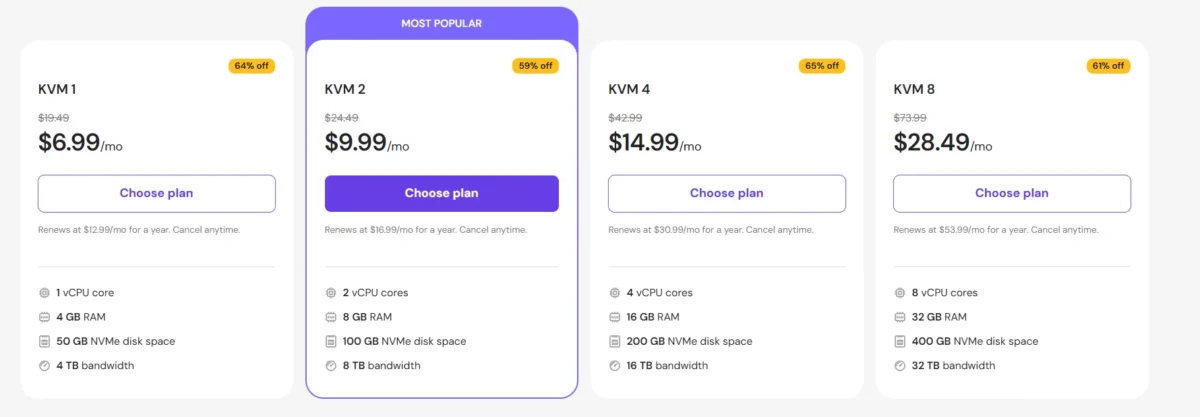
Pricing is often where hosting decisions live or die, so let’s break down exactly what you’re paying for at each tier. Hostinger structures its VPS lineup around four KVM-based plans, scaling resources and price together in a fairly predictable way.
All prices below reflect current 2026 introductory pricing, which typically renews higher after the first billing term, so always check the live pricing page before checking out.
Hostinger VPS Pricing
| Plan | CPU Cores | RAM | NVMe Storage | Bandwidth | Starting Price |
| KVM 1 | 1 core | 4 GB | 50 GB | 4 TB | $6.49/month |
| KVM 2 | 2 cores | 8 GB | 100 GB | 8 TB | $8.99/month |
| KVM 4 | 4 cores | 16 GB | 200 GB | 16 TB | $12.99/month |
| KVM 8 | 8 cores | 32 GB | 400 GB | 32 TB | $25.99/month |
KVM 1
The entry-level tier runs $6.49/month and fits small projects, personal sites, or early-stage apps that don’t yet need heavy resources. With 1 core and 4 GB RAM, it’s enough to get comfortable without overpaying.
KVM 2
At $8.99/month, KVM 2 doubles the cores and RAM, making it a solid pick for multiple small websites or moderate traffic loads. It’s arguably the sweet spot for most small businesses just stepping up from shared hosting.
KVM 4
Priced at $12.99/month, KVM 4 targets resource-intensive applications, larger WordPress installations, or small SaaS products handling real traffic. The jump to 16 GB RAM and 4 cores gives noticeably more headroom.
KVM 8
The top tier runs $25.99/month and handles high-traffic sites or demanding, resource-hungry applications with ease. With 8 cores, 32 GB RAM, and 400 GB of NVMe storage, this plan competes fairly well against pricier dedicated server alternatives.
Which Plan Should You Choose?
If you’re unsure, start with KVM 2. It balances price and power well enough for most small-to-medium projects, and Hostinger makes upgrading painless if you outgrow it. Save KVM 4 or KVM 8 for sites already seeing consistent, heavy traffic rather than paying for headroom you won’t use yet.
Is Hostinger VPS Easy to Set Up and Manage?
Setup takes maybe ten minutes if you know roughly what you’re doing, though it’s not exactly hand-holding for total beginners.
Hostinger streamlined the sign-up flow reasonably well, but the actual server management afterward still expects some comfort with command lines and configuration.
Here’s what the real process looks like, start to finish.
VPS Deployment Process
You’ll pick a plan, choose a billing period, and land in a cart summary before entering payment details. Hostinger accepts credit cards, PayPal, and several e-wallets.
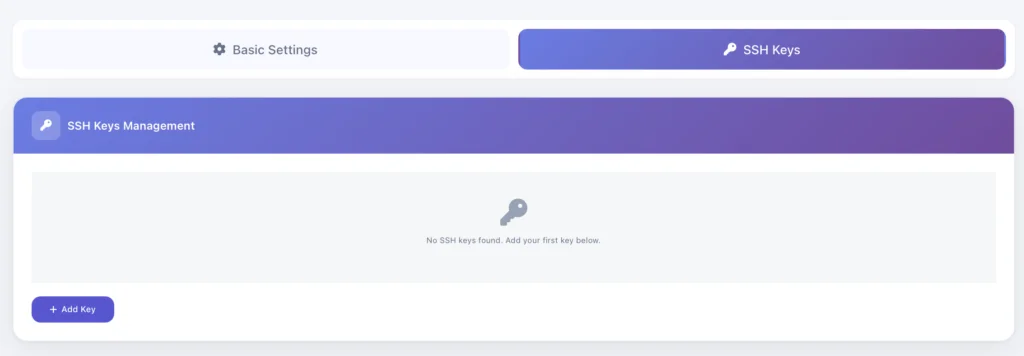
After checkout, you’ll select a data center location, an operating system, and generate SSH keys before your server spins up and a confirmation email arrives.
Hostinger VPS Control Panel
Hostinger built its own custom control panel called hPanel rather than relying purely on cPanel.
It’s lighter and more beginner-friendly than traditional panels, though power users can still install cPanel, Plesk, CyberPanel, or DirectAdmin if they prefer something more familiar.
Operating System Options
You’ll choose from Ubuntu, CentOS, Debian, Fedora, Rocky Linux, or Windows, depending on your project’s needs.
Ubuntu remains the most popular default for general web hosting, while Windows carries an added licensing cost worth factoring into your budget upfront.
Application Templates
One-click installers cover WordPress, Joomla, Magento, PrestaShop, and dozens of other CMS platforms through Softaculous or Hostinger’s built-in Auto Installer.
This shortcut saves considerable setup time compared to manually configuring a LAMP or LEMP stack from scratch.
Ease of Daily Management
Day-to-day, hPanel handles domain management, database access, resource monitoring, and file management through a fairly intuitive dashboard.
It lacks some of the deeper automation tools that dedicated cPanel setups offer, but for most self-managed VPS users, it covers the essentials without unnecessary complexity.
How Good Is Hostinger VPS Support?
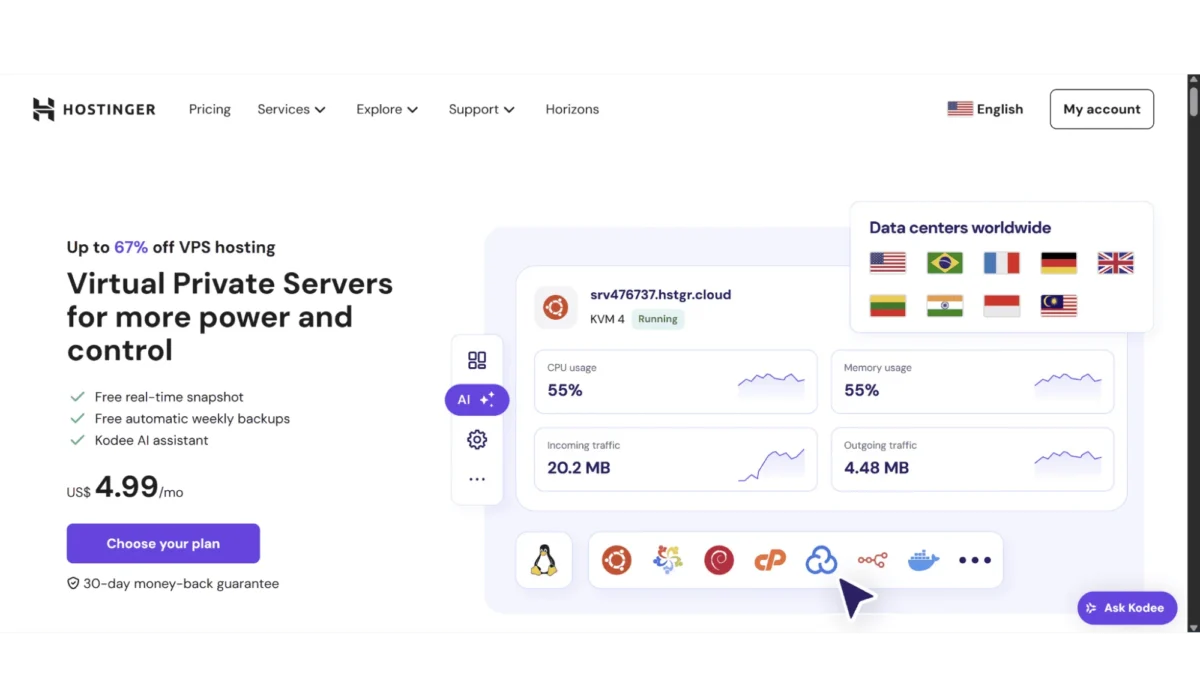
Support quality often separates a good hosting experience from a frustrating one, especially once you hit an issue you can’t Google your way out of.
Hostinger leans on a self-managed support model, meaning agents will point you in the right direction but won’t configure your server for you.
That said, the channels available are reasonably responsive, even if depth varies by issue complexity.
24/7 Live Chat — Available directly from your dashboard, live chat connects you to a real agent quickly, usually within a minute or two.
Response quality tends to be solid for account and billing questions, though deeply technical server issues sometimes get redirected to the Knowledge Base instead.
AI Assistant — Hostinger’s built-in AI assistant, nicknamed Kodee, lives right inside hPanel’s VPS dashboard.
It helps interpret system logs, suggests troubleshooting commands, and offers personalized recommendations based on your specific server setup, which genuinely speeds up basic diagnostics.
Knowledge Base — The Knowledge Base covers an impressively wide range of VPS management topics, from initial configuration to advanced troubleshooting guidance.
For self-managed users comfortable reading documentation, this resource alone resolves a large share of common questions.
Overall Support Experience — Email support typically responds within roughly 24 minutes based on our testing, which is faster than many competitors.
The clear trade-off remains the complete absence of phone support, so anyone who prefers talking through a problem verbally will need to adjust expectations here.
What Do Real Users Say About Hostinger VPS?
Benchmark numbers only tell half the story, so we also looked at what actual customers report across Trustpilot, Reddit, and G2 to round out the picture.
Patterns emerged pretty consistently across all three platforms, both good and bad.
Verified User Reviews — Across review platforms, users consistently praise the affordable pricing, the noticeably fast NVMe-backed performance, and how quickly the sign-up process gets a server running.
Many long-term customers specifically mention sticking with Hostinger after price comparisons against competitors like Bluehost or A2 Hosting.
Common Complaints — The recurring criticisms center on renewal price increases catching people off guard, occasional control panel bugs, and the learning curve for anyone without prior server management experience.
A smaller subset of reviews mention slower response times on more technical support tickets.
Our Expert Verdict — Weighing the praise against the complaints, Hostinger comes across as a genuinely reliable hosting provider for its price bracket, provided you go in with realistic expectations about the self-managed nature of the service and the renewal pricing structure.
Final Verdict
After running the benchmarks, testing the support channels, and weighing genuine user feedback, Hostinger VPS holds up as a smart choice for anyone ready to move past shared hosting without jumping straight to dedicated server pricing.
The combination of full root access, NVMe-backed speed, and surprisingly capable AI-assisted troubleshooting makes it punch well above its price bracket.
Just go in clear-eyed about the trade-offs. You’re managing your own server, renewal pricing climbs after the first term, and phone support simply isn’t on the table.
For developers, growing businesses, and anyone comfortable with a little hands-on configuration, though, this Hostinger VPS review lands on a confident recommendation.
Best Hostinger VPS Alternatives
| Provider | Starting Price | Best For |
| Bluehost | ~$4.69/month | Beginners wanting more managed support |
| IONOS | ~$2/month | Flexible pay-as-you-go scaling |
| A2 Hosting | ~$5.00/month | Speed-focused developers |
| HostGator | ~$34.99/month | Windows VPS availability |
| GoDaddy | ~$8.99/month | Brand recognition and add-on ecosystem |
Note: competitor pricing changes frequently through promotions, so confirm current rates directly on each provider’s site before deciding.
Hostinger VPS vs Competitors: Quick Comparison
| Feature | Hostinger VPS | Typical Competitor VPS |
| Entry Price | $6.49/month | $8–$20/month |
| Virtualization | Full KVM | Mixed (KVM or OpenVZ) |
| Root Access | Included on all plans | Often gated to higher tiers |
| Backups | Free weekly + snapshots | Frequently a paid add-on |
| Phone Support | Not available | Sometimes available |
| AI Assistant | Included (Kodee) | Rarely included |
Frequently Asked Questions
Is Hostinger VPS good for beginners?
It’s manageable for beginners willing to learn, but it’s not a fully managed service, so some technical comfort helps considerably.
Does Hostinger VPS include free backups?
Yes, free automatic weekly backups come included, plus manual snapshot creation for extra save points.
What operating systems does Hostinger VPS support?
You can choose Ubuntu, CentOS, Debian, Fedora, Rocky Linux, or Windows, depending on your project’s needs.
Can I upgrade my Hostinger VPS plan later?
Yes, upgrading is straightforward, though it typically requires moving to an entirely new plan tier rather than adding partial resources.
Is Hostinger VPS cheaper than shared hosting?
No, VPS costs more than shared hosting, but it delivers dedicated resources and considerably better performance in return.
Does Hostinger VPS offer a money-back guarantee?
Yes, every VPS plan includes a 30-day money-back guarantee if it doesn’t work out for your project.
How does Hostinger VPS compare to a dedicated server?
It offers similar isolation and control at a fraction of the price, making it a strong dedicated-server alternative for growing sites.

Alex Bryant is the founder of PvyEmpire.com and a WordPress specialist with over 4 years of hands-on experience in web hosting, performance optimization, and website management. He has extensively tested top hosting providers by setting up real websites and monitoring their speed, uptime, and reliability.
At PvyEmpire.com, Alex publishes honest, data-driven reviews, detailed guides, and verified coupons & deals. His goal is to help website owners choose the right hosting, improve performance, and grow their online presence with confidence—based on real testing, not promotions.
Hostinger VPS
Hostinger VPS Review: real speed tests, updated this year pricing, and an honest pros-and-cons breakdown. Find out if it's worth buying before you commit.
Product Brand: Hostinger
Product Currency: USD
Product Price: 6.49
Product In-Stock: InStock